We build talent communities so your team doesn’t have to start sourcing from scratch every time a role opens. Start with two or three groups tied to expected hires, get permission to stay in touch, and test the approach over 90 days.
We focus on four steps that connect recruiter time to hiring results:
- Plan ahead: Map roles and skills you expect to need over the next 12 to 24 months as part of your talent acquisition strategies.
- Keep contact useful: Set up opt-in forms and send one relevant monthly update.
- Follow up on fit: Review matches weekly and confirm interest before moving people into a hiring process.
- Measure hiring outcomes: Track applications, interviews, offers, and hires, then update or remove outdated records.
The aim is less repeat sourcing, not a bigger contact list. Here’s how we turn that plan into a pipeline your team can use.
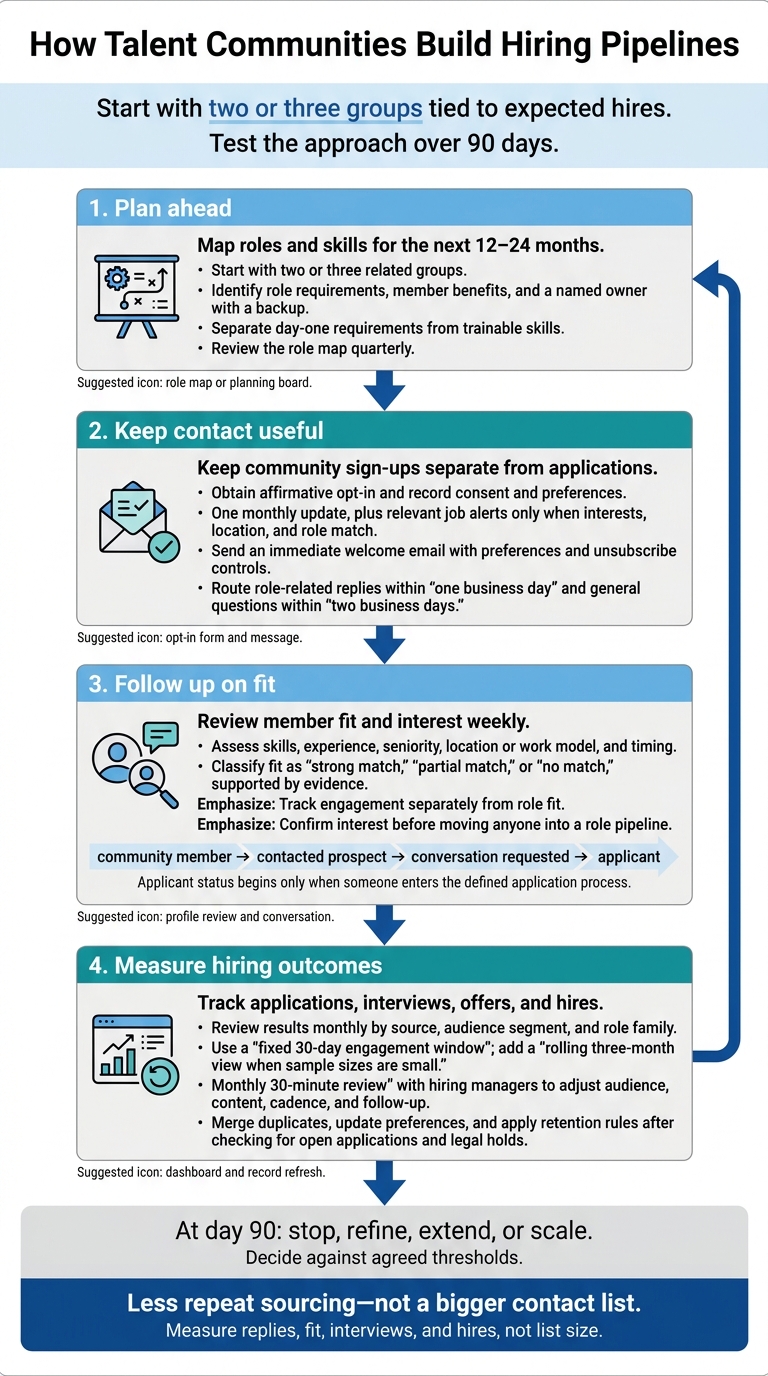
How Talent Communities Build Hiring Pipelines
1. Choose Future Roles and Target Audiences
Map Roles and Skills for the Next 12–24 Months
Build your community around a 12–24 month hiring plan, not a bigger contact list. Meet with the CEO or business lead, finance, department heads, and hiring managers. Link hiring demand to growth plans, launches, customer demand, recurring roles, and turnover. Rank roles by hiring likelihood, expected volume, time to fill, business impact, and talent scarcity. Start with two or three related groups, rather than every role or department.[1][2][4]
For each priority group, record timing, headcount, location, work model, pay range in U.S. dollars, must-have skills, trainable skills, seniority, and the business reason for hiring. Separate what people need on day one from what they can learn on the job. Compare demand with current employee skills and internal mobility options. Before choosing external hiring, check the gap against recent hiring results, funnel data, compensation benchmarks, other employers’ job postings, and regional talent supply.[2][5]
Give each group a named owner, a backup, and a clear response window. The owner maintains the segment record, reviews new members, coordinates relevant content, and follows up on time. Hiring managers confirm role requirements. Recruiting or people operations manage the system, consent records, duplicate removal, and reporting. Review the role map quarterly to keep activity tied to your budget and business needs, or rate your recruitment process to identify further optimization gaps.[4]
Define Audience Segments and Member Benefits
Segment contacts by job family, target role, seniority, core skills, location, and work preferences. Track engagement separately from role fit. Replies and event attendance may show interest, but neither proves someone meets your hiring requirements. Keep categories limited and useful. Too much detail adds admin without improving outreach.[3]
Audience group Future roles Interest signals Relevant content Follow-up owner Senior U.S. software engineers who prefer remote work Backend, platform, and staff engineering roles Cloud or distributed-systems experience, interest in a 6–12 month move, engagement with technical content Architecture posts, engineering events, product-roadmap updates, early role alerts Technical recruiter Mid-career implementation and customer-success professionals Implementation consultant, solutions consultant, customer-success manager SaaS or industry experience, customer-facing background, preferred travel level Customer stories, onboarding insights, company updates, role previews Customer-success hiring manager and recruiter Previous finalists and strong near-miss candidates Comparable roles expected within 12 months Prior interview evidence, relevant skills, continued interest Personalized check-ins, hiring updates, relevant events Recruiter who managed the prior process
Give each segment a clear reason to join. Explain what members will receive, set a realistic communication frequency, and make preferences easy to change. Do not promise an interview or a job.
Test your segment definitions on 10 to 20 existing contacts. Two reviewers should be able to identify the likely role, evidence of fit, and follow-up owner. This checks whether your segments support clear decisions rather than extra admin.
Use the agreed priority roles and segments to build sign-up paths and a 90-day content plan.
sbb-itb-a23bd6a
2. Set Up Sign-Up Paths and a 3-Month Content Plan
Add Opt-In Forms Where Candidates Connect
Keep community sign-ups separate from applications. Every sign-up page must name the employer, explain which messages members will receive, and make clear that joining is not an application or an interview guarantee.
| Entry point | Purpose | Information collected | Permission step |
|---|---|---|---|
| Careers page | Build a pipeline for future openings | Name, email, job interests, location, experience level | Unchecked checkbox confirming enrollment and communications |
| Closed-role page | Collect interest after a role closes | Core fields plus closed role or job family | State that the role is closed and offer a separate opt-in |
| Event page | Stay in touch with attendees | Name, email, interests, event name, optional LinkedIn or resume | Separate checkbox for talent-community communications |
| Live recruiter conversation | Record consent during a live interaction | Core fields plus recruiter notes and stated interests | Written or recorded affirmative consent in the ATS/CRM |
| Past-applicant re-engagement | Reconnect with former applicants about future roles | Application reference plus updated interests | Invitation email requiring an affirmative sign-up |
Set Form Fields and Contact Rules
Aim for a form that takes about two minutes to complete. Require first name, email, role interests, location or remote preference, and experience level. Keep LinkedIn profiles and resumes optional.
In your applicant tracking system (ATS) or recruiting CRM, use controlled values for these fields. Also track source, sign-up date, consent status, consent wording/version, consent timestamp, communication categories, last activity date, owner, and retention or deletion date. Test the forms before launch to confirm they create correctly tagged records without duplicates.
Place the privacy notice beside the submit button. Explain how you use data, who can access it, how long you retain it, and how members can request corrections or deletion. Do not collect Social Security numbers, medical details, financial information, or unnecessary demographic data. Restrict access by role and encrypt stored files.
Confirm retention and deletion rules with counsel. Private employers generally retain applicant records for one year, but that is not a universal deletion deadline for community records.[6][7]
Set a clear default: one monthly update, plus relevant job alerts only when interests, location, and role match. Let members choose message categories where practical. Send an immediate welcome email with preferences, current jobs, privacy information, and unsubscribe controls.
For commercial email, include accurate sender details, a valid physical postal address, and a clear opt-out. Honor opt-outs within 10 business days and keep the opt-out mechanism available for at least 30 days after sending. Maintain a suppression list to prevent accidental re-enrollment.[8][9][10]
Plan Content and Member Conversations
Once sign-up paths are live, plan one monthly touchpoint per segment to maintain contact until a role opens. Base each message on the priority role families and audience segments you have already defined as part of hiring as you scale.
Send additional job alerts only when interests, location, and role match. Use SMS only with separate permission, and give every message one clear response option.
Assign replies before messages go out. Route role-related replies to the recruiter within one business day and general questions to the community owner within two business days. Log responses and next steps in the ATS/CRM, not personal inboxes, so your team can track follow-up.
Month Audience Content Channel Owner Intended response Month 1 All new members Welcome, community purpose, preferences, interest poll Email and preference center Talent-community owner Confirm interests and content preferences Month 1 Engineering and product members Technical challenge or product-development story Segmented email and discussion thread Engineering recruiter and employee contributor Reply, vote, or submit a topic question Month 2 Members aligned with active job families Job alerts for the aligned role family, including location, pay range where required, and application link Recruiting team Click, refer, or apply Month 2 Event attendees and passive candidates Employee perspective or virtual event for the aligned role family Email, event platform, or LinkedIn community Employer-brand owner Register or join a discussion Month 3 Engaged members Skills survey or hiring-manager discussion for the aligned role family Survey, webinar, and follow-up email Recruiter and hiring manager Update availability and confirm role interest Month 3 Inactive members Preference reminder for the aligned role family CRM administrator Confirm, update, or unsubscribe
Use responses to update member records and flag interest for the weekly fit review.
Beyond Hiring: How to Build a Sustainable Talent Pipeline
3. Review Job Fit and Follow Up
Use responses from your monthly touchpoints to guide the weekly fit review and focus embedded recruitment time on relevant matches.
Review Member Fit and Interest Weekly
Assign a recruiter or use Recruitment as a Service to review new members, profile updates, and availability signals each week. Match records to current and planned roles based on skills, experience, seniority, location or work model, and timing. Hiring managers should validate specialized requirements using the same job-related standards for every candidate.[11] Record work authorization only when the role requires it, and apply one consistent standard.
Use the review to decide who to contact, pause, or leave in the community. Record each person as a strong match, partial match, or no match, supported by evidence and any missing information.
Keep role fit separate from interest. Clicks, event attendance, survey responses, and replies can guide outreach, but they do not establish qualifications.[12] In your ATS or CRM, record the potential role, fit rationale, last review date, next action, and owner. If information is missing, request clarification rather than reject someone without support.
Set Follow-Up Triggers and Response Times
Once fit is confirmed, choose the right outreach path. Confirm interest before advancing members, send the appropriate message, and log the next action. Check contact preferences before reaching out.
Use these targets as internal operating standards, not legal deadlines.
| Trigger | Recruiter action and reason for contact | Owner | Target response time |
|---|---|---|---|
| Matching job opens | Explain why the role may fit. Share the scope, location, compensation range when available, and conversation or application options. | Role recruiter | Within 1 business day |
| Member requests a conversation | Review the profile, explain the call’s purpose, and offer scheduling options. | Community owner or recruiter | Within 1 business day |
| Member updates availability | Confirm timing, preferred role, location, and work arrangement before proposing an opportunity. | Community owner | Within 2 business days |
| Member attends a relevant event or completes a survey | Review fit separately before deciding whether personal outreach is appropriate. | Community owner | Within 2 business days |
| Member opts out or changes preferences | Stop the affected messages and update suppression settings. | CRM owner | Same business day |
Confirm interest before moving anyone into a role pipeline. Ask whether the scope, work arrangement, compensation range when available, and start timing fit their plans. Record their response and the date. A click does not count as consent.
Use separate statuses: community member, contacted prospect, conversation requested, and applicant. Reserve applicant for people who enter your defined application process.
State the next step clearly: a conversation, an application, or continued community updates. Keep the stated timing for members who are not ready yet, and log the contact reason, response, status, and agreed next action.
4. Measure Hiring Results and Keep Records Current
Track Conversion From Member to Hire
Once follow-up is running, use the same records to track which members become applicants and hires. Review results monthly by source, audience segment, and role family. Focus on qualified applicants, interviews, and hires, not membership growth.
Define what counts as an active member, engaged member, and community-sourced candidate. Set clear reporting periods: use calendar months and a fixed 30-day engagement window. Add a rolling three-month view when sample sizes are small.
| KPI | Definition and calculation | Review frequency | Decision informed |
|---|---|---|---|
| New members by source | Count distinct new opt-ins by original source. | Monthly | Which acquisition channels deserve more investment |
| Segment size | Count active members in each role, skill, location, or experience segment. | Monthly | Whether the community can support expected hiring demand |
| Engaged-member rate | Distinct members taking a defined action within 30 days ÷ deliverable active members × 100. | Monthly | Which content and cadence are relevant |
| Member-to-applicant conversion | Members submitting an application ÷ members eligible for or exposed to relevant roles × 100. | Monthly and by role family | Whether the community generates qualified applicant interest |
| Applicant-to-interview conversion | Community-sourced candidates reaching an interview ÷ community-sourced candidates who applied × 100. | Monthly and quarterly | Whether targeting and initial screening produce viable candidates |
| Interview-to-hire conversion | Interviewed community-sourced candidates who are hired ÷ interviewed community-sourced candidates × 100. | Monthly and quarterly | Whether the community produces candidates who meet hiring requirements |
| Time to fill for community-sourced candidates hired | Days from requisition approval to accepted offer. | Monthly, with quarterly trend review | Whether the channel supports staffing capacity; compare similar roles and account for role difficulty before claiming faster hiring |
Keep each member record linked to a clear source and cohort. Cohort dates should stay fixed as candidates move through the process. Do not compare hires and interviews from unrelated cohorts.
Record first-touch source and source of record using member IDs and tracked links to prevent double counting. Label uncertain attribution as influenced, not sourced.[17] Count meaningful actions as engagement, and use email opens only as a secondary diagnostic.[15][16]
Report time to fill only when you have enough sample data. Compare similar roles, levels, locations, and periods, rather than isolated hires or unmatched groups. Time to fill starts at requisition approval; time to hire starts when the candidate enters the process.[13][14]
Update Content and Remove Outdated Records
Use performance data to keep the community accurate, relevant, and current. Hold a monthly 30-minute review with hiring managers using one dashboard. Review replies, event attendance, unsubscribes, bounces, inactivity, and hiring results together.
Use those findings to adjust your audience, content, cadence, and follow-up. Give each change an owner and deadline. Test one change at a time using the same reporting window so you can judge its effect.
After campaigns and events, merge duplicates, link applications to member records, and update role interests, location, and contact preferences. Quarantine hard bounces and investigate repeated soft bounces.
Apply retention rules to outdated records after checking for open applications and legal holds. Record the action date, reason, and responsible owner.
Conclusion: Start a 90-Day Pilot With Named Owners
Start with two or three segments tied to expected hires. Create a one-page plan that names an owner for each segment, content, replies, and record upkeep. This keeps the community focused on future hiring needs rather than audience growth. Set a simple, consistent cadence.
Follow the established opt-in and follow-up rules. Consistency matters more than volume. Use follow-up data to assess whether the pilot is working.
Measure replies, fit, interviews, and hires, not list size. Review results monthly against agreed thresholds and adjust the plan. At day 90, use those thresholds to decide whether to stop, refine, extend, or scale.
If your team lacks the capacity to run the pilot in-house, Rent a Recruiter can embed recruiters in your team to support it.[18][19][20]
FAQs
Can we build a talent community with few planned hires?
Yes. For smaller businesses, a focused pool of 20 to 50 candidates is often enough to build relationships without stretching your team too thin. A small group that stays engaged is worth more than a large database of contacts who never respond.
Keep those relationships active, and when a role opens, you can contact people you already know rather than start a costly, last-minute search from scratch.
How much staff time does a talent community need?
A talent community needs a dedicated owner with at least 8 hours per week to create and schedule regular updates. Plan for at least two updates per week, plus follow-up work, to keep engagement high.
How do we judge a pilot before it produces hires?
Track hiring outcomes, not just sign-ups. Measure engagement, qualified conversations, pipeline contribution, and interview and offer conversions. Compare time-to-fill, cost per hire, and sourcing hours against a 12-month baseline to see where you’re saving time and money.
Set clear targets: a 3:1 pipeline-to-hire ratio, time-to-engage under 7 days, offer acceptance of at least 75%, and response rates of 15-20%. Review results monthly. Remove stale or low-performing segments, then refine your messaging and follow-up.