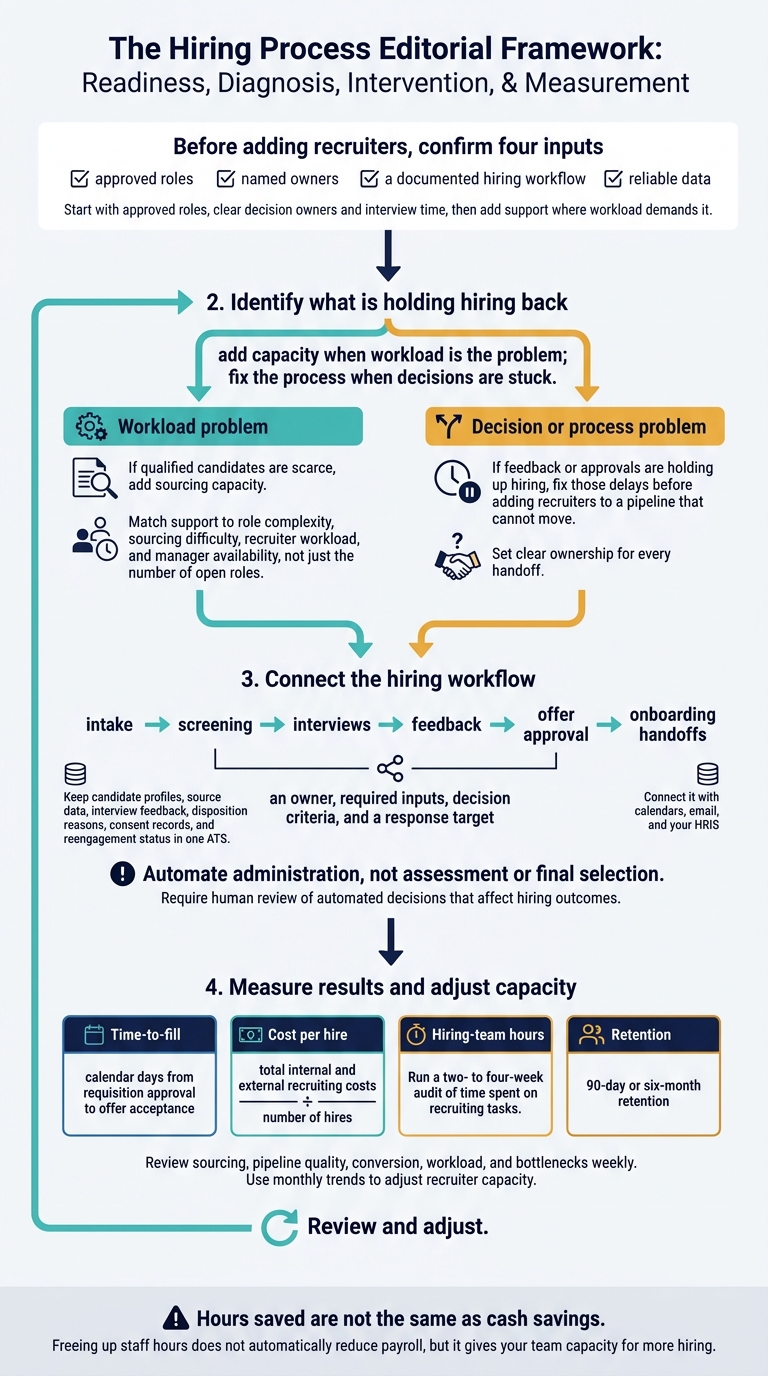
We scale hiring by fixing delays before adding recruiters. Start with approved roles, clear decision owners and interview time, then add support where workload demands it.
Our approach combines flexible recruiter capacity, repeatable workflows, connected systems and reliable reporting. We measure success through time to fill, cost per hire, hiring-team hours and retention, not recruiter headcount alone.
The rule is simple: add capacity when workload is the problem; fix the process when decisions are stuck. <u>Hours saved are not the same as cash savings.</u> Track both, and choose support that fits your hiring demand, budget and deadlines.
How to Scale Recruitment: Fix Delays Before Adding Capacity
How to Build a Structured Recruiting Process for Startups
sbb-itb-a23bd6a
Which Features Help Recruitment Scale?
For high-growth teams, recruitment scales when capacity can flex and teams follow repeatable processes. The test is whether those features improve speed, consistency, and cost control.
| Feature | Scalability problem addressed | Business benefit |
|---|---|---|
| Flexible recruiter and sourcer capacity | Recruiting workload rises or falls | Capacity adjusts to demand |
| Embedded recruiters | Recruiters lack business context and access to decision-makers | Clearer ownership and closer coordination |
| Standardized workflows | Intake, assessment, and approvals vary across teams | More consistent execution |
| Centralized candidate data | Fragmented records cause duplicate sourcing | Searchable, reusable talent pipelines |
| Automation | Scheduling and updates consume staff time | Less manual administration |
| Timely reporting | Delays and uneven workloads stay hidden | Earlier identification of bottlenecks |
| System integration | Disconnected hiring systems require duplicate entry | More reliable handoffs and data flow |
To put these features to work, connect them to each stage of your hiring process.
How Do Flexible Staffing and Clear Responsibilities Help?
Embedded recruiters work inside your systems and communication channels. Set clear ownership for every handoff so extra capacity doesn’t create confusion or delays.
The recruiter coordinates sourcing, screening, interviews, and candidate communication. The hiring manager owns role requirements and selection decisions. HR or People Operations handles employment and onboarding administration.
Match support to role complexity, sourcing difficulty, recruiter workload, and manager availability, not just the number of open roles. Review workloads and stalled stages regularly.
If qualified candidates are scarce, add sourcing capacity. If feedback or approvals are holding up hiring, fix those delays before adding recruiters to a pipeline that cannot move.
Which Hiring Workflows and Systems Should Connect?
Use consistent stages for intake, screening, interviews, feedback, offer approval, and onboarding handoffs. Give each stage an owner, required inputs, decision criteria, and a response target.
Keep candidate profiles, source data, interview feedback, disposition reasons, consent records, and reengagement status in one ATS. Connect it with calendars, email, and your HRIS to cut duplicate entry and give teams visibility across hiring stages.
Automate administration, not assessment or final selection. Use automation for scheduling, reminders, acknowledgments, approvals, and status updates. Make sure candidate communications explain what happens next and when to expect an update.
Require human review of automated decisions that affect hiring outcomes. Audit screening results for errors and bias, and protect records with role-based access and retention rules.
Assign someone to resolve integration failures. Regularly check for missing fields, duplicate records, and outdated statuses so your team can measure whether connected systems are improving hiring results.
How Do You Measure Recruitment Results?
Once workflows are in place, check whether added recruiting capacity improves hiring results. Track these measures to see whether you can scale without losing speed, control, or consistency:
- Capacity: Time needed to ramp up recruiting support when demand increases.
- Bottlenecks: Days spent in each stage and waiting for decisions.
- Administrative time: Monthly hours spent scheduling, collecting feedback, and updating records.
- Candidate communication: Percentage of updates sent on time and withdrawals caused by delays.
- Pipeline reuse: Percentage of hires or qualified candidates sourced from previous applicants.
- Spending predictability: Actual monthly recruitment spending against the approved budget.
Start with speed and throughput. Then check whether those gains also improve costs and reduce staff time.
Which Hiring Speed and Pipeline Metrics Should You Track?
Define time-to-fill as calendar days from requisition approval to offer acceptance. Time-to-hire measures days from a candidate’s entry into the process to acceptance.[3] Compare the last three to six months, grouping roles by seniority, location, and complexity.
Track stage conversion, the percentage of candidates moving to the next stage. Calculate offer acceptance by dividing accepted offers by offers extended.
Review open requisitions per recruiter alongside role complexity and hiring-manager response times. Set clear response targets for resume reviews and interview feedback so delays have an owner.
Pair speed metrics with 90-day or six-month retention and hiring-manager feedback. Faster hiring should not mask poor-fit hires.
How Do You Track Hiring Costs and Staff Time?
Calculate cost per hire by dividing total internal and external recruiting costs by the number of hires. Include recruiter and hiring-team time, advertising, sourcing tools, assessments, referral payments, and recruiting technology.[4]
Run a two- to four-week audit of time spent on recruiting tasks. Multiply those hours by each employee’s fully loaded hourly cost.
Keep time saved separate from cash savings. Freeing up staff hours does not automatically reduce payroll, but it gives your team capacity for more hiring.
Fixed pricing makes budgeting easier only when scope, responsibilities, technology costs, contract length, and terms for handling hiring surges are clear. Review planned versus actual spending, hires, and hours each month. Savings depend on hiring demand, process readiness, and role complexity, not pricing alone.
Use the results to identify whether you need more recruiting capacity or a better-prepared process. If results are flat or unstable, check that roles, budgets, and decision owners are in place before adding recruiters.
What Should Be Ready Before You Add Recruiters?
Before adding recruiters, confirm four inputs: approved roles, named owners, a documented hiring workflow, and reliable data. If hiring metrics are weak or unstable, check these first so extra capacity doesn’t get stuck behind the same delays.
Are Roles, Budgets, and Decision Owners Clear?
Confirm approved headcount, budget, location, start date, and hiring priority before sourcing begins.
Give recruiters a job brief covering core responsibilities, required and preferred qualifications, employment type, work schedule, location or remote-work expectations, compensation, benefits, and success measures for the first 6 to 12 months. Separate must-haves from preferences so recruiters know where to focus.
Create an ownership matrix covering intake, sourcing, screening, interviews, compensation approval, and final selection. Assign one accountable decision-maker to avoid conflicting feedback and duplicate approval queues.
Document interview and approval stages. Use structured interview questions and scorecards, and set response targets: feedback within 24 to 48 hours, for example, and a final decision within two business days. Resolve missing approvals before sourcing starts to avoid wasted recruiter time.
Are Hiring Data and Processes Reliable?
Once ownership is clear, check that your data and workflow support consistent delivery.
Audit open and recently closed ATS records as part of a recruitment health check for accurate source labels, feedback, rejection reasons, and offer outcomes. Give every active role an owner and a next action. Check dashboard calculations against sample records.[2] Reliable data supports better capacity decisions.
Document the workflow, including approved outreach, interview instructions, delay notices, and rejection messages, so recruiters communicate consistently.
Review data access and retention rules with HR or legal advisers. Check assessment accessibility and accommodation procedures with qualified HR or legal advisers.
Review sourcing, pipeline quality, conversion, workload, and bottlenecks weekly. Use monthly trends to adjust recruiter capacity.[2]
Conclusion: Which Recruiting Support Fits Your Hiring Plan?
Scalable recruitment combines flexible capacity, repeatable processes, connected systems, reliable reporting, and cost control. Choose the smallest support model that meets your hiring demand.
| Hiring need | Support to consider | Intended business benefit | Engagement length |
|---|---|---|---|
| Funding or product-launch hiring surge | Flexible embedded recruiting | Added hiring capacity within your existing team | Time-limited |
| Sustained hiring demand | Embedded recruiting | Consistent ownership and more predictable support costs | Recurring |
| Critical specialist or executive vacancy | Targeted specialist search | Focused attention on a business-critical role | Role-specific |
| Temporary workforce gap | Contract staffing solutions | Workforce flexibility without adding permanent positions | Time-limited |
| Unclear hiring performance | Recruitment health check | Prioritized process and reporting recommendations | Initial assessment |
Match support to scope, ownership, and reporting needs, not headcount alone. A health check identifies improvements but does not add hiring capacity.
Rent a Recruiter’s Role in Hiring Growth
For recruiting delivery inside your team, match support to the type and duration of your hiring demand. Rent a Recruiter embeds experienced recruiters within days and manages hiring from start to finish. It offers short-term and longer-term support for growing technology, SaaS, fintech, engineering, and professional services companies.
The company reports hiring cost reductions of up to 70% and more than 80 internal hiring and admin hours saved per month.[1] Results are not guaranteed. They depend on scope, hiring volume, role complexity, market conditions, and how promptly your internal team responds.
What to Prepare Before Discussing Recruiting Support
Bring your approved roles, hiring deadlines, current capacity, baseline costs, and bottlenecks. These details help define support, reporting, and triggers for scaling capacity up or down from the start.
FAQs
When should we scale recruiting capacity down?
Scale back recruitment capacity when hiring slows or project-based needs end. Monthly delivery reviews and quarterly planning help you compare actual hiring volumes with forecasts and adjust capacity as plans change. Growth rarely follows a straight line.
With embedded recruitment, you can reduce support without penalties or rigid commitments. That means no permanent staffing overhead during quieter periods, keeping recruitment costs aligned with your current business goals.
How soon should we expect measurable hiring improvements?
An embedded recruiter can start improving your hiring process and managing workflows within 14 to 21 days. Most companies see measurable return on investment within 2 to 6 months, through faster time-to-fill and lower costs.
Set clear metrics early, including time-to-hire and cost-per-hire. Weekly reporting helps your team spot bottlenecks and track hiring improvements as your business scales.
How can we forecast recruiter capacity needs?
Build your hiring forecast around business goals, including product milestones, revenue targets, and funding rounds. Plan 12 to 18 months ahead, update the forecast quarterly, and test what happens if hiring volumes increase or decrease.
Use your own historical time-to-hire and recruiter output to set realistic targets, rather than generic benchmarks. That keeps your hiring plans grounded in what your team can deliver.
Rent a Recruiter embeds experienced recruiters into your team, so you can adjust hiring capacity as demand changes without costly permanent overhead.