
If your hiring process breaks every time growth spikes, the problem is not headcount alone, it is the system behind it.
I’d sum the article up like this: scalable hiring comes from clear process, clean data, and the right level of recruiter capacity. When teams standardise stages, use one ATS as the source of truth, and track metrics like time-to-fill, time in stage, and offer acceptance rate, they cut delays, save admin time, and make hiring easier to control.
For scaling firms in SaaS, fintech, engineering, IT, security, insurance, and professional services, the commercial impact is direct:
- Technical roles now average 52 days to fill
- 26% of candidates drop out when hiring takes too long
- Connected hiring systems can cut time-to-fill to about 14 days
- Embedded support can cut hiring costs by up to 70% and save 80+ hours per month in admin
- A full-time recruiter can cost $117,000 to $200,000 per year
That means your hiring model should do three things:
- turn headcount plans into recruiter capacity
- run a fixed, stage-based process
- add support when demand jumps, without losing visibility or control
If I were advising a CEO, CFO, or HR leader, I’d say this: build the hiring model first, then add tech, then flex capacity only where the numbers show strain. That is the core point of the piece below.
Best Applicant Tracking Systems (ATS) for Small Businesses | Top Picks for 2025
sbb-itb-a23bd6a
Build the Operating Model Before Adding More Tools
Most scaling teams buy software before they fix the process underneath it. That usually gives you a faster version of a broken system.
Before you add another tool, get clear on how work moves, who owns each step, and how success is tracked. Then pick tools that fit that model, not the other way around.
Turn headcount plans into recruitment capacity
Your headcount plan needs to turn into actual hiring demand.
Break hiring down by role type, seniority, and timing. A senior engineer in a niche area will take far longer to hire than a mid-level sales rep. If your capacity plan treats those roles the same, you’ll miss targets and overload the team.
For fast-growth companies, the benchmark is about 1 recruiter for every 30 to 50 employees [6]. A dedicated recruiter usually makes sense once you’re hiring more than 20 to 25 people per year, or when an HR generalist is spending over half their time on recruitment [6].
That matters because hiring capacity is not just about team size. It’s about whether you have enough recruiter time to fill roles without delays, rushed decisions, or missed revenue plans.
Standardize a stage-based hiring process
A clear, stage-based process is what makes automation and reporting worth having. Without it, both become messy fast.
Your core stages should cover:
- Role intake
- Sourcing
- Screening
- Structured interviews
- Hiring decision
- Offer
- Handoff to the onboarding owner [5][6]
Each stage needs one clear owner and a set response-time standard. For example, a 24-hour feedback turnaround after interviews [1]. That keeps hiring moving and cuts the confusion that slows most teams down.
Structured interviews and role-specific scorecards also help shift evaluation away from gut feel and toward consistent, documented criteria. That consistency matters for more than decision-making. It makes your pipeline data usable. If every recruiter follows the same stages, your reporting starts to reflect what’s actually happening.
Define the right team structure for scale
The right team structure changes as your business grows. Early-stage companies often rely on founder-led hiring or personal networks. As hiring volume increases, dedicated recruiters should sit inside key functions such as engineering and sales, so evaluation rubrics stay consistent and delivery stays on track [7].
You also need to assign ownership clearly across talent acquisition leads, recruiters, coordinators, sourcers, and hiring managers. The recruiter should own the process from job brief to offer. HR or the hiring manager should own onboarding.
When those lines get blurred, handoffs slow down and candidates drop out. 26% of candidates abandon a hiring process simply because it takes too long [7].
Once ownership is clear, you can map each hiring stage to the systems and automations that support it.
Choose a Tech Stack That Supports Speed, Visibility, and Consistency
Once your process is set and ownership is clear, tools help you run it with less friction. The goal is simple: pick tools that make each hiring step faster, easier to track, and more repeatable.
That starts with discipline. Don’t buy more software than you can use. If the workflow is messy, extra tools just make the mess harder to see.
Core systems every scaling hiring team needs
Start with the system that tracks every open role and every candidate move. Your Applicant Tracking System (ATS) should run interview workflows, show where each person sits in the pipeline, and sync with your calendar, email, and reporting tools so your team isn’t stuck doing manual admin.
In practice, that means one source of truth. If recruiters, hiring managers, and HR are all working from different systems, delays creep in fast. A strong ATS cuts that drag and gives you cleaner reporting, less admin, and better control over time-to-hire.
Beyond the ATS, you’ll need scheduling support and a shared team inbox. Without them, teams end up bouncing between tools and creating handoffs that slow decisions down. Connected systems that combine sourcing, outreach, and scheduling can cut time-to-fill to an average of 14 days, compared to nearly double that for disconnected tools [8].
Tools for sourcing, screening, and selection at volume
Once the core workflow is stable, add sourcing and screening tools.
AI sourcing platforms help surface candidates who match your role criteria. That matters most when inbound applications aren’t enough, especially for niche roles or high-volume hiring. Used well, these tools extend recruiter capacity without adding headcount.
For higher-volume screening, asynchronous video interviews reduce scheduling back-and-forth and help teams move through early-stage review faster. Skills assessments add a more objective check during selection, so you’re not moving people forward on CV strength alone. 90% of organizations using skills-based screening report fewer hiring mistakes [8].
Structured scorecards make both tools work better. If every interviewer is judging against the same criteria, your team gets cleaner feedback, faster decisions, and less inconsistency.
What to implement now vs. later by growth stage
Add tools only after the workflow is clear. Otherwise, you’re layering software onto confusion. The table below shows the minimum setup to put in place at each growth stage.
| Growth Stage | Expected Volume | Implement Now | Add Later |
|---|---|---|---|
| Seed (10 to 50 employees) | 1 to 10 hires/year | Basic ATS, calendar scheduling, job distribution | Candidate CRM, AI sourcing |
| Series A (50 to 200 employees) | 2 to 5 hires/month | Full ATS with integrations, AI sourcing, multi-channel outreach | Assessment platforms, automated panel scheduling |
| Series B+ (200+ employees) | 5+ hires/month | Advanced ATS, panel scheduling, BI analytics dashboards | Talent marketing CRM, predictive analytics |
The rule is straightforward: connect your core systems before you add AI. Get your ATS, CRM, and calendar working together first. Once data moves cleanly between systems, AI sourcing and advanced assessments are far more likely to save time, cut waste, and improve hiring outcomes.
Embed Technology Into Daily Hiring Workflows
Tools only help when people use them the same way, every time. Once you’ve picked your stack, the next job is simple: make it the standard route for every hire.
Map each hiring stage to systems, owners, and automations
This is not about adding more software. It is about building one repeatable hiring process across every requisition.
For each req, map every stage to:
- one owner
- one system
- one automation
That applies across intake, sourcing, screening, interviews, offer, and onboarding handoff.
Then strip out handoffs that do not need human judgment. AI screening can review inbound applications against must-have criteria. Scheduling tools can send interview invites without recruiter input. Background checks can trigger on their own once an offer is approved. In high-volume hiring, automated screening and scheduling can cut time-to-hire by up to 60% [5].
Approvals and offer letters should move through connected systems, not email chains. When each step has a named owner and a clear system, work does not sit in someone’s inbox waiting to be picked up.
Train hiring managers to use the process properly
Hiring manager training needs to be tied to the job they actually do. That means interview kits, scorecards, and feedback entry, not broad training sessions they will forget a week later.
A good ATS can help here. Block stage progression until feedback is submitted, so the deadline sits inside the workflow instead of relying on reminders [9].
Set clear SLAs for feedback and stage moves. Then back that up with automated nudges and direct links to scorecards, so managers can act fast [9]. Less friction usually means better adoption.
Use data to spot bottlenecks and improve performance
Review ATS data every week. The aim is not more reporting. The aim is to see where time slips, quality drops, or ownership gets muddy before hiring slows down.
| KPI | Definition | Data Source | Benchmark (High-Growth SME) |
|---|---|---|---|
| Time-to-Fill | Days from requisition approval to offer acceptance | ATS | 14 to 30 days [8] |
| Time in Stage | Average days a candidate spends in a specific hiring phase | ATS Analytics | 2 to 3 days for initial screening; <5 days interview-to-offer |
| Conversion Rate | % of candidates moving from one stage to the next | ATS / Analytics Layer | 20 to 30% screen-to-interview; 50%+ final-to-offer |
| Offer Acceptance Rate | % of extended offers accepted | ATS | 80%+ |
| Outreach Response Rate | % of candidates responding to initial outreach | CRM / Sourcing Tool | 15 to 25% (up to 60% multi-channel) [8] |
| Recruiter Capacity | Active requisitions managed per recruiter | ATS / Workflow Audit | 15 to 25 active reqs depending on role complexity |
| Sourced-to-Offer Conversion | % of outbound candidates who receive an offer | CRM / ATS | 5 to 10% for quality outbound [10] |
Time in Stage is often the metric that tells you where things are breaking down. If screening is dragging, interviews are bunching up, or offers are sitting untouched, you will see it there first.
Once these numbers are visible, you can make better calls on capacity. You can see whether the issue is manager speed, recruiter bandwidth, process design, or whether it is time to add in-house hiring support or bring in extra embedded help.
Scale Capacity Without Losing Control
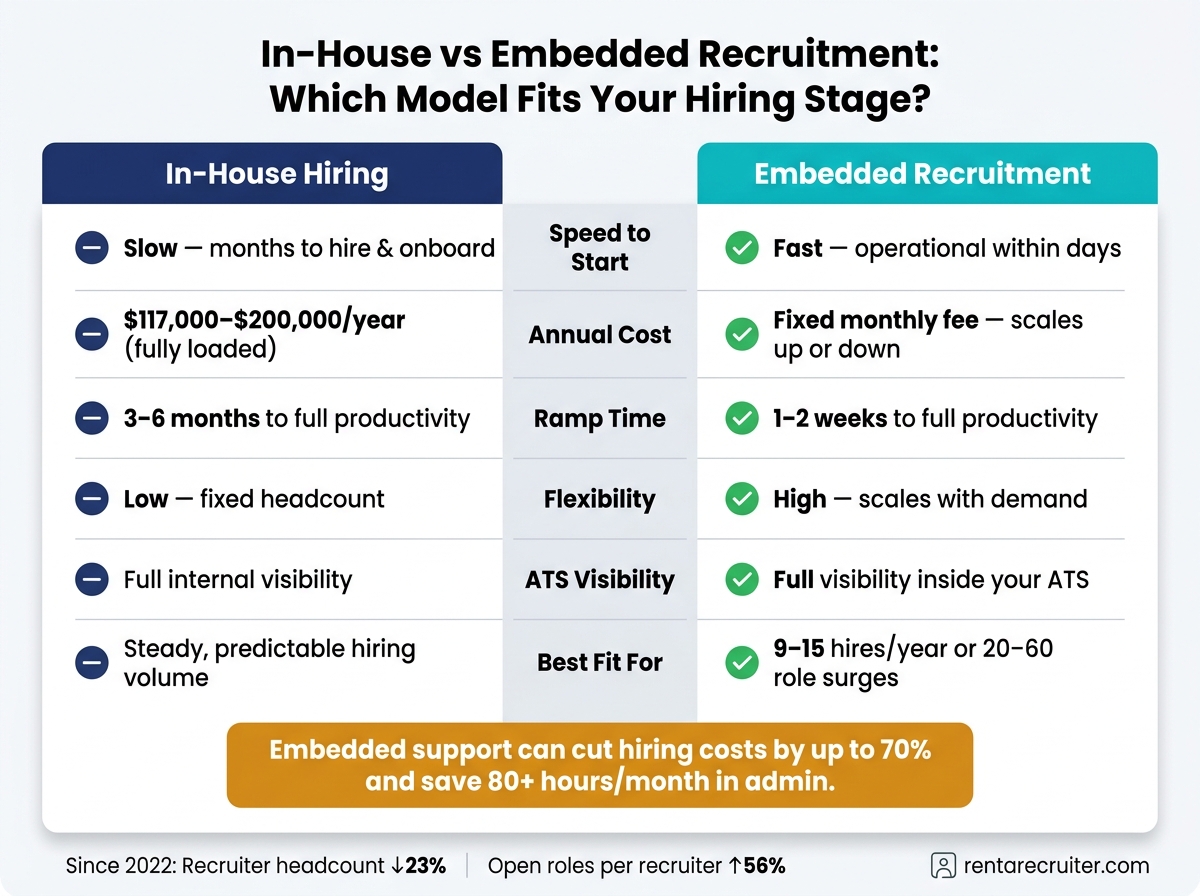
In-House vs Embedded Recruitment: Cost, Speed & Flexibility Compared
Once your reporting shows where hiring slows, the next call is simple: how do you add flexible hiring capacity without losing grip on process, cost, or visibility?
When to hire in-house and when to add embedded recruitment support
A full-time in-house recruiter makes sense when hiring demand is steady. But at a fully loaded $117,000 to $200,000 per year [11], that is a serious fixed cost.
Embedded support is better suited to funding rounds, new market launches, and short-term hiring surges [2].
Use the criteria below to match your hiring model to current demand.
| Factor | In-House Hiring | Embedded Recruitment |
|---|---|---|
| Speed to Start | Slow, months to hire and onboard | Fast, operational within days |
| Cost Structure | High fixed cost, salary plus benefits | Fixed monthly, can scale up or down |
| Ramp Time | 3 to 6 months to full productivity | 1 to 2 weeks [11] |
| Visibility | Full internal visibility | Full visibility inside your ATS [2] |
| Flexibility | Low, fixed headcount | High, scales with demand |
| Governance | Direct internal control | Embedded inside your workflow and reporting |
For 9 to 15 hires per year, or a 20 to 60 role surge, embedded support will often give you better value than a permanent hire [2][11].
That matters for one reason: you are paying for capacity that matches demand, not carrying fixed overhead when hiring slows.
How embedded recruiters strengthen your systems and reporting
An embedded recruiter works inside your ATS, follows your workflow, and keeps reporting steady as volume grows [2][3].
That becomes a big deal when internal capacity gets stretched. Since 2022, recruiter headcount across the market has fallen by 23%, while open roles per recruiter have climbed 56% [4]. When that gap opens up, hiring often turns reactive. Process slips. Reporting gets patchy. Quality drops.
An embedded recruiter helps stop that slide by working inside the system you already use, not around it.
Rent a Recruiter operates on this model with fixed monthly pricing, embedding experienced recruiters directly into your team within days. Companies typically cut hiring costs by up to 70% and save more than 80 hours per month in hiring admin.
Conclusion: Build a hiring engine that scales with the business
Once capacity is flexible, the next step is keeping hiring steady as demand shifts. Scalable hiring comes from the right operating model, a consistent tech stack, workflows people follow, and the ability to flex capacity when demand spikes, without losing visibility or process discipline.
Book a call with Rent a Recruiter to add flexible hiring capacity.
FAQs
When should we add a recruiter?
Consider adding a recruiter when your HR generalist is spending more than 50% of their time on hiring, or when your business is making 20 to 25 hires a year on a steady basis.
That’s usually the point where recruitment stops being a side task and starts eating into work that should sit elsewhere, like people ops, performance, and retention. If one person is trying to do all of it, something gives.
A dedicated internal recruiter often starts to make financial sense once you reach 15 to 20 employees and expect to hire at least two people a month for more than six months.
Timing matters too. Bring that person in about six months before hiring pressure peaks. Do it early, and you give them time to build process, set up pipeline flow, and help you avoid the last-minute scramble that slows teams down and drives up cost.
What hiring metrics matter most?
The most important hiring metrics are time-to-fill, time-to-hire, cost-per-hire, offer acceptance rate, and first-year retention or turnover.
If you’re scaling, don’t stop there. Track hires vs. targets, recruiter ramp time, applicants-to-hire ratio, and where candidates drop out of the process.
The point isn’t to measure more for the sake of it. It’s to measure what helps you make better hiring decisions.
Focus on outcomes, not activity. That’s how you spot bottlenecks, cut delays, and improve hiring fit before small process issues turn into expensive problems.
Which recruitment tools should we implement first?
Start with a lean setup: a reliable Applicant Tracking System (ATS) and an AI-powered sourcing platform.
Your ATS keeps candidate tracking and hiring workflows in one place. That gives you better visibility, less admin, and fewer process gaps as hiring picks up.
AI sourcing helps you find pre-qualified talent with less manual search time. For scaling teams, that means more recruiter output without adding headcount too soon.
Skip heavy assessment software at the start. In most cases, it adds cost and slows the process before you have the volume to justify it.
Use structured interview guides instead. They help your team assess people in a more consistent, objective way, while keeping the process simple and easy to run.
As hiring volume grows, you can layer in scheduling automation and screening tools. That way, you add software when it solves a clear problem, not just because it’s available.