For remote teams, paid family leave needs two plans: how you’ll pay for it and how you’ll cover the work. We recommend checking each employee’s work location and eligibility before committing to benefits or hiring cover.
Federal FMLA generally provides eligible employees with up to 12 workweeks of unpaid, job-protected leave, not paid leave. Your budget needs to account for both leave payments and staffing costs.
We focus on three steps to help you control costs and avoid delays:
- Confirm the rules: Check leave pay and job protection separately, including before relocations or new-state hires.
- Map the costs: Coordinate state payments, employer pay, and PTO, then budget for temporary cover.
- Assign ownership: Use one leave contact, clear handoffs, and a return plan that protects private information.
The aim is simple: <u>keep work moving without relying on employees during leave</u>. Start with location and eligibility, then build your payment and coverage plans around them.
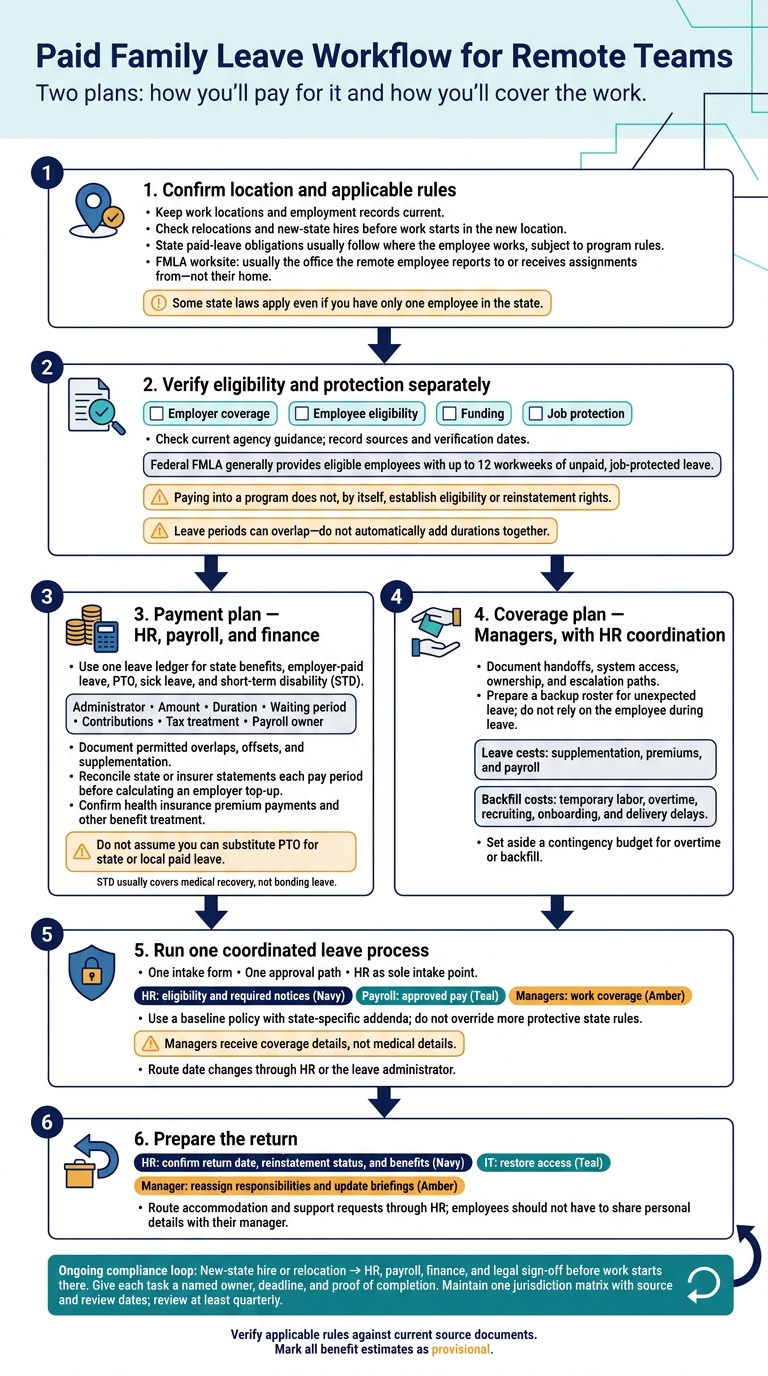
Paid Family Leave Workflow for Remote Teams
Check Work Locations and Leave Eligibility
Keep Work Location and Employment Records Current
Once you’ve separated pay from job protection, map each remote employee to the correct jurisdiction, which may involve outsourcing recruitment and talent acquisition to manage global compliance. Keep work locations and employment records current. Require advance notice of relocations so HR and payroll can check state coverage and contribution rules before a move takes effect.
Work location helps determine which federal and state rules apply, but the rules differ. For FMLA, a remote employee’s worksite is usually the office they report to or receive assignments from, not their home. State paid-leave obligations usually follow where the employee works, subject to program rules.
Small headcount does not rule out coverage. Some state laws apply even if you have only one employee in the state.
Confirm Eligibility Before Promising Benefits
Before promising a benefit, check employer coverage, employee eligibility, funding, and job protection separately.
For each applicable state program, confirm who qualifies, how benefits are funded, how long leave can last, and whether job protection applies. Check whether payroll must collect employee contributions, employer contributions, or both.
Paying into a program does not, by itself, give an employee eligibility or reinstatement rights.
Build a Leave Requirements Table
Keep one record for every jurisdiction that may apply. In your internal table, record each current requirement, its source, and the date you verified it.
Check federal rules against Department of Labor guidance, and state or local rules with the relevant agency. Leave periods can overlap, so do not automatically add their durations together.
| Provision | Eligibility to verify | Funding | Pay status | Leave length | Job protection | Administered by |
|---|---|---|---|---|---|---|
| Federal FMLA | Employer coverage, employee eligibility, and worksite rules | N/A | Unpaid | Applicable federal entitlement | Applies to eligible employees | Employer; DOL oversight |
| Applicable state paid leave | State-specific coverage and eligibility rules | Required employee and/or employer contributions | Program wage replacement | State entitlement | Check separately under applicable law | State agency or authorized plan administrator |
| Employer-paid parental leave | Written policy requirements | Employer | Policy-defined pay | Policy allowance | Check applicable law and policy separately | HR and payroll |
| Relevant local requirements | Covered location and local eligibility rules | As required by local rules | Verify local requirement | Local entitlement | Verify applicable protections | Employer; responsible local agency |
sbb-itb-a23bd6a
Coordinate Leave Payments and Staffing Costs
Document How Leave Benefits Work Together
Once eligibility is confirmed, map how pay, benefits, and staffing coverage will work during leave. Use one leave ledger for HR, payroll, finance, and the leave administrator. Include state benefits, employer-paid leave, PTO, sick leave, and short-term disability (STD).
For each payment source, record the administrator, amount, duration, waiting period, contribution structure, tax treatment, and payroll owner. Document allowed overlaps, offsets, and supplementation. STD usually covers medical recovery, not bonding leave.[6][7]
Do not assume you can substitute PTO for state or local paid leave. The Department of Labor says the FMLA substitution rule does not apply to portions covered by those benefits. Supplementation depends on the applicable rules.[8] Colorado, for example, prohibits mandatory PTO use during FAMLI leave, requires a written agreement for supplementation, and caps combined payments at average weekly wages.[6]
Each pay period, payroll should reconcile state or insurer statements before calculating any employer top-up, then document corrections.
Record how employees will pay health insurance premiums when payroll is reduced or paused. Check PTO accrual, bonuses, commissions, retirement contributions and matching, and equity vesting against the plan and applicable law. Assign owners for withholding and tax reporting. Do not assume every payment gets the same treatment.[5]
With payment rules documented, assign backup coverage.
Plan Handoffs and Backup Coverage
For remote teams, build handoffs around system access, clear ownership, and escalation paths.
Track leave payments and staffing costs separately so you can see the full budget impact:
- Leave costs: Supplementation, premiums, and payroll.
- Backfill costs: Fractional recruiters or temporary labor, overtime, recruiting, onboarding, and delivery delays.
Give managers the coverage details they need, not medical details. For unexpected leave, activate a preapproved backup roster, documented escalation paths, and authorized system access without relying on the employee’s help.
Set aside a contingency budget for overtime or backfill. Route date changes through HR or the leave administrator, and have managers prioritize work by customer impact, legal or security risk, and revenue.
Managing a Distributed Workforce: Remote and Multi-State Employee Compliance | Payroll & HR Webinar
Set a Consistent Leave Process
Once pay and coverage rules are set, standardize how leave requests move through your company so each team follows the same process.
Use One Leave Request Workflow
Make HR the sole intake point. Managers should route every leave request to HR rather than make side agreements. Use one intake form and one approval path, and restrict medical and family information to those who need it.
Keep responsibilities clear: HR checks eligibility and required notices, payroll handles approved pay, and managers arrange coverage.
Write a Baseline Policy With State Addenda
Put your core leave rules in a baseline policy, then add state-specific addenda. Your companywide policy must not override more protective state rules.
Separate legally required leave from optional benefits, such as extra caregiver days or postpartum support. Also list optional support, including childcare, mental health support, and lactation consulting.[4]
Prepare for the Employee’s Return
As leave ends, move from benefits administration to return planning. Keep contact about confirming the return date with HR only.
Before the employee returns, HR should confirm reinstatement status and benefits, IT should restore access, and the manager should reassign responsibilities and update briefings.
Route accommodation and support requests through HR. Employees should not have to share personal details with their manager.[4]
Check Leave Requirements Before Hiring in New States
Make every new-state hire or relocation a leave-compliance checkpoint before the start date. Confirm the employee’s physical work state, not your headquarters’ location. Even one remote hire can trigger leave, registration, job protection, and anti-retaliation duties.[9][2][10] Record the date the new location takes effect, and require HR, payroll, finance, and legal sign-off before work starts there.
Give each task a named owner, deadline, and proof of completion:
- HR checks applicable leave laws, notices, and policy rules.
- Payroll verifies registrations, contribution rates, deductions, and filing deadlines, then tests calculations before the first live paycheck.
- Finance budgets employer contributions and coverage costs.
- Legal reviews registration, job protection, and unresolved conflicts between rules.
Keep decisions and approvals in one jurisdiction matrix, including source dates and review dates, so each team works from the same rules. Sync HRIS and payroll location records on the effective date to reduce errors and avoid rework.
Review the matrix at least quarterly. Seek legal review when laws, contribution rates, or benefit requirements change, and set reminders for filings, notices, and registration renewals.
Track acknowledgment time, eligibility turnaround, payroll corrections, missed notices, and coverage costs. Use aggregated results to address administrative delays, not to judge employees.
Add Recruiting Support When Coverage Requires Hiring
When leave coverage or geographic expansion requires hiring, Rent a Recruiter can support sourcing, screening, interview coordination, and pipeline reporting. HR, payroll, finance, and legal retain ownership of eligibility, benefits, registrations, deductions, and compliance.
Conclusion: Key Leave Planning Checks
Before approving leave or confirming a new-state hire, check these three areas:
- Eligibility: Confirm the employee’s current work location, legal employer, tenure, and hours worked. Check pay eligibility and job protection separately before approving leave.
- Payment structure: Record how state benefits, employer pay, and PTO fit together. Make clear who pays, how much, when payments start, and how long they last.
- Handoff and coverage: Name one person responsible for managing leave. Document backup coverage, return-to-work steps, and how medical information will remain restricted to HR.[3][11][12]
Apply the same review to relocations and new-state hires. A change in work location can change leave eligibility and payroll rules. Before final approval, check the applicable rules against current source documents, record each source date, and mark all benefit estimates as provisional.
FAQs
What if a remote employee works in multiple states?
Where your employee works generally determines which laws apply, not where your company is headquartered. Follow the strictest applicable rules for each relevant state on paid leave, wages and overtime, payroll taxes, and required notices and disclosures.
Keep accurate work-location records and review compliance whenever an employee’s work location changes. [1][2]
How do we handle intermittent family leave?
For remote teams, manage intermittent family leave through clear scheduling, availability tracking, and compliance checks. Record approved leave dates and patterns, the employee’s work state and locality, and the paid-leave rules that apply.
Keep accurate time and leave records so payroll reflects any effects on wages and benefits.
Use neutral paid-leave policies with state-specific supplements. Recheck compliance whenever an employee’s work location or working arrangement changes.
What happens if state leave payments are delayed?
The available information does not explain what happens or what steps you should take if state paid family leave payments are delayed for remote employees.
State leave rules vary. Check the relevant state agency’s guidance for steps to resolve payment delays and any employer obligations while payments are disrupted.