Before your next remote hire starts, assign a safety policy owner and confirm where the employee will work. We recommend making these steps part of onboarding to reduce paperwork delays, payroll errors, and unresolved equipment issues.
Use these seven checks to give your team clear responsibilities:
- Workstations: Identify hazards and track fixes.
- Reporting: Explain how employees report injuries, hazards, and emergencies.
- Work hours: Record all work, handle overtime, and check break rules.
- Equipment: Set rules for safe use, repairs, and replacement costs.
- Injury records: Assign responsibility for records and reporting deadlines.
- Managers: Define who receives reports and when to escalate.
- Local requirements: Check the rules for each employee’s work location.
Our starting point is simple: <u>one owner, one tracker, and a deadline for every fix</u>. Build these checks into your hiring-to-HR handoff so your next hire starts with clear instructions, not unfinished admin.
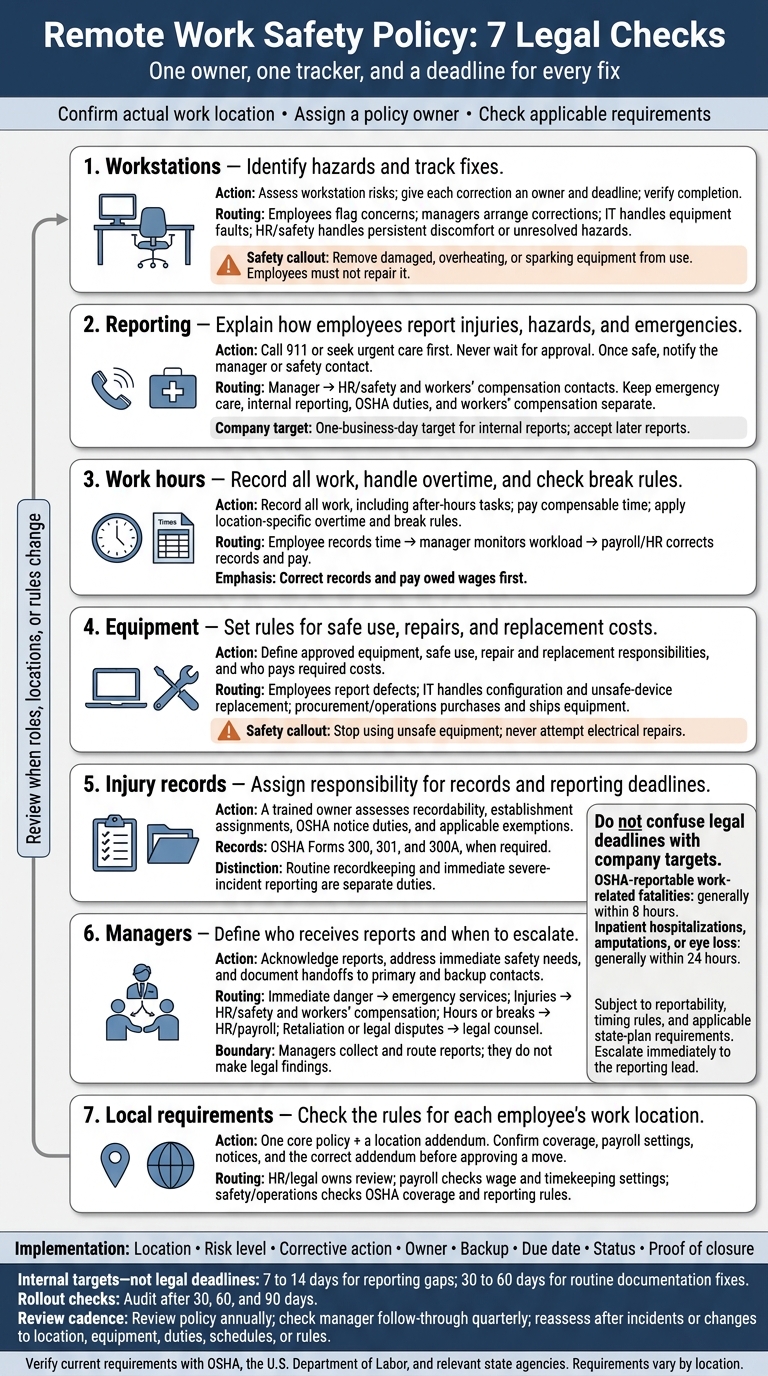
Remote Work Safety Policy: 7 Legal Checks
If an employee works remotely, how do they report injuries suffered at home?
sbb-itb-a23bd6a
Identify Your Remote Work Compliance Requirements
Build an access-controlled employee register that records each person’s actual work address, city and state, assigned worksite, duties, supervisor, employment status, and location-change date. A mailing address or “remote” label is not enough. Require advance approval for extended work from another state or country so HR can check requirements before the arrangement starts.
Record each employee’s exempt or nonexempt status, plus the compensation and actual duties that support that classification. Job titles alone do not establish an FLSA exemption.[9] Include their time zone, scheduled hours, fixed and recurring 168-hour workweek, and the process for correcting time records.[7]
For every work location, check whether federal OSHA, an OSHA-approved state plan, or another regulatory regime applies. Review the employee’s activities and any assigned office or client site, not just your headquarters.[8] Separately, confirm workers’ compensation coverage, reporting steps, claims contacts, and deadlines with your insurer or the relevant state agency. Do not assume every injury at home is covered.
Keep legal requirements separate from company safeguards in your compliance record. A workstation self-assessment can help reduce risk, but there is no general federal requirement to inspect every home work location.[5] State whether reviews use self-certification, voluntary virtual assessments, or another method. Set clear limits around privacy and consent.
Give one policy owner accountability, typically someone in HR, risk, legal, or operations. Have them record the policy version, effective date, jurisdictions covered, approval authority, and next review date.
For the November 3, 2026, compliance snapshot, verify applicable requirements using official Department of Labor, OSHA, state-plan, and state workers’ compensation sources. Keep each source and its review date. Assign supporting responsibilities to payroll, managers, IT, facilities, and workers’ compensation claims staff, or consider outsourcing recruitment and talent acquisition to streamline these compliance workflows. Reopen the review whenever an employee’s location, duties, or applicable rules change.
1. Review Workstation Risks and Track Corrections
Applicable Legal Requirements
Use a documented self-assessment for home workstations. Reserve inspections for hazards linked to company equipment, materials, or required work processes. Employers remain responsible for hazards created by equipment, materials, or work processes they provide or require.[4][14]
Policy Rules
Require a workstation self-assessment covering posture, chair support, desk height, legroom, keyboard placement, lighting, cords, and electrical safety.
Feet should be supported, wrists neutral, and the monitor centered, with its top at or slightly below eye level. Encourage position changes and brief breaks. These are ergonomic recommendations, not federally mandated break intervals.[11][12][13]
Record the findings so home-office ergonomics becomes a compliance process you can track.
Owners and Escalation
Employees flag concerns, managers arrange reasonable corrections, and IT handles equipment faults. HR or the safety lead handles persistent discomfort and unresolved hazards.
Remove damaged, overheating, or sparking equipment from use. Employees must not repair it. Route possible work-related injuries through the injury-reporting process, not the workstation tracker.[3][10]
Give every correction an owner and deadline so action does not stall.
Hazard Owner Corrective action Status Laptop screen too low Employee and IT Provide laptop stand and external keyboard Open Loose power cord across walkway Employee Reroute cord and secure it away from the walking path Complete Glare on monitor Manager and employee Reposition monitor and adjust blinds or lighting Follow-up scheduled Persistent wrist discomfort Manager and HR/safety lead Review setup, consider equipment change, and assess whether further support is needed Escalated
Records and Review Triggers
Document reviews at onboarding, a critical phase when hiring as you scale, after a move, after discomfort or an incident, and after material changes to equipment, duties, or hours.
Record the hazard, owner, target date, completion date, and employee confirmation. Keep medical details out of routine safety records, and assess potentially recordable injuries through the proper reporting process.[3][10]
If a hazard becomes an injury or emergency, use the reporting process described in the next check.
2. Define Injury, Hazard, and Emergency Reporting
Applicable Legal Requirements
When a hazard becomes an incident, keep emergency care, internal reporting, OSHA duties, and workers’ compensation separate.
For OSHA purposes, a home injury is work-related only when it occurs during work and results from the work itself, not simply from being at home. Workers’ compensation coverage is a separate decision governed by state rules. Employees should report concerns without having to determine whether either applies.[16][19]
Policy Rules
Call 911 or seek urgent care first. Never wait for approval. Once safe, notify the manager or safety contact.
Accept verbal and written reports through at least two accessible channels, such as phone and email, with HR as a backup. Provide accommodations for language, disability, or technology barriers.
Set a one-business-day target for reporting injuries, near misses, unsafe equipment, and work-related pain or discomfort. Accept later reports when symptoms or a possible work-related cause become clear. Prohibit retaliation and automatic penalties for late reporting.
Request the employee’s name and contact details, the date and time, the task, what happened, symptoms, care received, and witnesses. Do not require a diagnosis.
After intake, managers own escalation. HR and claims staff handle the next steps.
Owners and Escalation
Managers acknowledge reports and escalate serious events immediately, even when the form is incomplete.
Name a safety owner and backup to assess OSHA reporting duties. Fatalities generally require notice within 8 hours. Inpatient hospitalizations, amputations, or eye loss generally require notice within 24 hours, subject to timing rules and state-plan requirements.[15][17][18]
HR or the claims administrator provides separate workers’ compensation instructions. Internal procedures must not restrict employees’ right to contact OSHA.
Records and Review Triggers
Store the report, acknowledgment time, incident timeline, investigation findings, OSHA decision, claims referral, and closure date in a restricted-access system.
The safety owner reviews the process after a serious injury, repeated near misses, recurring ergonomic complaints, or a missed escalation deadline. Assign an owner and deadline for each correction.
Review trends quarterly to identify process gaps, not to punish employees for reporting concerns.
3. Set Work Hours, Overtime, and Break Rules
Managing remote safety means limiting fatigue and workload pressure, while preventing off-the-clock work and missed breaks.
Applicable Legal Requirements
Covered nonexempt employees generally earn 1.5 times their regular rate for hours worked over 40 in a defined 7-day workweek. Identify which roles are nonexempt. Exemptions depend on duties and salary tests, not job titles alone. Check stricter state and local rules before rolling out your policy.[6][7][25]
Policy Rules
Track every minute worked, including calls, email, training, work during meal periods, and brief tasks outside scheduled hours. Record the date, start and stop times, meal periods, time zone, and any edits or approvals.
Require advance approval for overtime, but pay for all work your company knows or should know took place.[6][25] Include availability windows and time zones in schedules and meeting invites so teams know when people are expected to work.
Treat hours control as a safety control, not just a payroll rule.
Federal law generally does not require meal or rest breaks. When you offer breaks, short breaks of 5 to 20 minutes are paid. Unpaid meal periods generally must last at least 30 minutes and be fully duty-free. Apply stricter state rules on timing, duration, or premium pay where required.[22][23][24]
Owners and Escalation
| Role | Required control |
|---|---|
| Employee | Record all work and breaks accurately, request overtime approval in advance, and report missed breaks or missing time. |
| Manager | Monitor workload and after-hours work, stop unpaid work, and address repeated missed breaks. |
| Payroll/HR | Pay compensable hours and overtime, apply location-specific rules, and retain corrections and approvals. |
Provide a separate reporting channel for missed breaks, off-the-clock work, and time-record corrections. Ask employees to submit corrections within the same pay period where possible, but accept later reports.
Correct records and pay owed wages first. Address approval violations or workload problems separately.
Records and Review Triggers
Retain time entries, edits, approvals, break attestations, and pay corrections. Review exceptions monthly to spot excess hours, frequent edits, and work during meal periods.
Recheck the policy after relocations, role reclassifications, timekeeping changes, recurring missed breaks, or new legal requirements.
4. Define Equipment and Home-Office Safety Rules
Applicable Legal Requirements
OSHA’s home-based worksite guidance covers hazards caused by equipment, materials, or processes your company provides or requires at home.[4] Its workstation guidance offers ergonomic advice. It does not create a universal federal requirement to provide a particular chair, desk, or monitor. Review state workers’ compensation, reimbursement, and privacy rules separately.[26]
Use these requirements to clarify what your company provides, what employees may use, and who must resolve each issue.
Policy Rules
Define which equipment your company issues, what employees may use, and how unsafe equipment is taken out of service. Keep an approved-equipment schedule covering laptops, monitors, docks, keyboards, mice, headsets, chargers, and surge protectors.
Require stable placement, ventilation, and secure cable routing for company-provided devices. Ban damaged chargers, overloaded outlets, daisy-chained power strips, electrical modifications, and unapproved software. Require only the accessories and setup needed to keep company-issued equipment stable, powered, and safe.[27][28][30]
Require company-managed operating system and application updates, screen locking, and strong, unique passwords. Require endpoint protection, multifactor authentication, and full-disk encryption when the device supports it.[11][31][32]
Allow personally owned devices only with written approval. Require a supported operating system, current patches, approved remote-access software, separation of business data, and remote wipe rights limited to company data. State who pays for required accessories, applications, connectivity, and repairs.[29]
Owners and Escalation
Give each team a clear role so equipment issues do not sit unresolved:
- Employees: Report loss or theft to IT immediately. Stop using equipment with frayed cords or devices that spark, become unusually hot, swell, or overheat. Disconnect only if safe, label and isolate the equipment, and report it. Never attempt electrical repairs.
- IT or security: Approve device models, configure accounts, apply updates, and manage access. Isolate unsafe devices or arrange replacements, and handle authorized locking or wiping.
- Procurement or operations: Purchase and ship equipment.
- Ergonomics-trained adviser: Support workstation setup.
- HR, IT, or asset manager: Coordinate replacement and retrieval.
- Managers: Escalate injuries, recurring hazards, or refusal to take necessary corrective action.
Prohibit retaliation for reporting a hazard. If a defect causes an injury or near miss, route it through the incident-reporting process.
Records and Review Triggers
Keep an asset register recording each device’s owner, serial number, issue date, warranty, configuration status, replacement date, and retrieval or disposal status.
Retain training records, workstation assessments, BYOD approvals and exceptions, maintenance tickets, defect reports, loss or theft incidents, corrective actions, and equipment returns.
Set written response and replacement targets so teams know when action is due. Review unresolved defects and overdue updates quarterly. Review the policy annually and after incidents, legal changes, new technology, repeated failures, or security events.
Route any injury, shock, or equipment-related incident through the incident-reporting workflow.
5. Check Injury Records and OSHA Reporting Deadlines
Applicable Legal Requirements
Employers with more than 10 employees at any point during the previous calendar year generally must keep OSHA injury and illness records, unless a low-risk industry or another exemption applies. Check your headcount, NAICS classification, establishment assignments, and state-plan rules each year. A routine recordkeeping exemption does not remove your duty to report severe incidents.[17][37]
After an incident is reported, this check moves it into the OSHA log, annual certification, and posting cycle.
Policy Rules
For covered establishments, maintain OSHA Forms 300, 301, and 300A, or equivalent records. Assign remote employees to the correct establishment rather than relying on a single company-wide log.[21][35][36]
Keep recordability decisions and annual log duties separate from immediate severe-incident reporting, which follows the incident workflow.[21][35][36]
| Event | Recordability | OSHA notice | Deadline | Exceptions and checks |
|---|---|---|---|---|
| First-aid only | Usually not recordable | Usually none | Document internally | None specified |
| Recordable, non-severe case | Forms 300 and 301 required when covered | Usually no immediate OSHA report | Record within 7 calendar days after receiving information that a recordable case occurred.[3] | Assess work-relatedness, treatment, job transfer, restrictions, and privacy rules. |
| Severe event | Log if recordable | Report immediately under the incident workflow | Follow the applicable OSHA deadline | State-plan rules may differ.[15][18] |
The reporting clock starts when the employer learns the event is reportable.[33]
Owners and Escalation
Assign a trained owner to classify recordability and route any required OSHA notice. For companies scaling quickly, fractional recruitment services can help ensure new hires are integrated into these safety workflows correctly. An authorized representative, supported by a backup, handles OSHA reporting through the online service, area office, or 1-800-321-6742.[15][33]
Records and Review Triggers
Retain Forms 300, 300A, and 301, plus any privacy-case list, for five years after the covered calendar year.[34][35]
Each year, review the prior year’s log, complete and certify Form 300A, and post it from February 1 through April 30 in a conspicuous workplace location. For remote teams, post at each physical establishment and provide secure electronic access to remote employees where allowed.[35]
Check electronic submission requirements separately, as they depend on establishment size and industry. Certain covered establishments must submit the prior year’s injury and illness data through OSHA’s Injury Tracking Application from January 2 through March 2.[17][38]
Audit logs quarterly against incident, workers’ compensation, and leave records while protecting medical privacy. Reassess after severe events, headcount growth, location changes, or rule changes.[17][34][35][38]
6. Assign Manager Safety and Escalation Duties
Applicable Legal Requirements
Train managers on OSHA basics, workers’ compensation intake, wage-and-hour rules, anti-retaliation, and state-specific reporting steps. Managers collect and route reports. They do not make legal findings or decide whether an incident is work-related. Never discourage reporting or retaliate.[41][1]
Policy Rules
Managers enforce the earlier checks day to day.
Provide training during onboarding and at regular intervals. Managers should be able to explain safety rules, reporting channels, and check-in topics: workload, hours, breaks, workstation discomfort, and equipment. Keep questions work-related. Do not demand private photos, access to private areas, or unnecessary medical details.
Managers must acknowledge each report, explain the next step, and address immediate safety needs. Prohibit investigations without approval, pressured witness interviews, altered statements, promises of confidentiality, and premature findings about work-relatedness or workers’ compensation.
Owners and Escalation
Make routing clear so reports reach the right team without delay:
- Immediate danger: Emergency services.
- Injury reports: HR/safety and workers’ compensation.
- Hours, overtime, or break issues: HR/payroll.
- Retaliation or legal disputes: Legal counsel.
Name primary and backup contacts, set response deadlines, and require a written handoff across time zones and shifts. Managers must immediately escalate events that may be OSHA-reportable. The reporting lead decides how to classify them.
Records and Review Triggers
Preserve the original report, the date and time received, work location, witnesses, equipment details, messages, corrective actions, and escalation notes. Keep sensitive information out of open channels. The records custodian holds the official file.
Review manager training at least annually and after reporting failures, retaliation allegations, repeated ergonomic concerns, or changes in work location or state. Use escalation notes to flag state- and city-specific issues for the final legal check.
7. Check State and Local Legal Requirements
Applicable Legal Requirements
Check the policy against each employee’s actual work location before onboarding or approving a move. Review local OSHA, pay, leave, reimbursement, notice, privacy, workers’ compensation, and injury-reporting rules. State plans may set stricter standards than federal OSHA and use different reporting rules.[20][42]
Policy Rules
Use one core policy for shared safety standards and a location addendum for local rules. Prepare the addendum before approval, name every covered state, city, or county, and apply the rule that gives workers greater protection.
Do not approve a move until you confirm coverage, payroll settings, required notices, and the correct addendum.
Owners and Escalation
- HR or legal: Own each location review.
- Payroll: Verify wage, timekeeping, and leave settings.
- Safety or operations: Confirm OSHA coverage and reporting rules.
Send unresolved coverage or legal questions to counsel before approval. Managers should not approve exceptions to bypass this review.
Records and Review Triggers
Keep a location register with the jurisdiction, sources checked, reviewer, review date, required addendum, approval status, and unresolved questions.
Review the register at least annually, and sooner after changes to laws, work locations, equipment, processes, or classifications, or after an incident. Assign an owner to monitor agency updates between annual reviews.
Assign Owners and Put the Policy Into Practice
Once the seven checks are approved, audit current practices against them. Log every gap in one compliance tracker, including the location, risk level, corrective action, owner, backup, due date, status, and proof of closure.[17][40] Escalate serious injuries and unsafe equipment immediately. Set internal targets of 7 to 14 days for reporting gaps and 30 to 60 days for routine documentation fixes. These are internal targets, not legal deadlines.
Give each corrective action one named owner and one backup. Get legal review before rollout. HR should then issue the approved policy and location addendum together, with the effective date and version number.
Build the hiring-to-HR handoff into onboarding. Pass HR the new hire’s work location, start date, classification, manager, and equipment needs. This gives HR the details needed to send the right policy package, setup guidance, reporting instructions, and training.
Use plain language to explain reporting, equipment use, work hours, and accommodation channels. Train managers on escalation, confidentiality, and non-retaliation. Have them confirm both training completion and their understanding of how to escalate unresolved hazards.[39][43]
Keep training records and acknowledgments showing who received which version and when. The acknowledgment should confirm receipt and understanding of reporting instructions. It must not waive rights or certify that a home is risk-free. Keep home photos, floor plans, and medical details out of routine policy records.
Keep hazards open until the correction is verified. Track interim controls, owners, due dates, and closure evidence. Review high-risk items weekly until closed.
For each policy revision, record the reason, approver, effective date, and retraining needs. Audit rollout progress after 30, 60, and 90 days, checking for missed acknowledgments, overdue actions, training completion, and delivery of the correct addenda.
Conclusion: Review All 7 Checks Regularly
Treat the policy as a repeat compliance cycle. Revisit all seven checks whenever a remote role, location, or rule changes.
Address urgent hazards first: report OSHA-reportable work-related fatalities within 8 hours, and inpatient hospitalizations, amputations, or eye loss within 24 hours. Give each remaining corrective action an owner, a deadline, and proof of closure.[40][17]
Review the policy annually and check manager follow-through quarterly. For companies scaling quickly, using recruitment on demand can help ensure new hires are integrated into these safety protocols seamlessly. Reassess promptly after changes to location, equipment, duties, or schedules, as well as incidents, near misses, or legal updates.
Before rollout or revision, verify requirements for each employee’s location with OSHA, the U.S. Department of Labor, and the relevant state safety, labor, and workers’ compensation agencies. Consult counsel or a safety specialist for unusual cases.
FAQs
How can we assess home-office safety without invading privacy?
Use employee self-assessments instead of routine home inspections. Give employees a questionnaire covering ergonomic, electrical, emergency, and psychosocial risks. Assign a named person to address each identified hazard promptly so actions don’t fall through the cracks [1].
Provide clear, accessible reporting channels for injuries, near misses, and unsafe conditions. Employees should be able to report concerns without fear of retaliation [1][2]. This helps you meet employer safety duties while respecting employees’ privacy at home [1].
How should we handle safety at coworking spaces?
Your duty of care still applies in coworking spaces. Treat them as professional workplaces. Approve each location before use and document it in your remote-work policy.
Require workers to assess ergonomic, electrical, and physical hazards. Confirm that each facility meets safety and accessibility requirements.
Set clear reporting channels for hazards, near misses, and injuries, so workers know how to flag issues. Review each arrangement periodically against your safety standards.
Which compliance gaps should our small team fix first?
Before hiring, put these checks in place to reduce compliance risk and avoid delays:
- Audit exempt and nonexempt worker classifications under the Fair Labor Standards Act and Department of Labor rules.
- Use approved job descriptions with pay bands aligned to market data and local minimum wage laws.
- Collect time, payroll, and I-9 records during onboarding.
- Maintain a shared, centralized hiring tracker with a named owner for every pre-start compliance check.