
Hiring is a bottleneck for many scaling companies. Managing recruitment with emails and spreadsheets drains time, leads to inefficiencies, and risks losing top talent to the biggest challenges in recruitment. An Applicant Tracking System (ATS) changes that. It centralizes hiring, automates repetitive tasks, and improves decision-making. For SMEs, this means faster hiring, lower costs, and a better candidate experience.
Key takeaways:
- ATS users report filling roles 40% faster and cutting recruitment costs by up to 60%.
- Only 45% of SMEs had adopted an ATS by 2025, compared to 90% of large enterprises.
- A well-implemented ATS reduces compliance risks, streamlines hiring, and provides data for smarter decisions.
Why this matters: If you’re juggling multiple roles or managing over 20 applications per job, manual processes are costing you time and money. Pairing an ATS with embedded recruitment ensures you not only have the tools but also the expertise to hire efficiently.
Next steps: Understand your current hiring process, define your needs, and track baseline metrics like time-to-fill and cost-per-hire. Then choose an ATS that aligns with your growth stage and integrates with your existing tools. Ready to optimize your hiring? Contact Rent a Recruiter for tailored recruitment support that works alongside your ATS.
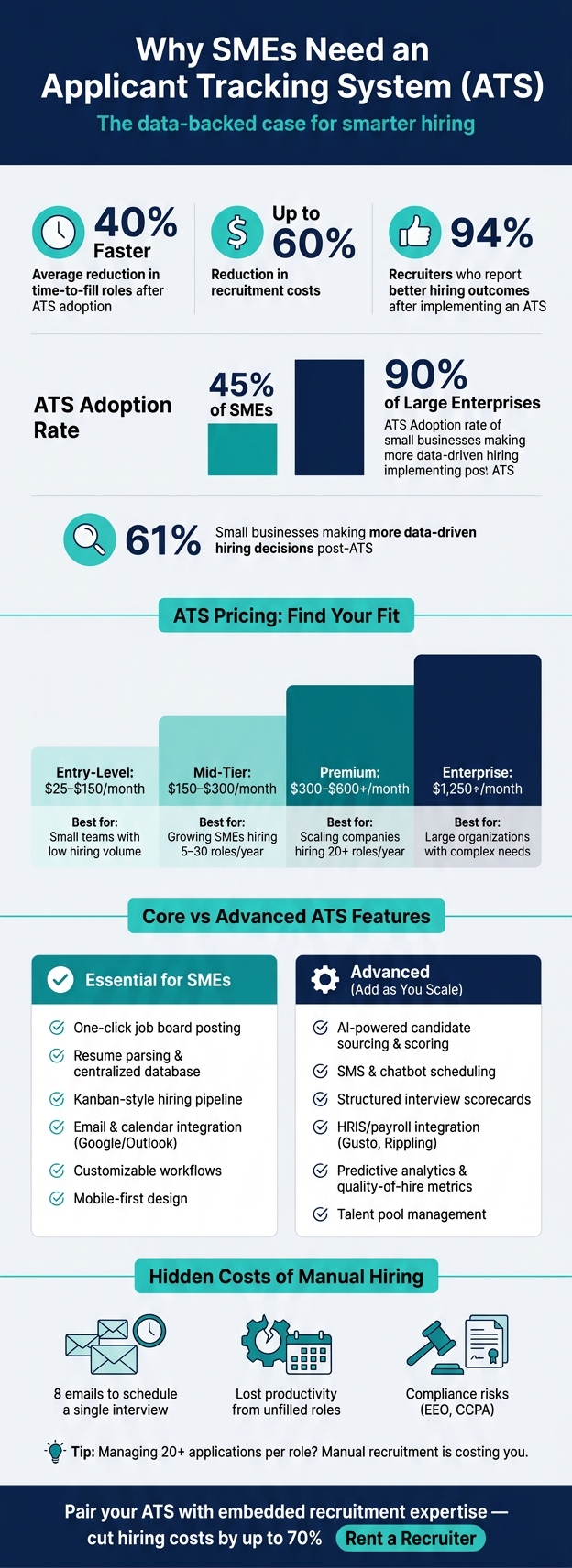
ATS for SMEs: Key Stats, Features & Pricing Tiers at a Glance
Best Applicant Tracking Systems (ATS) for Small Businesses | Top Picks for 2025
sbb-itb-a23bd6a
Understanding Your Recruitment Process Before Implementing an ATS
Before diving into ATS technology, it’s crucial to take a step back and fully rate your recruitment process to understand your current hiring flow. Skipping this step can lead to wasted time and money, as your ATS might not address the actual gaps in your recruitment flow.
"An ATS is a strategic platform – not a plug-and-play app. When implemented with care, it can transform hiring. When rushed or ignored, it becomes just another ignored system." – HRMGuide [7]
The focus here isn’t on creating an idealised version of your process but documenting how things actually work today.
Mapping Your Current Hiring Process
Start by breaking down every step of your hiring process. From where you advertise roles to how candidates are screened, interviewed, and approved, capture the details. This includes:
- Where jobs are posted
- How resumes are collected
- Who handles initial screenings
- How interviews are scheduled
- Who makes the final hiring decisions
Next, assign clear ownership for each stage. Many small and medium-sized enterprises (SMEs) discover gaps where no one is accountable, leading to delays or missed opportunities. Assigning ownership and defining next steps for each stage is critical before exploring ATS options. Use the table below to guide this process:
| Hiring Stage | Key Documentation Needed | Stakeholder Involved |
|---|---|---|
| Sourcing | Job boards, referral programs, social channels | Recruiter / Marketing |
| Screening | Knockout questions, resume filters | Recruiter / Hiring Manager |
| Interviewing | Number of rounds, assessments, feedback processes | Hiring Manager / Team |
| Approvals | Headcount and offer sign-off | Finance / Executive Leadership |
| Onboarding | Payroll and HRIS data integration | HR / IT / Payroll |
As you map things out, look for inefficiencies. For example, are there unnecessary steps or bottlenecks? Fixing these issues now will prevent them from being carried over into your ATS setup [7].
Measuring Baseline Recruitment Metrics
To gauge the success of your ATS, you need to know where you’re starting. That means tracking key recruitment metrics before implementing new software. Focus on these:
- Time-to-fill: How long it takes to close a role.
- Cost-per-hire: Total hiring spend divided by the number of hires.
- Pipeline conversion rates: Where candidates drop out of the hiring funnel.
- Source quality: Which platforms or referral channels produce your best hires.
These metrics highlight inefficiencies and wasted resources. For example, research shows that 61% of small businesses make more data-driven hiring decisions after adopting an ATS [5]. However, this improvement only happens if you’ve established a baseline to compare against.
Review data from your last 5–10 hires to create your baseline. Then, revisit these numbers 90 days after launching your ATS to measure its impact [7].
Identifying Hidden Costs and Risks
Some of the biggest costs in a flawed hiring process don’t show up as line items. For example, think about the hours spent coordinating interviews. Studies show that scheduling a single interview often involves eight emails [5]. Multiply that by every open role, and the administrative burden adds up quickly.
There are also hidden risks to consider. For instance:
- Open roles: Vacancies left unfilled for weeks lead to lost productivity.
- Candidate communication: Poor communication – such as missed updates or unclear timelines – can hurt your company’s reputation.
- Compliance issues: Without a consistent, documented process, SMEs risk non-compliance with EEO rules or privacy laws like CCPA.
A good rule of thumb? If you’re managing more than 20 applications per role or have more than two open positions at once, manual recruitment is likely costing you in missed opportunities and slower decisions [8].
"ATS setup isn’t ‘set it and forget it.’ It’s more like gardening. You plant, prune, and occasionally pull weeds." – HRM Guide [7]
Key ATS Features for High-Growth SMEs
Once your hiring process is structured and your metrics are clear, the next step is choosing an ATS that aligns with your needs. But not every feature is relevant at every stage of growth. Knowing what’s critical now versus what you’ll need later can save both time and money. The right features will complement your hiring process and metrics, ensuring your ATS evolves as your business scales.
Core ATS Features
At its core, any ATS should cover the basics. Job board distribution allows you to post openings to multiple job boards with a single click. Resume parsing organizes candidate information automatically, saving hours of manual data entry. A centralized candidate database ensures all your hiring information is in one place, eliminating the chaos of spreadsheets and email chains.
Look for a Kanban-style pipeline that visually tracks candidates through stages like Applied, Screening, Interview, and Offer. This makes it easy to spot bottlenecks and keep the process moving. Pair that with basic reporting – metrics like time-to-fill, source-of-hire, and conversion rates – and you’ll have the insights needed to make informed decisions from the start.
"An ATS transforms hiring from a cost center into a strategic function. It provides the data needed to make smarter, faster decisions that directly support your business’s financial health." – Helpside [1]
Must-Have Features for SMEs
For SMEs, the biggest challenge with any new tool is adoption. If it’s too complicated, it won’t get used. That’s why ease of use is non-negotiable. Choose an ATS with drag-and-drop functionality and an interface that anyone on your team can learn in under an hour [4][3].
Email and calendar integration is another must. It should sync effortlessly with tools like Google Workspace or Microsoft 365 to streamline scheduling and communication. Customizable workflows are equally important, letting you tailor the hiring process for different roles – whether you’re hiring a developer or a sales lead. And with over 60% of job applications expected to be mobile by 2026 [8], a mobile-first design is no longer optional; it’s essential.
"If you’re recruiting in addition to all of your other duties, an ATS helps so, so much." – Yiorgos Boudouris, Head of People and Talent, Tiny Mile [10]
Advanced Features to Add as You Grow
As your hiring needs expand, fractional recruitment services and advanced features can help you scale efficiently. Talent pools allow you to store and revisit strong candidates for future roles, significantly reducing sourcing time [6][4]. Standardized interview kits and scorecards help minimize bias and improve hiring quality by twofold [9].
Integration becomes increasingly critical as well. HRIS and payroll integration – connecting your ATS with systems like Gusto, Rippling, or BambooHR – automates data transfer for new hires, eliminating duplicate entry. This seamless onboarding process can increase new hire retention by 69% [6], making it a smart investment as your team grows.
Key ATS Features Comparison
| Feature | Essential for SMEs | Advanced (Add as You Scale) |
|---|---|---|
| Sourcing | One-click job board posting | AI-powered passive candidate sourcing |
| Screening | Customizable forms, keyword search | AI-powered ranking and scoring |
| Communication | Email templates, bulk messaging | SMS and automated chatbot scheduling |
| Collaboration | Shared notes and star ratings | Structured interview scorecards and kits |
| Reporting | Time-to-fill, source-of-hire | Predictive analytics, quality-of-hire metrics |
| Integrations | Google/Outlook calendar sync | HRIS/payroll data sync (Gusto, Rippling) |
Building a Business Case for an ATS
Quantifying ROI and Cost Savings
Take a close look at the gaps in your current hiring process. These gaps can reveal how quickly an Applicant Tracking System (ATS) could cut costs and improve hiring efficiency. Start by calculating your current expenses – like job board fees, recruiter and manager time, and agency charges. Don’t forget to factor in the cost of vacancies: every unfilled position means lost productivity and revenue.
For example, small businesses that adopt an ATS often reduce their time-to-hire by 40% and cut administrative recruiting tasks by over 50% [6]. Zapier, for instance, managed to lower its cost-per-hire by 35% within six months of using an ATS. This was achieved by reducing dependency on agencies, optimizing internal candidate databases, and speeding up sourcing by up to 70% [6].
These tangible results make a strong case for tying ATS adoption directly to your company’s goals.
Aligning ATS Investment to Business Goals
Beyond cost savings, an ATS can help you meet broader business objectives. Framing it as a strategic investment can make it easier to gain leadership buy-in. The connection between faster hiring and revenue growth is a straightforward example. For instance, leaving a sales role vacant for six weeks instead of three could delay pipeline activity, while slow hiring for engineering positions might push back key product timelines.
Take Asana as an example: after implementing an improved ATS, they boosted new-hire retention by 22% in just one year. This success was largely due to better collaboration during hiring and a smoother candidate experience [6]. Considering that replacing an employee can cost anywhere from 50% to 200% of their annual salary, even a modest improvement in retention can lead to substantial savings.
An ATS also reduces risk. Automated record-keeping ensures compliance with regulations like EEO and CCPA, helping avoid costly legal issues [11][2]. Plus, 61% of small business owners report making more data-driven hiring decisions after adopting an ATS [5], shifting away from gut-feel choices to decisions backed by data – something that leadership can confidently stand behind.
Budgeting for ATS Implementation
Once you’ve outlined the benefits and aligned them with your business goals, it’s time to define your ATS budget. ATS pricing varies widely, so it’s important to know exactly what you’re paying for. Entry-level tools range from $25 to $150 per month, while mid-tier options like Breezy HR average around $157 per month. Premium platforms, such as Workable, typically start at $299 per month, and enterprise-level systems can exceed $15,000 annually – though these are usually unnecessary for smaller businesses [4][2].
Be mindful of hidden costs, especially when moving between pricing tiers. Some features, like reporting or data export capabilities, might only be available in higher-priced plans. Make sure the plan you choose includes the functionality you actually need.
| ATS Tier | Typical Monthly Cost | Best Fit |
|---|---|---|
| Entry-Level | $25–$150 | Small teams with low hiring volume |
| Mid-Tier | $150–$300 | Growing SMEs hiring 5–30 roles/year |
| Premium | $300–$600+ | Scaling companies hiring 20+ roles/year |
| Enterprise | $1,250+/month | Large organizations with complex needs |
If your company is experiencing a hiring surge or scaling quickly after funding, combining your ATS with embedded recruitment support can help stabilize costs. Rent a Recruiter embeds skilled recruiters directly into your team. This approach helps you leverage your ATS to its full potential while cutting reliance on expensive external agencies – often reducing hiring costs by as much as 70% compared to traditional commission-based recruitment models.
Selecting and Implementing the Right ATS for Your SME
Defining Your Requirements
Before diving into vendor research, take a step back and define exactly what you need. Start by identifying the challenges you face – slow response times, scattered communications, or endless email threads. Then, think about your hiring volume. For SMEs hiring fewer than 15 roles annually, a pay-per-post model might be more cost-effective. But if you’re looking at 20+ hires a year, a flat-rate pricing plan often provides better value.
Next, list your must-have features. These might include a centralized candidate database, one-click job board posting, automated email templates, and a mobile-friendly application page. Don’t forget to consider the end users – if the system is too complex for non-recruiters, it’s unlikely to succeed.
"An ATS is about the amount of intention you want to put behind your recruiting – however big or small your team is." – Yiorgos Boudouris, Head of People and Talent, Tiny Mile [10]
Another critical factor? Integration. Ensure the ATS works seamlessly with tools your team already uses, like Google or Outlook calendars, Slack, and your payroll or HRIS platform. Also, confirm upfront that you retain data export rights. This ensures you can easily transfer candidate data if you switch platforms down the road [2][10].
With your requirements crystal clear, you’re ready to evaluate potential vendors. You can also explore our recruitment resources for additional hiring tools and templates.
Evaluating Vendors and Demos
Don’t get swayed by a vendor’s sleek demo videos. Instead, test the system with real-world scenarios. Start by uploading 10 actual resumes from past applicants and see how the platform parses and ranks them. Then, simulate a full hiring cycle to gauge how smoothly day-to-day tasks flow. High friction in these tasks can quickly become a drain on your team [8].
Mobile usability is another key factor. By 2026, over 60% of job applications will come from mobile devices [8]. If the mobile application process feels clunky or requires unnecessary account creation, candidates are likely to abandon it. During your trial, also test customer support. For SMEs without dedicated IT teams, responsive support can make or break your experience [3].
Be cautious of red flags. Vendors who refuse to offer free trials, charge setup fees exceeding $500 for entry-level plans, or require a sales call just to explain pricing may not be the right fit [8]. Start with a monthly billing option, and only commit to an annual contract after successfully completing at least one full hiring cycle with the system [4].
Setting Up Your ATS for Success
Once you’ve chosen your ATS, setting it up to match your workflow is essential. Most SME-focused platforms can be configured in just a few hours – this includes setting up pipeline stages, email templates, and a branded careers page [4]. It’s best to complete this setup before posting your first job.
Define your hiring stages clearly and ensure the ATS reflects them. This alignment helps streamline your process. Preload email templates for key communications like interview invites, rejections, and offer letters. Additionally, create structured interview scorecards to ensure consistent and objective feedback from hiring managers. This simple step can save hours of manual coordination each week.
"I can work with all my hiring managers at the same time in the same place. It’s so nice not to have to remember who you messaged on Teams or Slack." – Tamara Takács, Junior Recruiter, Tiqets [10]
Don’t overlook the mobile application experience. Review the entire process from a candidate’s perspective before launching. In today’s competitive hiring market, top candidates often accept offers within 7 to 12 days [4]. A cumbersome application process could mean losing out on great talent before you even realize they applied.
Conclusion and Next Steps
Key Takeaways
An ATS transforms hiring into a scalable, efficient process that grows with your business. The numbers don’t lie: 94% of recruiters see better hiring outcomes after implementing an ATS [5]. The result? Faster decisions and significant cost savings.
But it’s not just about speed or cost. An ATS brings consistency to every hire – structured scorecards, automated communications, and a searchable database ensure every role is handled with the same precision. It also strengthens your employer brand, showing candidates that your company is professional and well-organized. This matters when top talent is off the market in just 7 to 12 days [4]. In short, an ATS isn’t just a tool; it’s a competitive advantage.
Call to Action
The benefits are clear, but action is what drives results. While an ATS streamlines operations, expert recruiters ensure your strategy, team structure, and hiring quality are on point. Mapping your hiring process, choosing the right ATS, and implementing talent acquisition strategies are essential, but the right recruitment partner completes the picture – and that’s where Rent a Recruiter excels.
With Rent a Recruiter, experienced recruiters integrate directly into your team, handling the entire hiring process while bringing structure and visibility to your operations. Clients often cut hiring costs by up to 70% compared to traditional agency fees and save over 80 hours per month in internal admin. Plus, the team gets started within days, delivering fast, cost-effective recruitment support.
Pairing ATS efficiency with embedded recruitment expertise creates a complete hiring solution tailored for growing SMEs. Ready to see where your hiring process stands? Book a free Recruitment Health Check and discover how to make your recruitment work harder for your business growth.
FAQs
Do I really need an ATS yet?
If you’re still juggling hiring through spreadsheets, scattered emails, or sticky notes, it’s time to rethink your approach. An applicant tracking system (ATS) can transform how you manage recruitment. These tools help you save time, keep track of qualified candidates, and ensure no great applicant gets overlooked.
An ATS brings order to your hiring process, making it easier to scale as your business grows. With Rent a Recruiter, you can go a step further by embedding experienced recruiters directly into your team. They’ll ensure your hiring process is consistent, efficient, and ready to support your growth.
What should I set up first in an ATS?
To get started, take a close look at your current hiring pipeline and lay out clear recruitment goals. Pinpoint specific pain points, like delays in scheduling or lapses in candidate communication, that need fixing. Once you’ve identified these, prioritize core integrations – such as calendar and email tools – to streamline communication. Configure your hiring stages to align with your existing process. By doing this upfront, you ensure your ATS fits seamlessly into your workflow, cutting out avoidable headaches later on.
How do I measure ATS ROI in 90 days?
To evaluate ATS ROI within 90 days, begin by reviewing your previous hiring expenses. This includes administrative hours, job board spending, and agency commissions. Next, monitor key metrics such as time-to-hire, cost-per-hire, and hours saved. Most modern ATS platforms offer built-in analytics to track efficiencies, like streamlined scheduling and task management.
Dive into your pipeline data to assess candidate quality and identify the most effective sourcing channels. These insights will clearly demonstrate how your investment improves hiring efficiency and delivers measurable, long-term value.