
Disconnected systems are costing your business time and money. Recruiters waste 17.7 hours per vacancy on manual tasks, translating to $17,000 annually per recruiter. Integration between your ATS and HR systems solves this by automating data flow, reducing errors, and speeding up hiring processes.
With automation, marking a candidate as "Hired" in your ATS can instantly create an employee record in your HRIS, trigger payroll updates, and initiate onboarding tasks. Companies that integrate these systems cut hiring cycles by 40% and reduce payroll errors by 90%.
Key steps for successful integration:
- Define clear goals, like reducing manual work or improving data accuracy.
- Choose the right sync method: one-way for simple data transfer or two-way for dynamic updates.
- Map critical data fields (e.g., start dates, compensation) and standardize formats to avoid sync failures.
- Implement strong security measures, such as encrypted data transfer and role-based access.
- Test thoroughly in a sandbox environment before launch and monitor for errors post-implementation.
The result? Faster hiring, fewer errors, and a scalable recruitment process. If manual data entry is holding you back, Rent a Recruiter can help streamline your hiring while cutting costs by up to 70%.
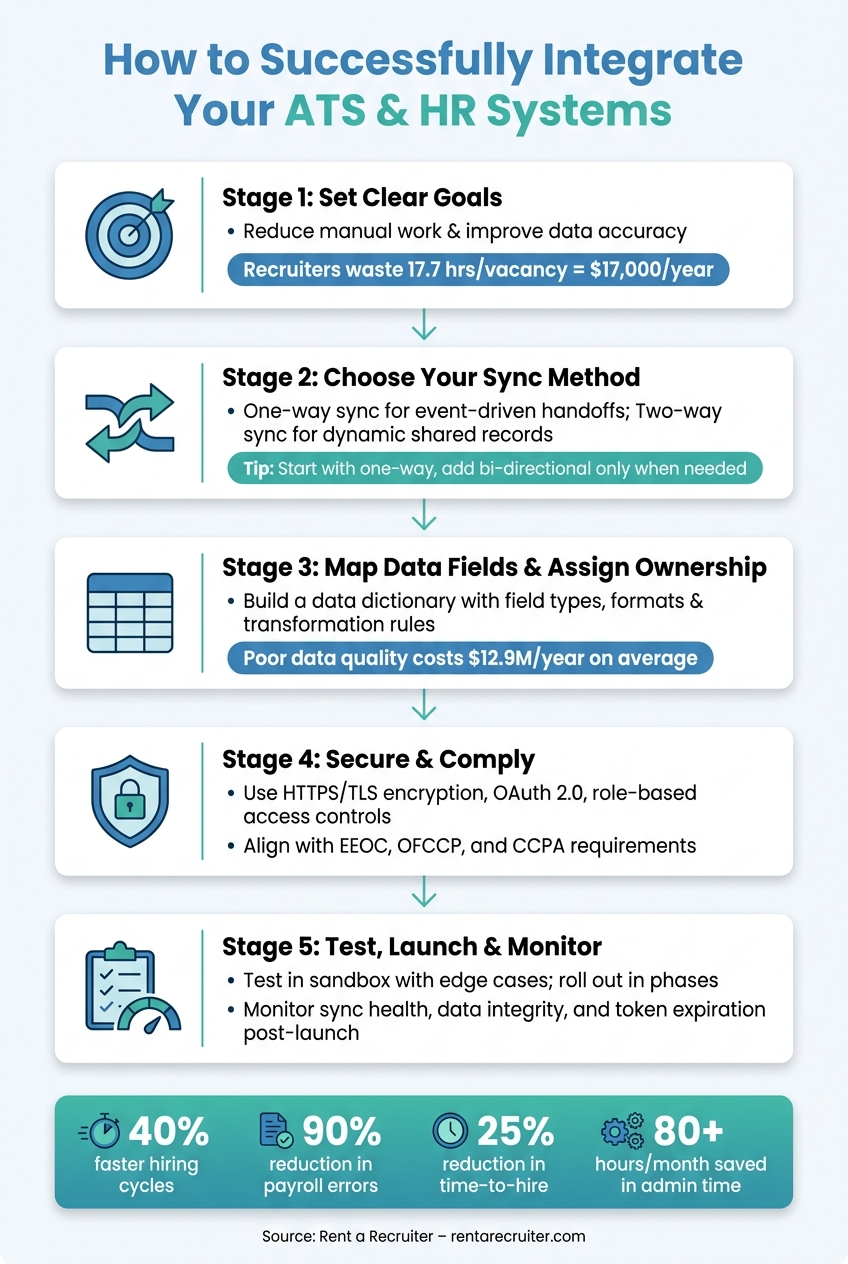
ATS & HR System Integration: Step-by-Step Workflow
ATS Integration: How To Connect With HRIS For HR Tech Solutions? – Legal And HR SaaS Stack
sbb-itb-a23bd6a
Setting Clear Goals and Defining the Scope of Integration
Before making any changes to an API or data field, it’s crucial to define your integration goals and rate your recruitment process to identify gaps. Without a clear plan, integration can add complexity instead of simplifying your workflow.
Key Objectives of Integration
The main driver behind integration is simple: stop recruiters from acting as human middleware. On average, knowledge workers lose 4.9 hours per week to manual data tasks that could be automated [1]. For HR professionals, around 57% of their time is spent on administrative tasks instead of focusing on strategic hiring [8].
A well-planned integration should:
- Enhance data accuracy by eliminating manual re-entry across systems.
- Speed up onboarding by ensuring that a "Hired" status in your ATS automatically creates an employee record in your HRIS.
- Improve reporting by consolidating data into a single, consistent view.
- Trigger downstream workflows, such as automatically initiating IT provisioning or background checks after an offer letter is signed.
Companies that integrate their recruiting workflows see a 25% reduction in time-to-hire [8]. Additionally, payroll and data entry errors can drop by as much as 90% [8]. These numbers highlight the impact of setting specific goals and defining the scope from the outset.
Once your objectives are clear, the next step is to choose the right data synchronization method.
One-Way vs. Two-Way Sync: Which Is Right for You?
One of the most common mistakes when scoping an integration is selecting the wrong sync direction. The choice depends on whether both systems need to actively update the same data.
"The depth of the integration determines whether it actually eliminates manual work or just relocates it." – Calvin Botez, Treegarden [1]
One-way sync pushes data from a source system to a target. For example, it might send a new hire’s details from your ATS to your HRIS. This method is straightforward and reliable, making it ideal for initial handoffs or event-driven notifications. Two-way (bi-directional) sync, on the other hand, allows changes in either system to update the other. While more powerful, it requires conflict resolution logic (e.g., "most recent change wins") and detailed audit logs [1].
| Feature | One-Way Sync | Two-Way Sync |
|---|---|---|
| Complexity | Low | High; requires conflict resolution |
| Best Use Case | New hire handoff, notifications, BI reporting | CRM-ATS sync, headcount reconciliation |
| Maintenance | Lower; fewer failure points | Higher; monitor for write conflicts |
| Data Risk | Stale data in the source system | Consistency across both platforms |
A practical rule of thumb: start with one-way sync for high-volume, event-driven processes. Only introduce bi-directional sync when both systems need to actively update the same records [1].
Identifying Critical Data Fields for Automation
When automating, focus on the most critical fields first. Start with fields prone to high error rates or delays [3].
| Integration Category | Key Fields to Automate | Objective |
|---|---|---|
| HRIS / Payroll | Name, start date, department, compensation, role | Eliminate re-entry; ensure payroll accuracy [1][8] |
| Background Checks | Candidate name, SSN, email, package type | Reduce delays; meet compliance requirements [3][1] |
| E-Signature | Offer details, candidate name, signed document | Speed up onboarding; centralize records [1] |
| Scheduling | Interviewer availability, video links, time zones | Reduce friction; improve candidate experience [1] |
| Assessments | Candidate ID, test score, completion status | Automate stage-gate advancement criteria [1] |
Before building your integration, standardize key formats like dates (use YYYY-MM-DD) and phone numbers (E.164 format). Inconsistent formatting is a common cause of sync failures [4][7], which can undermine your goal of creating fully automated workflows.
Data Mapping and Ownership Responsibilities
Once you’ve set your integration goals and decided on the sync direction, the next step is where the heavy lifting happens: defining data mappings and assigning ownership. This stage is critical for ensuring smooth, secure, and automated data flows between systems. For more guidance on optimizing your hiring infrastructure, explore our recruitment resources. Skipping it can lead to costly errors. Poor data quality alone costs companies an average of $12.9 million annually [10], while manually managing HR data adds about $28,500 per employee each year when you account for mistakes and compliance issues [10].
"HR automation breaks at the data layer – not the AI layer." – Jeff Arnold, Founder, 4Spot Consulting [10]
Mapping Key Data Fields
Start by creating a field-mapping document that outlines every data field, including its type, required status, accepted format, and any transformation rules. This document, often called a data dictionary, serves as the backbone of your integration project.
Be vigilant about format mismatches and enumeration conflicts. For instance, your ATS might store salaries as annual figures, while your HRIS expects monthly amounts. You’ll need a clear transformation rule to bridge that gap. Similarly, watch for character limits. If your ATS allows unlimited interview notes but your HRIS caps them at 255 characters, you’ll need truncation logic and a reference link to the original record to prevent silent data loss [10]. For mismatched enumerations, create translation tables. For example, an "On Leave" status in your ATS might need to map to "LOA-Paid" or "LOA-Unpaid" in your HRIS. Without such a table, the sync could fail or push incorrect data [10].
Once your mappings are done, assign ownership for each field to avoid conflicts down the line.
Establishing Source-of-Truth Rules
Data conflicts in bi-directional syncs often arise when ownership rules are unclear. When both systems can update the same field, it’s essential to decide which system’s data takes precedence. This is known as field-level survivorship and applies at the attribute level, not just system-wide.
Set clear survivorship rules. For example, legal data like names or Social Security Numbers should always override non-critical variants.
The risks of skipping this step are real. Consider this: in 2026, a mid-sized manufacturing company experienced a $27,000 payroll error when a platform update silently renamed an API field. Their ATS inadvertently pushed a $103,000 annual salary into the wrong HRIS field. The fix? A validation rule that flagged any compensation variance over 2% for manual review before finalizing the record [10]. This case underscores the importance of cross-checking sensitive data, especially payroll.
Data Ownership Comparison Table
The table below outlines which system should own specific fields, the recommended sync direction, and any critical transformation logic.
| Data Field | Source of Truth | Sync Direction | Key Rule |
|---|---|---|---|
| Candidate Profile | ATS | Bi-directional | Normalize email/phone; map to a persistent Person GUID [11] |
| Job Requisition | HRIS | Bi-directional | HRIS owns budget/headcount; ATS owns posting details [11] |
| Offer Details / Compensation | ATS | One-way (ATS → HRIS) | Cross-validate against offer letter; flag variances above 2% [10] |
| Hire Date | HRIS | One-way (ATS → HRIS) | Convert to ISO 8601 (YYYY-MM-DD); immutable once created [10] |
| Legal Name / SSN | HRIS | One-way (HRIS → ATS) | HRIS version overrides ATS candidate-provided data [11] |
| Department / Cost Center | HRIS | Bi-directional | Use lookup table for ATS-equivalent labels [10] |
| Employee ID | HRIS | One-way (HRIS → ATS) | Generated by HRIS; synced back to ATS for record linking [11] |
| Interview Feedback | ATS | One-way (ATS → HRIS) | Apply truncation logic if destination has character limits [10] |
A key takeaway here is to treat every individual – whether they’re a CRM contact, ATS candidate, or HRIS employee – as a single canonical entity linked by a persistent Global Unique Identifier (GUID). This approach eliminates duplicate records, simplifies identity resolution, and ensures your data remains reliable as your business grows [11][9].
Security, Compliance, and Access Controls
Once you’ve mapped out data ownership, the next step is to prioritise security and compliance. This isn’t just about keeping data safe from outside threats; it’s about managing access, meeting U.S. regulatory standards, and maintaining a clear, traceable record of all data movements. Focus on securing data both in transit and at rest using strong encryption and authentication protocols.
Data Privacy and Security Measures
Every connection between your ATS and HRIS must use HTTPS with TLS encryption for data in transit, while stored data should be encrypted at rest. For sensitive information, like Social Security Numbers or national IDs, implement field-level encryption to ensure these fields remain unreadable without proper decryption.
Authentication is critical. Use OAuth 2.0 or secure API keys – this is now a baseline requirement. For instance, Greenhouse plans to phase out its Harvest API v1 and v2 by August 31, 2026, requiring a shift to v3 with OAuth 2.0 [4]. Similarly, BambooHR transitioned to OAuth 2.0 access tokens in 2025, retiring older login methods [4]. If your integration still relies on outdated authentication methods, it’s time to upgrade.
"Provenance is not optional. In 2026, auditors expect event-level traceability across integrations." – PeopleTech, Senior Editor [11]
To meet audit expectations, maintain immutable logs that capture event IDs, source systems, actor IDs, timestamps, and before-and-after data values.
Role-Based Access and Permissions
Securing data is only part of the equation – controlling who can access it is equally important. Apply the principle of least privilege to ensure users and integrations only access the data they strictly need. For instance, a Slack integration may require write access to send notifications but should not have access to salary details or Social Security Numbers [1].
Use attribute-level controls to redact sensitive personal information for systems that don’t need it [11]. For example, analytics tools should only receive anonymised, aggregated data, not raw background check results or subjective interview notes [1].
Authenticate integrations through dedicated service accounts rather than individual user accounts. This approach keeps connections stable even as staff changes occur [1]. A central token registry can help track all API credentials and their expiration dates, with alerts set at least 30 days before tokens expire [1][2].
Regular checks are essential. Conduct quarterly permission audits to ensure all active API connections still align with the least-privilege principle, removing unnecessary access before it becomes a risk [1][11].
With these measures in place, you can better secure data and prepare for regulatory compliance.
Compliance with U.S. Hiring Regulations
Integrations in the U.S. must align with various regulatory frameworks. EEOC (Equal Employment Opportunity Commission) and OFCCP (Office of Federal Contract Compliance Programs) rules require applicant data to be stored in a standardised, auditable format. Using automated parsing ensures consistency across candidate records, which is essential during compliance reviews [5].
The CCPA (California Consumer Privacy Act) adds another layer of complexity, particularly around consent. Ensure consent flags are stored in the canonical record to easily demonstrate compliance [11]. Additionally, every tool handling candidate data – whether an ATS, HRIS, or middleware like Zapier or Workato – must have a signed Data Processing Agreement (DPA) [1].
For data deletion, adopt a tombstone pattern. When a candidate requests their data to be erased, the deletion should automatically propagate across all connected systems, not just the primary database [7].
| Compliance Area | Regulation | Key Action |
|---|---|---|
| Uniform applicant records | EEOC / OFCCP | Use automated parsing to standardise applicant data for audits [5] |
| Consent management | CCPA | Store consent flags in the canonical record [11] |
| Data deletion | CCPA / U.S. Privacy Laws | Implement a tombstone pattern for system-wide data deletion [7] |
| Vendor agreements | GDPR / U.S. Privacy Laws | Require signed DPAs from all middleware and sub-processors [1] |
| Audit traceability | General compliance | Log all API calls and data writes with correlation IDs and actor metadata [1][11] |
Designing Workflows and Using Automation
Once security and compliance are sorted, the next step is to ensure data flows smoothly between systems. No one has time for manual copy-pasting or data re-entry. This is where workflow design and automation step in to make life easier.
Connecting Recruitment and Onboarding Processes
One of the most effective uses of automation is creating a seamless transition from recruitment to onboarding. For example, when a recruiter updates a candidate’s status to "Hired" or "Offer Accepted" in the ATS, that single action should trigger multiple downstream processes: creating an employee record in the HRIS, setting up IT accounts (like email and software licenses), and initiating benefits enrollment [4][8].
Why does this matter? 46% of candidates lose interest in a role after 10–14 days of silence [4]. These delays are often caused by disjointed, manual workflows. Automation, especially trigger-based workflows, eliminates this bottleneck, ensuring candidates stay engaged and productivity stays on track, often supported by an embedded recruitment service to manage these workflows.
For real-time updates, use webhooks instead of polling. Webhooks instantly push data when an event occurs, reducing latency to nearly zero. Polling, on the other hand, slows everything down and adds unnecessary API calls [4][7].
Once workflows are triggered, the next priority is ensuring the data is clean and reliable.
Validation Rules and Error Handling
Automation only works as well as the rules behind it. Before data moves between systems, it should be validated and normalized. This includes actions like trimming extra spaces, standardizing text case, converting phone numbers to E.164 format, and aligning dates to MM/DD/YYYY. These small steps prevent errors that could otherwise create major headaches later [7][4].
To handle issues like API rate limits or network glitches, implement automated retry logic with exponential backoff. This ensures data isn’t lost during syncs. Pair this with Slack or email alerts for failed syncs so your team can address problems before they escalate into larger gaps [6][3].
Vivian Larsen, author of From Zero to ATS Hero, sums it up well:
"Integration is your recruitment system’s connection to utilities and services: water, electricity, internet, gas. Each connection point needs to work reliably, and when one fails, it affects your entire operation." [3]
Once your data is validated, the focus shifts to tackling duplicates and ensuring records stay up to date.
Preventing Duplicates and Keeping Records Current
Automation and error handling are just the start. To keep your data clean, you need an effective strategy for preventing duplicates. Start with email addresses as the primary matching key, then add fuzzy name matching (like Jaro-Winkler similarity scoring) as a secondary layer [7][1].
Here’s a simple system:
- Automatically merge records with a 95%+ confidence match.
- Flag anything between 70–95% for manual review.
- Treat matches below 70% as separate records [7].
One pilot program reduced duplicate candidate records from 14% to 1.8% in just three months by combining persistent IDs, E.164 phone standardization, and fuzzy name matching. This led to a 12% increase in recruiter-accepted interview invites, thanks to better AI-driven ranking [7].
To keep records up to date, bi-directional sync is key. For example, if an employee’s title changes in the HRIS, that update should automatically reflect in the ATS. By combining this with strong deduplication rules, you can maintain clean, accurate data without constant manual intervention [1].
The result? A smoother, faster recruitment process that saves time and keeps everyone – from candidates to recruiters – on the same page.
Testing, Launching, and Maintaining the Integration
Once your data mappings and security protocols are set, the next steps – testing, launching, and monitoring – are critical for a smooth rollout.
Pre-Launch Testing and Data Quality Checks
Always test your integration in a sandbox environment rather than using live production data. Most ATS and HRIS vendors offer sandbox access for this exact purpose.
Don’t limit your testing to ideal scenarios. Include edge cases like missing required fields, duplicate records, rate limits, and expired tokens. Use 5–10 test records with varied, realistic data to identify parsing errors and other issues.
Ensure your field mapping document is comprehensive. It should detail every field, required flags, and source-of-truth definitions. This document will be your go-to resource when troubleshooting any problems.
Instead of launching all integrations simultaneously, roll them out in phases. Start with high-impact connections, like ATS to HRIS or background checks. Validate these fully before adding additional integrations.
Monitoring and Exception Handling After Launch
Going live is just the beginning. While thorough pre-launch testing reduces risks, monitoring your integration in production is essential. Set up automated monitoring for key areas to maintain a healthy system:
| Monitoring Category | What to Track | Why It Matters |
|---|---|---|
| Sync Health | Success/failure rates | Identifies weak connections or mapping issues |
| Performance | API response times | Spots latency or throttling problems |
| Data Integrity | Validation failures | Highlights missing fields or mismatched formats |
| Security | Token expiration/auth errors | Prevents downtime from expired credentials |
| Volume | Record count anomalies | Detects silent failures even when connections seem active |
For instance, a drop in hires from 10 to 2 could signal a silent failure, even if the connection appears functional. Daily automated health checks can catch such issues early.
A practical tip: Always authenticate using service accounts rather than individual user accounts. This avoids disruptions caused by employee departures or expired credentials.
These monitoring practices not only solve immediate problems but also lay the groundwork for scaling your integrations as your business grows.
Scaling the Integration as Your Organization Grows
As your hiring needs and HR tech stack expand, managing multiple point-to-point integrations becomes increasingly complex. If you have more than five connections, consider a hub-and-spoke model with your ATS as the central hub. Transitioning to an Integration Platform as a Service (iPaaS) can streamline monitoring, error handling, and data transformation.
"An integration is never ‘done.’ APIs deprecate endpoints, vendors change pricing models, and data schemas evolve." – Truto.one [6]
For example, Greenhouse plans to deprecate Harvest API v1 and v2 by August 31, 2026, requiring a migration to v3 [6]. Subscribing to API changelogs for all vendors in your stack is a simple but effective way to avoid major disruptions.
Finally, schedule quarterly architecture reviews. An integration that works well for 50 employees might not meet the needs of a 500-person organisation. Regular reviews ensure your system evolves alongside your business and aligns with your changing HR processes.
Conclusion: Key Takeaways and Next Steps
An integrated ATS and HR system isn’t just a nice-to-have – it’s a game-changer for efficiency and cost savings. With $17,000 in lost productivity per recruiter annually and 17.7 hours wasted per vacancy, the numbers speak for themselves: disjointed systems cost more than you think [4].
The foundation for successful integration lies in four key areas: clear goals, precise data mapping, robust security, and smart automation. These elements ensure your systems work together seamlessly. For instance, defining which system owns specific data, securing access controls, and automating key processes – like triggering payroll when a candidate is marked "Hired" – can eliminate manual bottlenecks.
"The solution is not buying more tools. It is connecting the ones you already have." – Treegarden [1]
This quote captures the essence of integration: it’s about making your existing tools work smarter, not adding complexity. Treat integration as an ongoing process. Regularly review your system architecture, and stay updated on vendor changes to avoid disruptions.
For companies still bogged down by manual data entry and disconnected workflows, Rent a Recruiter offers a faster, more efficient way forward (see our recruitment model FAQs). Their embedded recruiters streamline your hiring process, saving over 80 hours per month in admin time and cutting hiring costs by up to 70% compared to traditional recruitment models.
FAQs
Which data fields should we integrate first?
To streamline your recruitment workflows, start by incorporating essential data fields for candidate information and application status. Capture key details such as personal information, resumes, and contact details. Combine this with real-time updates on application progress.
This setup allows for more efficient profile creation, seamless resume parsing, and automated tracking of applications. The result? A more structured, organized, and hassle-free hiring process.
How do we decide the source of truth for shared fields?
Creating a canonical data model is key to establishing a single, reliable source of truth for shared fields across systems. This approach ensures there’s one definitive record for each individual, reducing errors and preventing duplicate efforts. By standardizing the way data is organized and shared, you enable systems to work together smoothly, maintain synchronized and auditable records, and streamline integrations without unnecessary complications.
What should we monitor after integration goes live?
After launching the integration, keep a close eye on critical areas to ensure everything runs smoothly. Pay special attention to system connectivity, data accuracy, and automation performance. Look out for issues like data syncing errors or inconsistencies. Verify that workflows, such as onboarding and payroll updates, operate as intended without requiring manual input. Be alert to delays or system glitches that could signal underlying technical issues. Regularly reviewing these aspects will help maintain efficient operations and consistent data flow.