
Your career page is more than just a job board; it’s a 24/7 recruiter that can transform how you attract talent. For SMEs, where resources and brand recognition may be limited, an effective career page can drive better hiring outcomes without inflating costs. Here’s why it matters:
- Conversion Impact: Top-performing career pages convert up to 25% of visitors into applicants, compared to the 11% average.
- Cost and Time Savings: A streamlined page reduces hiring admin and can cut early turnover, which costs SMEs $15,000–$50,000 per mis-hire.
- Candidate Experience: Simplifying applications to under five minutes can boost completion rates by 365%.
The takeaway? A well-optimized career page reduces friction, attracts better-fit candidates, and protects your bottom line. Ready to make yours work harder? Let’s dive into the strategies that deliver measurable results.
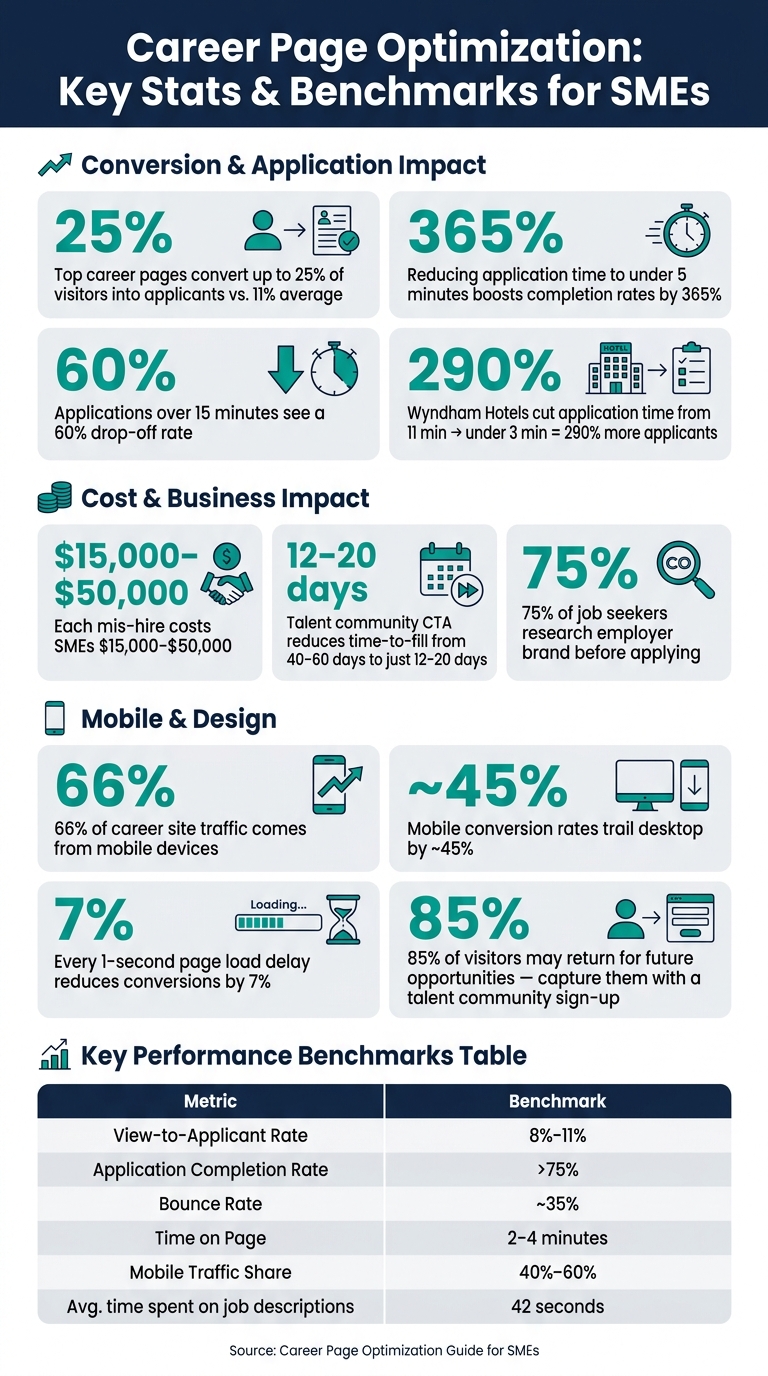
Career Page Optimization: Key Stats & Benchmarks for SMEs
Building a Career Page Strategy
Defining Your Hiring Objectives
Before diving into copy edits or photo uploads, take a step back and define the purpose of your career page. This clarity will guide every decision, from highlighting specific roles to optimizing your application process. If your business is scaling after a funding round or handling a sudden surge in hiring needs, your page should reflect that urgency, making it easy for candidates to apply quickly.
Set measurable goals to track success. For instance: "Secure 10 qualified engineering applications within 14 days."
Also, consider the type of talent pipeline you’re aiming to build. Some SMEs focus on filling immediate openings, while others benefit from maintaining an "always-open" talent community – a way to engage potential candidates even when no active roles are advertised. Both approaches are effective but require different career page strategies.
"Your career site should be your best recruiter." – Jobful [2]
With clear objectives in mind, you can shape your career page to highlight what makes your SME stand out. For more industry insights and hiring tips, you can explore our recruitment blog.
Tailoring the Career Page to SME Needs
A well-defined strategy informs every design and content decision that follows. SMEs have a unique advantage – they can act quickly, communicate authentically, and showcase their personality in ways that larger corporations often can’t. Use this to your benefit.
The most effective SME career pages answer three key questions for candidates: What does the company do? What is the work culture like? How do I apply? [1] Everything else is secondary. A personal note from the founder, candid team photos from a lunch or offsite, and a clear breakdown of your hiring process will resonate far more than polished stock images or vague mission statements.
"Specificity beats design. A simple page with exact salary ranges, real team photos, and honest benefits outperforms a beautifully designed page with stock images and vague promises." – FirstHR [1]
Building a functional career page doesn’t have to break the bank. Platforms like WordPress or Squarespace, paired with free tools like Google Forms or Typeform, can get the job done. For more advanced features, you might explore dedicated tools costing around $98/month or invest in custom builds ranging from $500 to $2,000. Choose a solution that aligns with your hiring needs and budget.
Finally, tailor your content to different candidate personas. For example, an intern visiting your page will look for mentorship opportunities and career growth paths. On the other hand, a senior engineer will want details about your tech stack, team structure, and decision-making processes [6]. A one-size-fits-all page rarely connects with anyone. Even small tweaks – like adjusting headlines or highlighting specific benefits – can make a big difference in attracting the right talent.
sbb-itb-a23bd6a
Building an Employer Brand and Messaging for Your Career Page
Your career page plays a crucial role in shaping your employer brand by giving candidates their first glimpse into what your company is all about. According to research, 75% of job seekers check out a company’s employer brand before deciding whether to apply [7]. For small and medium-sized enterprises (SMEs), this presents both a challenge and an opportunity. While you might not have the marketing resources of larger companies, you can implement talent acquisition strategies that offer something they often can’t: an authentic, human story. This personal touch can make all the difference in communicating your company’s identity.
Telling Your Company Story
Your company story is best told not through a polished mission statement but through a founder’s voice. Write a short, 150-word narrative that explains how your company started, the problem it solves, and the kind of people who thrive in your environment [1]. Keep it conversational, as if you’re explaining it to someone over coffee.
Avoid abstract phrases like "we empower innovation." Instead, focus on the tangible: what you create, who benefits from it, and where you’re headed. Candidates resonate with honesty far more than lofty aspirations.
Showcasing Culture and Values
Your company culture should feel as unique as your business itself. Generic buzzwords like "integrity" or "teamwork" won’t leave a lasting impression unless you back them up with specific examples. For instance, if work–life balance is a priority, say something like, "Our team finishes work by 5:15 PM, and we don’t send emails over the weekend" [1].
Employee testimonials are another powerful way to build credibility. Keep them short – two to three sentences – and include the employee’s name and role. Pair these with a "day in the life" section for your most common roles to give candidates a realistic sense of what working with your team is like. Replace stock images with real photos of your team, even casual ones taken on a smartphone. Candidates can tell the difference, and nothing beats the impact of genuine content [1].
"The more authentic your content, the more likely candidates are to connect with your employer brand." – Shelby Palmeri Farris, Hiring Expert [10]
Position your culture and values content prominently on the page, before your job listings. Research shows that candidates who feel a connection to your brand are more likely to complete their applications [8].
Setting a Clear and Consistent Tone of Voice
The tone of your career page gives candidates a sense of what it’s like to work at your company. If the page feels overly formal or reads like a legal document, candidates might assume your culture is rigid. A warm, straightforward tone, on the other hand, conveys a friendly and approachable environment. Aim for a balance: professional yet conversational.
Steer clear of corporate jargon like "synergizing human potential" or "dynamic self-starters" [1]. Instead, use the language your team naturally uses. Be specific about what you offer and what you expect, and keep your sentences short and direct.
"The best employer branding is a description of a reality, not an aspiration." – Jobful [4]
Consistency is key. Your tone should remain steady across the entire page, from job titles and benefits to details about the hiring process. A sudden shift from casual to formal can make candidates question whether your brand matches your actual work environment. One helpful tip: read your content out loud. If it sounds like something a real person would say, you’re on the right track. With your tone nailed down, you’re ready to create a career page that’s as engaging as it is informative.
Designing a User-Friendly Career Page
An engaging employer brand doesn’t mean much if candidates struggle to navigate your career page or abandon the application process halfway through. Design isn’t just about looking good – it plays a direct role in converting visitors into applicants. Building on your employer brand and content, here’s how thoughtful design can boost candidate engagement.
Layout and Navigation Best Practices
Good navigation connects your employer brand to a smooth candidate experience. Visitors should be able to find relevant roles in two clicks or less. Long, unfiltered job lists can frustrate users, leading them to leave your site. To avoid this, include filters for department, location, and work arrangement (remote, hybrid, on-site), along with a straightforward search bar to help candidates find roles quickly.
Make sure your Employer Value Proposition (EVP) and a prominent "Apply Now" button are visible above the fold on both desktop and mobile. Featuring authentic culture content before listing jobs can also encourage candidates to complete their applications.
Another feature to consider is a "Join Our Talent Community" sign-up option for those not ready to apply right away. This simple addition can help capture contact details from the roughly 85% of visitors who may return for future opportunities [2].
Mobile Usability and Accessibility
With 66% of career site traffic coming from mobile devices, it’s critical to ensure your site works seamlessly on smaller screens. Mobile conversion rates often trail desktop by around 45% [2], and poor design choices – like pinch-zooming or misaligned buttons – can make matters worse.
Small changes can have a big impact. Compress hero images to under 200KB to keep load times under 2.5 seconds; every one-second delay can reduce conversions by 7% [2]. Place the primary "Apply" button in the lower half of the screen, where it’s easy to tap with one thumb, and avoid hover-only menus, which don’t work well on touchscreens [6].
Accessibility is equally important. Add descriptive alt text for images, ensure logical keyboard navigation, and include ARIA labels on form inputs to support screen-reader users. These steps show your commitment to inclusivity [6].
"If your careers page is not fully responsive, you are losing more than half of your potential talent pool." – Manatal [9]
Simplifying the Application Process
Once your page is easy to navigate and mobile-friendly, focus on streamlining the application process itself. Lengthy applications are a major turn-off – applications taking longer than 15 minutes see a 60% drop-off rate, while reducing the process to five minutes or less can increase conversion rates by up to 365% [2][7].
Keep the initial application form simple: ask only for essentials like name, email, phone number, and a resume upload. Avoid requiring account creation or cover letters at this stage [2]. For instance, in 2024, Wyndham Hotels & Resorts redesigned its career page with a mobile-first, three-field application flow and LinkedIn auto-fill. This cut the average application time from 11 minutes to under 3 minutes and resulted in a 290% increase in applicants [2].
Finally, use clear, action-oriented button labels like "Apply Now" or "Join Our Team" instead of vague terms like "Learn More" or "Submit" [7]. These small adjustments can make a big difference in reducing friction and encouraging candidates to complete their applications. To see how your current setup compares, you can rate your recruitment process using our free analysis tool.
Key Content to Include on Your Career Page
Your career page isn’t just a placeholder for job listings – it’s a chance to showcase your company and attract the right talent. Candidates come looking for specifics, and if they don’t find them, they’ll move on. As Martina Di Gregorio, Global Content Strategist at Tellent, says:
"Your careers page is probably your most underinvested recruiting asset." [3]
Writing Clear Job Listings
Forget the buzzwords and stick to clarity. Avoid quirky titles like "Marketing Ninja" – use standard ones like "Content Marketing Manager" instead. Why? Search engines prioritize common terms, and candidates search using them [11].
Keep your job requirements short and focused – 3 to 5 key must-haves are enough. Long lists of demands can scare off qualified candidates [12]. And don’t be vague about pay. Include a specific salary range instead of saying "competitive compensation." This not only attracts better-fit candidates but is also required by law in states like Colorado, California, New York, and Washington [1][12].
One smart move? Define success in the role. A line like "In your first 90 days, you’ll own X and deliver Y" helps set expectations and draws in candidates who are genuinely motivated by the work [3][4].
Once you’ve nailed the job descriptions, it’s time to highlight what you can offer candidates.
Presenting Benefits and Perks
Be specific with your benefits – vague promises won’t cut it. Break them into clear categories like Health, Financial, Lifestyle, and Development, and include real numbers. For example: "100% employer-paid health insurance", "20 days PTO", or "$1,000 annual learning budget" [1].
If you’re using fractional recruitment services for SMEs to compete with big corporations, being upfront about what you offer can work in your favor. Honesty and precision build trust far better than corporate jargon ever will.
Now, let candidates see what it’s like to work with your team.
Giving Candidates a Look at Teams and Work Environment
Skip the stock photos. Candidates want to see real people and real workplaces. Snap authentic photos of your team – whether it’s a lunch break, a meeting, or your actual office. These feel more genuine than overly polished professional shoots [1].
If you value work-life balance, show it. Mention specifics, like the average departure time being 5:15 PM [1]. Adding a "Day in the Life" description for specific roles can also help candidates imagine themselves in the job. For instance, describe what a typical Monday morning might look like [1][5].
For smaller companies, a personal touch can make all the difference. A short video or note from the founder about the company’s mission and the type of people who thrive there often resonates more than glossy corporate content [1].
Explaining the Hiring Process
Transparency in your hiring process builds trust, yet it’s often overlooked. Clearly outline each step: screening call, skills test, interviews, and offer. Let candidates know how long each stage takes and who they’ll meet along the way [12].
Set a response timeline and stick to it. Saying "You will hear from me by Friday" can make a huge difference in candidate experience, as FirstHR points out:
"’You will hear from me by Friday’ is the most underrated sentence in recruiting." [12]
If you miss your deadline, follow up within 48 hours [12]. Even small details, like explaining what happens after the application or what Day 1 looks like, can reduce drop-offs and keep candidates engaged.
Tracking and Measuring Career Page Performance
Once your career page content is in place, the next step is figuring out if it’s doing its job. Without data, you’re making blind guesses. Small tweaks can lead to big improvements. As Tania Miranda, Global Head of SEO and Content at Tellent, explains:
"Tracking careers site metrics and assessing your site’s performance will allow you to adapt your strategies where needed… achieving a faster and cheaper time-to-hire." [14]
The metrics below align with the design and content strategies discussed earlier, ensuring every adjustment you make has measurable impact.
Key Metrics to Track on Your Career Page
After refining your career page’s design and content, tracking its performance is non-negotiable. A few critical metrics can reveal how well your page is converting visitors into applicants. Start with the view-to-applicant rate, which measures the percentage of visitors who actually click "Apply." For small to medium-sized businesses, a healthy range is between 8% and 11% [1]. Similarly, the application completion rate – the percentage of candidates who finish filling out the form – should exceed 75% [1].
Beyond conversion rates, keep an eye on engagement metrics like bounce rate and time on page. The average bounce rate for career pages hovers around 35% [1], while candidates typically spend 2 to 4 minutes exploring the page [1]. Also, with mobile devices accounting for 40% to 60% of traffic, ensuring your page is mobile-friendly is critical [1].
| Metric | Benchmark | Insight Provided |
|---|---|---|
| View-to-Applicant Rate | 8%–11% | Whether visitors are motivated to apply [1] |
| Application Completion Rate | >75% | Whether the form is too long or complex [1] |
| Bounce Rate | ~35% | Whether content and design are engaging [1] |
| Time on Page | 2–4 minutes | Whether candidates engage with your EVP [1] |
| Mobile Traffic Share | 40%–60% | The importance of mobile optimization [1] |
Using Analytics to Improve Your Career Page
Platforms like Google Analytics can provide valuable insights into your source of hire – whether candidates are coming from LinkedIn, organic search, or job boards [13]. This data allows you to focus recruitment spending on the channels delivering the best results.
To structure your efforts, try a 30-day measurement plan:
- Week 1: Benchmark your key metrics, like bounce rate and time on page.
- Week 2: Identify and address friction points by taking a recruitment health check of your application process.
- Week 3: Audit your page’s mobile speed and usability.
- Week 4: Add re-engagement options, such as a talent community sign-up for visitors who aren’t ready to apply [2].
This step-by-step approach keeps your improvements focused and measurable.
Turning Performance Data Into Action
Metrics are only useful if they lead to meaningful changes. For example, if the time spent on job descriptions is low – the industry median is just 42 seconds [2] – revamp your listings to be concise and engaging. Avoid overwhelming candidates with excessive details. Similarly, if your apply-start-to-complete rate isn’t where it should be, simplify the application form to just the essentials: name, email, and resume [2].
Streamlining the application process can significantly boost applicant numbers. Another priority? Page load speed. Even small technical fixes, like reducing load times, can make a noticeable difference in keeping candidates engaged.
Conclusion and Next Steps
Key Takeaways
Improving your career page isn’t a one-and-done task; it’s an ongoing effort that can dramatically improve how you attract candidates. A few standout principles from this guide can make all the difference.
Be real, not just polished. Honest job descriptions and authentic team photos consistently outperform generic stock images [1]. Candidates visit your career page with one question in mind: "What’s it really like to work here?" [4]. Answer it clearly and directly.
Simplify the process to keep candidates engaged. As Jobful puts it:
"The fastest career site conversion lift isn’t a new design – it’s removing things. Cut form fields. Cut pages. Cut clicks." [2]
Your career page is an investment, not an expense. Unlike job boards that charge per listing or click, your career page works 24/7 without added costs [4]. Add a talent community call-to-action (CTA) to capture passive candidates who may not be ready to apply yet – this small step can reduce time-to-fill from 40–60 days to just 12–20 days [2].
Track your metrics to keep improving. Even the best-designed page can underperform without data to guide ongoing refinements. Regularly monitor performance to ensure your strategy stays on track.
Once your career page is optimized, the next step is scaling your hiring function to handle the increased interest effectively.
How Rent a Recruiter Can Help You Scale Hiring
A well-optimized career page is only part of the equation – your hiring function needs to keep up with the flow of candidates.
Rent a Recruiter places experienced recruiters directly into your team within days, managing everything from sourcing to offer negotiations. Whether you’re scaling after a funding round, launching a new product, or dealing with a hiring surge, they provide the capacity to meet demand without delays. On average, clients cut hiring costs by up to 70% compared to traditional commission-based models and save over 80 hours a month on admin tasks.
Ready to turn your career page into a true hiring engine? Book a consultation with Rent a Recruiter to take the next step.
FAQs
What should my career page goal be?
Your career page isn’t just a formality; it’s a window into your company for potential hires. To make it effective, focus on attracting, engaging, and converting the right candidates. Here’s how:
- Clearly explain what your company does and the impact it makes.
- Showcase what it’s like to work there by highlighting your culture, values, and work environment.
- Provide a seamless path for candidates by detailing how to apply in a straightforward way.
Make sure the page is optimized for mobile and search engines, ensuring it reaches the widest audience possible. A streamlined application process – quick, intuitive, and hassle-free – encourages more candidates to complete their submissions. When done right, your career page becomes a powerful tool for building a strong talent pipeline.
What’s the fastest way to increase applications?
Optimizing your careers page is the fastest way to increase applications. Start by focusing on layout, speed, and mobile-friendly design to create a seamless user experience. Make the application process simple and quick – aim for under 15 minutes with as few clicks as possible. These adjustments can lead to a noticeable boost in applications, as top-performing career pages convert over 25% of visitors, often delivering results in just 30 days.
Which career page metrics matter most?
When evaluating the success of a career page, focus on metrics that show how well it attracts and engages potential candidates. Start with the visitor count to understand how many people are landing on the page. Then, look at the application conversion rate – this tells you what percentage of visitors actually submit an application. A high bounce rate, on the other hand, signals that many visitors leave without taking any action, which could point to issues with the page’s content or design.
Other key indicators include time spent on the page and content engagement, which reveal how effectively the page holds visitors’ attention. Finally, analyzing traffic sources can help you identify which channels are driving the most visitors, allowing you to fine-tune your recruitment marketing strategies. Together, these metrics provide a clear picture of how well your career page supports your hiring goals.