We recommend choosing candidate outreach software by cost per qualified interview, not how many messages it sends. Start with your hiring bottleneck, then test whether the tool saves recruiter time and turns outreach into hiring conversations.
We compare 10 tools across candidate search, contact data, follow-ups, reply handling, ATS connections, and pricing. Your shortlist should match the work you need done:
- Finding talent: Check search coverage and contact accuracy.
- Running outreach: Test message review, scheduled follow-ups, and automatic stops when someone replies.
- Keeping records aligned: Confirm that replies, ownership, and opt-outs reach your ATS.
- Controlling costs: Include seats, credits, integrations, add-ons, and setup time.
Our advice: run a two- to four-week pilot for one role before committing. Measure qualified replies, interviews, recruiter hours, and total cost. If capacity remains the problem, assess whether <u>recruiting support, rather than another subscription</u>, would close the gap.
Best AI Tools for Recruiters in 2026 – Complete Workflow Stack Guide
sbb-itb-a23bd6a
What Candidate Outreach Automation Can and Cannot Do
Use four checks: data quality, message sequencing, reply handling, and ATS updates to assess the 10 tools. These checks separate tools that automate outreach from those that simply queue tasks for recruiters, unlike AI-powered recruitment tools that handle the heavy lifting.
Candidate discovery searches profiles, past applicants, and ATS records using skills, location, title, and work history. Recruiters still need to check whether the information is current and the person fits the role.
Contact enrichment adds work emails, phone numbers, employers, titles, locations, and confidence scores. Coverage and accuracy vary, so review stale or low-confidence contacts before sending messages.[2][4]
Once your data is clean, check whether the tool sends messages automatically or leaves the work with your team.
Message sequencing schedules outreach and follow-ups across supported channels. Confirm whether each step sends a message or only creates a recruiter task. LinkedIn Recruiter’s messaging features depend on the edition, configuration, and usage rules.[3]
Reply handling can detect responses, pause sequences, and notify the assigned recruiter. Your team still needs to handle nuanced replies, including compensation questions and accessibility requests. Check that replies and opt-outs promptly stop outreach across channels, preventing duplicate messages and missed opt-outs.[6]
ATS updates need verification. Label each capability as native, integration-dependent, or manual. Native features run inside the tool. Integrations rely on supported connections, permissions, and field mapping. A CSV export is not continuous synchronization. Gem describes bidirectional synchronization with supported ATS platforms, but you should verify your exact plan and required fields.[5]
Test the full workflow with sample records: discover a profile, enrich its contact data, send outreach, receive a reply, and confirm that automation pauses and the ATS updates correctly. To identify further inefficiencies, you can rate your recruitment process using our analysis tool.
Check reply status, ownership, notes, stage changes, and opt-out status, not just whether a candidate record appears. Assign someone to update any fields the integration cannot maintain.
Candidate Outreach Tools at a Glance
Sourcing access does not always include automated outreach. This table compares sourcing, sending, and ATS sync so you can distinguish full outreach automation from tools that only support sourcing or record management. Before budgeting, check reply handling, automation depth, supported channels, and cost.
| Tool | Best for | Sourcing database | Outreach channels | Automation depth | Integrations | Starting price | Main limitation |
|---|---|---|---|---|---|---|---|
| Gem | Sequences linked to existing recruiting records | ATS/CRM rediscovery plus sourcing | Personalized sequences; multichannel support unverified | Moderate: setup-driven sequences with recruiter-controlled targeting | 16+ ATS connectors referenced for enterprise staffing[8] | Staffing Essentials: $99/user/month, billed annually; Professional: $149/user/month, billed annually. Confirm credits and user caps.[8][9][10] | Staffing pricing may differ from in-house recruiting plans |
| hireEZ | Candidate sourcing | Candidate sourcing | Package-dependent; unverified | Unverified: automated versus approval-based steps | ATS connections, sync fields, and plan access unverified | Price undisclosed | Confirm billing terms and allowances |
| SeekOut | Sourcing with stated contact allowances | Aggregated candidate data | Sending versus sourcing/export access unverified | Unverified: automated outreach | Higher-tier integration access is custom-priced[7] | Sourcing Core: $149/month paid annually upfront ($1,788/year) or $179/month billed monthly; 500 contact credits and 1,000 exports/month[7] | Sourcing and integrations may require separate tiers |
| Findem | Sales-led evaluation | Unverified | Unverified | Unverified: complete workflow | Connectors, field mapping, and included access unverified | Not publicly listed; request a quote | Pricing, seats, and capabilities require a sales discussion |
| Fetcher | Human-reviewed sourcing | Database searches with human verification of candidates and contact details | Automated sending channels unverified | Human-assisted sourcing | ATS/CRM support, including sync versus export, unverified | Price undisclosed | Human sourcing support and managed outreach vary by package |
| Juicebox | Candidate search with optional agent-led engagement | Candidate-search platform; underlying sources unverified | Agent-led engagement; channels unverified | Advanced with agent add-on: automatic sourcing and engagement | Candidate management and analytics may depend on ATS/CRM connections | Price undisclosed | Agent functionality may cost extra |
| Loxo | Teams assessing workflow scope | Unverified | Unverified | Unverified: automatic sends versus recruiter tasks | Native connectors, APIs, and plan access unverified | Price undisclosed | Comparable entry-package scope unverified |
| Recruiterflow | Outreach using existing recruiting records | ATS/CRM and user-held records | Email automation and additional channels unverified | Unverified: sequence triggers and manual steps | External connections and sync capabilities unverified | Price undisclosed | Confirm included outreach features and allowances |
| SourceWhale | Multichannel outreach connected to an ATS/CRM | ATS/CRM records plus external data providers | Email campaigns plus recruiter-led LinkedIn and calling | Moderate: campaign automation and activity logging | Two-way ATS/CRM sync and external data-provider connections | Price undisclosed | LinkedIn and calling steps remain recruiter-controlled |
| LinkedIn Recruiter | Searching and contacting LinkedIn members | LinkedIn member database | InMail | Basic/assisted: search and messaging support | ATS integration availability depends on edition | Not publicly listed; request a quote | Automation and InMail allowances vary by edition; no equivalent to verified external contact data |
Automation labels: Basic means recruiter-led sending. Moderate means setup-driven sequences. Advanced means automatic sourcing or engagement.
For procurement, request a written quote covering seats, billing term, credits, sending limits, integrations, and add-ons so you can compare costs on the same basis.
1. Gem
Gem works best when you need outreach, enrichment, and ATS sync in one workflow, rather than separate tools for each step.
Candidate Search and Contact Data
Gem’s AI Sourcing Agent searches more than 800 million profiles. It can also resurface past applicants, silver medalists, and prospects your team has already engaged.[9][12]
For recurring searches and high-volume tech roles, define skills, seniority, location, and must-have experience before searching. Check candidate history and duplicates before outreach so your team doesn’t contact someone who recently declined or is already assigned to a colleague.[12][14] This makes Gem a fit for repeatable sourcing, rather than one-off searches.
Message Personalization and Follow-Ups
Give Gem approved role details and personalization fields, using verified experience only. Review AI-written messages before sending, then schedule one follow-up in 3 to 5 business days. Stop sequences immediately after a reply, opt-out, application, or manual contact to avoid unnecessary outreach.[11][12][14]
Deliverability, Privacy, and Integrations
Before launch, authenticate your domain, use monitored inboxes, and increase sending volume gradually. Map ownership, stage, and opt-out fields so targeting and messaging stay aligned with your team’s records.[12][15]
Pricing, Reporting, and Scale
Measure hiring progress, not just sends. Track replies, screens, interviews, and hires. Review results weekly during launch, then monthly once performance is stable.[12]
Gem uses custom pricing. Request a quote and confirm included modules, credits, and renewal costs in writing so you know what your budget covers.[10][13]
2. hireEZ
Candidate Search and Contact Data
hireEZ suits hiring teams that need to search the open web and automate outreach beyond their ATS.
It searches 45+ open-web sources and uses AI-assisted search to help find people for technical and hard-to-fill roles. Start with a job description or keywords, then mark results “Good Fit” or “Not A Fit” to refine recommendations. Use its verification signals to distinguish people you can contact from profile-only matches.[17][19]
Message Personalization and Follow-Ups
hireEZ supports personalized email, SMS, and InMail outreach, with automated sequences and scheduled follow-ups. Check which channels and sequence rules your plan includes before building your outreach process.
Require approval before the first send. Set sequences to stop when someone replies, books a meeting, or opts out to avoid unnecessary follow-ups.[16]
Deliverability, Privacy, and Integrations
Check bounce handling, unsubscribe processing, and consent rules for each channel, especially before using SMS.
hireEZ connects to ATS, CRM, email, and calendar systems, but confirm which connectors your plan includes. Before launch, test that replies, opt-outs, source data, and candidate stages sync correctly so your team avoids manual updates and missed responses.[16][18]
Pricing, Reporting, and Scale
Treat pricing as quote-based unless current plan details are published. Request a quote that covers seats, contact reveals, sending limits, integrations, and analytics so you can assess the full cost.[19]
Pilot one hard-to-fill role. Track qualified profiles, usable-contact rate, positive replies, and screening calls separately to see where search activity turns into hiring conversations.[16][20]
3. SeekOut
Candidate Search and Contact Data
SeekOut helps teams find specialist talent beyond standard keyword matching. It combines semantic and Boolean search with AI skill extraction across 1 billion+ profiles, supporting technical, research, and other specialist hiring.[21][22][25]
For SMEs hiring scarce technical talent, its main appeal is search quality rather than high-volume outreach. Check contact-data allowances before buying. SeekOut also lets you rediscover talent already in your ATS.[21][23][25][27]
Message Personalization and Follow-Ups
SeekOut offers AI-assisted message drafting and multistep follow-ups.[22] Your hiring team can tailor outreach using verified details, such as a publication, patent, or open-source contribution. Check each factual reference before sending.[22][29]
Deliverability, Privacy, and Integrations
Before launch, confirm sending limits, bounce handling, unsubscribe controls, and reply detection. Check whether SeekOut supports your ATS and which fields sync, so your team knows what still needs manual input.
SeekOut describes SOC 2 Type II, encryption, and SSO. Request current documentation and review the privacy requirements that apply to your business.[21][23][24][25][26]
Pricing, Reporting, and Scale
For SMEs, the buying decision comes down to whether deeper sourcing justifies the cost.
SeekOut Sourcing Core starts at $149 per month billed annually or $179 per month billed monthly. Larger integration and recruiting packages require a quote.[25][26]
Use a 30-day pilot to track contact availability, reply rate, and interview conversion. Measure these separately to see whether results come from search quality or outreach performance.[25][28]
4. Findem
Candidate Search and Contact Data
Automated talent pools let your team reuse search criteria across external prospects, referrals, and past applicants, rather than rebuild each pipeline.[32] Attribute-based search combines skills with career context, including career stage, industry experience, and leadership scope. The platform reports more than 850 million candidate profiles.[31][32]
Separate must-haves from nice-to-haves before searching. Save those filters for similar roles to reduce repeat sourcing work and support repeat outreach.
Message Personalization and Follow-Ups
The platform supports personalised email drip campaigns and candidate nurturing.[30][32] Segment campaigns by role and seniority, then use verified career details to explain the fit.
Give each follow-up a clear purpose: add context, clarify fit, or ask permission to stay in touch. This approach makes the platform better suited to repeat hiring patterns than one-off blasts.
Deliverability, Privacy, and Integrations
Clean your ATS data before launching campaigns. Merge duplicates, update statuses, and address consent gaps. Map ownership, replies, and opt-outs back to the ATS so your team can track activity in one place.[33]
Before large-scale campaigns, verify data sources, sending limits, suppression controls, retention rules, and access permissions with the vendor.
Pricing, Reporting, and Scale
Request a quote covering seats, enrichment, campaign volume, integrations, implementation, and overages so you can assess the full cost.
Test searches that reflect your hiring needs before buying. Confirm reporting covers essential recruitment metrics like reply, positive-reply, screen, interview, and hire rates, not just email opens. Use the platform when repeat hiring makes saved talent pools and candidate history worth the setup time and cost.
5. Fetcher
Candidate Search and Contact Data
Fetcher suits teams that want recruiter-reviewed sourcing rather than fully self-serve search. It combines AI-matched candidate batches with recruiter feedback to improve results. Human-reviewed profiles and managed sourcing support depend on the plan. Its sourcing extension collects web profiles and adds contact details.[35][38][42]
Message Personalization and Follow-Ups
Once recruiters approve a batch, they can launch personalized email sequences with scheduled follow-ups. Outreach can also come from hiring managers’ email inboxes.[39][42]
One case study reported 1,000+ contacts, a 31% response rate, 29% interest, and two hires in three months. Treat these as case-specific results.[39]
Deliverability, Privacy, and Integrations
Fetcher lists connections with Greenhouse, Lever, Gmail, and Outlook.[34] Before rolling it out, run a one-role pilot to check two-way sync, duplicate prevention, and opt-out transfer.[36][37]
Contact enrichment can include personal email addresses. Document the data sources and confirm appropriate use before sending outreach.[40][42]
Pricing, Reporting, and Scale
G2 lists Starter at $0, Growth at $149 per seat per month, and Amplify at $549 per seat per month. Confirm current pricing and allowances directly.[41]
For smaller teams, a 30-day pilot can show whether the plan fits your hiring volume. Measure usable contacts, qualified conversations, interviews, and recruiter time saved, not email volume alone.
6. Juicebox
Candidate Search and Contact Data
Juicebox suits hiring teams looking for plain-language search and automated email sequences. It says it searches more than 800 million candidate profiles across 30+ data sources.[47] Each email reveal costs 1 credit; each phone-number reveal costs 3 credits.[51][52]
Before using the data, spot-check 25 to 50 records for outdated titles, old employers, and contact details belonging to the wrong person.[46]
Message Personalization and Follow-Ups
Composer turns intake notes and recruiting context into multistep outreach sequences. Recruiters can edit and preview messages before enrollment.
Email steps run automatically. LinkedIn and phone steps create manual tasks, not automated messages.[46][49] Review AI-generated claims before sending.
Deliverability, Privacy, and Integrations
Email steps require a connected mailbox. Before launch, confirm mailbox authentication, sending limits, and compliant use of contact data.[49]
Juicebox says it supports more than 100 ATS and CRM integrations. Check that the integrations your team needs are available on your chosen plan.[45]
Pricing, Reporting, and Scale
Plans include Free, Starter at $99 per seat per month billed annually, and Growth at $179 per seat per month billed annually for up to five seats.[43][48] Business pricing is custom. Agents are a separate add-on at $199 per agent per month.[48]
Check limits for searches, contact credits, exports, mailboxes, integrations, collaboration, and support before committing.[50]
Pilot 100 profiles for one role before expanding.[44][47] Track valid contact rate, duplicates, bounces, replies, interviews booked, and recruiter hours saved. Use those figures to assess hiring outcomes and time saved with fractional recruitment services, rather than message volume alone.
7. Loxo
Candidate Search and Contact Data
Loxo suits SMEs looking to manage sourcing, CRM, ATS, and outreach in one system. Core includes ATS, CRM, AI search, reporting, and email and calendar sync. Professional adds Loxo Source, a talent graph with more than 850 million profiles.[55][56]
Check whether searches use existing records or external sources. Confirm how current the contact data is, how duplicates are handled, and what enrichment limits apply.
Message Personalization and Follow-Ups
Outreach GPT turns job details into multistep campaigns. Recruiters can edit templates and enroll candidates individually or in bulk. Confirm which email, SMS, and phone actions run automatically, and whether LinkedIn workflows are native, integrated, or manual.[53][57][59]
Before rollout, check that sequences stop when a candidate replies or opts out. This helps your team avoid unnecessary follow-ups.
Deliverability, Privacy, and Integrations
Verify suppression lists and request documentation on consent records, deletion requests, and audit trails. For Gmail, Outlook, Google Calendar, and other connections, check two-way sync, which objects sync, duplicate handling, and plan limits.[57][58]
Pricing, Reporting, and Scale
Once you have checked workflow fit, assess the cost. Official entry pricing was not public in the retrieved sources. Third-party listings put Core at around $149 per user per month and Professional at around $199 per user per month, billed annually. However, those descriptions conflict.[54][55][56]
Get a written quote that covers sourcing credits, channel limits, overages, and API access so you can assess the total cost before committing.[56][57]
8. Recruiterflow
Candidate Search and Contact Data
Recruiterflow combines ATS, CRM, sourcing, and outreach in one system, so your team can manage outreach alongside hiring. Its Chrome extension supports LinkedIn imports and bulk sourcing. Check source attribution and consent before importing.[60][61]
Use one candidate record across multiple requisitions to keep outreach history intact and avoid duplicate profiles, especially when someone fits more than one open role.[60][61]
Message Personalization and Follow-Ups
Email sequences and Recipes automate follow-ups, reminders, and record updates, cutting manual admin. Stop sequences when someone replies, opts out, or changes roles to prevent duplicate messages across requisitions.[63][66]
Confirm which LinkedIn actions your plan supports. Keep manual review where platform rules require it.[63][64]
Deliverability, Privacy, and Integrations
Outreach automation needs clear permissions, sync settings, and suppression rules. Verify who owns the sending inbox, check how suppressions work, and limit access to sequences, exports, and workflow edits.[60][61][65]
Pilot one requisition before rolling out. Check field mapping, duplicate handling, consent history, and mailbox permissions before putting more hiring activity through the system.[60][61][65]
Pricing, Reporting, and Scale
Once your workflow is set, assess pricing and reporting against your hiring volume. For more industry insights, visit our recruitment blog.
Platform starts at $119 per user per month billed annually, or $149 per user per month billed monthly. AIRA is custom-priced.[60][62][64]
Track replies, positive responses, opt-outs, and stage moves, not just sends, to see whether outreach is moving people through your hiring process.[60][63]
9. SourceWhale
Candidate Search and Contact Data
SourceWhale supports multichannel outreach for teams already using an ATS or CRM, without rebuilding their sourcing process. It suits SMEs that need ATS-linked outreach rather than a standalone sourcing database.
It searches connected CRM/ATS records and the web. Before buying, verify its data sources and check how recruiters control channels and handle replies.
Message Personalization and Follow-Ups
Campaigns combine automated email with LinkedIn and phone tasks. Confirm whether SMS and WhatsApp are available for your account and region.
Keep recruiter review in place for messages about compensation, accommodations, immigration, and other sensitive topics.
Deliverability, Privacy, and Integrations
SourceWhale reports 100+ CRM and ATS integrations.[67][68] During the demo, check that replies, completed tasks, and unsubscribe updates sync across your systems. Review sending limits, retention settings, and consent rules too.
Pricing, Reporting, and Scale
Request a written quote covering seats, onboarding, integrations, contact credits, channel limits, and reporting.
Confirm that the dashboard tracks booked screens and qualified interviews, not just opens. Before adding licenses, measure setup time, reply handling, booked screens, and qualified interviews to assess the workload and hiring results.
10. LinkedIn Recruiter
LinkedIn Recruiter is built around LinkedIn’s network, but its automation stops at LinkedIn messaging.
Candidate Search and Contact Data
Use LinkedIn Recruiter when your team sources and contacts prospects inside LinkedIn and needs controlled InMail follow-ups rather than multichannel automation.
Filter by title, skills, location, company, industry, experience, workplace type, and Open to Work status. Then organize prospects into projects. Saved searches, candidate recommendations, and alerts help keep talent pools current, so your team can manage sourcing and outreach in one place.
Before reaching out, verify role fit, work authorization, and current interest to avoid spending time on unsuitable prospects.[71]
Message Personalization and Follow-Ups
Use role-specific templates, send one InMail, and follow up once after 7 days. Recruiter supports automated InMail follow-ups from 3 to 28 days; Recruiter Lite does not.[69][72]
Each scheduled InMail uses a credit upfront. If the candidate replies to the initial message, LinkedIn cancels the follow-up and refunds both credits.[71]
Deliverability, Privacy, and Integrations
Automation covers LinkedIn messaging only, not email, SMS, or phone. Use only approved integrations. Avoid scraping, browser bots, automated connection requests, and shared credentials.
Access depends on contract permissions and profile privacy settings. Assign clear project ownership to prevent duplicate outreach, including when admins disable follow-ups.[69][71]
Pricing, Reporting, and Scale
U.S. pricing is quote-based, with licensing per seat. Each license includes 150 monthly InMail credits, pooled across seats. Separate sending limits allow up to 1,000 InMails per day per seat, with a limit of 200 during a new seat’s first week.[70][71]
Request written terms covering seats, integrations, renewal, and additional credits so you can assess the full cost.
Track positive replies, screens, and cost per qualified conversation separately for initial messages and follow-ups to judge each seat’s return. Treat sending limits as ceilings, not targets: LinkedIn warns accounts when response rates remain below 13% for 14 days.[1]
Outreach Setup and Candidate Experience Checklist
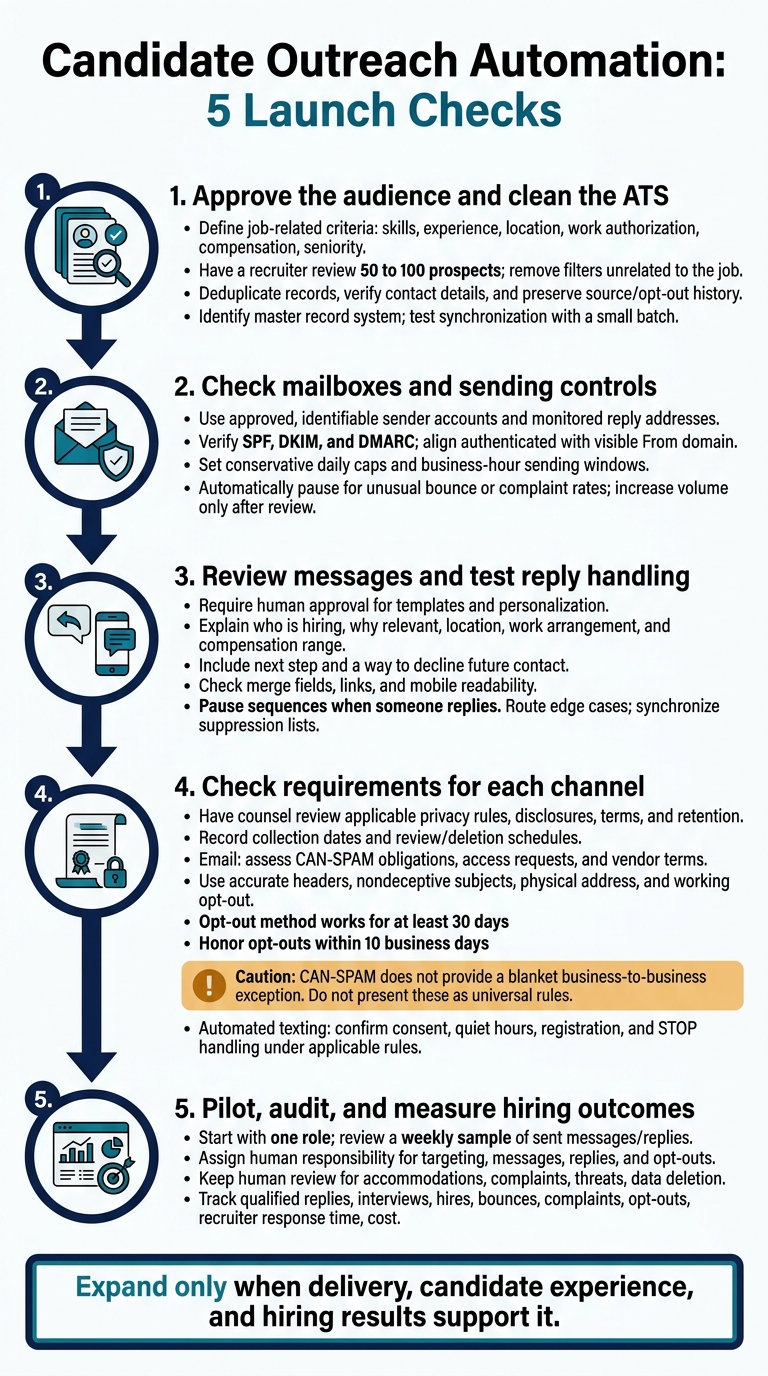
Candidate Outreach Automation: 5 Launch Checks
Before launching any outreach tool, use this checklist to protect delivery, reduce wasted recruiter time, and keep hiring decisions under human control.
Approve the audience and clean the ATS. Define job-related criteria for skills, experience, location, work authorization, compensation, and seniority. Have a recruiter review 50 to 100 prospects and remove filters unrelated to the job. Deduplicate records, verify contact details, and preserve source and opt-out history. Confirm which system holds the master record, then test the sync with a small batch.
Check mailboxes and sending controls. Use approved company accounts with identifiable senders, monitored reply addresses, named owners, and access controls. Verify SPF, DKIM, and DMARC, and align the authenticated domain with the visible From domain.[75][74] Set conservative daily sending caps, business-hour windows, and automatic pauses for unusual bounce or complaint rates. Increase volume only after reviewing delivery results. Once delivery checks pass, review message content and reply handling.
Review messages and test reply handling. Require human approval for templates and generated personalization. Every message should explain who is hiring, why the person appears relevant, and the key role details: location, work arrangement, and compensation range when available. Include the next step and how to decline future contact. Check merge fields, links, and mobile readability before launch. Pause sequences when someone replies, route edge cases to a recruiter, and sync suppression lists across every system.
Check requirements for each channel, not just each tool. Have counsel review applicable privacy rules, data-source disclosures, vendor terms, platform restrictions, and retention duties. Record collection dates and review or deletion schedules.
For email, assess CAN-SPAM obligations, access and deletion requests, and vendor data-processing terms. CAN-SPAM does not provide a blanket business-to-business exception.[73] Use accurate headers, nondeceptive subject lines, a physical postal address, and an opt-out method that works for at least 30 days. Honor opt-out requests within 10 business days.[73]
Before automated texting, separately confirm consent, quiet hours, carrier registration, and STOP handling under applicable TCPA, FCC, and state rules.[76][77][78]
Pilot, audit, and measure hiring outcomes. Start with one role and review a weekly sample of sent messages and tagged replies. Keep people responsible for targeting, messages, replies, and opt-outs. Human review must also cover sensitive decisions involving accommodations, work authorization, compensation exceptions, complaints, discrimination concerns, threats, or data deletion requests.
Track qualified replies, interviews, hires, bounces, spam complaints, and opt-outs, alongside recruiter response time and cost per qualified candidate. Expand only when delivery, candidate experience, and hiring results support it.
If your team cannot run this process consistently, the next section covers when embedded recruitment support makes sense.
When SMEs Need Embedded Recruiting Support
When software and process controls still leave hiring gaps, embedded recruiters add the capacity your team needs. Warning signs include multiple open roles competing for the same recruiters, inconsistent outreach and follow-up, poor pipeline visibility, hiring-manager delays, or a hiring spike after funding or a product launch.
Rent a Recruiter places experienced recruiters within your team to manage outreach, follow-ups, pipelines, and hiring from start to finish.[79][80]
Agree on workflow ownership before work starts. Decide who sets role requirements, handles candidate conversations, coordinates interviews, and reports results. Clear ownership helps prevent delays and duplicated work.
Match the support to your hiring demand: fixed-fee embedded recruiting for recurring needs, on-demand support for short-term spikes, and project-based support for a single hiring push.[79][80]
Keep two separate budget lines: recruitment service fees and software and third-party costs, including subscriptions, advertising, and messaging. Treat external costs as separate unless the written proposal includes them. Confirm pricing, recruiter allocation, role coverage, contract length, and cancellation terms.[79][80] Use these terms to assess whether longer-term support or a short engagement fits your needs and budget.
If you’re unsure where hiring is getting stuck, Rent a Recruiter offers a free recruitment health check with a personalized PDF assessment. Confirm its current availability and scope.[79]
Choose the Right Tool for Your Hiring Needs
Treat these as shortlists, not rankings. Before buying, verify current features, data coverage, plan limits, integrations, budget, and setup effort.
Match each tool to the talent acquisition strategies your hiring team needs to execute.
| Hiring need | Tools to evaluate | Main trade-off | What to test in a demo |
|---|---|---|---|
| Small team with limited recruiting capacity | Fetcher or Juicebox | Simpler setup versus workflow controls | Build a search, review contacts, launch outreach, and pause on reply |
| Recurring outbound campaigns | Gem or hireEZ | Campaign depth versus cost and configuration | Reuse a sequence, suppress opt-outs, and report qualified replies |
| Specialist or hard-to-fill searches | hireEZ or SeekOut | Data coverage versus match verification | Search technical or industry signals and check match accuracy |
| Specialist or technical search | Findem | Search depth versus setup and governance | Combine attributes, explain matches, and check data sources |
| All-in-one recruiting workflows | Loxo or Recruiterflow | Fewer systems versus migration effort | Move a candidate through outreach, pipeline stages, and reporting |
| Outreach added to an existing stack | SourceWhale | Campaign control versus integration dependency | Test replies, opt-outs, and two-way ATS sync |
| LinkedIn search and InMail | LinkedIn Recruiter | Native access versus messaging limits and follow-up restrictions | Check InMail allowances, follow-up rules, permissions, and manual steps |
Once two or three tools fit on paper, test them under the same conditions. Run a two- to four-week pilot using the same role and audience so you can compare results directly.
Track qualified replies, interviews, integration failures, and recruiter hours. Opens and sends aren’t the measure of success.
For the final decision check, compare total cost per interview and whether each tool reliably delivers qualified candidates within your budget.
FAQs
How do I calculate cost per qualified interview?
To calculate cost per qualified interview, divide your total recruitment costs for a set period by the number of interviews completed with qualified candidates in that same period.
Include software and tool subscriptions, setup and configuration fees, training costs, and internal administrative time spent sourcing, screening, and scheduling.
Use the same cost categories each time to keep your results accurate and comparable across reporting periods.
How can I reengage candidates without spamming them?
Use a multi-step outreach sequence: send a personal email on Day 1, follow up 2-3 days later, send a brief SMS around Day 8 if needed, and send a final email on Days 12-15. Stop immediately if the candidate replies.
Personalize messages with candidate-specific professional details, such as recent projects or posts. Have recruiters review AI drafts before sending to keep outreach relevant and avoid errors.
Wait at least 90 days before contacting nonresponsive candidates again. Honor opt-outs and prevent duplicate follow-ups to avoid wasted recruiter time and repeated contact.
When should I add recruiting support instead of software?
Add recruiting support when team capacity is the bottleneck, not automation. Software can automate routine tasks, but it still needs clean data, clear intake processes, and consistent human oversight. If your team is already stretched, it may add admin work rather than save time.
Rent a Recruiter embeds experienced recruiters into your team within days to manage hiring from sourcing to handoff. They keep outreach, data, and intake consistent as your hiring demand grows.