
If your team is still relying on manual search, you are likely spending too much, moving too slowly, and missing people who never apply.
I see the case for AI candidate sourcing as simple. It helps scaling companies build stronger pipelines with less recruiter admin, lower agency spend, and more control over hard-to-fill hiring. In the article, the core message is clear: AI works best when your ATS data is clean, your intake is structured, and every shortlist and outreach message is checked by a human.
Here’s the short version:
- AI sourcing focuses on front-end hiring, finding, ranking, and contacting people before they apply
- Companies using it can fill roles 50% faster
- Cost-per-hire can drop by 34%
- Candidate pools can grow by 340% compared with manual Boolean search
- AI-personalised outreach can lift acceptance rates to 55%, versus 29% as a standard benchmark
- Poor setup can do the opposite, weak matches, stale data, poor outreach, and wasted recruiter time
For CEOs, CFOs, HR leaders, and Talent Leaders, that means one thing: this is not just a sourcing tool decision. It is a hiring capacity and cost control decision.
The article also makes a practical point many teams miss. AI sourcing does not fix a weak hiring process. You still need:
- Clean ATS records
- Clear role briefs and scorecards
- Human review rules
- Weekly and monthly performance checks
- A pilot before wider rollout
If your team does not have the time to set that up, an embedded recruiter can do the heavy lifting inside your business, from ATS cleanup to shortlist review and outreach control. That is why many scaling companies also use Rent a Recruiter to cut hiring costs by up to 70% and save 80+ hours per month in hiring admin.
Below, I break down what the article says, what matters most, and where the business impact sits.
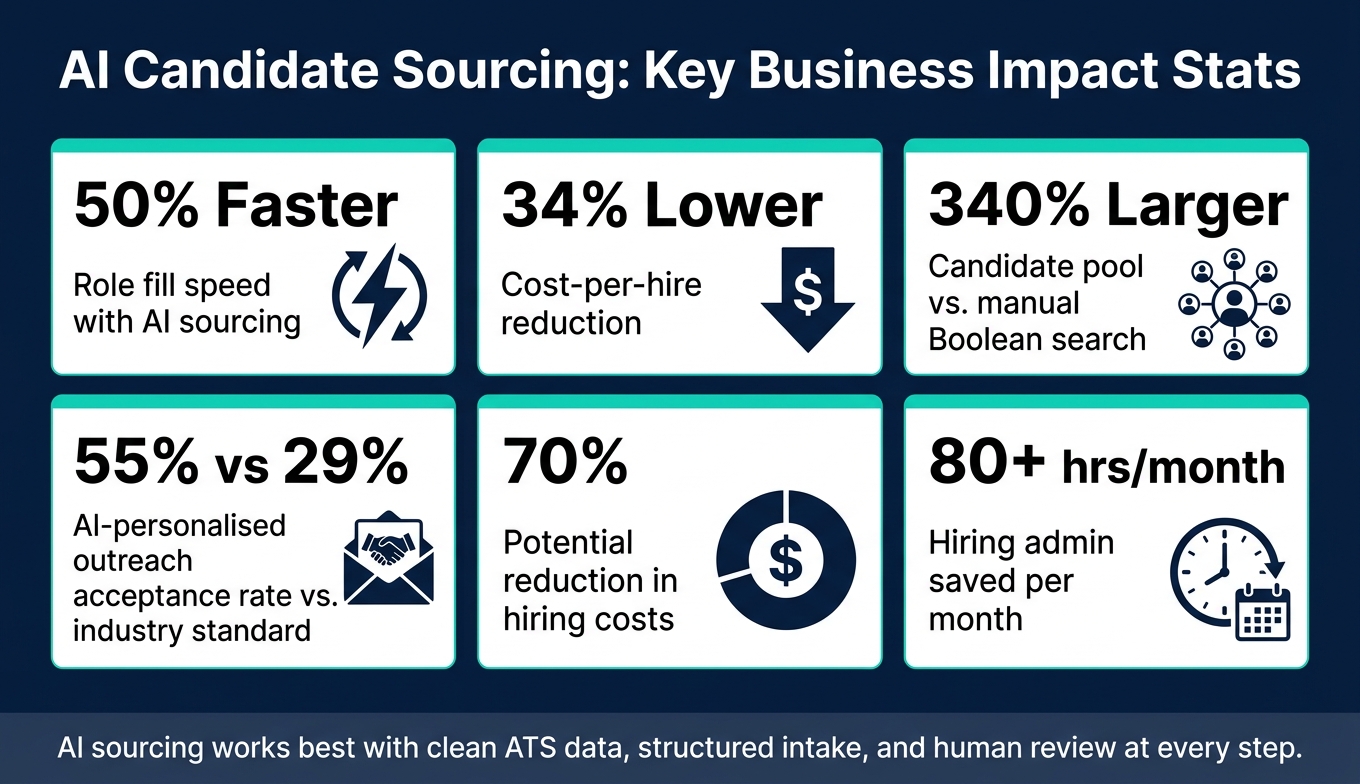
AI Candidate Sourcing: Key Stats & Business Impact
I Tried Every AI Tool For Recruiters, These Are The Best
sbb-itb-a23bd6a
What Needs to Be in Place Before AI Sourcing Works
AI sourcing works when the basics are in place: clean data, a clear hiring process, and recruiters who know how to use the output well.
Without that, even good tools can produce weak matches, noisy shortlists, and extra admin. The tech matters, but the setup matters more.
Core AI Capabilities Used in Candidate Sourcing
It helps to be clear on what these tools do, and what they do not do. That makes it easier to set expectations and judge whether a tool is helping your team save time or just adding another layer.
| Capability | What It Does | Why It Matters |
|---|---|---|
| Semantic Search | Understands related terms and role context | Replaces complex Boolean strings and surfaces candidates keywords miss [2][3] |
| Skills Inference | Extracts skills from project work, GitHub activity, or papers rather than relying only on resumes | Finds passive talent and adjacent skills that standard filters overlook [7][1] |
| Candidate Rediscovery | Mines your existing ATS for past "silver medalist" candidates | Reduces external sourcing spend by surfacing talent you already know [10][7] |
| Predictive Signals | Flags candidates who may be open to a move based on tenure and market activity | Helps prioritise outreach toward people most likely to respond [2][5] |
| Generative Outreach Drafting | Drafts personalised messages based on candidate signals and role context | Helps recruiters create tailored outreach faster while keeping the final message human-reviewed [6][10] |
| Contextual Ranking | Scores candidates against unwritten role requirements like "experience in hypergrowth" | Helps surface the strongest matches quickly [9] |
In practice, these tools shift recruiters away from manual search and toward shortlist review, brief refinement, and better decision-making. That can save hours each week, but only if your data and review steps are solid from the start.
Data, Process, and Recruiter Readiness
Poor data and weak process drag down match quality. If the input is messy, the output usually is too.
Start with your ATS. Clean it before you switch anything on. That means running a deduplication sprint, aligning job titles to a shared taxonomy, and standardising fields for skills, seniority, location, and work authorisation. It also means tagging past "silver medalist" candidates so rediscovery tools can surface people your team already knows [10].
Next, tighten your intake process. Keyword-heavy job descriptions don’t give AI tools enough structure. A better route is a structured intake call that captures must-haves, nice-to-haves, expected outcomes, and evaluation criteria. Scorecards linked to patterns from past successful hires can sharpen matching as well [6][7].
Then, train recruiters before launch. They need to know how to review AI output with a critical eye, use approved templates and checklists, and flag weak recommendations so the system can be tuned over time. A 2 to 4 week pilot where humans approve every shortlist gives you a safer starting point. It helps your team lock in quality thresholds and stops people from trusting unreviewed output too early.
Finally, make sure the tool syncs natively with your ATS so recruiters aren’t stuck re-entering data by hand and your reporting stays clean [6].
How Embedded Recruiting Support Can Help
For most SMEs, the issue isn’t picking a tool. It’s getting the work done properly.
Messy ATS data, loose intake habits, and stretched internal teams can stall AI sourcing before it starts. That’s where embedded support can make a direct business difference.
When internal capacity is tight, an embedded recruiter can take on the setup work AI sourcing depends on, from data hygiene and structured intake to outreach quality control and reporting. Instead of asking your team to squeeze this into an already busy week, you get someone inside the function who owns the operational lift.
Rent a Recruiter places experienced recruiters inside your team within days, managing the groundwork behind AI sourcing while running hiring end-to-end. That includes data hygiene, intake discipline, outreach quality, and reporting. Clients typically cut hiring costs by up to 70% and save more than 80 hours per month.
AI Sourcing Workflows: From Candidate Discovery to Outreach
With the basics in place, you can use AI to run a repeatable workflow from brief to shortlist to outreach.
Choosing the Right Tool Categories for Discovery and Matching
For SMEs, start with the smallest stack that covers rediscovery, external search, and outreach.
| Tool Category | Primary Use Case | Typical Data Sources | SME Benefits | Implementation Complexity | Key Limitations |
|---|---|---|---|---|---|
| AI Search & Match (ATS/CRM) | Rediscovering "silver medalists" in existing pools | Internal ATS, CRM, email archives | Uses data you already have; surfaces high-intent candidates | Low (native integration) | Limited to your existing database |
| Sourcing Agents | Autonomous pipeline building and outreach | LinkedIn, GitHub, web-wide profiles | Scales pipeline building | Medium (API/ATS setup required) | Requires clear intake brief and ongoing calibration |
| Enrichment Tools | Finding verified contact data for identified candidates | Public records, social profiles | High deliverability; reduces bounce rates | Very low (browser extension) | No discovery features; privacy risks |
| Generative Assistants | Ad-hoc research and outreach drafting | Multiple data sources and LLMs | Fast personalization; no Boolean skills needed | Low (web-based) | Needs human review to avoid generic tone |
For most SMEs, the best starting point is simple: combine an AI search and match layer to mine your ATS with a sourcing agent for external discovery. That gives you coverage across your existing talent pool and the outside market, without building a bloated stack too early.
Enrichment tools and generative assistants can come later, once the core workflow is in place and your team is using it the same way across recurring roles.
Once the stack is chosen, standardise one workflow for every recurring role.
Building a Repeatable Sourcing Process for Recurring Roles
Recurring roles are where AI sourcing starts to pay off fastest.
Save the intake criteria as a reusable search template. A query like "Find a sales leader who scaled a B2B team through hypergrowth" gives an AI agent far more direction than a flat list of skills. From there, save the search so it keeps scanning for new matches instead of forcing your team to start from scratch every time.
This gets stronger over time. Feed the AI a profile of your top-performing hire in that role, then use it to spot similar talent patterns. Pair that with a candidate rediscovery workflow, where your ATS is scanned for past applicants and final-stage silver medalists, and you’re sourcing from two directions at once without doubling recruiter effort.
That matters when hiring volume starts to climb. Recruiters using this approach fill roles 50% faster while spending 80% less time on manual search [2]. If your company is carrying 10 or more open roles at once, that’s not just a sourcing tweak. It’s a direct gain in recruiter capacity, hiring speed, and team output.
Using AI to Write Outreach Without Hurting Employer Brand
After discovery and matching, use AI to speed up first contact without losing voice or control.
This is where a lot of teams get into trouble. The risk is not only a poor email. It’s a message that sounds robotic, says the wrong thing about your company, or ends up in spam because contact data was never checked.
A simple three-message cadence works well, with recruiter review before anything goes out. The first message, sent on Day 1, should be candidate-specific and tied to something concrete, like a recent project or publication. A shorter value-add nudge follows on Day 3. A brief, respectful breakup message closes the sequence on Day 7 [11]. AI can draft all three, but a recruiter should review and approve each one before send.
To protect your employer brand at scale, build a brand voice guide before automating outreach. Include approved subject lines, tone guidance, and DEI language standards. Give that to the AI alongside the candidate brief, and the output will sound much closer to your company. Skip that step, and most generative tools fall back on generic phrasing that people spot straight away.
The payoff can be big when the brief is tight and the review layer is in place. AI-personalised outreach achieves a 55% candidate acceptance rate, compared to the 29% industry standard [2]. The lift does not come from automation alone. It comes from better input, better control, and recruiter judgement at the point of send.
Guardrails and Performance Measurement
Bias, Privacy, and Human Review Rules
Once AI is handling discovery and outreach, governance becomes the next limit. For lean teams, guardrails are what turn AI sourcing from a fast shortcut into a process you can trust and repeat.
AI sourcing only works when you have clear rules, clean data, and human review. Without those controls, AI can repeat old hiring patterns. If your past hires leaned toward one type of background, your AI may keep pulling in more of the same. The first rule is simple: AI informs; humans decide. That rule should apply across the full workflow, from discovery to ranking to outreach.
For SMEs, the main risks usually fall into four areas:
| Risk | Likely SME Impact | Mitigation Step | Indicator to Watch |
|---|---|---|---|
| Past-hire bias | Narrowed talent pool; legal exposure | Quarterly bias testing with test profiles | Shortlist rates by group |
| Stale or incomplete data | High bounce rates; missed qualified candidates | Prioritize opt-in candidate databases over scraped data | Candidate-to-interview conversion rate |
| Generic outreach | Damaged employer brand; low response | Use brand voice guides and require human review | Response rate and unsubscribe rate |
| Decisions made without human review | Legal liability; loss of candidate trust | Mandatory human review before shortlisting | Manual override rate |
One stat is worth watching closely: 19% of organizations using AI in hiring report that their tools have screened out qualified applicants because the underlying data was stale or incomplete [4]. Opt-in candidate databases and regular ATS data hygiene are not nice-to-haves. They help keep your pipeline accurate and stop wasted time later in the process.
Once those controls are in place, the next step is simple. Check whether the workflow is addressing common recruitment challenges like hiring speed and quality.
U.S. employers should pay close attention here. Several jurisdictions already require bias audits or disclosure for AI-assisted hiring [9][8][12]. You should tell candidates in job postings and privacy notices when AI is used in sourcing, and give them a clear opt-out or manual-review path [1][9].
Metrics That Show Whether AI Sourcing Is Paying Off
Before launch, set a baseline for time-to-fill, cost-per-hire, and recruiter hours. Then track performance on a regular cadence so you can see whether AI is cutting cost, saving time, or lifting hiring output.
| Metric | How AI Moves It | Target Improvement | Review Cadence |
|---|---|---|---|
| Time-to-Source | Automates discovery and ranking | Up to 70% reduction [1] | Weekly |
| Sourced Candidate Quality | Semantic matching vs. keyword search | 15–25% higher precision [1] | Monthly |
| Outreach Response Rate | AI-personalized messaging at scale | 40–50% open rate vs. 20–25% generic [1] | Monthly |
| Cost-per-Hire | Reduces agency reliance and time-to-fill | 20–50% reduction [1] | Quarterly |
| Pipeline Diversity | Skills-based matching vs. credential filtering | 10–15% increase in diverse slates [1] | Quarterly |
Keep a close eye on response rate. 67% of candidates say they can tell when outreach is AI-generated, and that often lowers their interest in the role [1]. When response rates stall or drop, the problem is usually not the tool. It is more often a weak brief, poor input data, or no recruiter review before messages go out.
That matters because poor outreach does more than hurt replies. It can waste recruiter hours, drag out time-to-fill, and chip away at employer brand at the same time.
How to Keep Improving Results Over Time
Treat AI sourcing as a monthly operating loop, not a one-off setup. Run a 30-day pilot on one or two hard-to-fill roles, compare the results against your pre-AI baseline, then adjust your search criteria and messaging before you roll it out more widely [9]. If the AI keeps returning poor matches, check the job brief or intake call transcript first [6].
Each pilot should make the next one better. Feed outcomes back into the process on a regular basis. Flag what stood out in the profiles of successful hires. Note where dropped candidates fell out of the funnel. Update your templates and review rules based on what you learn. That’s how you stop the process from going flat after the first few months.
If your team does not have recruiting ops capacity, outside support can help keep reporting and calibration in shape. Rent a Recruiter can keep reporting, talent mapping, and hiring performance tracking steady as hiring volume grows.
Conclusion: How to Roll Out AI Candidate Sourcing at Scale
AI candidate sourcing works best when the basics are in place: clean data, a structured intake process, human review, and regular measurement. Get those guardrails right, and rollout becomes a matter of execution.
For growing SMEs, the upside is clear: faster searches, lower cost-per-hire, and better outreach response.
A phased rollout helps keep risk low. In Week 1, audit your current process and choose your tools. In Week 2, connect your ATS and APIs. In Week 3, pilot two or three hard-to-fill roles in shadow mode, with recruiters approving every action before the AI acts on its own. By Week 4, measure KPIs against your pre-AI baseline and decide what to scale [9]. If the pilot shows a 15% to 20% improvement over the control group, that’s a strong sign to expand to more requisitions [9].
Once the pilot is live, use the data to tighten the workflow. Feed shortlist decisions back into the ATS, refine search criteria, and keep human reviewers close as volume grows.
If your team doesn’t have the recruiting ops capacity to manage that rollout, Rent a Recruiter can help. They can embed experienced recruiters inside your team to run the rollout and keep hiring consistent at scale. Book a call to see how it works.
FAQs
How do I know if my ATS data is clean enough for AI sourcing?
Your ATS data is ready for AI sourcing when it is structured, enriched, and current.
Start with the basics. Remove duplicate profiles. Standardize job titles, skills, and locations so your data speaks the same language across the system. If one profile says "Software Engineer" and another says "Software Developer" for the same kind of role, AI can miss the pattern. That leads to weaker sourcing and more noise for your team.
Historical context matters too. Feed in past hiring outcomes and reasons candidates were not selected. That gives the AI a clearer picture of what your team tends to accept, reject, and prioritize. In plain terms, it helps the system reflect your hiring preferences instead of making broad guesses.
You also need to keep that data fresh. Old records can skew sourcing recommendations, waste recruiter time, and push the wrong people to the top of the list. If the data is stale, the output will be too.
For hiring leaders, this is not just a data clean-up task. It affects search accuracy, recruiter efficiency, and hiring quality.
What should a small team pilot first with AI sourcing?
Small teams should start with low-barrier, high-impact tasks, not heavy enterprise systems.
That usually means using free or low-cost tools that save time straight away. For example, ChatGPT can help draft job descriptions, and Calendly can take scheduling admin off your plate. You get time back fast, without a big setup project or a long contract.
For sourcing, teams with fewer than five people are often better off with lightweight AI matching overlays for LinkedIn, rather than paying for broad database platforms. It’s a simpler move, costs less, and gets your team working sooner.
The business case is pretty clear:
- Less onboarding
- Lower upfront spend
- Faster time to value
- Less strain on a small hiring team
If your team is lean, the goal isn’t to buy the biggest stack. It’s to pick tools that remove admin, speed up hiring work, and start paying off early.
How much human review is still needed with AI sourcing?
AI sourcing does not replace recruiters. It shifts their time away from manual search and toward higher-value work like shortlist validation, hiring-manager calibration, and candidate engagement.
That matters because your team stops spending hours on repetitive sourcing tasks and puts more effort into the work that affects hiring outcomes. You get better use of recruiter capacity, tighter alignment with hiring managers, and more control over quality.
Most workflows still need human review. Teams should validate shortlists, approve automated actions, and check quality at the right points in the process.
With those checkpoints in place, you keep governance tight and improve sourcing precision without losing oversight.