Subscription recruitment buys monthly recruiting capacity, not guaranteed hires. We recommend starting with approved roles for the next 3 to 6 months, a clear budget, and time for hiring decisions. A fixed fee helps you plan spending, but unused capacity still costs money.
Rent a Recruiter reports up to 70% lower hiring costs versus commission-based models and more than 80 internal hiring and admin hours saved per month. These are provider claims, not promised results. We recommend checking expected savings against your own costs and hiring volume.
Before you commit, we suggest four checks:
- Fit and cost: Compare subscription, agency, and in-house costs for the same roles and period.
- Hiring workflow: Agree priorities, selection criteria, decision owners, and response deadlines.
- Provider and scope: Confirm recruiter experience, capacity, included services, system access, and exit terms.
- Results and capacity: Track hiring speed, cost per hire, pipeline quality, and retention. Adjust support when demand changes.
Monthly pricing and embedded recruitment are not the same thing. We’ll help you check both <u>what you’re buying and how it will work</u>, starting with your hiring plan.
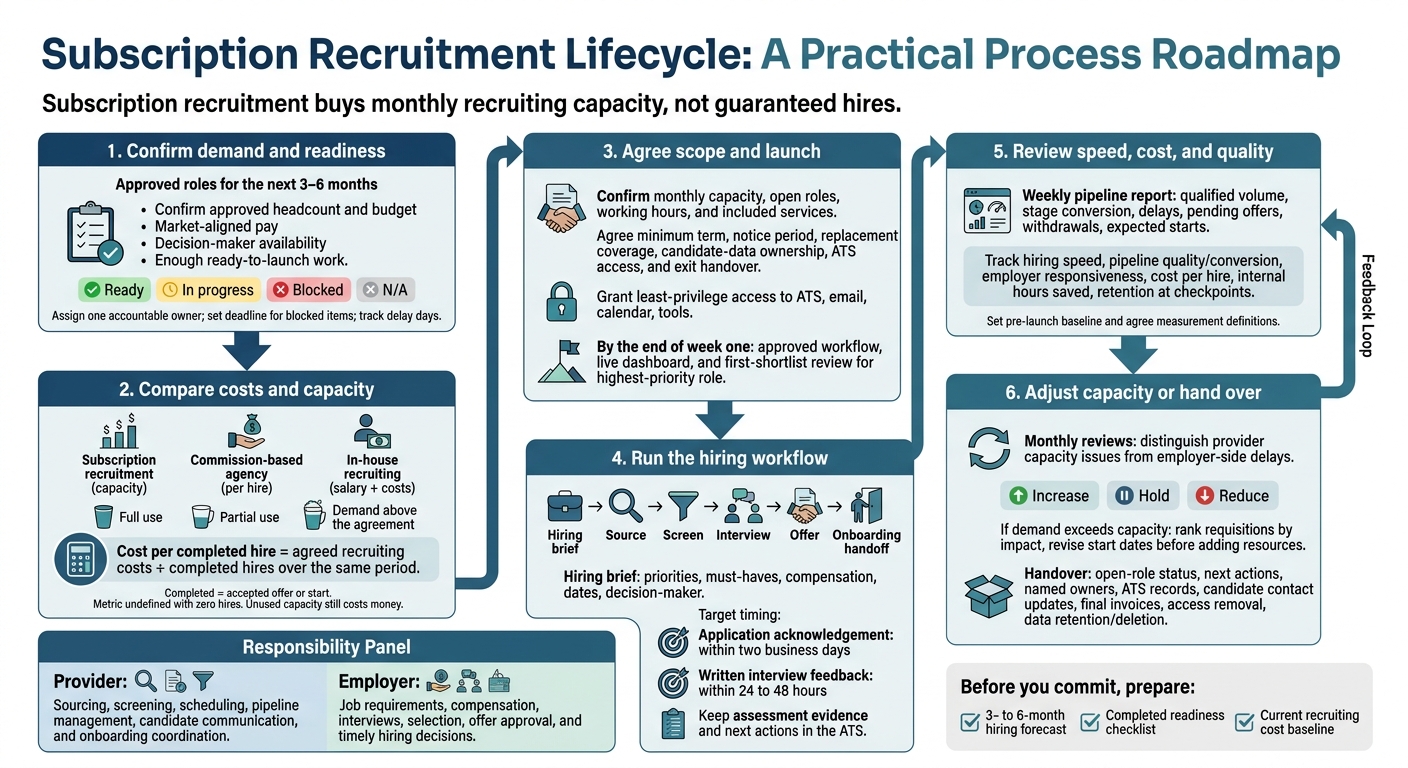
Subscription Recruitment: From Hiring Plan to Handover
Assess Hiring Needs and Costs
When Subscription Recruitment Fits
Base your subscription on approved roles for the next 3-6 months, not projected growth. Your hiring plan should show whether you have enough work to justify recurring recruiting capacity.
Vacancy count is only part of the workload. Specialist, senior, and hard-to-fill local roles need more sourcing and screening. Match that demand to recruiter capacity and the time your managers can commit.
| Hiring condition | Effect on delivery | Check before committing |
|---|---|---|
| Recurring vacancies | Can keep recruiting capacity in use | Are roles and target start dates approved? |
| Post-funding growth or a product launch | Concentrates hiring into a defined period | Has finance released the hiring budget? |
| Hiring across teams or locations | Adds coordination and market-specific work | Can the recruiter cover each function and location? |
| Specialist or senior roles | May need intensive sourcing and assessment | How many complex searches can run together? |
| Sporadic vacancies or undefined roles | Can leave paid capacity unused | Is there enough ready-to-launch work? |
| Slow hiring decisions | Candidates may stall despite active sourcing | Can managers protect time for interviews and feedback? |
Quick fit check: Confirm approved roles, market-aligned pay, decision-maker availability, enough workload, and full funding.
Hiring Readiness Checklist
Give each requirement one accountable owner. Mark it as Ready, In progress, Blocked, or N/A.
A recruiter cannot move a search forward without approvals, interviewers, or system access. Set a deadline for every blocked item and track delay days so you can see where hiring time is being lost.
| Requirement | Accountable owner | Readiness status |
|---|---|---|
| Approved headcount and budget | Finance or executive sponsor | Ready / In progress / Blocked / N/A |
| Vacancy request and business justification | Hiring manager | Ready / In progress / Blocked / N/A |
| Job description and selection criteria | Hiring manager and HR | Ready / In progress / Blocked / N/A |
| Salary band and variable pay in USD | Compensation, HR, or finance | Ready / In progress / Blocked / N/A |
| Employment type and classification | HR or legal | Ready / In progress / Blocked / N/A |
| Work location, remote policy, and time zone | Hiring manager and HR | Ready / In progress / Blocked / N/A |
| Hiring manager and decision-maker availability | Department leader | Ready / In progress / Blocked / N/A |
| Interview panel and evaluation process | Hiring manager | Ready / In progress / Blocked / N/A |
| ATS access, permissions, and templates | Talent operations or IT | Ready / In progress / Blocked / N/A |
| Expected hires and start dates | Executive sponsor and hiring managers | Ready / In progress / Blocked / N/A |
Clear these blockers before comparing costs. Once you confirm fit, use the same roles, time frame, and service scope for each cost comparison.
Compare Subscription, Agency, and In-House Recruiting Costs
Compare total recruiting costs, not just invoices or salaries. Subscription pricing depends on capacity, recruiter seniority, search complexity, scope, geographic coverage, and minimum term.
Check whether advertising, assessments, background checks, and other charges sit outside the fee. Model full use, partial use, and demand above the agreement to see how your spend changes.
| Factor | Subscription recruitment | Commission-based agency | In-house recruiting |
|---|---|---|---|
| Cost drivers | Recurring capacity fee and approved extras | Placement fees tied to hires and compensation; terms vary | Recruiter pay, benefits, payroll taxes, management, and overhead |
| Included work | Contract-defined sourcing, screening, coordination, and offer support | Search and candidate presentation; other support varies | Internally assigned recruiting responsibilities |
| Tools | Confirm included licences, client access, and data ownership | Confirm tool charges and access to candidate records | Company-funded ATS, sourcing tools, and advertising |
| Hiring-manager time | Managers still define roles, interview, and decide | Managers still review submissions, interview, and decide | Managers still participate; administrative support depends on staffing |
| Flexibility | Depends on capacity-change rights and minimum commitments | Separate search and placement terms apply | Capacity changes may require hiring or reallocating staff |
| Forecasting | Stable fees can still mean poor value when underused | Spend changes with hires, salaries, and fee terms | Stable payroll, but output depends on workload and staffing |
Cost per completed hire = agreed recruiting costs ÷ completed hires over the same period.
Define “completed” consistently: either an accepted offer or an employment start. With zero hires, the metric is undefined. Low-volume months can also distort it.
Compare savings only when periods, hiring volumes, role mixes, and service scope match. Record vacancy costs separately unless both calculations include them consistently. The lowest-cost option depends on your hiring volume, role mix, and hiring speed.
sbb-itb-a23bd6a
Manage the Recruitment Workflow
Once you’ve agreed on capacity, use a clear workflow to turn it into hires, or perform a recruitment health check to identify process gaps.
Set Hiring Priorities and Selection Criteria
Turn each intake meeting into a one-page hiring brief. Rank active roles by business impact, urgency, and hiring difficulty. Separate immediate searches from future pipeline work so recruiter time goes where you need it most.
Record duties, seniority, location, employment type, work arrangement, compensation, and target dates. Distinguish must-have qualifications from trainable skills, and specify the evidence needed to meet each criterion.
The employer approves requirements and names the decision-maker. The provider documents the brief and sourcing plan within the agreed capacity. Reserve interview time upfront, then review initial profiles together before expanding outreach or changing requirements.
Use that same brief to guide sourcing and selection.
Source, Screen, and Interview Candidates
The provider uses inbound applications, referrals, and targeted outreach to find candidates, then screens them against the agreed criteria. Track each candidate’s source, stage, evidence, next step, and owner in the ATS. Shortlist notes should describe demonstrated skills, not impressions.
Agree on response deadlines and aim to acknowledge applications within two business days. The provider schedules interviews and follows up on feedback. The employer evaluates candidates and makes the decisions.
Give each interviewer a specific assessment area. Use the same core questions and scoring criteria for comparable candidates, with written feedback submitted within 24 to 48 hours, before the panel discussion.
The EEOC treats interviews and tests as selection steps, so keep assessments job-related and apply them consistently.[6] Provide required accommodations, avoid questions about protected characteristics, and have qualified counsel review local pay-transparency and salary-history rules.[3][4]
Move approved candidates into the offer process while keeping the rest of the pipeline up to date.
Manage Offers and Candidate Pipelines
Before making an offer, confirm base pay, incentives, equity, benefits, classification, employing entity, reporting manager, work arrangement, contingencies, and start date.
The employer approves the terms and written offer. The provider coordinates approvals, candidate communication, and the onboarding handoff. Name an owner for each check: references, background checks, and employment eligibility verification.
U.S. employers must properly complete Form I-9 for each person hired for employment in the United States. Route legal, immigration, and classification questions to qualified advisers.[5]
Close inactive applications promptly and record disposition reasons. Define access permissions, retention periods, deletion rules, and ownership of ATS records when the engagement ends. Keep future candidates only for a documented purpose, with permission where required and a review date.
Review a weekly pipeline report covering qualified candidate volume, stage conversion, delays, pending offers, withdrawals, and expected starts. The provider flags bottlenecks and recommends corrective action. The employer decides whether to change pay, requirements, priorities, or future hiring plans.
Choose and Onboard an Embedded Recruitment Provider
Once you’ve defined your hiring workflow, choose a provider that can run it inside your systems.
Assess the recruiter, not just the provider’s brand. Check their background, sector knowledge, and experience with your roles. Ask how they would manage a representative vacancy from start to finish, then verify the assigned recruiter’s experience before signing.
Agree on Capacity, Scope, and Contract Terms
Rent a Recruiter describes a fixed monthly embedded model and says experienced recruiters can join your team within days.[7] Before setting a start date, confirm availability, onboarding timing, system access, and experience with your roles.
Put the agreement in writing, covering:
- Capacity and services: monthly capacity, number of open roles, working hours, and included services.
- Contract terms: minimum term, notice period, and replacement coverage.
- Data and handover: confidentiality, candidate-data ownership, ATS access, and exit handover.
Make decision rights clear. The provider can own sourcing, screening, scheduling, and pipeline management. You retain authority over job requirements, compensation, interviews, selection, and offers.
Once terms are signed, move straight to access, ownership, and reporting.
Set Up Systems and Start Hiring
Before sourcing begins, give the recruiter least-privilege access to your ATS, email, calendar, and communication tools.
Use a launch checklist to name the executive sponsor, recruiter lead, hiring-manager owners, and ATS administrator. Confirm reporting definitions and frequency, response deadlines, escalation contacts, and the first-shortlist date.
By the end of week one, have an approved workflow, a live dashboard, and a first-shortlist review for your highest-priority role.
Track Hiring Speed, Cost, and Quality
Set a pre-launch baseline and agree on dashboard definitions before measuring progress. Break down results by role, department, source, location, and recruiter so strong averages don’t hide weak searches.
Track speed alongside quality. A faster shortlist saves little time if candidates keep missing the agreed assessments.
| Measure | Definition to agree |
|---|---|
| Hiring speed | Time from approved requisition to first qualified shortlist, first interview, offer, and fill; open-role age |
| Pipeline quality and conversion | Offer acceptance rate, stage conversion, and source quality |
| Employer responsiveness | Hiring-manager response time after feedback requests |
| Cost and time saved | Cost per hire and internal hours saved versus the baseline |
| Retention | Share of new hires still employed at agreed checkpoints, where enough data exists |
Rent a Recruiter reports up to 70% lower hiring costs versus commission-based models and more than 80 internal hiring and administrative hours saved each month.[1][2] These are provider claims. Test the reported cost and time savings against your baseline, hiring volume, included costs, and time-tracking method.
Use the results to decide whether to increase, hold, or reduce capacity at the next review.
Adjust Capacity and Prepare for Handover
Use monthly reviews to distinguish provider capacity issues from delays on your side. Late feedback, unclear requirements, compensation misalignment, and interview bottlenecks can all slow hiring.
If demand exceeds agreed capacity, rank requisitions by business impact and revise start dates before adding resources. Check that any reduction, pause, or cancellation follows the contract.[7]
Before reducing support, require a transition file showing open-role status, next actions, and named owners. Transfer ATS records, notify active candidates of their new contact, reconcile final invoices, remove access that is no longer needed, and confirm retention or deletion of provider-held data.
Conclusion: Check Fit Before You Commit
Once you’ve reviewed fit, workflow, and provider setup, check whether your approved hiring demand supports the capacity you’re buying. Subscription recruitment buys recruiting capacity, not guaranteed hires. Your return depends on controlled demand, clear scope, fast decisions, and agreed measures of cost, speed, and quality.
If the model fits your hiring plan, prepare three inputs before you commit: a 3- to 6-month hiring forecast, a completed readiness checklist, and your current recruiting cost baseline. Use live hiring data. Separate approved vacancies from contingent roles, confirm managers’ availability for interviews, and count internal hiring time, not just external invoices.
Share these inputs with Rent a Recruiter to set the right capacity and test expected savings against your hiring data. Savings are an estimate, not a promise. Use your own numbers to check the case before you commit.
FAQs
How many hires justify a recruitment subscription?
A recruitment subscription generally suits companies making 10 to 24 hires per year. You pay a predictable monthly fee, which can cost less than commission-based agency fees. If you make fewer than 10 hires a year, an agency may be a better fit.
For more than 25 hires annually, a subscription gives you flexible support for growth or hiring spikes, without the immediate overhead of building a full in-house recruitment team.
What happens if no one gets hired?
You pay for recruitment support, not per hire. Your costs stay predictable, but you still pay for that support even if no hires are made. As hiring needs change, you can scale support up or down, or pause the service entirely.
We work closely with your internal team, using weekly reporting and regular check-ins to track recruitment metrics and keep hiring aligned with your business goals and staffing needs.
How soon can I judge recruitment results?
Your embedded recruiter can deliver a curated list of qualified candidates within 48 hours.
Use a 30- to 90-day pilot to assess results. At 30 days, review how well the recruiter fits into your team and the candidate experience. At 60 days, assess process efficiency. At 90 days, measure costs, time-to-fill, and internal hours saved.
You may see gains, such as a 50% reduction in time-to-fill, before deciding whether to scale.