A long list of LinkedIn profiles is not a hiring plan. We start with your priority roles, hiring deadlines, and one accountable owner for each candidate record so your team spends time on people who match your hiring needs.
Our approach connects LinkedIn sourcing with your ATS or CRM, structured screening, tracked outreach, and clear recruiter-to-manager handoffs. We use a 30-day launch plan and measure conversions, time in stage, and cost per hire to show where hiring stalls before you spend more on sourcing.
- Build for demand: Set coverage targets and choose tools that fit your hiring volume.
- Keep work moving: Track contact history, next steps, and feedback deadlines in one shared record.
- Check hiring readiness: Review current fit, recruiter workload, and results, not just profile counts.
We’ll walk through how to put this into practice and when added recruiting capacity can help you meet your hiring deadlines.
Set Up LinkedIn and Build Candidate Pools
Once you’ve set coverage targets and assigned owners, build the system your team will use to store, find, and move candidates through hiring.
Choose LinkedIn Tools and Link Candidate Records
Choose LinkedIn tools based on hiring volume and workflow, then connect candidate records to your ATS or CRM. Search access alone shouldn’t determine what you buy.
| Tool | Intended use | Search | Outreach | Collaboration | Integrations and limits |
|---|---|---|---|---|---|
| Standard LinkedIn access | Networking, referrals, and occasional sourcing | Basic profile and network discovery | Connection requests and ordinary messaging, subject to account rules | Limited recruiting workflow | Manual transfer or approved integrations; limited pipeline management |
| Recruiter Lite | Lower-volume recruiting for an individual or small team | Approximately 20 filters, Boolean search, saved searches where available, and access up to the user’s third-degree network[2] | 30 InMail credits per month; outreach subject to plan limits[2] | Basic project-based organization | No ATS integration[9] |
| LinkedIn Recruiter | high-volume, specialized, or collaborative sourcing | 40+ filters, Boolean search, advanced filters, talent-pool searches, and full network access[10] | About 100 to 150 InMails per month; allowance varies by agreement[10] | Shared projects, notes, collaboration, and search insights | Supported ATS integrations; credits, seats, and features vary by agreement[7][9][10] |
Next, decide where records live and how your team handles duplicates.
Store prospect records in your CRM or ATS, and keep active applications in the ATS. Match records using LinkedIn profile URLs and normalized email addresses. Review uncertain matches manually.
The goal is one candidate, one owner, one source of truth. Your ATS or CRM handles record searches, shared permissions, reporting, and follow-up. It doesn’t replace LinkedIn search.
Use approved integrations or documented exports. Record the source and date of every imported field, and avoid unrestricted profile copying.
Organize Projects, Tags, and Statuses
Name projects using [Role] - [Location/work arrangement] - [Team] - [Hiring period]. Create one project per requisition and use Talent Pool view for search and filtering. This gives your team visibility into each stage and keeps follow-up consistent.
| Feature | Purpose | Practical use | Subscription availability |
|---|---|---|---|
| Projects | Organize sourcing for a role or hiring effort | Store search results, job applicants, and leads from media campaigns in one work area | Available in Recruiter and Recruiter Lite, with capabilities varying by edition[4] |
| Talent Pool view | Discover and filter candidates within a project | Search and filter potential candidates | Available in Recruiter and Recruiter Lite; verify current edition behavior[3][8] |
| Tags | Apply lightweight, reusable labels | Label candidate characteristics, not workflow stages | Availability and tag controls may vary by product edition |
| Workflow statuses | Show the current sourcing or relationship state | Track progress from discovery through screening, nurture, or closure | Verify status and customization options in your subscription |
Tag examples:
Referral,Strong SQL,Needs sponsorship review, orSilver medalist.Status examples:
New,Reviewed,Contacted,Replied,Interested,Screening,Nurture, andClosed.
Tags describe characteristics. Statuses show progress. Don’t use tags instead of statuses or create a project for every tag.
Keep statuses mutually exclusive and assign an owner to each stage. Separate closed outcomes into hired, declined, unresponsive, not qualified, or no longer available.
Each candidate record should contain the source, owner, LinkedIn profile URL, contact dates and channels, preferences, relevant notes, status, next action, and follow-up date. Also record the requisition or project, location, work arrangement, voluntarily disclosed compensation expectations, job-related and legally appropriate work authorization information, and last verification date.
With records organized, your team can build searches that find suitable candidates without repeating work.
Build Searches With Filters and Boolean Logic
Start with titles, skills, location, and experience. Add supported filters gradually, including related titles and transferable skills. Treat schools and previous employers as context only.
Review the first 25 to 50 profiles against the hiring manager’s criteria, then change one variable at a time. Save reusable searches where available. Track qualified profiles reviewed, positive replies, screens scheduled, and hires, not just result counts.[3][5][6]
Search should produce candidates your team can move forward, not simply a long list of profiles.
Hypothetical search target: U.S.-based backend engineers using Java or Kotlin and cloud platforms, excluding primarily front-end titles. Apply location separately through structured filters.
("backend engineer" OR "back-end engineer" OR "software engineer" OR "platform engineer") AND (Java OR Kotlin) AND (AWS OR Azure OR GCP OR "Google Cloud") NOT ("front-end engineer" OR "frontend developer")
In LinkedIn Recruiter, AND narrows results, OR broadens them, and NOT excludes terms. Quotation marks search for phrases; parentheses group alternatives.
LinkedIn documents Boolean support in Recruiter, but the Project filter doesn’t support Boolean syntax.[2][11] Check exclusions carefully. A suitable backend engineer may mention front-end work from an earlier role.
Apply the same qualification criteria to everyone your searches return.
Assess Current Fit and Future Potential
Use the same rubric to assess immediate and future role fit: skills, scope, seniority, work arrangement, compensation, availability, and motivation. Mark missing evidence as unknown until confirmed.
Keep profile fit, explicit interest, and screening outcomes separate. “Open to Work” doesn’t mean someone is interested in your role.
Retain future-fit prospects only when there’s a clear role rationale, an owner, a review date, and a retention limit.[6][12]
Setup and qualification checklist
- [ ] Confirm account limits, approved integrations, and field ownership.
- [ ] Test searches against the hiring manager’s criteria.
- [ ] Resolve qualification unknowns before progressing candidates.
sbb-itb-a23bd6a
Manage Outreach and Candidate Relationships
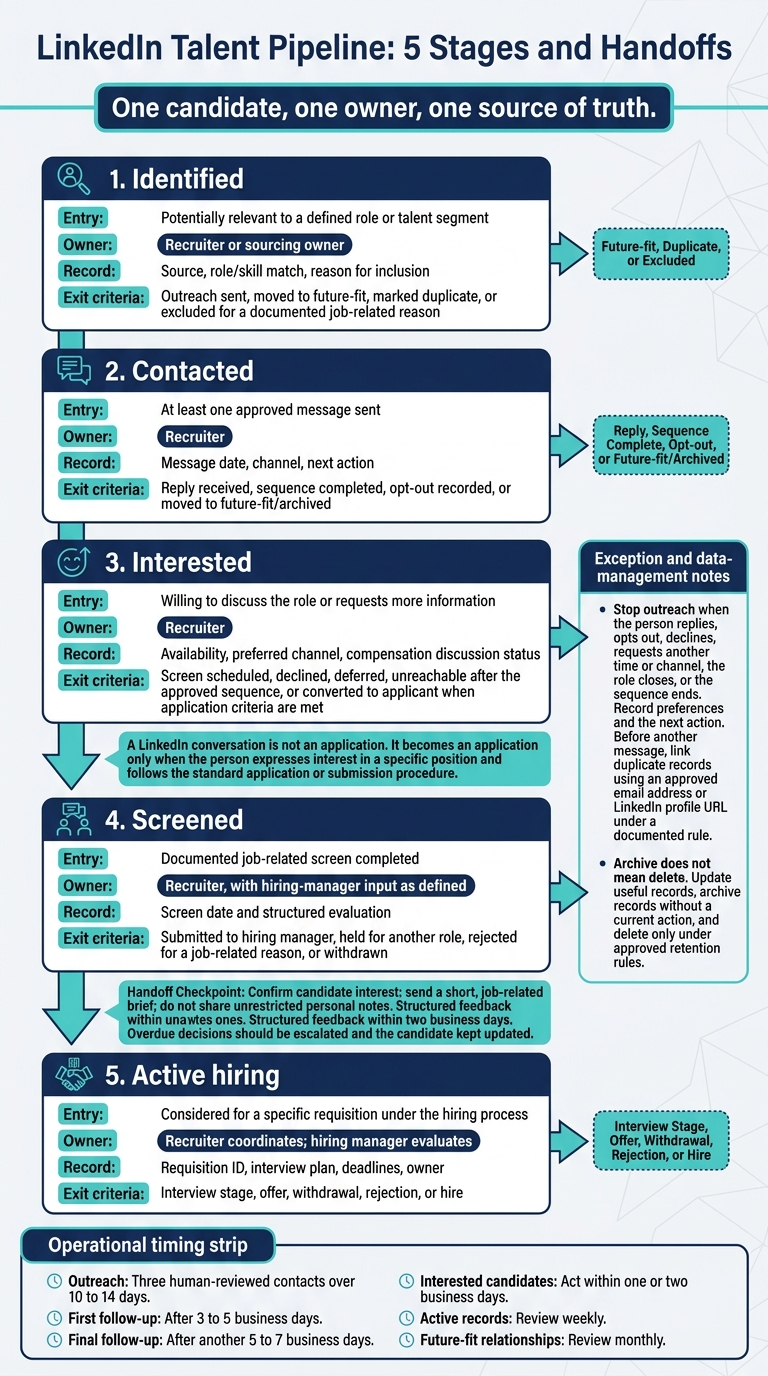
LinkedIn Talent Pipeline: 5 Stages and Handoffs
Once a candidate enters your pool, switch from searching to tracked outreach. Record each contact, response, and next step so your team knows who needs attention.
Personalize Messages and Plan Follow-Ups
Explain why you contacted the person, what the role involves, its location and work arrangement, compensation where appropriate, and the next step.
Hypothetical outreach example: Hi Jordan – your experience leading Kubernetes migrations at a B2B SaaS company stood out. We’re hiring a Senior Platform Engineer to improve reliability for a growing payments platform. The role is based in Austin, TX, with a hybrid schedule of two days per week in the office; the expected base salary is $155,000–$180,000 plus bonus and equity. Would you be open to a brief conversation about the team and the work?
Plan three human-reviewed contacts over 10 to 14 days: the initial message, a first follow-up after 3 to 5 business days, and a final follow-up after another 5 to 7 business days. LinkedIn reports that 90% of InMail responses arrive within one week.[18]
Stop the sequence when the person replies, opts out, declines, requests another time or channel, the role closes, or the sequence ends. Record their preferences and the next action to avoid wasted effort or unwanted contact.
| Relationship classification | Engagement approach | Follow-up trigger |
|---|---|---|
| Active | Discuss the role, process, and logistics. | Candidate response, scheduled conversation, interview outcome, requested decision date, or missed deadline |
| Future-fit | Send occasional relevant updates with permission. | Stated availability, suitable opening, requested check-in date, or relevant skills or location change |
| Passive | Send one brief exploratory message. | Reply, relevant profile update, referral, or review based on stated preference |
| Archived | Stop routine outreach and retain only what policy and law require. | Documented business need, current information check, and permissible contact basis |
Define Pipeline Stages and Handoffs
A LinkedIn conversation is not an application. It becomes one only when the person expresses interest in a specific position and follows your standard application or submission procedure.[17]
Assign one accountable owner to each record. The recruiter handles sourcing, candidate communication, and process coordination. For growing SMEs, fractional recruitment services can provide this expertise without the overhead of a full-time hire. The hiring manager handles role-specific evaluation and timely feedback.
Move interested candidates to a screen, then confirm their interest before sending the hiring manager a short, job-related brief. Do not share unrestricted personal notes. Require structured feedback within two business days, escalate overdue decisions, and keep the candidate updated.
Before sending another message, link duplicate records using an approved email address or LinkedIn profile URL, following a documented rule.
| Stage | Entry criteria | Owner | Required information | Exit criteria |
|---|---|---|---|---|
| Identified | Potentially relevant to a defined role or talent segment | Recruiter or sourcing owner | Source, role/skill match, reason for inclusion | Outreach sent, moved to future-fit, marked duplicate, or excluded for a documented job-related reason |
| Contacted | At least one approved message sent | Recruiter | Message date, channel, next action | Reply received, sequence completed, opt-out recorded, or moved to future-fit/archived |
| Interested | Willing to discuss the role or requests more information | Recruiter | Availability, preferred channel, compensation discussion status | Screen scheduled, declined, deferred, unreachable after the approved sequence, or converted to applicant when application criteria are met |
| Screened | Documented job-related screen completed | Recruiter, with hiring-manager input as defined | Screen date and structured evaluation | Submitted to hiring manager, held for another role, rejected for a job-related reason, or withdrawn |
| Active hiring | Considered for a specific requisition under the hiring process | Recruiter coordinates; hiring manager evaluates | Requisition ID, interview plan, deadlines, owner | Interview stage, offer, withdrawal, rejection, or hire |
Review Aging Records and Coverage Gaps
Review active records weekly and future-fit relationships monthly. Use an exception report, rather than checking every profile, to focus your team’s time where action is needed.
Flag unanswered messages, missing owners or next actions, overdue feedback, stale records, and gaps in priority skills or locations. Act on interested candidates within one or two business days.
Reconfirm current fit before counting someone as ready for a role. Update useful records, archive those without a current action, and delete records only under approved retention rules. Archive does not mean delete. Keep these status changes reflected in hiring reports so decisions use current data.
Protect Candidate Data and Apply Job-Related Criteria
Limit the data you collect, use role-based access, and set written retention rules. Apply job-related criteria and obtain legal review for privacy, EEO, pay transparency, and automated assessments.[14][15][16]
Follow LinkedIn’s restrictions on scraping without permission and messaging automation.[13] Keep records clean and apply retention rules consistently so pipeline reporting remains reliable.
Measure Results and Improve Pipeline Performance
Once outreach and stage management are in place, use metrics to check whether your pipeline is moving and where hiring is slowing down.
Track Conversions, Timing, and Hiring Costs
Separate pipeline movement from hiring results. Response speed, time in stage, and conversion rates show movement. Hires, hiring duration, and cost per hire show results.
New LinkedIn ads often generate most applicants within the first 24 hours and have an effective 7-day lifespan.[1]
| Metric | What to watch | Why it matters |
|---|---|---|
| 24-hour applicant volume | Interest immediately after a post goes live | Shows reach. |
| Reply speed | How quickly prospects reply to outreach | Flags slow follow-up or weak messaging. |
| Time in stage | How long candidates stay in each stage | Shows where candidates stall. |
| Conversion rates by source | Which channels move candidates forward | Shows which channels perform. |
| Cost per hire | Recruitment spend per hire | Tracks costs as hiring volume changes. |
| Post-hire attrition by team, manager, tenure, and role | Separate views of where employees leave after hire | Helps distinguish pipeline issues from post-hire issues.[1] |
Review results by role first, then by source where channels have enough volume. Show counts alongside percentages and state the sample size. Use the same cost calculation each month so you can compare trends.
Before spending more on sourcing, use these signals to locate the delays.
Find Bottlenecks and Update Hiring Plans
If candidates stall between stages, check recruiter capacity before increasing sourcing volume.[1] More applicants will not fix a workload bottleneck. If you are unsure where your process is failing, rate your recruitment strategy to identify hidden inefficiencies.
Check for gaps in sourcing, screening, and candidate presentation before adding more effort.[1] If hiring criteria are out of date, update them first, then adjust your searches and outreach. When applicant quality or volume drops, replace ageing LinkedIn ads with updated ads.[1]
Report Hiring Readiness and Set Review Schedules
Turn your bottleneck findings into a simple hiring-readiness dashboard with clear owners and review schedules.
Show progress against coverage targets, response speed, time in stage, attrition patterns, and recruiter workload. Prospect counts alone do not show hiring readiness.
| Cadence | Review owner | Focus and decision |
|---|---|---|
| Daily | Recruiter | Response speed, first-contact timing, and follow-ups |
| Weekly | Recruitment lead and hiring managers | Time in stage, stalled records, and hiring manager feedback loops |
| Monthly | Recruitment lead and finance | Cost per hire trends, conversion rates by source, and recruiter workload |
| Quarterly | People leadership and business leaders | Post-hire attrition, workforce planning, and benchmark checks[1] |
Review checklist: Confirm metric definitions and review windows. Record baseline results and sample sizes. Assign one owner, a deadline, and a success measure to each improvement.
Conclusion: Put Your LinkedIn Pipeline Into Practice
Follow a 30-Day Pipeline Launch Plan
Give sourcing, outreach, and reporting a 30-day launch schedule, with clear owners at each stage.
- Week 1: Confirm priority roles and assign pipeline owners.
- Week 2: Set up LinkedIn tools, access controls, and retention rules.
- Week 3: Launch outreach and define handoffs between recruiters and hiring managers.
- Week 4: Agree on metrics, reporting ownership, and review dates.[1]
If your internal team lacks capacity, add support before the launch slips and hiring timelines suffer.
Add Recruiting Capacity With Rent a Recruiter
Rent a Recruiter places experienced recruiters inside your team to manage hiring end to end through Recruitment as a Service, bringing structure, visibility, and consistency to your process.
This support keeps your pipeline covered during short-term hiring spikes or when continued demand exceeds your internal capacity. Confirm the current service scope and pricing on the website.
FAQs
How many candidates should I pipeline per role?
Aim for 3 to 8 candidates per role, with a 3:1 pipeline-to-hire ratio to give you enough coverage.
Match pipeline depth to hiring priority:
- Mission-critical roles: Keep 10 or more candidates in the pipeline at all times.
- High-impact roles: Maintain 5 to 10 candidates and review the pipeline quarterly.
- Standard roles: Maintain 3 to 5 candidates and review the pipeline twice a year.
If a critical role has fewer than 3 viable candidates, step up sourcing to prevent hiring bottlenecks.
How do I set realistic pipeline conversion targets?
Start with your total hiring goal, then work backward to calculate how many candidates you need to contact, screen, and interview. Use your applicant tracking system to check current conversion rates at each stage, so you can plan recruitment workload against your hiring target.
Industry-standard benchmarks, such as a 15-20% resume-to-interview ratio and an 80-90% offer acceptance rate, can help set expectations. Audit your data regularly and keep stage definitions consistent to avoid skewed targets.
When should I add recruiting capacity?
Add recruiting capacity before a vacancy becomes urgent. If sourcing demand exceeds your team’s bandwidth, timelines slip, outreach stalls, or applications take too long to become a shortlist, bring in embedded recruitment or fractional recruiting support. This keeps pipeline relationships active and hiring moving [1][2].
Build pipelines before you need to hire. Plan for extra support 4 to 12 weeks before a role is approved, allowing more time for senior roles [3][4].