
If your hiring process blocks people at the application, assessment, interview, or onboarding stage, you are shrinking your talent pool and paying more to fill roles.
I’d sum the article up like this: accessible hiring is not just an HR task, it is a process fix that cuts friction across the full hiring funnel. When you tighten job requirements, fix broken application flows, use structured interviews, and prepare onboarding properly, you can improve time-to-hire, cost-per-hire, offer-to-start conversion, and early retention.
A few numbers make the point fast. In 2024, the employment rate for working-age Americans with disabilities was 38%, compared with 75% for people without disabilities. Only 55.6% of job application attempts were completed, and 76.7% of sites tested had serious barriers for at least one user. That is not a talent shortage. It is a process problem.
Here’s the short version of what you need to do:
- Audit role requirements so old filters do not remove good people before screening starts
- Write plain job ads with clear duties, working hours, pay ranges, and a visible accommodation contact
- Fix careers pages and ATS flows so forms work with keyboards, screen readers, and common file types
- Run structured interviews with the same core questions, scorecards, and clear pre-interview information
- Set up onboarding before day one with accessible documents, captioned training, and equipment ready to go
- Track funnel data like pass-through rates, offer-to-start conversion, first-30-day attrition, and accommodation turnaround time
The commercial point is simple: when you remove avoidable hiring friction, you get a process that is easier to run, easier to measure, and less likely to lose qualified people for the wrong reasons.
If you need help putting that into practice, Rent a Recruiter can support your team with a more structured hiring process across sourcing, interviews, and onboarding.
Below, I break down where most barriers show up, what to fix first, and how to turn accessible hiring into a process your team can repeat as you grow.
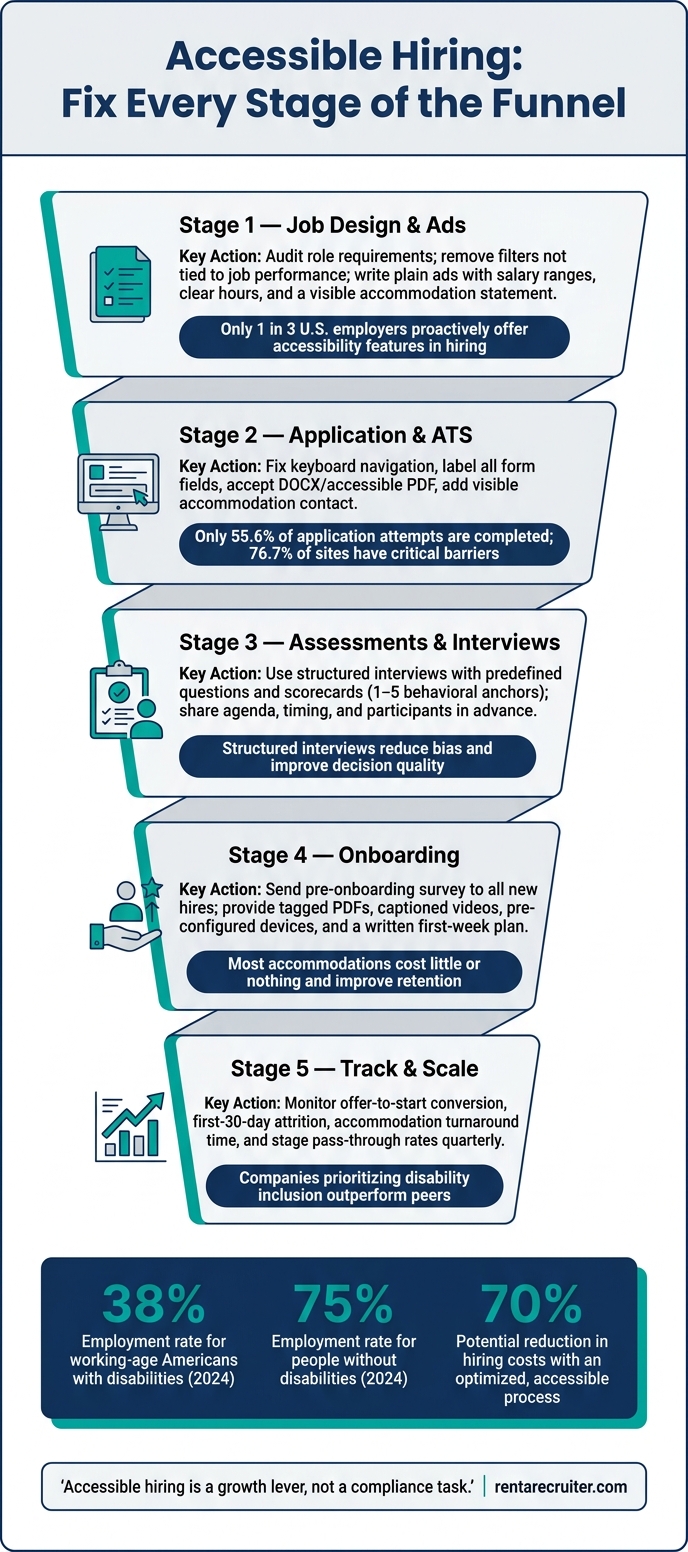
Accessible Hiring Funnel: Fix Every Stage to Win More Talent
Build accessibility into job design and job ads
Define job requirements without screening out qualified candidates
A lot of hiring friction starts before anyone applies. It starts in the role design.
When job requirements reflect habit instead of business need, you screen out people who could do the job well. At scale, that means a smaller talent pool, slower screening, and more wasted time for hiring teams. A blanket degree filter, a fuzzy travel requirement, or a physical demand copied from an old job description can remove strong applicants before you ever see them.
A simple fix is a requirements audit before the role goes live. Review each criterion and ask: if this were removed or changed, would job performance suffer in a meaningful way?
Some requirements will stay. A CPA license for a senior accounting role is a clear example. Others may not hold up. A bachelor’s degree in business for a customer success role often does not, especially if someone can show the same level of skill through experience. Under the ADA, employers are required to separate essential job functions from marginal ones, and that’s the right place to start when shaping any role.[1]
Travel and communication requirements often cause trouble here.
Vague travel language creates doubt and can put off qualified people. Spell it out instead: travel is typically 1–2 trips per quarter; virtual meetings are used whenever possible. That gives candidates a plain picture of the job and helps your team assess fit with less back-and-forth.
The same goes for communication. “Excellent communication skills” sounds fine on paper, but it’s subjective. One interviewer may read it one way, another may read it differently. A better version names the actual work: communicate clearly with customers by email and chat, and work with internal teams through written documentation and occasional video calls. Now both candidates and interviewers have something concrete to judge.
Clear role requirements set the baseline. After that, the application itself needs to be just as usable.
Write job ads and accommodation statements that are clear and usable
Clear, specific job ads tend to bring in better-fit applicants and shorten screening time.
In the U.S., a strong job ad should spell out what success looks like in the role. That means outcome-based responsibilities, such as resolving customer tickets within agreed response times, not fluffy language that sounds good but says little. It should also separate must-haves from nice-to-haves, show work location and hours in a familiar U.S. format, such as Monday–Friday, 9:00 a.m.–5:00 p.m. Eastern Time, and include a salary range in U.S. dollars, such as $85,000–$105,000 per year, where possible.
Formatting matters too. Headings, bullet points, and clear contrast make the ad easier to read and easier to act on.
Here’s where job ads often go off track, and what works better instead:
| Problematic Practice | Accessible Alternative |
|---|---|
| Rockstar developer who lives and breathes code, always on-call | Software engineer to build and maintain core product features; rotating on-call schedule with documented procedures |
| Must have excellent communication skills | Communicate clearly in written and spoken English with customers and teammates; we support different communication styles and assistive technologies |
| Bachelor’s degree required (for skill-demonstrable roles) | We welcome different educational and career backgrounds; show us examples of your work and explain your problem-solving process |
| Must be able to travel 50% of the time | Travel is typically 1–2 trips per quarter; virtual meetings are used whenever possible; open to discussing alternative arrangements |
Every job ad should also include a visible accommodation statement.
This matters more than many teams think. Less than one-third of surveyed U.S. employers offer accessibility features such as providing interview questions ahead of time, offering alternative interview formats, or including accommodations by default.[2] If that support is missing, qualified candidates may drop out early, not because they lack the skill, but because the process feels closed off.
A short line near the application instructions can make a clear difference:
If you need assistance or an accommodation during the application or interview process, please contact [email].
Put it somewhere easy to find. Don’t bury it in fine print. That small change signals that your hiring process is open, usable, and set up to remove avoidable friction.
Once the role and ad stop filtering people out for the wrong reasons, the same standard needs to carry through the application, assessment, and interview stages.
sbb-itb-a23bd6a
Make applications, assessments, and interviews accessible
Fix application flow barriers that slow down qualified applicants
Only 55.6% of application attempts were completed, and 76.7% of sites had critical issues that blocked at least one tester.[5][10] That points to a process problem, not a talent problem. In many cases, the friction sits inside career pages and ATS workflows, which can be resolved by integrating an embedded recruitment service into your team.
The issues show up in familiar places: forms that fail with screen readers, buttons and fields with no labels, weak keyboard navigation, and file upload steps that reject accessible formats.[5] A simple first check goes a long way. Try to complete your own application using only a keyboard, with no mouse. If your team gets stuck, part of your applicant pool will too.
You should also check whether form fields have clear labels, whether error messages are specific and readable by assistive technology, and whether time limits can be extended or switched off. If your online application is the main route into your hiring process, it needs to be accessible. If it is not, you need a working alternative. Use WCAG 2.1/2.2 AA as the benchmark.[14][15]
Here’s how accessible and inaccessible application features compare in practice:
| Application Feature | Inaccessible Version | Accessible Version | Impact |
|---|---|---|---|
| Keyboard navigation | Mouse-only controls, keyboard focus gets trapped in pop-ups | Full keyboard support, logical tab order, visible focus states | Reduces abandonment from assistive tech users; lowers ADA risk |
| Form fields and labels | Unlabeled inputs, vague or missing error messages | Clearly labeled fields, programmatic error messages tied to each field | Improves completion rates and data quality |
| File uploads | Proprietary formats only, multi-step upload flows | Accepts DOCX, accessible PDF, or plain text; simple upload interaction | Prevents failure late in the flow; reduces manual workarounds |
| Accommodation contact | No guidance, or buried in fine print | Visible support contact for application and interview accommodations | Increases trust; reduces drop-off from candidates who need adjustments |
| Time limits and accounts | Forced account creation, strict session timeouts | Optional accounts; extendable or removable time limits | Reduces frustration-driven abandonment; widens applicant pool |
Use the same bar for assessments and interviews.
Run assessments and interviews with consistent formats and scorecards
The same accessibility rules that apply to your career site also apply to assessments and interviews. If a skills test does not work with a screen reader, or an interview is booked with no agenda, you are not measuring candidates fairly. You are measuring how well they can work around a weak process.
Once the application flow is fixed, the next pressure points are test format and interview structure.
For online assessments, make sure tests work with keyboard navigation and assistive technology, accept text-based responses where possible, and do not depend on speed or sensory input unless those are directly tied to the role.[16][17][18] State any accommodation options in the assessment instructions.[9]
For interviews, use structured interviews.[8][12] That means asking the same core questions to every candidate and scoring answers against predefined criteria using a scorecard. Share the format in advance, including the date and time in clear U.S. format, who will be present, what topics will be covered, and what tools or documents should be ready.[8][9] That simple step cuts confusion, lowers no-show risk, and helps candidates who need captioning, breaks, or other communication adjustments.
Scorecards are what turn interview feedback into hiring data. A strong scorecard lists role-specific competencies, uses behavioral anchors for each rating level, for example, 1 = insufficient evidence, 3 = solid, 5 = expert, and leaves space for notes tied to specific observations rather than general impressions.[4][6][7][11] Just as important, interviewers should submit scores before group discussion so the first loud opinion does not shape the rest of the panel’s view.[3][4][6][11]
| Interview Practice | Standard Approach | Accessible, Structured Approach | Impact |
|---|---|---|---|
| Interview format | Variable questions per candidate, unstructured | Predefined questions aligned to competencies for all candidates | Improves fairness, reduces bias, strengthens defensibility |
| Pre-interview communication | Minimal details, last-minute scheduling | Clear agenda, timing, participants, and topic areas shared in advance | Lowers anxiety and missed interviews; supports candidates needing accommodations |
| Accommodations | Reactive, undocumented, handled case by case | Proactive offer with a simple request mechanism and documented process | Reduces ADA legal risk; expands access to qualified candidates |
| Evaluation method | Open discussion, gut feel | Scorecards with behavioral anchors; scores recorded before group discussion | Reduces bias; improves decision quality; creates auditable data |
| Pass-through tracking | No systematic monitoring | Regular review of stage-by-stage pass-through rates | Detects adverse impact early; supports fair and consistent decisions |
For SMEs, these are process choices that improve hiring data, cut legal risk, and remove friction that quietly screens out people who could perform well in the role.[8][12][13]
Carry these same formats and scorecards into onboarding handoffs.
Interview & Hiring Process Accommodations
Extend accessibility into onboarding and day-to-day hiring operations
That structure needs to carry on after the offer. This is where onboarding either holds up or breaks down in practice.
For many new hires with disabilities or other access needs, the friction starts on day one. They hit inaccessible documents, training videos without captions, or equipment that was never set up properly. Those gaps create avoidable first-week attrition, and that costs you time, money, and momentum.
Build onboarding processes that support different access needs from day one
The fix starts before day one.
Once an offer is accepted, HR should send a confidential pre-onboarding survey to every new hire, not only to people who disclose a disability. Ask whether they need any workplace adjustments. That small shift matters. It removes the pressure of having to speak up first, and it gives IT and facilities time to prepare assistive technology, ergonomic equipment, and accessible workspaces before the employee starts.
Documentation is often the next weak point. Employment contracts, benefits guides, and policy handbooks should be shared as tagged PDFs or accessible HTML, with clear headings, alt text, and plain language summaries. Scanned documents and image-based PDFs do not work with screen readers, so they create a barrier straight away. Training content needs the same care. Caption all videos, provide transcripts, and use a WCAG 2.1 AA-compliant LMS.
A structured first-week plan also makes a big difference. Share it in writing a few days before the start date. For neurodivergent employees and others who work best with predictable schedules, this reduces uncertainty early on. The plan should include a day-by-day schedule, clear objectives, check-in times, and time set aside for assistive technology setup. Less ambiguity in week one means lower stress and a shorter path to productivity.
Accommodations are often low-cost and frequently improve retention and productivity.[19][20]
The fastest way to cut onboarding friction is to standardize the most common failure points.
| Onboarding Barrier | Accessible Alternative | Effect on Ramp Time and Retention |
|---|---|---|
| Inaccessible training materials (scanned PDFs, uncaptioned video) | Tagged PDFs or accessible HTML with headings and alt text; closed captions, transcripts, and adjustable playback speeds on all recorded content | Reduces confusion on day one; supports screen reader users, deaf and hard-of-hearing employees, and improves comprehension for all learners |
| Standard laptop with no assistive tech | Pre-configured devices with screen readers, speech-to-text, or high-contrast settings based on pre-onboarding survey | Eliminates downtime waiting for equipment; enables contribution from day one |
| Unstructured first week | Written day-by-day agenda with objectives, check-in times, and flexibility for accommodation-related appointments | Reduces overwhelm for neurodivergent employees; shortens time to productivity |
| Verbal-only manager handoff | Standardized handoff template documenting agreed accommodations, preferred communication formats, and review dates | Prevents accommodations from being lost during transitions; reduces ADA risk |
You also need a named accommodations contact. Every new hire should know exactly who to go to if they need an adjustment. That should be a named HR or People Operations contact, listed in the offer letter and in the onboarding portal. Without that, requests drift, managers handle them differently, and employees can disengage before they have a fair shot at doing the job well.
Standardize accessible hiring as you scale
What works in one team can fall apart when hiring spreads across functions.
The answer is to make accessibility a repeatable, documented process inside your existing workflow. That includes accessible job ad review before posting, accommodation discussion before offer, pre-start equipment confirmation, and training format checks before onboarding begins. Checklists tied to clear owners, recruiter, HR, IT, and hiring manager, make accountability plain and cut the risk of steps being missed when hiring picks up.
Recruiters and hiring managers should be trained on the same process. Recruiters need to handle accommodation conversations with confidence across the funnel. Hiring managers need to know how to run accessible interviews, use scorecards in a consistent way, and carry accommodation agreements into day-to-day team practice. Quarterly funnel reviews should track offer-to-start conversion, first-30-day attrition, and accommodation turnaround time. That gives you a clear view of where new hires are dropping out, and why. It turns accessible onboarding into an operating process, not a one-off HR task.
If your team does not have the bandwidth to put this into practice, outside support can help keep the process consistent. Rent a Recruiter offers an embedded model that places experienced recruiters inside your team to help design accessible job ads, standardize interview formats, document accommodation workflows, and coordinate onboarding handoffs end-to-end.
Conclusion: Turn accessible hiring into a scalable growth system
Accessible hiring is a growth lever, not a compliance task. When you build it into job design, applications, interviews, and onboarding, it becomes a system your business can repeat and scale, not a one-off project.
The commercial upside is clear. Companies that put disability inclusion first often outperform their peers, while most accommodations cost little or nothing.[21][22][23] That result comes from removing avoidable friction across the hiring funnel. In plain terms, you make it easier for the right people to get through your process, and that shows up in lower turnover and lower hiring costs.
What matters next is process discipline. Audit job ads, fix the application flow, standardize interviews, collect pre-start accommodation needs, assign one contact, and track time-to-fill, acceptance rate, and first-year retention. Make the process repeatable so accessibility does not depend on one person knowing what to do.
If your team needs help putting that system into practice, outside support can cut the time and lift the load. Rent a Recruiter offers an embedded recruitment model where recruiters join your team and help run accessible hiring with more structure and consistency. Companies typically reduce hiring costs by up to 70% and save over 80 hours per month in internal hiring and admin time.
Book a call to see how embedded recruiting support can help you scale accessible hiring.
FAQs
Where should we start first?
Start by pinpointing the biggest immediate bottleneck in your hiring process, team culture, or hiring data.
A strong first move is to audit your recruitment funnel and see where candidates drop off. Then review your job descriptions for gendered language and requirements that don’t need to be there.
That gives you a clearer view of what’s slowing hiring, where bias may be creeping in, and what to fix first.
If you need to move faster, Rent a Recruiter can assess your current approach and help you build a more structured, bias-resistant hiring process.
How do we measure success?
Measure success with recurring hiring audits backed by data. Start by setting a baseline for your hiring funnel, then track pass-through and conversion rates by demographic group at each stage, from application through to offer.
That gives you a clear view of where drop-off happens, and whether certain groups face extra friction in your process. For hiring leaders, that matters because hidden blockers don’t just create risk, they also slow down hiring and shrink your talent pool.
Use the four-fifths rule to flag possible bias. If a protected group’s selection rate falls below 80% of the highest-performing group, review that stage for barriers.
Don’t stop at the numbers. Pair the data with candidate surveys or stay interviews so you can see what’s happening behind the funnel metrics. Data shows where the issue sits. Direct feedback helps you understand why.
What are the most common hiring barriers?
Common hiring barriers usually come from bias in the process and a lack of consistency.
You see it in small things that add up fast: exclusionary language in job ads, application platforms that are hard to use, and interviews that lean too much on subjective "gut-feel" calls instead of clear scoring.
That creates a business problem, not just a people problem. Good candidates drop out. Hiring slows down. Decision quality slips.
Poor communication and long hiring cycles make things worse. So does failing to provide low-cost accommodations when they’re needed. If your process feels confusing or hard to access, qualified people will often move on before you ever get a fair shot to assess them.
Rent a Recruiter helps reduce these barriers with standardised, skills-based hiring processes and proactive accessibility checks. That gives you a hiring process that is easier to run, easier to measure, and more likely to lead to stronger hiring outcomes.


