
If your temporary team cannot get access, find context, and hand work over cleanly on day one, delivery slows and cost shows up fast.
I’d judge temporary team tools on seven things: integration readiness, central communication, task ownership, shared docs, mobile and async access, security controls, and HR or time-tracking links. Those areas shape ramp-up time, admin load, handoff quality, and offboarding risk. In practice, poor knowledge transfer leads to delays for 58% of teams, while structured onboarding libraries can cut time-to-productivity by 40%.
If you’re hiring as you scale in SaaS, Technology, IT, Fintech, Engineering, Security, Insurance, or Professional Services, this is about more than convenience. It is about protecting delivery, reducing wasted manager time, and keeping contractor access under control.
Here’s the short version:
- Integrations decide how fast people can start
- Central communication cuts missed updates and context loss
- Task management makes ownership and deadlines clear
- Documentation access reduces handoff gaps
- Mobile and async tools keep work moving across time zones
- Security and offboarding reduce access risk
- HR and workforce links cut admin and billing errors
I’d use these seven checks to filter tools fast, then test them against the full lifecycle, from onboarding to offboarding.
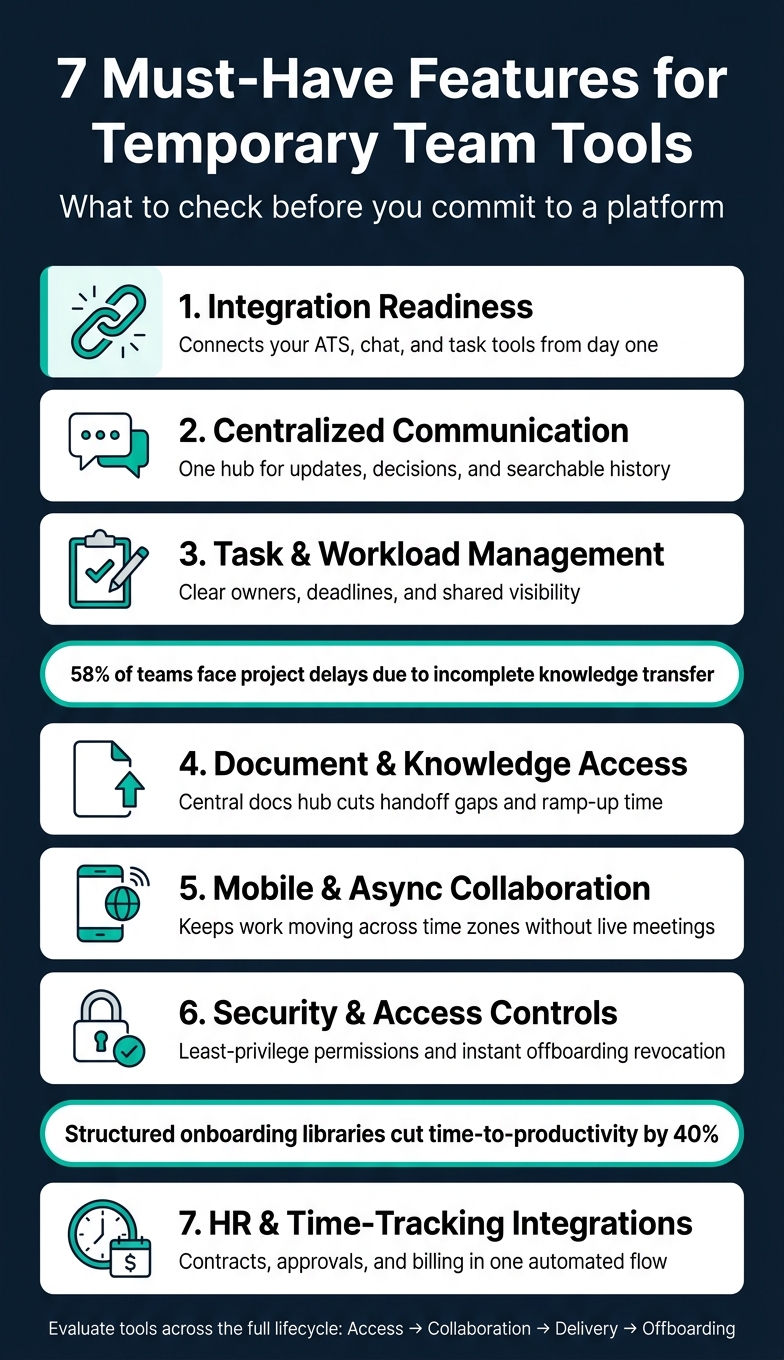
7 Must-Have Features for Temporary Team Tools
10 Best Team Collaboration Tools 2025 Review
sbb-itb-a23bd6a
1. Integration Readiness for Embedded Recruiters
When you bring an embedded recruiter into your team through a service like Rent a Recruiter, your systems need to plug into your ATS, chat, and task tools without friction.
If data sits in separate places, speed drops and visibility suffers. That has a direct cost. Hiring managers spend more time chasing updates, recruiters lose momentum, and pipeline decisions slow down.
For embedded recruitment to work well, your ATS, chat, and task tools need two-way sync. In practice, that means looking closely at onboarding speed, live visibility, and access control.
Onboarding Speed
Fast access matters most when the recruiter needs to contribute from day one. If logins, workflows, and tool access drag on, your hiring plan slows before the work even starts.
Fast onboarding assets help temporary hires become productive sooner, cutting ramp time before it affects delivery [3].
Visibility and Accountability
Real-time updates in chat and task tools keep hiring managers aligned without extra status meetings. That saves time and keeps decisions moving.
It also keeps pipeline progress visible without people having to chase updates manually [1].
Access Control and Compliance
Once work starts, access control is your last line of protection. Your tools should support role-based access and immediate revocation when the engagement ends [2].
That cuts the risk of inactive accounts staying live after offboarding. It also gives you tighter control over hiring data, internal systems, and team workflows.
2. Centralized Communication and Messaging
When a temporary team comes together fast, scattered communication slows things down almost at once. If team members are in one tool, managers are in another, and coordinators are somewhere else, you get delays, missing context, and handoff issues from day one.
A central hub keeps updates in one place and cuts down on context switching. Tools like Slack can serve as that shared hub for distributed teams, pulling in alerts from the tools your team already uses so temporary staff see the updates that matter without bouncing between apps [1].
Temporary-Team Coordination
A central hub with searchable message history keeps decisions visible after a contractor leaves. Decision logs, threads, and project context stay accessible, which cuts down on the knowledge gaps that slow handoffs and disrupt delivery [4].
Onboarding Speed
A ready-to-use communication stack stops split comms before they start and helps new hires contribute fast. Short recorded walkthroughs let contractors get up to speed without waiting around for live meetings [1].
Visibility and Accountability
Automated workflow features such as daily standups and status updates keep everyone aligned without manual check-ins [1]. When updates are visible in one place, it becomes much easier to assign work, track progress, and see where follow-up is needed.
Once communication is centralised, the next step is turning that visibility into clear task ownership.
3. Task, Project, and Workload Management
Once communication is in one place, the next step is simple: turn it into assigned work with clear owners and deadlines.
If you skip that step, temp teams drift fast. Work gets discussed, but not assigned. Deadlines sit in chat. People assume someone else is handling it. Before long, you’re dealing with missed handoffs, duplicate work, and delays you could have avoided.
A solid project management tool fixes that. It gives both internal staff and contractors one shared view of work in progress, so everyone can see what needs doing, who owns it, and what’s due next.
Temporary-Team Coordination
Use one task system for employees and contractors. That keeps ownership, deadlines, and progress in the same place, instead of spread across email, chat, and spreadsheets.
Pick a tool that makes task creation fast, keeps ownership visible, and fits your current workflow with little admin. The goal is not more process for the sake of it. The goal is less confusion, fewer follow-ups, and better delivery.
Onboarding Speed
If contractors need days to figure out how work gets assigned, you’ve already lost time.
Use task templates, clear acceptance criteria, and a clear definition of done. That helps temporary staff start work straight away and cuts back-and-forth at the start of an engagement.
Visibility and Accountability
Focus on delivery, not time spent.
Track cycle time, blocked work, and delivery milestones instead of hours logged. That gives you a better read on whether work is moving, where things are getting stuck, and what needs attention before deadlines slip.
Access Control and Compliance
Give temporary staff access only to the projects they need. Review guest access often, and remove it during offboarding.
That keeps project data tighter, lowers risk, and makes access control far easier to manage when teams change from one month to the next.
From there, the next priority is shared files, decision logs, and handoff notes.
4. Document Collaboration, File Sharing, and Knowledge Access
Shared files and documentation keep temporary teams moving. When access is scattered, delivery slows, handoffs get messy, and risk climbs.
Clear ownership is only part of the job. Contractors also need fast access to the documents behind the work. Give them day-one access to the document repository, wiki, and collaboration spaces they need to do the role properly. Supported contractor onboarding can cut onboarding and training costs by up to 38% [4].
Temporary-Team Coordination
Once work is assigned, knowledge access often becomes the next bottleneck. If people are digging through Slack threads, email chains, and old folders, work stalls.
Use one central documentation hub so contractors know exactly where to find current project files, key decisions, and handoff notes. That cuts wasted time and helps work move without constant manager input.
Onboarding Speed
Standardised documentation helps new contractors get productive faster, especially when using recruitment on demand to scale teams quickly. Instead of spending days asking where things live, they can start with a clear map of the tools, files, and working notes they need.
It also helps to pair each contractor with an internal guide for the first two weeks. That person can show them where files sit, how docs are structured, and which sources are current. Small step, big payoff.
Visibility and Accountability
Ask contractors to update shared docs throughout the engagement, not just at the end. If project knowledge only gets written down during offboarding, you’re already behind.
This matters more than many teams think. Up to 58% of teams face project delays because knowledge transfer is incomplete [4]. Regular documentation protects continuity, makes progress easier to track, and lowers the risk of losing context when a contract ends.
Access Control and Compliance
Access should be tight and role-based. Give contractors access only to the folders, pages, and systems they need. Use MFA. Revoke access automatically when the contract ends.
That keeps your documentation usable without opening up avoidable compliance or security issues.
With docs in place, the next priority is mobile and async access.
5. Mobile Access and Async Collaboration
Once files are easy to find, your contractors still need to get work done from anywhere, without sitting around waiting for live meetings. Temp workers often span time zones, so your setup needs to support fast async handoffs. If people can only move work forward when everyone is online at once, delays pile up fast.
Mobile and async tools keep work moving when schedules don’t line up.
Temporary-Team Coordination
Async tools remove the need for everyone to be available at the same time. Instead of leaning on live calls across time zones to review work or pass over tasks, use short recorded walkthroughs and task tools that surface project updates and alerts automatically. That way, contractors can catch up on their own schedule [1].
For scaling teams, this isn’t just a convenience. It cuts wasted time, trims meeting load, and helps work move without bottlenecks.
Onboarding Speed
Mobile access matters most in the first few days. If a contractor can’t get into the right tools from a phone or laptop on day one, you lose productive time straight away.
Avoid tools that need long provisioning cycles or desktop-only setup. The easier it is to log in and start, the faster a new contractor can contribute.
Visibility and Accountability
Async collaboration works best when progress is visible without a live check-in. Completion tracking can show whether a briefing video has been watched, and written updates in a centralised task tool create a time-stamped record managers can review at any point [1].
That gives leaders clear accountability without breaking the contractor’s flow. You get visibility into progress, and the contractor gets space to work.
Access Control and Compliance
Enforce MFA on every mobile login, use company-managed accounts, and revoke access straight away at offboarding.
That makes mobile access a security decision as much as a productivity one.
6. Security, Compliance, and Temporary Access Controls
Mobile access only works when permissions, provisioning, and offboarding are locked down.
Short-term contractors bring risk at both ends of the engagement. You need tight access at the start, and you need it removed the moment the contract ends. For scaling teams, this isn’t a nice-to-have. It’s one of the main things to check in any tool you use for temporary workers.
Once contractors are inside your internal systems, security stops being optional.
Least-Privilege Access
Use least-privilege access. Give contractors access only to the systems and data they need to do the job. That means granular permissions across pages, tasks, and files.
This cuts avoidable exposure and helps you stay in control if scope changes mid-project.
Onboarding Speed
Use SSO to provision and revoke contractor access across tools from one dashboard.
That saves time for IT and HR, but it also lowers risk. If your team is hiring fast without alignment or managing several contractors at once, manual setup creates gaps. One dashboard means fewer missed steps.
Visibility and Accountability
Audit logs, version history, and issue tracking give you a clear record of access and changes for compliance and incident review.
If something goes wrong, you need to know who accessed what, what changed, and when. Without that trail, reviews take longer and risk costs more.
Access Control and Compliance
Revoke access immediately at contract end and run a standard offboarding check for shared links, guest accounts, and leftover permissions.
This is where many teams slip. A contract may end on paper, but access often lingers across shared drives, project tools, and guest logins. That gap creates risk you don’t need.
Use the table below to compare the security features that matter most.
| Security Feature | Why It Matters for Temp Teams |
|---|---|
| SSO Integration | Provision and revoke access from one place |
| Least-Privilege Permissions | Limit exposure to required systems and data |
| Audit Logs | Track access and changes |
| Instant Access Revocation | Remove access the moment work ends |
| Automated Offboarding | Catch leftover accounts and links |
7. HR, Time-Tracking, and Workforce Management Integrations
Once communication, tasks, and access are set up, the last piece is workforce admin. This is where HR and workforce integrations earn their keep.
They bring contracts, time, payroll, and offboarding into one flow. For scaling teams, that means less admin, fewer delays, and tighter control.
Temporary-Team Coordination
When contractors split time across different projects, disconnected systems create noise fast. You end up chasing updates, checking hours in one tool, and project status in another.
Connected HR and time data fix that. You can see capacity, logged hours, and approvals in one place. When time-tracking also connects with task data, managers get a clear view of progress without constant check-ins.
That matters for temporary teams because you can spot workload issues early and keep delivery moving.
Onboarding Speed
Slow onboarding costs time from day one. If contracts sit in one system, approvals in another, and access requests happen by email, work stalls before it starts.
Automated workflows move contractors from signed contract to active work with less manual admin. When contracts, approvals, and access all sit in one workflow, people can start on day one without the usual back-and-forth.
For hiring leaders, the upside is simple: faster ramp-up and less time lost to process gaps.
Visibility and Accountability
When time approvals link to project tracking, you get a built-in accountability trail. Managers can see what was worked on, what shipped, and what is still open.
That gives you oversight without leaning on invasive monitoring. It also makes end-of-engagement handoffs cleaner, because the work history, approvals, and open items are already documented.
In practice, that means fewer surprises, cleaner billing, and better control over delivery.
Access Control and Compliance
Offboarding is where weak processes often show up. If a contract ends but access stays live, you create risk straight away.
HR automation should trigger deactivation and final approvals as soon as the engagement ends. That keeps offboarding consistent and stops permissions from lingering after work is done.
For teams in SaaS, Fintech, Security, and Professional Services, that kind of control is not just useful. It’s expected.
Use these integration types to compare tools quickly.
| Integration Type | What It Handles | Why It Matters |
|---|---|---|
| HR System | Contracts, tax forms, onboarding workflows | Reduces manual admin |
| Time-Tracking | Hours logged, approvals, billing | Keeps payroll accurate |
| Project Management | Task progress, workload visibility | Shows progress in real time |
| Automated Offboarding | Account deactivation, access removal | Closes access immediately |
Feature Comparison Tables to Guide Your Evaluation
Compare features, not products, if you want to narrow your shortlist faster. The goal is simple: find the setup that helps temporary teams get to work fast, keeps access under control, and doesn’t bury your team in admin.
Start with the tool behavior that has the biggest day-to-day impact. For temporary teams, that usually comes down to three things: onboarding speed, access control, and admin load.
Project Management Views
Different views suit different types of work. Pick the wrong one, and friction shows up on day one.
| View Type | Onboarding Speed | Task Visibility | Admin Effort | Best For |
|---|---|---|---|---|
| List | High | Low (task-level) | Low | Rapid issue logging and personal task management |
| Board (Kanban) | Medium | High (status-level) | Medium | Sprint tracking and identifying workflow bottlenecks |
| Timeline/Roadmap | Low | High (deadlines) | High | Strategic planning and cross-team alignment |
| Calendar | High | Medium (time-based) | Low | Tracking milestones and deadline-based work |
If your team needs fast adoption, lists are usually the easiest starting point. If you need clearer workflow visibility across a temp team, boards tend to work better.
Permission Models
The way you grant access affects both security and speed. Get this wrong, and you either slow people down or leave risk behind after they leave.
Next, compare how each permission model affects access and offboarding.
| Permission Model | Onboarding Speed | Access Control | Admin Overhead | Best For |
|---|---|---|---|---|
| Open access | Instant | Very Low | Minimal | Early-stage startups (1–5 people) |
| Role-Based (RBAC) | Fast | High | Medium | Growing teams with distinct functions |
| Least-Privilege | Moderate | Very High | High | Enterprise/regulated industries |
| Guest/External Access | Slow | High | High | Short-term contractors and agencies |
This is where trade-offs get real. Open access is fast, but risky. Least-privilege gives tighter control, but adds more admin. For most temporary teams, the best fit is the model that gives people access fast without leaving permissions behind at offboarding.
Documentation Workflows
The way your team stores and shares knowledge has a direct effect on ramp-up time, handoffs, and what walks out the door when contractors leave.
| Workflow Type | Handoff Efficiency | Training Time Impact | Fewer Handoff Errors | Admin/Security Overhead |
|---|---|---|---|---|
| Shared Folders | Low | High | Low | High (manual permissions) |
| Live Docs (Notion/Google) | High | Medium | Medium | Medium (needs governance) |
| Searchable Knowledge Bases | Very High | Low | High | Low (structured access) |
| Async Video (Loom) | High | Low | Medium | Low (but requires privacy review) |
In most cases, searchable knowledge bases beat shared folders for temporary teams. They’re easier to use, easier to search, and less likely to create messy handoffs. Structured onboarding libraries can also cut time-to-productivity by 40% [3].
Use these trade-offs to tighten your shortlist before you move to the final checklist.
A Practical Checklist for Choosing the Right Tool
Once you’ve got a shortlist, this is where the sales pitch needs to meet day-to-day reality.
Test the tool against three things: day-one access, daily coordination, and clean offboarding. That’s usually where the gap shows up between what a vendor says and what your team will deal with every week.
Use the demo to test the full temporary-team lifecycle: access, collaboration, delivery, and offboarding.
Before you book a demo, get clear on your hiring budget. A lot of the features temporary teams rely on most, like SAML SSO, compliance exports, and data residency controls, often sit behind higher-tier plans. If AI add-ons, compliance features, or data residency come with extra fees, factor those into your budget before the call.
Focus on the workflows your temporary team will use on day one. That’s what will affect rollout speed, admin time, and risk from the start.
The table below covers the core areas to check in every demo. Use it as your shortlist filter.
| Category | What to Verify in the Demo | Why It Matters for U.S. Teams |
|---|---|---|
| Security | Does it support SAML SSO and MFA? | Required for regulated teams |
| Access Control | Can you set least-privilege permissions per role? | Protects sensitive data shared with external staff |
| Offboarding | Can you revoke all access instantly from one centralized dashboard? | Protects IP at offboarding |
| Communication | Does it integrate with Slack or Microsoft Teams? | Keeps communication in one place |
| Task Management | Does it support Agile/Scrum boards out of the box? | Supports fast task tracking |
| Documentation | Is there a built-in wiki or searchable knowledge base? | Reduces handoff delays |
| Mobile | Is the mobile app fully featured, not just a viewer? | Supports async work |
| Audit Logs | Does it provide compliance exports or detailed activity logs? | Needed for audits and incident reviews |
| Seat Flexibility | Can you scale seats up or down monthly? | Supports monthly seat changes |
One thing worth asking the vendor to show live: instant contractor offboarding from the admin dashboard.
If they can’t show that cleanly in the demo, don’t assume it will be simple later.
Conclusion
After looking at communication, tasks, documentation, security, and integrations, the decision comes back to lifecycle control.
The right tool for a temporary team helps contractors get productive from day one, without opening security gaps or creating admin mess when they leave.
Ramp-up time, context retention, accountability, and clean offboarding should shape every feature decision. If a tool takes weeks to set up, it slows delivery before the work even starts.
Poor knowledge transfer slows handoffs. That’s why documentation needs to sit inside the workflow, not outside it. And if hiring sits inside that workflow too, your stack should support it without piling on extra admin.
If hiring is part of the picture, Rent a Recruiter places experienced recruiters directly into your team within days, helping you speed up ramp-up and make handoffs cleaner. Choose tools that support the full lifecycle: access, collaboration, delivery, and offboarding.
FAQs
What is the most important feature for day-one ramp-up?
The most important feature is minimal onboarding friction.
For temporary teams, that means training people on what they need right now: core safety protocols, key equipment, and task-specific instructions. Nothing extra. No bloated induction process that slows down time to productivity.
A dedicated mentor can help new hires settle in faster. So can a welcome packet with the tools, access details, and company information they need on day one.
The business impact is simple: less ramp time, fewer mistakes, and faster contribution from new hires.
How can I test offboarding before choosing a tool?
Don’t rely on a polished sales demo. Run a 30 to 60-day pilot on a live requisition using your actual candidate data and workflows.
Use a scorecard to track speed, accuracy, and team adoption. If basic tasks feel awkward or need too many clicks, adoption will likely fail. That turns into lost time, slower hiring, and money spent on a tool your team won’t use.
Testing with your own data also helps surface integration gaps and workflow friction before full deployment. It’s a simple way to spot problems early, when they’re still cheaper and easier to fix.
Which tools help temporary teams work across time zones?
Prioritize tools that support asynchronous collaboration and central project tracking, so work keeps moving without calendar friction.
A simple setup often works best:
- Loom for updates, walkthroughs, or demos
- Linear or Jira for project and sprint visibility
- Slack or Microsoft Teams for day-to-day communication
- Notion for shared documentation and briefs
This matters more than teams expect. When updates live in one place and progress is easy to see, you cut back on meeting overload, reduce delays, and keep delivery on track.


