
A poor recruitment CRM decision slows hiring, adds admin, and drives up cost. If you are scaling in SaaS, IT, fintech, engineering, security, insurance, or professional services, the right system should help you cut time-to-fill, reduce recruiter workload, and keep hiring data under control.
Here is the short version.
A recruitment CRM is not just an ATS with extra fields. It should help you:
- build talent pools you can reuse
- run email, SMS, and sourcing follow-up from one system
- track pipeline blockers before roles stall
- report on time-to-fill, source performance, and cost-per-hire
- sync cleanly with your ATS, email, calendar, and sourcing tools
The commercial test is simple. If the platform cannot support search, automation, reporting, and integrations at the same time, your team will spend more hours on manual work and lose control as hiring volume grows.
A few numbers make that clear:
- 47% of HR teams regret their software choice within 12 months
- CRM workflows can reduce time-to-fill by 25% to 40%
- AI-led workflow support can cut admin by 40% to 60%
- Mobile-first apply flows can lift completion rates by 34%
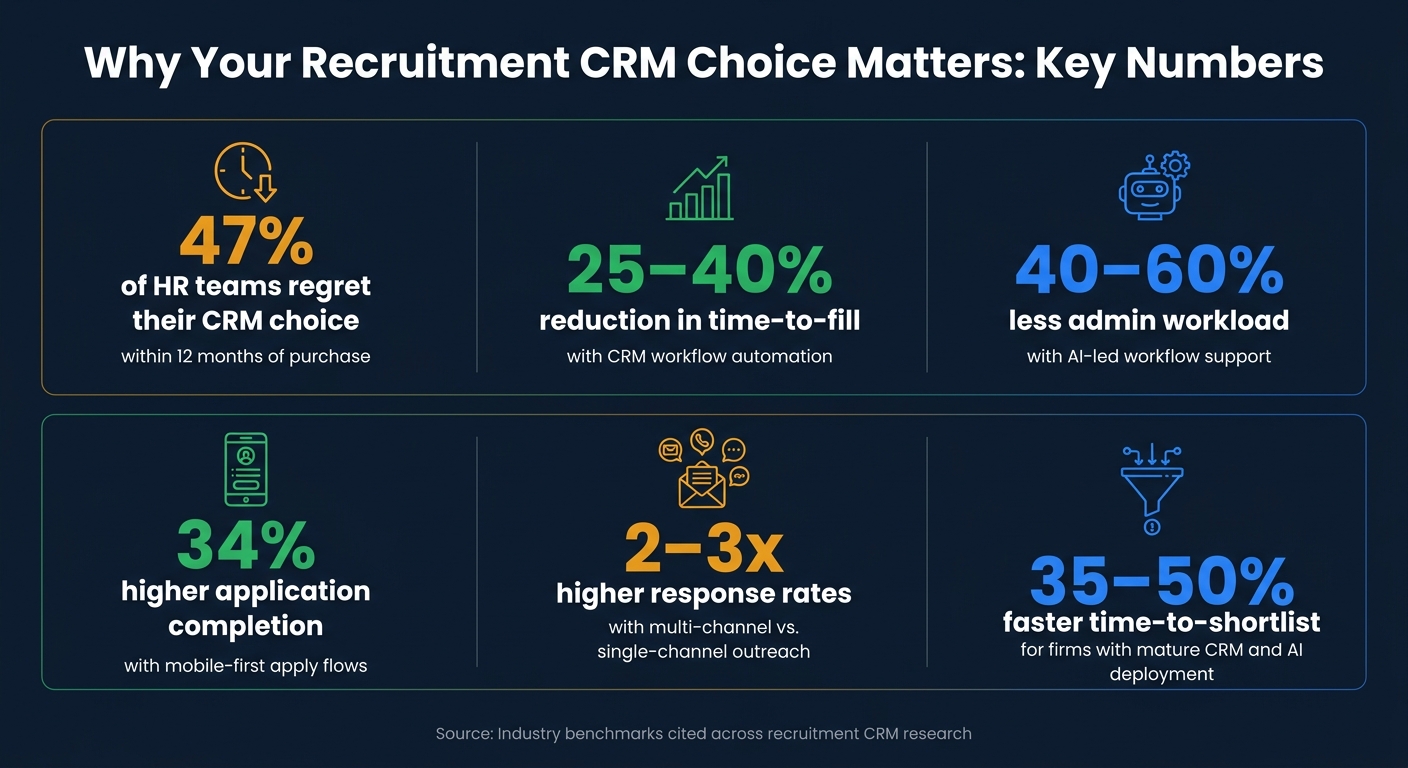
Recruitment CRM: Key Stats That Make the Business Case
RecruitCRM Deep Dive: ATS Features That Actually Convert Placements
sbb-itb-a23bd6a
Quick comparison
| Area | What you need to check | Business impact |
|---|---|---|
| Candidate data | Single candidate record, resume parsing, deduplication, searchable history | Less repeat work, better reuse of past applicants |
| Search and pools | Semantic search, Boolean filters, dynamic talent pools | Shorter sourcing cycles, better shortlist speed |
| Outreach | Email, SMS, automated sequences, templates, response tracking | More replies, fewer manual follow-ups |
| Pipeline | Kanban view, time-in-stage, alerts, shared notes, scheduling | Better team visibility, less delay between stages |
| Reporting | Time-to-fill, source ROI, cost-per-hire, conversion rates, capacity view | Better budget control and headcount planning |
| Integrations | ATS sync, Gmail/Outlook sync, API access, sourcing tool links, exports | Lower admin, cleaner data, lower switching risk |
If you are reviewing platforms now, use this checklist to sort must-haves from gaps and tie each feature back to one outcome: lower hiring cost, less recruiter admin, or faster hiring delivery.
Checklist Section 1: Candidate Data, Search, and Talent Pool Management
Start with the data layer. If your records are messy or hard to search, every CRM feature that sits on top gets weaker. When the data layer is clean and structured, search works better, talent pools stay usable, and your team spends less time fixing admin.
Must-Have Database and Profile Features
A resume and phone number won’t cut it. You need multi-year candidate records, records that stay with a person across more than one hiring cycle, not just a single application [2].
That matters for one simple reason: if your team can’t see the full history, you lose time, repeat outreach, and miss people who were already a close fit.
Use this checklist to assess whether a CRM’s profile structure meets that standard:
- [ ] Universal candidate record , one profile per candidate across roles and years [2]
- [ ] AI resume parsing , turns resumes into searchable fields [3][4]
- [ ] Standardized skills fields , consistent field names and synonym mapping to prevent fragmented data [1]
- [ ] Interaction history , email, text, interview feedback, last-touch dates, and notes [2][6]
- [ ] Automated deduplication , removes duplicate records [3]
- [ ] Consent and compliance tracking , opt-in, retention, and erasure status [1][6]
- [ ] Custom attributes , fields for role-specific qualifiers like remote eligibility, security clearance, or contract type [1]
- [ ] Outcome labeling , consistent tags such as hired, declined, or not a fit [1]
Structured records only help if recruiters can pull them back fast. If search is weak, even a well-stocked database turns into dead weight.
Search, Segmentation, and Talent Pools for Future Requisitions
Boolean search gives you tight filtering. But if you’re hiring at scale, that’s only part of the picture. You also need semantic search that understands intent and synonyms [3].
Why does that matter? Because hiring teams don’t always search the same way candidates describe themselves. One recruiter types "Account Executive". Another searches "Enterprise Sales". A good CRM should connect those dots without forcing manual work.
Dynamic segmentation takes that a step further. It builds talent pools that refresh on their own. So a segment like "UX designers interviewed in the last 6 months" updates as new data enters the system [1].
That saves time, cuts manual list management, and makes your database more useful for the next role, not just the current one.
Use this checklist to assess search and segmentation capabilities:
- [ ] Semantic search , matches intent and synonyms, not just exact keywords [3]
- [ ] Boolean search , supports precise filtering
- [ ] Multi-field filtering , filter by skills, seniority, availability, and custom attributes [1]
- [ ] Dynamic talent pools , rule-based segments that update automatically as candidate data changes [1]
- [ ] Signal-driven tagging , tags from email clicks, event attendance, or assessment results [1]
- [ ] Configurable pool structure , organize pools by skills, seniority, availability, and intent [1]
Comparison Table: Basic Records vs. Talent Pooling
The table below shows the gap between basic contact storage and scalable talent pooling.
| Capability | Basic Records | Scalable Talent Pooling |
|---|---|---|
| Search Depth | Keyword matching only | Semantic search + skills graph |
| Segmentation | Static, manually updated lists | Dynamic, rule-based segments that auto-update |
| Candidate Profile | Single application history | Multi-year longitudinal record |
| Data Quality | Manual deduplication | Automated deduplication |
| Compliance | Manual consent tracking | Built-in consent and retention automation |
| Resume Parsing | Rule-based extraction | AI-based structured extraction |
Checklist Section 2: Multi-Channel Outreach, Automation, and Employer Brand Control
Once your data layer is clean and your talent pools are structured, multi-channel outreach keeps candidates moving without burying recruiters in follow-up.
Email alone won’t do it. Cold email response rates for agencies fell from 7% to 5.1% by 2026, a 27% year-over-year drop [3]. At the same time, multi-channel sequences across email, SMS, and LinkedIn messaging deliver 2 to 3 times higher response rates than single-channel outreach [2].
That changes the buying test.
It is no longer enough for your CRM to store talent. It needs to help you reach people fast, in the right channel, and at scale. If it can’t do that, your team ends up doing manual admin instead of hiring with a scalable model.
Must-Have Outreach and Nurture Workflow Features
The aim here is simple: keep outreach moving without recruiters having to chase every next step by hand. You want tools that let your team send, track, and re-engage from one place.
Use this checklist to assess outreach and nurture capabilities:
- [ ] Built-in email and SMS , covers both channels without extra tools
- [ ] Outreach templates , standardised messaging that supports a steady employer brand voice
- [ ] Multi-step automated sequences , multi-channel flows that continue based on candidate behaviour
- [ ] Conditional triggers , actions that run when a candidate opens, replies, scores, or changes status
- [ ] Scheduled sends and follow-up reminders , timed outreach and re-engagement prompts
- [ ] Personalisation tokens , fields that pull in segment-specific data like skills, seniority, or past interview context
- [ ] Unified activity timeline , syncs email and calendar activity into one candidate record
- [ ] Response tracking , open rates, click rates, and engagement signals to spot responsive candidates
AI-augmented outreach workflows can cut admin workload by 40% to 60% [2]. For lean hiring teams, that’s not a nice extra. It’s time back.
The teams getting the best return are not just automating sends. They’re using conditional logic so the right message goes to the right candidate at the right stage, without a recruiter managing each step one by one. That means less manual effort, more consistency, and fewer candidates slipping through the cracks.
Campaign Tools for Sourcing Events
Outreach sequences help with warm candidates already sitting in your database. But scaling companies also need to bring in new people, the ones who have never heard of you, never visited your careers page, and are not yet in your pipeline.
That’s where campaign and lead capture tools come in.
Every touchpoint should feel connected. Same message. Same tone. Same employer identity. If your event follow-up, landing pages, and sign-up forms all look disconnected, people notice, and drop-off tends to follow.
Use this checklist to assess campaign and employer brand features:
- [ ] Branded landing pages , custom pages tied to roles, events, or talent communities
- [ ] Mobile-friendly forms , short forms built for mobile to improve application completion rates [4]
- [ ] Talent community sign-ups , opt-in flows that send candidates straight into segmented talent pools
- [ ] Event-platform integrations , follow-up triggered straight after event engagement
- [ ] Campaign-specific templates , email and SMS copy shaped for sourcing events and talent community outreach
- [ ] Chrome extension for one-click sourcing , capture profiles from LinkedIn or ZoomInfo straight into the CRM
Platforms with mobile-optimised apply flows see 34% higher application completion rates than platforms built with a desktop-first approach [4]. That is a direct pipeline issue. If your forms are clunky on mobile or take too long to finish, you’re losing applicants before they even enter your CRM.
Comparison Table: Channel Coverage and Automation Depth
| Capability | Basic Outreach Setup | Full Multi-Channel Automation |
|---|---|---|
| Channel Support | Email only | Email, SMS, and LinkedIn |
| Sequence Automation | Manual one-off sends | Multi-step, conditional sequences |
| Personalization | Basic name tokens | AI-driven, segment-specific content |
| Lead Capture | Static "Contact Us" form | Branded landing pages and mobile-friendly forms |
| Event Follow-Up | Manual post-event outreach | Event-platform integrations with triggered sequences |
| Engagement Analytics | Open and click rates | Response tracking, source ROI, and responsive candidate signals |
| Activity Logging | Recruiter-entered notes | Two-way email and calendar sync |
Once outreach is automated, the next question is whether the CRM shows what happens after that first touch.
Checklist Section 3: Pipeline Visibility, Team Collaboration, and Reporting
Once outreach starts working, your CRM needs to show exactly where candidates slow down and what the team needs to do next.
If that view is missing, things get messy fast. Hiring managers chase recruiters for updates. Recruiters repeat outreach that already happened. Leadership loses sight of headcount plans. A recruitment CRM should cut that drag, not add to it.
Must-Have Pipeline and Collaboration Features
Use this checklist to assess pipeline and collaboration capabilities:
- [ ] Visual Kanban pipeline, with drag-and-drop stages such as Applied, Screening, Interview, and Offer
- [ ] Customizable pipeline stages, set by role type, team, or hiring workflow
- [ ] Time-in-stage tracking, to flag candidates who have stalled longer than expected
- [ ] Stalled-candidate alerts, with early warnings for requisitions or candidates at risk of missing SLAs
- [ ] Shared notes and @mentions, so context stays attached to the candidate record
- [ ] Task assignment with ownership, so next steps are clear across distributed teams
- [ ] Centralized conversation history with two-way email sync
- [ ] Automated interview scheduling with self-serve slots and multi-party calendar coordination
- [ ] Role-based access control (RBAC) for role-specific access
- [ ] Immutable audit trail for decisions and compliance
These features do more than tidy up workflow. They help you spot stuck roles early and cut recruiter admin. Automated ingestion of interview scores can reduce recruiter follow-up time by 30% [1].
That shared visibility should then flow straight into reporting, not sit across separate screens.
Reporting That Supports Hiring Speed, Cost Control, and Forecasting
Pipeline visibility shows you where candidates are. Reporting shows you why hiring is slowing down and what that delay is costing you.
For scaling U.S. SMEs, dashboards should bring speed, cost, and workload into one view. A stalled interview stage is not just a process issue. It affects team capacity, headcount timing, and the cost of leaving revenue-driving or delivery-critical roles open.
Use this checklist to assess reporting and dashboard depth:
- [ ] Time to fill and time to shortlist, tracked by role, team, and source [2]
- [ ] Time-in-stage bottleneck reports, to see which stage slows hiring most
- [ ] Source effectiveness, including conversion and retention by channel [4]
- [ ] Cost-per-hire in USD, calculated per role and per sourcing channel [4]
- [ ] Recruiter activity metrics, such as open requisitions per recruiter, task completion rates, and interview-to-offer ratios [1]
- [ ] Pipeline conversion rates, to spot where candidates disengage
- [ ] SLA risk alerts, to flag requisitions likely to miss targets before they do [1]
- [ ] Capacity forecasting, using pipeline velocity to project future headcount needs
The upside is hard to ignore. Firms with mature CRM and AI deployment report a 35-50% compression in time to shortlist [2]. They also report a 25-40% reduction in time-to-fill across mandate types [2]. That means faster hiring, lower drag on the business, and less cost tied up in open roles.
Comparison Table: Workflow Structure and Reporting Depth
| Capability | Basic Pipeline Setup | Full Collaboration and Reporting |
|---|---|---|
| Pipeline View | Static list or fixed stages | Visual Kanban with real-time velocity tracking |
| Bottleneck Detection | Manual review | Time-in-stage alerts and SLA risk warnings |
| Collaboration Tools | Individual recruiter notes | Shared notes, @mentions, task ownership, and audit trail |
| Scheduling Support | Manual email coordination | Automated self-scheduling with two-way calendar sync |
| Access Control | All users see all data | Granular RBAC by role and seniority |
| Dashboard Visibility | Delayed CSV export | Real-time dashboards with SLA risk signals |
| Financial Reporting | No cost tracking | Cost-per-hire in USD, source ROI, and campaign attribution |
| Forecasting | Reactive headcount planning | Pipeline velocity and SLA risk-based capacity planning |
Next, check whether the CRM integrates cleanly and can scale with hiring volume.
Checklist Section 4: Integrations, Scalability, and Next Steps for Decision-Makers
Once you have pipeline control, the next test is simple: will the CRM still hold up when hiring volume grows?
A platform that feels fine for a 5-person hiring team can start to crack when that team doubles, often requiring fractional recruitment services to manage the transition. More recruiters, more hiring managers, more open roles, more handoffs. That’s when small system issues turn into slowdowns, admin drag, and reporting gaps.
This is where integrations matter most.
If your CRM connects cleanly with the rest of your hiring stack, speed and control improve as the team grows. If those connections are weak, the opposite happens. Work gets duplicated. Data goes out of date. Reporting becomes harder to trust. Costs start creeping up.
Must-Have Integrations and Scale-Readiness Criteria
Integration depth is where many CRM decisions fall apart. 58% of recruiting teams report their current systems don’t fully meet their needs, with integration gaps named as the main complaint [3].
In practice, the gap between a clean setup and a messy one often comes down to one thing: are the integrations native and bi-directional, or stitched together through third-party connectors that create delays?
Use this checklist to assess integration depth and scale-readiness:
- [ ] Bi-directional ATS sync, with near-real-time updates for candidate status and interview notes
- [ ] Native email and calendar integration (Gmail and Outlook) with reliable two-way sync
- [ ] SSO and SCIM for automated user provisioning as your hiring team grows
- [ ] Open API access for custom data connections and portability
- [ ] Direct sourcing tool connections (e.g., LinkedIn Recruiter, HireEZ, or SeekOut) with no manual data re-entry
- [ ] Native or API-level ingestion of video interview scores and background check results
- [ ] No-code workflow builder so recruiters can adjust automations without IT support
- [ ] Department-level rules and permissions by business unit or location
- [ ] Full data portability, including candidate records, attachments, and stage-by-stage history
Don’t stop at asking whether an integration exists. Ask how it works.
Native integrations usually sync in real time. Third-party connectors can lag by 15 minutes or more [3]. That delay can cause problems fast, especially if you’re triggering automated outreach right after a screening call or updating hiring managers on live pipeline movement.
Also, get export terms confirmed in writing. If you ever need to move systems, data portability affects both risk and switching cost.
How to Score Your Shortlist and Run a Pilot
Once integrations are reviewed, test the system under live hiring conditions.
Score each vendor on a 1 to 5 scale across five areas: Integrations & API (25%), Automation & Scheduling (20%), Analytics & Reporting (20%), AI features and controls (20%), and Segmentation & Personalization (15%) [1].
That weighting matters. Integrations and API access should carry the most operational risk weight, because if data flow breaks, the rest of the workflow breaks with it.
Then run a 30 to 60 day pilot using real open roles and the actual hiring team members who will use the system [2]. Don’t run a polished demo test. Use live vacancies, live recruiter workflows, and day-to-day hiring activity.
Test search and AI screening with anonymised candidate data [5]. Track three metrics during the pilot:
- time-to-shortlist
- recruiter hours saved per week
- reduction in manual data entry errors
This is where many buying teams get caught out. 47% of HR teams regret their software choice within 12 months, usually because the evaluation did not reflect real hiring conditions [4].
A structured pilot helps you spot those issues before rollout, not after budget, time, and team trust have already been spent.
Conclusion: The Features That Protect Hiring Speed and Cost Control
The right CRM keeps candidate data, outreach, reporting, and integrations working as one system. That’s what protects hiring speed and cost control as volume grows. For teams needing immediate support without long-term overhead, on-demand recruitment provides the necessary flexibility to scale.
FAQs
How is a recruitment CRM different from an ATS?
An ATS manages hiring for a live role. It tracks candidates from application through offer and onboarding, usually across a 60- to 120-day hiring cycle.
A recruitment CRM does something different. It helps you build and track long-term relationships with passive talent, often over months or even years before a role opens.
Put simply, an ATS supports the active hiring pipeline. A CRM supports ongoing candidate engagement.
For hiring leaders, that difference matters. One tool helps you fill roles in front of you. The other helps you build a talent bench before demand hits, which can cut sourcing time and reduce pressure on your team when hiring ramps up.
Which CRM features matter most for a growing hiring team?
For a growing hiring team, focus on recruitment CRM features that cut admin and help you build long-term talent pipelines.
Look for strong integrations across your ATS, HRIS, email, and calendar, so your team spends less time switching tools and fixing data by hand. That means less manual work, fewer delays, and a cleaner hiring process.
You’ll also want candidate segmentation that lets you group talent by role, skills, location, seniority, or stage in the funnel. This makes personalised outreach far easier, which can lift response rates and help you stay in touch with people who are not ready to move today but may be a fit later.
Automation matters too. Features like interview scheduling, screening workflows, follow-up emails, and task reminders save time and give your team more room to focus on hiring decisions instead of admin.
Analytics should not be an afterthought. You need clear reporting on conversion rates, pipeline movement, and source performance, so you can see what’s working, where drop-off happens, and where time or budget is being lost.
AI-readiness is worth looking at as well. As your hiring data grows, platforms that can support AI-driven search, matching, and workflow support are often better placed to grow with your team.
How can we test a recruitment CRM before rollout?
Go beyond vendor demos. Test the system properly before rollout.
Start with an audit of your current setup. Map your systems, note who owns each data source, and list every touchpoint across the hiring process. Then check the integration layer in plain terms: is it a native integration, a real-time sync, or a third-party connector sitting in the middle?
That matters because integration quality affects speed, data accuracy, and team workload. A slick demo can hide a messy setup behind the scenes.
Use a dedicated test environment and run end-to-end job flows with your own data. Don’t settle for sample workflows that look clean in a sales call. Put the system through the work your team actually does, from job creation to approvals, pipeline movement, reporting, and export.
Before you sign, get the data export policy confirmed in writing. If you ever need to switch systems, you need a clear view of what data you can take, in what format, and how much effort that will cost your team.


