
If your hiring process feels busy but roles still sit open, the issue is usually workflow, not effort.
I see the same pattern in scaling SMEs across SaaS, IT, Engineering, Fintech, Security, Insurance, and Professional Services. Hiring slows down when approvals drag, feedback sits in inboxes, and no one owns each step. The cost is direct: small businesses with fewer than 100 employees take 49 days to fill a role, versus a 41-day national average. On top of that, recruiters and HR teams spend 17.7 hours of manual admin per vacancy.
Here’s the short version. If you want to improve hiring output, you need to:
- audit each hiring stage from req approval to offer acceptance
- assign one owner per step
- lock the role brief before sourcing starts
- use a fixed pipeline with stage deadlines
- standardise interviews and scorecards
- use your ATS around the workflow, not around old habits
- add recruiter capacity when hiring volume outgrows the team
- review the numbers each quarter and fix the main bottlenecks
This matters because weak hiring workflows do more than slow recruitment. They push up cost per hire, delay delivery, and drain leadership time. Good candidates often accept another offer in about 10 days, so every slow handoff has a price.
For many teams, the fastest way to cut pressure is a mix of better process and extra capacity. That is where embedded recruitment can help. Instead of handing work to traditional recruitment agencies, you place recruiter support inside your team, inside your systems, and inside your workflow. If you want to see the cost side, use this ROI calculator.
Below, I break down the fixes that matter most, where time is usually lost, and how you can turn hiring into a process you control.
How to Build a Structured Recruiting Process for Startups
sbb-itb-a23bd6a
Audit Your Current Hiring Workflow
Audit the full hiring flow before you change it. You can’t fix delays you haven’t measured.
Map Every Stage from Requisition to Offer Acceptance
A full hiring workflow starts the moment a team knows it needs to hire and runs through to the new hire’s first day. Map each stage from headcount request to onboarding handoff: approval, intake, sourcing, screening, interviews, assessment, references, offer, and onboarding.
For each stage, note:
- who owns it
- what input is needed to start
- what tools are used
- what marks completion
- how long it takes in business days
This sounds basic, but it’s where many scaling teams lose control. If you don’t know where time is spent, you end up blaming the wrong part of the process.
SMEs often lose time in four places: delayed role approval, slow resume review, unstructured interviews, and multi-step offer approvals. UC Davis breaks the recruitment journey into measurable blocks: Hiring Needs (20 to 25 business days), Posting and Talent Search (14 to 17 business days), Screening and Shortlisting (3 to 7 business days), Interview and Evaluation (7 to 15 business days), and Offer and Pre-Onboarding (10 to 17 business days).[1] That kind of view makes it much easier to spot where your own timeline is slipping.
Find Gaps in Ownership, Handoffs, and Time Between Stages
Use an ownership matrix to assign one accountable owner to every stage. That’s the point. Not a team. Not a shared inbox. One person.
When ownership is vague, handoffs get messy. Work sits in someone’s queue. Approvals stall. Candidates wait. Your time-to-hire stretches, and the cost shows up fast in lost productivity and delayed delivery.
| Workflow signal | Healthy | Problem |
|---|---|---|
| Ownership | One owner per step | Multiple people assume someone else will act |
| Approvals | Clear sequence and criteria | Multi-person approvals stall requisitions |
| Tracking | One source of truth in ATS | Email, spreadsheets, and chat split the record |
| Handoff | Defined transition to onboarding | Onboarding starts late after acceptance |
That baseline shows you which handoff to fix first.
Track the business days between:
- headcount request and approval
- approval and first candidate
- screening and first interview
- final interview and decision
- decision and offer sent
If hiring manager review takes 6 business days while the other stages take 2 to 3, that’s your bottleneck.[2]
Also watch for process drag that hides in plain sight. Repeated data entry across tools. Approval chains that pull in three leaders for routine mid-level roles. Interview feedback sent by email or chat instead of through a scorecard. None of that improves hiring quality. It just adds cost per hire and slows decisions.
Once the bottlenecks are clear, lock the role brief before opening the req.
Align on the Role Before You Start Hiring
Use the bottlenecks from your audit to tighten the role before sourcing starts. If a role goes live without clear internal alignment, recruiters end up chasing the wrong profile. That pushes your team toward the wrong candidate, slows screening, and creates rework before a single interview is even booked.
Use a Structured Intake Brief for Every Open Role
Treat the intake brief as the shared role brief, not a draft job description. Its purpose is to lock in the what and why of the role before sourcing begins, so every stakeholder works from the same definition of "good" and delays later in screening and interviews are cut out.
The brief should include the business need, why this role exists now, and 5 to 8 core responsibilities written as outcomes. Add a short list of must-have skills, and cap that list at five so it does not turn into a wish list. Keep must-haves separate from nice-to-haves. That keeps the search tight and cuts wasted time.
It should also include a compensation range in dollars approved before posting, the interview panel with each person’s assigned competency area, and a target start date so the team can plan backward. Store the signed brief in the ATS and use it in every later review. If anything changes after sign-off, require approval first. That stops scope drift before it slows hiring. [5][6]
With the brief locked, define the decision rules before interviews begin.
Set Decision Rules with the Hiring Manager Early
Agree on scorecards and knockout criteria during intake so every interviewer uses the same scoring rubric from day one. That keeps debriefs focused on evidence instead of dragging the team back into role-definition debates. [4][7][8]
Knockout criteria should be clear and written down. These are hard disqualifiers such as required work authorization, a specific certification, or a minimum number of years of experience. If there is any room for flexibility, note it clearly.
You should also agree on final decision authority early. Decide who can approve a hire, what happens if one panelist disagrees, and how offer approval works inside the agreed compensation band. When these rules are set at the start, late-stage debate is less likely to stall the pipeline. [3][4][6]
Build a Standardized Candidate Pipeline
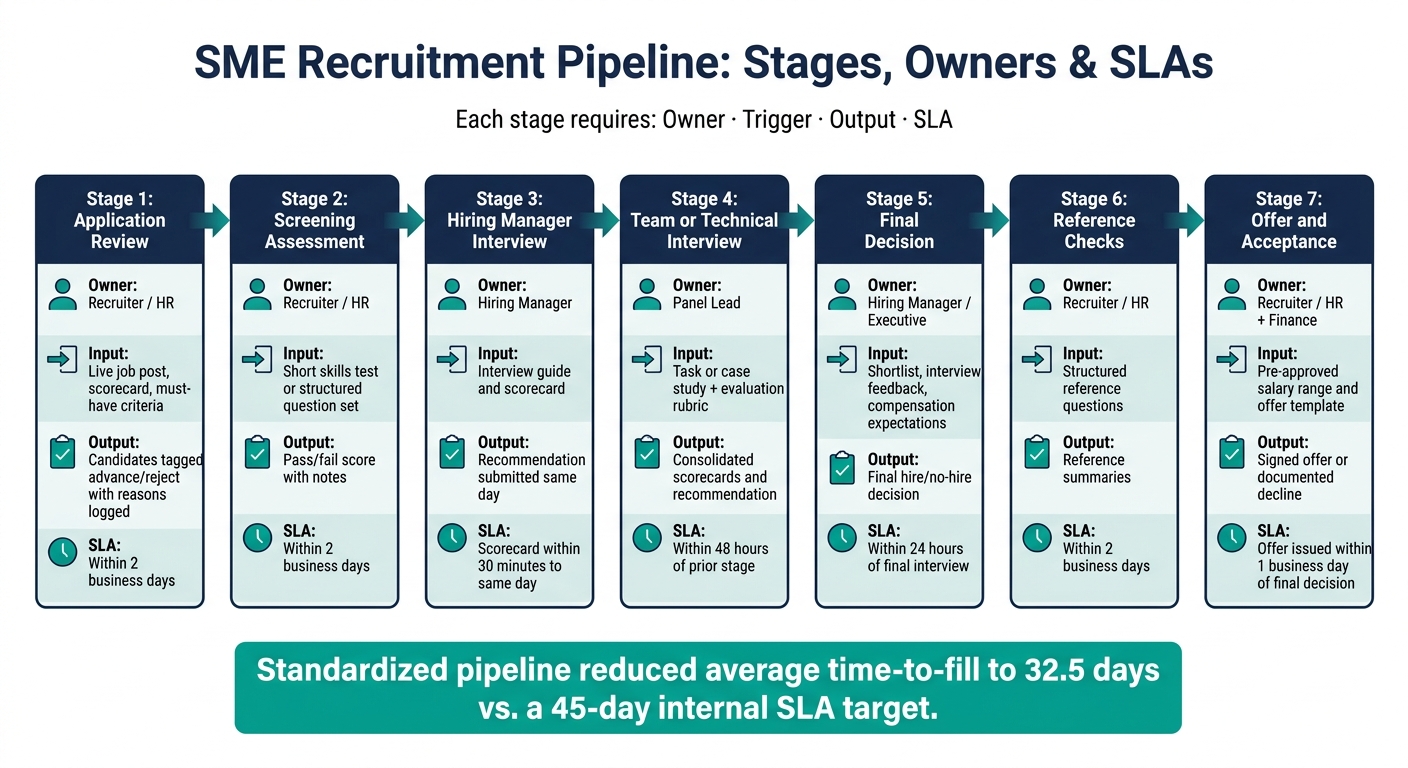
SME Recruitment Workflow: 7-Stage Hiring Pipeline with SLAs
Once the role brief and decision rules are set, you need one clear candidate path for every hire. If stages are not defined, hiring slips into an ad hoc process. Each role ends up following a different route, ownership gets muddy, and delays start stacking up between steps. Get this base right, and you can standardize candidate flow without adding red tape.
Define Clear Stages, Outputs, and Deadlines
For most SME roles, a practical pipeline usually has 5 to 7 stages. Each stage should be defined by four things: owner, trigger, output, and SLA. Miss any one of those, and the stage turns into a vague checkpoint that nobody owns properly. The table below gives you a ready-to-use framework with SLAs that fit lean teams.[11][12]
| Stage | Owner | Required Input | Expected Output | Target Turnaround |
|---|---|---|---|---|
| Application review | Recruiter / HR | Live job post, scorecard, must-have criteria | Candidates tagged advance/reject with reasons logged | Within 2 business days |
| Screening assessment | Recruiter / HR | Short skills test or structured question set | Pass/fail score with notes | Within 2 business days |
| Hiring manager interview | Hiring Manager | Interview guide and scorecard | Recommendation submitted the same day | Scorecard submitted within 30 minutes to same day |
| Team or technical interview | Panel lead | Task or case study + evaluation rubric | Consolidated scorecards and recommendation | Within 48 hours of prior stage |
| Final decision | Hiring Manager / Executive | Shortlist, interview feedback, compensation expectations | Final hire/no-hire decision | Within 24 hours of final interview |
| Reference checks | Recruiter / HR | Structured reference questions | Reference summaries | Within 2 business days |
| Offer and acceptance | Recruiter / HR + Finance | Pre-approved salary range and offer template | Signed offer or documented decline | Offer issued within 1 business day of final decision |
This kind of setup has a direct business payoff. One standardized workflow cut average time-to-fill to 32.5 days against an internal SLA of 45 days.[14] That did not happen because the team simply worked harder. It happened because the pipeline had clear exit criteria at every stage, which kept decisions moving and stopped handoff delays.
Use Structured Interviews and Scorecards to Speed Up Decisions
Once candidates reach interview stage, the biggest source of drag is often messy feedback. Interviewers use different standards, debriefs drift back into re-discussing the role, and decisions slow down.
A structured interview fixes that. Every candidate gets the same set of predetermined questions, mapped to 5 to 7 defined competencies, scored on a 1 to 5 scale with written behavioral anchors. That matters because structured interviews are about twice as predictive as unstructured ones.[13]
The next choke point is interview consistency. Keep the scorecard short and usable:
- role and level
- competencies
- evidence notes
- recommendation
- risk flags
Then require same-day submission.[9][10] When scorecards come in on the same day, debriefs get shorter and cleaner. Your team reviews structured evidence instead of trying to rebuild impressions from memory. That shortens decision cycles without cutting corners on hiring quality.
Once the pipeline is stable, the next step is to strip out admin friction and add capacity through embedded hiring where hiring volume spikes.
Cut Admin Work and Add Capacity Where Needed
Once the pipeline is standard, the next step is simple: strip out the admin work that still slows hiring down.
Set Up Your ATS Around the Workflow, Not Around Ad Hoc Habits
A lot of SMEs use their ATS for the basics, opening roles, logging candidates, and sending emails. But the repeat work still sits in spreadsheets, inboxes, and side conversations. That creates drag.
Your ATS should reflect the pipeline you built, not the patchy habits your team fell into over time.
Start with the parts of the process that create the most friction: intake, screening, scheduling, and candidate communication. Build job templates with set fields such as job title, department, hiring manager, salary band, employment type, and approved description. That means new roles can be opened in minutes, not hours.
Then automate the tasks that chew up time:
- Candidate acknowledgement emails
- Stage-change notifications
- Interviewer reminders
- Rejection communications
Connect your ATS to your calendar tool as well, so candidates can self-schedule within set time slots. That alone can save hours of back-and-forth every week.
Access should be tight and practical. HR admins need configuration control and reporting access. Hiring managers need stage movement and feedback access. Interviewers should only see interview details and the scorecard. That keeps the process clean and cuts delays caused by confusion or over-permissioning.
Track the metrics that show where time is being lost, all in one dashboard:
- Time in stage
- Overdue feedback
- Scheduling lag
If you’ve automated the work and roles are still stalling, the issue usually isn’t process anymore. It’s capacity.
Use Embedded Recruiting Support During High-Volume Hiring Periods
When hiring volume jumps past what your team can handle, temporary embedded recruitment support can take the pressure off fast.
HR.com research shows that 57% of HR professionals report working beyond normal capacity due to understaffing, and HR professionals spend up to 57% of their time on administrative tasks.[16][17]
That’s the problem in plain English. Your team isn’t just busy. They’re buried in work that pulls them away from hiring momentum.
This is where extra recruiter capacity pays for itself.
Rent a Recruiter places experienced recruiters directly into your team within days. Embedded recruiters can manage intake, sourcing, screening, scheduling, and offer coordination inside your current workflow when hiring demand runs ahead of internal capacity. Because they work inside your systems, not beside them, they can also help set up your ATS in a better way, leaving you with a more structured, repeatable hiring function after the engagement ends.[15]
Track Performance and Improve the Workflow Each Quarter
Once your pipeline is standardised, the next step is simple: check if it’s making hiring faster and more dependable by rating your recruitment process.
That means looking at quarterly data, not gut feel. If the workflow is working, you should see fewer delays, better stage movement, and stronger hiring results.
Monitor the Metrics That Show Whether the Workflow Is Working
Six metrics give you a solid read on workflow health. Track them against the stage deadlines and owners already set inside your process.
Time-to-fill, calendar days from requisition approval to offer acceptance, shows how fast you can respond to hiring demand. The U.S. median is about 45 days [21][22]. If key roles are running well past that mark, your pipeline is slowing somewhere, and that delay costs time, output, and team momentum.
Stage conversion rates show where people drop out of the process. Average apply-to-screen conversion is about 30%, and screen-to-interview is about 28% [20]. If your numbers sit well below that, the issue often starts earlier than people think, usually with weak job descriptions or poor screening rules.
Offer acceptance rate below 70% often points to pay, role clarity, or candidate experience issues [19][23]. Hiring manager response time of more than 3 days after a first interview tends to drag the rest of the process with it [18].
Source of hire tells you which channels bring in the best hires, not just the most applicants. Post-hire retention at 6 and 12 months shows whether process changes are improving hiring quality, or just helping you fill seats faster.
| Metric | What It Reveals | Risk Threshold |
|---|---|---|
| Time-to-fill | Overall hiring speed | 45+ days (U.S. median) [21][22] |
| Stage conversion rates | Pipeline bottlenecks | Apply-to-hire below 3.7% [20] |
| Offer acceptance rate | Compensation or experience gaps | Below 70% [19][23] |
| Hiring manager response time | Feedback delays | More than 3 days after first interview [18] |
| Source of hire | Channel quality vs. volume | Channels producing low-retention hires |
| Post-hire retention (12 months) | Hiring quality and process rigor | Rising first-year turnover |
Build a Simple Review Loop and Action Plan
You don’t need a huge quarterly meeting to improve hiring. A 60 to 90 minute review is usually enough to spot issues and agree what changes next.
Bring in the hiring lead or COO, your internal recruiter or HR generalist, and one or two hiring managers from teams doing the most hiring, like engineering or sales. Keep the session tight and tied to business impact.
Review the core metrics against the prior quarter. Pinpoint the top two or three bottlenecks using recent roles as examples. Check whether the process changes made last quarter shifted the numbers. Then agree on three to five clear actions for the next quarter, each with an owner and deadline.
This is where the workflow moves from theory to practice. Update scorecards, job description templates, and ATS-tracked SLAs based on what the data says, not what people assume. If hiring manager response time is sitting at 4 days and candidates are pulling out during that gap, tighten the SLA to 2 days and track what changes next quarter [18].
Before the review ends, make sure every fix has a named owner and a due date.
FAQs
What should we fix first in our hiring workflow?
Start by auditing your current hiring process. Find the bottlenecks. Look for the manual tasks that eat up the most time.
Before you add new software, fix the process first. Set clear ownership, use consistent interview scorecards, and put feedback SLAs in place. That gives you control and cuts wasted time across the hiring team.
Once that foundation is set, use an ATS as your central hub. Then automate the repetitive work, like interview scheduling and candidate screening.
The order matters. If you automate a messy process, you just move the mess faster. If you standardize first, your ATS can help you save time, reduce admin, and improve hiring outcomes.
When do we need extra recruiting capacity?
You need extra recruiting capacity when hiring demand outgrows your team’s bandwidth and the process starts to drag.
At first, the signs can look small. Feedback takes longer. Hiring speed drops. Hiring managers feel more strain. Different roles start being handled in different ways, which leads to an uneven process and mixed results.
This tends to happen during periods of fast growth, especially after funding, a product launch, market expansion, or a sudden spike in hiring volume.
When that happens, the cost isn’t just delay. It’s lost time, slower delivery, and more pressure on your internal team.
Which recruitment metrics matter most for SMEs?
For SMEs, keep your hiring dashboard tight. You do not need 20 metrics. You need a small set that shows speed, cost, conversion, and early success: Time-to-Fill, Time-to-Hire, Cost-per-Hire, Offer Acceptance Rate, and 90-day retention.
That mix gives you a clear read on hiring performance.
- Time-to-Fill shows how long roles stay open, which affects team output and revenue plans.
- Time-to-Hire shows how fast you move once the right people enter process.
- Cost-per-Hire tells you what hiring is costing the business, not just in fees, but in total spend.
- Offer Acceptance Rate shows whether your offer, process, and employer story are landing.
- 90-day retention gives you an early signal on hire quality and onboarding fit.
You should also track pipeline conversion rates, time in stage, and sourcing channel effectiveness.
These metrics help you spot the friction. Where are candidates dropping out? Which interview stage is dragging? Which channels bring in people who get hired, not just people who apply?
Taken together, they show where hiring slows down, where costs climb, and whether new hires are staying and performing.


