
My approach to LinkedIn Recruiter outreach: target the right people, explain the role clearly, and measure qualified conversations, not message volume. Start with agreed must-haves and one profile detail that connects each person to the work. That keeps recruiter time focused on conversations that can lead to hires.
I use this checklist to keep outreach focused:
- Agree the brief: confirm role scope, requirements, and outreach ownership.
- Search and review: check available filters, assess work impact, and group suitable profiles.
- Make contact relevant: personalise the opening and explain the role’s scope, pay, and working arrangements using confirmed facts.
- Keep it short: write a brief InMail with one clear next step.
- Choose the channel and timing: check messaging access, previous contact, and the recipient’s local business hours.
- Set a stopping point: send one follow-up through another channel, then stop after silence or a decline. Honour opt-outs immediately.
- Measure hiring outcomes: track qualified conversations, interviews, and hires; test one message change at a time.
- Match effort to the role: compare fully personalised messages, lightly personalised templates, bulk InMail, and follow-ups.
- Keep the process consistent: assign one owner per person, record contact history, and set response standards.
The aim is less wasted outreach, not more activity. <u>Review results weekly</u> so you can put recruiter time into the searches and messages that lead to interviews.
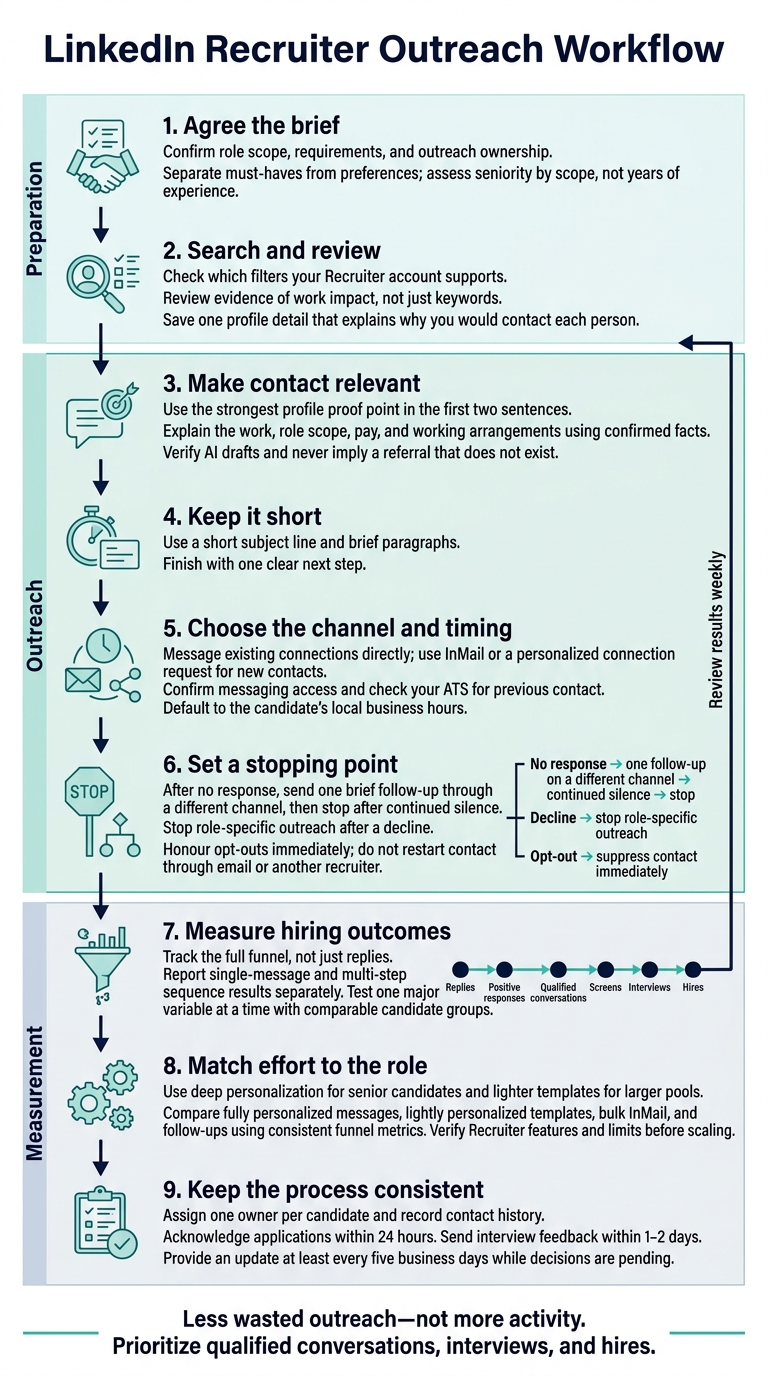
LinkedIn Recruiter Outreach Workflow
Master InMail: 5 Best Practices for Higher Response Rates
If managing outreach feels overwhelming, an embedded recruitment service can provide the dedicated support needed to optimize your hiring process.
sbb-itb-a23bd6a
Confirm Role Details and Outreach Ownership
Meet with the hiring manager before outreach. Agree on the role’s purpose and expected business impact so your messages are specific and backed by facts. For senior hires, clarify the business priorities the role must deliver against.[1]
Use the brief to assign follow-up ownership, choose outreach channels, and set a follow-up limit. Record specific proof points to make each message relevant:[1]
Recent projects, awards, or company milestones.
Use this agreement to define the nonnegotiable candidate traits next.
1. Define Must-Have Candidate Requirements
With the role brief agreed, separate must-haves from preferences before you search. Link each required skill to the business problem it helps solve. If the hiring manager cannot explain why a skill is needed, treat it as a preference, not a search filter.
Assess seniority by scope, not years of experience. Look at what candidates have built, owned, or led rather than requiring an exact job title or background.
Use only nonnegotiables as search filters. Keep preferences flexible, and base outreach on evidence in each profile. This gives you a focused set of profiles to review without excluding people over criteria the role does not need.
2. Filter Results and Review Candidate Profiles
Check which filters your Recruiter account supports before searching. Choose fields that fit the role as you scale: title, skills, employer, location, industry, and experience. This keeps your search focused and reduces time spent reviewing unsuitable profiles.
Treat each result as a lead, not a match. Look for evidence of impact in the candidate’s work history, rather than relying on matching keywords.
As you narrow the list, save one profile detail that explains why you’d contact each person. A recent project, promotion, award, or post can give you a clear reason to reach out.
Group candidates by specialization, problems solved, or interests. Keep one strong proof point for each person and use it as the opening hook in your first message.
3. Personalize the Opening and Opportunity
Use the strongest proof point from your profile review in the first two sentences. Connect it directly to the role’s priorities so your outreach gives the candidate a clear reason to respond.
Use a template to guide the structure, not write the content. For senior IT candidates, focus on the business problems they would help solve, then clearly explain what the role offers them.
AI drafts are starting points, not ready-to-send messages. Check names, titles, project details, and other facts against the profile or source before sending. Remove any claims you cannot support.
Only mention a shared connection if it is genuine. If you reference it in the subject line or follow-up, keep the context consistent. Never imply a referral that does not exist.
4. Explain What the Role Offers
Once you’ve explained why you chose the candidate, show why the role deserves their time. Lead with the work, not the company story. Describe the problem they would solve, the scope of the role, and the decisions they would own. For senior hires, explain how they would shape business direction, not just hold a title. [1]
Connect the challenge and level of ownership to their background without overpromising. Share only confirmed details, with clear timelines and expectations. Don’t promise growth or advancement unless the hiring manager has confirmed it. This helps you set expectations before the hiring process moves forward. [2]
Keep the message brief and direct once you’ve made the offer clear.
5. Keep InMail Short and Clear
Once you’ve established that the role is relevant, make your InMail easy to scan. Use a short subject line, brief paragraphs, and one clear next step.
Keep it concise so the recipient can understand the opportunity and decide whether to reply without extra back-and-forth.
Example:
Subject: Your engineering post / VP opportunity
Hi there, I enjoyed your recent LinkedIn post about scaling engineering teams. That experience is why I’m reaching out.We’re hiring a VP of Engineering to lead our scaling efforts. The annual base salary range is $220,000–$260,000 USD, plus equity. The role is fully remote for US-based candidates.
Are you open to a 10-minute introductory chat next Tuesday or Wednesday?
6. Choose the Right Outreach Channel
With your message ready, choose the channel most likely to get it seen. Match the channel to the relationship: message existing connections directly. For new contacts, use InMail or a personalized connection request.
Confirm messaging access before sending. Check the candidate’s profile in the product you’re using to see which options are available. Access in LinkedIn doesn’t mean you have the same options in LinkedIn Recruiter.
Next, check your ATS or Recruitment as a Service partner to avoid duplicate outreach and wasted recruiter time. If your first channel gets no response, send one follow-up through a different channel, then stop. Log previous messages so your follow-ups stay consistent.
7. Send Messages in the Candidate’s Time Zone
Once you’ve chosen the channel, send messages during the candidate’s local business hours as your default.
When testing send times, group results by candidate experience level. Executive-level candidates with 10+ years of experience have the lowest response rate at 6.3%.[1] Use your results to set send windows for each segment, rather than one schedule for everyone.
8. Limit Follow-Ups and Respect Opt-Outs
After your first outreach, send one brief follow-up on a different channel. If the candidate does not respond, stop.[1]
Give that follow-up a clear reason. Reference a recent promotion, speaking engagement, article, LinkedIn post, or project the candidate led, and connect it to the role. Make the message personal rather than repeating your pitch or sending a generic reminder.[1]
Record the outcome and communication history in your ATS. Keep no response, decline for this role, and request for no future contact separate so your team avoids wasted outreach and protects candidate trust.[2]
Close the sequence after silence, stop role-specific outreach after a decline, and suppress opt-outs immediately. Do not restart contact through email or another recruiter. Shared records and embedded recruitment workflows should block duplicate contact.[2]
9. Track Qualified Conversations and Hiring Results
Once outreach goes out, measure which messages lead to qualified conversations. Track the full funnel, not just replies. Record replies, positive responses, qualified conversations, screens, interviews, and hires as separate stages.
Report single-message and multi-step sequence results separately. This shows whether the opener or the full cadence drives qualified conversations. Use the same reporting method across campaigns so you can compare results consistently.
Test one major variable at a time. Compare a candidate-specific opener with a role-focused opener while keeping the candidate segment comparable. Don’t compare very different candidate groups.
Choose the version that delivers more qualified conversations and interviews, not simply more replies [1]. Use the findings to make outreach more relevant, rather than send more messages. Apply the same metrics when comparing InMail approaches.
Compare 4 InMail Approaches
Use the same funnel metrics across all four approaches to match message depth to each candidate group and track what leads to replies or qualified conversations.
| Approach | Personalization level | Appropriate use | Main advantage | Key risk | Metrics |
|---|---|---|---|---|---|
| Fully personalized | Deep candidate research | Executive/C-suite roles and candidates with 10+ years of experience | Supports a conversation about business goals | High research time | Qualified conversation rate |
| Lightly personalized template | Light edits referencing a specific project, promotion, or award | Mid-level roles and similar candidate groups | Balances relevance and speed | Surface-level edits can still feel generic | Reply rate |
| Bulk InMail | Low; shared wording for a screened group | High-volume roles with shared requirements | Faster outreach | Weak relevance; high-volume templated outreach typically gets only 3-7% replies[2] | Reply rate and opt-out rate |
| Follow-up InMail | Based on prior contact | One follow-up for warm prospects | Builds on the previous contact | Repeated unwanted contact | Qualified conversation rate |
Match research time to the role. Use deep personalization for senior candidates and lighter templates for larger pools.
Before scaling outreach, verify that your Recruiter seat supports the features you plan to use. Check its current features and limits, or use AI-powered recruitment tools to support automated sequences and personalization fields[1].
Standardize Outreach as Hiring Grows
Once you choose the right InMail approach, set a consistent process as hiring volume grows. Standardize the structure, not the wording. Personalize each subject line and reason for reaching out. For senior-level roles, connect your message to business goals the candidate could help shape.
Assign one owner per candidate for first contact, follow-ups, and status updates. This prevents duplicate outreach and missed replies.
Set clear response-time standards for active candidates:
- Acknowledge applications within 24 hours.
- Send interview feedback within 1-2 days.
- Provide an update at least every five business days while decisions are pending.[2]
Check messages for accurate role details, clear personalization, and timely responses. Use candidate feedback to refine your outreach, and build these standards into your team’s outreach checklist.
Outreach Checklist
Use this checklist before each outreach sequence to keep messages relevant and consistent.
- [ ] Requirements and search: Confirm the must-haves and check that each profile shows relevant impact or evaluate your recruitment strategy for broader gaps.
- [ ] Message and opportunity: Give one specific reason for reaching out, check the role details, and finish with one clear call to action.[1]
- [ ] Channel and timing: Choose your channel deliberately, check previous contact history, and review current LinkedIn Recruiter rules for InMail, automation, and contact limits, or consider fractional recruitment services to manage high-volume outreach.
- [ ] Follow-up and records: Set a follow-up limit, log message activity in your ATS, and stop outreach immediately if someone opts out.[2]
- [ ] Weekly review: Track qualified conversations, not replies, and check which searches and messages lead to interviews.[2]
Conclusion: Focus on Relevance and Response Quality
Once you’ve standardized outreach, test whether relevant messages earn qualified responses, not just more replies.
Start with one experience-based candidate segment. Test a short, tailored sequence that connects a specific profile detail to what the role offers. Keep one fixed follow-up to isolate message quality and make results easier to compare across candidates and campaigns.[1]
Measure qualified conversations, interviews, and hires. Check whether interested candidates meet the requirements, stay engaged through interviews, and accept offers.[2] Keep the steps that lead to interviews and offers.
FAQs
How long should I wait before following up?
Follow up every 2 to 5 business days [1]. A common schedule is days 3, 10, and 17 [1]. If you receive a “not now,” send one considered follow-up 5 to 7 days later [2].
If there’s still no response, stop to protect your employer brand. Plan to reconnect in 4 to 6 months [2], and always wait at least 90 days before restarting contact [3].
What makes a candidate conversation qualified?
A candidate conversation becomes qualified when your outreach moves past a generic sales pitch and gives someone a clear reason to engage. Start with a specific, verifiable detail from their background, such as a recent project, LinkedIn post, or technical contribution.
Position the role as a possibility, not a hard sell. Explain the impact they could have, then keep the ask simple: a 15-minute exploratory chat. The aim is to build a relationship, not push for an immediate decision.
How can I personalize outreach to sparse profiles?
Use verifiable professional signals, not generic praise. Reference one specific touchpoint: a recent LinkedIn post, GitHub project, conference talk, or company initiative they contributed to. Showing you’ve done your homework can drive much higher engagement than automated templates, helping your hiring team spend less time chasing replies.
Keep your message under 400 characters where possible. Explain how the opportunity could fit their background, then finish with a low-pressure invitation to a brief chat.


