
If your team relies on inbound applicants, you are missing most of the market. Around 70% of workers are not actively job hunting, and Slack communities can help you reach people who never apply through job boards.
For hiring leaders in SaaS, fintech, engineering, security, insurance, and professional services, the upside is simple: better fit, fewer weak applicants, and more interviews from less outreach. This only works if you treat Slack sourcing like a channel you measure, not a side task. That means choosing the right groups, finding people based on work signal, messaging with care, and tracking which communities turn into interviews and hires.
What matters most:
- Start with open roles, not broad audience lists
- Join niche Slack groups where your target hires already talk shop
- Look for proof of skill, not just profile keywords
- Keep outreach short, clear, and tied to pay and role scope
- Track source-to-interview rate by community, role, and recruiter time
If you do that well, Slack can become a high-yield sourcing channel for hard-to-fill roles, especially where LinkedIn reply rates are low and hiring teams need stronger shortlists with less wasted effort.
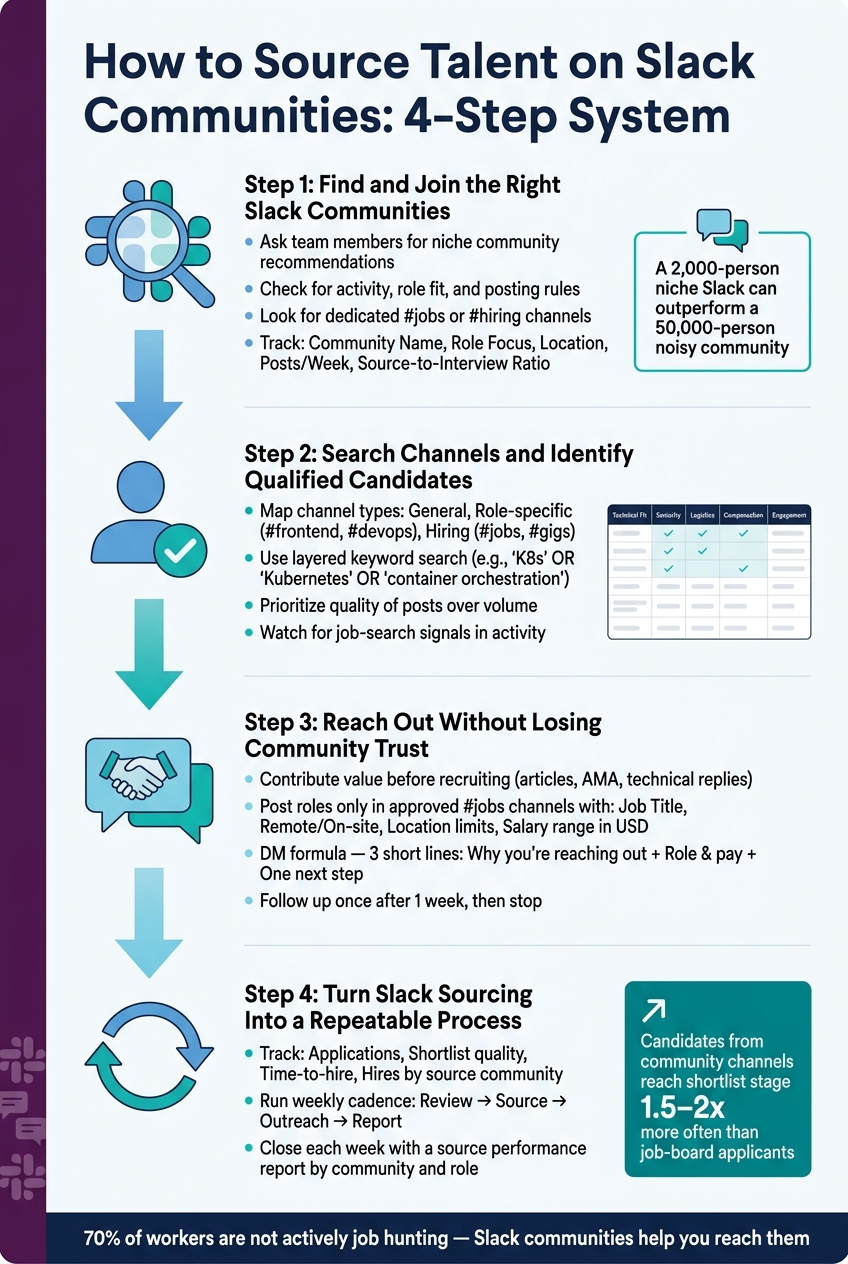
How to Source Talent on Slack Communities: 4-Step System
Step 1: Find and Join the Right Slack Communities
How to build a target list of communities
Start with your open roles, not broad interest areas, especially when hiring as you scale.
If you’re hiring a senior backend engineer, you need very different Slack groups than if you’re hiring a product designer. The tighter your target persona, the less time you waste in the wrong places.
One of the best ways to find the right communities is to ask people already on your team. Employees in the function you’re hiring for usually know which Slack groups people pay attention to. But the brief matters. Don’t ask, "Any good tech Slack groups?" Ask for something narrow, like this:
"a senior backend engineer with Go payment-system experience – where would they spend time online?" [1]
That kind of prompt gets better answers, faster.
You can also use AI search tools to find niche communities that standard search often misses. Targeted Google searches and Slack directory searches can help too, especially for groups that don’t show up in big public lists [2].
Once you have a shortlist, check each community for:
- Activity
- Role fit
- Posting rules
That gives you a cleaner starting point before outreach begins.
How to choose communities worth joining
Not every large Slack group is worth your time.
What matters is whether the community has role-relevant discussion and whether it can produce interviews, not just clicks or views. The best groups are usually the ones where people talk about real work: decisions, trade-offs, tool changes, and problems they’re trying to solve. If a channel is mostly job posts and company promotion, the signal is weak.
Before you join, look for a dedicated #jobs or #hiring channel. That’s usually a good sign that employer posts are allowed. Then read the guidelines. Some communities are open to recruiter activity. Others are strict about self-promotion, and if you ignore that, you’ll burn the channel fast.
The metric that matters here is source-to-interview ratio, not member count [1].
A 2,000-person Slack with the right audience can beat a 50,000-person community full of noise.
How to join and track your communities
Join with a clear company identity. Use your real name and company identity. If you show up with a vague profile or a personal-only account, people are more likely to ignore you, or worse, flag you as spam.
Follow any moderator onboarding steps. Then take a beat and observe before posting [1]. That small pause helps you understand tone, rules, and what kind of outreach won’t fall flat.
Track every community before your team starts messaging people. This keeps reporting clean and helps you avoid duplicate outreach from multiple recruiters.
| Field | What to Record |
|---|---|
| Community Name | Full name |
| Role Focus | e.g., DevOps, Security, Platform Engineering |
| Location | e.g., US-based, global, remote-first |
| Posts/week | High / Medium / Low based on weekly post volume |
| Date Joined | MM/DD/YYYY format |
| Source-to-Interview Ratio | Updated as outreach progresses |
This kind of tracking makes it easier to see which communities are worth more sourcing time in Step 2. It also gives you a simple way to tie channel activity back to hiring output, which matters if you’re trying to cut wasted sourcing hours and improve interview yield.
sbb-itb-a23bd6a
Step 2: Search Channels and Identify Qualified Candidates
Map the channels before you start sourcing
Once you join a Slack community, map the channels before you search for names.
Most communities tend to have three channel types that matter for hiring:
- General channels
- Role-specific channels such as
#frontend,#devops, or#security - Hiring or gig channels such as
#jobsor#gigs
Role-specific channels usually give you the strongest technical signals. General channels help you spot who shows up often and adds useful input. That quick map helps you decide where to search first and which channels are worth outreach time.
Use keyword search and profile signals to assess fit
Slack search works best when you use related keywords, not just one term.
For a Kubernetes role, search for terms like "K8s" OR "Kubernetes" OR "container orchestration". Then narrow the search with a term such as "observability" or "distributed systems" before you broaden it again.
When you find someone worth checking, start with their profile bio. Many specialists link to GitHub, portfolios, or project pages there. After that, review what they post in channels. Quality matters more than volume. Put more weight on members who answer hard questions, share their work, or get recognised by others as go-to experts.
It also helps to watch for job-search signals. That could be recent activity in the right channels or a mention of "looking for new challenges." None of this guarantees interest, of course. But it gives you a natural opening for a first message that doesn’t feel generic. Use those signals to decide who should be logged and contacted.
Record only the sourcing data your team will use
Only record the fields your team will use for sourcing and outreach. If you’re outsourcing recruitment and talent acquisition across multiple roles, log candidates straight into your ATS. Keep each record short. If someone on the hiring team has to reread long notes to figure out the next step, the system is already slowing you down.
| Data Category | What to Record |
|---|---|
| Technical Fit | Core skill set, tools used |
| Seniority | Years of experience, likely level |
| Logistics | Location, time zone |
| Compensation | Range in USD, if shared |
| Engagement | Slack community name, channel where found, next step |
Log the community and channel as source fields so you can tie replies back to channel quality.
Step 3: Reach Out Without Losing Community Trust
Contribute before you post jobs or send direct messages
Once you have a shortlist, the job changes. You’re no longer just trying to find people. You’re trying to earn a reply without burning trust.
Start by joining the community properly. Watch how people speak, who others listen to, and what kind of posts get a good response. Then add something useful before you recruit.
That could be a helpful article, a solid reply to a technical question, an AMA, or a "how we work" post from your engineering team. In technical communities, practitioner-led content lands far better than recruiter-led promotion.
Post roles in the right channels with clear details
Only post roles in the approved jobs channel or thread. Don’t drop hiring posts into general discussion and hope for the best. That’s a fast way to get ignored, or worse, blocked.
Make the role easy to scan. Include:
- Job title
- Remote or on-site status
- Any location limits
- Salary range in USD, if you can share it
The easier it is to judge fit at a glance, the better your response rate tends to be.
If a public post doesn’t do the job, move to direct outreach sparingly, and always with context.
Personalize outreach and make the next step easy
When you send a direct message, mention something the person actually did. It might be a question they answered in #backend, a tool they referred to, or a problem they helped someone debug. That small detail shows you’re not blasting the same note to everyone.
Keep DMs to three short lines:
- Why you’re reaching out
- The role and pay
- One simple next step
Follow up once after a week, then stop. More than one follow-up can hurt your name in communities you may want to hire from again. If someone says no, or doesn’t reply, log it and respect it. They may still suit a different role later [1][3]
Step 4: Turn Slack Sourcing Into a Repeatable Process
Track conversion rates by community, role, and recruiter effort
Once outreach starts, measure what each community gives you back. Slack sourcing only works when you track output at the source level.
Skip vanity metrics. Focus on hiring outcomes.
Track:
- Applications
- Shortlist quality
- Time-to-hire
- Hires by source community and role
That gives you a clear view of where the pipeline is healthy, where it slows down, and where recruiter time is paying off.
Then compare those results with the time your recruiter spends in each community. That matters. A channel that looks busy on the surface can still be a poor use of time if it produces weak shortlists or slow-moving hires.
Track resume-to-interview ratio by community and role. Tag each candidate by community and role so you can report source performance by channel.
Build a weekly workflow that saves time and improves visibility
Run Slack sourcing on a weekly cadence. Review activity, source candidates, send outreach, and report results on the same rhythm each week.
That simple structure saves time and gives leaders a better line of sight into what is and is not working.
Close each week with a source report that shows which communities moved candidates forward and which did not. The point is to make sourcing visible, accountable, and measurable so you can make better calls on where recruiter time should go.
Use those weekly reports to decide where to keep investing recruiter time.
Get embedded recruitment support when internal capacity is stretched
When the process outgrows internal capacity, outsource the coordination, not the judgment.
If your team is short on bandwidth, Rent a Recruiter can provide embedded recruitment support to keep Slack sourcing consistent and visible.
Slack for Recruiters. Why Every Recruiter Should Be Using This!
Conclusion: Build a Slack Sourcing System and Measure the Results
Slack sourcing works when you treat it like a system, not a one-off task. Join the right groups, spot real expertise, reach out with context, protect trust, then measure what turns into interviews and hires.
That last step matters more than most teams think.
Once you’ve built your list, searched channels, and started outreach, track results by community and by role. Then put your time where the return is strongest. The pattern is simple: join the right groups, spot real expertise, reach out with context, and measure what converts.
When you track outcomes, the best communities stand out fast. Candidates sourced through social and community channels often reach the shortlist stage 1.5 to 2x more often than generic job-board applicants [4]. For you, that can mean less screening, less wasted recruiter time, and faster shortlisting.
The goal is not broad activity. It is a small, high-yield set of communities that brings in candidates on a repeatable basis.
If team capacity is tight, embedded recruitment support can keep the process moving. If your team lacks bandwidth, Rent a Recruiter can embed recruiters to keep Slack sourcing structured, visible, and consistent.
FAQs
How do I find the best Slack groups for a role?
Start by building a candidate persona. You need a clear picture of where your target talent spends time at work, what they care about, and which channels they use to stay sharp.
For niche or technical roles, this matters even more. Go straight to communities linked to the right industry, tech stack, or job function. That’s where you’re more likely to find people who match the role, rather than wasting time in broad groups with low fit.
Before you start outreach, put in 2 to 4 weeks of steady participation. Share useful insights. Join discussions. Add something worth reading. That helps you build trust before you ask for attention.
The focus is simple: spend time where your ideal candidates are already active. That leads to better response rates, less wasted effort, and a hiring process that moves with more intent.
What should I say in a Slack outreach message?
Lead with a specific detail from their work, like a product launch, architecture call, or engineering decision, so it’s clear you’ve done your homework.
Then name the role, share a realistic pay range, and ask for a small next step, like a quick 10-minute chat. Keep it to three sentences max.
If they don’t reply, send one follow-up a week later.
How do I measure if Slack sourcing is working?
Measure Slack sourcing by tracking downstream outcomes, not vanity metrics like community size. What matters is the share of hires that come from Slack and how your cost per hire stacks up against other channels.
Use your ATS to track the source of every application, interview, and hire. Then look at the numbers that show whether Slack is driving business value or just activity:
- Source-to-interview rate
- Shortlist rate
- 90-day retention
- Cost per hire compared with other sourcing channels
If the numbers look weak, review the pipeline for bottlenecks. You might find the issue isn’t Slack at all. It could be slow screening, unclear role briefs, or poor follow-up after first contact.


