
If your team is still reading resumes by hand, you’re burning hours on work software can cut to minutes.
I see the business case like this: AI resume screening can shrink first-pass screening by 70% to 95%, move shortlists from 5 to 8 days to 1 to 2 days, and free recruiters to spend time on interviews, hiring manager alignment, and decisions. For scaling companies in SaaS, IT, fintech, engineering, security, insurance, and professional services, that means lower hiring admin, less delay, and fewer missed candidates.
Here’s the short version:
- Manual screening is slow. Recruiters can spend 23+ hours screening resumes for one hire.
- AI handles first-pass filtering. It parses resumes, checks must-haves, scores against role criteria, and ranks applicants.
- The time savings are clear. For 100 applicants, first review can drop from 8 to 13 hours to 5 to 20 minutes.
- You still need human review. Recruiters should check edge cases, review shortlist quality, and approve final decisions.
- The output depends on setup. Clear must-haves, weighted criteria, and synonym mapping make the difference.
- The commercial upside is simple. You cut wasted recruiter time, get hiring managers to interview stage sooner, and reduce the cost of open roles sitting unfilled.
For many teams, the issue is not whether AI can screen resumes. It’s whether your hiring process is clear enough to use it well. If you need extra hands to set that up and run it inside your team, <a href="https://rentarecruiter.com/contact-us/">Rent a Recruiter</a> can help build a hiring workflow that moves faster and stays under your control.
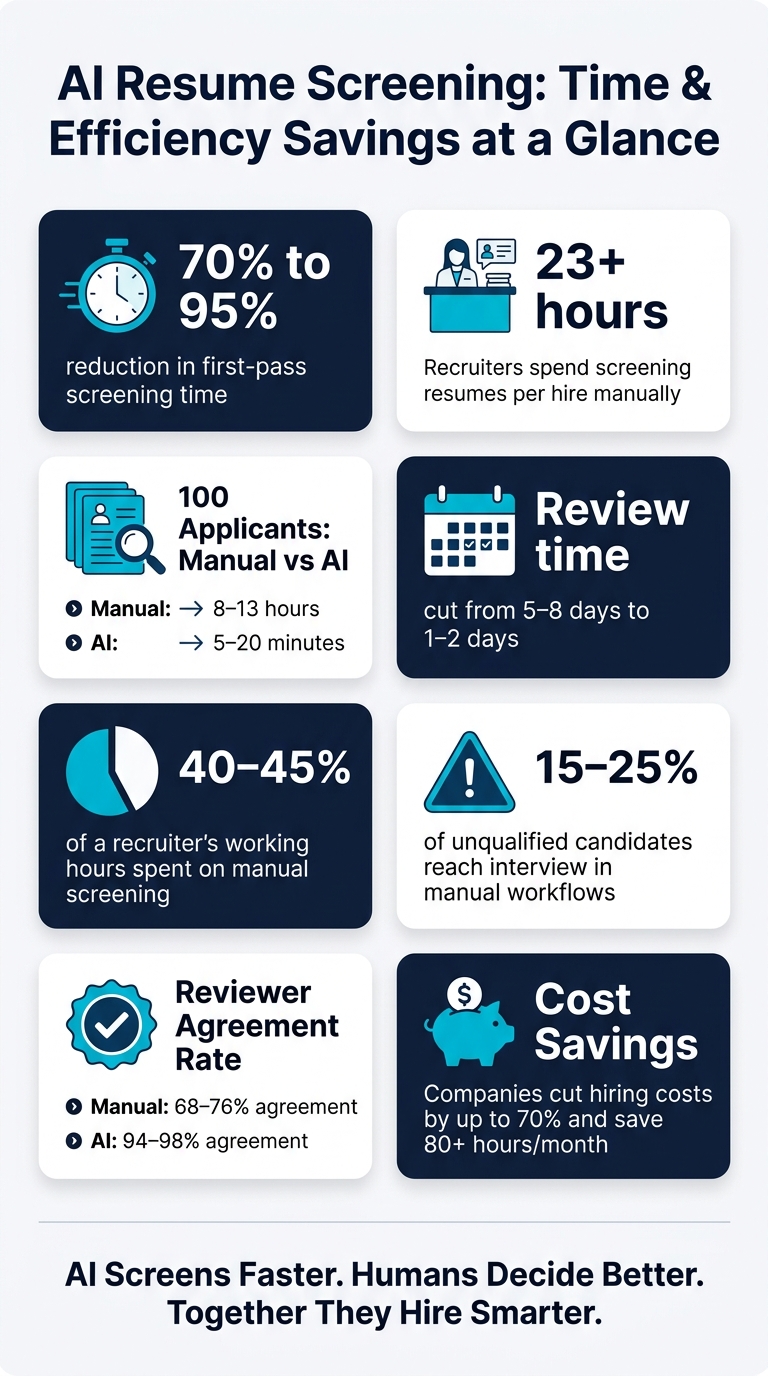
AI Resume Screening: Time & Efficiency Savings at a Glance
How AI Resume Screening Works
Resume Parsing and Data Standardization
When someone applies, the system pulls text from PDF, DOCX, or TXT files and turns it into structured data. That usually includes contact details, location, work authorisation, job titles, employers, education, certifications, skills, and dates.
It also standardises dates, salaries, titles, and skills so like-for-like experience is measured the same way.
That matters for one reason: clean data leads to cleaner screening. Once the information is structured, the system can apply role-specific rules and score candidates in a consistent way.
Matching, Scoring, and Ranked Shortlists
After parsing, the AI applies the screening rules the recruiter set for that role. Must-haves come first, things like U.S. work authorisation, a required certification such as CPA or AWS Certified Solutions Architect, or a minimum number of years of experience. If a candidate misses a must-have, they’re filtered out or flagged.
Candidates who clear that first pass are then scored against weighted criteria such as skills, industry background, seniority, and recency. For example, a SaaS account executive with U.S. enterprise sales experience would score higher than a generalist salesperson for a SaaS role if that background carries more weight. The result is a ranked shortlist of the highest-scoring candidates, along with short reasons for the score, such as matched work authorisation, required skills, and related experience.[3][2]
Your recruiters still need to review the shortlist and sense-check lower-ranked profiles. But this is where the time savings start to show. The system handles the repeat work, so your team can focus on judgement. For many SMEs, combining this tech with Recruitment as a Service is the fastest way to scale without the overhead of traditional agencies.
Where the Hours Are Saved
The time savings come from stripping out manual, repetitive tasks. Opening resumes one by one, typing contact details and job titles into the ATS, tagging candidates, and checking the same baseline criteria across a large applicant pool, all of that drops away.
For a role with 100 applicants, manual screening can take 8 to 13 hours. AI can cut that to 5 to 20 minutes, reducing initial screening time by 70% to 95% and shrinking review from 5 to 8 days down to 1 to 2 days.[1][3][2]
That has a direct business effect. Hiring managers get to interviews sooner, which matters when strong candidates are off the market fast.
There’s one catch. These gains only hold when the screening criteria are defined before automation starts, or you rate your recruitment process to identify other efficiency gaps.
sbb-itb-a23bd6a
How to Implement AI Resume Screening in Your Hiring Process
Audit Your Current Workflow and Set a Baseline
Start by finding where time slips away in screening, then automate the high-volume work that needs the least judgment first. Spend two weeks mapping each step from the moment a role goes live to the point a shortlist lands with the hiring manager.
Split the process into two parts. One is hard requirements, such as experience, certifications, and location. The other is judgment-based factors like leadership and team fit. AI works best on the hard requirements, and those usually take up 60% to 70% of screening time [4]. That gives you a clear place to cut delay without handing over human judgment.
Manual screening still eats up 40% to 45% of a recruiter’s working hours, so you need a baseline before you switch anything on. Track these two numbers first:
- Days from application to first contact
- Your false positive rate, meaning the share of unqualified candidates that still reach interview, which often sits between 15% and 25% in manual workflows [4]
If you want a sharper view of quality, track reviewer agreement too. In manual screening, agreement rates tend to sit at 68% to 76%, compared with 94% to 98% for AI [4]. That matters. It shows whether AI is cutting time and improving consistency, or just moving the work somewhere else.
Define Screening Criteria Before You Automate
AI only works when your rules are clear. If the criteria are vague, the output will be vague too.
Start by splitting requirements into must-haves and preferred qualifications. Must-haves are the non-negotiables, things like years of experience, certifications, or location needs. Preferred qualifications help you sort strong candidates from the rest, such as leadership potential or role-specific strengths. Once that is set, assign weight to the criteria that matter most for the role.
One step teams often miss is synonym mapping. You need to map equivalent terms so the system reads close variants as the same skill or experience [4].
Without those mappings, qualified candidates can be filtered out because the system does not recognize equivalent wording.
That one detail can affect shortlist quality more than most teams expect.
Run a Pilot, Measure Results, and Refine
Don’t roll this out across every role at once. Test it on a small group of live roles first. A pilot with 3 to 5 active roles works well, especially higher-volume roles where admin time is highest. Run AI screening alongside your current manual process so you can compare shortlists, adjust thresholds, and spot candidates the team may have missed [4].
Track the numbers that tie back to hiring output and team time:
- Screening hours saved
- Days to first contact
- Share of shortlisted candidates who move to interview
Watch whether you’re getting speed without driving up false positives.
If the system misses qualified candidates, loosen a must-have or add a synonym mapping. If too many low-fit applicants are getting through, tighten the must-have thresholds. Recruiters or an embedded recruitment service should still review edge cases and approve the final shortlist. That gives you a process your team can use the same way every time, with less admin and more control.
How SMEs Turn AI Screening Into Faster, More Scalable Hiring
Use AI Screening to Cut Admin and Improve Consistency
Once your pilot is working, the next step is simple: roll AI screening out across more roles and teams.
When you lock in screening criteria like skills, experience, certifications, location, and work authorisation, you get the same shortlist format every time. That means your hiring managers spend less time digging through raw resumes and more time reviewing people who already meet the bar.
If you’re hiring across several roles or business units at once, shared scoring logic helps keep decisions aligned. AI parsing also standardises job titles, skills, and dates, which makes ATS reporting faster and more reliable.
Add Human Oversight to Protect Quality
AI screening works best when there’s a clear review layer behind it.
A practical setup is a tiered review structure:
- Candidates above a high-confidence threshold move into a priority review queue
- Borderline candidates get a quick manual scan, so recruiters can catch non-traditional backgrounds or transferable skills the algorithm may miss
- Rejected profiles are spot-checked for parsing errors and unusual resume formats
This gives your team a structured way to protect quality without going back to hours of messy resume reading. In most cases, recruiters can manage it in a short daily review pass.
You should also log AI scores, document screening criteria, and review pass-through rates by demographic group. That creates a defensible audit trail and helps you check that AI tools are not producing uneven outcomes for protected groups, in line with EEOC guidance on AI in hiring.[5][6][7] When hiring volume grows beyond what your team can comfortably review, embedded recruitment support can stop delays from stacking up.
Build Hiring Capacity With Embedded Recruitment Support
Rent a Recruiter places experienced recruiters directly inside your team within days, taking ownership of end-to-end hiring, including AI screening configuration, ATS setup, candidate communication, and reporting.
The commercial upside is clear. Fixed monthly pricing gives you cost control, and companies often cut hiring costs by up to 70% while saving more than 80 hours per month in internal hiring and admin time. That gives you a repeatable screening process that can grow with hiring demand, without pushing more admin back onto your internal team.
AI for Recruiters: How We Cut Candidate Screening Time by 79%
Conclusion: What to Do Next
Once screening is structured, the next move is straightforward: shift from manual sorting to a faster, repeatable workflow. AI screening cuts out manual resume reading and speeds up shortlisting. When that part moves faster, the rest of the hiring process usually follows.
For scaling SMEs, that means less admin, faster shortlists, and more recruiter time spent where it matters most, on judgment.
That said, results depend on clear rules and human review. AI can assess hundreds of resumes far faster than a person working manually, but the shortlist still needs a recruiter’s decision behind it. That’s where teams get the best return, not from handing over hiring to software, but from using AI inside a hiring process that is structured, repeatable, and built to move with less friction.
If you want help turning that into a working hiring system, Rent a Recruiter can place recruiters inside your team and manage the workflow end to end. Ready to review your workflow and estimate your savings? Book a discovery call with Rent a Recruiter.
FAQs
How accurate is AI resume screening?
AI resume screening works well when your goal is speed without losing too much quality.
In practice, it improves candidate ranking quality by 15.85% compared with old-style keyword filters. That matters when your team is sorting through high application volume and needs to get to the right people faster. Recruiters also move forward with 83% of candidates flagged by AI, which shows the screening output is often good enough to support real hiring decisions.
That said, AI should sit at the top of the funnel, not at the final decision point.
Used well, it helps you cut admin time, reduce manual screening, and bring more consistency to early-stage review. Used badly, it can screen out strong people for the wrong reasons.
The safest approach is simple:
- Use AI as a filtering tool
- Keep human review in the process
- Apply structured scorecards
- Set clear, skills-based criteria
That mix gives you a better shot at reducing bias while lowering the risk of rejecting qualified candidates. For hiring leaders, that means a screening process that saves time and holds up under scrutiny.
What roles benefit most from AI screening?
AI resume screening works best for high-volume hiring and repeat roles, where speed and efficiency have a direct impact on results. If you’re dealing with large applicant volumes during a growth phase or a hiring spike, it helps your team sort applications fast and keep the process moving.
Used well, it acts as a filtering tool for repeatable, low-judgement tasks. That means your recruiters spend less time on manual screening and more time on interviews, stakeholder alignment, and final hiring decisions.
For scaling teams, the business impact is simple:
- Less admin time for internal hiring teams
- Faster shortlist delivery when applicant volume jumps
- More consistent screening before human review
It’s not there to replace recruiter judgement. It’s there to handle the first pass, so your team can focus on the calls that need human input.
How do we prevent qualified candidates from being filtered out?
Use AI as a support tool, not the final decision-maker.
That matters for one reason above all: hiring risk sits with you, not the software. AI can help your team move faster, sort data, and cut admin. It should not be the thing that decides who gets screened out.
Avoid rigid keyword matching. It often filters out strong people for the wrong reasons, especially in SaaS, IT, Engineering, and Professional Services roles where titles, tools, and career paths vary a lot. A candidate might have the right track record without using the exact wording in your job spec.
Set your system to weigh must-have skills and core competencies first. Focus on what the person needs to do the job, not whether their CV mirrors your phrasing line for line. That gives you a better shortlist and helps prevent missed hires that cost time, revenue, and team momentum.
A simple setup usually works best:
- Use structured scorecards tied to the role
- Require human review before any rejection is final
- Check ATS data on a regular basis for bias, stale rules, or old screening logic
Structured scorecards help hiring teams assess people against the same criteria. That cuts inconsistency and gives HR leaders and CFOs a clearer view of hiring quality. Human review adds a layer of judgment that software can’t give, especially for non-linear careers or niche hiring markets.
Regular ATS audits matter more than many teams think. Screening rules can drift over time. Old filters, poor data hygiene, or biased patterns in past hiring activity can quietly damage results. If your system is working off bad inputs, it will keep producing bad outputs, just at scale.


