
Hiring compliance isn’t optional. For SMEs, getting background checks wrong can lead to fines, lawsuits, and reputational damage.
Here’s the challenge: federal, state, and local laws often conflict. From "ban-the-box" rules to record-sealing laws, staying compliant means navigating a legal maze. And mistakes cost more than you think – defending a single FCRA lawsuit can set you back $50,000 to $150,000, even if you win.
The solution? Structured, repeatable processes. By standardizing your background check workflows, you reduce legal risks, speed up hiring, and prepare your business to scale.
Key Takeaways:
- FCRA compliance: Provide standalone disclosures, written consent, and follow a two-step adverse action process.
- Local laws: Comply with the candidate’s work location laws, not your HQ’s.
- Documentation: Retain records for five years and securely destroy them when no longer needed.
- Tailored checks: Align screening types with job roles to avoid discrimination claims.
If your hiring is ramping up, consider embedded recruitment to manage compliance while cutting costs by up to 70%. Prevention costs less than fixing compliance errors later.
Background Check Disclosure And Consent: What Growing Small Businesses Should Standardize In 2026
The Legal and Regulatory Framework for Background Checks
Understanding the laws that govern background checks is the cornerstone of a compliant hiring process. For small and medium-sized enterprises (SMEs) in the U.S., this means navigating a mix of federal, state, and local regulations.
Federal Regulations: FCRA and EEOC Guidelines
The Fair Credit Reporting Act (FCRA) is the leading federal law regulating background checks conducted through third-party Consumer Reporting Agencies (CRAs). It outlines specific employer obligations, including the requirement to provide candidates with a standalone written disclosure before ordering a report. This disclosure must be a separate document, free from liability waivers or unrelated text. Even minor errors, like adding extra lines or skipping steps in the adverse action process, can lead to compliance issues.
"FCRA errors typically stem from minor mistakes, such as an extra line in a disclosure or a skipped adverse action step." – Michael Kendrick, Senior Manager of Corporate Compliance, Cisive [4]
Additionally, Title VII of the Civil Rights Act, enforced by the EEOC, mandates that background screening practices do not unfairly impact protected groups. Employers are advised to apply the "Nature-Time-Nature" test, which considers the nature of the offense, the time elapsed, and its relevance to the job before rejecting a candidate based on a criminal record. Even when using third-party vendors, employers must ensure their processes meet these standards.
"If an employer administers a selection procedure, it may be responsible under Title VII if the procedure has a disparate impact, even if the procedure was designed or administered by an outside vendor." – U.S. Equal Employment Opportunity Commission [11]
Other federal laws also come into play:
- The Americans with Disabilities Act (ADA) prohibits pre-offer medical inquiries.
- The Genetic Information Nondiscrimination Act (GINA) bars employers from requesting genetic or family medical history.
- The Immigration Reform and Control Act (IRCA) requires employers to complete Form I-9 within three business days of a new hire’s start date.
| Federal Law | Key SME Obligation |
|---|---|
| FCRA | Provide standalone disclosure, obtain written consent, and follow a two-step adverse action process |
| Title VII | Ensure screening criteria are job-related and applied consistently |
| ADA | Avoid pre-offer medical inquiries |
| GINA | Do not request or use genetic or family medical history |
| IRCA | Verify Form I-9 within three business days of hire |
These federal requirements form the foundation of compliance, but SMEs also need to navigate state and local laws, which often add more complexity.
State and Local Compliance Considerations
While federal laws set the baseline, states and cities frequently impose their own rules. Importantly, compliance is based on where the employee works, not where the company is headquartered [8]. This is especially relevant for SMEs with remote teams spread across the U.S.
Take "ban-the-box" laws as an example. Over 37 states and 150 municipalities have restrictions on when employers can ask about criminal history [4]. In Maryland, employers can ask about criminal records only after an interview, while in California and New York City, inquiries must wait until a conditional job offer is made [10]. Texas recently joined the movement, enacting its first statewide ban-the-box law in September 2025. This law applies to employers with 15 or more employees and delays criminal history inquiries until after a candidate is deemed qualified [8].
Jurisdictions also vary on lookback periods – the timeframe during which criminal convictions can be reported. While federal law allows indefinite reporting of most convictions, states like California, Massachusetts, and Washington limit reporting to seven years [4]. Philadelphia has gone further, reducing the lookback period for misdemeanors to four years starting in January 2026, while also giving candidates 10 business days to respond to pre-adverse action notices [4][8].
"Clean Slate" laws are another emerging trend. States like Virginia, Pennsylvania, and Michigan now automatically seal certain criminal records, making them inaccessible to background checks even if they exist in databases [8]. Employers must ensure their screening providers comply with these laws by excluding sealed records.
"If you have remote employees, you must follow the background check laws of the state and city where those employees physically work – not where your company is headquartered." – Caitlin Kapolas, Content Creator, Lift HCM [8]
Candidate Privacy and Data Security Obligations
Protecting candidate data is just as important as complying with screening criteria. The FCRA includes specific rules for handling and disposing of background check information. Under the FCRA Disposal Rule, employers must securely destroy sensitive consumer report data, whether by shredding paper documents or permanently deleting electronic files [9][7].
In addition, EEOC rules require SMEs to retain personnel and employment records – including background check results – for at least one year after the record is created or a personnel action is taken, whichever is later [9]. Many experts recommend retaining FCRA-related documents for five years to align with the statute of limitations for certain claims [11]. If a candidate files a discrimination charge, all related records must be preserved until the case is resolved.
Candidates also have rights during the process. If they dispute information in their report, the CRA must reinvestigate within 30 days [7]. These obligations aren’t optional; they are legal requirements with serious consequences for non-compliance.
Types of Background Checks and Their Compliance Requirements
When it comes to background checks, the rules aren’t one-size-fits-all. What’s required depends on the type of check, the role you’re hiring for, and where the candidate will work. Here’s a breakdown of the most common checks and the compliance considerations that come with them.
Identity, Employment, and Credential Verification
I-9 verification is the first step for every new hire. Governed by the Immigration Reform and Control Act (IRCA) rather than the Fair Credit Reporting Act (FCRA), it’s a common area where compliance issues arise. Employers must complete Form I-9 within three business days of a new hire’s start date. While E-Verify is optional for most private employers, it’s mandatory for federal contractors and adds an extra layer of work authorization confirmation.
Employment verification involves confirming job titles, employment dates, and rehire eligibility. If a vendor conducts interviews for this purpose, the resulting investigative consumer report triggers additional FCRA requirements, including providing a separate candidate disclosure within three days [5].
Education and license verification is particularly critical in regulated industries. For example, in sectors like healthcare, it’s essential to confirm licenses directly with the issuing boards rather than relying solely on résumés.
Criminal, Civil, and Credit Checks
Criminal background checks come with strict legal requirements. Under the FCRA, arrests or non-convictions older than seven years cannot be reported for roles paying less than $75,000 annually [4]. State laws add another layer of complexity, with varying lookback periods. For instance, Philadelphia limits misdemeanor reporting to four years [4].
Credit checks are even more restricted. At least 13 states, including California, Colorado, Maryland, and New York, heavily limit or prohibit their use for most hiring purposes [4][3]. New York will introduce additional restrictions starting April 18, 2026 [4]. If your hiring spans multiple states, it’s safest to avoid credit checks unless the role involves clear financial responsibilities.
"A blanket ‘no criminal history’ policy violates EEOC guidance and may violate Title VII through disparate impact." – FirstHR [3]
Civil record checks, which reveal bankruptcies, liens, and civil judgments, must adhere to FCRA disclosure and adverse action procedures. These checks should only be used when directly relevant to the role.
| Check Type | FCRA Triggered? | Key Compliance Risk |
|---|---|---|
| Criminal search (via vendor) | Yes | Ban-the-Box timing; lookback limits |
| Credit report | Yes | Prohibited in 13+ states for most roles |
| Civil records | Yes | Standard disclosure and adverse action process |
| I-9 / E-Verify | No (Federal Law) | Must be completed within 3 days of hire |
| Education/License verification | Yes | Investigative report rules if references are interviewed |
Role-Specific and Industry-Specific Checks
Certain checks are only defensible when they align closely with the role’s requirements. Motor Vehicle Record (MVR) checks are a prime example. For roles involving driving or fleet management, MVR checks are often required under Department of Transportation regulations [4]. However, running an MVR check on a software developer could lead to claims of discrimination.
In healthcare, verifying professional licenses and running sanctions checks are non-negotiable. Employers must check databases like the OIG’s List of Excluded Individuals and Entities, maintained by the Centers for Medicare & Medicaid Services (CMS) [12]. Hiring a sanctioned provider, even by mistake, can result in severe penalties.
As background checks evolve, new technologies bring their own compliance challenges. AI-assisted screening tools must comply with strict regulations, including audits for bias and data retention for four years under laws like Illinois House Bill 3773 (effective January 1, 2026) and similar rules in California and Colorado [1][2]. Employers are responsible for the outcomes of their vendor’s AI tools, not just their internal decisions.
"If a background check is relevant to a role, apply it consistently to every candidate for that role. This helps reduce bias risk and ensures your process is easier to defend." – Jenna Phipps, Author, Checkr [1]
The key takeaway? Define a clear, standardised set of checks for each role before you start hiring. Inconsistent application – like running credit checks for some candidates but not others in the same role – can quickly lead to legal trouble, even if each individual check complies with regulations. A tailored, consistent approach ensures your screening process aligns with broader compliance requirements.
sbb-itb-a23bd6a
Building a Compliant Background Check Policy for SMEs
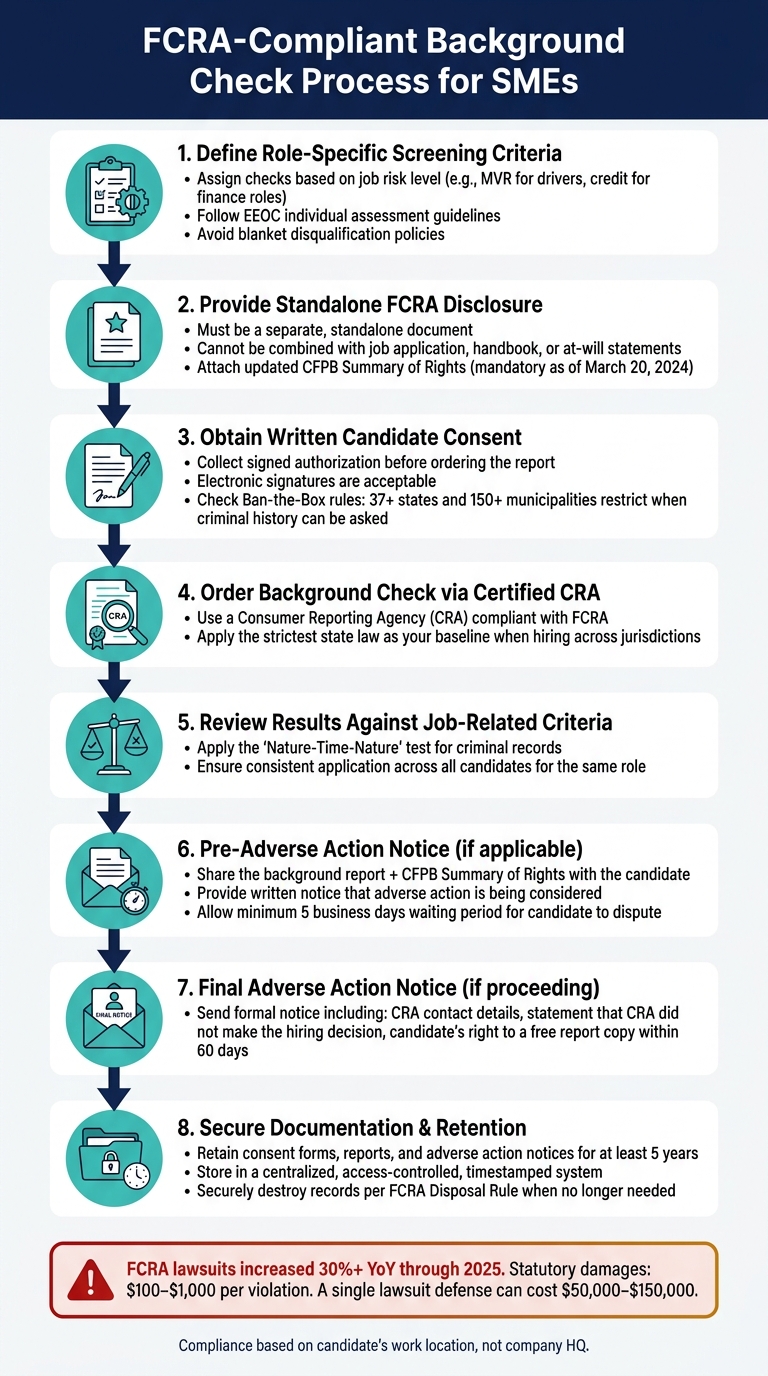
FCRA-Compliant Background Check Process for SMEs
A written screening policy helps reduce risks and ensures consistency in hiring decisions. Developing this policy involves turning legal requirements into practical steps.
Defining Screening Criteria by Role
Organize roles by their associated risks and assign specific background checks to each. Consistency is key to avoiding legal issues. For instance, a financial analyst might require a credit check (if allowed by state law) and employment verification. A delivery driver may need a Motor Vehicle Report (MVR) check, while a software engineer might only need identity, employment, and criminal history verification.
Avoid blanket disqualification policies. Instead, follow the Equal Employment Opportunity Commission (EEOC) guidelines by conducting individual assessments for criminal history findings. Consider factors such as the nature of the offense, the time since it occurred, and its relevance to the job before making a hiring decision [13].
Candidate Communication and Consent
Before requesting a background report from a Consumer Reporting Agency (CRA), provide the candidate with a standalone disclosure and obtain written consent. This disclosure must be a separate document, not part of a job application, employee handbook, or at-will employment statement. Even a single extra sentence can cause compliance problems.
To stay compliant, avoid combining Fair Credit Reporting Act (FCRA) disclosure language with other text. Use a one-page standalone form, which can include an electronic signature, and attach the current Consumer Financial Protection Bureau (CFPB) Summary of Rights. As of March 20, 2024, this updated document is mandatory [13]. Additionally, if hiring in one of the over 180 jurisdictions with Ban-the-Box laws, delay any criminal history inquiries until after an initial interview or a conditional offer [2][14].
Once you have the candidate’s consent, follow the required steps for adverse action to remain compliant.
Adverse Action Procedures and Documentation
The adverse action process is one of the most overlooked parts of FCRA compliance, but skipping it can be costly. FCRA-related lawsuits increased by more than 30% year-over-year through 2025, with statutory damages ranging from $100 to $1,000 per violation – even when no actual harm is proven [2].
Here’s what the adverse action process requires:
- Pre-adverse action notice: Share the candidate’s background report, the CFPB Summary of Rights, and a notice explaining that adverse action is being considered.
- Waiting period: Allow at least five business days for the candidate to dispute inaccuracies or provide additional context before making a final decision.
- Final adverse action notice: Send a formal notice that includes the CRA’s contact details, a statement clarifying that the CRA did not make the hiring decision, and information about the candidate’s right to request a free copy of their report within 60 days.
For example, one auto parts supplier faced a $950,000 settlement for using disclosure forms with unnecessary language [4]. This highlights the financial risks of cutting corners in compliance.
"The most commonly skipped duties are numbers 3 through 5: the adverse action sequence. Small businesses that run background checks but skip the adverse action process when they find negative results are violating FCRA every single time." – FirstHR [3]
To protect against discrimination claims, document the job-related reasons for rejecting any candidate. Retain consent forms, background reports, and adverse action notices for at least five years in a secure, access-controlled system. When these records are no longer needed, dispose of them securely by shredding paper copies or permanently deleting digital files, as outlined in the FCRA Disposal Rule [6][7].
Scaling Background Check Compliance as Hiring Grows
As your hiring volume increases, ensuring compliance in background checks becomes more complex. While manual checks might work for a small team, they quickly become a liability when you’re hiring across multiple locations, roles, and recruiters. To scale effectively, you need a system that combines automation with expert oversight.
Building a Repeatable Background Check Workflow
To stay compliant, your background check process must be seamless and integrated into your hiring workflow. The ideal setup? Automated triggers that initiate checks without relying on someone to remember. Embedding these checks into your Applicant Tracking System (ATS) or HRIS ensures they happen at the right stage, eliminating manual errors.
Start by creating role-specific screening packages. Instead of applying the same checks to every hire, tailor them to the role and document the business rationale for each. This approach not only speeds up hiring but also strengthens your audit readiness. When hiring across jurisdictions, use the strictest state law as your baseline to ensure compliance everywhere.
Centralized documentation is another must. Store all authorizations, disclosures, and adverse action notices in a single, timestamped system. This way, if a compliance issue arises, your team can quickly access the necessary records without scrambling.
Once automation is in place, make sure your team understands the compliance rules they’re working within.
Training Hiring Teams on Compliance Basics
Compliance can falter when hiring managers operate without a clear understanding of the rules. As Mitratech aptly put it: "Compliance breaks down when hiring speed outpaces the system supporting it." [15]. Training your team on the most error-prone compliance steps is critical.
Focus on key areas like when to ask about criminal history, how to handle standalone FCRA disclosures, and the proper sequence for adverse actions. Real-world examples highlight the risks of skipping training. For instance, in 2026, a major online retailer faced a $5 million settlement for bundling background check disclosures with other application materials – a mistake that basic training could have prevented [5]. Similarly, The Salvation Army settled for $1.87 million due to improper language in disclosure forms [5].
Regular training updates are equally important. For example, the Illinois Clean Slate Act, effective June 30, 2026, will automatically seal around 1.74 million criminal records [2], impacting what appears on background checks. Annual refreshers ensure your team stays informed on such changes.
While training and automation are vital, having recruitment experts on hand can take compliance to the next level.
Using Recruitment Expertise to Support Compliance
When hiring ramps up, keeping every step compliant can overwhelm internal teams. It’s not just about knowing the rules – it’s about having the capacity to apply them consistently across all hires. This is where expert recruiters come in.
Rent a Recruiter embeds experienced recruiters into your team to manage hiring end-to-end, ensuring compliance at every stage. They build workflows that align with shifting regulations, such as New York State’s credit history restrictions (effective April 18, 2026) or updated ICE I-9 enforcement standards starting March 2026. By handling the administrative load, they free up your team while maintaining compliance standards.
As Mitratech noted: "Defensible background screening isn’t about reacting well in the moment. It’s about building a process that’s designed to be explained." [15]. With structured, audit-ready processes in place, your hiring can scale without compromising on compliance.
Conclusion: Staying Compliant While Scaling Your Hiring
Background check compliance isn’t a one-and-done task. It’s a continuous process that requires consistent effort, thorough documentation, and staying on top of evolving regulations. Recent FCRA lawsuits have made it clear: the cost of non-compliance is real, no matter your company’s size.
To stay on the right side of compliance, focus on the essentials: work with a certified Consumer Reporting Agency, ensure standalone disclosures and written consent, follow the two-step adverse action process, and apply screening criteria consistently. As Vetty explains, "Effective compliance hinges on proper sequencing, documentation, and handling exceptions." [6]
For many SMEs, it’s not the lack of knowledge but operational pressures that lead to compliance missteps. Annual audits of disclosure forms, tailored screening packages for specific roles, and centralized recordkeeping are key to building a defensible process. This not only reduces risk but also creates a strong foundation for scalable hiring.
If your hiring is ramping up and your team is feeling the strain, Rent a Recruiter can embed experienced recruiters directly into your team. They’ll manage hiring end-to-end, ensuring compliance at every step while helping you scale efficiently. By adopting this approach, you’ll achieve the structure and consistency compliance demands while cutting hiring costs by up to 70%.
"Prevention is dramatically cheaper than defense." – FirstHR [3]
This simple truth is a powerful reminder: addressing compliance now is far less expensive than dealing with the fallout of a misstep later.
FAQs
Which state or city’s background check laws apply for remote hires?
For remote hires, the laws governing background checks are typically based on the state and city where the employee will physically work. These regulations can differ significantly, so your HR team needs to follow the rules specific to the candidate’s location, rather than those of your company’s headquarters. To make compliance easier, many employers choose to align their processes with the most restrictive state laws within their operational reach. Rent a Recruiter can assist in simplifying and managing this process efficiently.
What’s the correct FCRA adverse action timeline, and how long should I wait?
Under the Fair Credit Reporting Act (FCRA), employers must follow a two-step notification process before taking any adverse action based on a background check. First, you need to send a pre-adverse action notice, which includes the background report and a copy of the Summary of Your Rights under the FCRA. After that, give the candidate a chance to review the report and dispute any errors. While the FCRA doesn’t set a specific timeframe, allowing at least five business days is a standard practice. Be sure to check if your state or local laws impose stricter requirements.
Which background checks should I run for each role without increasing discrimination risk?
Consistency is key when it comes to reducing discrimination risks during candidate screening. Tailor your screening practices to the specific requirements of each role:
- Office roles: Conduct criminal history and identity verification.
- Driving positions: Include motor vehicle record checks.
- Financial roles: Perform employment verification.
Steer clear of blanket policies, such as automatically disqualifying candidates with a criminal record. Instead, carry out individualized assessments for any negative findings. Evaluate the relevance of the issue to the job and document your decisions thoroughly to align with EEOC guidelines. This approach not only ensures fairness but also protects your organization from potential compliance issues.
Related Blog Posts
- Best Certification Programs for Hiring Compliance 2026
- 10 Recruitment Compliance Tips for SMEs
- Compliance Checklist for Scalable Recruitment
- Top Anti-Discrimination Practices for SMEs
75% of candidates research your company’s reputation before applying. If your employer brand isn’t clear or consistent, you’re losing top talent to competitors. For small and mid-sized businesses (SMEs), employer branding isn’t about big budgets. It’s about building trust through every candidate interaction – from job descriptions to Glassdoor reviews.
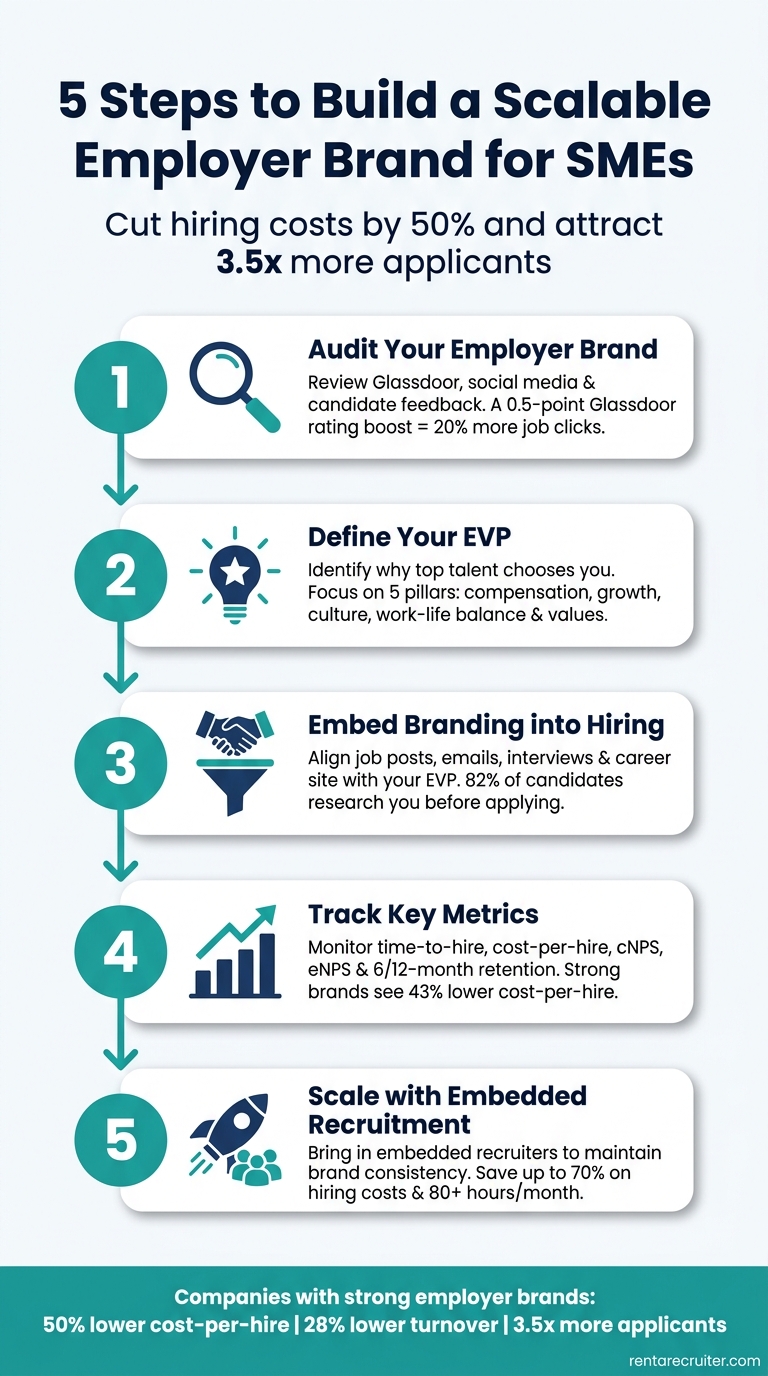
The result? Lower hiring costs, faster time-to-hire, and stronger retention. Companies with a solid employer brand cut hiring costs by 50% and attract 3.5x more applicants per role. Here’s how SMEs can build an employer brand that scales without breaking the bank:
- Audit your current reputation: Check Glassdoor, social media, and candidate feedback for gaps.
- Define your EVP (Employer Value Proposition): Why should someone work for you? Highlight what makes your workplace stand out.
- Streamline hiring communications: Ensure job posts, emails, and interviews reflect your EVP.
- Track results: Use metrics like cost-per-hire, offer acceptance rates, and retention to measure success.
- Get support when scaling: Embedded recruitment can help maintain consistency as your hiring needs grow.
Want to save time and cut costs? Rent a Recruiter provides embedded recruitment support, helping SMEs scale hiring efficiently while staying true to their brand.
5 Steps to Build a Scalable Employer Brand for SMEs
Create a Killer EMPLOYER BRAND Strategy for Your Small Business
sbb-itb-a23bd6a
Step 1: Audit Your Current Employer Branding and Candidate Experience
Before you scale, it’s crucial to take a hard look at how candidates and employees perceive your company. A thorough audit can uncover gaps in your employer brand and candidate experience – gaps that, if left unchecked, could cost you top talent.
How to Conduct an Employer Brand Audit
Start by Googling your company name with terms like "reviews" or "careers." This is often the first impression candidates get, so it’s worth understanding what they see. Dive into your last 50 Glassdoor and Indeed reviews to identify recurring themes. This isn’t just about vanity metrics – boosting your Glassdoor rating by 0.5 points can result in 20% more job clicks and 16% more application starts [3].
Next, examine your job descriptions, career site, and LinkedIn page side by side. Are they consistent in tone? Does your messaging clearly communicate why someone should work for you? If your job posts sound overly formal but your Instagram presence is lighthearted and playful, candidates will notice. Also, review your candidate communications – offer letters, interview invites, and rejection emails. These should reflect the same voice and professionalism as your external branding.
| Audit Area | What to Review | What to Look For |
|---|---|---|
| External Reputation | Glassdoor, Indeed, Google, social mentions | Trends in ratings, consistent positives/negatives [5] |
| Messaging | Career site, job descriptions, social media | Consistent tone, clear "why work here" message [5][1] |
| Candidate Comms | Emails, rejection notices, interview invites | Professional tone, alignment with branding [1] |
| Internal Experience | eNPS, exit interviews, pulse surveys | Gaps between internal culture and external promises [5] |
Finally, step into a candidate’s shoes and experience your hiring process firsthand. This will help you identify disconnects between your brand promise and the actual candidate experience.
How to Map the Candidate Journey
Visit your career page as if you were seeing it for the first time. Can you understand the role and its appeal in under 30 seconds? If not, it’s time for a refresh. Test the application process – how many steps does it take? Overly complicated forms often lead to drop-offs.
Map out every stage of the candidate journey: discovering your job post on social media, navigating your career site, applying, recruiter outreach, interviews, receiving an offer, and onboarding. At each step, look for bottlenecks. Are there moments where communication slows or stops entirely? These "black holes" can seriously damage your brand. Keep in mind, 70% of candidates expect the hiring process to take three weeks or less [3]. Delays not only frustrate but also drive candidates away.
"Candidates remember how you made them feel. A fast, respectful ‘no’ is a thousand times better for your brand than silence. They’ll tell their friends you’re a class act, even if they didn’t get the job." – Jasmine Makkar, Marketing Professional, HireZapp [1]
How to Gather Internal Feedback
Tap into your employee base with an anonymous eNPS survey. Ask them how likely they are to recommend your company as a place to work. A score above 30 is a good sign [7], but anything lower points to areas needing attention.
Go further with stay interviews. Ask your best employees why they joined, what keeps them engaged, and what might make them leave. Similarly, check in with new hires during their first 90 days – why did they pick you over other offers? These conversations often reveal your true employee value proposition (EVP). If what employees experience internally doesn’t match what you’re promoting externally, that’s the gap you need to close.
"The strongest employer brand is not the one that claims to be the best. It is the one whose employees spontaneously attest that it delivers on its promises." – Balencio [7]
Bridging the gap between internal feedback and external messaging ensures your employer brand feels genuine and can grow with your company. For more insights on optimizing your hiring strategy, explore our recruitment blog.
Step 2: Build a Clear Employer Value Proposition (EVP)
After completing your audit, the next step is to establish your Employer Value Proposition (EVP). At its core, your EVP answers the question: "Why should someone choose to work here instead of somewhere else?"
Think of the EVP as the internal agreement – what employees genuinely gain in return for their time and effort. Your employer brand is the external expression of this agreement. If the foundation (your EVP) isn’t solid, no amount of branding or marketing can make up for it[4][11].
How to Define Your EVP Pillars
Start by speaking directly with your top-performing employees. Ask them:
- Why did you decide to join?
- Why do you continue to stay?
- What might make you consider leaving?
Look for recurring themes in their responses. These patterns will help you uncover your genuine strengths as an employer[11]. For SMEs, this often includes advantages that larger companies can’t easily offer: access to leadership, quicker decision-making, opportunities to take on varied roles, and the chance to make a noticeable impact hiring as you scale[4]. These are the qualities that resonate with the right candidates.
"A high-impact EVP attracts the right candidates, not just more candidates." – Randstad Enterprise [8]
A strong EVP typically revolves around five key areas: compensation and benefits, career development, work environment and culture, work-life balance, and company values[9]. Flexibility has become especially important – 91% of workers now prioritize flexible work options, a massive jump from 51% in 2019. Interestingly, 94% of small businesses already offer hybrid work setups, compared to 83% of larger organizations[9][10].
Once you’ve identified your pillars, document them clearly. These will serve as the foundation for all candidate-facing communication.
How to Document and Apply Your EVP
After defining your EVP pillars, put them into a format that’s easy for your team to use. A simple EVP playbook can be an effective tool. Build it around a core positioning statement, using this template:
"At [Company], [target employee type] can [primary benefit] while [secondary benefit] in an environment that [cultural differentiator]. Unlike larger companies, we offer [unique small-team advantage]." [4]
Avoid generic claims like "great culture." Instead, use specific, measurable examples such as "engineers deploy to production in their first week" or "we publish all salary ranges internally and externally."[11] Specificity builds credibility and trust.
Once your EVP is documented, involve HR, team leads, and other employees to ensure it accurately reflects the reality of working at your company[11]. A concise, one-page playbook works best. Include:
- A clear positioning statement
- The five EVP pillars, supported by concrete proof points
- A few real employee stories or quotes
This document will ensure consistent messaging across job postings, your careers page, and even interview discussions. When everyone is aligned, your EVP becomes a powerful tool for attracting the right talent.
Step 3: Embed Employer Branding into Your Hiring Process
Once your EVP is documented, the next step is ensuring it resonates throughout your hiring process. The disconnect between an inspiring EVP and a candidate’s actual experience is where many SMEs falter. Here’s how to weave your EVP into every hiring touchpoint using proven talent acquisition strategies.
Standardize Job Descriptions and Outreach
Your EVP should guide the tone and structure of all hiring materials. Start by creating a consistent format for job descriptions. Include a clear "About Us" section – just two or three sentences that highlight your mission and what sets your team apart. Follow that with an "Opportunity" section that focuses on the role’s impact rather than just listing responsibilities. For instance, instead of saying, "Reports to senior leadership", write something like, "You’ll collaborate directly with our CEO on product strategy starting in your first week." This level of detail makes the role more relatable and engaging.
Extend this consistency to all candidate communications. Branded, EVP-aligned responses at every stage – whether it’s a follow-up email or a rejection note – demonstrate professionalism and respect. As marketing expert Jasmine Makkar puts it:
"Candidates remember how you made them feel. A fast, respectful ‘no’ is a thousand times better for your brand than silence. They’ll tell their friends you’re a class act, even if they didn’t get the job." – Jasmine Makkar [1]
Build a Career Site and Online Presence That Scales
Your careers page is a critical piece of your employer branding. It should feature authentic team photos (ditch the stock images), outline your interview process, and showcase at least one or two stories of employee growth. With 82% of candidates researching an employer’s reputation before applying [2], a thin or outdated careers page can cost you top talent before they even consider hitting "Apply."
Your social media presence also matters. LinkedIn is indispensable for most SMEs – use it to share employee milestones, provide context for open roles, and establish thought leadership. Instagram, on the other hand, is great for showcasing your workplace culture. Whatever platforms you choose, consistency is key. Strike a balance between cultural content and job postings to keep your audience engaged. Tools like Buffer (~$6/month) and Canva Pro (~$15/month) can help you stay consistent without requiring a full marketing team.
Improve the Candidate Experience
Every step of the interview process reflects on your brand. Confirm interviews well in advance, stick to scheduled times, and provide clear next steps. These small but meaningful actions communicate respect for the candidate’s time and effort. Ensure that everyone involved in the hiring process, from recruiters to team leads, understands your EVP so the brand message remains consistent throughout.
Respectful communication and punctuality are non-negotiable. Additionally, collect feedback from candidates after each hiring cycle to identify areas for improvement. With 75% of job seekers researching a company’s reputation before applying [6], a poor candidate experience can tarnish your brand far beyond the hiring process itself.
Step 4: Track, Review, and Manage Your Employer Branding Efforts
Crafting a strong employer brand is just the beginning. The real challenge lies in knowing if it’s working and ensuring it improves over time. Without clear metrics, it’s impossible to measure success.
Key Employer Branding Metrics to Track
Once your Employer Value Proposition (EVP) is integrated into your hiring process, you need to evaluate its impact using specific metrics. These metrics generally fall into four categories: recruitment efficiency, candidate sentiment, employee advocacy, and retention quality.
For recruitment, focus on time-to-hire and cost-per-hire. A well-regarded employer brand can reduce reliance on paid job boards and external agencies, saving money. In fact, companies with strong employer brands report a 43% lower cost-per-hire [13].
When it comes to candidate sentiment, tools like the Candidate Net Promoter Score (cNPS) are invaluable. This post-interview survey asks candidates how likely they are to recommend your hiring process. Combine this with your offer acceptance rate to get a clear picture. A drop in acceptance rates often signals a disconnect between your brand promise and the actual hiring experience.
On the employee side, track your Employee Net Promoter Score (eNPS) and referral rates. Employee referrals are about 10 times more likely to convert into hires compared to job board applicants [12]. A strong referral rate indicates that employees trust and believe in your brand. Lastly, monitor retention at 6- and 12-month intervals to ensure new hires’ experiences align with what they were promised during recruitment.
| Metric Category | Key KPIs | What It Tells You |
|---|---|---|
| Recruitment | Time-to-hire, Cost-per-hire | Efficiency and cost-effectiveness of hiring |
| Candidate Experience | cNPS, Offer acceptance rate | Candidate perception of your brand during hiring |
| Employee Advocacy | eNPS, Referral rate | Internal trust and engagement with the brand |
| Retention | 6/12-month attrition, Quality-of-hire | Long-term alignment between promise and reality |
How to Set Up a Regular Review Process
Rather than focusing on weekly fluctuations, look at quarterly trends across these metrics. Compare current data to the previous quarter and flag any notable changes.
A practical way to maintain alignment is by comparing leadership’s portrayal of the workplace with employees’ actual experiences. Use brief pulse surveys or informal feedback sessions to identify gaps. As TuraHire wisely notes:
"The employer brand should meet the standard of accuracy, not perfection. A gap between the brand promise and lived experience is a direct driver of turnover." [12]
Additionally, monitor and respond to reviews on platforms like Glassdoor and LinkedIn. 70% of candidates are more likely to apply to companies that actively engage with reviews [14]. Address critical feedback thoughtfully – this demonstrates maturity and appeals to top candidates.
By regularly tracking and reviewing these metrics, you can validate your branding efforts and adjust as your hiring needs grow. But the process doesn’t stop there. Assigning ownership is essential to ensure consistency and accountability.
Assign Ownership of Your Employer Brand
To turn insights into action, assign clear responsibilities for managing your employer brand. Without ownership, progress often stalls. One effective strategy is to use a RACI model:
- Responsible: HR or People team handles daily execution and tracking.
- Consulted: Marketing ensures alignment with the overall brand.
- Accountable: The CEO acts as the visible champion of your EVP.
Line managers also play a critical role by shaping employees’ day-to-day experiences, which can either strengthen or weaken your brand externally.
"Your employer brand exists whether you manage it or not – it’s shaped by current employees, ex-employees, and public perception." [12]
Once roles are defined, develop an annual branding plan tied to measurable business goals. For example, reducing agency spend, increasing offer acceptance rates, or improving diversity hiring. This approach keeps your efforts grounded in outcomes that matter most to your business.
Step 5: Use Embedded Recruitment Support to Scale Faster
Even with a strong EVP and clear metrics, scaling up hiring can stretch your team thin. This often leads to inconsistencies that push your employer brand to the backseat. Spotting these issues early gives you the chance to bring in specialized recruitment support, ensuring your brand remains intact as you grow.
When to Bring in Embedded Recruitment Support
Some clear signs that your recruitment setup is falling behind include fewer career site conversions, lower offer acceptance rates, and an EVP that no longer aligns with your current reality. This mismatch becomes even more apparent if you’ve embraced remote or hybrid work, undergone leadership changes, or entered new markets. Outdated or generic messaging can weaken your brand and fail to attract the right talent.
As Lori Sylvia, Founder & CEO of Rally, explains:
"Your employer brand is one of your most powerful tools for attracting talent – but only if it reflects who you are today and connects with the talent you need tomorrow." [15]
What Embedded Recruitment Delivers
When these gaps start to show, embedded recruitment can provide the solution. Rent a Recruiter places experienced recruiters directly into your team within days, handling the entire hiring process with a consistent and structured approach. This means every job description, candidate interaction, and offer discussion reflects your values and tone, turning your EVP from a static document into a lived experience.
Embedded recruitment doesn’t just bring consistency; it also helps you allocate your budget more effectively. Companies partnering with Rent a Recruiter often cut hiring costs by up to 70% compared to traditional commission-based agencies. On top of that, they save over 80 hours per month on hiring admin – time that can be redirected toward strategic projects like strengthening your employer brand instead of being bogged down in logistics.
"Wherever your biggest gaps are, having the right support can help you move faster and make smarter decisions." – Lori Sylvia, Founder & CEO, Rally [15]
Conclusion and Next Steps
Creating an employer brand that scales with your business takes dedication, but the payoff is worth it. Start by taking these five steps: assess where you stand today, define a clear and genuine EVP, weave your brand into every hiring touchpoint, measure your progress with key metrics, and secure the right support to grow efficiently.
The numbers speak for themselves: companies with strong employer brands see a 50% reduction in cost-per-hire, 28% lower turnover rates, and attract 2.5x to 3.5x more applicants [3][4][6]. These results come from consistently engaging candidates with purpose and authenticity.
And here’s the thing – small and mid-sized businesses don’t need huge budgets or branding teams to get started. Focus on the basics: sharpen your job descriptions, respond to every Glassdoor review within 48–72 hours, and ensure every candidate receives a response, even if it’s a rejection. These small but consistent efforts build a reputation that draws in top talent and sets your business apart.
If your hiring efforts begin to outpace your internal resources, embedded recruitment can be a game-changer. Rent a Recruiter places seasoned recruiters directly in your team, ensuring your hiring stays aligned with your employer brand. No inflated fees, no delays – just structured, efficient hiring. You can even start with a free Recruitment Health Check to identify quick wins and strengthen your employer branding strategy.
FAQs
What’s a simple way to write an EVP for a small team?
When building an EVP for a smaller team, start by conducting interviews with 15–20 of your top performers. Focus the conversation on three key questions: why they joined, what keeps them engaged, and what might cause them to leave. These insights will help you uncover recurring themes that genuinely reflect your team’s day-to-day experience.
Steer clear of generic phrases like "great culture" – they don’t tell the full story. Instead, pinpoint 2–3 specific traits that truly set your team apart. Use a clear and compelling structure to communicate your EVP:
"At [Company], [target employee type] can [primary benefit] while [secondary benefit] in an environment that [cultural differentiator]."
This approach not only highlights what makes your team unique but also connects directly with the kind of talent you’re looking to attract.
Which hiring touchpoints impact employer brand the most?
Employer branding is influenced by every interaction candidates and employees have with your company. Some of the most impactful touchpoints include:
- Interview process: The pace and quality of communication during interviews shape how candidates perceive your company.
- Onboarding: A smooth, engaging onboarding experience fosters trust, while a disorganized one can quickly erode confidence.
- Digital presence: Platforms like your career page, social media profiles, and review sites such as Glassdoor or LinkedIn heavily impact how your company is viewed.
- Employee advocacy: Stories and reviews shared by employees carry significant weight and are often seen as the most credible source of insight.
What metrics should I track first to prove employer branding ROI?
To measure the ROI of employer branding, focus on two key metrics: Candidate Net Promoter Score (cNPS) and Employee Net Promoter Score (eNPS).
- cNPS gauges how likely candidates are to recommend your hiring process to others, offering a snapshot of your external reputation.
- eNPS, on the other hand, measures employee satisfaction and their willingness to advocate for your company, reflecting the strength of your internal culture.
Tracking these scores gives you a clear starting point to evaluate the impact of your employer branding efforts and supports the case for further investment in your hiring strategy.
Related Blog Posts
- The Ultimate Guide to Flexible Recruitment Solutions for SMEs
- Employee Advocacy in Recruitment: Benefits for SMEs
- Fintech vs. SaaS: Employer Branding Differences
- Top Strategies For Passive Candidate Outreach
Employer Branding Checker
Measure How Your Company Is Seen by Talent
An Employer Branding Checker gives companies a practical way to assess how appealing they look to current employees and future candidates. Employer reputation isn’t built on one factor alone. It’s shaped by employee satisfaction, public review scores, social visibility, and how actively a company presents career opportunities online. When those signals are strong and consistent, hiring tends to get easier and retention often improves.
What This Tool Evaluates
This employer brand assessment looks at both internal and external indicators. A healthy satisfaction score suggests people enjoy the work environment. Strong review ratings can reinforce trust with job seekers. Social media activity helps show culture in motion, while regular career page updates signal that the company is engaged, current, and serious about hiring.
Why It Matters
A solid employer brand score can help teams identify strengths they should lean into and weaknesses they shouldn’t ignore. For HR leaders, recruiters, and founders, this tool offers a quick snapshot of brand health along with useful next steps. If you want a clearer view of your talent attraction strategy, an Employer Branding Checker is an easy place to start.
FAQs
How does the Employer Branding Checker calculate the score?
The tool uses a weighted scoring model to evaluate the main signals that shape employer brand perception. Employee satisfaction and online review ratings carry the most weight because they reflect both internal culture and public reputation. Social media engagement, career page freshness, and any recent branding activity add supporting context, helping create a balanced score that lands in weak, moderate, or strong territory.
What if I don’t have exact data for every input?
That’s completely fine. This tool is designed to be useful even when you’re working with estimates. If you don’t have formal survey results or detailed engagement metrics, you can use your best reasonable approximation. The goal is to get a directional read on your employer brand, spot likely gaps, and identify practical ways to improve over time.
Can this tool help improve recruiting results?
Yes, especially if you use the results as a starting point for action. A weaker score can reveal issues that may be hurting candidate interest, such as low employee sentiment, outdated careers content, or weak visibility on social platforms. By acting on the recommendations, companies can strengthen their reputation, create a better candidate experience, and become more attractive to potential hires.
When hiring plans fail, it’s rarely about bad recruiters. The real problem? Leadership isn’t looped in early enough. Without buy-in, recruitment becomes reactive, budgets get squeezed, and timelines slip. For scaling companies, this disconnect can cost millions in lost revenue or missed opportunities.
Here’s how to fix it:
- Tie hiring to business goals: Every role should link directly to measurable outcomes like revenue, risk, or growth.
- Show the cost of not hiring: Use data to highlight risks, like delays or penalties, tied to unfilled roles.
- Speak leadership’s language: CEOs care about growth, CFOs focus on costs, and department heads need team results.
- Present a clear, data-backed plan: Use metrics like revenue lost to vacancies or cost-per-hire to make your case.
By shifting the conversation from "what this hire costs" to "what it costs if we don’t hire", you’ll align recruitment with business strategy, secure approval faster, and build trust with leadership. For companies struggling to execute, embedded recruitment can bridge the gap, cutting costs by up to 70% while saving 80+ hours per month in admin.
Ready to turn headcount requests into strategic wins? Let’s dive in.
How HR Can Get Leadership Buy-in (Straight from a CEO)
Understanding Leadership Priorities and Business Goals
Before stepping into any discussion with leadership, it’s crucial to grasp their priorities fully.
Map Hiring Plans to Business Goals
Every hiring request should tie directly to a measurable business outcome. This isn’t about vague goals like "team expansion" but specific triggers like a contract win, product launch, or an approved roadmap milestone. These connections make a request feel essential, not optional.
To prioritize roles, align them with business impact categories:
- Revenue-generating (e.g., Sales)
- Revenue-protecting (e.g., Customer Success)
- Risk-mitigating (e.g., Compliance)
- Mission-critical infrastructure (e.g., IT, Finance)
This framework helps leadership quickly decide what to fund first, showing that you’ve already done the heavy lifting they’d otherwise need to handle.
"A vague request signals a request to begin analysis. A specific request reads as a request for permission to act on thinking that has already been done." – Mary Beth Hazeldine, Managing Director, Winning Presentations [4]
Identify Who Approves Hiring Decisions
Not everyone in a leadership meeting has the same level of authority or focus. Understanding who makes the final call on headcount, budgets, and timelines is essential for tailoring your pitch. Typically, hiring decisions reflect three key perspectives:
| Stakeholder | Primary Priority | What They Need to See |
|---|---|---|
| CEO | Growth, vision, competitive edge | Revenue impact, strategic alignment |
| CFO | Cost, efficiency, budget control | ROI, cost-per-hire compared to benchmarks |
| Department Head | Team performance, goal delivery | Operational impact, time-to-fill by team |
Engage these stakeholders individually ahead of any formal presentation. This allows you to address objections early and ensure alignment on the urgency of the request before presenting to the group. [4]
Connect Hiring Needs to Leadership Pain Points
Leaders care about tangible risks: missed deadlines, regulatory issues, revenue declines, or team burnout. Your job is to link the hiring gap directly to these concerns.
One of the most effective strategies is to focus on the cost of not hiring. For example, in May 2026, a CTO at a mid-sized financial services firm secured approval for six engineers in just 11 minutes. How? By tying the request to a specific contract win – the Northern Trust integration. They demonstrated that without those hires, the project would face a ten-week delay, triggering a $180,000 penalty and risking $2.4 million in second-phase revenue. [4]
"The headcount requests that get approved lead with the cost of not hiring – and let the salary number sit inside that comparison rather than stand alone." – Mary Beth Hazeldine, Managing Director, Winning Presentations [4]
When you shift the conversation from "here’s what this hire costs" to "here’s what it costs if we don’t hire", you change the entire dynamic. This approach lays the foundation for a persuasive, data-driven case that resonates with leadership.
Building a Data-Driven Business Case for Hiring
Getting leadership on board means presenting data that ties hiring decisions directly to business outcomes. This section focuses on using precise metrics to validate your case, building on the idea of aligning hiring needs with business challenges.
Use Metrics to Define the Hiring Problem
Skip metrics that focus on activity, like the number of applications or job postings. Instead, zero in on outcomes such as quality of hire, revenue lost due to vacancies, and cost-per-hire compared to industry standards.
Here’s a quick breakdown of key metrics to include in executive discussions:
| Metric | What It Measures | Why Leadership Cares |
|---|---|---|
| Revenue Lost to Vacancy | The daily financial impact of unfilled roles | Links hiring delays directly to revenue losses |
| Quality of Hire Score | Combines 90-day performance, 6-month effectiveness, and 12-month retention rates | Demonstrates the long-term value of recruitment decisions |
| Cost-per-Hire | Total cost to fill a role | Highlights efficiency; the 2025 industry average is $5,475 for non-executive roles [2] |
Keep the focus on results. Detailed operational data can stay in an appendix for those who want a deeper dive.
"Every metric you present should answer both [So What? and Now What?]. If you can’t immediately connect that number to revenue impact or competitive risk, it doesn’t belong in your deck." – John Vlastelica, Founder, Recruiting Toolbox [2]
Calculate the Cost of Delayed Hiring vs. Acting Now
For CFOs and CEOs, one of the most compelling figures is the daily cost of inaction. Use this formula to calculate revenue loss per vacancy:
(Annual revenue ÷ number of employees) ÷ 365 × average days to fill × number of open positions [2]
Take this example: A company with $50 million in annual revenue and 200 employees loses about $685 per employee per day in productivity. With 8 open roles and an average of 44 days to fill, the total loss is approximately $240,000 in output. And that’s before factoring in overtime costs, project delays, or employee burnout. [2]
In January 2026, LevelUP shared a real-world example: a vacant IT infrastructure manager role with a $150,000 salary delayed critical modernization projects worth $2 million. This vacancy alone put $130,000–$170,000 of that value at risk due to delayed upgrades and rework. [5] Framing hiring needs as a potential risk to business operations can turn a simple headcount request into a strategic priority.
Set Clear, Measurable Hiring Goals
Once you’ve established the financial impact, define specific hiring goals that connect directly to business outcomes. Avoid vague objectives like "hire faster" or "improve quality." Instead, create tiered, time-bound targets:
- Base level: Maintain current operations
- Strategic level: Fill critical gaps
- Transformational level: Build a strong talent pipeline for future growth
Additionally, consider goals beyond time-to-hire. For instance, a target like "reduce time-to-full-contribution for sales hires from 90 days to 60 days" directly ties hiring to revenue impact – a language that resonates with leadership.
"Start with the business question, not the data." – Lori Sylvia, Founder, Rally Recruitment Marketing [2]
sbb-itb-a23bd6a
Presenting Your Hiring Plan and Getting Leadership Approval
How to Tailor Your Hiring Pitch to Every Leader
Once you’ve built a solid, data-backed case, the next hurdle is presenting it in a way that turns leadership’s interest into approval. The delivery is just as important as the content.
Build a Clear, Concise Hiring Plan Presentation
For executive audiences, a streamlined five-slide presentation often works best. Here’s how to structure it:
- Start with the business problem – focus on a specific risk to an initiative, not just a general staffing shortfall.
- Quantify the cost of inaction using your vacancy cost formula.
- Frame headcount as an investment with a clear return.
- Outline the hiring timeline, ramp-up plan, and success metrics for 30, 90, and 180 days.
- End with a decision request that specifies the budget, headcount, and approval deadline.
During the meeting, aim for a concise flow: 2 minutes on headline KPIs, 5 minutes for the story behind the numbers, 5 minutes on action plans and projected outcomes, and 3 minutes for discussion. Use visuals effectively – titles like "Referrals convert 11x better than job boards" are far clearer and more impactful than vague labels like "Source conversion data." [2]
"The requests that get approved aren’t the ones with the best justification. They’re the ones with the best presentation." – Mary Beth Hazeldine, Managing Director, Winning Presentations [6]
With the structure in place, tailor your delivery to address the specific concerns and priorities of each leader.
Tailor Your Pitch to Each Leader’s Priorities
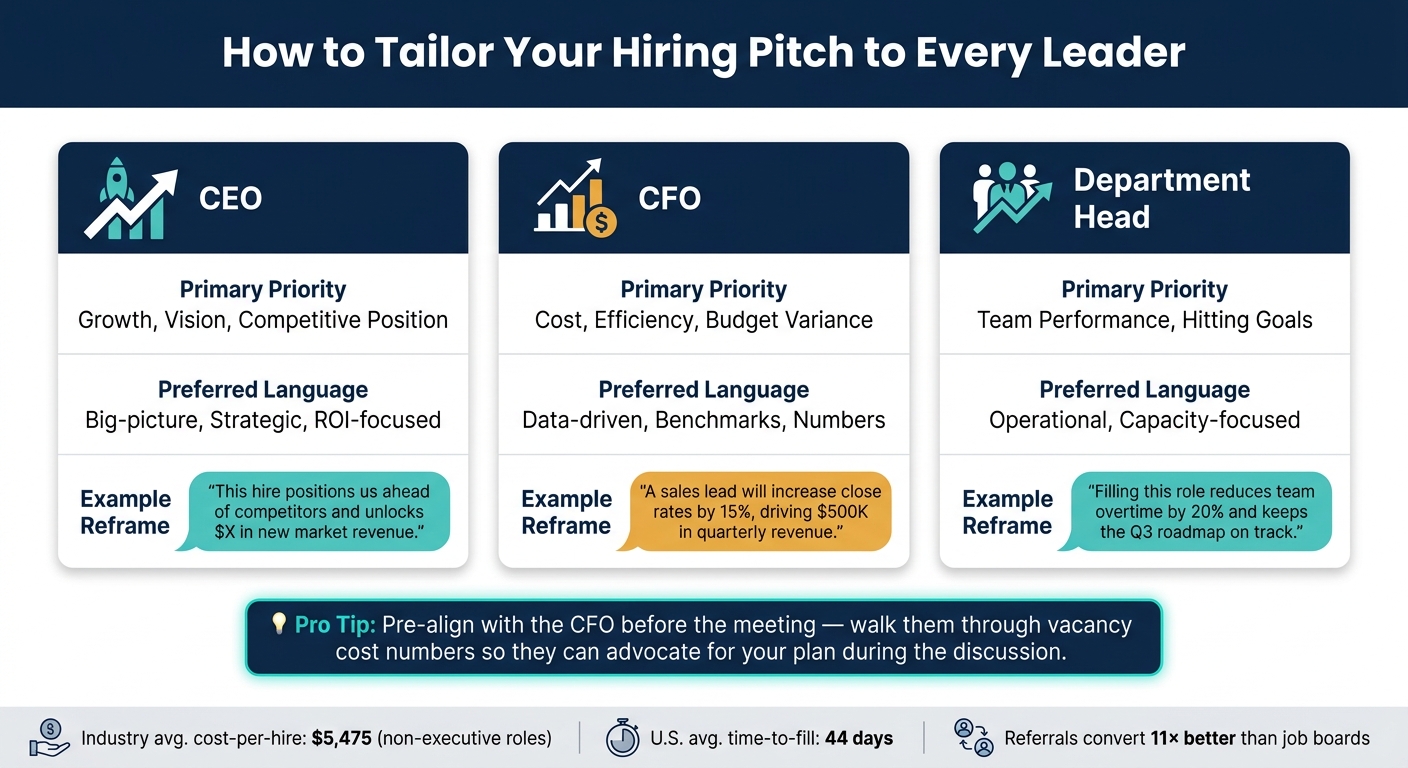
A one-size-fits-all hiring plan won’t land equally well with every decision-maker. While your earlier stakeholder analysis identifies key decision criteria, the table below highlights how to adapt your messaging style:
| Stakeholder | Primary Priority | Preferred Language |
|---|---|---|
| CEO | Growth, vision, competitive position | Big-picture, strategic, ROI-focused |
| CFO | Cost, efficiency, budget variance | Data-driven, benchmarks, numbers |
| Dept. Head | Team performance, hitting goals | Operational, capacity-focused |
Adjusting your language can make or break your pitch. For instance, instead of telling a CFO, "we need a sales lead to boost morale," reframe it as, "a sales lead will increase close rates by 15%, driving $500K in quarterly revenue." [3]
Ask for Specific Decisions on Budget, Headcount, and Timelines
End your presentation with a clear ask. Specify the budget, headcount, and timelines you need. Offering tiered options – such as Tier 1 for immediate risk reduction, Tier 2 for addressing all current gaps, and Tier 3 for future growth – can shift the conversation from "should we hire?" to "what level of investment works best?" [7]
If your full request feels too ambitious, propose a phased approach. For example, suggest approving six hires now and another six next quarter. This keeps progress moving rather than stalling over a single large decision. It’s also wise to pre-align with the CFO before the meeting. Walk them through the cost-of-vacancy numbers ahead of time so they can advocate for your plan during the discussion. [7]
"Successful headcount requests don’t ask for people – they present a business case for outcomes." – Mary Beth Hazeldine, Owner & Managing Director, Winning Presentations [6]
Delivering Results and Keeping Leadership Informed
Getting leadership approval is just the beginning. The real challenge – and the key to building trust – comes after the decision is made. Consistent execution and transparent reporting turn a one-time "yes" into a long-term partnership with leadership.
Track the Right Hiring Metrics
Most recruiting reports fall flat because they focus on activity metrics (like application volumes or phone screens) instead of the business outcomes that matter to leadership. No wonder only 12% of CEOs trust the metrics shared by talent acquisition teams [2]. Every metric you present should answer two critical questions: so what? and now what? For example, if time-to-fill is increasing, explain its impact on revenue and offer actionable solutions.
Here are the metrics that resonate most with leadership:
| Metric | Why It Matters to Leadership |
|---|---|
| Quality of Hire | A top priority for 31% of organizations, as it demonstrates long-term ROI |
| Cost-per-Hire | With an average of $5,475 for non-executive roles, benchmarks help justify budgets |
| Time-to-Fill | The U.S. average is 44 days – delays directly impact operational costs |
| Source Effectiveness | Referrals convert 11× better than job boards, guiding smarter resource allocation |
(Source: [2])
Keep executive dashboards focused. Limit them to five to seven key metrics to ensure leadership stays engaged [2].
"We report mostly tactical metrics that focus on costs, rather than the strategic ones that cover HR areas that impact corporate revenue." – Dr. John Sullivan, Author and Talent Strategist [2]
Set a Regular Reporting Schedule
Once you’ve identified the right metrics, consistency is key. A disciplined reporting schedule builds trust and keeps leadership aligned. Use monthly updates for CHROs and hiring managers, quarterly business reviews (QBRs) for CEOs and CFOs, and reserve weekly updates for critical hiring surges to avoid overwhelming your audience.
When presenting at a QBR, treat it as a story rather than a data dump [2]. Use a situation-complication-resolution format: explain where things stand, highlight risks of inaction, and outline your next steps. Pair this narrative with simple, annotated visuals that make key insights easy to grasp.
Use Embedded Recruitment Support to Scale Hiring
Of course, reporting is only as good as your ability to deliver results. Today, recruiters are managing 93% more applications with 14% fewer staff [2]. This imbalance can derail hiring plans and undermine leadership confidence.
This is where Rent a Recruiter can help. By embedding experienced recruiters into your team within days, we handle your hiring process end-to-end, adding structure, consistency, and transparency. Clients often cut hiring costs by up to 70% compared to traditional commission-based agencies while saving over 80 hours per month in internal admin.
For scaling companies in sectors like technology, SaaS, fintech, or professional services, embedded recruitment not only increases hiring capacity but also strengthens the accuracy of your reporting. This ensures you deliver on the promises made during the approval stage, turning leadership trust into measurable, lasting outcomes.
Conclusion: Aligning Hiring Plans with Leadership to Hit Business Goals
Gaining leadership support isn’t a one-and-done task – it’s a continuous effort grounded in trust and collaboration. The steps outlined here – linking hiring to business goals, using data to build your case, presenting a clear roadmap, and delivering results through consistent reporting – are all part of that process.
The key to success? Alignment. As Zac Miller aptly put it:
"If your ability to deliver depends on the people you hire, then recruiting can’t be an afterthought. It needs to be part of the business strategy from the start." [1]
Your hiring plan should evolve with your business. Review it quarterly, focus on metrics that show real impact, and ensure every hire contributes to revenue growth, operational efficiency, or risk mitigation.
If your internal team is overextended or lacks the bandwidth to execute at this level, Rent a Recruiter can step in. By embedding skilled recruiters directly into your team, you gain the capacity, structure, and transparency needed to meet your hiring commitments. Plus, clients often cut hiring costs by up to 70% and reclaim over 80 hours per month from administrative tasks.
FAQs
What data should I bring to justify a new hire?
When making a hiring decision, it’s essential to articulate how the role directly affects business outcomes. Let’s break this down with clear evidence:
The Reason for Urgency
Imagine your company is gearing up for a product launch scheduled for Q2 next year. To hit that milestone, you need a Senior Product Manager who can oversee development, align cross-functional teams, and manage timelines. Without this hire, delays are almost inevitable, and the revenue tied to the product – projected at $5 million annually – could be at risk.
The Cost of Not Hiring
Failing to fill this role promptly could result in:
- Revenue Loss: Missing the product launch by just one quarter could cost $1.25 million in delayed revenue.
- Increased Operational Costs: Current teams may face burnout from covering gaps, leading to higher turnover. Replacing one senior team member alone can cost upwards of $50,000 in recruitment and onboarding.
- Market Risks: Competitors may seize the opportunity to launch similar products, reducing your market share.
Role Overview
- Position: Senior Product Manager
- Start Date: January 15, 2024 (to align with product roadmap deadlines)
- Reporting Line: Reports to the VP of Product
- Annual Cost: $160,000 (including salary, benefits, and overhead)
Workforce and Hiring Metrics
Data shows that the average time-to-fill for a senior product management role is 60 days. However, with embedded recruitment, this timeframe can be reduced by 40%, saving nearly a month. That’s critical when every day of delay could mean thousands of dollars lost.
Success Metrics for the First 6-12 Months
To measure the impact of this hire, focus on clear, actionable goals:
- First 3 Months: Develop a detailed product timeline and align stakeholders.
- 6 Months: Ensure 80% of product milestones are on track or completed.
- 12 Months: Deliver the product launch on time, achieving at least 90% of projected revenue targets for the first quarter post-launch.
This approach not only justifies the hiring decision but also ties the role directly to measurable business outcomes. It demonstrates why acting now is crucial to avoid financial setbacks and operational disruptions.
How do I calculate the cost of leaving a role unfilled?
To figure out the cost of vacancy (CoV), start by estimating the daily financial impact of the open role, then multiply that by the number of days it remains unfilled. Here’s a straightforward method: take the position’s annual revenue contribution, divide it by 220 workdays to get the daily cost, and then multiply that by the vacancy duration.
For a more detailed calculation, include factors like lost revenue, overtime or coverage costs, productivity losses, and recruitment expenses. Add these together and multiply by the number of days the position is open to get a clearer picture of the total cost.
How can I win CFO and CEO approval for headcount fast?
To secure buy-in from leadership, position headcount as a business investment, not just a reaction to workload. Start by identifying the core business problem. Is it lost revenue opportunities? Delayed product launches? Strategic risks tied to understaffing? Frame the conversation around these high-impact challenges.
Next, quantify the cost of inaction. For instance, how much revenue could be lost if key roles remain unfilled? Or, what’s the risk to your growth strategy if timelines slip? By highlighting the tangible consequences, you make the case for urgency.
Then, present headcount as the solution. Show how the right hires will deliver measurable ROI. Include a clear plan that outlines:
- Timeline: When the roles will be filled and the expected ramp-up period.
- Metrics for success: How you’ll measure the impact of these hires on business outcomes.
- Risk mitigation: A transparent strategy, including an exit plan if goals aren’t met.
Be proactive in addressing potential objections. CFOs and CEOs value specificity, so provide a fully burdened cost breakdown of the proposed roles, including salaries, benefits, and any associated costs. Set a decision deadline to keep the process moving.
By framing your proposal this way, you shift the conversation from “Can we afford this?” to “Can we afford NOT to act?” That’s the kind of pitch that gets approval.
Related Blog Posts
- How to Forecast Recruitment Costs for Growth
- Checklist for Building Scalable Hiring Models
- Cost-Effective Recruitment Strategies for Funded Tech Startups
- How to Align Recruitment Teams with Business Goals
Talent Mapping Planner
Build a Practical Hiring Strategy
A Talent Mapping Planner helps HR teams move from vague hiring goals to a clear sourcing strategy. Instead of guessing where to find candidates, you can align required skills, preferred locations, urgency, and seniority level in one practical workflow. That makes it easier to decide whether a role should be sourced locally, regionally, or through remote channels.
Turn Roles Into Actionable Sourcing Plans
For growing teams, talent planning often stalls when hiring managers know what they need but not where to look. This tool bridges that gap by suggesting likely talent pools such as universities, online communities, professional platforms, and regional hiring markets. A strong talent mapping planner also helps prioritize outreach based on timing, so immediate hires get faster attention while longer-term roles can follow a pipeline-building approach.
Better Workforce Planning for HR Teams
Used well, a talent mapping planner supports smarter recruitment decisions, stronger workforce planning, and better alignment between business goals and hiring execution. It’s especially useful for HR leaders who want a focused, repeatable way to map skills to location and build sourcing plans that are realistic, organized, and easier to act on.
FAQs
How does this tool decide which locations or platforms to recommend?
The planner looks at the role or skill set, your geographic preferences, and the target experience level to suggest practical sourcing routes. For example, junior hiring may lean more toward universities, bootcamps, and early-career platforms, while senior hiring may point more toward professional networks, industry communities, and targeted outreach in established talent hubs. If you select remote, the recommendations shift toward broader digital channels and distributed talent pools.
Is this meant for strategic workforce planning or immediate recruiting needs?
It works well for both. If you’re hiring right away, the tool prioritizes faster channels and shorter outreach windows so your team can move quickly. If the need is three to twelve months out, the plan becomes more forward-looking, helping you build pipelines, identify target regions, and start relationship-based sourcing before demand becomes urgent.
Can HR teams use this even without deep labor market data?
Yes. The tool is designed to be practical, not overly technical. You don’t need a research team or a stack of market reports to get value from it. It gives HR and talent acquisition teams a structured starting point for where to search, which sourcing pools to tap, and how to pace outreach based on business urgency. You can use it as a planning layer before adding your own market insight or internal hiring data.
Cross-functional onboarding isn’t just about getting new hires up to speed – it’s about preparing them to contribute effectively across your entire business. For SMEs, where every hire has an outsized impact, poor onboarding can lead to high turnover, wasted time, and operational bottlenecks. 33% of new hires look for another job within six months due to bad onboarding, and replacing them can cost up to 60% of their annual salary.
Here’s why cross-functional onboarding works better:
- Retention: Companies with structured onboarding retain 82% of new hires, compared to 46% with disjointed processes.
- Productivity: New hires reach full productivity up to 50% faster with clear workflows and interdepartmental context.
- Collaboration: Breaking down silos early reduces misalignment, improves decision-making, and avoids costly mistakes.
For growing SMEs, this approach provides a scalable way to align teams, reduce turnover, and maximize the ROI of every new hire by optimising your hiring strategy. If building this structure feels overwhelming, Rent a Recruiter can help you create a process that works without the high costs of traditional agencies.
Reshaping Your Onboarding Process to Make New Hires Successful
sbb-itb-a23bd6a
What Cross-Functional Onboarding Means for SMEs
Most traditional onboarding processes focus narrowly on a single team. A new hire gets their tools, meets their manager, and learns the essentials of their role. But what’s often missing is the bigger picture – how the organization operates as a whole. Cross-functional onboarding flips this approach. It emphasizes the interconnectedness of departments, showing how work flows across teams and how decisions in one area impact others [1].
Rather than just teaching a new hire what they need to do, this method provides insight into how their role fits into the larger system. It highlights dependencies, handoffs, and the ripple effects of their actions. As Alex from Orichi puts it:
"Most productivity breakdowns aren’t caused by a lack of talent or effort. They’re caused by missing context, unclear expectations, and misaligned systems – exactly the problems that structured onboarding solves." – Alex, Orichi [1]
This approach becomes increasingly important as companies grow. When there are only 10 employees, informal knowledge-sharing fills the gaps. But as headcount climbs to 50 or 100, that informal system collapses. Without a structured, cross-departmental onboarding process, new hires are left to navigate the complexities of the business through trial and error – a costly and inefficient learning curve [1].
Core Components of Cross-Functional Onboarding
To make cross-functional onboarding work, SMEs need four key elements:
- Visible workflows: Map out how tasks move between departments so new hires can see how their role fits into the broader process [1].
- Communication norms: Establish clear guidelines for communication tools – for instance, using Slack for urgent issues and email for less pressing matters. This helps eliminate early miscommunications [1][2].
- Cross-functional mentorship: Pair new hires with a buddy from another department to foster interdepartmental relationships and build a broader network quickly [2].
- A unified onboarding plan: Create a single roadmap that integrates input from HR, IT, Finance, and team leads. This ensures a consistent experience rather than leaving each team to manage onboarding independently [2].
These components transform onboarding from a simple checklist into a structured workflow. It’s a process that’s coordinated, sequenced, and shared across the business [6]. This approach not only streamlines onboarding but also addresses the most common challenges SMEs face.
Common Onboarding Challenges in SMEs
For SMEs, the biggest challenge isn’t a lack of motivation – it’s a lack of time. without a dedicated HR team or flexible hiring model, onboarding often falls to whoever can spare a moment. The result? Inconsistent and fragmented experiences that vary wildly depending on who’s managing the process.
Another issue is siloed teams. When departments don’t collaborate during onboarding, new hires are set up to inherit those silos. They focus on their team’s priorities without understanding how their work affects others. For example, a sales rep might close deals that the customer success team isn’t equipped to handle, creating unnecessary friction [1].
On top of this, critical knowledge often resides in the heads of long-tenured employees. New hires are left to interrupt senior staff repeatedly for answers, slowing everyone down. This lack of documentation exposes a major weakness in many SMEs. It’s no wonder that only 12% of employees feel their organization excels at onboarding [7][8]. That number underscores just how widespread these challenges are, even in businesses of all sizes.
What the Research Shows About Performance and Collaboration
Studies reveal that cross-functional onboarding plays a critical role in improving both performance and retention. Annabell Mitschelen and Simone Kauffeld from Technische Universität Braunschweig emphasize this point:
"Onboarding is not merely a process of knowledge transfer, but a dynamic interaction between organizational structures and newcomer engagement." [9]
This means onboarding goes beyond handing out manuals or policies. It’s about helping new hires understand the real workings of the company – the processes, the informal networks, and the unspoken norms. This dynamic approach leads to two major benefits: quicker problem-solving and stronger knowledge-sharing practices.
Faster Problem-Solving and Better Coordination
Research consistently shows that informal, problem-based learning speeds up team coordination across departments [9]. When a new hire gains cross-functional exposure right from the start, they quickly learn who to approach when issues arise. They also understand which teams handle which decisions, cutting down resolution times significantly.
That said, onboarding isn’t about overwhelming new hires with every detail. A study on private manufacturing firms highlighted the risks of "extensive involvement." In this case, every new management hire who was deeply immersed in all business and social activities left the company within 18 months [5]. Why? Being pushed too quickly into tightly bonded teams made them feel like outsiders rather than collaborators.
Henning Piezunka, a management professor at Wharton, explains this dynamic:
"Managers underestimate how special these relationships are and believe they can just onboard someone… The top management team isn’t geared toward having another equivalent member in there." [5]
A better approach is selective involvement, where new hires begin with independent tasks, allowing trust and collaboration to develop naturally. This method not only improves coordination but also strengthens knowledge-sharing practices, which are essential for small and medium enterprises (SMEs) as they scale.
Knowledge Sharing and Workforce Resilience
Cross-functional onboarding directly improves how knowledge flows within an SME. Research shows that effective sharing of both tacit and explicit knowledge enhances operational performance, with innovation acting as a key driver [10]. When employees across departments share insights, the business becomes more adept at tackling new challenges.
Resilience is another critical factor. Onboarding programs that encourage self-directed learning empower new hires to seek out information and build connections across teams [9]. This independence reduces reliance on a single manager or team for guidance, a benefit often realized through an embedded recruitment service – a significant advantage in SMEs, where employees often juggle multiple responsibilities.
Business Benefits of Cross-Functional Onboarding for SME Growth
Cross-functional onboarding isn’t just a buzzword; it delivers clear, measurable advantages for growing SMEs. By fostering collaboration and knowledge-sharing across departments, the results translate directly into better business outcomes.
Getting New Hires Up to Speed Faster
Research shows that structured onboarding can boost new hire productivity by over 70% [11]. For SMEs, this means faster ramp-up times and fewer delays. Imagine outsourcing recruitment when hiring 10 employees annually and shaving two weeks off their onboarding process – that’s nearly five months of additional productive capacity recovered in a year [1].
One effective approach is using 30/60/90-day roadmaps. In the first 30 days, new hires focus on mastering tools and systems. By 60 days, they’re building relationships with key stakeholders, and by 90 days, they’re operating independently and aligning with company goals [3]. This structure not only provides clarity but also helps managers oversee progress without hovering.
Breaking Down Silos and Reducing Redundant Work
Faster onboarding also tackles inefficiencies caused by silos. When roles and responsibilities aren’t clear, new hires might either duplicate efforts or leave tasks undone. Cross-functional onboarding addresses this early, ensuring clear departmental boundaries and smoother collaboration [1].
Silos can also lead to misaligned priorities. For example, a sales team might focus on closing deals without considering whether customer success can handle the workload [1]. Breaking down these barriers ensures teams work toward shared goals rather than competing metrics.
Improving Knowledge Retention and Communication
Turnover is a costly problem, especially during the early stages of employment. Around 20% of employees leave within the first 45 days [8]. Structured onboarding, however, increases the likelihood of employees staying for at least three years by 58%, significantly cutting hiring costs [11][8].
A well-designed onboarding process ensures that institutional knowledge – like unspoken rules, communication norms, and preferred tools – is passed down effectively. This prevents new hires from having to "reinvent the wheel" and reduces the frustration of figuring things out on their own. Better internal communication and knowledge-sharing ultimately create a more cohesive and productive team.
How to Build a Cross-Functional Onboarding Program in Your SME
Creating a cross-functional onboarding program doesn’t have to be resource-heavy. The key is a clear structure and shared responsibility across departments. As monday.com explains:
"Onboarding is a team sport. Using a RACI matrix ensures that no activity falls through the cracks between departments." [13]
Start by assigning clear roles: HR oversees culture and compliance, IT manages hardware and system access, managers focus on role-specific performance, and a designated "buddy" helps with social integration. This approach ensures no task is left undone – a common challenge in SMEs where onboarding responsibilities often fall through the cracks, requiring a more modern approach to recruitment services. From there, focus on fostering collaboration across departments to broaden the new hire’s exposure.
Setting Up Cross-Functional Touchpoints
During the first three days, introduce new hires to team tools, workflows, and key colleagues. In the second and third weeks, schedule short, informal chats – about 15 minutes – with team members from other departments such as finance, product, or sales. These interactions help break down silos and build an internal network early on.
Another valuable addition is a Week 2 "Ask Me Anything" session. This 30-minute open Q&A with the full team encourages curiosity and gives new hires a safe space to ask about cross-department dynamics they might not feel comfortable discussing with their manager. [12] To prevent burnout during shadowing or mentoring, rotate responsibilities among team members so no one feels overburdened.
Documenting Processes and Knowledge
One of the most common mistakes SMEs make during onboarding is failing to document processes. A "How We Work" document – covering communication channels, response time expectations, meeting schedules, and decision-making processes – removes much of the guesswork for new hires. [12] Pair this with a searchable internal wiki that consolidates standard operating procedures and answers to FAQs, so new hires can find what they need without constantly interrupting senior staff.
Structured onboarding programs can help employees reach full productivity 50% faster than informal ones. [12] A well-maintained knowledge base not only supports this acceleration but also allows for continuous improvement over time.
Using Feedback to Improve Onboarding Over Time
To keep improving your onboarding program, gather structured feedback at regular intervals. Schedule check-ins during weeks 1, 3, and 6, and use standardized surveys at the 30-, 60-, and 90-day marks. This helps identify potential confusion and track how confident new hires feel. Interviewing your last five hires can also reveal gaps in your documentation – these are the areas to address next. As Trainual puts it:
"The onboarding system gets better as you measure it." [7]
Make sure all feedback sessions are scheduled during the hiring process to ensure they take place, even when workloads ramp up. This proactive approach ensures your program evolves alongside your team’s needs.
How to Measure the Impact of Cross-Functional Onboarding
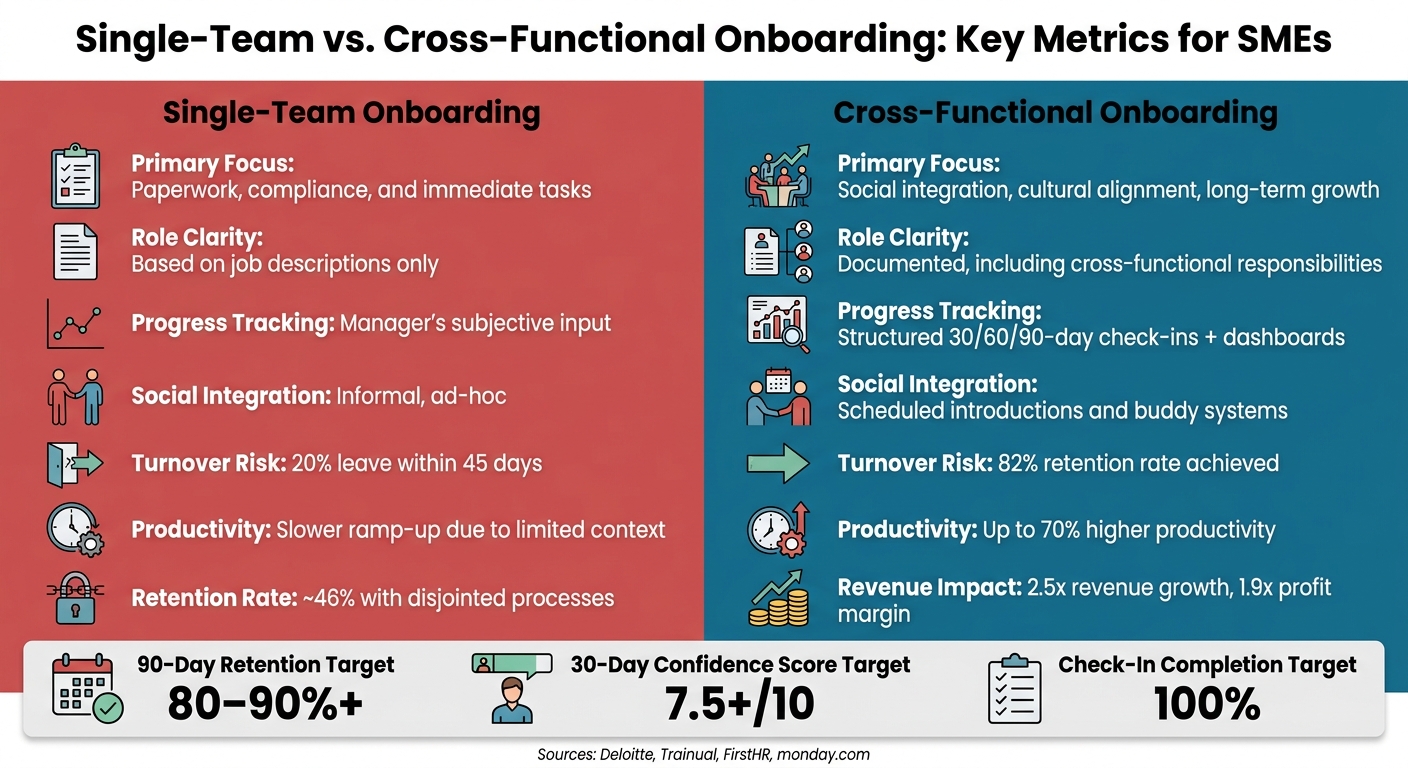
Single-Team vs Cross-Functional Onboarding: SME Impact Stats
Assessing the success of your onboarding program boils down to tracking specific metrics. These benchmarks provide clarity on what’s working and where adjustments are needed.
Key Metrics to Track
Start with your 90-day retention rate. Statistics reveal that one in three new hires leaves within the first 90 days, often pointing to poor cultural fit (19.5%) or an underwhelming onboarding experience (17.4%) [7]. If early attrition is high, it’s a red flag that your onboarding process may need a rethink, perhaps by integrating fractional recruitment services to ensure better cultural alignment from the start.
Next, measure Time to Productivity – how quickly a new hire completes their first independent task without requiring corrections. To make this meaningful, define what "productive" means for each role before onboarding begins. Pair this with a 30-Day Confidence Score, where new hires rate their readiness on a scale of 1 to 10. Scores below 7 should trigger immediate follow-ups [15].
"The first 90 days of employment are when new hires decide whether to stay or leave, and most of that decision is made in the first 30 days based on information you could have collected with a three-question Google Form." – FirstHR [15]
Another critical metric is the check-in completion rate. Regular one-on-ones with managers and cross-functional interactions are vital. A completion rate below 80% indicates the process isn’t being consistently followed [15].
Here are some benchmarks to guide your evaluation:
| Metric | SME Standard | Warning Sign | Critical Failure |
|---|---|---|---|
| 90-Day Retention | 80–90%+ | 70–79% | Below 70% |
| 30-Day Confidence | 7.5+/10 | 6–7 | Below 6 |
| Day 7 Satisfaction | 7+/10 | 6–7 | Below 6 |
| Check-In Completion | 100% | Below 90% | Below 80% |
| Training Completion | 100% (Compliance) | Below 80% | Any compliance gap |
(Source: [15])
These benchmarks allow you to compare the outcomes of single-team onboarding against cross-functional approaches.
Single-Team Onboarding vs. Cross-Functional Onboarding: A Comparison
Studies highlight that effective onboarding correlates with 2.5 times higher revenue growth and a 1.9 times greater profit margin [14]. The key difference lies in whether onboarding focuses narrowly on role-specific tasks or builds a broader understanding of the organization.
| Feature | Single-Team Onboarding | Cross-Functional Onboarding |
|---|---|---|
| Primary Focus | Paperwork, compliance, and immediate tasks | Social integration, cultural alignment, and long-term growth |
| Role Clarity | Based on job descriptions | Clearly documented, including cross-functional responsibilities |
| Progress Tracking | Relies on manager’s subjective input | Structured check-ins (30/60/90 days) and real-time dashboards |
| Social Integration | Informal, ad-hoc interactions | Scheduled introductions and buddy systems |
| Retention Impact | Higher risk of early exits (20% turnover within 45 days) | Retention improves significantly, with an 82% boost and a 58% higher long-term stay rate |
| Productivity | Slower ramp-up due to limited context | Up to 70% higher productivity with faster contributions |
This comparison underscores the advantages of a broader onboarding strategy. Implementing such a strategy often requires structured talent acquisition services to bridge the gap between hiring and long-term integration. Cross-functional onboarding not only enhances retention but also accelerates productivity and contributes to overall business growth.
Conclusion: How Cross-Functional Onboarding Supports SME Growth
Onboarding isn’t just an HR task; it’s a growth lever. For SMEs, where every employee plays a critical role, losing even one hire can disrupt operations. Cross-functional onboarding addresses this by aligning efforts across departments from day one, creating a unified approach that drives both individual and company success. The data backs this up.
When employees understand their role in the bigger picture from the start, they perform better, make fewer mistakes, and stay longer. Companies with strong onboarding processes achieve 2.5x revenue growth and 1.9x profit margins compared to those without [16]. These figures reflect the compound impact of clear communication, structured processes, and collaborative touchpoints.
"Scalable onboarding infrastructure – not individual manager effort – is a core capability distinguishing high-growth companies that sustain performance during rapid hiring." – Deloitte Global Human Capital Trends [4]
The takeaway? A unified onboarding strategy is essential, especially for SMEs navigating rapid growth. This means structured preboarding, coordinated introductions, defined milestones, and ongoing feedback – all done consistently. Yet, consistency is where many SMEs falter when scaling quickly.
If building this structure feels overwhelming, there’s help. Rent a Recruiter offers embedded recruiters who integrate directly into your team. They bring the expertise and systems needed to create a scalable hiring process, without the high costs or delays of traditional agencies. Companies partnering with Rent a Recruiter typically cut hiring expenses by 70% and save over 80 hours per month in internal admin, giving your team the time and resources to onboard effectively.
FAQs
What’s the simplest way to start cross-functional onboarding?
The simplest way to kick off cross-functional onboarding is by assigning new hires a buddy or mentor from a different department. This straightforward approach not only helps them form connections but also gives them a wider view of how the company operates. Another effective tactic is organizing interdepartmental meet-and-greet sessions or team-building activities. These events encourage collaboration and help employees understand how their roles fit into the bigger picture, all without needing complicated tools or intensive HR efforts.
How do you avoid overwhelming new hires with too much exposure?
Onboarding doesn’t need to overwhelm new hires. A structured approach like the 3-3-3 rule can make their transition smoother and more effective. Here’s how it works:
- In the first week, focus on three key people they should meet, three clear goals they can achieve, and three essential tools they’ll need to get started.
Kick off their first day with a later start and an earlier finish, giving them time to absorb everything. Pair them with a peer buddy to answer questions and guide them through the initial phase. Use a 30-60-90 day plan to provide a clear roadmap for their progress.
Finally, let connections form naturally. Avoid pressuring them to dive into every activity or relationship immediately – building familiarity takes time. This approach ensures they feel supported without being overwhelmed.
Which onboarding metrics should SMEs track first?
Small and medium-sized enterprises (SMEs) should prioritize tracking retention rates and time-to-productivity to gauge the success of their onboarding efforts. Metrics such as compliance completion rates, readiness scores, and performance against 30-, 60-, and 90-day goals provide valuable insights into how well new hires are settling in. Tools like the employee Net Promoter Score (eNPS) can be used to assess engagement levels. Together, these measurements ensure new employees are smoothly integrated into the team while identifying areas where the onboarding process can be refined.
Related Blog Posts
- The Ultimate Guide to Flexible Recruitment Solutions for SMEs
- 5 Benefits of Embedded Recruitment for Scaling SMEs
- How Role-Specific Training Boosts New Hire Performance
- Why Structured Onboarding Matters for Scaling SMEs
Understand Your Hiring Spend
A strong recruiting strategy isn’t just about filling open roles quickly. It’s also about knowing what each hire actually costs your business. A Cost Per Hire Estimator helps you pull those numbers together in one place, giving hiring managers, HR teams, and business owners a clearer view of recruiting performance.
What This Tool Measures
This estimator adds up direct recruiting expenses, internal HR labor, and optional onboarding or training costs to show your total hiring spend. Then it calculates the average amount spent for each new employee. That makes it easier to compare time periods, evaluate recruiting channels, and spot budget leaks before they grow.
Why It Matters
Tracking cost per hire can lead to better decisions across the hiring process. If certain roles are unusually expensive to fill, or outside agencies are driving up costs, those patterns become easier to see. A reliable cost per hire calculator can also support workforce planning, budget forecasting, and conversations with leadership.
For growing teams, understanding recruitment costs isn’t just a finance exercise. It’s a practical way to build a more efficient hiring process, improve resource allocation, and keep talent acquisition aligned with business goals.
FAQs
What is cost per hire, exactly?
Cost per hire is the average amount your company spends to bring one new employee on board. It usually includes direct recruiting costs like job board fees or agency charges, plus internal costs such as HR time. If you include onboarding and training, you get an even more realistic view of what each hire truly costs.
Should I include onboarding and training in the calculation?
If your goal is to understand the full investment behind each hire, yes, it makes sense to include them. Some companies track recruiting costs separately from post-hire costs, while others prefer one blended number for planning and budgeting. This estimator supports both approaches by letting you add those extra costs only if you want to.
How can I reduce my cost per hire without hurting quality?
Start by looking at where most of your spending goes. If agency fees are high, you might strengthen referral programs or improve direct sourcing. If internal time is the main driver, tightening interview stages or automating scheduling can help. The best savings usually come from making the process more efficient, not from cutting corners on candidate quality.
Hiring reactively is costing SMEs time and money. Workforce forecasting can change that by predicting hiring needs, aligning recruitment with business goals, and reducing costly mis-hires. SMEs using data-driven models see faster scaling, lower costs, and better retention.
Key Takeaways:
- Cost Savings: Avoid bad hires, which can cost 1–2x an employee’s annual salary.
- Faster Hiring: Data models reduce time-to-fill by 20%.
- Efficiency Gains: Predictive analytics save SMEs up to $570,000 annually in lost efficiency.
- Retention Boost: Proactive planning improves first-year retention by 23%.
SMEs often struggle with poor data quality (as seen in our recruitment reports), limited resources, and skill gaps. Starting small, focusing on high-impact roles, and using tools like predictive models can deliver quick wins. For businesses lacking internal capacity, embedded recruitment offers immediate expertise to bridge the gap.
Bottom line? Data-driven forecasting turns hiring into a growth engine, cutting costs while improving outcomes.
What Research Says About Data-Driven Workforce Forecasting
HR Analytics and Workforce Outcomes in SMEs
For small and medium enterprises (SMEs), accurate workforce forecasting is essential to align hiring strategies with growth goals. Yet, many SMEs are missing out on the benefits of HR analytics. Research reveals that SMEs are 138% less likely than larger companies to implement robust people analytics, which can cost mid-sized firms up to $570,000 annually in lost efficiency (based on UK research converted to US dollars) [13].
The challenge often lies in timing. As Matthew Crook, SMB General Manager at Access People, explains:
"When 78% of firms only notice a retention problem after a resignation has been handed in, it’s already too late." [13]
By leveraging HR analytics, SMEs can shift from reactive to proactive. Tools that analyze attendance, payroll, and performance data can help identify early signs of disengagement or turnover risk, allowing companies to address issues before they escalate into vacancies.
Predictive Models in Workforce Forecasting
Advanced predictive models are transforming workforce forecasting. For instance, ensemble models like XGBoost, equipped with automated hyperparameter tuning, have achieved 98.72% accuracy in predicting employee attrition on benchmark datasets [9]. Similarly, deep learning models trained on over 90,000 anonymized resumes have demonstrated an R² score of 0.9877, effectively predicting how long candidates are likely to stay in a role [12].
What makes these models particularly valuable for SMEs is their ability to incorporate Organizational Lifecycle (OLC) features – metrics that reflect a company’s stage of growth, such as start-up or rapid expansion. Including these variables has been shown to boost human capital forecast accuracy by over 17% [8]. This is especially important for early-stage SMEs, where workforce needs can change rapidly. For these businesses, embedded recruitment for startups provides the agility needed to scale teams alongside these data-driven forecasts.
Dr. Emeka Santos, Principal Scientist at Knowledge Discovery AI, highlights the importance of transparency in these tools:
"Interpretable ML methods enhanced stakeholder trust and decision-making utility in HR strategic planning." [8]
This growing focus on Explainable AI (XAI) tools, like SHAP and LIME, is helping HR managers understand the factors behind predictions, making it easier to act on insights. These tools demystify machine learning outputs, breaking down what drives predictions in straightforward terms.
Barriers and Opportunities for SMEs
Despite the potential of these high-accuracy models, SMEs face several barriers to implementation. Research consistently points to four key challenges: poor data quality, limited internal analytical skills, risks of algorithmic bias, and concerns around privacy and ethics [7][10]. Compounding these issues, only 23% of SMEs have a dedicated AI budget, and it typically takes 24 to 30 months for an organization to fully integrate HR technology [13].
That said, starting small can make a big difference. A pilot project for workforce forecasting can deliver a baseline model and initial validation within 4 to 8 weeks [11]. Focusing on a single high-impact area – such as a contact center or operational team – allows SMEs to demonstrate quick ROI before scaling up. Predictive models often highlight actionable factors like promotion history, tenure, job satisfaction, workload, and financial incentives [9], giving SME leaders clear areas to address once they have access to the data.
sbb-itb-a23bd6a
Workforce Planning, Optimization and Demand Forecasting
Data Sources and Techniques for Accurate Forecasting
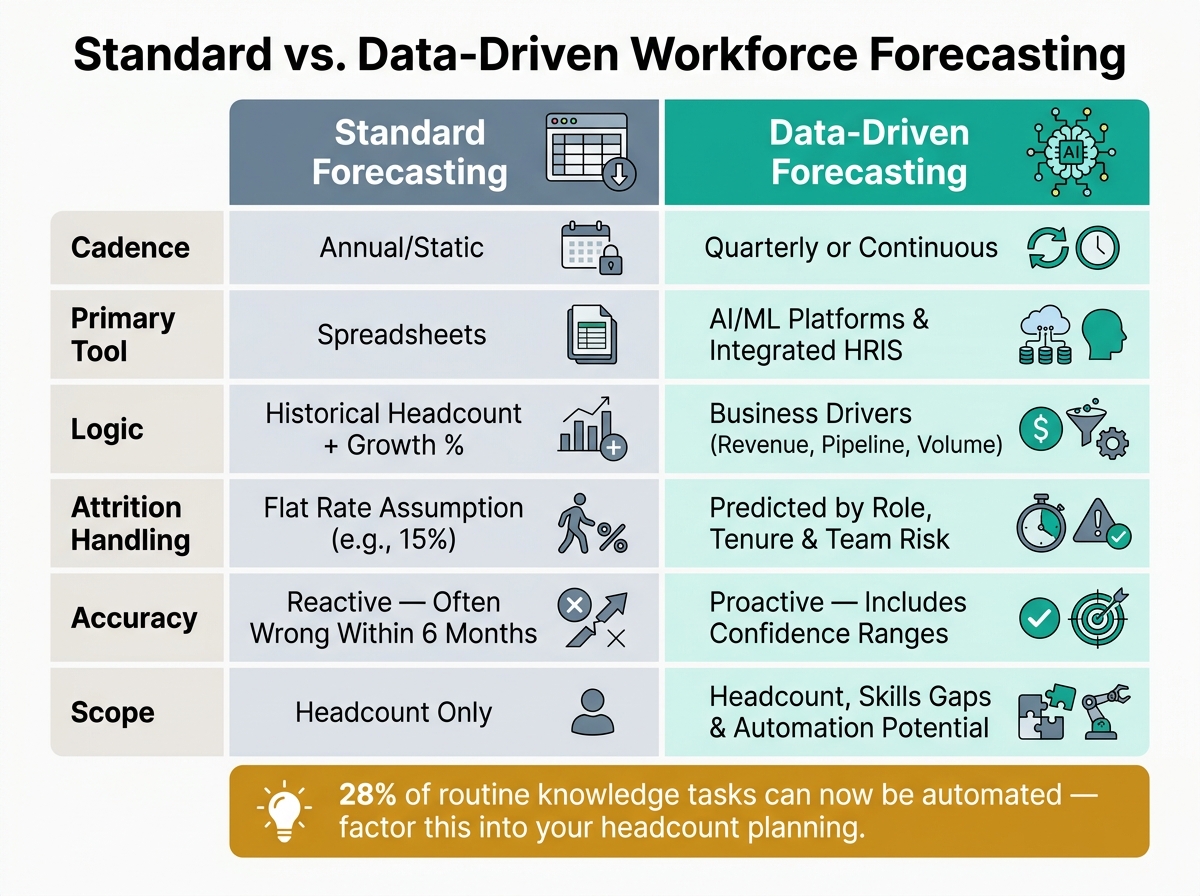
Standard vs. Data-Driven Workforce Forecasting for SMEs
Accurate forecasting hinges on using the right mix of data sources and analytical methods. Here’s how businesses can make it work.
Internal and External Data Sources
The foundation of accurate forecasting lies in solid data inputs. On the internal side, this includes headcount history, turnover rates by role type, skills inventories, and metrics like time-to-fill and cost-per-hire. Business-specific data, such as revenue targets, ARR pipeline, product roadmaps, and customer growth trends, also provide vital clues about upcoming hiring needs [2][6].
External data fills in the blanks where internal metrics fall short. Labor market insights, such as talent availability, salary benchmarks, and graduation rates in key fields, are critical. Broader economic trends and industry-specific growth data give businesses an edge in anticipating workforce demands. Additionally, regulatory changes – like OSHA staffing requirements or new labor laws – can influence headcount planning, often catching unprepared companies off guard.
"Hiring capacity modeling is not just about filling roles; it’s about aligning talent acquisition with business goals and financial projections." [2]
- Lori Goler, VP of People at Meta
Once the data is in place, the next step is applying techniques that turn raw numbers into actionable hiring forecasts.
Analytical Techniques: Descriptive to Predictive
Most businesses start with descriptive analytics, which examine past headcount and turnover trends. While useful for establishing a baseline, this approach only provides a view of the past.
Predictive analytics take things further by connecting business drivers directly to staffing needs. For instance, regression analysis can link metrics like ticket volume for support teams or ARR pipeline for sales to precise headcount requirements. Time-series decomposition uncovers seasonal trends that simple flat-rate assumptions often miss. Companies using these data-driven models report a 20% reduction in time-to-fill [2].
Advanced scenario planning offers even more flexibility. By tying decisions to specific trigger events – like hitting a revenue milestone – businesses can seamlessly shift from a base hiring plan to an expanded one. This eliminates delays between recognising a need and acting on it, a gap where many companies fall behind [15].
"The goal is not a perfect prediction. It is a data-driven starting point that makes workforce planning a strategic conversation instead of a spreadsheet exercise."
- Superdots Team [5]
These techniques lay the groundwork for comparing traditional and data-driven forecasting approaches.
Comparison Table: Standard vs. Data-Driven Forecasting
The table below highlights the differences between standard and data-driven forecasting methods.
| Feature | Standard Forecasting | Data-Driven Forecasting |
|---|---|---|
| Cadence | Annual/static [5] | Quarterly or continuous [1][15] |
| Primary tool | Spreadsheets [5] | AI/ML platforms and integrated HRIS [5][2] |
| Logic | Historical headcount + growth % [5] | Business drivers (revenue, pipeline, volume) [5][14] |
| Attrition handling | Flat rate assumption (e.g., 15%) [5] | Predicted by role, tenure, and team risk [5][15] |
| Accuracy | Reactive; often wrong within 6 months [5] | Proactive; includes confidence ranges [5] |
| Scope | Headcount only [5] | Headcount, skills gaps, and automation potential [15][14] |
An emerging trend is the inclusion of a "Bot" column in workforce planning. This accounts for tasks that AI or automation can handle, reducing the need for additional hires. Studies show that about 28% of routine knowledge tasks can now be automated [15][14]. Ignoring this factor could lead to inflated hiring projections.
This comparison underscores the advantages of shifting to data-driven forecasting models, helping businesses streamline and optimise hiring strategies effectively.
How SMEs Can Start Using Data-Driven Forecasting
Getting started with data-driven forecasting can feel daunting for SMEs. The challenge isn’t convincing teams of its value – it’s knowing how to take those first steps while staying within budget.
A 3-Phase Adoption Model
A step-by-step approach can help SMEs gradually build their forecasting capabilities without overwhelming resources or teams:
| Phase | Focus | What to Do |
|---|---|---|
| Phase 1: Audit | Data Consolidation | Centralize data from your HRIS, ATS, and payroll systems. Gather 6–12 months of historical hiring and termination data. Define a minimum viable dataset (MVD) that includes key fields like employee ID, hire/termination dates, role, and salary [4]. |
| Phase 2: Pilot | Rapid Validation | Test forecasting on 1–2 high-volume roles over 30–90 days. Focus on 3–5 key metrics (e.g., time-to-fill, 90-day attrition) and use simple models like logistic regression to validate results [4]. |
| Phase 3: Scale | Predictive Modeling | Expand forecasting to all roles. Automate model updates and incorporate scenario planning to prepare for growth triggers like funding rounds or new product launches [4][5]. |
By building trust in the data during the audit phase, SMEs can gain leadership support for scaling efforts. This phased approach also addresses common obstacles like data quality issues and skill gaps.
Overcoming Common Barriers
Once the model is in place, SMEs often face challenges in implementation. For smaller teams, tools like spreadsheets or basic HRIS platforms may suffice initially. Instead of trying to forecast for every role, focus on the 5% of positions that drive the majority of business impact [3]. For example, presenting a hiring range (e.g., 6–10 engineers) demonstrates analytical rigor while avoiding overprecision [5].
To combat internal resistance, use models that are easy to interpret. Build trust by testing each hire with questions like, "What happens if this role remains unfilled for three months?" [1].
How Embedded Recruitment Expertise Helps
Partnering with external experts can make a significant difference, especially for SMEs with limited internal capacity. Embedded recruitment offers a way to accelerate progress by bringing in experienced recruiters who integrate directly into your team.
"Workforce planning for SMEs has shifted from an annual budgeting exercise to a continuous leadership discipline." – Mark Loughnane, Lead of Rent a Recruiter [1]
With Rent a Recruiter, businesses can gain structured hiring processes and actionable data insights – like source-of-hire effectiveness and candidate-fit metrics – that improve forecasting and align hiring with strategic goals [1][4]. Rather than treating recruitment as a one-off task, the embedded model ensures hiring remains commercially aligned with your business needs.
The impact is clear. MasterTech worked with Rent a Recruiter for 27 months, embedding a dedicated Talent Partner who delivered 29 placements with a 4:1 CV-to-interview ratio. This saved the company $123,000 compared to traditional agency fees [1]. Similarly, Unique saw success when an embedded recruiter coordinated 291 interviews across global offices (Berlin, Zurich, New York, London, and Singapore), leading to 17 offers and 10 hires in just a few months [1].
Measuring Results and What Comes Next
Measurable Business Outcomes
The numbers behind data-driven forecasting are hard to ignore. Companies with a structured workforce plan see revenue growth 2.4 times faster than those hiring reactively [15]. On the expense side, forecasting can trim hiring costs by 25% to 40%, primarily by avoiding the "emergency hire" premium. This premium often includes a 19% markup in agency fees and sign-on bonuses [15]. And let’s not forget the cost of bad hires. Replacing an employee can range from 50% to 200% of their annual salary, with averages hitting $17,000 per hire and soaring to $240,000 for executive roles [6].
Retention also gets a boost. Companies leveraging active workforce plans report a 23% improvement in first-year retention compared to reactive hiring [15]. Proactive forecasting speeds up hiring too, with time-to-fill reductions across all roles. For critical positions, these reductions can reach up to 50% [15].
Take Angi, for example. In early 2026, this home services platform implemented automated workforce forecasting and management. Within just four months, they achieved a 30% reduction in per-FTE costs, saving $213,120 overall [16].
Emerging Trends in Workforce Forecasting
Workforce forecasting continues to evolve, bringing sharper strategies to the table. For SMEs, three major trends are shaping the future: skills-focused planning, scenario modeling, and early attrition prediction.
First, the focus is shifting from headcount to skills. Teams are now identifying "skills clusters" and spotting capability gaps 6 to 12 months in advance – essential when 39% of core job skills are expected to change by 2030 [5][6][16].
Second, scenario modeling is becoming a must-have. SMEs are crafting "what-if" models – covering base, upside, and downside scenarios – with pre-set triggers that allow hiring decisions to happen ahead of market shifts [5][15]. This eliminates delays caused by waiting for executive alignment during periods of rapid growth.
Finally, AI-powered attrition prediction is giving HR teams a head start. Machine learning tools can flag employees at risk of leaving 3 to 6 months before they resign [5][17]. This allows for proactive sourcing instead of last-minute scrambling. Gartner has even ranked workforce planning as the second most critical HR capability for 2026, just behind AI literacy [15].
"The goal is not a perfect prediction. It is a data-driven starting point that makes workforce planning a strategic conversation instead of a spreadsheet exercise." – Superdots Team [5]
Scale Your Hiring with Rent a Recruiter
While forecasting pinpoints hiring needs, actually meeting those needs requires scalable recruitment solutions. Many SMEs struggle to bridge this gap, which is where Rent a Recruiter steps in. Within just five days, Rent a Recruiter embeds experienced recruiters directly into your team, providing immediate hiring capacity without the overhead of traditional agencies [1].
"Workforce planning only works when HR is aligned with commercial decision-making." – Mark Loughnane, Lead of Rent a Recruiter [1]
Whether you’re tackling short-term hiring goals or building a long-term recruitment function, Rent a Recruiter provides the expertise and structure to turn your workforce plan into action. Book a call to see how embedded recruitment can help you hire smarter.
FAQs
What’s the smallest dataset I need to start workforce forecasting?
To begin workforce forecasting, establish a solid understanding of where your organization stands today and how it has evolved over time. Start by compiling a detailed headcount report that includes key details like department, role, level, location, hire date, and compensation.
Next, gather at least two years of recruitment data, covering metrics such as hiring rates, departure rates, time-to-fill, and offer acceptance rates. Align this data with your revenue targets and upcoming business goals to pinpoint any talent gaps that could impact your ability to meet those objectives.
How do I connect revenue or pipeline targets to a hiring plan?
To ensure your hiring strategy aligns with revenue and pipeline goals, consider adopting a capacity-driven approach. Begin by establishing clear role-specific ratios, such as one sales rep for every $1.2M in revenue. Then, work backward from your ARR and pipeline targets, factoring in ramp-up times – typically 90 to 180 days.
Implement trigger-based hiring by tying new roles to specific, measurable milestones. For instance, open positions only when you hit defined revenue benchmarks or reach a certain number of customers. This approach keeps your hiring aligned with growth, ensuring you scale efficiently without overextending resources.
How can I reduce bias and protect employee privacy in HR forecasting models?
To reduce bias, focus on transparency by anonymizing sensitive information during training and performing thorough fairness checks. Implement strategies like holdout periods and back-testing to uncover bias and keep an eye on model drift over time.
When it comes to privacy, enforce strict data governance and ensure your data sources are clean and well-integrated. Steer clear of over-relying on subjective judgment, as this can introduce bias – especially in situations where historical data is scarce or unique cases emerge.
Related Blog Posts
- 5 Steps to Forecast Hiring Needs with Data
- Checklist for Building Scalable Hiring Models
- How Forecasting Software Helps Manage Hiring Demand
- Hiring Demand Trends for SMEs 2026
Recruitment Strategy Generator for Practical Hiring Plans
A strong hiring process starts with a clear plan, not guesswork. This Recruitment Strategy Generator helps HR teams and hiring managers map out a tailored approach based on company size, industry, hiring targets, timeline, and available budget. Instead of piecing together a strategy from scattered notes and past campaigns, you can quickly build a focused recruitment roadmap that reflects real business needs.
Plan Your Hiring With More Confidence
Different industries call for different recruiting methods. A growing tech company may need a mix of LinkedIn outreach, niche job boards, and referral programs, while healthcare or retail teams often benefit from faster, high-volume sourcing channels. This tool helps translate those needs into a practical hiring plan with recommended platforms, a timeline breakdown, and smart budget guidance when spending details are available.
Turn Inputs Into Actionable Next Steps
The Recruitment Strategy Generator is built for teams that want simple, useful output they can act on today. From identifying the best sourcing channels to improving hiring efficiency, it gives structure to the planning process without making it feel complicated. If you’re looking for a better way to organize recruitment efforts, this hiring strategy tool can help you move faster and make stronger staffing decisions.
FAQs
Who is this Recruitment Strategy Generator best for?
It’s designed for HR professionals, recruiters, hiring managers, and small business owners who need a structured hiring plan without spending hours building one from scratch. Whether you’re filling a few roles or scaling a larger team, the tool gives you a straightforward strategy based on your company size, industry, timeline, and budget. It’s especially helpful when you want a plan that’s practical enough to use right away.
How does the tool decide which recruitment channels to recommend?
The recommendations are based on the details you provide, including your industry, the number of roles you need to fill, your hiring window, and whether you’re working with a set budget. For example, a tech company hiring quickly may benefit from job boards, LinkedIn, and employee referrals, while a retail business with seasonal demand may lean more on local job platforms and social media outreach. The goal is to suggest channels that fit the hiring context, not a one-size-fits-all list.
Can I use this tool even if I don’t have a recruitment budget yet?
Yes. The budget field is optional, so you can still generate a useful hiring plan without it. If you leave it blank, the tool focuses on strategy, channels, and timeline recommendations. If you do have a budget, it can help you think through how to divide spending across job ads, sourcing tools, referral incentives, and other recruiting activities in a more intentional way.
Hiring fast without breaking the bank is the challenge every scaling SME faces. Manual processes waste time, delay decisions, and drive up costs. Recruitment automation changes the game, cutting hiring times by up to 60% and reducing costs per hire by as much as 70%.
Here’s how automation delivers results for SMEs:
- Saves Time: Automates repetitive tasks like resume screening, interview scheduling, and onboarding admin, freeing up 5–10 hours per hire.
- Cuts Costs: Reduces reliance on expensive agencies and lowers cost-per-hire to as little as $900–$1,500.
- Improves Speed: Shortens time-to-fill from 38+ days to as little as 9–15 days, helping SMEs secure top talent before competitors.
- Boosts Consistency: Creates a structured, transparent hiring process with real-time visibility into pipelines.
Automation doesn’t replace your team, it amplifies their impact. The result? Faster, smarter hiring that scales with your business.
Ready to scale hiring without adding overhead? Rent a Recruiter embeds expert recruiters into your team, combining automation with hands-on support to deliver real results.
The Future of Hiring: AI-Driven Recruitment at Scale
sbb-itb-a23bd6a
How Automation Helps SMEs Scale Hiring
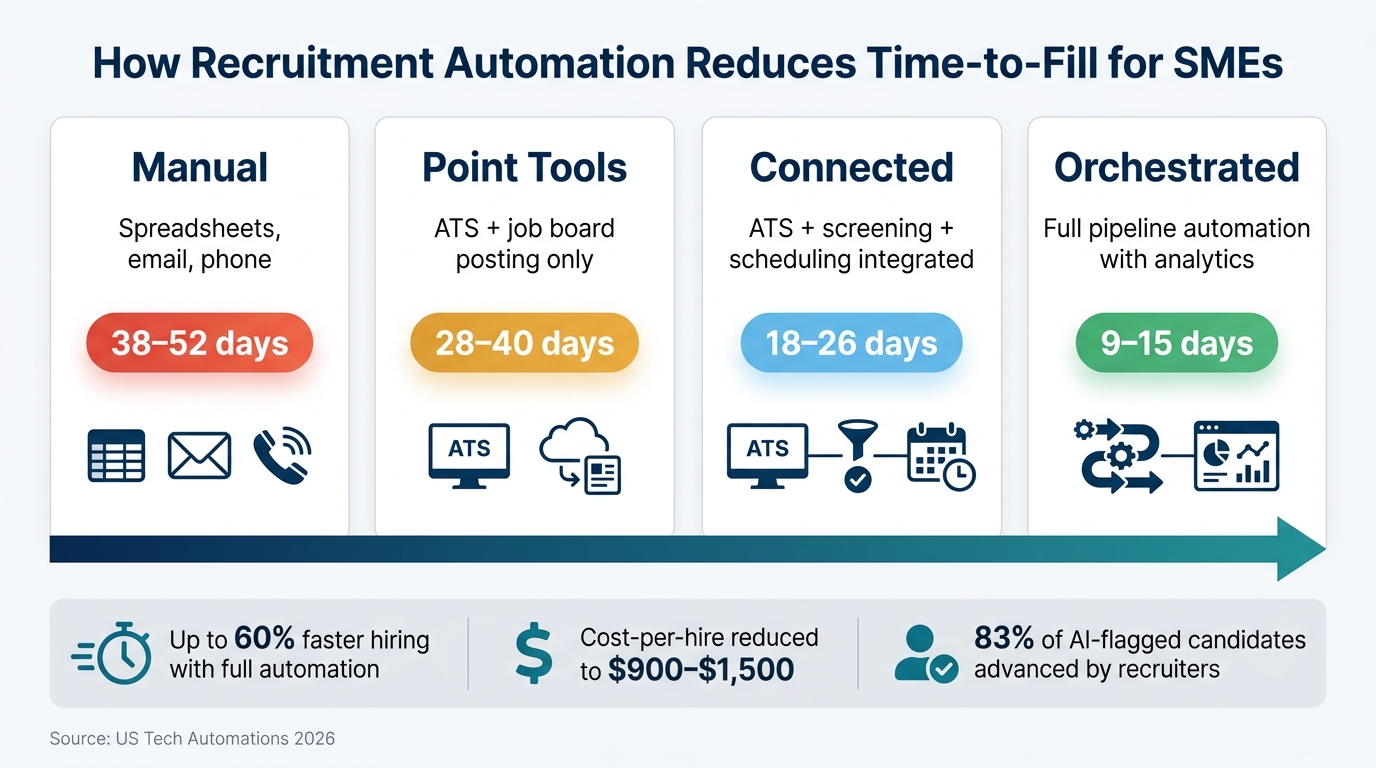
Recruitment Automation Stages: Time-to-Fill & Cost Savings for SMEs
For many SMEs, the hiring process falters not due to lack of effort but because a small team is managing too many tasks at once. Automation doesn’t replace these teams – it removes the bottlenecks that slow them down. By cutting out repetitive tasks, streamlining workflows, and speeding up hiring, automation transforms talent acquisition services for SMEs.
For teams wearing multiple hats, every minute saved translates into better decisions and faster progress.
Cutting Out Repetitive Manual Tasks
The biggest drain on time during hiring isn’t the decision-making – it’s the repetitive tasks. Writing job descriptions, sifting through resumes, and coordinating interviews can take 19–29 hours per hire. With automation, this drops to just 3–5 hours [3].
AI sourcing tools, for example, can scan millions of profiles in minutes, slashing sourcing time by up to 90% [6]. Automated screening tools use knockout questions to filter out 60–75% of unqualified applicants before a recruiter even reviews a resume [9]. Self-serve scheduling tools can save 4–6 hours per hire [3]. Together, these tools create a faster, leaner process.
Take BigGeo, a 40-person data company, as an example. They used an AI agent from Employment Hero to handle a surge in applications. The tool ranked candidates, explained its reasoning, and conducted initial AI-led interviews, narrowing 20 applications down to just 3 finalists.
"The tool will rank candidates, and tell me why it ranked candidates in a particular way. Then these candidates get an e-mail inviting them to an interview conducted by the AI agent, further narrowing down the pool." – Arden Styles, COO, BigGeo [2]
Beyond saving time, automation also ensures that hiring processes are consistent and transparent.
Building Consistency and Visibility Into Hiring
Automation brings order to hiring chaos by creating a unified candidate record. Without it, candidate details can get lost, follow-ups are forgotten, and decisions are often made with incomplete information. Shockingly, only 28% of recruiting teams have real-time visibility into their hiring pipeline, leaving 72% relying on outdated data [9].
Automated workflows solve this by logging every candidate interaction, tracking progress at each stage, and sending alerts when action is needed. This single source of truth is invaluable, particularly for SMEs where hiring responsibilities are often spread across multiple roles.
This clarity not only improves decision-making but also significantly shortens hiring timelines.
Reducing Time-to-Hire
Speed matters. Automating candidate screening alone can reduce the time-to-first-interview by 68% [9]. When screening, scheduling, and onboarding are automated, SMEs can fill roles 40% faster compared to manual methods [3].
The level of automation in a company’s hiring process directly affects how quickly roles are filled:
| Automation Stage | Description | Time-to-Fill |
|---|---|---|
| Manual | Spreadsheets, email, phone | 38–52 days |
| Point Tools | ATS + job board posting only | 28–40 days |
| Connected | ATS + screening + scheduling integrated | 18–26 days |
| Orchestrated | Full pipeline automation with analytics | 9–15 days |
Source: US Tech Automations 2026 [9]
Transitioning from a manual process to a connected system can nearly halve the time it takes to fill a role. For an SME looking to hire six new team members after securing funding, this difference can determine whether a critical project launches on time or falls behind schedule.
What the Research Says About Recruitment Automation for SMEs
Research shows that recruitment automation helps SMEs hire faster, cut costs, and create more reliable hiring processes. Studies and industry benchmarks consistently highlight that SMEs leveraging automation outperform their peers in key recruitment metrics.
Shorter Hiring Timelines
Recruitment automation significantly reduces hiring timelines. AI-powered tools have been shown to cut hiring times by 31% [4], while automated scheduling tools reduce interview confirmation times to a median of 3.7 hours compared to 5 hours – a 26% speed improvement [8]. This is a major efficiency boost, especially given that scheduling alone accounts for 38% of a recruiter’s time – the largest operational bottleneck in hiring [11]. Teams using automated scheduling solutions are also 1.6 times more likely to meet their hiring goals with precision [11]. For small teams juggling multiple roles, these time savings can make an enormous difference.
"The hiring challenge in 2026 isn’t about adding more people or cutting teams. It’s about redesigning how hiring work gets done." – Ahryun Moon, CEO and Co-Founder, GoodTime [11]
Lower Hiring Costs
Automation also delivers significant cost savings. 82% of SMEs using AI report lower recruitment costs, as tasks like manual resume screening – averaging 23 hours per hire – are reduced to mere seconds [4]. For companies making multiple hires, this translates into considerable savings.
The median cost per hire is $1,340, but this figure rises sharply for specialized roles, reaching $2,795 for tech positions and $10,625 for executive hires [10]. Automation helps keep these costs in check by reducing the need for additional HR staff and limiting reliance on costly external agencies. With 30% of organizations prioritizing cost-per-hire reductions by 2026 [10], automation is becoming a go-to solution for SMEs facing budget pressures. These savings go hand in hand with the improved workflows automation enables.
More Consistent Hiring Workflows
While speed and cost savings often dominate the conversation, automation’s ability to create consistent hiring processes is just as impactful. Automated workflows reduce candidate drop-off rates by 47% and cut time-to-fill by an average of 22 days [12]. Companies in the top tier of recruitment automation maturity report an average ROI of 412% within 18 months [12].
Another key benefit is the ability to maintain clean and organised hiring pipelines. Without automated archiving, candidate records can remain unarchived for over 150 days during periods of high activity [8]. Automation ensures that every step of the process stays timely and professional, safeguarding both the employer’s reputation and the integrity of hiring data over time.
Automation Tools and Methods SMEs Are Using
When it comes to automation, success depends on choosing the right tools and applying them effectively. Small and medium-sized enterprises (SMEs) are focusing on three key areas: AI-powered screening, workflow platforms, and data analytics. Each plays a role in improving specific stages of the hiring process.
AI-Powered Candidate Screening and Matching
AI screening tools are transforming how resumes are reviewed. Using advanced models, these tools interpret resume context more accurately, boosting candidate ranking quality by 15.85% compared to outdated keyword filters [13]. By May 2025, 43% of HR tasks were automated with AI and machine learning, a significant jump from 26% the previous year [13]. These tools are achieving impressive results, with 83% of candidates flagged by AI being moved forward by recruiters – four out of five, to be exact [13].
Take the example of BigGeo: AI helped narrow down 20 applications to just three top finalists. This demonstrates how AI tools can save time while delivering better outcomes [2].
Workflow Automation Platforms
Once AI improves candidate matching, the focus shifts to streamlining the rest of the hiring process. For instance, scheduling interviews – a task that typically eats up 35% of a recruiter’s time – can be automated, cutting coordination efforts by 60–80% [4].
Platforms like FirstHR ($98/month) automate administrative tasks such as collecting e-signatures, managing tax forms, and creating 30-60-90 day onboarding plans. This is critical for reducing early turnover, as 20% of new hires leave within their first 45 days, costing SMEs anywhere from $15,000 to $50,000 per departure [1][14]. Other tools, such as JazzHR ($49–$99/month), handle applicant tracking with AI resume parsing, while HiredAI offers a free tier and paid plans up to $95/month for unlimited job postings [1][4].
The trend is clear: all-in-one platforms are becoming the go-to choice for SMEs. These systems integrate sourcing, screening, scheduling, and onboarding into a single workflow. Companies using such platforms have seen tangible results, with mid-market firms achieving an 89.8% offer acceptance rate in 2026, compared to 81.5% for larger enterprises [4].
Using Data to Guide Hiring Decisions
Automation tools are even more powerful when paired with data-driven insights. Modern platforms track metrics like time-to-hire, cost-per-hire, and pipeline conversion rates in real time. This gives smaller teams access to the same level of analytics that larger organisations have relied on for years [4].
AI adoption among SMEs (10 to 100 employees) surged from 47% to 68% in just one year [4]. The payoff? Companies using AI recruitment tools report a 50% improvement in quality-of-hire metrics alongside faster hiring timelines [4]. As PeopleScout predicted in its 2026 recruitment outlook:
"Sophisticated recruitment capabilities will no longer be the exclusive domain of large enterprises, as cloud-based talent technology and AI tools have eliminated the need for massive capital investment." [4]
However, the rise of AI-generated resumes has introduced challenges. 54% of SME leaders say it’s now harder to verify candidate information [5]. While automation can help flag inconsistencies, critical roles still require human oversight – or a skilled embedded recruiter who knows how to spot red flags.
How to Implement Automation Without Getting It Wrong
Automation offers a lot of potential, but getting it right requires careful planning and execution. Here’s how to make sure you implement automation effectively, without losing the benefits it’s meant to deliver.
Getting Your Processes in Order First
One of the biggest mistakes companies make is automating a flawed process. As Vamo explains, "If your hiring process is chaotic, automation can accelerate existing chaos." Before you even think about tools, take a detailed look at your hiring workflow – from the initial job intake all the way to the signed offer letter. Identify where time is wasted and where steps don’t add value.
Start by standardizing your process. Define clear stages, set criteria for moving candidates forward, and assign ownership for each step. Use a single, centralized system to manage applications instead of juggling email, LinkedIn messages, or spreadsheets. Scattered data makes automation harder to implement effectively. Also, establish baseline metrics like time-to-fill, cost-per-hire, and response rates. This will help you measure whether the tools you implement are actually making a difference [6].
Once your process is streamlined, it’s time to figure out which parts of it should remain manual. For many SMEs, this is where fractional recruitment services provide the necessary human oversight without the overhead of a full-time hire.
Knowing Where Not to Automate
Automation is great for repetitive tasks, but it falls short when judgment is required. Before automating any step, ask yourself: Does this task need context that software can’t interpret? Could an automated error create legal problems? Would automation make candidates feel undervalued? If the answer to any of these is yes, keep the task human-led.
For example, automation works well for tasks like sourcing candidates using AI, ranking applications based on qualifications, scheduling interviews through self-booking tools, and sending status updates. But areas like selling your company’s mission, assessing cultural fit, conducting interviews, handling salary discussions, and delivering rejections require a personal touch.
This is backed by research: only 8% of job seekers believe AI makes hiring fair, while 46% report losing trust in the hiring process – and 42% blame AI for this decline [7]. Over-automation can harm your employer brand, so balancing tech with human oversight is essential.
Keeping Control of Automated Processes
Automation isn’t a "set it and forget it" solution. To ensure it works as intended, you need to monitor and adjust regularly. Review outputs weekly, audit candidate quality monthly, and keep detailed audit trails to catch issues early. For example, 19% of companies using hiring automation have reported that their tools missed qualified candidates [6].
"Automation helps you execute a good strategy more efficiently; it does not create the strategy for you." – Mohit Jindal, CTO & Co-Founder, HireZapp [15]
It’s also important to remember that employers are legally responsible for any discriminatory outcomes caused by automated tools. The EEOC has made this clear. To stay compliant, ensure human oversight of AI-generated shortlists and use platforms that provide explainable results. For instance, tools with scorecards can show why a candidate was ranked a certain way.
If you’re new to automation, start small. Choose one high-volume role, run the process for 60–90 days, and measure results at 30-day intervals. Once you’re confident in the outcomes, you can expand [16].
Conclusion: Using Automation to Build a Scalable Hiring Process
Automation has reshaped the way SMEs approach hiring. By moving from manual processes to fully automated recruitment pipelines, companies can dramatically cut time-to-fill from over 38 days to just 9–15 days and reduce cost-per-hire from $4,200–$6,800 to as little as $900–$1,500 [9]. These shifts not only save time and money but also improve the efficiency of small teams.
The best strategy blends automation with human expertise. Use automation to handle repetitive tasks like screening, scheduling, status updates, and onboarding paperwork. Meanwhile, preserve human input for critical decisions, such as final interviews and assessing culture fit. In this way, AI serves as a tool to amplify human decision-making, not replace it [7].
The key to success lies in process discipline. Automation works best when it’s applied to a clean, measurable, and well-structured process. SMEs that succeed in scaling their hiring invest in building this foundation first. This disciplined approach ensures their recruitment efforts are sustainable and effective over the long term.
If your team is ready to scale hiring but lacks the in-house capacity, Rent a Recruiter can help. By embedding experienced recruiters directly into your team, they bring the structure, consistency, and speed that automation thrives on. With this expert support, SMEs can reduce hiring costs by up to 70% compared to traditional agency models and save over 80 hours per month in administrative tasks. It’s a smarter way to scale hiring without adding unnecessary overhead.
FAQs
What should we automate first in our hiring process?
To scale hiring effectively, begin by automating time-consuming, repetitive tasks that don’t need human oversight. Prioritize areas like:
- Candidate sourcing and resume screening: Use AI-powered tools to cut down 60–70% of manual work, freeing up your team for higher-value activities.
- Interview scheduling: Implement self-serve options to minimize back-and-forth emails and speed up the process.
- Pre-boarding and onboarding workflows: Streamline these steps to create a consistent experience, secure new hires, and set the foundation for better retention.
How do we prevent AI screening from rejecting great candidates?
To prevent AI screening from overlooking qualified candidates, think of it as a filtering tool, not the final authority. Let AI handle the initial shortlist by removing clearly unqualified profiles, but ensure a human reviews the final decisions. Use structured scorecards to define and document criteria, making the process clear and consistent. Configure AI tools to focus on relevant skills rather than rigid metrics like keyword frequency. Most importantly, keep human oversight in place for rejections to maintain fairness and accuracy.
How can we measure ROI from recruitment automation?
To gauge ROI from recruitment automation, apply this formula: ROI = (Total Benefits − Total Costs) ÷ Total Costs.
Start by calculating total benefits. This includes gains such as increased recruiter capacity, reduced reliance on agency fees, faster time-to-fill, and lower rates of candidate attrition. Before implementing automation, track internal KPIs like cost-per-hire and time-to-accept over a 4–6 week period. Then, run a 90-day pilot to assess improvements and clearly identify the impact of automation on your hiring process.