Temporary workers need to be ready to deliver, not waiting for access or instructions. We recommend naming one manager, setting clear deliverables, and checking tools and training before the first shift. For a hypothetical 12-week assignment at $55 per hour, base labour alone totals $26,400, so lost working time eats into your budget.
We break temporary worker integration into four steps:
- Plan: Agree scope, costs, responsibilities, and success measures.
- Onboard: Prepare access, training, and team contacts before work starts.
- Manage: Review results, remove blockers, and approve changes before they add costs.
- Close out: Transfer knowledge, recover equipment, and end access on time.
Our approach keeps <u>ownership clear from start to finish with structured talent acquisition services</u>. Track time to the first accepted deliverable, completion rates, and manager support hours to see where your process needs work. You can also rate your recruitment process to identify specific efficiency gaps.
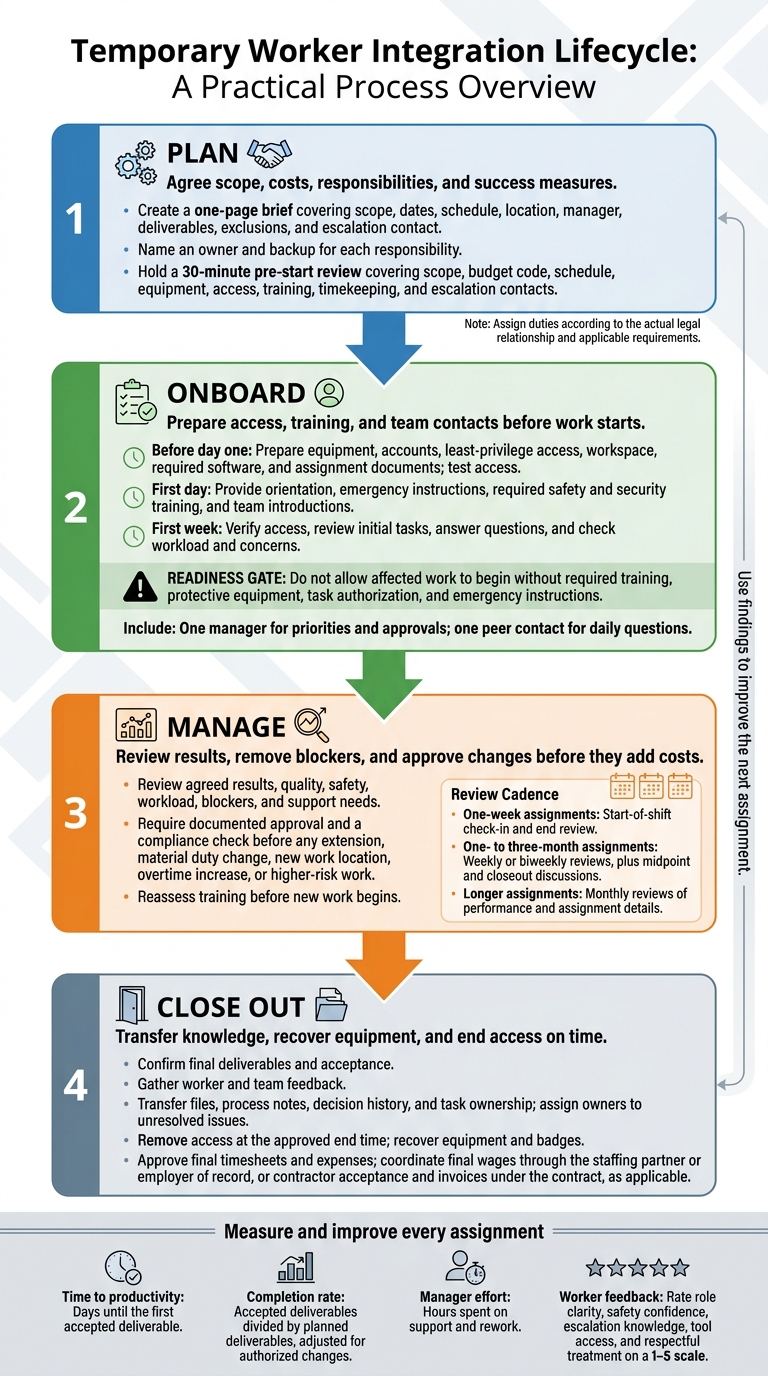
Temporary Worker Integration: The 4-Step Process
Plan the Assignment and Set Responsibilities
Set the Scope, Budget, and Success Measures
Create a one-page brief with the scope, dates, schedule, location, manager, deliverables, exclusions, and escalation contact. Give the worker a clear picture of success before day one. State whether an extension is possible, without guaranteeing it.
Budget for the full assignment cost: wages or agency fees, overtime, taxes, equipment, software, onboarding, supervision, and offboarding.
Hypothetical planning example: A 12-week software engineer assignment at 40 hours per week and $55 per hour has a base labor budget of $26,400, before other costs. Set three checkpoints: first-week ramp-up, a tested API integration by week six, and a final handoff before departure. Use the same milestone structure for every temporary assignment.
Clarify Worker Status and Legal Duties
Use the table below to plan the arrangement, not to settle worker classification. Legal review is still needed, including who directs the work, who pays, and who holds applicable employment, tax, safety, and joint-employer duties.[3][4]
| Arrangement | Employment relationship | Supervision | Who pays | Benefits/leave duties | Key compliance duties | Suitable uses |
|---|---|---|---|---|---|---|
| Direct temporary employee | Your company employs the worker for a limited period | Your company directs the work and how it is performed | Company payroll | Your company handles applicable benefits and leave | Payroll, wage and hour, tax, recordkeeping, safety, and other employment requirements | Fixed-term projects, seasonal work, or short-term coverage |
| Independent contractor | An independent business provides services under a commercial agreement | Your company directs the result, not the method | The worker invoices your company | The worker generally handles benefits and business expenses, subject to applicable law | Classification, tax reporting, contract terms, confidentiality, intellectual property, and applicable labor protections | Defined deliverables requiring specialized expertise and genuine independence |
| Agency-supplied worker | A staffing agency employs or engages the worker for assignment to the host | The host usually directs day-to-day work; the agency and host may share responsibilities | The agency typically pays the worker and invoices the host | The agency commonly handles benefits; the agreement specifies responsibilities | Allocation of duties, wage and hour compliance, safety coordination, records, and joint-employer obligations | Fast scaling, seasonal demand, skills gaps, or assignments requiring staffing support |
Create a Responsibility Matrix
The host employer is where agency-supplied workers perform the assignment. Name an owner and backup for each responsibility, based on the actual legal relationship. One person may cover several roles. Use the matrix to close gaps before the start date.
| Responsibility | Hiring manager | People operations | IT | Host employer | Staffing partner, if applicable | Worker |
|---|---|---|---|---|---|---|
| Day-to-day priorities and supervision | Sets priorities | Advises | Consulted as needed | Directs host-site work when applicable | Coordinates assignment | Follows agreed direction |
| Equipment and workspace | Approves needs | Coordinates setup | Prepares devices | Provides agreed workplace equipment | Confirms agreement | Protects equipment |
| System access | Approves permissions | Confirms worker details | Creates and tests accounts | Authorizes host-system access | Supplies required details | Completes security requirements |
| Time approval | Approves hours | Checks process | Not applicable | Designates approver for host-directed hours | Processes agency payroll | Submits accurate hours |
| Performance feedback | Reviews deliverables | Advises on process | Flags technical barriers | Provides workplace feedback | Handles agency follow-up | Acts on feedback |
| Safety and task-specific training | Confirms task readiness | Tracks completion | Provides IT/security training | Owns site-specific training | Coordinates and verifies readiness | Participates and reports hazards |
| Escalation of conduct, safety, or scope issues | Handles scope and workload | Handles people matters | Handles security incidents | Handles workplace hazards | Handles agency matters | Reports concerns promptly |
Hold a 30-minute pre-start review to confirm scope, budget code, schedule, equipment, access, training, timekeeping, and escalation contacts.
Test access before the start date to avoid lost working time. Record unresolved items with an owner and deadline, and resolve missing owners before work begins.
Require documented approval and a compliance check before any extension, material duty change, new work location, overtime increase, or higher-risk work.
With scope and ownership agreed, move to pre-start onboarding and access setup.
sbb-itb-a23bd6a
Onboard Workers and Connect Them With the Team
Use Pre-Start and First-Week Checklists
Once responsibilities are clear, prepare the worker’s access, safety arrangements, and team contacts before day one. Use one standard onboarding process, with assignment-specific modules for access, orientation, safety, and check-ins. This helps workers get productive without gaps that cause delays or put people at risk.
For high-risk roles, document hazard assessments, task authorization, protective equipment, emergency procedures, and checks of the worker’s ability before work begins. Assign tasks based on worker type and applicable requirements.
Use this checklist to track setup, first-week checks, and support throughout the assignment.
| Timing | Checklist item | Accountable owner | Completion status |
|---|---|---|---|
| Before day one | Confirm start date, location, arrival instructions, schedule, dress or PPE requirements, parking, and accessibility needs | Host manager | Not started / In progress / Complete |
| Before day one | Prepare equipment, badge, accounts, least-privilege access, workspace, and required software | Host IT | Not started / In progress / Complete |
| Before day one | Confirm employment or assignment documents, confidentiality terms, conduct standards, time-reporting method, and contact information | Employer | Not started / In progress / Complete |
| First day | Provide welcome, site orientation, role overview, reporting lines, communication channels, and emergency instructions | Host manager | Not started / In progress / Complete |
| First day | Complete required safety, hazard, PPE, restricted-task, injury-reporting, and security training before relevant work begins | Host employer | Not started / In progress / Complete |
| First day | Introduce the manager, peer contact, immediate team, and key cross-functional partners | Host manager | Not started / In progress / Complete |
| First week | Verify access, review initial tasks, answer questions, and confirm the worker can find key documents and support contacts | Host manager | Not started / In progress / Complete |
| First week | Check workload, clarity, sense of belonging, accessibility, and any concerns about conduct or safety | Host manager | Not started / In progress / Complete |
| Rest of assignment | Hold scheduled check-ins, review objectives, track access delays and training gaps, and document assignment changes | Host manager | Not started / In progress / Complete |
Separate host-business tasks from staffing-partner tasks. Clear ownership prevents paid downtime and repeated explanations. Record completion dates and evidence, including checks that required tools and documents open. Escalate blocked access the same day, and track paid downtime caused by missing equipment or permissions.
Confirm Safety Training and Task Readiness
For agency-supplied workers, the staffing partner should provide applicable general safety instruction, confirm qualifications for the assignment, communicate known restrictions, and verify that the host has delivered required site training.
The host generally provides site- and task-specific training because it controls the workplace. Contracts do not remove either party’s safety duties. Use language and vocabulary workers understand. Training should be identical or equivalent to what permanent employees receive for similar work.
Check federal OSHA requirements and the applicable OSHA-approved state plan. State plans may set additional or different requirements.
Do not allow affected work to begin without required training, protective equipment, task authorization, and emergency instructions. Cover actual hazards, restricted tasks, evacuation routes, first aid, injury and near-miss reporting, and how to report unsafe conditions.
Check understanding, not just attendance. Have the worker demonstrate a task or explain the emergency response. Record training and readiness checks, then repeat them before new tasks or changed exposures.
After training, connect the worker with their manager, peer contact, and daily communication channels.
Provide Team Access and Support
Assign one manager for priorities and approvals and one peer contact for daily questions. Explain which decisions the worker can make alone, which need approval, and where to record work. Clear boundaries reduce delays and avoid unnecessary approval requests.
Give access to relevant project meetings, documentation, messaging channels, and recognition processes. Exclude meetings and data unrelated to the assignment.
For remote and hybrid work, document working hours, time zones, expected response times, and urgent-contact routes. Provide accessible documents and captions or transcripts where needed.
At the first-week check-in, record unresolved access delays. Rate role clarity, safety confidence, escalation knowledge, tool access, and respectful treatment on a 1-5 scale, and assign an owner to each issue. Use these checks to spot risks early and carry the findings into the performance and closeout stage.
Automate Employee Onboarding in Microsoft 365 | Full Tutorial
Manage Performance and Close Out Assignments
After onboarding, focus on regular performance checks, controlled changes, and closeout planning. Keep expectations clear so assignment changes do not disrupt delivery.
Review Results, Workload, and Assignment Changes
Match the review schedule to the assignment length. For one-week assignments, hold a start-of-shift check-in and an end review. For one- to three-month assignments, schedule weekly or biweekly reviews, plus midpoint and closeout discussions. For longer assignments, review performance and assignment details monthly.
Use the role clarity, access, and safety standards set during onboarding as your review baseline. Assess agreed results, quality, reliability, safety, collaboration, workload, blockers, and support needs, not subjective fit.
Give timely, task-specific feedback that explains the result, its impact, and the next step. Recognize contributions and record actions, deadlines, and resources for follow-up.
For agency-supplied workers, coordinate feedback and changes with your on-demand recruitment or staffing partner. Document changes to duties, hours, location, or supervision, including approval and the effective date. Reassess training before new work begins.
Manage independent contractors against milestones and acceptance criteria rather than directing every work method. Classification depends on the working relationship, not the contract label.[2][3] Give workers a safe reporting route through HR, the staffing partner, or a safety contact.
Use these reviews to spot integration risks before they affect delivery or safety.
Track Integration Risks and Results
| Risk | Warning signs | Preventive control | Corrective action | Owner |
|---|---|---|---|---|
| Unclear ownership | Duplicate work, missed approvals, conflicting instructions | Responsibility matrix, named decision-maker, written priorities | Reconfirm roles and deadlines in writing | Host manager |
| Access delays | Worker cannot log in, uses another person’s account, work remains idle | Pre-start access checklist and day-one access test | Open an urgent IT ticket and provide approved temporary access | IT and host manager |
| Excluded from communication | Missed meetings, decisions learned secondhand, incomplete context | Add the worker to relevant channels and meeting invites | Send decision summaries and include the worker in future discussions | Host manager |
| Inconsistent training | Repeated errors, unsafe behavior, uncertainty about procedures | Standard onboarding checklist and task-readiness signoff | Pause the task, retrain, and verify competency | Host manager and staffing partner |
| Scope creep | Unapproved duties, longer hours, new hazards, changed deliverables | Written scope, change approval, and periodic scope reviews | Reconfirm scope, rate, timeline, training, and contract terms | Host manager and staffing partner or procurement |
Track problems alongside outcomes so you can spot patterns, not just individual incidents. Measure:
- Time to productivity: Days until the first accepted deliverable.
- Completion rate: Accepted deliverables divided by planned deliverables, adjusted for authorized changes.
- Manager effort: Hours spent on support and rework.
Carry forward worker feedback scores. Track incidents, near misses, and completion of corrective actions. Compare assignments with similar complexity, risk, and access needs, and review trends monthly.
Low reporting counts are not proof of success. Workers must be able to report hazards and injuries without fear.[1]
When an assignment ends or changes scope, complete a clear closeout.
Review Extensions and Complete the Handover
Before extending an assignment or discussing conversion, review the business need, approved budget, worker interest, documented performance, workload, safety record, role requirements, and internal alternatives.
Have HR or counsel check the staffing agreement’s extension, conversion, notice, fee, exclusivity, and maximum-term provisions against federal, state, and local requirements. Pay particular attention to changes in classification, pay, schedule, benefits, or work location.
Confirm the decision in writing with the worker and, where applicable, the staffing partner. Include the new end date, duties, compensation channel, reporting relationship, and next review date.
Use a closeout checklist to keep delivery, payments, and access controls on track:
- Confirm final deliverables and acceptance with the worker.
- Gather feedback from the worker and receiving team.
- Provide a contact for later questions.
- Transfer files, process notes, decision history, and task ownership.
- Assign owners to unresolved issues.
- Remove access at the approved end time.
- Recover equipment and badges.
- Approve final timesheets and expenses.
- Coordinate final wages through the staffing partner or employer of record.
- Confirm contractor acceptance and invoices under the contract.
- Retain only necessary information under privacy, records-retention, and access-control policies.
Conclusion: Follow a Consistent Integration Process
Use one checklist and one responsibility matrix across every temporary assignment, from start to finish. Track time to productivity, manager hours, completion rates, and worker feedback. Use those findings to improve the process before the next worker starts.
If hiring demand outgrows your internal capacity, add recruiting support while keeping the same integration process.
Add Recruitment Support as Hiring Demand Grows
When sourcing, screening, or interview coordination exceeds your team’s capacity, Rent a Recruiter can provide recruiters to manage hiring end to end for high-growth SMEs.
Recruiting support fills hiring gaps. It does not transfer responsibility for integration. That still starts with clear ownership, access, and readiness.
The employer and host remain responsible for onboarding, supervision, safety, team participation, access control, and closeout. Adding recruiters does not change those responsibilities or your temporary-worker onboarding process.
Review Hiring Capacity and Next Steps
Before booking a call, prepare your expected monthly or quarterly hiring volume, priority roles, target start dates, and current recruiting capacity. Include your external agency costs and the internal admin hours spent coordinating recruitment.
Identify where searches stall and whether leaders have a clear view of pipeline progress. Use the call to define the hiring gap and the level of support needed to keep your integration process consistent.
FAQs
How can I streamline onboarding for very short assignments?
Have equipment, system access, and paperwork ready 5 to 10 business days before the start date. Use digital e-signatures to complete compliance paperwork before Day 1, keeping orientation focused on work. Limit training to required safety guidance, tools, and assignment tasks.
Give every blocker a clear owner and set a first-week milestone. Track deliverables, deadlines, and progress in one shared project management tool so your team can see what’s due and what needs attention.
How can I keep temporary workers engaged without promising permanent roles?
Treat temporary workers as part of your team. Include them in team-building activities, group lunches, and recognition programs so they feel they belong. Assign a mentor or peer buddy to offer support and help them connect with colleagues.
Set clear expectations for project deliverables, timelines, and assignment duration. Give temporary workers the direction and team connection they need to stay engaged and deliver results throughout their assignment.
What should I do if a temporary worker misses early milestones?
Investigate immediately rather than assuming the worker is at fault. Check your shared project management tool for unclear acceptance criteria, missing inputs, or technical access issues. Ask the worker directly what’s blocking progress.
If the scope is unclear or the role doesn’t fit the assignment, adjust the requirements or end the engagement before more costs build up. Document the blocker, assign an owner, and set a resolution date.