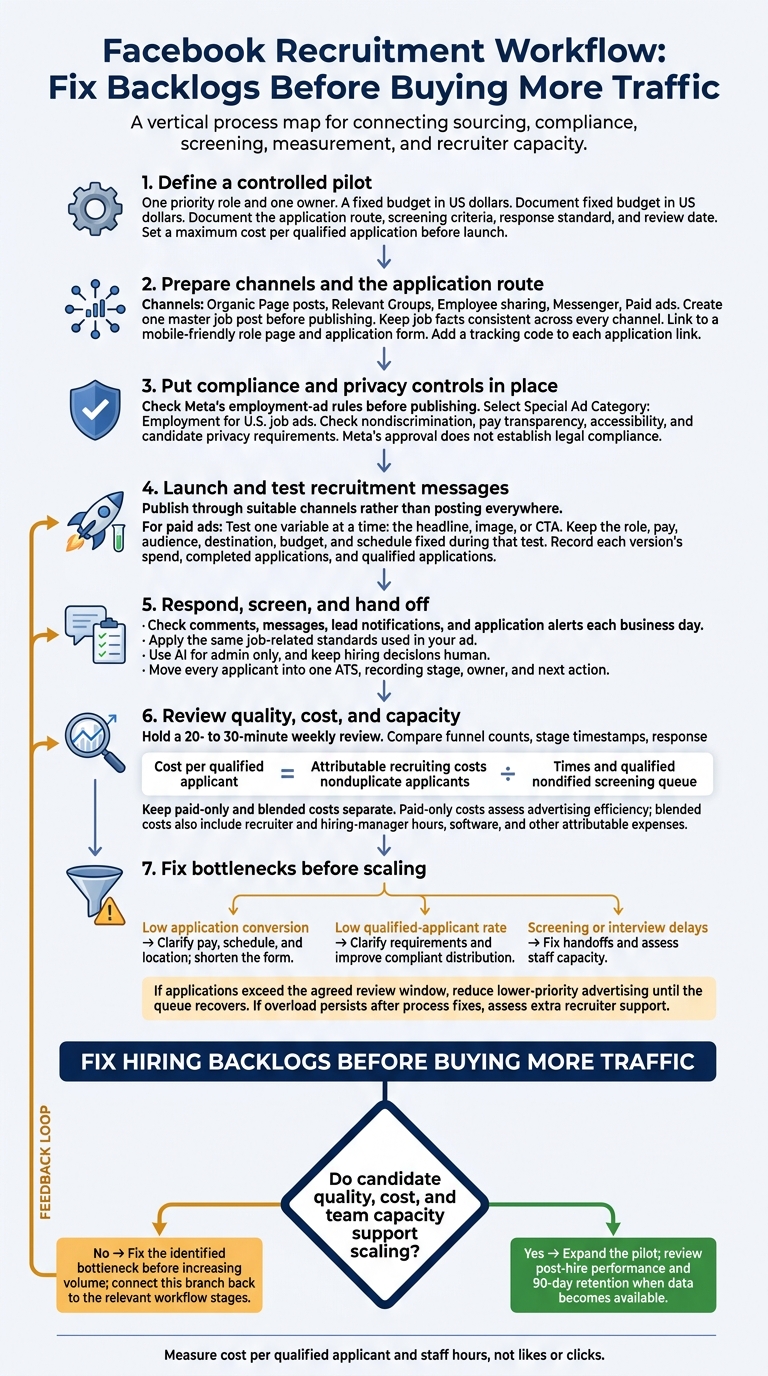
Facebook recruitment only pays off when it brings qualified applicants your team can turn into hires. We recommend starting with one role, a fixed budget in US dollars, and a clear application route. Measure cost per qualified applicant and staff hours, not likes or clicks.
For your pilot, focus on three things:
- Reach: Use Pages, relevant Groups, employee sharing, and paid ads where they fit the role.
- Control: Keep job details consistent, use job-related screening, and track applications in one system.
- Capacity: Check responses each business day and review results weekly before spending more.
Our rule: <u>fix hiring backlogs before buying more traffic</u>. This guide shows you how to test Facebook as a sourcing channel, measure its hiring return, and decide when embedded recruitment support makes more sense than more advertising.
Facebook Recruitment: From Pilot to Qualified Hires
How to Run Facebook Ads for Hiring in 2025 (Complete Guide)
sbb-itb-a23bd6a
Choose Facebook Channels and Prepare Your Page
Match your Facebook channels to the role, candidate type, and hiring urgency. Your mix should support the hiring volume and response speed you need.
Compare Pages, Groups, Employee Sharing, Messenger, and Ads
Pages, Groups, employee referrals, Messenger, and ads serve different purposes. Choose channels based on your hiring needs, rather than posting everywhere and adding admin work.
| Channel | Purpose | Suitable hiring needs | Candidate intent | Reach and control | Cost | Administrative effort | Primary risk |
|---|---|---|---|---|---|---|---|
| Organic Page posts | Employer branding | Long-term pipeline | Passive or researching | High control, limited reach | Low | Moderate | Low engagement |
| Relevant Groups | Niche outreach | Specialized or local roles | Active | Low control, high relevance | Low | High | Spam or rule violations |
| Employee sharing | Referrals and trust | Network-based referrals | Passive or warm | Moderate control | Low unless incentivized | Low | Limited network |
| Messenger | Communication | High-volume inquiries | High | High control | Low | Moderate | Response expectations |
| Paid ads | Broader distribution | Urgent or hard-to-fill roles | Variable | Targeting subject to Meta rules | Budget-based | Moderate | Fraudulent applications [4] |
For Messenger, use AI-powered recruitment tools like chatbots can answer FAQs and share role information, reducing repetitive replies for your team [3].
Prepare Your Page and Mobile Application Form
Your Page should give people clear reasons to work for you. Short employee videos can show the job and your company culture [3].
Link directly to a mobile-friendly role page and application form. Remove unnecessary steps so interested applicants can complete the process without friction.
Set Account Access and Message Responsibilities
Give each person only the account access they need. Document who approves posts, monitors Messenger, and provides cover during absences.
Keep manual review in place so qualified applicants are not missed [4]. Use Messenger for basic questions, then direct interested candidates to the application form.
With access and response duties assigned, move on to the job post and sourcing message.
Follow Hiring Ad and Privacy Rules
Check Meta‘s Employment Ad Rules
Before publishing, check Meta’s restrictions on Facebook audience selection, location settings, delivery optimization, and available tools. Do not work around targeting restrictions with substitute traits, custom audiences, lookalike audiences, or similar methods.
Save the final ad copy, settings, approver, and launch date. Meta’s approval does not establish legal compliance. Set these controls before launch so every applicant follows the same compliant process.
Follow Nondiscrimination and Pay Transparency Laws
Apply the same job-related standards when writing ads, screening responses, and reviewing delivery. Tie qualifications to essential duties and avoid wording that excludes protected groups.[2][5]
Check campaign delivery for unexplained patterns of exclusion. Use demographic information only where the law permits.
Before posting, check pay-range and benefits-disclosure rules for the employer’s location and every place applicants may work. Remote hiring can trigger requirements in multiple jurisdictions. Confirm that the application process is accessible and provide a way to request accommodations.[6]
Requirements differ by location and change over time. Consult qualified counsel if you’re unsure which rules apply.
Protect Candidate Data
Keep sensitive personal, financial, medical, and immigration data out of comments and informal Messenger chats. Never ask for a candidate’s Facebook password or access to their private account.
For applications submitted through connected forms, provide a privacy notice explaining who collects the information, why it is collected, how it is shared with outsourced recruitment vendors, how long it is kept, and how applicants can ask questions or exercise their privacy rights.
Use approved secure systems, not screenshots, personal email, or ad hoc spreadsheets. Restrict access to authorized staff, require individual accounts and multifactor authentication, and remove access immediately when roles change.
Document retention periods for applications, messages, screening notes, and ad records. Keep records required for legal or compliance purposes, then delete or anonymize expired data across Meta inboxes and connected hiring tools.
Write Job Posts and Find Candidates
With channels and compliance in place, focus on a clear job post and sources that bring in qualified applicants.
Include Key Job Details
Create one master job post before publishing. Include the job title, employer, location, work arrangement, employment type, schedule, pay range, duties, required and preferred qualifications, benefits, accessibility details, travel, start date, and application instructions.
Separate required skills from preferred qualifications, and explain how you’ll evaluate success. Tell applicants what to submit, where to apply, and how to request accommodations. Clear details help reduce avoidable questions and unsuitable applications.
Keep job facts consistent across every channel. Use a short summary and application link on your Facebook Page, follow each Group’s required format, and give employees current copy to share. The full job post should include the complete description and structured application fields.
Add a tracking code to each application link so you can see which sources deliver qualified applicants.
Find Relevant Groups and Hiring Threads
Search using combinations of role, skill, trade, alumni affiliation, and location. Match each Group to the role’s location, seniority, and skill set.
Check recent discussions, geographic relevance, moderation, and posting rules. Member count alone won’t tell you whether a Group is worth your time. Confirm whether employer posts need approval or must go in a recurring hiring thread.
State your company name clearly and explain why the role fits the community. Follow the posting schedule rather than repeating advertisements. Record the Group, permission status, posting date, and qualified applications, then update or close posts when hiring ends.
Once your post is live, use outreach and referrals to reach more relevant people without copying the same ad everywhere.
Use Personal Outreach and Employee Referrals
Contact people only when their public or recruitment-focused profile shows relevant experience. Identify the employer, explain the connection to the role, include location and compensation details, and share the official application link.
Respect silence and refusals. Don’t scrape profiles, send mass unsolicited messages, seek private information, or judge suitability by personal characteristics.
Give employees an approved share kit with current job facts, a closing date, and an optional message. Sharing must be voluntary.
Answer factual questions, then direct interested people to the application link. Record only the source, contact date, response, application status, and next action needed to manage the process.
Review sources weekly. Judge them by qualified applicants and screening progression, not reactions or follower counts.
Run Paid Facebook Recruitment Campaigns
Use paid campaigns when organic posts and outreach need more reach, faster results, or higher application volume.
Set the Campaign Goal, Budget, and Application Route
Choose Leads for short forms within Meta. Choose Traffic when applicants need to review a full job page or apply through your ATS.
Before launch, set a fixed test budget in U.S. dollars, an end date, and a maximum cost per qualified application. Document where applicants will apply and what counts as success.
Select Special Ad Category: Employment for U.S. job ads. Age and gender targeting are unavailable in the United States, ZIP code targeting is removed, and city or address targeting may require a minimum radius. Check the controls in Ads Manager before publishing. Do not use other filters to recreate prohibited targeting.[8][9]
Send applicants to a mobile-friendly destination that includes the key details from your master job post. For U.S.-targeted lead ads, Meta prohibits collecting age, gender, marital or relationship status, street address, city, postal code, or ZIP code.[7]
Test Ad Copy, Images, and Calls to Action
Test one variable at a time: the headline, image, or CTA. Keep the role, pay, audience, destination, budget, and schedule fixed so you can judge what changed performance.
Record each version’s spend, completed applications, and qualified applications. Small samples can point you in a direction, but they do not prove a result. Prioritize qualified applications over cheap clicks or reactions.
Track Applications and Candidate Responses
Use UTM parameters and matching ATS fields to connect each application to its campaign and ad version. Match Meta leads against ATS records so duplicates and incomplete forms do not inflate your results.
Use Meta Pixel or other tracking technologies only where applicable law, platform policies, and your privacy notices permit them. Obtain consent where required.[7][10]
Assign one owner to check comments, messages, lead notifications, and application alerts each business day. Document how applications move into screening so your team knows who takes over.
Before increasing spend, check ad delivery, mobile application completion, applicant qualifications, response rates, and recruiter workload. Fix application drop-offs and screening backlogs first, rather than paying to send more applicants into a stalled process.
Screen Applicants and Coordinate Hiring
Apply Consistent, Job-Related Screening
Screen applications against the same job-related standards used in your ad. Define required skills and structured screening questions before you start reviewing applicants.
Ask every Facebook applicant the same short, role-specific questions about their work and decisions. Review answers carefully and investigate inconsistencies. Keywords and polished writing aren’t proof of fit. Use AI for admin only, and keep hiring decisions human.
Move qualified candidates into a single handoff process so your team can act without repeating work.
Track Applicant Status and Hiring Handoffs
Apply the same tracking discipline you use for campaigns to your ATS handoff. Move every applicant into one ATS, recording their stage, owner, and next action. Keep each candidate’s source and screening outcome there, not scattered across Messenger.
Give recruiters responsibility for screening, scheduling, and candidate updates. Keep hiring managers focused on final assessments and decisions. Pass screening notes and open questions to the next stage so the next person has what they need.
Set a clear timeline for updates. Dedicated recruiter support keeps candidates moving between stages, while clear handoffs help you spot when hiring volume exceeds your internal capacity.
Measure Results and Review Recruitment Capacity
Measure Applicant Quality, Hiring Time, and Cost
Once Facebook sourcing is live, track the full hiring funnel, not just application numbers. The data should show whether you need better traffic, better-qualified applicants, or more internal hiring capacity.
Use application conversion to assess the post and form, qualified-applicant rate to assess targeting, and time to fill to assess hiring capacity.
| Metric | Calculation |
|---|---|
| Application conversion | Completed applications ÷ tracked landing-page visitors × 100. If you use clicks instead of visitors, clearly label the denominator. |
| Qualified-applicant rate | Applicants meeting predefined minimum requirements ÷ completed applicants × 100. |
| Interview rate | Applicants invited to interview ÷ completed applicants × 100. Also report interviews ÷ qualified applicants to assess progression. |
| Offer acceptance | Accepted offers ÷ offers made × 100. |
| Time to fill | Calendar days from the approved requisition or job opening date to the accepted offer. Report both the median and average.[12][13] |
| Cost per qualified applicant | Attributable recruiting costs ÷ qualified, nonduplicate applicants. |
| Cost per hire | Total internal and external recruiting costs ÷ hires.[13] |
Apply consistent attribution rules. Exclude duplicates and incomplete applications, and keep unknown sources separate. Compare raw counts alongside rates by role, location, and source, using matching periods that give candidates time to progress.
Keep paid-only and blended costs separate. Ad spend divided by paid-attributed outcomes measures advertising efficiency. Blended costs also include recruiter and hiring-manager hours, software, and other attributable expenses. That distinction helps you see whether advertising is efficient and what hiring actually costs.
Address Low Conversion and Screening Backlogs
Hold a 20- to 30-minute weekly review with your recruiter, hiring manager, and campaign owner. Compare funnel counts, stage timestamps, response times, and the screening queue to separate sourcing problems from process delays.
Low conversion points to the post or form. If clicks are strong but applications are low, clarify pay, schedule, and location, and shorten the form. Low qualified-applicant rates call for clearer requirements and more targeted, compliant distribution. Interview delays point to staffing.
Audit inconsistent screening outcomes and investigate low offer acceptance separately. Give each fix an owner and deadline so the review leads to action.
If applications exceed the agreed review window, reduce lower-priority advertising until the queue recovers. A queue that stays overloaded after process fixes signals a capacity problem, not a sourcing problem.
Add Embedded Recruitment Support
Compare weekly screening and coordination hours with available staff capacity before increasing spend. More applications won’t resolve a backlog your team cannot process.
When internal capacity is the bottleneck, Rent a Recruiter embeds recruiters into your team to manage hiring end to end and relieve screening and coordination backlogs.[11]
Conclusion: Start With a Measurable Hiring Pilot
With setup, compliance, sourcing, and screening in place, move to a controlled pilot. Test one role, confirm Meta’s employment-ad rules, and state the pay, location, schedule, and requirements clearly.
Use Facebook to extend your reach. Keep screening, interviews, references, and final hiring decisions job-related and documented.
Test One Role and Review Results
Assign one priority role and one owner. Before launch, document the budget, application route, screening criteria, response standard, and review date.
Compare qualified candidate numbers, hires, total costs, and team workload against your baseline before expanding. Look beyond accepted offers: review post-hire performance and 90-day retention when that data becomes available.
Scale only when candidate quality, cost, and team capacity support it. If the pilot stretches your team beyond capacity, arrange outside support before increasing volume.
Plan Support for More Hiring
If screening and coordination expose a capacity gap, talk with Rent a Recruiter about embedded support matched to your hiring targets and workload.
FAQs
How much should I budget for a Facebook recruitment pilot?
Start with a fixed budget and a 90-day test focused on one priority role. Compare results with your current hiring baseline. Track cost per hire in U.S. dollars, including ad fees and recruiter time, so you can see the full hiring cost.
Review ROI quarterly using your recruitment data. Be ready to move 10% to 20% of your budget to channels, including Facebook, that deliver the best candidate quality and conversion rates.
How long should I test Facebook recruitment before scaling?
Keep your initial Facebook recruitment test to 90 days [1]. Before you launch, set clear success metrics, such as qualified applicants, cost per hire, or conversion rates, so you can compare results with your existing channels [1].
If Facebook consistently underperforms on quality and cost over two or three quarters, stop using it. Don’t keep spending on a channel out of habit [1].
How can I spot fake applications without rejecting qualified candidates?
Define must-have role requirements, then use early knockout questions or short assessments to screen for fit before your team invests more time.
Standardize data entry in your applicant tracking system (ATS). Audit records monthly for duplicates and inconsistent entries to keep hiring data reliable.
Use structured feedback templates to record specific rejection reasons and refine your screening criteria. If application volume is high but quality is low, check whether your job description or application form is drawing the wrong audience.