
If contractor hiring is growing but your back office still runs on spreadsheets, email, and shared drives, you are likely losing time, missing documents, and making finance work harder than it should.
I’d sum it up like this: contractor management software helps you cut admin, tighten payment control, and keep contractor hiring moving as volume grows. In the source article, the pressure is clear. 1099 contractors made up 1.8% of all filled jobs in 2024, up from 1.4% the year before. More contractor hiring means more W-9 collection, more invoice checks, more document tracking, and more year-end reporting.
Here’s what matters most if you’re deciding whether your business needs it:
- Use it to centralise contractor intake, onboarding, documents, invoices, payments, and offboarding
- Prioritise W-9 collection, 1099 readiness, spend tracking, approval flows, and document expiry alerts
- Choose software based on your contractor model, not vendor claims
- Roll it out in phases so hiring does not stall
- Track KPIs like time to start, payment cycle time, overdue documents, and spend vs budget
For CEOs, CFOs, HR leaders, and Talent leaders, the commercial point is simple. More contractors should not mean more admin headcount, slower approvals, or messy reporting. If your process cannot hold up as volume grows, the issue is not just tooling. It is process control.
That is also where embedded recruitment can help. Software gives you system control. Process discipline comes from the people using it well. If intake is loose, approvals drift, or hiring managers work outside process, even good software will not fix the problem on its own.
If you want the short version, this guide shows you how to spot when manual contractor processes stop working, pick software that fits your setup, and roll it out without slowing hiring or creating extra finance admin.
Contractor Management Software: Core Capabilities Explained
Match software features to the contractor work you actually manage.
Contractor types and U.S.-specific workflows
Most U.S. SMEs deal with four main contractor groups, and each one needs a different setup.
- 1099 contractors: W-9 collection, secure payment setup, repeat compliance checks, and 1099 reporting readiness
- Freelance specialists: light onboarding, deliverable tracking, and invoice management
- Project-based consultants: SOWs, milestone approvals, and structured payment schedules
- Field subcontractors: mobile access, work orders, credential checks, and location-based scheduling
If your platform handles all four in the same way, something usually breaks. You end up with delays, missing documents, or extra admin for your team.
For U.S. SMEs, the baseline is pretty clear: W-9 collection at onboarding, domestic bank payment support, secure document storage, and state-specific recordkeeping. Software will not give legal advice, but it will keep records organised and easy to find when finance, HR, or ops need them.
Once you know which contractor groups you manage, you can map those needs to the functions that matter.
The features that drive control and efficiency
Use these features to remove manual handoffs from onboarding through payment.
The biggest gains usually come from automating onboarding, approvals, and document tracking. A good onboarding workflow should request a W-9, bank details, and insurance certificates as soon as a contractor is added. That cuts the back-and-forth, saves time, and helps work start sooner.
Beyond onboarding, the features that matter most for control are document and credential tracking with expiration alerts, mainly for insurance certificates and licences. You also want approval routing for invoices and work orders, plus clear spend tracking by department or project.
For field teams, mobile access is a must. Contractors need to log time, send completion updates, and change job status from their phones without chasing emails or paper forms.
Integrations matter too. When the system connects with tools like QuickBooks, ADP, or your existing ATS, you cut duplicate data entry and give finance, HR, and operations one shared source of truth.
Feature comparison table: what to assess in each platform
Use this table to compare platforms against your actual workflows, not vendor claims.
| Feature Category | What to Look For | Best Fit |
|---|---|---|
| Onboarding & Intake | Automated W-9 requests, e-signatures, reusable intake forms, approval routing | All contractor types |
| Compliance Tracking | Insurance/license expiration alerts, audit trails, SOW storage, classification support | 1099s, field subcontractors |
| Document Management | Centralized storage, tagging by contractor or project, missing-document alerts | All contractor types |
| Scheduling & Work Orders | Work order creation, job assignment, location-based scheduling | Field subcontractors |
| Time Tracking | Digital timesheets, mobile/GPS clock-in, project/job code tagging | Field teams, hourly 1099s |
| Invoice Approvals | Multi-step approval workflows, invoice matching to approved hours or milestones | All contractor types |
| Spend Reporting | Real-time spend by department/project, invoice aging, budget vs. actual | Finance and operations leads |
| Integrations | QuickBooks, Xero, ADP, Sage, ATS, project management tools | All SMEs |
| Mobile Access | Contractor-facing app for time, documents, job status | Field subcontractors, remote freelancers |
When you assess each platform, ask three simple things: Is it automated? Can your team configure it? Will it still work well as you scale your contractor volume?
sbb-itb-a23bd6a
How to Choose the Right Contractor Management Software
Picking the right platform starts before you open a vendor website.
The SMEs that get this right first map how they use contractors today. Then they use that picture to rule platforms in or out. That makes demos shorter, shortlists cleaner, and decisions far less subjective.
Map your contractor model before reviewing software
Before you book a single demo, get clear on four things: who uses contractors, what work they’re doing, how approvals and payments flow, and whether your contractors work across multiple states or countries.
A software sprint team and a field services team won’t need the same workflows, contractor records, or approval layers. That difference matters. If the platform can’t match how work happens in your business, admin builds up fast.
Bring HR, finance, ops, and legal into this exercise early. Each team looks at the problem from a different angle. Finance cares about payment control and reporting. HR cares about records and onboarding. Legal cares about classification risk and document handling. Ops cares about speed. If those groups are out of sync now, you can end up with software that suits one department and slows down everyone else.
Selection criteria that reflect SME realities
Once your contractor model is mapped, score platforms against the things that match your team’s workload, risk level, and budget.
- Compliance: Put W-9 support, 1099 handling, and expiration alerts near the top of the list.
- Automation: Look for configurable workflows for approvals, document requests, and reminders.
- Integration: Make clean integrations with QuickBooks, NetSuite, or Xero a must-have.
- Implementation speed: Speed matters just as much as feature depth. If a platform takes too long to configure, or non-technical managers struggle to use it, you lose time when the business needs to move.
- Cost: Don’t stop at the monthly fee. Include implementation fees, integration setup, and internal admin time. Fixed, predictable monthly pricing in USD is usually easier to budget for.
The right platform should cut admin work, not add another layer of process.
Shortlisting table: compare your options side by side
Use this table to score shortlisted platforms in the same way each time. Rate each area as high, medium, or low based on demos and reference checks, not vendor marketing.
| Criteria | What to Assess |
|---|---|
| Compliance Depth | W-9/1099 support, document alerts, classification guidance, state-level tracking |
| Integration Strength | QuickBooks, NetSuite, Xero, ATS, HRIS, native vs. API-only |
| Implementation Complexity | Time to go live, IT dependency, configuration effort for a lean team |
| Scalability | Ability to handle rising contractor volume; multi-state or international expansion |
| Reporting Quality | Spend by project/department, compliance status, headcount visibility |
| Approx. Monthly Cost (USD) | Subscription + implementation + internal admin time at realistic hourly rates |
First, rule out any platform that misses your minimum compliance or integration needs. After that, remove anything too hard to roll out with your current team, or too limited for growth over the next 12 to 24 months.
What should remain is a shortlist of two or three realistic finalists. From there, validate them with a scenario test. For example, can the platform support onboarding 10 contractors for a product launch in four weeks without slowing approvals, documents, or payments?
Once you have two or three finalists, the next step is planning a rollout that does not slow hiring.
How to Roll Out Contractor Management Software Without Slowing Hiring
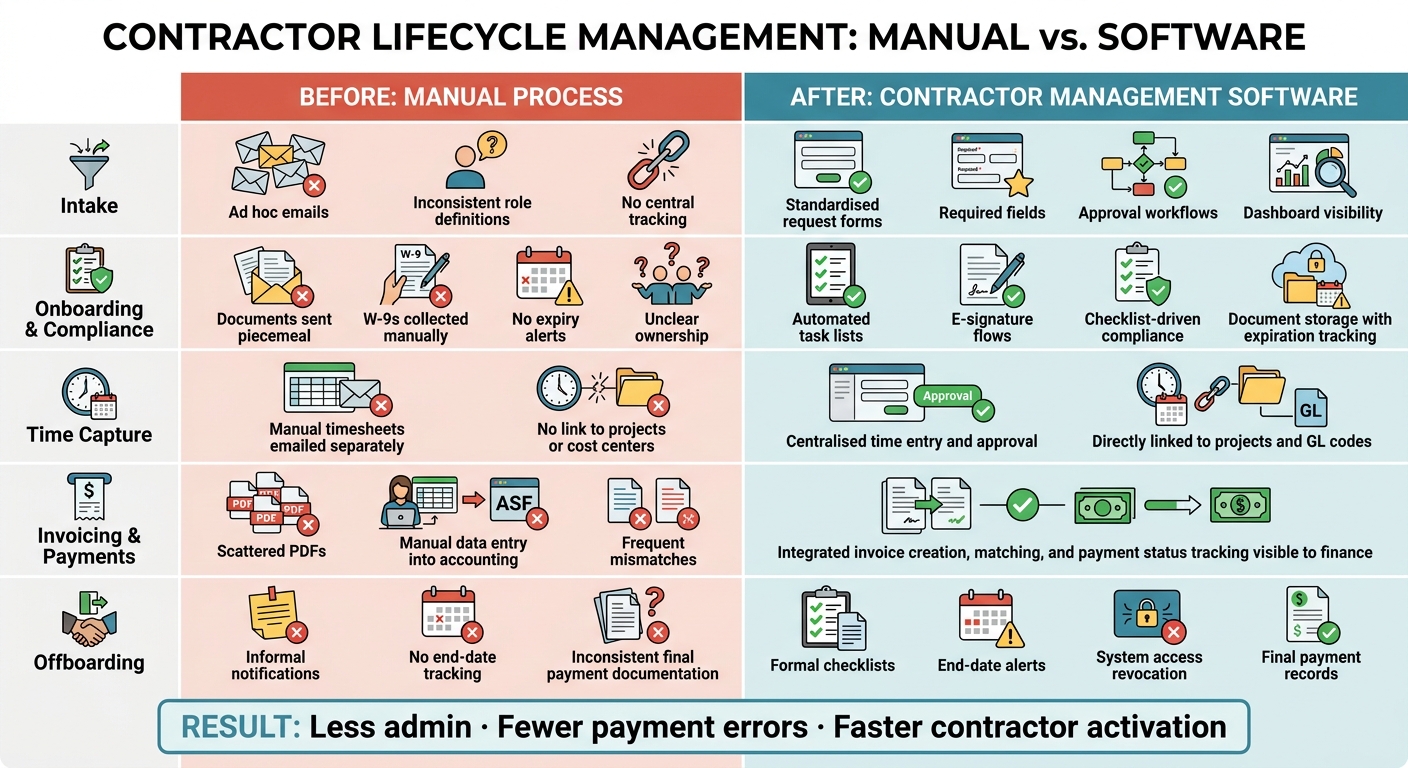
Contractor Lifecycle: Before vs. After Contractor Management Software
Prepare data, workflows, and success metrics first
Start with the data and workflows you already use. The aim is faster hiring with fewer manual steps, not a clunky process hidden inside new software.
Pull contractor records from email, spreadsheets, shared drives, and connected systems. Look for the cracks in the process: missing W-9s, uneven rates, duplicate vendor records, and expirations no one is tracking.
A simple way to get a baseline is to review three to five recent engagements from intake through final payment. Follow each step and flag anything missing, delayed, or unclear. That gives you a plain view of where time is lost and where risk builds up.
Before you import anything, clean the data. Standardise legal names, tax classifications, contract terms, rates, payment details, and compliance documents. Verify TINs before migration so you cut down the risk of 1099-NEC errors. Finance should tie this work to the quarterly close, reconciling contractor spend against purchase orders and invoices.
Set targets you can track. If onboarding now takes 10 business days, aim for 3. If finance spends hours pulling 1099 data every January, define what clean data means before the January 31 filing deadline. Clear targets give HR, finance, recruiters, and hiring managers the same view of success. They also give you a benchmark for what to check after launch.
Train teams, run a pilot, and phase the rollout
Each team needs training tied to its part of the process. HR should focus on onboarding and compliance. Recruiters need to know contractor setup. Hiring managers need a simple path for requests and approvals. Finance needs to own invoice matching and payment runs.
For rollout, begin with a pilot in one business unit or one contractor category. Keep it tight. Run it for 6 to 12 weeks with clear goals: validate core workflows, test the core integrations used every day, and log issues as they happen.
Integration testing needs to reflect live working conditions. For example:
- A contractor requisition created in your ATS should appear correctly in the contractor management system
- Approved timesheets should pass through to payroll without manual re-entry
Fix critical issues before you move to the next group. That step matters. If the first team ends up doing double entry or chasing missing approvals, trust in the system drops fast.
After the pilot, roll out by business unit or contractor type instead of switching everything in one go. Apply go-live dates to specific workflows, such as new contractor intake, and leave a short window for handling legacy engagements manually. Keep a narrow fallback process for urgent hires during the changeover, then backfill that data into the system after.
Once the pilot is stable, it becomes much easier to show the process shift in practical terms, less admin, fewer delays, and cleaner data for finance.
Process table: before and after contractor management software
At higher contractor volume, these are usually the first steps to break. The table below shows what changes at each lifecycle stage.
| Lifecycle Stage | Before | After |
|---|---|---|
| Intake | Ad hoc emails, inconsistent role definitions, no central tracking | Standardised request forms, required fields, approval workflows, dashboard visibility |
| Onboarding and Compliance | Documents sent piecemeal, W-9s collected manually, no expiry alerts, unclear ownership | Automated task lists, e-signature flows, checklist-driven compliance, document storage with expiration tracking |
| Time Capture | Manual timesheets emailed separately, no link to projects or cost centers | Centralised time entry and approval, directly linked to projects and GL codes |
| Invoicing & Payments | Scattered PDFs, manual data entry into accounting, frequent mismatches | Integrated invoice creation, matching, and payment status tracking visible to finance |
| Offboarding | Informal notifications, no end-date tracking, inconsistent final payment documentation | Formal checklists, end-date alerts, system access revocation, final payment records |
Use these before-and-after stages to set rollout metrics. Over time, attach measures to each row, average onboarding time, overdue compliance items, late invoices per quarter. That makes the business impact easier to see: less admin, fewer payment errors, and faster contractor activation.
Measuring Results and Improving Contractor Hiring Over Time
The KPIs that show whether the software is working
After rollout, the focus needs to change. Stop looking at setup milestones and start looking at day-to-day hiring performance.
What matters now is simple: as contractor volume goes up, are you also getting more admin, more errors, or slower payments? If the answer is yes, the software may be live, but the process still has work to do.
Once rollout is stable, track a small set of trend KPIs each month or quarter:
- Time to start
- Document-completion rate
- Overdue compliance items
- Spend vs. budget
- Payment cycle time
A good target is a 95%+ document-compliance rate and steady payment cycle times as hiring volume grows. That tells you the system is holding up under pressure, not just working in quieter periods.
Use the dashboard to flag exceptions, not to report every single detail. That’s where teams often get stuck. Too much reporting creates noise. The point is to spot issues early and fix them before they slow down hiring or create payment problems.
Monthly reviews help you catch payment delays and overdue documents. Quarterly reviews should look at the bigger commercial picture: is the software helping you cut costs and support contractor hiring at scale?
If these metrics start to slip, the issue is usually not the platform itself. More often, it’s unclear workflow ownership or weak hiring discipline.
How embedded recruitment support can strengthen software outcomes
Software alone won’t fix a messy hiring process.
Embedded recruiters can strengthen results by tightening intake, enforcing workflow discipline, and driving adoption during hiring spikes. Rent a Recruiter places experienced recruiters directly into your team within days, helping you build structure, visibility, and consistency while cutting hiring costs and saving internal time.
Conclusion: Build a contractor process that can scale
When metrics stay steady as contractor volume grows, that’s a strong sign the process is working.
If you’re adding more contractors without adding avoidable admin, errors, or delays, your process can scale. If not, tighten the workflow and keep tracking the KPIs that have a direct link to cost, time, and hiring output.
To review your contractor hiring process or estimate potential savings, book a call with Rent a Recruiter.
FAQs
When are spreadsheets no longer enough?
Spreadsheets stop working once hiring gets busy.
When tracking is manual, your data ends up fragmented. Visibility drops. Hiring slows down.
You’ll usually see the same problems show up fast:
- Duplicate work across email and chat
- Candidate details spread across disconnected tools
- Admin bottlenecks that drag out hiring
- Missed talent because follow-up slips
- Reporting you can’t rely on
- Teams going back to private spreadsheets for status updates
At that point, the issue isn’t just admin. It’s lost time, weaker hiring control, and less confidence in your numbers.
What should SMEs prioritize first in contractor software?
SMEs should put regulatory compliance and workflow integration first.
Start with worker classification. Make sure the software supports audits against IRS and Department of Labor guidelines, so you can cut misclassification risk and avoid tax issues.
Then pick a tool that connects with payroll, HRIS, and communication platforms. Look for role-based access control and automated offboarding too. That gives you tighter security and less admin work for your team.
How long does a typical rollout take?
It depends on your organisation’s size.
Small teams can roll out contractor management software in a few hours, or it may take several weeks. Mid-market deployments usually take 3 to 6 months.
A 30- to 60-day pilot on a live requisition is a smart step before full deployment. It gives you time to test workflows, spot integration gaps, and help your team get used to the process before you commit at scale.


