A poor platform choice costs you time, money, and hiring control. If you are scaling across the US, Ireland, Australia, or the Middle East, you need a platform that helps you hire faster, cut admin, and keep spend clear as hiring volume grows.
Here’s the short version:
- Start with hiring scope, not product demos
- Check sourcing and workflow fit for remote and cross-border hiring
- Review integrations, compliance support, and pricing before you buy
- Stress-test scale at 5, 25, and 75 hires per year
- Decide if software alone is enough, or if you also need embedded recruitment
The article makes one point clear: the right setup improves time-to-fill, lowers cost-per-hire, and saves internal team hours. With the global remote hiring market valued at $4.1 billion in 2024 and projected to hit $13.2 billion by 2035, this is now a core growth decision for scaling firms in SaaS, Technology, IT, Fintech, Engineering, Security, Insurance, and Professional Services.
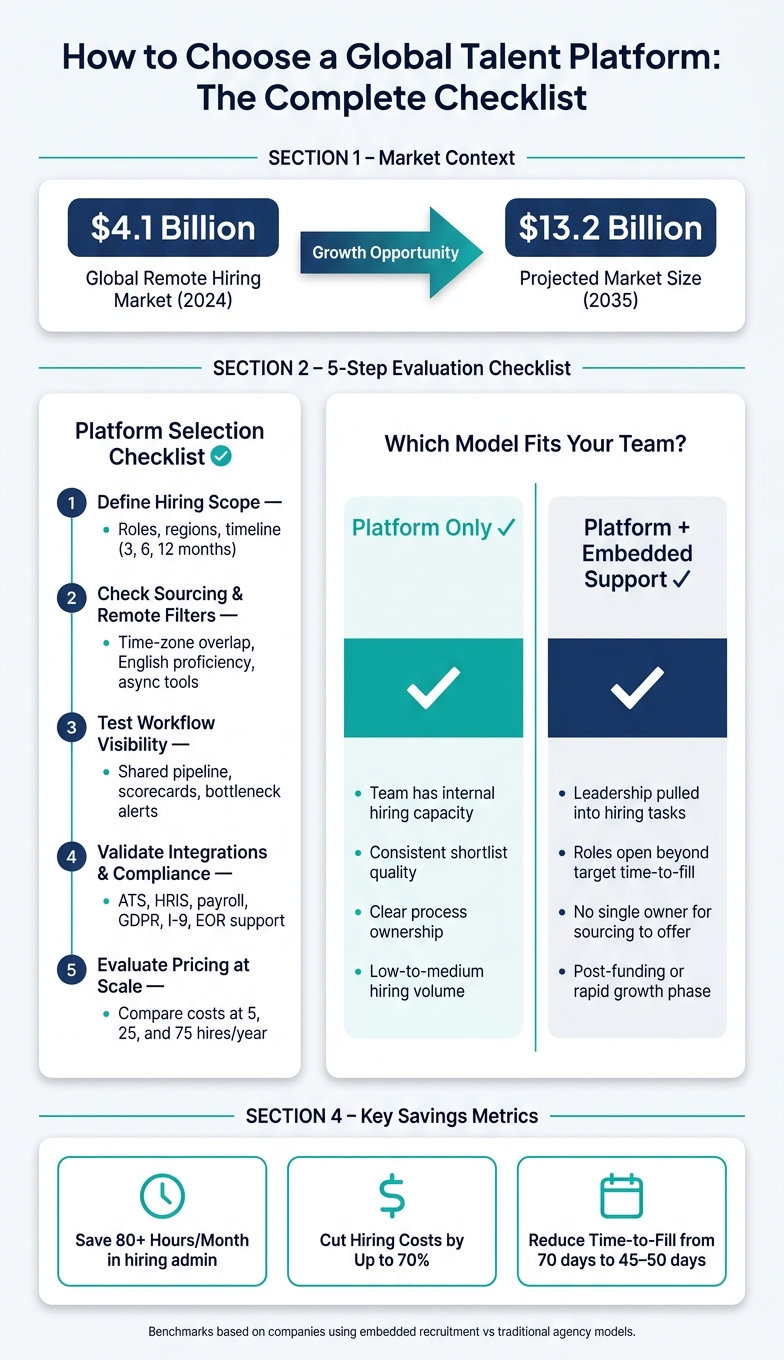
Global Talent Platform Checklist: Platform-Only vs Embedded Recruitment
Global Hiring Platform: Find and Onboard Anyone Anywhere
Quick Comparison
| What to check | Why it matters | Business impact |
|---|---|---|
| Hiring scope | Stops you buying for features you do not need | Better fit, less wasted spend |
| Sourcing filters | Helps you find people by region, time zone, and role fit | Lower sourcing time |
| Workflow visibility | Keeps hiring teams aligned | Shorter time-to-fill |
| Integrations | Cuts manual work across ATS, HRIS, and payroll | Fewer admin hours |
| Pricing model | Shows what cost looks like as volume grows | Better budget control |
| Extra support | Helps if your team lacks bandwidth to run hiring end-to-end | More hires, less leadership time lost |
If your team already has hiring capacity, a platform may be enough. If not, Rent a Recruiter can add recruiter capacity inside your business, often cutting costs by up to 70% and saving 80+ hours per month in hiring admin versus traditional recruitment agencies. Read on if you want a simple way to judge platform fit against business outcomes, not sales claims.
1. Define your hiring scope before comparing platforms
Before you look at any platform, get clear on what you need to hire. If you skip this step, feature lists can pull your attention away from the hiring gaps that affect cost, speed, and team output.
List the roles, regions, and hiring timeline
Build a role planning matrix for the next 3, 6, and 12 months. For each role, note the function, seniority level, employment type, target region or time zone, and how urgent the hire is.
Then spell out the points that affect platform fit. That includes required time-zone overlap with U.S. business hours, required English level, and whether you are open to nearshore, offshore, or global talent. For roles that rely on close day-to-day teamwork, a minimum of 4 hours of overlap with Eastern Time can be a practical requirement.[2][3]
These details matter more than they might seem at first. They shape which filters you need, which talent pools are worth paying for, and whether a platform can help you hire at the pace your business needs.
Set success metrics tied to business outcomes
Once the scope is clear, turn your hiring plan into targets that leadership already tracks. Focus on time to fill, cost per hire, pipeline quality, and internal hours saved per month.
For example, you might aim to cut senior engineering time to fill from 70 days to 45 to 50 days, reduce cost per hire by 30% to 50% versus traditional recruitment agency commissions, and save 40 to 80 hours per month in sourcing and coordination.[1]
Use your last 6 to 12 months of hiring data as the baseline, even if it is not perfect. Approximate numbers are still useful. They give you a way to judge a platform on business impact, not just on how polished the demo looks.
Those benchmarks will make the next step much simpler. You will be able to compare platform fit against actual hiring outcomes, not marketing claims.
2. Check core platform capabilities for remote hiring
Once your hiring scope is clear, assess platforms based on fit, not feature volume.
Review sourcing, search, and remote-readiness filters
Start with the talent pool. A platform might talk about global reach, but what matters is simpler than that. Can it give you enough relevant candidates in the markets you plan to hire in? And can you search by location, time zone, and role criteria without wrestling with the system?
Then pressure-test the remote filters. The ones that matter most are:
- Time-zone overlap
- English proficiency
- Prior remote experience
- Role specialisation
If a platform cannot filter by UTC offset or remote-work history, that is a gap in a core function. In practice, platforms that build remote hiring filters into the product from day one tend to deliver shortlists that are stronger and easier to move forward with.
It is also worth checking for async screening tools, such as one-way video interviews or structured questionnaires. These cut scheduling friction and save time, especially when you are hiring across several time zones.
Test workflow visibility for hiring teams
Deep sourcing only helps if your team can move people through the process without delay. Check whether the platform gives hiring managers, HR, and leadership a shared view of the pipeline. You do not just need a list of candidates. You need clear stage-by-stage visibility, plus bottleneck alerts, so hiring stays fast and coordination does not turn into admin drag.
Look for standardized scorecards that every interviewer uses, role-based access so each stakeholder sees what they need, and scheduling tools that convert time zones automatically. When those pieces work well together, they cut the back-and-forth that often slows distributed hiring.
For scaling teams, that has a direct business effect. Less admin, fewer delays, and shorter time-to-hire.
Sourcing and workflow comparison table
Use this scorecard to compare platforms side by side. Rate each area on a simple 1 to 5 scale, so you have something easy to share with the rest of your team.
| Capability | What to look for |
|---|---|
| Talent pool coverage | Enough candidates in your target regions (Americas, EMEA, APAC) |
| Remote-readiness filters | Time-zone overlap, prior remote experience, async tool familiarity |
| Search filters | Seniority, role type, language, role specialisation |
| Screening tools | Async video, structured assessments, language tests |
| Interview coordination | Time-zone-aware scheduling, calendar sync, automated reminders |
| Collaboration features | Shared scorecards, comments, role-based access |
| Reporting visibility | Stage metrics, bottleneck tracking, conversion by stage |
A platform that performs well across all seven rows is worth moving to the next step. One that scores high on sourcing but weak on workflow visibility, or the other way around, will usually create friction as hiring volume grows.
Once sourcing and workflow fit are clear, the next step is to review integrations, cross-border risk, and cost.
sbb-itb-a23bd6a
3. Validate risk, integrations, and total operating cost
Sourcing and workflow only matter if the platform can scale across borders, systems, and hiring volume.
If it cannot handle compliance, connect with your stack, or keep costs under control as headcount grows, it will slow you down when hiring pressure picks up. That is where platform decisions start to hit the business.
Confirm cross-border support and system fit
Start with documentation. Can the platform support international hiring without pushing extra admin work back onto your team?
For U.S. hires, check I-9, W-4, state tax, W-9, and 1099-NEC workflows. For international hires, look at localized contracts, GDPR notices, and country-specific onboarding.
This matters more than many teams expect. Only 8% of companies report full compliance with international tax requirements[6]. If you are hiring across Ireland, the US, Australia, or the Middle East, weak compliance support can turn into delays, manual fixes, and avoidable risk. Built-in templates or EOR integrations can save time and cut errors.
Then map your systems before you buy. Review your ATS, HRIS, payroll, and collaboration tools first. After that, check for native integrations or documented APIs.
Platforms with single sign-on (SSO) and standardised data fields usually make life easier. They tend to reduce admin mistakes and lower the risk of data silos as hiring grows across teams and regions.
Evaluate pricing structure and cost control
Pricing models vary a lot, and those gaps get expensive at volume.
EOR-linked platforms often charge $199 to $650 per employee per month, and some go up to $1,000 or more depending on country and complexity[4][5]. Sourcing and workflow platforms more often use flat monthly subscriptions, per-role fees, or hybrid pricing.
The lowest sticker price is not the point. Predictable total cost is what helps you plan hiring with confidence.
Ask vendors for annual pricing based on 5, 25, and 75 hires per year. That gives you a clearer view of what happens when hiring ramps up.
Watch for extra fees tied to:
- Integrations
- Additional admin seats
- Data exports
Fixed or tiered subscription models are often easier to forecast than commission-based structures. When headcount climbs, commission costs can jump fast and put pressure on budget control.
Cost and operating model comparison table
Use this table to compare how different platform types perform across the areas that shape operating cost and internal workload.
| Dimension | Low hiring demand | Medium hiring demand | High hiring demand |
|---|---|---|---|
| Pricing structure | Flat monthly or per-role pricing | Fixed or tiered pricing | Predictable subscription pricing; commission-based models become harder to control |
| Implementation requirements | Simple setup, limited configuration | Guided onboarding with integration mapping | Vendor-led implementation with ATS, HRIS, and payroll integration |
| Support included | Standard email or chat support | Dedicated success manager | Embedded support or dedicated account team |
| Internal admin effort | Low, limited manual coordination | Moderate, multiple regions and roles require consistent process | High without automation, manual coordination across jurisdictions creates large overhead |
| Reporting depth | Basic stage tracking and source reporting | Stage metrics, time-to-hire, and source effectiveness by region | Full analytics, including cross-border cost breakdowns, diversity metrics, and bottleneck tracking |
| Expected scalability | Most platforms handle this level | Gaps appear if integrations are weak | Only platforms with robust integrations, compliance, and flexible pricing scale cleanly |
A platform may work well at your current hiring level and still become a problem one step later. That is worth flagging early. Switching platforms in the middle of growth is expensive, time-consuming, and disruptive for hiring teams.
If compliance, integrations, or admin support already look heavy at this stage, the next call is simple: do you need platform-only support, or do you need extra help from an embedded recruiter?
4. Decide whether you need a platform only or embedded recruitment support
A platform gives you access to candidates. Embedded support gives you the process, capacity, and ownership needed to turn that access into hires.
If a platform gives you visibility but hiring still slows down, the issue usually is not access. It is capacity. Use the criteria already set out, platform fit, process ownership, and internal bandwidth, to make the call.
Signs your team needs embedded hiring support
The clearest sign is when hiring starts dragging leadership away from growth work. If founders or department heads are spending too much time reviewing applications or chasing interview feedback, that time is no longer going into the business. At the same time, recruiters who are carrying too many open roles often struggle to keep shortlists steady.
Ask a simple question: can your team run hiring in a steady way with the platform you choose?
Watch for signals like these:
- Hiring managers are misaligned on what "good" looks like for a role
- Shortlists vary too much across departments or regions
- Roles keep staying open beyond your target time-to-fill
- No one owns sourcing, scheduling, and feedback loops from start to finish
When these patterns show up, a platform on its own will not remove the bottleneck. The problem is not candidate access. It is process ownership.
When execution is the issue, embedded support fills the gap.
How Rent a Recruiter can strengthen platform outcomes
Rent a Recruiter places recruiters into your team within days, adding hiring capacity straight into your business so your internal team can stay focused on growth. This tends to matter most after funding or a new product launch, when hiring demand climbs fast and internal teams get stretched.
You can use embedded recruitment for short-term hiring spikes or for steady support over a longer period.
Companies working with Rent a Recruiter typically cut hiring costs by up to 70% and save more than 80 hours per month in internal hiring and admin time [7].
Use this split to decide whether to shortlist based on platform capability alone, or whether embedded support should sit inside the model.
Conclusion: Use the checklist to choose a platform that supports scalable hiring
The right global talent platform is not the one that looks best on a demo. It is the one that improves hiring speed, visibility, and cost control for your company’s growth plan.
Use the checklist to separate what helps from what just adds noise.
Shortlist based on business fit, not feature volume
Work through the checklist in order. Shortlist platforms based on fit: hiring scope, sourcing reach, workflow visibility, total cost, and internal team capacity.
A platform that fits your business will beat a feature-heavy option your team never fully uses. More features do not mean better hiring. They often mean more admin, more setup, and less adoption.
If capacity is the bottleneck, that leads to the next decision: is software enough on its own, or do you also need hiring support?
Next step: Book a call or see your potential savings
If your team can run hiring in a consistent way, software alone may be enough.
If your team lacks the capacity to do that, embedded recruiting support can turn the platform into a more reliable hiring system, with better follow-through and lower internal strain.
Rent a Recruiter embeds experienced recruiters into your team to manage hiring end to end and reduce the cost of growth. Book a call or see your potential savings.
FAQs
How do I know if a platform fits our hiring goals?
Start by mapping your current hiring process and pinpointing the main bottleneck. That gives you a clear baseline before you look at any platform.
Then judge the platform on three things: does it cut manual admin, shorten time-to-hire, and fit your current tech stack? If it fails on any one of those, you may just be adding another tool, not fixing the problem.
Look for native two-way ATS sync, context-aware semantic search, and strong reporting. Those features matter because they affect day-to-day recruiter output, hiring visibility, and decision speed.
A 30- to 60-day pilot across one or two live roles is often the best way to test this properly. It gives you a direct view of cost-per-hire and pipeline quality against your current baseline, without forcing a full rollout too early.
What integrations matter most for global hiring?
The most important integrations are the ones that connect your ATS to the tools your team already uses every day, through two-way sync.
Start with native integration across your CRM, email, calendar, and HRIS. That keeps candidate updates aligned across systems, cuts manual admin, supports automated scheduling, and gives you reporting you can actually trust.
For hiring teams under pressure to scale, that matters. Less manual work means more time back for hiring. Better data means fewer errors, fewer delays, and stronger visibility into pipeline and performance.
When is software not enough for hiring?
Software on its own won’t fix hiring if your team doesn’t have the internal capacity to set it up, manage it, and run the process behind it.
Yes, tools can automate repetitive tasks. But they still need clean data, structured intake, and steady human oversight. Without that, software often adds work instead of removing it. You end up with noisy data, patchy workflows, and activity that doesn’t turn into hires.
That’s the commercial problem. You’re paying for systems, but not getting the hiring outcome you expected.