
Every open role costs money, and if you are not tracking time-to-hire in a fixed way, you are guessing where that money is going.
I would boil this down to four things: define the metric once, log the right dates, track delays by stage, and review the numbers every week. That gives you more control over hiring speed, less time lost in admin, and a clearer view of where teams are slowing decisions. For scaling firms in SaaS, Technology, IT, Fintech, Engineering, Security, Insurance, and Professional Services, that matters when the U.S. median time-to-hire is now 44 days, vacant roles can cost about $500 per day, and candidate drop-off climbs when updates stall.
Here is the short version:
- Set one rule for time-to-hire, from candidate entry to offer acceptance
- Use one system of record, with required date fields and fixed stage names
- Measure time in each stage, not just the total hiring cycle
- Set SLAs and owners for screening, interviews, decisions, and offers
- Review stuck roles weekly and fix repeat delays before they spread
- If the issue is team capacity, not process, embedded recruitment can add hiring support without agency-style fees
If I want hiring data to help me cut cost, save time, and keep growth on track, this is the recruitment health check I would use.
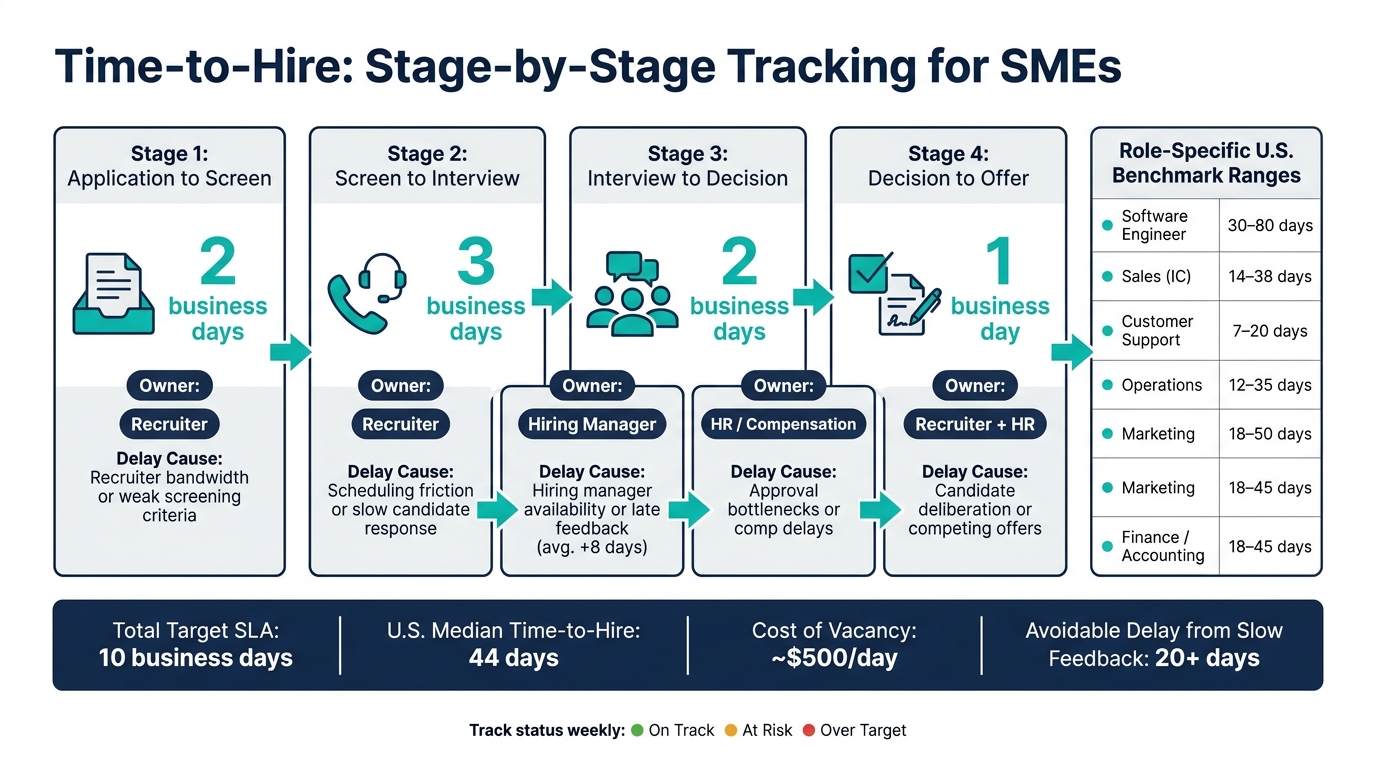
Time-to-Hire Tracking Process: 5 Stages, SLAs & Owners for SMEs
What Is TIME-TO-HIRE?! How do you CALCULATE Time-to-Hire? | Talent Acquisition & Recruitment (2021)
sbb-itb-a23bd6a
1. Define Time-to-Hire Before You Track It
Before you try to improve time-to-hire, you need one shared definition across HR, finance, and hiring managers.
Time-to-hire is the number of calendar days from the moment a candidate enters your pipeline to the day they accept the offer.
That sounds simple, but this is where teams often go wrong. If each group uses a different start date or end date, your reporting turns messy fast. You cannot compare roles, spot delays, or trust the numbers.
Checklist: Standardize the metric and start point
Before you log a single date, lock down two things: when the clock starts and when it stops.
Stop the clock at offer acceptance. That is the point the role is filled.
The start point depends on how the candidate entered your pipeline:
- Applied candidates: start at Application Received Date
- Sourced candidates: start at First Outreach Date
Use MM/DD/YYYY across your ATS, spreadsheets, and reports. Add the rule to ATS help text, require same-day logging to stop backdated entries, and review closed roles each week.
This matters more than it may seem. A clean definition gives you usable data, which means better hiring decisions, less debate in review meetings, and a clearer view of where time is being lost.
Time-to-hire vs. time-to-fill
These two metrics are linked, but they answer different business questions.
| Metric | Start Point | End Point | Main Use | Limitation |
|---|---|---|---|---|
| Time-to-hire | Candidate enters pipeline: application date or first outreach date | Offer acceptance date | Measures pipeline speed, how fast qualified candidates move through your process | Does not show how long the role sat open before candidates entered |
| Time-to-fill | Requisition approval date | Offer acceptance date | Measures total vacancy duration; useful for headcount planning and cost-of-vacancy analysis | Blends approval delays with pipeline performance, which makes root-cause analysis harder |
Use the metric that fits the question. For many SMEs, managing these metrics is easier with structured talent acquisition services that provide the necessary reporting framework.
If you want to diagnose recruiter response times, interview scheduling delays, or friction in candidate experience, use time-to-hire. If you want to understand the total business cost of an open role or plan headcount with more accuracy, use time-to-fill.
Put plainly, one tells you how fast your process moves once a candidate is in it. The other tells you how long the business waited overall.
Checklist: Build a simple metrics dictionary
A one-page metrics dictionary keeps HR, hiring managers, and finance on the same page. At minimum, define these three terms:
| Term | Plain-English Definition |
|---|---|
| Time-in-stage | Days a candidate spends in each step of your process, such as screening, interview, or offer; used to identify gaps and bottlenecks |
| Source of hire | The channel that brought in the hired candidate, such as a job board, referral, LinkedIn outreach, or career site |
| Offer acceptance rate | Accepted offers ÷ total offers extended × 100; tells you if your compensation and process are competitive |
For offer acceptance rate, be precise about what counts as accepted. Use a signed offer letter or another formal acceptance, not just a verbal yes. That detail matters when you compare months, teams, or role types.
Add one plain example next to each definition. For example: If we extend 10 offers in August and 8 are signed, our offer acceptance rate is 80%. Examples land faster than definitions, especially for non-HR stakeholders.
Keep the dictionary somewhere easy to find, such as a shared drive, an intranet page, or the top tab of your hiring spreadsheet. That makes monthly reviews simpler and cuts down on time lost arguing over what a metric means.
Once the definition is fixed, capture it the same way every time in your ATS or spreadsheet.
2. Set Up Reliable Tracking in Your ATS or Spreadsheet
Once your definitions are locked in, your ATS or spreadsheet needs to record that same data the same way every time.
Use one system of record with required fields for every candidate. That’s what turns hiring data into something you can manage, not just admin work. Clean fields and fixed stages help you spot where hiring slows, where handoffs break down, and where time gets lost.
Checklist: Make core data fields mandatory
You do not need a bloated form with endless fields. You need the right fields, completed properly, every time a candidate moves through the pipeline. Use MM/DD/YYYY for all date fields across your ATS or spreadsheet.
| Field | Format | Mandatory? |
|---|---|---|
| Candidate ID | Alphanumeric (e.g., C-2026-001) | Yes |
| Role / Requisition ID | Text (e.g., REQ-2026-015) | Yes |
| Job Title | Plain text (e.g., Account Executive) | Yes |
| Application Date or First Outreach Date | Date | Yes (one must be present) |
| Phone Screen Date | Date | Recommended |
| First Interview Date | Date | Recommended |
| Offer Sent Date | Date | Yes (if candidate reaches offer stage) |
| Offer Acceptance Date or Offer Declined Date | Date | Yes (if an offer is extended) |
| Hire Date | Date | Yes (for hired candidates) |
| Current Stage or Final Status | Picklist (Applied, Phone Screen, Interview, Decision, Offer Sent, Offer Accepted, Offer Declined, Rejected, Hired) | Yes |
Keep dates as date-type fields, never free text. In a spreadsheet, that means you can run a simple formula like =Hire Date - Application Date and get time-to-hire straight away. In an ATS, set required fields so a recruiter cannot move a candidate to "Offer Sent" without a Role ID and an Application Date or First Outreach Date already logged.
That small bit of discipline saves time later. It also gives you cleaner reporting when you need to explain hiring speed, recruiter output, or cost per hire.
Checklist: Standardize stage names and ownership
Free-text status fields are where tracking usually falls apart. One recruiter writes "1st interview done", another writes "interviewed", and suddenly your reporting is a mess.
Use one fixed stage flow: Applied/Sourced → Phone Screen → Interview → Decision → Offer Sent → Offer Accepted/Declined → Hired. Keep it simple and stick to it.
Ownership should be just as clear:
- The recruiter owns screening and interview updates
- The hiring manager owns Decision within 2 business days of the final interview
- HR owns offer and closeout stages
A one-page "stage rules" guide shared with recruiters and hiring managers helps more than most teams expect. Log stage changes on the same day interviews happen or offers go out. If updates drift by even a few days, your reporting starts telling the wrong story.
Checklist: Check data quality every week
Weekly cleanup keeps your numbers solid enough to use in real decisions. If the data is messy, the dashboard is useless.
Run these four checks every week:
- Duplicate records: Filter by candidate name, email, and Role ID. If the same person appears twice for the same role, merge the records and keep the one with the most complete data.
- Stuck candidates: Filter active stages like Interview or Decision, then sort by last update date. Any candidate sitting in the same stage beyond your SLA needs to be moved forward, rejected, or marked as withdrawn.
- Missing dates: Filter for Final Status = Hired and check for blank Application Date, Offer Sent Date, or Hire Date. Use calendar or email logs to fill in missing values.
- Last 20-30 hires: Check that each record has a Candidate ID, Role ID, an Application or First Outreach Date, an Offer Sent Date, an Offer Acceptance or Declined Date, and a Hire Date.
Once the data is clean, you can break time-to-hire down by stage and see the real bottlenecks. That’s where you start saving time, tightening accountability, and getting more from your hiring spend.
3. Measure Time-to-Hire and Find Bottlenecks by Stage
Clean data only helps if you use it. This is where your hiring data starts paying off.
The goal is simple: turn dates into a metric you can track, compare, and act on. If you want better hiring outcomes, lower admin time, and fewer delays, you need to know how long hiring takes and where it slows down.
Checklist: Calculate your average time-to-hire
The formula is simple: Offer Acceptance Date minus Candidate Entry Date = Time-to-Hire (in days).[3] Use the same start date you standardised earlier.
Then total the time-to-hire for each hire in the month or quarter and divide by the total number of hires. That gives you your average.
Don’t stop at a company-wide number. Break it down by department, seniority, and source of hire. That’s where hidden delays show up. A broad average can blur major gaps between teams. Embedded IT recruitment for software engineering can take around 55 days, while customer support can be closer to 12 days.[1]
Use this checklist:
- [ ] Calculate time-to-hire for every hire using: Offer Acceptance Date minus Candidate Entry Date
- [ ] Add all time-to-hire values for the period and divide by total hires to get your average
- [ ] Segment averages by department, role seniority, and source of hire
- [ ] Flag any role or department that is far slower than your company-wide average
Checklist: Compare your results to U.S. benchmarks
Benchmarks are a guide, not a pass-fail test. Senior and technical roles often take longer. Sales and customer support usually move faster. What matters is knowing where you sit, then deciding what needs attention first.[1]
| Role or Function | Your Avg. Time-to-Hire | U.S. Benchmark Range | Variance | Priority |
|---|---|---|---|---|
| Software Engineer | – | 30 to 80 days | – | – |
| Sales (IC) | – | 14 to 38 days | – | – |
| Customer Support | – | 7 to 20 days | – | – |
| Operations | – | 12 to 35 days | – | – |
| Marketing | – | 18 to 50 days | – | – |
| Finance / Accounting | – | 18 to 45 days | – | – |
Add your averages, check whether each role sits above or below the range, and mark High Priority for roles that are both well above range and business-critical.
This is where hiring leaders can make better calls. If a role is slow but not urgent, it may not need immediate action. If a role is slow and blocks revenue, delivery, or product output, that’s a different story.
Checklist: Track time-in-stage and set response SLAs
Your overall time-to-hire tells you the headline number. Stage-by-stage timing shows you the cause.
That matters because you can’t fix a delay if you don’t know who owns it. Once you have your average, break it into stages and look for the slowest handoff first.
Track the average number of days spent in these five stages: application to screen, screen to interview, interview to decision, decision to offer, and offer to acceptance. This lets you trace delays back to the right part of the process. Slow application-to-screen often points to recruiter bandwidth or weak screening criteria. Slow interview-to-decision often points to hiring manager availability or late feedback.[2]
Set an SLA for each stage and give each one a clear owner. Use this table as your starting point.[2]
| Stage | Current Average | Target SLA | Owner | Status |
|---|---|---|---|---|
| Application to Screen | – | 2 business days | Recruiter | – |
| Screen to Interview | – | 3 business days | Recruiter | – |
| Interview to Decision | – | 2 business days | Hiring Manager | – |
| Decision to Offer | – | 1 business day | HR / Compensation | – |
| Offer to Acceptance | – | 2 business days | Recruiter + HR | – |
Track Status as On Track, At Risk, or Over Target. If a stage is over target, it needs a direct conversation with the owner.
Use this checklist to keep it tight:
- [ ] Calculate average days spent in each of the five stages above
- [ ] Compare stage averages to the SLA targets and note which stages are over
- [ ] Identify the single stage with the largest gap between current average and target SLA
- [ ] Assign a named owner to each stage and confirm they know the target
4. Use Tracking Data to Hire Faster and Spend Less
Once your stage data shows where hiring slows, use a fixed reporting rhythm to act on it.
Checklist: Set a weekly and monthly reporting rhythm
The goal is not more meetings. It is direct action at the right time.
Run a 20 to 30 minute weekly hiring standup with your recruiter or HR lead and hiring managers. Focus on roles past SLA, candidates stuck in a stage, and any role blocking revenue or day-to-day operations. Keep the dashboard tight: roles past SLA, average days by active stage, and candidates idle for 7+ days.
Then run a 45 to 60 minute monthly review with department heads and leadership. Look at average time-to-hire by team, source, and location. Review trends across 3 to 6 months, spot departments that keep missing target, and assign 1 to 2 process changes with clear owners and deadlines.
Each quarter, hold a 30 to 45 minute audit with HR or recruiting plus operations or finance. Check timestamps, definitions, and SLA targets so your reporting stays clean and your team is not making decisions off bad data.
Use this checklist:
- [ ] Schedule a recurring weekly hiring standup (20 to 30 min) with recruiter and hiring managers
- [ ] Review roles past SLA and candidates idle 7+ days each week
- [ ] Hold a monthly review (45 to 60 min) of average time-to-hire by department and source
- [ ] Assign 1 to 2 process changes each month with clear owners and deadlines
- [ ] Run a quarterly audit to confirm timestamps, definitions, and SLA targets
Use that meeting to assign one owner to each delay before it snowballs.
Checklist: Act on recurring bottlenecks early
Data means nothing if nobody owns the fix. In SME hiring, the first repeat issues your tracking data tends to surface are interview scheduling delays, slow hiring manager feedback, and too much manual coordination.
According to benchmark data, internal hiring-manager response delays can add an average of 8 days to a search, and across several stages that can turn into 20+ days of avoidable delay.[4]
If your weekly review shows the same department missing feedback SLAs for two or three weeks in a row, that is not a one-off. It is a process issue. Fix it with pre-booked interview blocks, mandatory ATS scorecards, or fewer interview rounds. Then track whether the change sticks over the next one or two hiring cycles before you move to the next fix.
Use this checklist:
- [ ] Flag any department that misses feedback SLAs more than twice in a row
- [ ] Introduce pre-booked interview blocks for hiring managers with recurring scheduling delays
- [ ] Make structured scorecards mandatory before a candidate can advance in the ATS
- [ ] Quantify the cost of your top bottleneck to make the business case for fixing it
- [ ] Measure time-in-stage before and after each process change to confirm it’s working
If delays keep showing up because of capacity, not process, your internal team may need extra support.
When embedded recruitment support makes sense
When hiring coordination regularly goes past internal capacity, embedded recruitment support can keep hiring moving. Rent a Recruiter places experienced recruiters inside your team within days to manage hiring end-to-end, bring structure and reporting discipline, and cut hiring costs by up to 70% while saving over 80 hours per month.[5]
Conclusion: A Simple Checklist for Better Hiring Decisions
Time-to-hire tracking works best when your process stays consistent. When the metric, data, stage timing, and SLAs all follow the same rules, you get a clearer picture of what is slowing hiring down. Once that system is in place, the impact shows up where it matters most, speed, cost, and control.
For U.S. SMEs, the payoff is practical. You can hire faster, lose fewer candidates to delays, spot blockers earlier, and cut recruitment spend. Even a small fix in one weak point, like interview scheduling or offer approval, can reduce the full hiring cycle.
Use this checklist to put the process into action:
- Define time-to-hire with a clear start and end point, then document it in a essential recruitment metrics dictionary
- Make core ATS or spreadsheet fields mandatory so your data is reliable from day one
- Track time in stage, not just total time-to-hire, so you can see where candidates actually stall
- Set SLAs for feedback, approvals, and follow-up, then review results weekly or monthly
If the bottleneck is capacity rather than process, your internal team may need extra hiring support.
When the data points to a capacity issue, not a process issue, Rent a Recruiter places experienced recruiters directly into your team within days. That gives you the structure, visibility, and end-to-end hiring management scaling SMEs need. Get in touch if hiring demand is outpacing your team and you need more capacity and control.
FAQs
What is a good time-to-hire for an SME?
For SMEs, a strong time-to-hire usually sits between 16 and 23 days, measured from the point a candidate enters your pipeline to the moment they accept your offer.
That matters because top candidates often accept another role within 10 days. If your process drags, you don’t just lose talent, you lose time, team capacity, and revenue momentum.
This is not the same as time-to-fill.
Time-to-fill tracks the full hiring cycle, from job requisition through to offer acceptance. That figure usually lands between 21 and 42 days.
The gap between the two matters. Time-to-hire shows how fast you move once the right people are in process. Time-to-fill shows how long the whole hiring machine takes to deliver.
Both numbers shift based on role complexity, seniority, and department.
Should we track time-to-hire in an ATS or a spreadsheet?
Use a spreadsheet only if you’re early stage and keeping things simple. Keep one row per hire and track the key dates, pipeline entry, offer, and acceptance, so time-to-hire is measured the same way every time.
Once you’re managing more roles, roughly more than 20 open positions, spreadsheets start to break down. They get messy, harder to audit, and tougher to trust when leadership wants clear hiring data.
At that point, an ATS is the better option. It records stage timestamps automatically and gives you one auditable record of the hiring process. That means less manual admin, cleaner reporting, and fewer disputes over what happened and when.
How do we know if our hiring delays are process or capacity issues?
Map your hiring workflow from end to end. Then track time spent at each stage and drop-off between stages.
This gives you a clear view of where hiring is moving well, and where it starts to drag.
If candidates move fast through early steps but then stall at one point, that’s usually a sign of an internal bottleneck. The same applies when dwell time goes beyond about 5 business days. In most cases, the delay comes from things like slow feedback, scheduling gaps, or approval hold-ups.
It also helps to compare time-to-hire with time-to-fill.
If time-to-hire looks healthy but time-to-fill keeps stretching out, the problem often sits outside candidate quality. More often, it’s tied to approvals, interview scheduling, scorecards, or limited decision-making capacity.
That matters because a hiring team can look busy on paper while the process still loses time where it counts. When decision points slow down, hiring costs climb and teams wait longer for headcount to land.


