Recruitment metrics show what’s happening. KPIs show whether your hiring is meeting business goals. I recommend starting with one priority, such as filling critical roles on time, then setting a target, owner, and review date.
Track three to five supporting metrics to explain missed targets. Review speed and cost alongside quality and retention, so a cheaper hire does not become a costly replacement.
Quick Comparison
| Criteria | Recruitment metrics | Recruitment KPIs |
|---|---|---|
| Purpose | Explain hiring activity and results | Measure progress against business goals |
| Target | Optional | Required |
| Ownership | Can support shared analysis | Needs an accountable owner |
| Business link | Helps diagnose problems | Guides spending, staffing, and delivery decisions |
My approach is simple: agree on definitions, keep the data consistent, rate your recruitment process, and act when results miss the target. Give leaders a short view of outcomes and hiring teams the detail needed to resolve delays. If your team lacks capacity to act, consider external support against the same measures. Using embedded talent acquisition services can provide the necessary capacity to hit these targets.
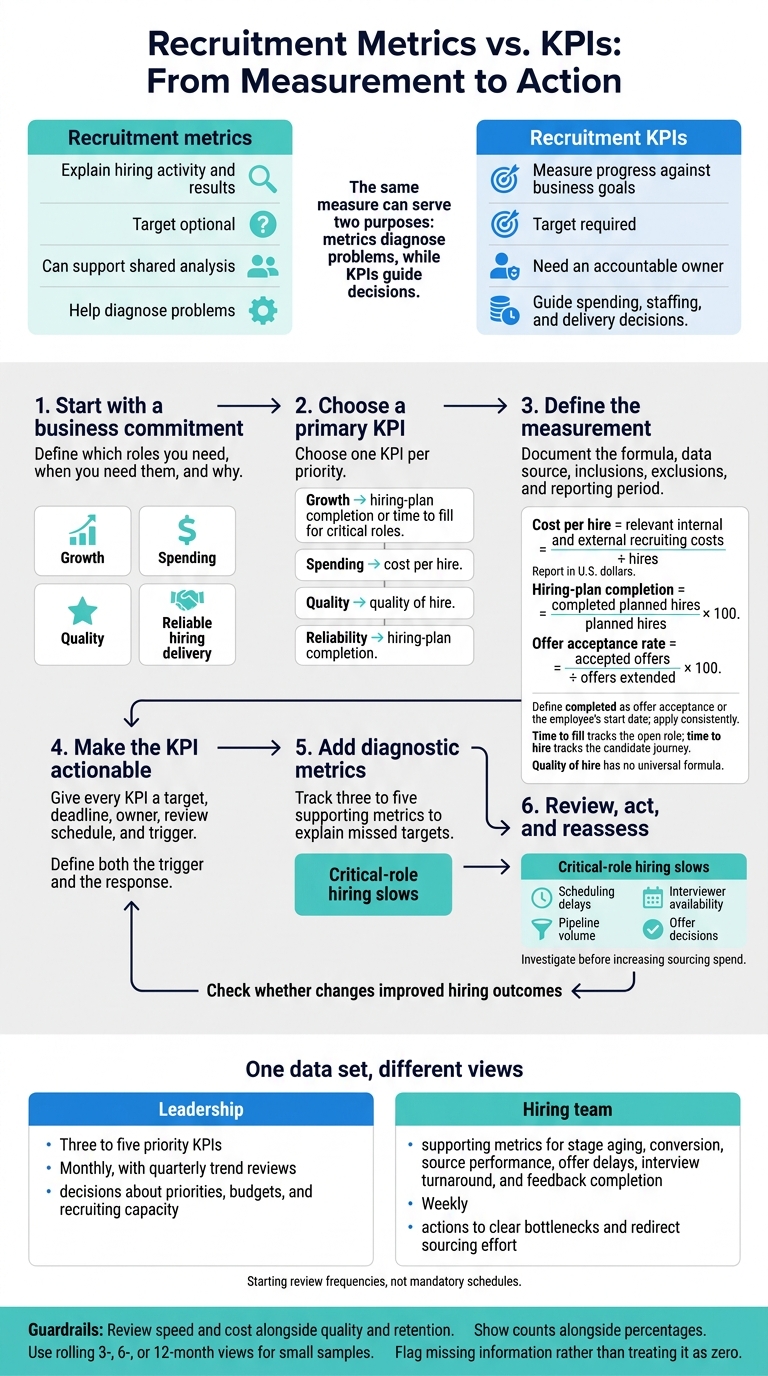
Recruitment Metrics vs. KPIs: From Measurement to Action
What are KPIs and Metrics? | Data Fundamental for Beginners
sbb-itb-a23bd6a
Recruitment Metrics vs. KPIs: Key Differences
The same measure can serve two purposes: metrics diagnose problems, while KPIs guide decisions.[6]
| Dimension | Recruitment metrics | Recruitment KPIs |
|---|---|---|
| Purpose | Diagnose hiring activity and results | Track progress against business priorities |
| Targets | Can be reported without a target | Need a defined target or threshold |
| Ownership | Can support shared analysis | Have an accountable owner |
| Business linkage | May be indirect | Tie directly to a business or hiring goal |
The next step is deciding which measures need targets and which should remain diagnostic.
Metrics Measure Hiring Activity and Results
Recruitment metrics track volume, speed, cost, efficiency, and funnel behavior.[3] Time to fill tracks the open role; time to hire tracks the candidate journey. Define each measure’s start and end points consistently so your team can compare results.[3][5]
These measures help you pinpoint where hiring breaks down. On their own, they don’t tell you whether hiring is meeting your goals.
KPIs Measure Progress Toward Hiring Goals
A metric becomes a KPI when you add a goal, target, review cadence, owner, and action threshold.[6]
For example, tracking time to fill for critical roles can help protect a launch date. Cost per hire can help keep growth within budget. Quality of hire, new-hire retention, and time to productivity track whether hires perform, stay, and contribute. Hiring-plan completion shows whether approved roles are filled on time.
Quality of hire has no universal formula. Document the performance, retention, or manager-assessment components you’ll use before setting a target.[4]
Strengths and Limits of Metrics and KPIs
| Approach | Strength | Limit |
|---|---|---|
| Recruitment metrics | Show funnel delays, candidate losses, and source performance | Too many can overwhelm teams and reward activity over results |
| Recruitment KPIs | Focus attention and assign accountability | Headline results can hide process problems or harmful trade-offs |
| Both together | Connect missed goals to evidence your team can act on | Need consistent definitions and reliable data |
How to Choose KPIs and Supporting Metrics
Once you’ve defined the hiring problem, choose measures that help your team act.
Match Measures to Hiring Goals
Start with the business commitment, not the dashboard. Define which roles you need, when you need them, and why. Choose one KPI per priority, then add only the metrics that help explain the result.
For growth, use hiring-plan completion or time to fill for critical roles; for spending, cost per hire; for quality, quality of hire; for reliability, plan completion.
Supporting metrics include stage conversion rates, source cost, internal recruiting hours, retention, time to productivity, requisition aging, and offer acceptance.
Define Calculations and Reporting Periods
Document each measure’s formula, data source, inclusions, and exclusions. Report monthly or quarterly, with clear rules for grouping results.
- Cost per hire = relevant internal and external recruiting costs ÷ hires. Report in U.S. dollars. Include recruiter time, recruiting software, advertising, referral bonuses, and background checks.
- Hiring-plan completion = completed planned hires ÷ planned hires × 100. Define “completed” as offer acceptance or the employee’s start date, based on your staffing commitment. Apply that definition consistently.
- Offer acceptance rate = accepted offers ÷ offers extended × 100.
Track offers extended during the reporting period, and show pending offers separately. Keep the original hiring plan alongside dated revisions. Remove canceled roles from the denominator only after formal approval.
For time measures, record whether you use calendar or business days and which requisition or candidate milestone starts the clock. For the interview-to-offer ratio, count either individual candidates or interview events. Do not mix the two.
Set quality criteria before recruiting starts, with performance checks at 90 or 180 days. Measure retention only among hires who have reached the same checkpoint. Tie productivity to a measurable milestone for each role.
With definitions agreed, assign ownership and decide what happens when results miss the target.
Set Targets, Assign Owners, and Plan Responses
Give every KPI a target, deadline, owner, review schedule, and trigger. Base targets on comparable roles, current capacity, and business deadlines, rather than one company-wide speed target. Define both the trigger and the response for each KPI.
When critical-role hiring slows, the recruiting lead should check scheduling delays, interviewer availability, pipeline volume, and offer decisions before increasing sourcing spend.
Break results down by role or department when sample sizes allow. Show counts alongside percentages, and use rolling 3-, 6-, or 12-month views for small samples. Review speed and cost alongside quality and retention so faster hiring does not hide weaker outcomes.
How to Build Useful Hiring Reports
Once you’ve defined your KPIs, build reports that help each audience make decisions.
Separate Leadership and Hiring-Team Reports
Use one data set with different views. Give leadership three to five priority KPIs tied to hiring speed, spending, and quality. Give your hiring team the supporting metrics that explain why results differ. A spreadsheet or ATS export works if it groups results by role, owner, and date.
| Audience | Measures | Decisions supported | Starting review frequency |
|---|---|---|---|
| Leadership | Hiring-plan progress, time to fill, cost per hire, quality of hire | Adjust priorities, budgets, or recruiting capacity | Monthly, with quarterly trend reviews |
| Hiring team | Stage aging, conversion, source performance, offer delays, interview turnaround, feedback completion | Clear bottlenecks, resolve feedback delays, and redirect sourcing effort | Weekly |
Keep each review focused on decisions, not raw volume. Weekly reviews should address stalled searches and next actions. Monthly reviews should check whether those changes improved hiring outcomes.
Record each change and the next review date. Match the review schedule to your hiring volume, and remove fields that nobody uses to make decisions.
Keep Hiring Data Consistent
Standardize requisition statuses, candidate stages, source and cost fields, and key dates so your dashboards don’t mislead. Document each reporting cohort and its quality and retention checkpoint. Flag missing information rather than treating it as zero. Regular data-quality audits help keep reports reliable.[9]
Assign one data-quality owner to check for duplicates, missing timestamps, and open requisitions before reports go out. Recruiters and hiring managers still own timely updates.
Give leaders aggregated results. Restrict identifiable candidate and employee records to approved users, limit exports, and document data-retention periods.[8]
Use Embedded Recruitment Support When Needed
If your team lacks the capacity to update reports, investigate bottlenecks, and act on missed KPIs, Rent a Recruiter embeds experienced recruiters to support hiring and reporting. Its recruitment health check can identify process and reporting gaps.[1]
Before support starts, set a baseline for hiring delivery, data completeness, response times, and post-hire outcomes. Track the same KPIs before and after support begins, comparing results with that baseline and comparable cohorts.
Conclusion: Diagnose With Metrics, Set Priorities With KPIs
Once your reports are in place, turn the findings into decisions. Use metrics to diagnose hiring performance; use KPIs to track progress toward business goals.
To focus limited recruiting capacity with effective talent acquisition strategies, set one primary KPI with a clear calculation and target. Add three to five supporting metrics to explain the result. Assign one owner, schedule recurring reviews, and agree on what happens when a target is missed. Reporting alone won’t fix the problem.
A speed target means little if new hires leave early or take too long to become productive.[7][2]
If your internal team lacks the capacity to act on missed targets, external support can help. Rent a Recruiter embeds recruiters in your team to help meet hiring goals and keep reporting on track.
FAQs
Which hiring KPI should my small business prioritize first?
Start with four recruitment metrics: cost per hire, time to fill, offer acceptance rate, and 90-day retention. Together, they give you a baseline for hiring costs, speed, how competitive your roles are, and whether you’re hiring the right people. You get a clear starting point without overwhelming your team with data.
Once that baseline is in place, add funnel-specific metrics such as source of hire. Rent a Recruiter can help structure and manage this process by embedding experienced recruiters into your team.
How can I set realistic hiring targets with limited data?
Agree on shared hiring metrics and consistent formulas, with costs in U.S. dollars and timing in calendar days. Use your available hiring history to set a baseline, then define SMART targets by role family that match your hiring capacity and realistic timelines.
Report medians or ranges, and treat small samples as a guide rather than firm evidence. If your applicant tracking system has gaps, fill in the key fields in a spreadsheet with one row per hire.
What should I do when hiring KPIs conflict?
When hiring KPIs conflict, balance speed, cost, and quality rather than chasing one target. Cutting time-to-hire can mean cutting corners on screening, increasing the risk of poor hires or early turnover.
Compare metrics such as cost-per-hire and retention to find what’s driving the problem. Low retention is more likely to point to onboarding gaps or a mismatch between the role and the hire than sourcing speed.
Assess each KPI against its business impact. Then prioritize process changes that bring hiring speed, spending, and outcomes back into balance.