
Your job ad has less than 15 seconds to grab attention. Miss the mark, and candidates move on. The solution? Treat your job posting like a marketing tool, not just a compliance checklist. Clear titles, concise descriptions, and strategic posting can increase applications by up to 40% while improving candidate quality.
Here’s how to make every job post count:
- Use clear, searchable titles: Avoid jargon like "Ninja" or "Rockstar." Stick to industry-standard terms and keep titles short for better visibility.
- Be specific about responsibilities: Focus on outcomes and separate must-have qualifications from nice-to-haves.
- Showcase your company: Add team photos, videos, and branding to stand out. Candidates evaluate your workplace before applying.
- Post strategically: Use the right platforms and post between Tuesday and Thursday mornings for maximum visibility.
- Test and track results: A/B test titles, descriptions, and formats. Monitor essential recruitment metrics like views-to-apply ratios and refine based on data.
Optimized job ads attract more qualified candidates faster, saving time and reducing hiring costs. Start small – adjust one element today and measure the impact.
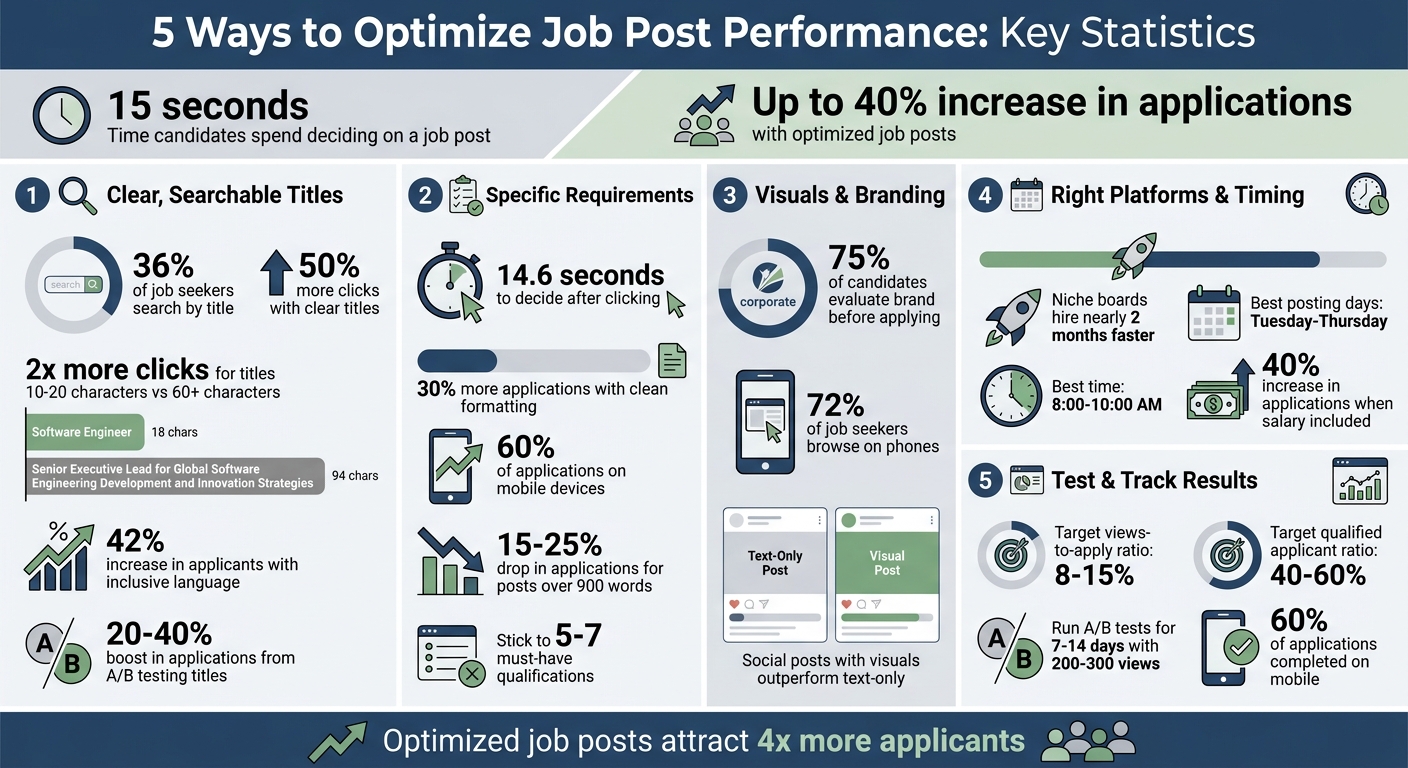
Job Posting Optimization Statistics: Impact on Applications and Hiring Performance
No One’s Applying to Your Job Posting? Fix It Fast with This 8-Step Framework
If you need more than just a framework, consider a recruitment as a service model to scale your hiring efficiently.
sbb-itb-a23bd6a
1. Write Clear, Searchable Job Titles
Your job title is the cornerstone of your job posting – it’s what drives visibility and attracts the right candidates. In fact, job titles are the most critical SEO element in your listing [8]. With 36% of job seekers searching by title [6], using unclear or unconventional terms could mean missing out on top talent.
Stick to terms candidates actually search for. For example, "Software Engineer" performs far better than something like "Code Warrior", and "HR Generalist" is more effective than "People Operations Guru." As TalentAlly explains, "Your goal isn’t just creativity – it’s clarity" [6]. Titles that mirror common search queries can generate up to 50% more clicks [6].
Be specific about seniority and role details to help candidates self-qualify. A title like "Senior Email Marketing Specialist" is far more effective than a vague "Marketing Associate." Keep titles concise – between 10 and 60 characters. Titles in the 10-20 character range get twice as many clicks as those exceeding 60 characters [7]. Longer titles can also get cut off on mobile, hiding key details.
Avoid formatting pitfalls that hurt search rankings or trigger spam filters. Skip ALL CAPS, excessive punctuation, and gimmicky terms like "Ninja" or "Rockstar." Instead, opt for inclusive and unbiased language – job ads with such language see a 42% increase in applicants [6]. Including both full terms and abbreviations, like "Registered Nurse (RN)" or "Certified Public Accountant (CPA)", can capture a broader range of search behaviors [5].
Finally, consider A/B testing your job titles – it can increase applications by 20%–40% [1]. Tools like Google Trends can help you identify high-performing keywords, and placing key terms at the beginning of the title can improve visibility, especially on mobile [7].
2. Include Specific Job Requirements and Responsibilities
Candidates spend just 14.6 seconds deciding if a job is worth their time after clicking on a posting [1]. So, once your optimized title grabs attention, your description needs to quickly and clearly communicate the role’s fit. This is where your requirements and responsibilities come into play.
Be specific. Instead of writing something vague like "Manage social media", focus on outcomes: "Grow our LinkedIn audience and drive traffic to the careers page" [8]. This kind of precise language helps candidates picture their potential success and assess whether they’re the right fit. Similarly, swap generic terms like "strong communication skills" for concrete examples, such as "Proven experience presenting data-driven recommendations to C-suite executives."
It’s also important to separate essential qualifications from those that are merely preferred. Stick to 5–7 must-haves [1]. This distinction prevents qualified candidates from self-selecting out because they feel they don’t meet every single criterion.
Once your content is clear, structure it for readability. Job descriptions with clean, organized formats see 30% more applications than cluttered ones [9]. Use bullet points, bold headers, and short paragraphs to make key information easy to digest – especially for mobile users, who account for over 60% of job applications [2]. Place critical details like salary, location, and the top three responsibilities within the first 200–300 words so candidates can assess fit without endless scrolling [1].
"A job description isn’t just a list of duties – it’s a company’s first impression, a marketing tool, and a talent magnet all rolled into one."
– TalentAlly [9]
Keep it concise. Job postings longer than 900 words experience a 15–25% drop in application rates [1]. Avoid corporate jargon or internal acronyms, as 60% of candidates abandon the process when faced with unclear or overly complicated language [9]. Stick to standard industry terms to ensure clarity and appeal.
3. Add Visuals and Company Branding
Visuals and branding play a crucial role in grabbing a candidate’s attention quickly. Text-heavy job posts often fail to engage, and with 75% of candidates evaluating a brand before applying [12], your visuals might be their first real impression of your workplace.
Focus on using real images that highlight your team, office spaces, and daily work life. Stock photos often feel impersonal and don’t convey what makes your company stand out.
"Simple smartphone recordings of team members sharing what they enjoy about working at your company can be very effective."
– Jen Dewar, JobScore [12]
Short, authentic videos – 1 to 2 minutes long – can build trust far better than overly polished corporate content. Genuine visuals not only create a sense of trust but also help your job posts stand out in a competitive market. Pair these with strong branding for a seamless candidate experience.
Incorporate your logo and maintain a consistent color scheme to make your posts instantly recognizable. Tools like Canva can help you create branded templates for "Day in the Life" photo carousels or infographics explaining your hiring process. These types of visuals not only look professional but also show candidates you’ve put thought and effort into the role they’re considering. Social media posts with visuals consistently outperform text-only listings in engagement [11].
Make sure your images are optimized for mobile devices – 72% of job seekers browse on their phones, so fast-loading visuals are a must [1]. Compress file sizes and include alt-text and geotags to improve local search visibility, helping candidates find your business more easily [10].
Steer clear of generic graphics like "fast-paced team" clichés. Instead, showcase your team collaborating in real, relatable settings. Authentic visuals communicate your company culture clearly and make your posts stand out from the crowd.
4. Choose the Right Platforms and Posting Times
Once your job titles, requirements, and branding are polished, the next step is deciding where and when to post your job listing. This decision is a key part of a recruitment process audit to identify inefficiencies. These choices directly affect how quickly you can attract the right candidates.
Some platforms work well for broad outreach. For example, Indeed and LinkedIn attract a large audience, with Indeed driving significant traffic[13]. However, for specialized roles, niche platforms often yield better results. If you’re hiring for tech positions, Dice connects you with over 3 million tech professionals[14]. For healthcare roles, platforms like Health eCareers and Nurse.com are ideal[14]. Finance professionals tend to frequent eFinancialCareers, while remote job seekers are active on platforms like FlexJobs and Remote.co[13][14].
"Niche job boards produce hires nearly two months faster than general platforms." – RecruitBPM[14]
Selecting the right platform is only half the equation. Posting at the right time is just as important.
Timing matters. Aim to post between Tuesday and Thursday, ideally between 8:00 AM and 10:00 AM, when candidates are likely checking job boards during their morning routine[15][17][18]. Avoid posting on Friday evenings, as your listing could get buried over the weekend. Instead, consider posting on Sunday evening when candidates are gearing up for the week ahead, or early Monday morning for maximum visibility[16][17].
"Avoid posting on Friday evenings to prevent your listing from becoming outdated by Monday. Instead, wait until Sunday evening or Monday morning and post when candidates are most active." – Rob Long, CRO at Workable[16]
Posting during peak activity times not only increases visibility but also ensures your listing appears in email alerts and search results when candidates are most engaged. Additionally, including salary ranges in your job ad can increase application rates by up to 40%[15]. By strategically choosing the right platforms and posting times, you can remove barriers for top talent and improve the overall performance of your job ad by revamping your recruitment strategies.
5. Test Different Versions and Track Results
To improve the performance of your job postings, try A/B testing by altering one variable at a time. This could be the job title, salary visibility, or the length of the job description. This method helps pinpoint what changes lead to better results[1].
"A/B testing is a simple, cost-effective way to optimize your job postings and attract more qualified candidates." – Jenny Skundrich, Recruitics[3]
Run A/B tests on job titles for 7–14 days, ensuring each version gets at least 200–300 views[1]. For instance, changing "Marketing Ninja" to "Marketing Associate" has been shown to boost click-through rates by 20–40%[1].
After testing, focus on key metrics to evaluate performance. Aim for a views-to-apply ratio of 8–15%[1]. If you’re falling short, consider an embedded recruitment service to revisit your strategy. For a qualified applicant ratio, target 40–60%[1]. If you’re overwhelmed by low-quality applications, consider trimming non-critical skills from the "must-have" list[1].
Keep an eye on your time-to-fill metric (the number of days from posting to offer acceptance) to assess how competitive your job post is. Also, track the application completion rate to spot any obstacles in the process[19]. If you notice candidates starting but not finishing applications, it could mean your form is too long or complicated. With over 60% of applications completed on mobile devices in 2026[2], it’s crucial to test your job post on a phone. Make sure key details like the title, location, and salary are visible within the first three seconds without scrolling[1]. Use these insights to refine your job titles and descriptions even further.
Conclusion
Optimizing job postings is not just a one-time task – it’s an ongoing process that directly impacts how quickly you hire, how much it costs, and the quality of candidates you attract. By focusing on searchable job titles, including clear requirements, showcasing your company brand, selecting the right platforms and timing, and experimenting with different versions, you can turn your job ads into powerful recruitment tools.
Here’s the proof: optimized job posts can attract up to four times more applicants than those that aren’t[4]. Clear, specific requirements also lead to better-quality candidates and a higher volume of applications. When these strategies are combined, you’re not just speeding up the hiring process – you’re creating a repeatable, scalable recruitment system that adapts to hiring as you scale that positions your business ahead of competitors in a crowded job market.
As recruitment expert Abbigail Fox explains:
"In a world where attention is scarce and competition is fierce, better job ads aren’t a ‘nice to have.’ They’re a strategic advantage." – Abbigail Fox, Marketing Professional[2]
Take a moment to review your current job postings. Start small – adjust a single element, such as making the job title easier to search for or including a salary range. Track the results, and you’ll quickly see how even small tweaks can significantly improve your ability to attract the right candidates for your roles.
FAQs
What should I A/B test first in a job post?
The job title is your first chance to grab attention, so it needs to work hard. A clear, concise, and searchable title can make a huge difference in attracting the right candidates. Start by A/B testing different versions of the title. Try variations with relevant keywords or alternative phrasing to see which performs better in terms of visibility and application rates.
This small tweak can help you pinpoint the title that resonates most with your target audience, ensuring your job post stands out and draws in qualified applicants.
What metrics show if my job post is effective?
When evaluating how well your job post is performing, focus on three key areas: application rates, candidate quality, and engagement metrics such as views and click-through rates. Recruitment analytics tools can help you track these metrics, giving you the insights needed to determine if your job post is hitting the mark.
How can I make my job post mobile-friendly fast?
To make your job post easy to navigate on a smartphone, focus on creating a smooth experience for mobile users. Make sure your recruitment site loads quickly, includes touch-friendly features like larger buttons, and offers simplified application forms designed for mobile, complete with auto-fill options. A clean layout and straightforward navigation can go a long way in keeping candidates engaged and reducing the chances they’ll abandon the process.