We use new hire surveys to find onboarding delays that waste time and slow progress, not to rate employees. Check feedback in week one and at 30, 60, and 90 days, then connect it to access delays, training gaps, and time to independent work.
Our approach is simple:
- Check the data: Confirm response counts, protect privacy, and check which groups are missing.
- Read scores alongside comments: Compare similar groups and check process records before deciding what caused a problem.
- Act and measure: Give each fix one owner, a deadline, and a target tied to time saved or role readiness.
Better ratings alone are not the goal. We look for <u>less rework and fewer delays</u>. Keep access, training, and manager support with your internal teams; route hiring handoff gaps to recruiting.
Here’s how we turn feedback into changes you can measure.
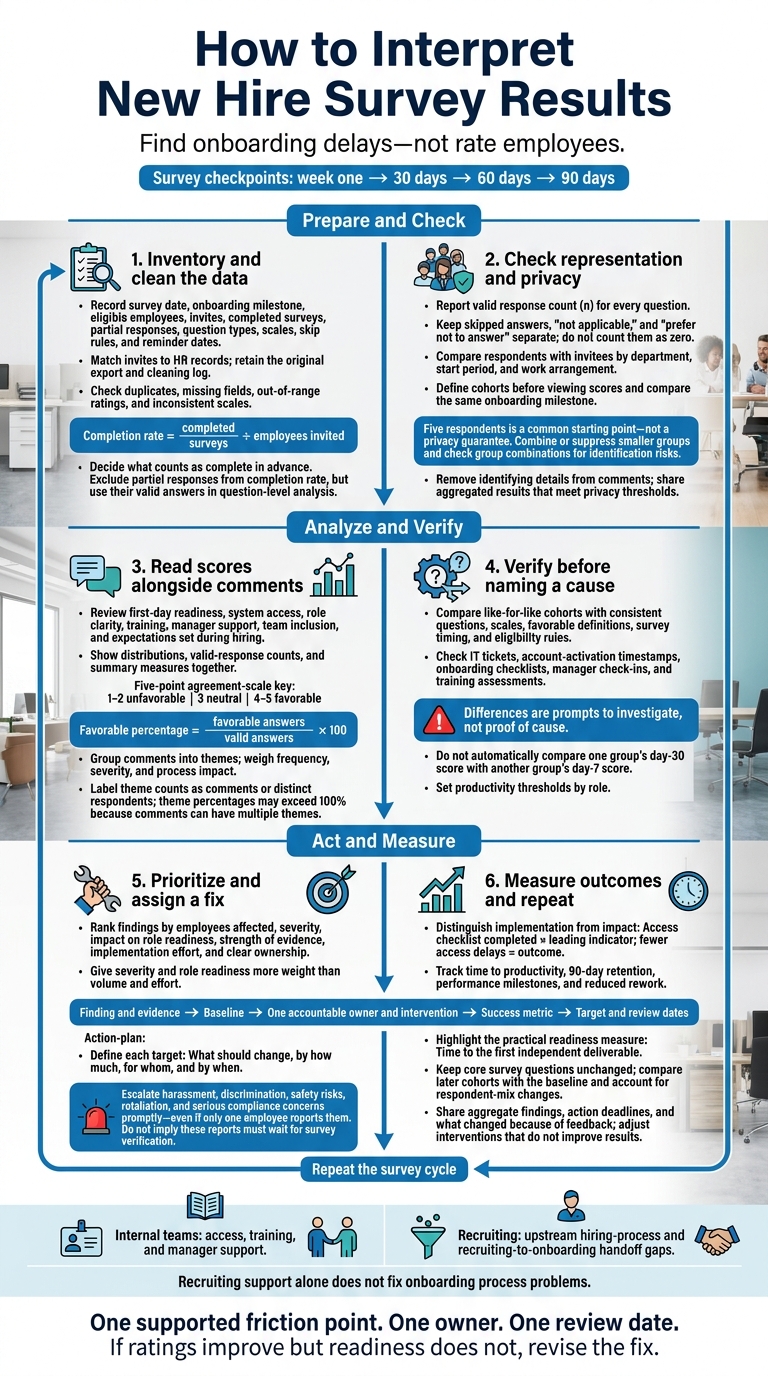
How to Interpret New Hire Survey Results
How to Analyze Employee Engagement Survey Data | Step-by-Step Tutorial in Excel
sbb-itb-a23bd6a
Step 1: Prepare and Check Survey Data
Start with a survey inventory so your analysis uses clean, traceable data. Record the survey date, onboarding milestone, eligible employees, invites, completed surveys, partial responses, question types, scales, skip rules, and reminder dates.
Match the invite list to your HR system and document exclusions. Keep the original export alongside a cleaning log. This gives your team a clear record of what changed and makes score patterns and comment themes easier to trust.
Check Response Rates and Answer Quality
Calculate completion rate by dividing completed surveys by employees invited. Decide what counts as complete before analysing the data. Exclude partial responses from this rate, but include their valid answers in question-level analysis.
Report the valid response count (n) for every question. Keep skipped answers, “not applicable,” and “prefer not to answer” separate. None should count as zero.[5][8]
Check for duplicates, missing fields, out-of-range ratings, and inconsistent scales. Make sure higher scores mean the same thing across questions. Don’t combine 1-5 and 1-10 ratings without adjusting them.
Compare respondents with invitees by department, start period, and work arrangement to identify underrepresented groups as part of hiring as you scale. Run nonresponse-bias checks when participation is low or differs sharply between units, so decisions don’t rely on an uneven picture of onboarding.[7]
Group Responses and Protect Privacy
Define cohorts, groups that share a start period or another attribute, before viewing scores. Compare responses from the same onboarding milestone. Group results by department, role family, or work arrangement to see onboarding trends without exposing identities.
Set a minimum group size before analysis. Five respondents is a common starting point. Combine or suppress smaller groups, and check every group combination for identification risks.[6]
Remove names and identifying details from comments. Paraphrase wording that could identify someone where needed. Share only aggregated results that meet your privacy thresholds, not individual response records.
State who can access raw data, which identifiers remain, and whether the survey is anonymous or confidential.[6]
Step 2: Analyze Scores and Comments
Once your data is clean, move from checking its accuracy to understanding what it says about your onboarding process.
Review Score Distributions and Survey Measures
Review first-day readiness, system access, role clarity, training, manager support, team inclusion, and expectations set during hiring. Show score distributions, valid-response counts, and summary measures together so averages don’t hide problems.
Define favorable responses before calculating results. On a five-point agreement scale, 4 and 5 are favorable, 3 is neutral, and 1 and 2 are unfavorable.
| Measure | Calculation | Purpose | Limits |
|---|---|---|---|
| Average (mean) | Sum of valid scores ÷ number of valid answers | Shows the overall level on a numeric scale | Extreme ratings can distort it, and it can hide polarized responses |
| Median | Middle score after ordering valid responses | Shows the typical response; useful for skewed or ordinal scales | Does not show how much responses vary |
| Favorable percentage | Favorable answers ÷ valid answers × 100 | Shows the share expressing a positive view | Can hide neutral and unfavorable responses |
| Change between cohorts | Later score − earlier score | Tracks movement after an onboarding change | May reflect differences in respondents, roles, workloads, or hiring conditions |
Report percentage-point changes alongside counts. Avoid universal benchmarks: question wording, role, and survey timing all affect results.
One low rating does not prove your process is broken. Check the related comment, the employee’s circumstances, and process records before deciding what needs attention. Overall recommendation scores can add context, but they cannot replace item-level evidence on access, training, clarity, or manager support.
Comments help explain what’s behind the scores.
Group Comment Themes and Investigate Causes
Read every comment before assigning themes such as system access, role clarity, training sequence, manager availability, team inclusion, and recruiting expectations. A comment can have several themes. Label counts clearly as comments or distinct respondents; theme percentages may exceed 100%.
Weigh frequency, severity, and process impact. A single report of a security or payroll failure may need faster action than several minor complaints about convenience.
Connect each theme to its related scores, then check a process issue or record before calling it a cause. Have a second reviewer check the coding, and remove identifying details before sharing excerpts.
After reviewing individual survey items, compare cohorts to see whether problems affect one group or several.
Compare Cohorts and Onboarding Outcomes
For valid comparisons, keep the questions, response scale, favorable definition, survey timing, and eligibility rules the same.
Separate comparisons between different cohorts, repeated responses, and onboarding milestones. You cannot automatically compare one group’s day-30 score with another group’s day-7 score. Differences are prompts to investigate, not proof of cause.
- Compare like-for-like groups: Account for department, role level, work location, manager, start date, and changes in workload or the business.
- Check supporting records: Review IT tickets, account-activation timestamps, onboarding checklists, manager check-ins, training assessments, and exit data.
- Read differences in context: Relationships show associations, not causation. Small samples, prior experience, workload shifts, and respondent differences may explain score changes.
Define outcomes consistently. Distinguish training attendance from passing an assessment, specify which tasks are due by day seven, measure days to a documented productivity threshold, and track retention at day 90. Set productivity thresholds by role, rather than using one target for everyone.[1][9]
Step 3: Prioritize Improvements and Measure Results
Once you can see the patterns, turn findings into a ranked action list. Assess each finding by employees affected, severity, impact on role readiness, strength of evidence, implementation effort, and clear ownership. Give severity and role readiness more weight than volume and effort.
Escalate harassment, discrimination, safety risks, retaliation, and serious compliance concerns promptly through the appropriate internal process, even if only one employee reports them.
Set Actions, Owners, and Success Measures
Give each confirmed problem a specific fix. Access delays need preboarding access checks and confirmation from system owners. Unclear responsibilities need role-specific plans. Training gaps need revised learning objectives and practice tasks. Weak manager support needs scheduled check-ins with completion tracking.
Assign one accountable owner to each action, even when several teams contribute. Use this template to keep the work and its results visible:
| Plan field | What to record |
|---|---|
| Finding and evidence | The confirmed problem, affected employee count, and supporting process records |
| Baseline | The current result, population, and measurement period |
| Owner and intervention | One accountable person and the exact process change |
| Success metric | The target improvement in access delays, rework, onboarding completion time, or another relevant outcome |
| Target and review dates | When the change will be implemented and results assessed |
Use leading indicators to track whether teams have made the change. Use outcomes to check whether it worked.
Completing an access checklist is a leading indicator; fewer access delays is an outcome.
Set baselines before implementation. Define every target by what should change, by how much, for whom, and by when. Pair leading indicators with outcomes such as time to productivity, 90-day retention, performance milestones, and reduced rework.
Fix Recruiting-to-Onboarding Handoff Gaps
If surveys show mismatched expectations, incomplete setup, or unclear ownership before day one, compare what you communicated during hiring with what new hires encountered.
Document the accepted job description, compensation and start-date details, work location, equipment requirements, accommodations or accessibility needs shared with appropriate consent, promised training, and candidate commitments. Give each handoff item an owner, deadline, system of record, and escalation contact.
During hiring spikes, check whether gaps grow with recruiting workload or persist at normal hiring volumes. If recruiting workload causes the gaps, assign both a recruiting owner and an onboarding owner before work begins. Recruiting support alone does not fix onboarding process problems.
Use the next survey cycle to check whether the fix changed the result.
Repeat Surveys and Share Progress
Share aggregate findings and action deadlines with responsible leaders. Then tell new hires what changed because of their feedback.
Keep core questions unchanged in the next survey cycle, adding targeted questions only when needed. Compare later cohorts with your baseline measures to assess changes in survey scores and readiness metrics. Account for shifts in the mix of respondents so those changes do not distort the comparison.
At each review date, report progress and adjust interventions that have not improved results.
Conclusion: Keep Improving Onboarding
Use each survey cycle to validate your data, read scores alongside comments, and compare like-for-like cohorts. Check likely causes before assigning actions, then measure whether those actions helped new hires do their work.
Once the pattern is clear, start with one supported friction point, one owner, and one review date. Measure role readiness through a practical outcome:
Time to the first independent deliverable.
If ratings improve but readiness does not, revise the fix.
Route upstream hiring-process issues to recruiting by refining your talent acquisition strategies. If your findings point to hiring-capacity limits or gaps in the recruiting-to-onboarding handoff, Book a Call with Rent a Recruiter. Keep training, access, and manager-support fixes with the internal owners responsible for them. Each fix belongs with the team that can change it.
FAQs
How can I improve low survey participation?
Keep surveys to 6 to 10 questions, taking no more than five minutes to complete. Make responses anonymous so participants can give honest feedback without fear of repercussions.
Use your ATS to automate survey requests at key milestones, with preset response deadlines. This cuts manual follow-up and keeps feedback collection on schedule.
Share the improvements you make based on feedback. When participants see that their input leads to real change, they’re more likely to complete future surveys.
What if survey scores and comments conflict?
Use scores to track trends and comments to understand what’s behind them. Scores show the scale of a problem; comments explain what needs fixing. Focus on patterns across responses, not isolated complaints.
When a score drops, assign an owner to review the comments and make a targeted fix. Then measure again to check whether the change addresses the root cause.
How soon should I expect onboarding fixes to work?
Expect to see an impact in your next hiring cycle [1]. Issues often appear in the first week and continue through the first 30 days. Use surveys at 7, 30, and 60 days to spot bottlenecks and address them [2][3].
If knowledge check scores fall below 70% by week three, act immediately [4]. Use quarterly reviews to assess how well onboarding works and whether your fixes have helped [1].