
If your hiring process breaks on mobile, you lose applicants, slow hiring, and spend more to fill the same roles.
I’d sum it up like this: mobile-first hiring is not just a UX fix. It helps you cut application drop-off, save recruiter time, and move from application to offer faster. For companies looking to scale your tech team with these efficiencies, specialized support is available. The article shows where hiring funnels fail on mobile, which app features fix those gaps, and what to put in place first so you get better hiring output from the same team.
What matters most:
- 89% of job seekers use mobile during their job search
- Mobile applicants complete 53% fewer applications than desktop users
- If an application takes over 15 minutes, 73% abandon it
- Mobile-optimised apply flows can cut time-to-fill by 15% to 30%
- 67% of mobile candidates drop off when forced to create an account
- 64% prefer SMS for hiring updates
For hiring leaders, the message is simple. Short forms, no-login apply flows, SMS updates, self-serve scheduling, and mobile onboarding help you protect conversion and reduce admin. If you want those tools to work day to day, process control matters too, which is where Rent a Recruiter or an embedded recruitment model can help.
Below, I’ll break down the commercial case in plain terms, where mobile hiring tends to fail, and what to fix first.
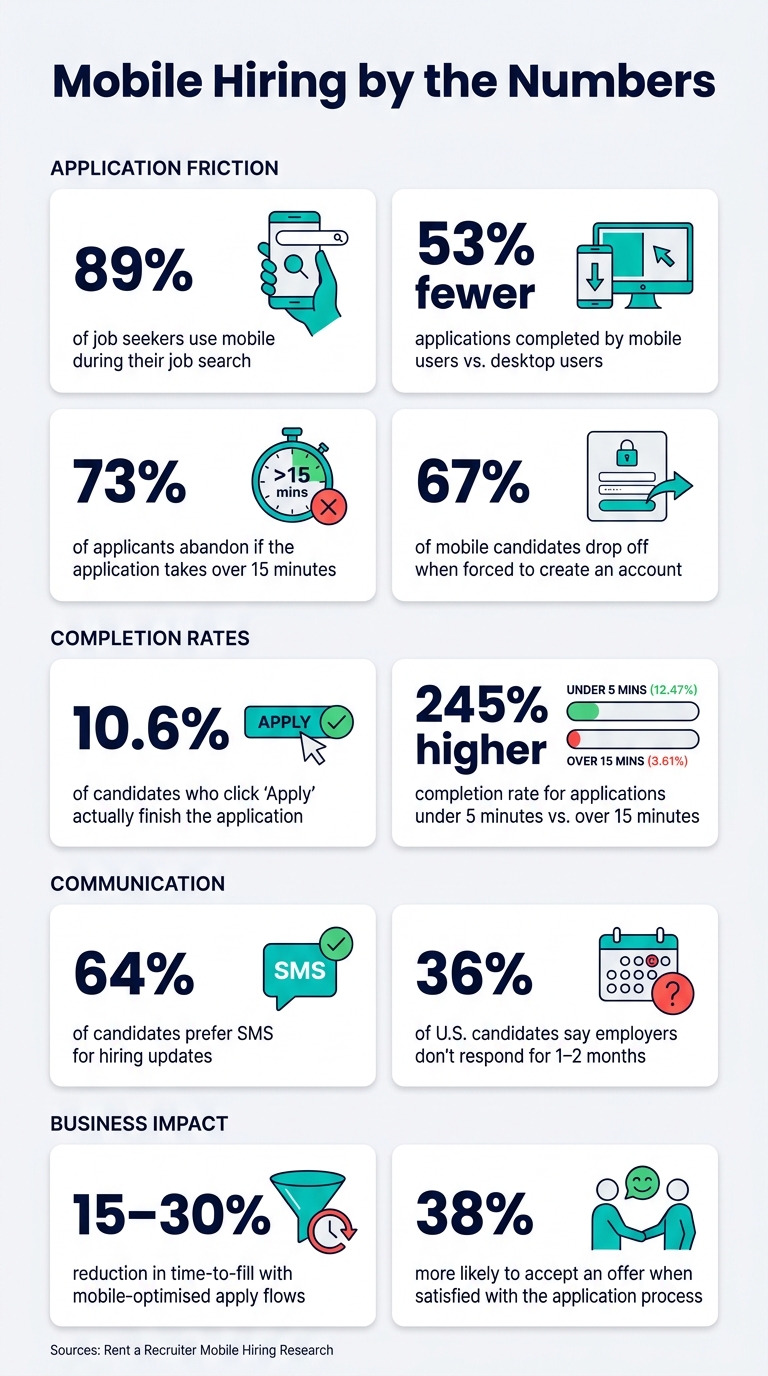
Mobile Hiring by the Numbers: Why Candidate Experience Matters
Recruitment Marketing: Creating a Mobile Optimized Candidate Experience
sbb-itb-a23bd6a
Where Candidate Experience Breaks Down in Tech Recruitment
Most hiring workflows still suit desk-based recruiters more than mobile candidates. That gap is often where candidate experience starts to fail.
Long applications, slow replies, and unclear next steps
The drop-off often begins at the application stage. Only 10.6% of candidates who click "Apply" actually finish the application [3]. That is a huge leak at the top of the funnel.
One of the biggest blockers is forced account creation. 67% of mobile candidates abandon a job application when they hit a login screen [2]. Resume uploads add even more friction, especially when candidates do not have files saved on their phones.
Then comes the silence. 36% of U.S. candidates say employers do not respond for one to two months [3]. In practice, that means many employers are letting silence do the talking. Candidates read that as rejection and move on.
For hiring teams, this is not just a candidate issue. It affects application completion, speed-to-hire, and offer conversion.
Fragmented communication and scheduling delays
Email still leads most recruitment workflows, but candidate habits have moved on. 64% of workers prefer recruitment updates by SMS [3].
That matters in tech hiring, where good candidates are often in process with more than one employer. Slow coordination can end the conversation before the interview even happens. A few back-and-forth emails, a calendar link that does not work well on mobile, or confusion across time zones can be enough.
This gets worse with passive tech candidates. If someone is already employed and applying here and there, any extra admin makes it easier to drop out than push ahead.
Weak employer storytelling during the hiring process
A lot of tech employers put time and money into brand building, then send candidates to a plain ATS page with almost no context. That is where momentum drops.
On mobile, dense blocks of text are easy to skip. If the page does not explain the mission, the team, and why the role matters, candidates will not hang around to figure it out.
75% of job seekers abandon applications due to poor mobile recruitment experiences [5]. That number points to a simple problem: if candidates cannot quickly see what is in it for them, they leave.
These friction points are exactly what mobile-first hiring apps are built to remove.
How Mobile Apps Fix Candidate Experience Problems
Mobile-optimized applications and real-time status updates
Mobile apps cut taps, trim forms, and show progress right away. A mobile-first setup treats the phone as the main device, so the process is built for one-handed use and short bursts of attention. In practice, that means autofill-ready fields, resume parsing, and one-tap access links so candidates can start screening without setting up an account.
When a mobile flow feels slow or confusing, drop-off happens fast. The fix is simple: fewer steps, automatic updates, and less scheduling friction.
Progress bars help because they remove doubt. Applications under 5 minutes convert at 12.47%, compared to 3.61% for those taking over 15 minutes, a 245% difference in completion rate [3].
Real-time push notifications also fix one of the biggest hiring gaps: silence. Instead of waiting on email, candidates see status changes the moment something happens, application received, under review, interview scheduled.
For hiring teams, that has a direct business effect. Higher completion rates mean more finished applications from the same traffic spend. Less confusion also means fewer follow-up queries landing with recruiters and hiring managers.
Centralized messaging, instant scheduling, and mobile-friendly assessments
Once a candidate applies, the next risk is coordination. This is where mobile apps help most. They bring updates into one place through SMS, in-app messages, and reminders, so people are less likely to miss the next step.
Self-serve interview booking removes the back-and-forth completely. Candidates choose a slot from their phone, the calendar syncs on its own, and reminders go out without manual chasing. That cuts drop-off tied to slow scheduling and saves recruiter time at the same time.
For engineering roles, self-paced screening works well on mobile too. Candidates can share code samples, GitHub links, or short video, audio, or text responses when it suits them. That keeps the process moving without extra handoffs, which matters when hiring teams are trying to move fast without adding admin. (See our hiring model FAQs for more on how we manage these workflows.)
Candidate experience before and after mobile-first hiring: a comparison
The move from a standard hiring process to a mobile-first one changes the numbers that hiring leaders care about most:
| Pain Point | Before | After | Impact |
|---|---|---|---|
| Application time | Long forms; mandatory login and file uploads | Shorter forms; autofill and one-tap access | Completion rates jump from 20-50% to 70-85% [2] |
| Communication | Email-only; messages buried or missed | Push notifications and SMS updates in real time | Candidates stay informed at every stage without chasing updates |
| Interview scheduling | Back-and-forth emails to find a slot | Instant self-serve booking via mobile calendar sync | Fewer withdrawals and faster progression to interview |
| Status visibility | Candidates wait in silence; ghosting is common | In-app tracking with automated stage updates | Candidates are 38% more likely to accept an offer when satisfied with the application process [7] |
For CEOs, CFOs, and talent leaders, the pattern is hard to miss. Shorter apply times lift completion. Faster scheduling cuts loss between stages. Better visibility improves offer acceptance. When those three things improve together, hiring teams get more output from the same recruiter capacity.
These gains matter most when teams prioritise the right mobile features first.
What to Implement First in a Mobile-First Hiring Process
Prioritize the mobile features that move hiring metrics fastest
Start with the steps that create the most drop-off: apply, schedule, and update.
The biggest mobile friction point is the login screen. 67% of mobile candidates abandon applications when they hit a mandatory account creation step [2]. If you replace that with no-login links, you remove a major blocker while still linking the application back to the invitation record in your ATS.
Keep the apply flow under 5 minutes [4]. That one change can cut friction fast and improve completion rates. Use SMS notifications to confirm receipt and share next steps. Add self-serve calendar booking so candidates can book time without the usual back-and-forth, which causes 42% of candidates to withdraw [4].
Mobile onboarding matters too. Let candidates sign and upload documents from their phone. On mobile job listings, show salary in U.S. dollars ($). Clear pay details help people decide faster and cut avoidable drop-off.
Use candidate journey data to cut drop-off and speed up hiring
Use the candidate stage to decide what to fix first.
| Feature | Relevant Candidate Stage |
|---|---|
| Mobile Career Page | Awareness / Attraction |
| No-Login Links | Application |
| Short Apply Flow | Application |
| Async Video/Audio/Text | Screening |
| SMS Notifications | Communication |
| Automated Scheduling | Interview |
| Mobile Onboarding | Post-Offer |
To see which fixes matter most in your funnel, track these six metrics: mobile application completion rate, time to complete, recruiter response times, interview no-show rate, offer turnaround time, and candidate satisfaction (NPS) [4][6].
Split the data by device, mobile versus desktop. That shows you where the gap sits. If mobile candidates complete applications at a much lower rate, fix that first. If the drop-off shows up later, such as scheduling or post-offer paperwork, focus there instead. The point is simple: use stage-level data to put time and budget where they will have the biggest effect on hiring speed and conversion.
Strengthen execution with embedded recruitment support
Tools on their own won’t fix a broken process.
Rent a Recruiter places experienced recruiters directly into your team to run mobile-first workflows day to day. That includes keeping response SLAs on track, sending screening links on time, booking interviews without delays, and keeping communication and scheduling steady across roles.
For CEOs, CFOs, and HR leaders, that matters because mobile hiring only works when the process is actually run well. The gain isn’t just a better candidate experience. It’s less drop-off, less admin, and faster movement from application to offer.
Risk Controls, Key Takeaways, and Next Steps
Protect candidate trust with accessibility, privacy, and human oversight
After fixing application and scheduling friction, the next priority is protecting trust.
Mobile tools can speed up hiring. But if you push automation too far, trust drops just as fast. When AI handles too much of the candidate interaction, 47% of candidates find chatbots alienating [4]. That’s the line to watch.
Use mobile tools for logistics. Keep people involved in the moments that carry the most weight, like interviews, feedback, and offer discussions.
No-login flows cut password friction and lower one area of risk. But video, audio, and transcript data still need protection. That means encryption in transit and at rest, with recruiter access locked down through SSO or MFA [2].
Accessibility matters just as much. If your process only works for people who can record a clean video in perfect conditions, you’ll lose strong applicants for the wrong reasons. Offer text, audio, and file-based responses alongside video to avoid shutting out candidates with disabilities or poor recording conditions [2][1].
Use these controls to check the highest-risk points in the mobile candidate journey.
| Risk | Candidate Impact | Mitigation |
|---|---|---|
| Login Friction | 20 to 25% drop-off at login [3] | Use no-login magic links and tokenised URLs |
| Data Breach | Loss of trust; legal liability | Encrypt data at rest and in transit; require SSO/MFA |
| Over-Automation | Candidate resentment; bias risk | Use AI for logistics only; require human review of top candidates |
| Exclusionary Design | Reduced diversity; accessibility failure | Offer multi-format responses and large tap targets |
| Communication Gap | 36% "ghosting" perception [3] | Use SMS for status updates; set 48-hour response SLAs |
Conclusion: mobile-first hiring improves speed, visibility, and conversion
The takeaway is simple: mobile tools work when the hiring process behind them works.
A shorter application flow cuts drop-off. SMS updates keep people informed. Self-serve scheduling removes the delays that cause withdrawals. Put together, those changes move candidates from application to offer with less friction and less admin.
For hiring leaders in SaaS, Technology, IT, Fintech, Engineering, Security, Insurance, and Professional Services, that speed has a direct business effect. You save recruiter time, protect conversion, and improve your odds of landing in-demand talent before another employer gets there.
When these controls are in place, mobile hiring stays fast without losing candidate confidence.
For teams that need execution support, Rent a Recruiter embeds experienced recruiters directly into the hiring team within days.
FAQs
Which mobile hiring fix should we implement first?
Start with a mobile-first application process. Most job seekers search and apply on their phones, so if your application is slow or clunky on mobile, you’re losing people before screening even starts.
A simple, fast, mobile-optimised flow cuts friction and improves candidate satisfaction. That has a direct business effect: more completed applications, less drop-off, and less time lost chasing stalled candidates.
Keep the process tight. Use:
- Large tap targets
- Autofill-friendly fields
- Text-to-apply options
The goal is simple: let candidates apply in under three minutes.
From there, tighten up screening and communication with asynchronous steps and candidate-preferred messaging. That gives you a smoother process without adding admin, and helps your team move people through the funnel with less delay.
How can we measure mobile candidate drop-off?
Track the application funnel by entry point, device, and exit step so you can see exactly where people drop out.
That matters because drop-off rarely happens at random. It usually shows up at specific friction points, like login screens or long application forms.
When you break the funnel down this way, you can spot where abandonment is highest and fix the parts of the process that are slowing hiring down or cutting into application volume.
How do mobile apps improve time-to-fill?
Mobile apps help cut time-to-fill by making it simpler and faster for candidates to apply. When your application process works well on a phone, more people finish it. That matters. Mobile-optimized forms, including text-to-apply and responsive applications, reduce drop-offs and help more candidates apply while they’re on the move.
They also speed up communication and scheduling. Features like calendar syncing and instant messaging help recruiters respond faster, cut manual delays, and move candidates through the hiring process with less friction.