
If your team is sending LinkedIn InMails without a clear structure, you are wasting recruiter time and losing reply rates.
I’d boil this article down to one simple point: short, specific InMails tied to a clear hiring situation get more replies and save time across the hiring team. The piece covers 10 recruiter InMail templates, each built for a different search type, from live roles and passive talent to referrals, follow-ups, and past candidate re-engagement. It also points to a few numbers worth noting, including higher response rates for shorter messages, 90% of replies arriving within one week, and 37% higher response rates from people using Open to Work signals.
For hiring leaders, the business point is clear:
- Less recruiter time wasted writing from scratch
- More consistency across outreach during hiring spikes
- Better response odds when messages match the search context
- Lower friction in the first touch, which helps keep pipelines moving
The 10 template types covered are:
- Specific open role
- Passive candidate
- Niche or hard-to-fill role
- Recent LinkedIn activity
- Mutual connection or referral
- Past candidate re-engagement
- Senior or highly specialised candidate
- Mission-led outreach
- Follow-up
- Referral request
Quick Comparison
| Template Type | Best Use | Main Angle | Business Use |
|---|---|---|---|
| Specific open role | Live vacancy with a clear trigger | Why them, why now | Helps teams move on active hiring needs |
| Passive candidate | Person is not actively looking | Low-pressure first touch | Opens pipelines earlier |
| Niche or hard-to-fill | Narrow skill search | Direct skill match | Helps reduce sourcing drag |
| Recent LinkedIn activity | Public post or comment | Context from their activity | Makes outreach less cold |
| Mutual connection | Shared contact exists | Trust from day one | Helps with warmer intros |
| Past candidate re-engagement | Known person from earlier process | New role, new context | Cuts sourcing time |
| Senior or highly specialised | Leadership or narrow expert hire | Precision and ownership | Better fit for high-value searches |
| Mission-led outreach | Person has shown interest in the problem space | Company mission and role outcome | Useful where mission drives interest |
| Follow-up | No reply to first message | New reason to respond | Keeps momentum without noise |
| Referral request | Wrong person, right network | Easy redirect ask | Helps teams find hidden talent pools |
If you are hiring across SaaS, IT, fintech, engineering, security, insurance, or professional services, the takeaway is simple: pick the InMail format that fits the search, keep it under 400 characters where you can, and standardise the structure across your team. That is how you protect response rates as hiring volume grows.
sbb-itb-a23bd6a
How to Use These LinkedIn InMail Templates
Each template is built to earn a reply fast. The structure stays simple: personal detail, role fit, simple ask. If you want better response rates, stick to that format and tailor it with care.
Before you send anything, check the subject line. Aim for 25 to 70 characters so it shows in full on mobile [1]. Clear beats clever. "Saw your work in fintech infrastructure" will usually do better than "Exciting opportunity for you!" Keep the message itself conversational. Write like you’d speak to someone you respect, not like you’re pasting text from a job ad. Skip heavy copy and pasted job-post language.
Start with a personal detail
Lead with something real from the candidate’s profile. That could be a project, a recent post, a company they helped scale, or a skill that lines up with the role.
This matters for one simple reason: it shows the message was written for them. Generic openers like "I came across your profile" or "Hope you’re doing well" tend to feel automated. Best to leave them out.
Explain why the role is a good fit
Link one or two parts of the candidate’s background to the role. Keep it specific. Show why the match makes sense based on what you can see.
That lands better than a hard sell. It’s also a better way to start a serious hiring conversation, because you’re showing judgment, not just sending volume.
Keep the ask simple
Close with one low-friction ask, such as "Open to a quick chat?" That makes it easy to reply without much effort.
Don’t ask for a resume in the first message. That’s high friction, and it can make the outreach feel process-heavy from the start.
Next, match the template to the candidate type and hiring situation.
How to Pick the Right InMail Template
You shouldn’t use the same message for every search. The right template depends on the hiring context, the seniority of the role, and how much you know about the person already.
In practice, most outreach falls into three buckets: direct, low-pressure, and highly targeted. Pick the one that fits the moment, not just the vacancy.
Use the open role template for direct outreach
Use this when you have a live role and a clear trigger. That could be a funding event, team growth, a recent role move, or an Open to Work signal. Candidates with that signal respond 37% more often than those without it [2].
This is the right option when timing matters and you can clearly explain why this person and why now. Adding a salary range in USD can also make the message feel more relevant and concrete [4].
Use lower-pressure templates for passive candidates
Around 70% of the global workforce sees itself as passive talent [3]. That doesn’t mean they’re off the market. It means a hard sell usually lands badly.
Use this approach when there’s no urgency and your goal is to open a conversation, not force a decision. For hiring teams, that matters. A softer message can help you start relationships earlier, which often cuts sourcing time later.
Use targeted templates for narrow searches
For niche roles, senior hires, or searches that need a very specific skill set, generic cold InMails tend to fall flat. Cold InMails to senior executives perform poorly without strong personalisation [3].
Be specific. Mention something clear and verifiable, like a talk they gave, a project they shipped, or a post they wrote. Mutual connection and referral-based templates work well here too, because they add trust and make the ask feel lighter.
Use the table below to match the template to the hiring scenario.
| Situation | Template to Use | Key Focus |
|---|---|---|
| Live role, clear trigger | Direct | Why them, why now, clear CTA |
| Passive talent, no urgency | Low-pressure | Low pressure, long-term fit |
| Niche or senior search | Targeted | Credibility, specific context |
| Shared contact | Mutual Connection | Trust via referral, soft ask |
| Past candidate re-engagement | Re-engagement | Past context + new signal |
| No reply yet | Follow-up | Persistence without pressure |
Narrow searches and highly specific messages usually outperform broad outreach.
1. Specific Open Role InMail Template
Use this template for live roles when your outreach ties to a clear, checkable trigger. That could be a funding round, a hiring spike, a role change, or an Open to Work signal.
Personalized opener
Start with one verified trigger. Keep it tight. A funding event, hiring push, role change, or Open to Work signal gives your message context straight away.
Clear role context
Name the role, the team, and the business problem in a single line.
Role impact
Focus on the impact of the role, not a list of duties. That tends to land better because it shows why the hire matters.
Low-friction call to action
Close with one small ask and a polite out. Make it easy for the person to reply without feeling boxed in.
Template:
Subject: Saw the [Company] hiring push, quick idea
Hi [First Name],
Noticed [Company] is expanding [specific team/function], your background leading [specific experience] caught my attention. We’re hiring a [Role Title] to [specific outcome or problem to solve], and your work on [verifiable detail] seems like a strong match.
Open to a 10-minute chat? If not, no worries.
[Your Name]
2. Passive Candidate InMail Template
Use this template when the candidate is not actively looking and your outreach needs to feel exploratory, not pushy.
Start with proof. Then tie that proof to one clear outcome in the role.
Personalized opener
Skip the generic intro. Point to something specific and easy to verify, a recent LinkedIn post, a project they led, or another public post, talk, or interview quote. Quote one line from their post to show you did the work. Lead with one clear reason this message makes sense for them.
Candidate value proposition
Position the role as a hypothesis: "This may be relevant." Passive candidates often respond better to the outcome a role could create for them than to a long list of duties.
Low-friction call to action
Ask for the smallest next step possible. Phrases like "Open to a 10-minute chat?" or "Is this relevant for you right now?" tend to work better than asking for a long intro call [1][4].
Use this structure when you want curiosity, not commitment.
Template:
Subject: Your post on [Topic], quick thought
Hi [First Name],
Your post on [specific topic] caught my attention, especially the part about [one specific line or idea]. I’m working with [Company Name], a [industry] company hiring a [Role Title] to [one concrete outcome], and your background in [specific area] seems like it could be a strong fit.
This may be relevant, open to a 10-minute chat?
[Your Name]
3. Niche or Hard-to-Fill Role InMail Template
For niche searches, you need to show relevance immediately. This template works best when you’re contacting a highly specialised candidate, where generic outreach usually gets ignored.
Personalized opener
Start with one specific, verifiable signal of expertise, like a project, post, talk, or contribution. That shows the message is relevant and not just another mass send.
Clear role context
State the job title and salary range in USD upfront. Then add the hiring trigger if there is one. Stick to one verifiable trigger only, and only use it if it matters to the search.
Candidate value proposition
Position the fit as a hypothesis, not a sales pitch. A line like "Your background in [specific area] suggests this could be a strong next step" lowers resistance and makes it easier for the candidate to reply. Lead with impact first, not perks.
Low-friction call to action
Keep the ask simple. One next step is enough. This structure works when the candidate needs proof, not persuasion.
Template:
Subject: Question about your work on [Specific Project or Topic]
Hi [First Name],
I came across your recent [post/project/GitHub contribution] on [specific topic], especially [one specific detail]. I’m hiring a [Exact Role Title] at [Company Name] to [one business outcome], with a range of [salary range in USD]. Your background in [specific area] suggests this could be a strong next step.
Open to a 10-minute chat?
[Your Name]
4. Recent LinkedIn Activity InMail Template
This template works when someone has recently posted, commented, or shared a public view on LinkedIn. That gives you a real reason to reach out, not a cold message pulled out of thin air.
Personalized opener
Start with the exact post, comment, or share that prompted the message.
Clear role context
Spell out the role title, company, and salary range right away.
Candidate value proposition
Tie their point of view to one business outcome this role is there to deliver.
Low-friction call to action
Make one ask only. Keep the whole message to four lines max.
Template:
Subject: Your post on [Topic] got me thinking
Hi [First Name],
Your recent LinkedIn post, comment, or share on [specific topic], especially the part about [direct quote or specific point], caught my attention. I’m hiring a [Role Title] at [Company Name] to [one business outcome], with a salary range of [range]. Your take on [topic] suggests this could be worth a conversation.
Open to a 10-minute chat?
[Your Name]
5. Mutual Connection or Referral InMail Template
When you have a real shared contact, lead with trust, not a hard sell. This works best when that person can help lower friction from the first line. Before you name anyone, make sure you have permission.
Personalized opener
Use the mutual connection’s name in the subject line or opening sentence. The point is not just to drop a name. It’s to use a shared relationship to make the message feel grounded.
Mention the contact, then add the specific project, community, or work setting that links you. That small detail does a lot of work. It shows this outreach is based on an actual connection, not a generic send.
Clear role context
Get to the role title and company fast. The referral already gives you context, so you do not need a long setup.
Keep the role description tight and direct.
Candidate value proposition
Give one concrete reason this person may fit the role. Skip broad claims. Focus on a specific result instead.
Use wording like this: "[Mutual Name]’s note about your work on [specific project] suggests this could be a strong fit for [specific outcome]."
That line works because it links their past work to a clear hiring need.
Low-friction call to action
Keep the ask to one line. The goal is simple: make the first reply feel easy by leaning on the shared connection.
Template:
Subject: [Mutual Name] suggested I reach out
Hi [First Name],
[Mutual Name] mentioned your work on [specific project or area] when we discussed our search for a [Role Title] at [Company Name]. That suggested you may be a fit for [specific outcome].
Open to a quick 10-minute chat?
[Your Name]
6. Past Candidate Re-Engagement InMail Template
Use this template when you’ve already spoken with the candidate before and the new role changes the picture.
Past candidates already know your company and have cleared your hiring bar. The job here is simple: make the message feel current, not recycled.
Personalized opener
Start with the past interaction. Mention the role they interviewed for, the stage they reached, or something from an earlier conversation. If they were a finalist, say that plainly. It helps build rapport. Then spell out what’s changed since you last spoke.
Clear role context
Give a clear reason for reaching out now. That could be new funding, team growth, or a broader remit. Don’t pitch the same role again unless something material has changed.
Candidate value proposition
Tie the new role to something you already know about them. Use one clear detail, a skill, a project, or a career move that makes the fit make sense.
Low-friction call to action
Ask for a 10-minute sanity check, not an interview. Keep the ask to one line.
Template:
Subject: New context since my last note
Hi [First Name],
We spoke back in [Month/Year] when you were a finalist for [Previous Role] at [Company Name]. You made a strong impression, and I’ve been keeping you in mind.
We now have a [New Role Title] opening that’s different in [specific way – scope, seniority, team focus], and your background in [specific skill or experience] makes me think it’s worth a quick chat.
Worth a 10-minute sanity check?
[Your Name]
7. Senior or Highly Specialized Candidate InMail Template
Use this when the candidate is senior, specialised, and unlikely to answer a generic note. These people get a flood of recruiter messages, and most of them sound the same. Generic outreach gets ignored, so every line needs a clear job. The template below keeps the message short, credible, and easy to reply to.
Personalized opener
Start with something you can verify, a post, a public move or decision they made, or a technical contribution you can point to. If it helps, position the message as a possible fit, not a hard sell.
Clear role context
State the role and the outcome in one sentence. Senior candidates want clarity, so if it makes sense, share the compensation range in USD early. Be clear on what this person will own, and why the hire matters now.
Candidate value proposition
Connect the role to one public signal from their work and one specific outcome they could own. Keep the focus on senior-level ownership and the decision this hire is meant to drive. Skip vague fit language.
Low-friction call to action
Ask for a "10-minute sanity check" or whether they’re "open to a quick idea." One line is enough.
Template:
Subject: Question about your work on [specific project or initiative]
Hi [First Name],
I came across your [specific post/talk/project] on [topic], especially your point about [specific detail]. It maps directly to what we’re building at [Company Name].
We’re looking for a [Role Title] to [one-line outcome]. Your background in [specific skill or domain] makes me think you’d be well placed to judge whether this is worth exploring.
Open to a 10-minute sanity check?
[Your Name]
8. Culture or Mission-Led InMail Template
Use this when the mission is the main draw and the person has already shown public interest in that problem.
Personalized opener
Start with one clear, verifiable signal. That could be a post, a talk, or a public comment tied to the mission. From there, connect it straight to the outcome this role will own.
Candidate value proposition
Link the mission to one business outcome this person could lead, based on their public point of view or posts that show a strong fit.
Low-friction call to action
Keep the ask small. "Open to a quick chat?" works well.
Template:
Subject: Your take on [Topic] , quick thought
Hi [First Name],
Your post on [specific topic] stuck with me, especially your point about [specific detail]. It’s exactly the problem we’re trying to solve at [Company Name].
We’re building [one-sentence mission] and looking for a [Role Title] to own [specific outcome]. If that resonates, this role may be worth a look.
Open to a quick chat?
[Your Name]
9. Follow-Up InMail Template
Use this when a candidate hasn’t replied to your first message and you want to follow up one more time. The key is simple: don’t send a nudge for the sake of it. Give them a new reason to reply.
A good follow-up adds context. That might be a company update, a project signal, or a team challenge that makes the role more timely.
Personalized opener
Briefly mention your first note, then move straight into what’s changed. That shift matters. It shows this isn’t just a generic bump.
You can point to a recent company announcement, a new project update, or a clear team need tied to the role.
Low-friction call to action
Keep this message shorter than the first one. One simple ask is enough.
"Worth a 10-minute sanity check?"
Template:
Subject: One more thought on [Role Title]
Hi [First Name],
Following up with one new detail since my last message. [Company Name] just shared [recent company announcement / new funding round / recent project update], which makes the [Role Title] opening feel even more relevant for someone with your background in [specific skill or area].
The role still owns [specific outcome]. I thought it was worth another look.
Worth a 10-minute sanity check?
[Your Name]
10. Referral Request InMail Template
Use this when the person you’re messaging probably isn’t the hire, but may know the person you need. The aim is not to sell the role. It’s to ask for a referral in a way that feels simple to answer.
Personalized opener
Start with one specific, verifiable detail about the person, like a recent post, quote, announcement, or shared contact.
Clear role context
Spell out the problem this role will solve so they can think of someone who’s done that kind of work before.
Low-friction call to action
Keep the ask light and easy to reply to. A line like "Wrong person to ask?" or "Not the right contact?" gives them a simple way to respond without effort.
Template:
Subject: Quick routing question, [Role Title]
Hi [First Name],
I saw your recent post on [specific topic] and thought you might be the right person to ask. We’re looking for someone to own [specific problem or outcome] at [Company Name], a [Role Title] role focused on [one-line description of the core challenge].
If you’re not the right contact, a quick redirect would be appreciated.
Wrong person to ask?
[Your Name]
Template Scenario Snapshot Table
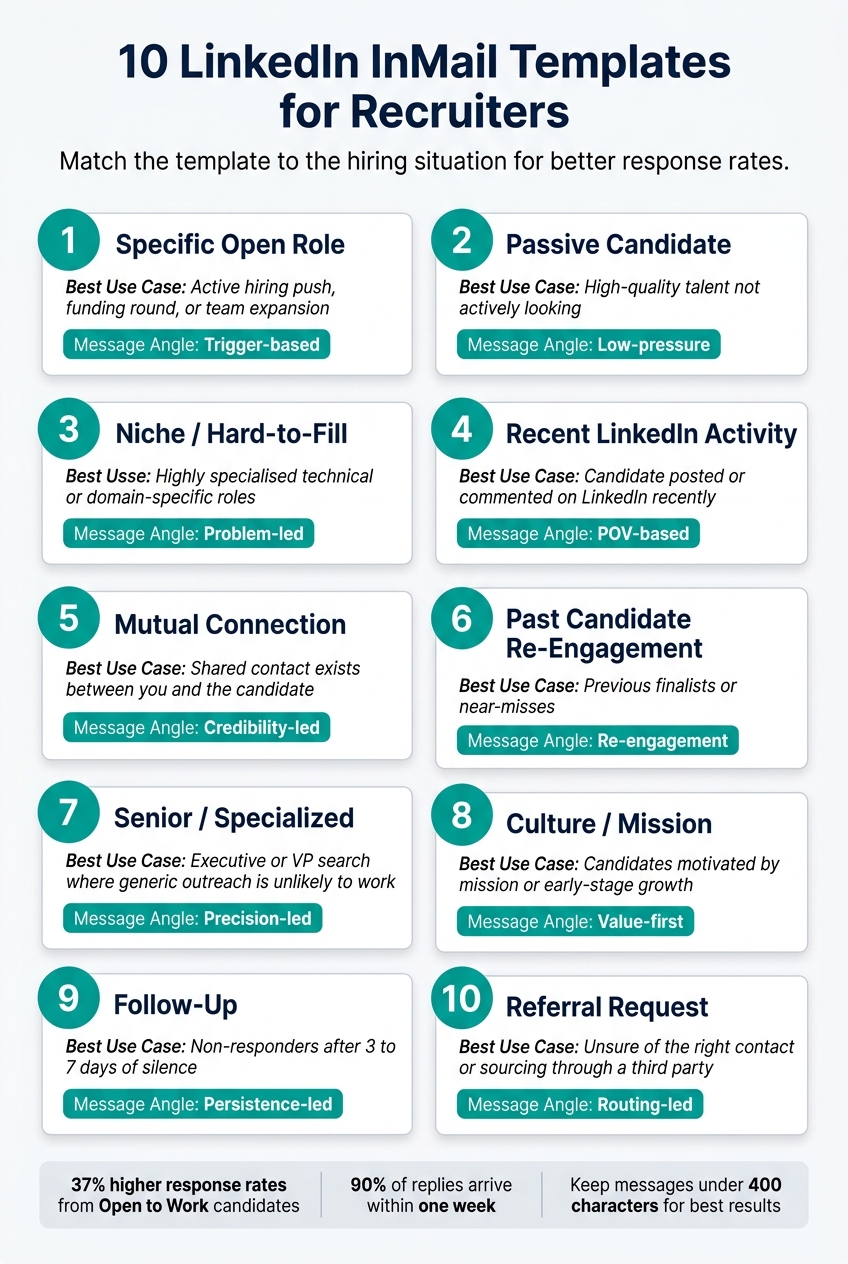
10 LinkedIn InMail Templates for Recruiters: Quick-Select Guide
Use this as a quick selector before you write. Pick the template that fits the hiring situation, your timing, and the angle you want to lead with.
| # | Template | Best Use Case | Message Angle |
|---|---|---|---|
| 1 | Specific Open Role | Active hiring push, funding round, or team expansion | Trigger-based: connect your outreach to a specific, timely business signal |
| 2 | Passive Candidate | High-quality talent not actively looking | Low-pressure: make a light first ask |
| 3 | Niche / Hard-to-Fill | Highly specialised technical or domain-specific roles | Problem-led: name the exact challenge their experience solves |
| 4 | Recent LinkedIn Activity | Candidate posted or commented on LinkedIn recently | POV-based: quote a specific line from their post to show you paid attention |
| 5 | Mutual Connection | Shared contact exists between you and the candidate | Credibility-led: use the shared name to build trust from the start |
| 6 | Past Candidate Re-Engagement | Previous finalists or near-misses | Re-engagement: refer to the earlier conversation and a new, relevant role signal |
| 7 | Senior / Specialized | Direct hire and executive search where generic outreach is unlikely to work | Precision-led: lead with outcomes and metrics, skip the flattery |
| 8 | Culture / Mission | Candidates motivated by mission or early-stage growth | Value-first: lead with the "why" before making any ask |
| 9 | Follow-Up | Non-responders after 3 to 7 days of silence | Persistence-led: add new context instead of sending a basic nudge |
| 10 | Referral Request | Unsure of the right contact or sourcing through a third party | Routing-led: ask "Wrong person to ask?" to make a quick redirect easy |
How to Scale Outreach Without Losing Personalization
Build a repeatable message structure
Once you’ve got the right template, the next step is scale, without losing relevance. The best way to do that is to standardize the structure, not the exact wording.
For InMail, that means every recruiter works from the same skeleton:
- Subject line
- Why-you, why-now opener
- Value fit
- One ask
- Follow-up
What changes is the content inside each part. What stays the same is the framework.
That gives you more consistency across the team, saves time, and makes outreach easier to manage when hiring volume picks up.
Personalize the parts that matter most
The aim is simple: be consistent where it helps, and personal where it counts.
You don’t need to personalise every line. Focus on the parts the candidate will actually notice. The opener should point to something real and easy to verify. The value framing should connect to what matters in their career. The ask should fit their seniority and likely level of interest.
Tone matters too. A senior leader will expect a different approach than an individual contributor. Get that wrong, and even a well-written message can feel off.
Bring in extra recruiting support during hiring spikes
When hiring volume climbs faster than your internal team can handle, outreach is often the first thing to slip. Speed drops. Follow-up gets patchy. Message quality starts to drift.
That’s where Rent a Recruiter can help. They place experienced recruiters directly inside your team within days, managing hiring end-to-end with more structure and consistency.
You add capacity without adding headcount, which helps you keep outreach moving during hiring spikes while protecting response rates and team time.
Conclusion
These 10 templates cover the recruiting situations you’ll run into most often, but they’re not plug-and-play. They work best as a starting point. The reply you get depends on how well you tailor the message to the person and the moment.
Personalised outreach gets more replies than generic bulk sends because people can tell when a message was written with them in mind. Use the template as your base, then tailor the trigger, the fit, and the ask.
Short, specific messages that show you’ve read the profile tend to beat long, generic pitches. That’s what turns a template into outreach that gets answered.
Lead with a real trigger, explain why the role makes sense, and be clear about timing. Do that often, and your outreach stays fast, relevant, and easier to scale.
FAQs
How much should I personalize each InMail?
Make each InMail feel like it was written for one person, not a list.
Use one specific, verifiable detail from the candidate’s background, like a recent LinkedIn post, a GitHub project, or a company initiative they’ve been part of. That kind of detail shows you’ve done the work. Generic praise does the opposite.
Keep the message under 400 characters. In most cases, short and specific beats long and padded.
When should I send a follow-up InMail?
Most replies land soon after your first message, so timing matters. Follow up every 2 to 5 business days to stay on the radar without becoming a nuisance.
A common cadence is 3 to 6 touches. One simple example is the 3-7-7 pattern: follow up on days 3, 10, and 17.
Each follow-up should add new, relevant context. Don’t just bump the thread. Share something useful, like a short insight, a business case, or a point tied to the role, team, or hiring need.
Which template works best for senior hires?
For senior hires, direct, value-led messaging tends to work best. Senior candidates and executives usually have little patience for fluff or generic outreach, so your message needs to be precise and tied to business impact.
Be clear about the role’s influence, especially where it involves building teams, leading functions, or shaping growth. Show them why the role matters, not just what it includes.
It also helps to open with a signal-based hook. In plain terms, tell them why they were picked. That might be their track record in scaling a team, leading a function through growth, or handling a key shift in the business. This makes the outreach feel targeted, not mass sent.
Close with a short, low-commitment call to action. Something simple works best, like asking whether they’d be open to seeing the role notes.
“Would you be open to a quick look at the role notes?”
That kind of ask feels easy to answer. And for senior hiring, lower friction usually means better response rates.


