Stop wasting time and money on chaotic hiring processes. A recruitment knowledge base centralizes everything your team needs – job templates, interview guides, compliance materials – into one organized, searchable hub. This simple system can cut onboarding time by up to 85%, reduce time-to-hire by 50%, and save hours of admin work every week.
Here’s what you’ll learn:
- How to audit and organize your existing recruitment resources.
- Key tools and templates to make hiring faster and consistent.
- Steps to launch and maintain a knowledge base that scales with your team.
Bottom line? A recruitment knowledge base isn’t just a tool, it’s how scaling companies ensure hiring stays efficient and consistent as they grow.
How to Create an Internal Knowledge Base Your Team Will Actually USE 🔍📚 | ClickUp
sbb-itb-a23bd6a
How to Plan Your Recruitment Knowledge Base
Creating a recruitment knowledge base is essential for streamlining processes and ensuring your team has access to the right information when they need it. Here’s how to plan effectively.
Audit Your Existing Recruitment Resources
Before diving into building your knowledge base, take stock of what you already have. Recruitment knowledge often exists, but it’s scattered across Slack threads, old emails, forgotten Drive folders, or even just in someone’s head.
Start by making a content inventory spreadsheet. For each resource, note the document title, its location, the owner, the last update date, and what action you plan to take (keep, archive, replace, or merge). This gives you a clear view of what’s useful and what’s clutter.
Don’t overlook two critical steps:
- Interview senior recruiters to capture undocumented "tribal knowledge" that isn’t written down.
- Review recent Slack messages to identify recurring questions. If certain queries keep popping up, that’s a gap your knowledge base should address.
Also, review any resources older than six months and rename vague file titles (e.g., “Notes”) for clarity using a format like [Category] Topic (Scope) | Owner | Date.
"When the same answer exists in three places, it is wrong in two." – Helpable
Focus on the 20 key documents that address 80% of common questions. Once the inventory is complete, you’ll be ready to define your knowledge base goals.
Set Clear Objectives and Requirements
With your content mapped out, it’s time to decide what you want your knowledge base to achieve. Common objectives include:
- Reducing ramp-up time for new recruiters
- Preserving institutional knowledge
- Standardizing hiring processes
- Providing recruiters with self-service tools
On the functional side, consider these must-haves:
- AI-powered or natural language search so users can ask questions without needing to know exact keywords.
- Granular access controls to protect sensitive information like salary bands or candidate notes.
- Simple contribution processes so team members can update content without IT help.
- Integrations with tools like Slack, Google Workspace, or Microsoft Teams to fit seamlessly into your workflow.
Assign ownership for each content category from the start and schedule regular reviews (e.g., quarterly) to keep the information accurate and relevant.
Choose the Right Knowledge Base Tools
Once you’ve outlined your objectives, select a tool that fits your needs. Here’s how two popular options compare:
| Feature | General Platforms (Notion, Confluence) | AI Knowledge Assistants (CustomGPT.ai) |
|---|---|---|
| Search | Keyword-based or manual navigation | Natural language, conversational queries |
| Setup | Requires manual structure and migration | Ingests existing documents (PDFs, URLs) directly |
| Maintenance | High – manual updates required | Lower – AI-assisted indexing |
| Best For | Broad collaboration and structured documentation | Rapid onboarding and self-service retrieval |
General platforms like Notion ($10–$15/user/month) or Confluence ($6–$12/user/month, free for up to 10 users) are budget-friendly and familiar to many teams. They work well for structured documentation but require careful governance to avoid disorganization.
AI-powered tools like CustomGPT.ai offer a different approach. Instead of manually navigating folders, recruiters can ask questions in plain language and get synthesized answers from internal documents. This can significantly speed up onboarding, as shown in recent case studies [1].
For smaller teams or those just getting started, general platforms are a practical choice. If onboarding speed is a major challenge or your team is scaling quickly, layering an AI assistant on top of your existing setup can save time and improve efficiency.
How to Structure and Populate Your Knowledge Base
Build a Clear Information Architecture
Once you’ve set your goals and chosen the right tools, the next step is creating a logical structure for your knowledge base. Avoid organizing it by departments; instead, focus on tasks and user intent. Categories like Sourcing, Interviewing, Onboarding, and Compliance align better with how recruiters naturally search for information.
A hybrid structure works best. Combine top-level categories with user-specific filters (e.g., a "Hiring Manager View" versus a "Recruiter View") and create topic hubs like a "Sourcing Hub" for easy navigation. Features such as breadcrumbs, a search bar, and cross-links on every page are essential. For instance, link a Job Description template directly to its related Interview Scorecard. This approach transforms your knowledge base into a connected ecosystem rather than a collection of standalone files.
Consistency is key. Use a clear naming format like [Type] Topic (Scope) | Owner | YYYY-MM-DD to make content easier to locate and trust.
"A company knowledge base turns into a document dump within 6 months if you don’t design three things upfront: a logical structure, granular access rights, and fast search." – TrackStack [7]
Core Content Categories for Recruitment
With the structure in place, it’s time to fill your knowledge base with meaningful content. Here are the essential categories every recruitment knowledge base should include:
| Core Category | What to Include |
|---|---|
| Sourcing & Attraction | Job description templates, Boolean search strings, job board lists, employer branding assets |
| Screening & Interviewing | Interview guides, question banks, scorecard templates, assessment rubrics, diversity hiring guidelines |
| Hiring Process & Compliance | Offer letter templates, background check consent forms, EEO policies, referral program rules |
| Onboarding & Training | New hire checklists, Day 1 guides, internal tool tutorials, welcome kits |
| Market Intelligence | Salary bands, compensation benchmarks, industry hiring trend reports , or stay updated with our recruitment blog |
| Communication Templates | Outreach emails, InMail scripts, follow-up messages, rejection letters |
When it comes to tools like scorecards and rubrics, they serve different purposes but work best together. Scorecards define the competencies you’re hiring for, while rubrics provide clear scoring guidelines. Using both, with specific behavioural anchors, can improve quality of hire by 26% compared to unstructured processes [9].
Standard Templates for Recruitment Content
Consistent templates are the backbone of an effective knowledge base. They make it easier for team members to document processes accurately and prevent the system from becoming chaotic.
"If documenting is hard, the problem is templates, not people." – TrackStack [7]
Here’s how you can structure your templates for different types of content:
- How-to Guides: Start with Goal → Prerequisites → Steps → Expected Result → Next Steps.
- Policy Documents: Include Summary → Applicability → Details → Exceptions → Effective Date → Owner.
- Troubleshooting Articles: Organize as Symptoms → Root Cause → Solution → Prevention → Escalation Path.
Set review schedules for different types of content. For example, critical compliance policies may need quarterly reviews, while evergreen FAQs could be updated every six months. Without regular updates, even the best-designed knowledge base can become outdated. On average, U.S. knowledge workers lose 5.3 hours each week waiting for information or recreating existing content [2]. Standardized templates not only simplify the initial creation process but also make ongoing maintenance much easier.
How to Launch and Maintain Your Knowledge Base
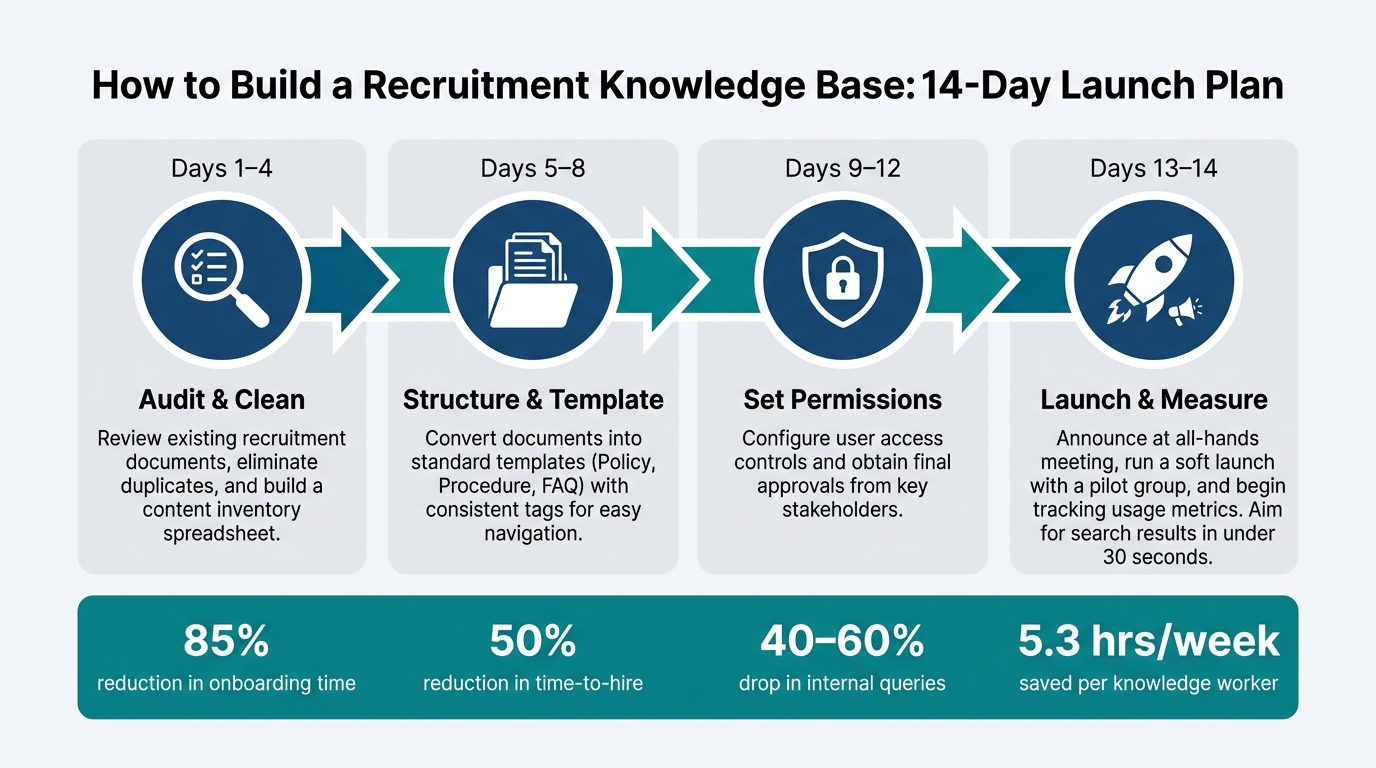
How to Build a Recruitment Knowledge Base: 14-Day Launch Plan
Steps to Launch Your Knowledge Base
Launching a knowledge base doesn’t have to be overwhelming. A phased rollout, like a 14-day plan, helps you stay organized and ensures you don’t release an incomplete system [4]:
- Days 1–4: Review and clean up your existing recruitment documents, eliminating duplicates.
- Days 5–8: Convert documents into standard templates (e.g., Policy, Procedure, FAQ) with consistent tags for easy navigation.
- Days 9–12: Set user permissions and get final approvals from key stakeholders.
- Days 13–14: Announce the launch during an all-hands meeting and start tracking early usage metrics.
Before going live, do a soft launch with a pilot group. This could be a small embedded recruitment team or pod. Ask them to test how quickly they can find information (aim for under 30 seconds) and provide feedback on navigation and search functionality. Their insights can help you fix any structural issues before rolling it out company-wide. To make adoption seamless, integrate the knowledge base into tools your team already uses, like Slack or Microsoft Teams. You can also leverage AI-powered recruitment tools to automate content tagging and search indexing.
Once launched, monitoring usage and gathering feedback is key to keeping the system effective.
How to Measure Usage and Effectiveness
| Metric | What It Measures | Action to Take |
|---|---|---|
| Search Success Rate | Percentage of searches that lead to a clicked article | Adjust article titles to better align with how users search [5][8] |
| Deflection Rate | Drop in repetitive questions to HR or recruitment teams | Update articles addressing the most common queries [5] |
| Zero-Result Queries | Searches that yield no results | Prioritize creating content based on these gaps [8][11] |
| Content Freshness | Percentage of articles updated within their review cycle | Schedule regular reviews and archive outdated content [5][10] |
| Time-to-Productivity | Speed at which new recruiters become fully productive | Compare this metric to pre-knowledge base benchmarks [4][6] |
A well-maintained knowledge base can reduce internal queries by 40% to 60% [10], saving your team hours of answering repetitive questions. Treat every "unhelpful" article rating like a bug in software – it signals something needs fixing, not ignoring [10].
Metrics like these provide a roadmap for continuous improvement.
How to Set Up Maintenance and Feedback Loops
"A weak knowledge base doesn’t fail because teams wrote too little. It fails because they never built a way to keep knowledge moving." – Gautam Sharma, Founder, Dokly [5]
The biggest challenge isn’t creating content – it’s keeping it relevant. Assign a dedicated owner for each content category. This person is responsible for maintaining accuracy, even if they didn’t write the original material. Implement a tiered review process and update content immediately when hiring policies, tools, or processes change, or when zero-result searches start to rise [3][4].
Add a simple "Was this helpful?" rating to every article. It takes seconds for recruiters to click, but it provides valuable insights into which pages are underperforming. Combine this with a designated Slack channel where team members can flag errors or suggest new content. This informal system keeps the feedback loop active without creating unnecessary bureaucracy.
How Rent a Recruiter Helps You Build and Scale Your Knowledge Base
How Rent a Recruiter Supports Knowledge Base Creation
Creating a recruitment knowledge base can feel like piecing together a puzzle when vital information is scattered across emails, chats, or informal conversations. Here’s a startling fact: 42% of institutional knowledge resides solely in employees’ heads, undocumented and inaccessible [12]. This knowledge gap poses a serious risk, but Rent a Recruiter steps in to bridge it.
With Rent a Recruiter, embedded recruiters bring the expertise to organize your knowledge effectively. They help you identify what needs documenting first, establish a clear structure, and create essential content to support your hiring from day one. Drawing from their experience with high-growth companies in technology, SaaS, fintech, and engineering, they implement proven strategies to set your team up for success.
"The difference between organizations that scale smoothly and those that hit walls? … It’s whether they’ve figured out how to capture and share what their people actually know." – Sid Varma, Founder, AllyMatter [12]
This approach lays the groundwork for a robust, scalable knowledge base that grows with your business.
How to Grow Your Knowledge Base as Your Business Scales
Once the foundation of your knowledge base is built, it needs to evolve as your company grows. Rent a Recruiter ensures your documentation keeps pace with your scaling needs by adding advanced resources like talent mapping reports and employer branding guides as your hiring demands increase.
This continuous support keeps your repository relevant and ensures that your hiring processes remain efficient, accessible, and aligned with your business goals.
Cost Savings and Efficiency Gains with Rent a Recruiter
The numbers speak for themselves. Poor knowledge sharing costs businesses up to $47 million annually [2], largely due to wasted time spent searching for information or duplicating efforts. By centralizing and streamlining access to critical hiring data, Rent a Recruiter not only speeds up onboarding but also delivers measurable cost savings across your recruitment efforts.
Conclusion: Steps to Build a Recruitment Knowledge Base That Scales
Key Takeaways
Creating a recruitment knowledge base is about keeping your hiring process organized and ready to grow with your team. The steps are simple but impactful: review what you already have, organize content based on the questions your team actually asks, assign ownership for each piece of content, and schedule regular updates to ensure everything stays relevant.
Did you know employees spend nearly 20% of their workweek – that’s a full day – searching for internal information or chasing down colleagues? A well-structured knowledge base eliminates that wasted time, allowing recruiters to focus on what matters most: hiring top talent.
"Good HR documentation doesn’t slow people down; it speeds them up. It replaces ‘ask HR’ with search → follow → done." – Vikas Tiwari, B2B Marketing Professional, AllyMatter [4]
The companies that scale hiring efficiently are the ones that treat documentation as a priority, not an afterthought. Start with the questions your team asks most often, and build from there as your team grows [3][2].
By following these steps, you’ll create a system that not only organizes critical information but also makes your recruitment process smoother and more efficient.
Next Steps: Work with Rent a Recruiter
If building and maintaining a recruitment knowledge base feels overwhelming, Rent a Recruiter can make it easier. Their embedded recruiters integrate into your team – often within days – and bring the tools, templates, and expertise needed to establish consistent hiring processes and documentation.
Clients often see up to 70% savings on hiring costs compared to traditional commission-based recruitment models and reclaim over 80 hours per month by reducing internal admin work. Whether you need short-term help to meet hiring goals or a long-term partner to create a scalable recruitment function, Rent a Recruiter has the expertise to make it happen. Schedule a consultation to learn how they can help you bring structure and clarity to your hiring process – a crucial step for scaling recruitment operations effectively.
FAQs
What should I document first?
Start by taking a close look at your current communications – think Slack threads, emails, or internal messages. Identify the questions your team deals with most frequently. These high-volume queries are where you should focus your efforts first, as they likely consume the bulk of your team’s time.
To make the biggest impact quickly, prioritize creating or refining the top 20 documents that address about 80% of these inquiries. This approach gives you a solid base to work from, saving time and reducing repetitive back-and-forth.
Need extra help getting organized? Rent a Recruiter can assist in structuring and streamlining your hiring processes for smoother operations.
How do I keep it from getting outdated?
To keep your recruitment knowledge base current, make sure each knowledge area has a dedicated owner. These individuals should routinely review the content to ensure it stays accurate and relevant. Set a consistent review schedule – monthly for critical documents or quarterly for frequently accessed materials. Include a "last-reviewed" date on each article, so users know how fresh the information is. Whenever tools or processes are updated, reflect those changes in the content immediately. Use analytics to spot gaps or outdated sections and address them promptly to maintain the knowledge base’s reliability.
How do I secure sensitive hiring info?
To protect sensitive hiring data, it’s essential to comply with regulations like GDPR and HIPAA. For handling candidate information, including Social Security numbers, ensure you follow all relevant legal requirements. When running background checks, remember to adhere to the Fair Credit Reporting Act by providing a clear written disclosure and obtaining explicit consent from the candidate. Rent a Recruiter supports businesses by simplifying recruitment processes, maintaining compliance, and cutting costs.