
If one hiring stage slows down, the whole business pays for it. For many scaling companies, an open role can cost $4,000 to $9,000 per month, while average cost per hire sits around $5,475 and average time to fill is about 44 days.
I’d break hiring bottleneck analysis down to one job: find where candidates stall, work out why, and fix the delay before it hits delivery, revenue, and team capacity. In practice, that means mapping each hiring stage, tracking stage-level data, checking where dwell time and drop-off spike, then fixing the root cause, whether that is slow approvals, weak screening, poor scheduling, or lack of recruiter capacity.
Here’s the short version:
- Map the process from req approval to offer and start date
- Track time-in-stage, conversion, time to fill, and cost per hire
- Compare results by role, team, and hiring manager
- Match the delay to the cause, not just the symptom
- Fix the process, then review it every quarter
If your hiring feels slow, the issue usually is not the whole funnel. It is one stage, one handoff, or one approval point. That is what this guide helps you find and fix.
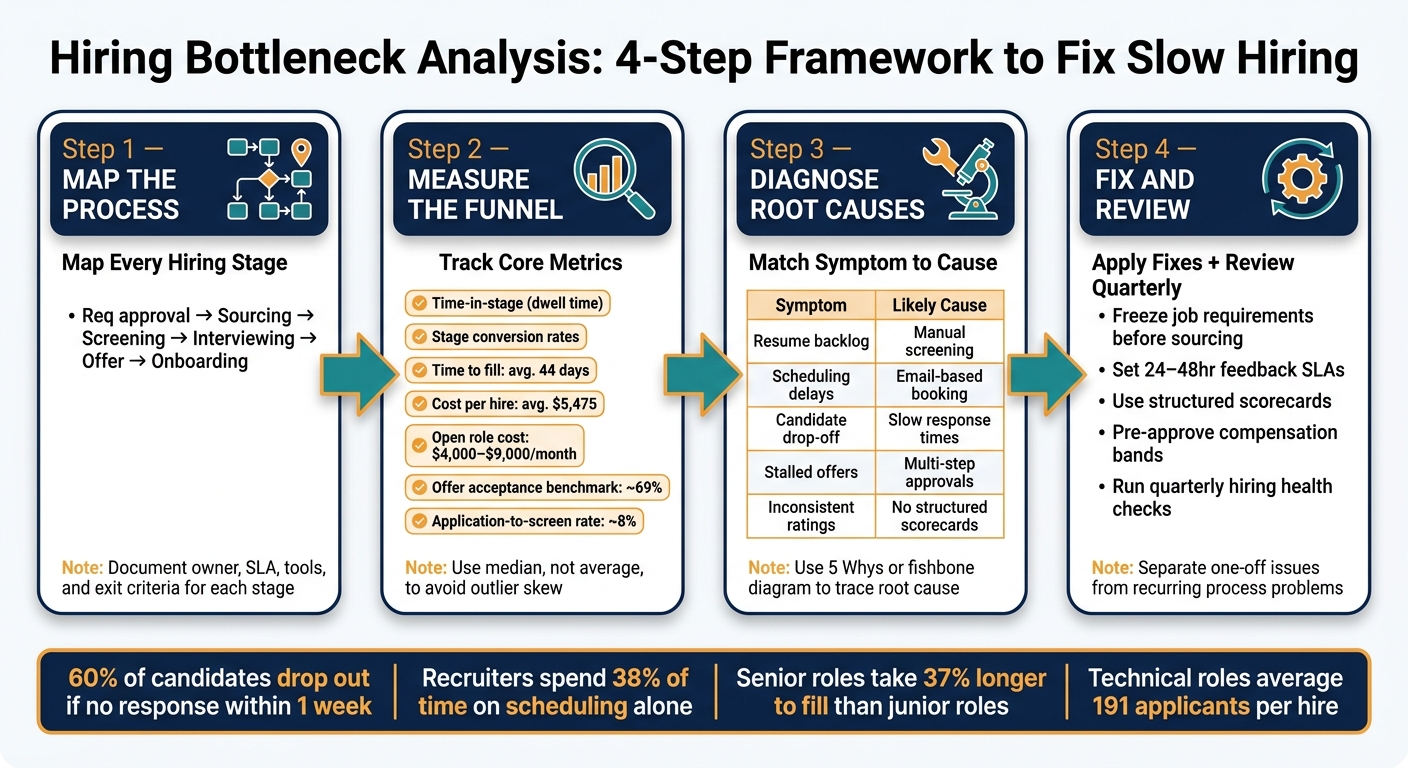
Hiring Bottleneck Analysis: 4-Step Framework to Fix Slow Hiring
Map the Hiring Process Before You Diagnose It
You can’t fix what you can’t see. Before you start pulling reports, map the hiring workflow as it runs today. That’s where hidden delays tend to show up, especially in handoffs, approval gaps, and waiting time between stages.
Trace the full path from requisition approval to accepted offer and start date. Once that path is clear, you can measure where hiring slows down and what that delay is costing you in time, team capacity, and missed hires.
Document Each Stage, Owner, and Decision Point
Start with a small working group. Include a recruiter, a hiring manager, and a recent hire. That gives you both the process view and the day-to-day reality of how hiring feels on the ground.
Map the current workflow, not the version sitting in a policy doc. If the process says feedback lands in 24 hours, but managers take four days, write down four days.
Use this checklist to document each stage the same way across the business:
| Documentation Category | Details to Capture |
|---|---|
| Stage Name | Standardized label, such as requisition approval, sourcing, screening, interview rounds, offer negotiation, onboarding |
| Owner | The specific role responsible for moving the candidate forward |
| SLA/Turnaround | Expected completion time, such as interview feedback within 24 to 48 hours [4][3] |
| Tools Used | ATS, AI screening, Calendly, scorecards, job descriptions |
| Exit Criteria | Conditions required to advance the candidate to the next stage |
| Typical Delays | Known failure points such as manager travelling or calendar ping-pong |
Standardise your stage names across every role and department. If sourcing, screening, interviewing, offer, and onboarding mean different things in different teams, your reporting gets messy fast.
Clean stage definitions give you cleaner data, sharper comparisons, and fewer arguments about what the numbers mean.
Capture the Data You Need for Analysis
The process map shows where work is meant to move. The data shows where it actually stops.
Track entry and exit timestamps, decision reasons, source, and ownership at each stage. Then segment that data by department, location, and hiring manager. That’s how you spot whether a delay is isolated or baked into the wider process.
Without clean stage-level data, it’s hard to tell what kind of problem you’re dealing with:
- Speed: candidates are sitting too long between steps
- Conversion: too many people are dropping out or being rejected at one stage
- Capacity: the team simply doesn’t have enough recruiter or manager time
Each problem needs a different fix. Guessing burns time and drags out hiring even more.
Use the timestamps to find where candidates wait, stall, or drop off. That’s usually where the cost sits too, whether it’s recruiter hours, manager bottlenecks, or offers lost to faster-moving companies.
sbb-itb-a23bd6a
Measure Funnel Performance to Find the Real Bottleneck
Once your process is mapped across requisition approval, sourcing, screening, interviewing, offer, and onboarding, the next step is measurement. This is where guesswork ends.
Data turns a vague complaint like "hiring is slow" into something you can act on. You stop debating opinions and start seeing where time is being lost, where candidates drop out, and what that delay is costing you.
Track the Core Metrics That Show Delay and Drop-Off
Start with time-in-stage, also called dwell time. This is often the clearest metric because it shows how long candidates sit at each step in the process you mapped.
Use the median number of days in each stage, not just the average. A few outliers can skew the average and hide what most candidates are going through. If dwell time jumps at the review stage, that is usually where momentum starts to break. Candidates go cold fast, and around 60% drop out entirely if they hear nothing within one week [5].
Then look at stage conversion rates. These show where your funnel is leaking. One common weak point is application-to-screen, where only about 8% of applicants make it through the first review [5]. If screen-to-interview looks healthy but offer acceptance is low, the problem is usually later in the process, often around alignment, approval speed, or compensation. The benchmark for offer acceptance is around 69% [1][5].
You also need cost per hire and time to fill. These connect hiring friction back to business impact. The average U.S. time to fill is about 44 days, and technical roles can stretch to around 10 weeks [5]. The average cost per hire for non-executive roles is about $5,475 [2]. On top of that, every month a role stays open can cost between $4,000 and $9,000 in lost productivity [2].
Once you know where the slowdown sits, you can test what is behind it: capacity, workflow, or decision-making.
Compare Metrics by Role, Team, and Hiring Manager
Top-line averages can hide the problem.
Once you know which stage is dragging, compare results by role and hiring manager. That helps you see whether the slowdown is isolated or spread across the business. Segment the data by function, seniority, and hiring manager.
Technical roles average around 191 applicants per hire and take roughly 15 more days to fill than business roles [5]. Senior roles take about 37% longer to fill than junior roles [5].
| Metric | Technical Roles | Business Roles | Senior Roles |
|---|---|---|---|
| Avg. Time to Fill | ~10 weeks [5] | ~8 weeks [5] | ~37% longer than junior [5] |
Put these numbers side by side and patterns start to show up fast. If one role keeps slowing down, the issue is often linked to a hiring manager, recruiter bandwidth, or a broken workflow.
If one team has long dwell time at the review stage while another moves through the same step with no issue, that usually points to a team-specific capacity gap or process friction. In plain terms, the funnel is not broken everywhere, just somewhere.
Spot the Warning Signs Early
A bottleneck rarely lands all at once. It builds over time, and if you are not tracking the right signals, it can sit there for weeks before anyone names it.
A screening backlog is often the first warning sign. Resumes start stacking up, and first reviews slow down. That is partly about volume and partly about team capacity. Recruiters spend about 38% of their time scheduling interviews [2], which leaves less time for actual candidate review.
The next red flag is interview scheduling delay. If it takes more than two to three days to lock in interviews, that friction multiplies across every open role [2]. What looks like a small admin issue can quietly add days, then weeks, to your hiring cycle.
Another warning sign is inconsistent interviewer scoring. If the same candidate gets wildly different ratings from different interviewers, your team probably lacks clear evaluation criteria. That slows decisions, creates rework, and drags out the process [2].
Finally, watch for offers sitting unapproved for more than one week after a final interview. That usually points to weak internal communication or unclear approval chains [2].
The point here is simple: each of these signals points to a different problem. If candidates are stalling, you need to know exactly where, because the fix for slow screening is not the fix for delayed approvals.
Diagnose Root Causes and Fix What Is Slowing Hiring
Knowing where candidates stall is only half the job. The harder part is working out why it keeps happening, then fixing it in a way that lasts.
Use a Simple Root-Cause Framework
Once you spot the bottleneck, don’t jump straight to a process change. Trace the cause first.
The 5 Whys is a simple way to move from symptom to fix. Start with the problem you can see, for example, offers sitting unapproved for more than a week, then keep asking why until you get to the issue underneath.
A fishbone diagram helps when there may be more than one cause. Put the symptom at the head, then branch into areas like role design, process design, tools, stakeholder behaviour, and capacity. That makes it easier to see if the delay is driven by process, people, or both before you change anything.
Use stage-level metrics alongside recruiter and hiring manager input to pinpoint where hiring slows.
Use those methods to link each symptom to its most likely cause.
Match Common Symptoms to Likely Problems
Most SME hiring delays come back to a small group of repeat issues: roles launched without clear scope, manual handoffs, disconnected tools, slow feedback, shifting criteria, and multi-step approvals.
The table below links the most common symptoms to the likely cause and the first fix worth testing.
| Observed Symptom | Likely Root Cause | First Corrective Action |
|---|---|---|
| Resumes pile up; long time-to-screen | Manual screening; no ranking | Use automated resume parsing and scoring rubrics |
| Days lost to scheduling back-and-forth | Manual scheduling via email | Use self-service scheduling |
| Candidates withdraw or go silent | Slow response times; poor mobile application experience | Set a 24-hour first-touch SLA; simplify forms |
| Requisition requirements change mid-search | Rushed or incomplete intake meeting | Use a mandatory intake template before launch |
| Inconsistent interviewer ratings | No structured criteria | Use standardized scorecards |
| Offers stalled in approval | Multi-step approvals (email-based) | Pre-approve compensation bands and limit approvers |
Apply Fixes That Improve Speed, Visibility, and Capacity
Recruiting teams already spend roughly 38% of their time solely on scheduling interviews [2], so self-service scheduling tools can cut a huge amount of back-and-forth. That saves recruiter time and helps keep candidates moving.
Beyond scheduling, four operating changes tend to have the biggest impact for most SMEs.
First, freeze job requirements before sourcing starts. Use a short intake template that captures must-haves, deal-breakers, and a target decision date. If requirements shift after screening begins, you need to revisit the timeline and compensation range. If not, the search can quietly restart, and that costs time.
Second, set hard feedback SLAs. A 24 to 48-hour deadline tied to the interview invite, with a rule that new interviews pause until feedback is submitted, makes delays visible. It also creates accountability without adding admin.
Third, standardise evaluation with structured scorecards and job-related rubrics so managers assess the same criteria. A short calibration meeting at the start of the search can align everyone on what “good” looks like. That helps cut mixed signals, rework, and slow decision-making.
Fourth, reduce approval layers at the offer stage. Pre-approving headcount and compensation bands at the start of each quarter, and limiting approvers to a small group of empowered stakeholders, stops offers getting trapped in long email chains. For scaling teams, that can mean fewer lost hires and less drag on internal teams.
Then review the changes quarterly to stop new bottlenecks from building up.
Build a Repeatable Hiring Improvement System
Run Quarterly Hiring Health Checks
Once you’ve fixed the main bottleneck, make a quarterly review part of the process. That stops delays from creeping back in.
Each quarter, pull your core funnel data and review the same stages you mapped earlier. That way, your quarter-on-quarter trends stay like-for-like. Look at the time spent in each stage so you can see where candidates are waiting longest. Check drop-off rates to spot where people stop replying. Review offer approvals to find where delays are starting to build.
The aim is simple: separate one-off issues from process problems that will show up again next quarter.
Don’t stop at the numbers. Check whether role definitions are still clear, whether interviewers are sending feedback on time, and whether structured scorecards are being used the same way across the team. It’s also worth reviewing your top sourcing channels to see if they’re still delivering.
Choose the Right Improvement Path for Your Growth Stage
Match the fix to the root cause, not the symptom. Use the review to choose the lightest fix that deals with the bottleneck.
| Improvement Path | Implementation Effort | Impact on Time-to-Hire | Process Visibility | Best Fit for High-Growth SMEs |
|---|---|---|---|---|
| Workflow Redesign | Medium | Moderate | High | Essential for all stages |
| Stronger reporting and ATS data | High | High | Highest | Best for teams scaling past 50+ employees |
| Increased Internal Headcount | High | Moderate | Medium | Costly and slow to implement |
| Embedded support, such as Rent a Recruiter | Low | Very High | High | Ideal for rapid scaling; adds immediate capacity and end-to-end structure |
The right path depends on what’s actually causing the delay: workflow, data, or capacity.
Start with workflow redesign. In many scaling companies, the issue isn’t a lack of effort. It’s a messy process, unclear ownership, or approval steps that drag on longer than they should. Fix that first.
Stronger reporting and better ATS data start to pay off once you’re past 50 employees and need clean hiring data to guide decisions. Without that visibility, it’s hard to spot patterns, forecast hiring load, or manage costs with any confidence.
Adding internal headcount is a bigger commitment. It brings fixed salary cost, onboarding time, and slower ramp-up. For some teams, that makes sense. For others, it’s more weight than they need.
If capacity is the issue, embedded recruitment usually closes the gap fastest. You get immediate hiring support, tighter process control, and end-to-end structure without waiting to build the function from scratch.
Conclusion: Turn Bottleneck Analysis Into Faster, Lower-Cost Hiring
Map the process, measure the funnel, diagnose root causes, and review quarterly. Done properly, those steps turn hiring into an operating system, not a string of one-off searches.
Every unfilled position can cost a company between $4,000 and $9,000 per month in lost productivity and delayed projects [2]. That’s why the fastest-growing teams don’t treat hiring delays as an HR problem alone. They treat them as a business cost.
If you’re ready to take control of your hiring process, Book a Call to talk through where your bottlenecks are and how to fix them. Or, if you want to understand the financial impact first, See Your Potential Savings to evaluate what a more efficient hiring process could mean for your bottom line.
FAQs
What is the first sign of a hiring bottleneck?
One of the first signs is candidate backlog.
People start piling up at one stage of the process faster than your team can move them through it. When that happens, roles stay open longer than planned, and candidate engagement starts to slip.
You might also see applications sitting for days before anyone reviews them. Or the pipeline keeps getting stuck at the same points, like interview scheduling or approval chains.
That matters because hiring delays don’t just slow recruitment. They slow team growth, drag out time-to-productivity, and can push good people out of process before you get to a decision.
Which hiring metrics matter most?
Focus on the Big Four: cost per hire, time to fill, offer acceptance rate, and 90-day retention.
These four metrics give you a clear read on what your hiring function is doing for the business. They show efficiency, the candidate experience, and the quality of hire. If you’re scaling in SaaS, Technology, Fintech, Engineering, Security, Insurance, or Professional Services, this is the dashboard that tells you whether hiring is helping growth or slowing it down.
To find bottlenecks, go one layer deeper. Track conversion rates and time in stage at each step of the process.
One pattern shows up again and again: the application-to-screen stage tends to see the biggest drop-off, with about 92% of candidates filtered out. That isn’t always a problem on its own. But if the drop-off is high and the next step is slow, you’re likely losing time, recruiter capacity, and good people who won’t wait around.
A simple rule helps here: any stage taking more than 5 business days is a warning sign.
That delay can point to a few common issues:
- Slow CV review
- Poor interview scheduling
- Unclear hiring decisions
- Too many approval steps
None of that is just an HR problem. It hits time to hire, team output, and cost. And when delays stack up, offer acceptance and early retention usually take a hit too.
How often should we review our hiring process?
Review frequency should match your hiring volume.
If you hire fewer than 10 people a year, a 30-minute quarterly review is usually enough. It gives you a clear check-in point without adding admin your team does not need.
If you’re hiring at a higher volume, review monthly. That helps you track core metrics like cost per hire and time to fill, and spot issues before they start slowing the business down.
No matter how many roles you hire for, hiring managers should review the pipeline weekly. That is where you catch immediate bottlenecks, see which channels are producing the right applicants, and avoid delays that push up hiring costs.
If time to hire starts climbing, or candidate satisfaction drops, review the process straight away. Waiting usually means more lost time, more pressure on the team, and a weaker hiring outcome.


