Unfilled roles cost businesses up to 2% of the position’s annual salary every week. For scaling companies, this isn’t just a financial drain, it’s a growth bottleneck. Most businesses fall into reactive hiring patterns, scrambling to fill roles after the need arises. A data-driven approach flips this on its head, enabling you to forecast hiring needs, align recruitment with business goals, and reduce time-to-fill by 20%.
Here’s how you can use data to plan smarter and hire faster:
- Review workforce data: Map headcount, attrition trends, and recruitment metrics to establish a baseline.
- Align hiring with business goals: Tie recruitment to revenue targets, product launches, or expansion plans.
- Understand talent supply: Assess internal talent pools and external market trends to ensure roles can be filled.
- Leverage predictive models: Use analytics tools to anticipate hiring surges and turnover risks.
- Track and refine results: Monitor metrics like forecast accuracy, time-to-fill, and cost-per-hire to improve over time.
Scaling companies using predictive hiring cut costs by up to 70% compared to traditional recruitment agencies while speeding up hiring timelines. If you’re struggling with hiring bottlenecks, Rent a Recruiter can embed dedicated recruiters into your team, helping you turn forecasts into hires without the overhead of permanent staff.
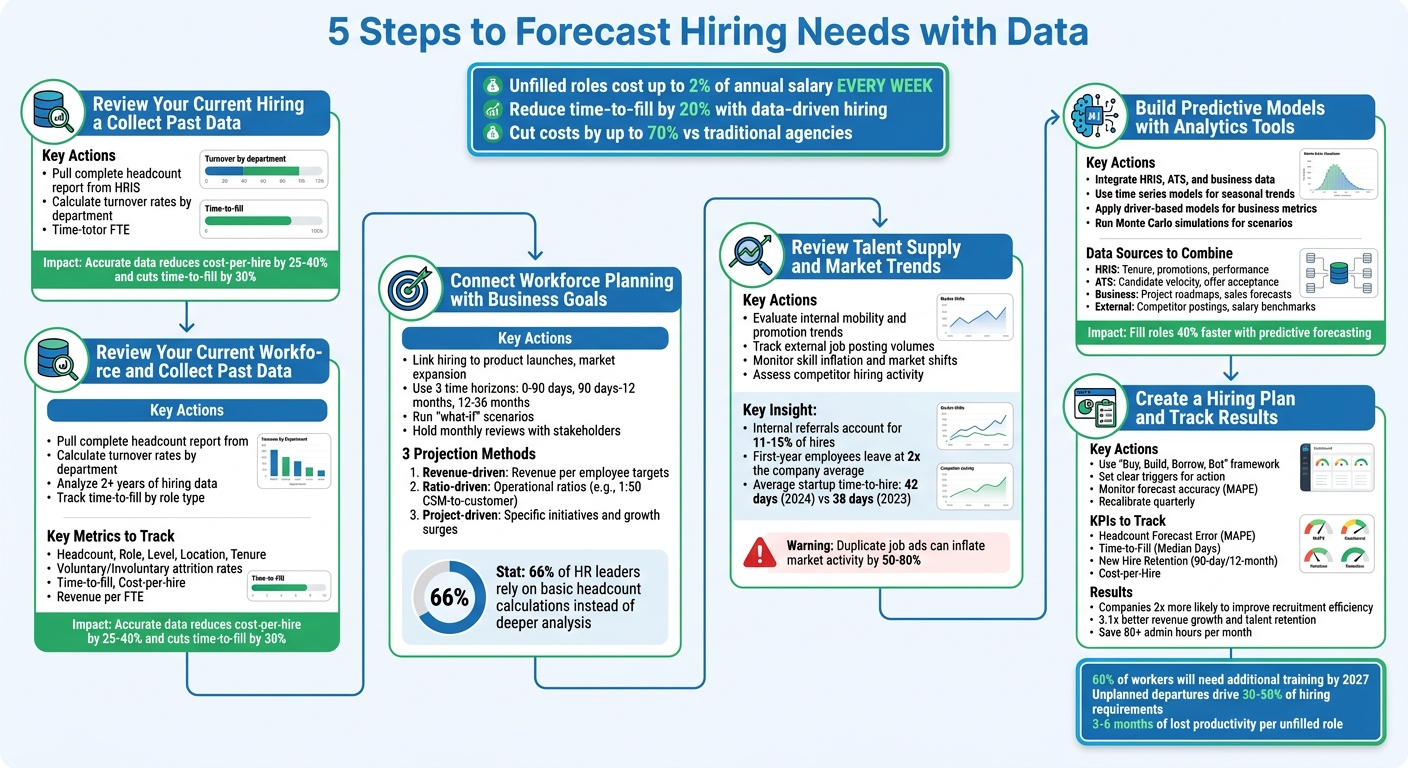
5-Step Data-Driven Hiring Forecast Process for Scaling Companies
Predictive Hiring – Everything You Need to Know
sbb-itb-a23bd6a
Step 1: Review Your Current Workforce and Collect Past Data
Start by gathering two key sets of information: current workforce data and historical recruitment metrics. These will form the foundation for accurate hiring predictions and workforce planning.
"A forecasting model is only as good as its inputs. Garbage data produces garbage predictions" [9].
When companies get this step right, the benefits are clear: accurate data can reduce cost-per-hire by 25–40% and cut time-to-fill by 30% [9].
Review Workforce Metrics
To begin, pull a complete headcount report from your HRIS or payroll system. Avoid relying on outdated org charts [9]. Your data should include details like department, role, level, location, hire date, and compensation for each employee. This creates the baseline you’ll use for all workforce analysis moving forward.
Next, dig into your attrition trends. Calculate turnover rates by dividing voluntary exits by your average headcount. Keep in mind that employees in their first year are twice as likely to leave [9]. Watch for seasonal patterns too – January and April often see spikes in turnover [9]. The lag between someone leaving and their replacement starting can result in 3 to 6 months of lost productivity [9].
Don’t overlook your skills inventory. This helps determine if your team is equipped for upcoming projects. Track current skills, identify gaps, and monitor training completion rates [3][7]. This is becoming increasingly important, as 60% of workers will need additional training by 2027 [4]. Assess productivity measures like revenue per full-time employee (FTE) or project hours worked to gauge efficiency [7][4].
Once you’ve mapped out your current workforce, shift your focus to understanding historical recruitment trends.
Collect Past Recruitment Data
Analyzing recruitment reports and historical data provides valuable insights for planning. Pull at least two years (or eight quarters) of hiring and departure data from your ATS and HRIS [9]. Look at metrics like time-to-fill, cost-per-hire, offer acceptance rates, and pipeline velocity. These figures feed into predictive models that help forecast future hiring needs.
When reviewing time-to-fill, break it down by role type and seniority level rather than using an overall average. For instance, hiring a senior engineer will naturally take longer than filling an entry-level customer support role. This level of detail ensures your timelines are realistic [7].
Track both voluntary and involuntary turnover. Even performance-based terminations, which typically make up 3–5% of exits annually, require backfilling [9]. Predicting attrition rates allows you to cut down on reactive hiring, addressing nearly half of unplanned recruitment needs [9]. Unplanned departures often drive 30–50% of hiring requirements in most companies, making this dataset crucial for effective planning [9].
| Metric Category | Key Data Points | Source System |
|---|---|---|
| Workforce Baseline | Headcount, Role, Level, Location, Tenure, Salary | HRIS / Payroll |
| Attrition | Voluntary/Involuntary rate, Tenure at exit, Reason for leaving | HRIS / Exit Interviews |
| Recruitment | Time-to-fill, Cost-per-hire, Offer acceptance rate, Pipeline velocity | ATS |
| Productivity | Revenue per FTE, Utilization rate, Cycle time | Finance / CRM / Ops |
Step 2: Connect Workforce Planning with Business Goals
The next step is to align your hiring forecast with your business objectives. Building on the data foundation established in Step 1, this ensures your hiring strategy supports your company’s growth. Interestingly, 66% of HR leaders admit their workforce planning often relies on basic headcount calculations instead of deeper analysis[4].
The key is to start with the work that needs to be done, rather than focusing solely on headcount. Instead of asking, “How many people do we need?”, shift to, “What work needs to be accomplished, and what skills are required to achieve that?” JobsPikr highlights this shift in perspective:
"Headcount is an output. Work is the input. Most plans start with the output." – JobsPikr [4]
Link Hiring Needs to Growth Milestones
Your hiring forecast should directly reflect the business events that generate new work. For example, product launches, entering new markets, securing funding, or landing major customer deals are all moments that demand specific talent[3][10]. If a product launch requires niche expertise, focus on hiring for those skills rather than a broad approach. Similarly, expanding into a new region may necessitate hiring for local market knowledge and compliance capabilities.
Timing is critical. Align hiring schedules with project deadlines to avoid mismatches. For instance, if a product milestone requires senior engineers and the average time-to-hire for such roles is 90 days, ensure job requisitions are opened early enough to meet that timeline. Breaking your workforce planning into three time horizons can help:
- 0–90 days: Immediate operational needs.
- 90 days to 12 months: Tactical, project-based hiring.
- 12–36 months: Strategic hires for future growth[11].
This approach prioritizes immediate needs while also preparing for long-term growth. For more tools to help with your planning, explore our recruitment resources.
Use Business Data to Forecast Demand
Integrate business metrics such as revenue targets, sales pipeline, support volumes, and project backlogs to forecast staffing needs[4].
Here are three methods to align hiring with business performance:
- Revenue-driven projections: Calculate headcount based on revenue-per-employee targets. For instance, if your goal is $150,000 in revenue per employee and you project $15 million in revenue, you’ll need a team of about 100 people.
- Ratio-driven projections: Use operational benchmarks, such as maintaining a customer success manager-to-customer ratio of 1:50, to scale teams as your customer base grows.
- Project-driven projections: Plan for specific initiatives, like launching a new product or opening an office, which may require a surge in hiring[9].
Document the assumptions behind each projection. For example, if you plan for "1 support agent per 200 customers", note this clearly so adjustments can be made if customer growth or service complexity changes[10][9].
Running regular “what-if” scenarios can help you prepare for potential changes. Questions like, “What if revenue grows 20% instead of 15%?” or “What happens if we add 10 headcount mid-year?” allow you to model different outcomes and adapt your strategy as needed.
| Projection Method | Driver | Best For |
|---|---|---|
| Revenue-driven | Revenue per employee targets | Stable business models with consistent output ratios[9] |
| Ratio-driven | Operational ratios (e.g., 1:50 CSM-to-customer) | Scaling teams like Support or Sales[9] |
| Project-driven | Product roadmaps or office openings | Specific initiatives and growth surges[9] |
Hold monthly reviews with talent acquisition, finance, and department heads to compare actual results with projections[10][8]. These regular check-ins ensure your hiring plans remain flexible and accurate as business needs evolve.
Step 3: Review Talent Supply and Market Trends
After aligning your hiring forecasts with business objectives, the next step is assessing whether those roles can realistically be filled. This involves examining both internal talent pools and external labor market conditions. Combining these insights helps you refine your forecasts and ensures your hiring strategy is forward-thinking. By looking both inward and outward, you can create forecasts that are actionable and grounded in reality.
Review Internal Talent Pools and Pipelines
Start by evaluating trends in internal mobility, promotions, and attrition to understand how talent flows within your organization. These patterns reveal whether your current workforce development is on track to meet future needs. Pay particular attention to attrition rates; for instance, employees in their first year often leave at twice the overall company average [9]. Analyzing historical attrition data by department and job level can help you anticipate replacement needs before they become urgent.
Go beyond headcount and use tools like skills inventories and performance management systems to identify gaps in knowledge or expertise. This is crucial for making informed decisions about whether to hire externally, upskill existing employees, bring in contractors, or automate certain tasks [3]. Internal mobility and referrals play a key role here, accounting for 11–15% of hires while often leading to better retention rates and faster ramp-up times [6]. Before posting new job openings externally, explore whether internal candidates could step into those roles through promotions or lateral moves.
Track External Market Indicators
Internal metrics show how prepared you are today, but external data highlights market trends that might affect your hiring plans. Pay attention to signals like job posting volumes and shifts in seniority levels within your industry and region. For example, an increase in senior-level postings could indicate heightened competition for experienced professionals, which may require adjustments to your compensation strategy [4].
Also, watch out for skill inflation, where previously optional skills become standard requirements [4]. Macroeconomic indicators such as unemployment rates and sector-specific hiring trends [7][2] provide further context on talent availability. For instance, in 2024, the average time-to-hire for startups rose from 38 days in 2023 to 42 days [5], reflecting tighter competition in certain sectors. Additionally, keep in mind that duplicate job ads and reposts can inflate market activity by 50% to 80% [4]. Use deduplication methods to avoid overestimating demand.
Step 4: Build Predictive Models with Analytics Tools
Once you’ve gathered workforce data, aligned hiring strategies with business goals, and assessed market conditions, the next step is creating models that turn this information into actionable forecasts. The goal isn’t perfection but to generate insights that guide hiring decisions before roles become vacant.
Combine Data Sources for Better Insights
To get a complete picture, integrate data from multiple sources like HRIS, ATS, business operations, and external market trends. For example:
- HRIS data: Tenure, promotions, and performance metrics.
- ATS data: Candidate velocity, offer acceptance rates, and time-to-hire.
- Business data: Project roadmaps and sales forecasts.
External market signals, such as competitor job postings, unemployment rates, and salary benchmarks, help you gauge whether your hiring targets align with current talent availability. Standardizing job titles and skills ensures external data aligns with your internal roles.
Clean data is essential. Include fields like employee ID, hire and termination dates, roles, locations, salaries, and manager IDs. When this foundation is in place, companies using predictive forecasting often fill roles up to 40% faster on average [2].
Develop Models for Different Hiring Scenarios
Different business challenges call for tailored models. Use tools like:
- Time series models (e.g., ARIMA or Prophet) to spot seasonal hiring trends.
- Driver-based models to connect hiring needs with business metrics.
- Survival analysis to predict turnover risks.
Scenario planning is key to understanding potential outcomes. For example, running "what-if" simulations can help you explore the impact of hiring freezes, doubling engineering headcount, or cutting budgets. Monte Carlo simulations can add another layer by providing probabilistic ranges, helping you assess the likelihood of different scenarios.
Start small. Focus on a high-impact area like engineering attrition or sales hiring. Validate your models by comparing predictions with historical data, and recalibrate them quarterly or after major changes in the organization. Dashboards should include clear triggers – like a forecasted 10% headcount shortfall – so you can act promptly, such as reassessing recruiter capacity.
These predictive models set the stage for flexible hiring plans and ongoing performance tracking, which are covered in Step 5.
Step 5: Create a Hiring Plan and Track Results
Once your forecasting models provide actionable insights, the next step is turning those insights into a structured, results-focused hiring plan.
Build a Flexible Hiring Plan
Forecasts are only useful if they lead to decisions. A strong hiring plan should explore multiple talent strategies – not just opening job requisitions. Consider the "Buy, Build, Borrow, and Bot" framework: hire externally (Buy), invest in training your current team (Build), bring in contractors or consultants (Borrow), or leverage automation (Bot) [3].
Set clear triggers for action. For example, if you’re facing a 10% shortfall in headcount, you might redeploy internal staff or shift to contingent hiring [7]. This avoids last-minute scrambling when hiring timelines slip.
Dynamic capacity modeling can replace outdated spreadsheets by pulling real-time data from your ATS. This gives you a live view of recruiter capacity and hiring progress. It also allows you to test scenarios, such as the impact of adding 10 new hires mid-cycle, so you can plan more effectively [8].
Monitor Metrics and Adjust Forecasts
To measure success, track key metrics like Headcount Forecast Error (MAPE) to see how closely actual hiring aligns with predictions. Pair this with Time-to-Fill (median days) and Cost-per-Hire to monitor operational efficiency [7]. Quality metrics like new hire retention at 90 days and 12 months help ensure you’re hiring people who stay and contribute.
| KPI Category | Metric | Purpose |
|---|---|---|
| Accuracy | Headcount Forecast Error (MAPE) | Assesses how closely actual hiring matches the forecast |
| Velocity | Time-to-Fill (Median Days) | Measures how quickly roles are filled across different functions |
| Quality | New Hire Retention (90-day/12-month) | Links hiring sources to long-term employee success |
| Efficiency | Cost-per-Hire | Accounts for expenses like agency fees, advertising, and onboarding |
Revisit and recalibrate your models quarterly or after significant organisational changes to ensure accuracy [7][4]. Monthly review meetings with Talent Acquisition, Finance, and department leaders help maintain alignment on forecasts and resource needs [7][2]. Companies using predictive forecasting often fill roles 40% faster, and unfilled positions can cost 1–2% of an annual salary per week [2], making precise tracking crucial.
To turn these insights into action, you need scalable recruitment support.
Get Scalable Support with Rent a Recruiter
Turning forecasts into results requires recruitment capacity that adapts to your needs. Rent a Recruiter embeds experienced recruiters into your team within days, managing hiring from start to finish while bringing clarity and structure to your process. Whether you’re scaling after a funding round, launching a new product, or handling a hiring surge, embedded recruitment removes the high costs of commission-based agency models.
Most businesses save up to 70% on hiring costs compared to traditional recruitment agencies and cut internal admin hours by over 80 hours per month. This flexible model lets you scale teams quickly based on project requirements without committing to long-term, full-time hires. Instead of reacting to hiring emergencies, you can focus on building a proactive talent pipeline [2]. This ensures your forecasts lead to hires that align with your business goals and timelines.
Conclusion
Data-driven hiring forecasting has become a game-changer for scaling SMEs in 2026. With 66% of HR leaders still relying on basic headcount planning [4], companies that embrace advanced strategies gain a clear advantage. The five steps outlined here – examining workforce data, aligning hiring with business goals, studying market trends, developing predictive models, and crafting adaptable hiring plans – turn recruitment into a proactive, strategic asset.
"Workforce planning for SMEs in 2026 requires adaptive, commercially aligned decision-making rather than static headcount plans." – Rent a Recruiter [1]
The benefits speak for themselves: businesses using data-driven hiring practices are twice as likely to improve recruitment efficiency and three times more likely to avoid costly mis-hires [6]. Companies with strong analytics capabilities outperform their peers in revenue growth and talent retention by 3.1x [6]. When roles are filled 40% faster [2], forecasting evolves into a revenue-protecting strategy, not just an HR task.
However, effective forecasting demands the ability to execute. Take MasterTech as an example. By embedding a dedicated Talent Partner from Rent a Recruiter for 27 months, they achieved 29 placements, maintained a 4:1 CV-to-interview ratio, and saved $123,000 compared to traditional agency fees [1]. They also managed 291 interviews across five global offices in record time, securing 10 critical hires [1]. Both companies turned projections into results by adding expert recruitment capacity without the burden of permanent headcount.
If your hiring plans consistently fall short or exceed budget, you can rate your recruitment to identify gaps, or Rent a Recruiter can embed skilled recruiters into your team in just days. They bring the structure and expertise needed to transform data into hires that fuel your growth.
FAQs
What data do I need to start forecasting hiring?
To predict future hiring needs effectively, it’s crucial to analyze a mix of internal data, historical patterns, and external market indicators. Focus on these key areas:
- Internal metrics: Look at turnover rates, average promotion timelines, and overall workforce composition to understand internal movement and gaps.
- External labor trends: Monitor shifts in the job market, emerging roles, and industry-specific demands to stay ahead of changes.
- Skill and role alignment: Compare internal skillsets with external benchmarks to identify where gaps or overlaps exist.
- Historical hiring data: Review past metrics like time-to-fill, vacancy durations, and seasonal demand trends to spot patterns.
This combination of insights enables you to create more precise workforce plans and stay prepared for future needs.
How do I tie hiring forecasts to revenue and growth plans?
To align hiring forecasts with revenue and growth plans, rely on data-driven strategies such as predictive analytics and capacity modeling. These methods help tie workforce planning directly to your business objectives, whether that’s meeting revenue goals, hitting sales targets, or launching new products.
By forecasting hiring needs based on your growth trajectory, you can sidestep the risks of overstaffing or understaffing. This ensures your team is properly resourced and ready to deliver on key strategic priorities.
Which predictive model should I use for hiring and attrition?
Predictive analytics powered by AI can transform how businesses forecast hiring needs and manage employee attrition. By analyzing a mix of historical trends, external labor market data, and internal metrics – like employee tenure and promotion patterns – these models provide actionable insights.
Some commonly used models include:
- Drift and recalibration: Tracks deviations from expected trends and adjusts predictions accordingly.
- Intervention analysis: Evaluates how specific actions or changes impact hiring or retention.
- Gap and risk assessment: Identifies potential staffing shortages or risks within the workforce.
- Supply availability forecasting: Predicts the availability of talent in the market.
- Demand forecasting: Estimates future staffing needs based on business growth or changes.
These tools not only help businesses anticipate staffing requirements but also cut costs and simplify the hiring process, making workforce planning far more efficient.