
Before hiring demand spikes, we recommend agreeing which roles come first, when to add support, and who approves the budget. SHRM reported an average time-to-fill of 41 days in 2024, so your plan needs to work back from required start dates, not just interview schedules.
We focus on three steps to protect delivery and control spending:
- Set response triggers: Compare hiring demand with recruiter hours, interview availability, and onboarding capacity.
- Add support where it helps: Prioritize business-critical roles, set spending caps in USD, and keep hiring standards in place.
- Measure recruitment metrics: Review progress and costs weekly, then use hiring and retention outcomes to improve your next forecast.
<u>More recruiters alone will not solve every bottleneck.</u> We show you how to plan for growth or disruption, assign owners, and use temporary recruiting support where capacity gaps put your deadlines at risk.
Contingency Planning: Prepare for Business Uncertainty
sbb-itb-a23bd6a
Define Hiring Scenarios and Response Triggers
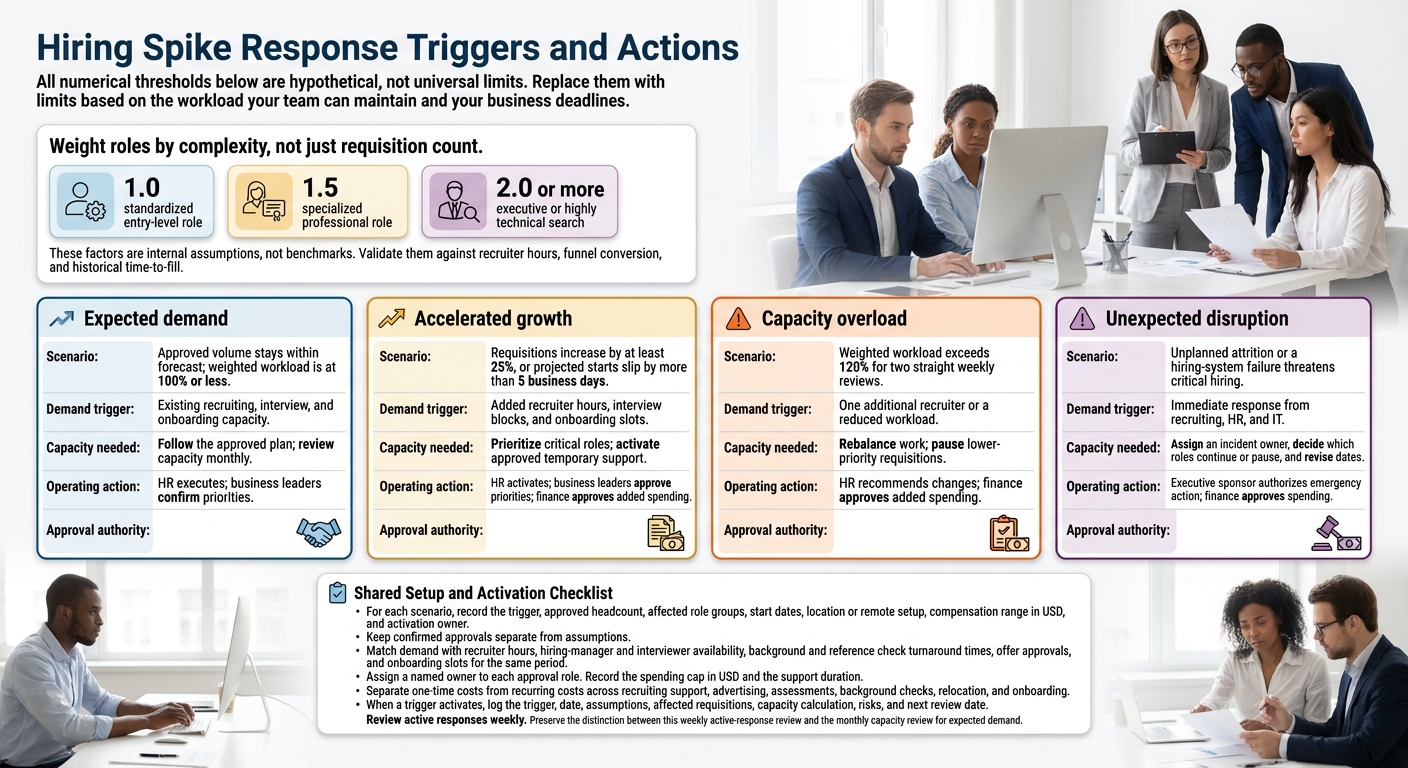
Hiring Spike Response Triggers and Actions
Turn the risks above into three response states: expected demand, accelerated growth, and unexpected disruption. Use them to identify when hiring pressure puts delivery at risk.
For each scenario, record the trigger, approved headcount, affected role groups, start dates, location or remote setup, compensation range in USD, and activation owner. Keep confirmed approvals separate from assumptions.
Match each scenario to the recruiter, interviewer, and onboarding capacity it will use.
Compare Hiring Demand With Team Capacity
Map each role’s U.S. location or remote setup, time zone, and approved compensation range in USD, including bonus and equity.
Compare current and upcoming requisitions with capacity for the same period. Account for recruiter hours, hiring-manager and interviewer availability, background and reference check turnaround times, offer approvals, and onboarding slots.
Weight roles by complexity, not just requisition count.
Suggested planning factors are 1.0 for a standardized entry-level role, 1.5 for a specialized professional role, and 2.0 or more for an executive or highly technical search.
These factors are internal assumptions, not benchmarks. Validate them against recruiter hours, funnel conversion, and historical time-to-fill, or rate your recruitment process to identify efficiency gaps.
Set Response Thresholds, Budgets, and Owners
Set thresholds that protect critical roles first. All numerical thresholds below are hypothetical, not universal limits. Replace them with limits based on the workload your team can maintain and your business deadlines.
| Scenario | Demand trigger | Capacity needed | Operating action | Approval authority |
|---|---|---|---|---|
| Expected demand | Approved volume stays within forecast; weighted workload is at 100% or less | Existing recruiting, interview, and onboarding capacity | Follow the approved plan; review capacity monthly | HR executes; business leaders confirm priorities |
| Accelerated growth | Requisitions increase by at least 25%, or projected starts slip by more than 5 business days | Added recruiter hours, interview blocks, and onboarding slots | Prioritize critical roles; activate approved temporary support | HR activates; business leaders approve priorities; finance approves added spending |
| Capacity overload | Weighted workload exceeds 120% for two straight weekly reviews | One additional recruiter or a reduced workload | Rebalance work; pause lower-priority requisitions | HR recommends changes; finance approves added spending |
| Unexpected disruption | Unplanned attrition or a hiring-system failure threatens critical hiring | Immediate response from recruiting, HR, and IT | Assign an incident owner, decide which roles continue or pause, and revise dates | Executive sponsor authorizes emergency action; finance approves spending |
Assign a named owner to each approval role. Record the spending cap in USD and the support duration. Separate one-time costs from recurring costs across recruiting support, advertising, assessments, background checks, relocation, and onboarding.
When a trigger activates, log the trigger, date, assumptions, affected requisitions, capacity calculation, risks, and next review date. Review active responses weekly.
Standardize Hiring Without Skipping Controls
Speed up coordination, not evaluation. When hiring demand spikes, cut delays without weakening controls. Use a stage-gated workflow covering role approval, screening, interviews, required checks, offer approval, and onboarding. Give every stage an owner and a required output so higher volume does not reduce hiring quality.
Approve Job Requirements and Interview Scorecards
Before sourcing starts, require a business justification, headcount or budget approval, a job description, a U.S. compensation range, and job-related screening criteria. Separate must-have qualifications from skills you can teach. Define 6- and 12-month outcomes and score candidates against them.
Build scorecards around three to six competencies, using a 1-5 scale with clear standards for weak, acceptable, and strong evidence. Assign competencies to interviewers and align scoring before interviews begin. Require independent written feedback before group discussion.
Keep decisions moving with clear targets:
- Review resumes within two business days.
- Complete scheduling within three business days.
- Submit feedback within 24 hours.
- Make offer decisions within two business days of the final interview.
Measure hiring-manager response time separately from recruiter processing time so you can see where delays occur. Name an approver for exceptions and record each reason. No exception can waive a legal requirement.
Complete Required Checks and Keep Hiring Records
Higher volume can tighten timelines, but it cannot reduce compliance requirements. Assign HR or a trained compliance owner to verify applicable federal, state, and local rules.
For consumer-report background checks, keep the stand-alone disclosure and written authorization. If the report may affect the hiring decision, send the pre-adverse-action notice, a copy of the report, and the FCRA summary of rights before taking adverse action. Then follow the required adverse-action steps.[6][7] Allow candidates time to review or dispute the report. A start date is not a reason to shorten this process.
| Task | Safe acceleration method | Required control | Owner |
|---|---|---|---|
| Interview scheduling | Reserve interview blocks and automate scheduling | Confirm the correct interview panel, accessibility needs, and candidate communications | Recruiting coordinator |
| Offer production | Use approved templates and electronic signatures | Confirm budget approval and check that terms match the approved role and compensation | Recruiter and HR |
| Background checks | Use an approved vendor and monitor turnaround times | Preserve disclosure, authorization, and required notice procedures where applicable | HR or compliance owner |
| Form I-9 | Schedule onboarding early and use trained authorized representatives | Complete Section 1 by the first day of employment and Section 2 within three business days after the first day of paid work.[3][4] If employment lasts fewer than three business days, complete both sections on day 1.[9] | Employee for Section 1; employer or authorized representative for Section 2, monitored by HR |
| Candidate records | Centralize documents and automate retention reminders | Restrict access, preserve required records, and securely dispose of sensitive reports | HR or privacy owner |
Store applications, scorecards, approvals, and disposition reasons in an applicant-tracking system (ATS) or HR system with role-based access. Keep background-check data separate where required.
EEOC guidance generally requires covered employers to retain hiring records for one year after the record or personnel action, whichever is later. Records tied to a discrimination charge must remain until the matter ends.[5][7] Retain Form I-9 for three years after hire or one year after termination, whichever is later.[8][10]
Expand Recruiting Capacity and Control Costs
Once a trigger is active, prioritize roles before adding recruiters. Score approved openings by business impact, start date, revenue and customer impact, skill scarcity, and regulatory deadlines. Classify each as critical, high priority, or deferrable within an 8-12-week planning horizon. Use embedded support only for role groups that need immediate coverage.
Assign Embedded Recruiters to Defined Role Groups
Rent a Recruiter can place experienced recruiters in your team quickly and manage hiring end-to-end. Before relying on that support, confirm availability, experience, role coverage, scope, and start date.
For a fixed-cost recruitment model, document the fee in USD, included services, expected capacity, minimum term, renewal or termination terms, and additional fees. More recruiting capacity does not guarantee more hires.
Group roles by function, geography, or recruiting complexity. Assign each group a named recruiter, requisition list, hiring managers, target dates, decision rights, and weekly reporting requirements.
Keep policy, approvals, reporting, process, and budget decisions inside your business. Route compensation exceptions to HR and finance. Escalate critical roles with no qualified candidates after two weeks.
Reforecast demand 2-4 weeks before the engagement ends. Use your company’s ATS to hand over candidate status, sourcing notes, open risks, and next actions.
Monitor Hiring Progress, Workload, and Spending
As support ramps up, check whether added capacity is improving delivery. Use one shared dashboard showing target, actual, variance, trend, and corrective action. This helps you spot bottlenecks without losing sight of hiring quality or deadlines.
Include approved requisitions by priority and target start date, recruiter workload by role group, qualified candidates per role against agreed screening criteria, and pipeline conversion by stage. Define interview-to-decision time, offer acceptance rate, time-to-fill, and time-to-start consistently.
Track total spending and cost per hire in USD. Include internal recruiting labor, embedded fees, advertising, technology, assessments, and background checks. Compare both forecasts and actual spending with the approved budget.
Review the dashboard weekly, or daily during urgent hiring surges. Focus on missed targets and decisions that need action.
Tie upcoming starts to equipment, access, training, and manager readiness. An accepted offer is not yet working capacity if those pieces are missing.
Conclusion: Review Results and Keep the Plan Current
Keep your contingency plan current. Update scenarios, triggers, ownership, and outcomes so it remains a working document that protects hiring speed, quality, and cost.
Revise Capacity Estimates After Each Hiring Spike
Review each hiring spike within 30-60 days to adjust capacity estimates and trigger thresholds. Check stage delays, withdrawals, early turnover, onboarding completion, exceptions, and support costs.
Assess new-hire performance at 90 days and retention at 12 months. Time to fill and cost per hire measure speed and spend, not productivity or retention.[11][12]
Use actual recruiter hours and throughput by role group to update capacity estimates. Check whether support triggers activated early enough. Separate staffing gaps from approval bottlenecks so you address the right problem, then update intake templates, scorecards, and approval rules.
Give one person accountability for the plan. Schedule monthly reviews during fast growth and quarterly reviews during steadier periods. Use the findings to reset your next hiring forecast and support plan.
Review Upcoming Hiring and Support Needs
Separate approved openings from possible demand. Compare upcoming needs with recruiter hours, interviewer availability, and onboarding capacity.
If a clear gap remains, Rent a Recruiter can embed recruiters directly into your team and manage hiring end-to-end. Assess fit against role complexity, expected duration, ownership model, reporting needs, and total cost. Base the decision on your needs, not an assumed result.
Compare total recruiting spend, internal admin time, and hiring outcomes before and after adding support. Use those findings to update your next hiring scenario, trigger, and support decision.
FAQs
How do I plan for hiring spikes with limited historical data?
Tie your hiring plan to upcoming business milestones, not just past trends. Build best-case, expected-case, and worst-case scenarios for headcount, budget, and recruiter capacity so you can plan for changes in demand.
Prioritize roles by business impact. Pre-approve compensation bands and offer rules to reduce approval delays, and standardize interviews to keep hiring decisions consistent.
Track weekly metrics to spot bottlenecks and adjust your plan. If hiring volume exceeds your team’s capacity, consider embedded recruitment support.
How can I tell if I need recruiters or faster approvals?
Track time spent at each hiring stage and how long hiring managers take to respond [2]. Idle offers, top candidates accepting other offers, and managers spending more time on administrative coordination than decisions can all point to a need for faster approvals [1][2].
Use pre-approved salary ranges and batch offer generation to reduce these delays, save managers time, and keep hiring moving [1].
What should I do if hiring demand drops unexpectedly?
Update your rolling headcount forecast immediately to reflect current business needs. Review hiring plans monthly with finance and department leaders to avoid unnecessary overhead and keep recruitment aligned with demand. Scale back hiring capacity when needed rather than carrying fixed costs.
Use the latest data to formally review what worked. Document clear trigger thresholds for when hiring should ramp up again.


