
If your hiring process is slow, unclear, and hard to track, it is costing you money every single day.
I’d boil this article down to one point: map every hiring stage, assign an owner, track a small set of KPIs, and review it every quarter. That gives you more control over time-to-hire, cuts wasted effort, and helps stop good applicants from dropping out before offer stage. For scaling teams in SaaS, IT, Fintech, Engineering, Security, Insurance, and Professional Services, that means lower hiring drag and better use of leadership time.
Here’s the short version:
- Vacant roles cost money, with lost output often sitting at $98 per day
- Average time-to-hire is about 42 to 44 days, so delays add up fast
- Poor hiring experience hurts acceptance rates, with 52% of people declining offers after a bad process
- A simple checklist works better for SMEs than a heavy process document that nobody uses
- The seven stages to map are: Awareness, Consideration, Application, Selection, Offer, Preboarding, and Onboarding
- The core data to track is: owner, candidate action, employer touchpoint, and KPI at each stage
- The main business metrics are: time-to-hire, cost-per-hire, offer acceptance, source quality, candidate satisfaction, and 90-day retention
This article lays out how to turn that checklist into a hiring system you can run the same way each time, then improve with data.
Mapping Your Candidate’s Journey to Improve Candidate Experience
sbb-itb-a23bd6a
Checklist Prep: Set the Foundations Before You Map
Before you map the journey, get clear on the hiring setup you’re working with. If you skip this step, your map will reflect guesswork instead of what happens in practice. This prep helps you lock the inputs before you map each stage.
Define Hiring Goals, Role Priorities, and Process Owners
Document planned hires, target start dates, and salary bands for the next 6 to 12 months, split by function and seniority.
Then rank roles by revenue impact, urgency, and difficulty to fill. Start with the highest-priority roles first. They carry the most hiring risk, and fixing problems there usually gives you the best ROI.
Set an owner, backup, and response time for each stage. Once ownership is clear, define the candidates each role is meant to attract.
Build Candidate Personas and Collect Baseline Metrics
A candidate persona is more than a job description. For each target role, document experience level, must-have versus nice-to-have skills, preferred channels, and compensation expectations that fit your market. For distributed teams, include work style preferences and time zone availability too.
This matters because personas show where your messaging, sourcing, or pay may be breaking the journey. If you’re hiring Engineers in the US, for example, but your process assumes they will tolerate slow feedback or below-market pay, the drop-off is not a mystery. It’s built into the process.
Base these personas on data from past hires. Speak to recent joiners about where they were looking and what nearly made them walk away. That kind of input often tells you more than an internal hiring review.
At the same time, pull your baseline hiring metrics before you start mapping. The U.S. average cost-per-hire reached $4,700 in 2023, up 14% from $4,129 in 2019[1]. Work out your own figure using a simple formula: total internal and external recruiting costs divided by the number of hires in a given period.
Pair that with your current time-to-hire by role type and your offer acceptance rate. These numbers give you a starting point. Without them, it’s hard to tell whether any process change is saving time, cutting cost, or improving hiring outcomes.
Then check whether your tools and feedback loops can support that process, or rate your recruitment process to identify immediate gaps.
Audit Your Current Tools, Messaging, and Feedback Sources
Review your stack by area:
| Area | What to Check |
|---|---|
| ATS | Broken workflows, unclear pipeline stages |
| HRIS / Onboarding | Duplicate data entry, manual handoffs |
| Scheduling tools | Time zone confusion, rescheduling friction |
| Email templates | Inconsistent tone, missing next steps |
| Careers page | Outdated roles, missing salary ranges |
| Interview scorecards | Vague criteria, no structured rating scale |
Beyond tools, review your candidate feedback. Post-interview surveys sent to both hired and rejected candidates can show friction your team may not spot on its own.
If candidates keep saying they felt uninformed between stages, that’s a communication gap your journey map needs to fix, regardless of what your internal process document says. What your team thinks is happening and what candidates feel are often two different things.
Collect this feedback before you finalize the map, not after.
With these inputs in place, your stage-by-stage map is far more likely to show where candidates actually stall. That gives you something useful to fix, not just something neat to present.
Stage-by-Stage Checklist for Mapping the Candidate Journey
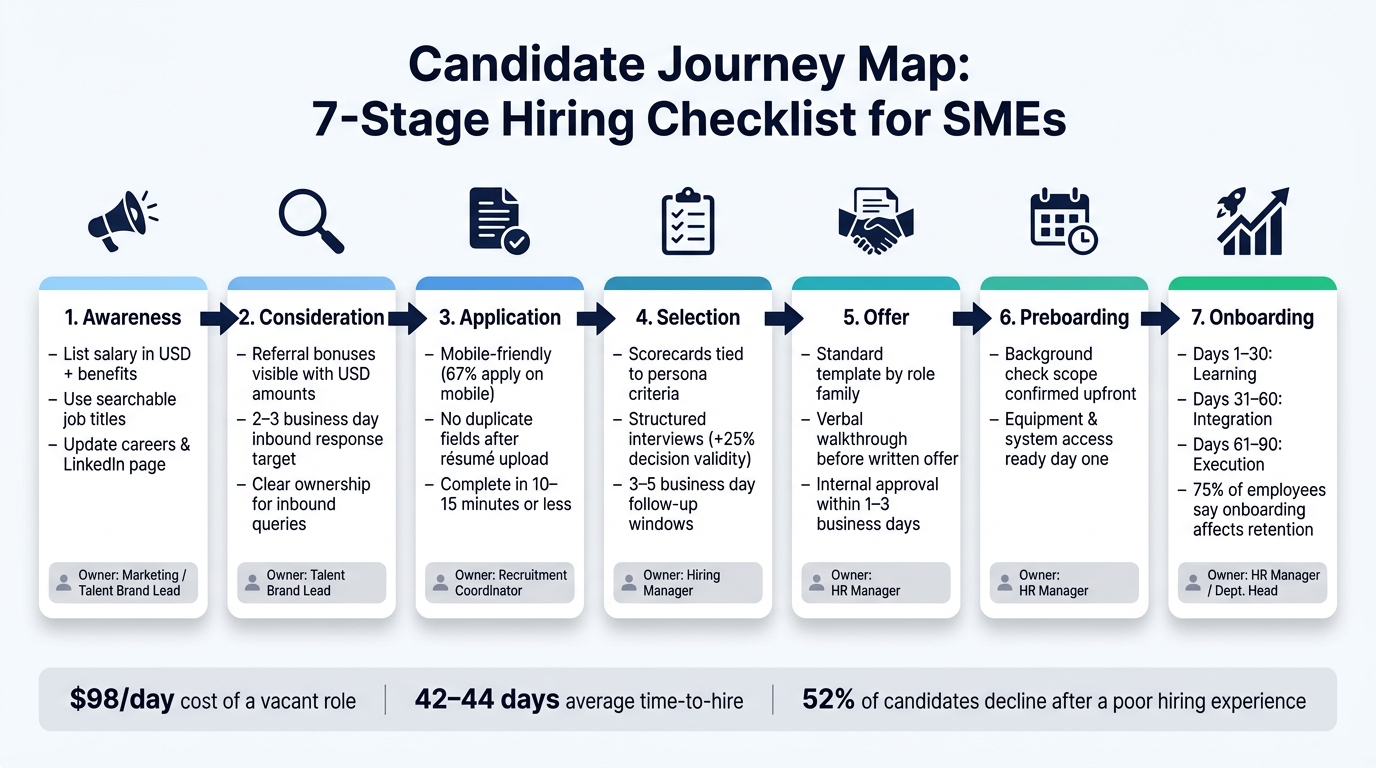
Candidate Journey Map: 7-Stage Hiring Checklist for SMEs
Once your basics are sorted, personas, metrics, and tools, you need to review each hiring touchpoint from the candidate’s point of view. That helps you spot where people drop out, where delays creep in, and who should fix each issue.
Awareness and Consideration
Start with the job ad. If key details are missing, you lose people before they even apply.
List salary in USD, core benefits, location type, and any state restrictions in every job ad. Use job titles people search for. For example, "Software Engineer II" will usually perform better than an internal label no one knows. Keep your careers page and LinkedIn page up to date with team size, tech stack, culture, and growth path.
Internal referrals matter too, but only if people can see how the scheme works. Make referral bonuses easy to find, show the amount in USD, and keep the submission process simple. For inbound questions, set a 2 to 3 business day response target and give one person clear ownership.
If the job ad does its job, the application stage needs to keep that momentum going.
Application and Selection
This is where many companies lose good people. 60% of candidates abandon applications that feel too long or rigid[3]. That is a direct hit to hiring volume and pipeline quality.
Check that the form works properly on mobile. Around 67% of job applications are now completed on mobile devices[5]. If your process breaks on a phone, you are making it harder for people to finish. Remove duplicate fields too. If someone uploads a résumé, do not ask them to type the same work history again. In most cases, the full application should take 10 to 15 minutes or less.
Selection needs structure, not guesswork. Build a scorecard for every stage and tie it back to your persona criteria. Structured interviews improve hiring decision validity by up to 25%[4]. Document who owns each stage, what format it takes, and how long it should last. Then set firm follow-up windows of 3 to 5 business days[2][6] after each stage so candidates get either a decision or clear next steps.
That kind of pace does more than improve the experience. It cuts drift, keeps hiring teams aligned, and helps you close stronger people before they disappear into another process.
Offer, Preboarding, and Onboarding
At offer stage, speed and clarity can make the difference between an accepted offer and a lost hire.
Use a standard offer template for each role family. Include base salary, pay frequency such as biweekly, bonus or commission, equity, and benefits. Internal approvals should move within 1 to 3 business days[2]. Before you send the written offer, walk through it verbally. That gives you a chance to answer questions early and reduce back-and-forth.
Once the offer is accepted, preboarding should take friction out of day one. Confirm the background check scope and timeline upfront. Make sure equipment and system access are ready from the start. Then move into a documented 30-60-90 day onboarding plan:
- Days 1 to 30: learning
- Days 31 to 60: integration
- Days 61 to 90: execution
This part matters more than many teams think. Nearly 75% of employees say organized onboarding influences whether they stay[2]. For scaling companies, that means onboarding is not just an HR task. It affects retention, ramp time, and the return you get from every hire.
| Stage | Key Checklist Items | Owner |
|---|---|---|
| Awareness | Salary in USD, benefits listed, location type, any state restrictions, careers page current, 2- to 3-day response time target | Marketing / Talent Brand Lead |
| Application | Mobile-friendly and easy to finish, under 15 min, no duplicate fields | Recruitment Coordinator |
| Selection | Scorecards tied to persona criteria, stage ownership documented, 3- to 5-day follow-up windows | Hiring Manager |
| Offer | Template ready by role family, verbal walkthrough done, approval within 1 to 3 business days | HR Manager |
| Preboarding & Onboarding | Background check communicated, equipment ready day one, 30-60-90 day plan documented | HR Manager / Dept. Head |
How to Find Gaps, Prioritize Fixes, and Measure ROI
Spot Friction Points With Data and Candidate Feedback
Use the stages, owners, and KPIs from your hiring map to see where the process slows down. Look at each stage and check for drop-offs, slow handoffs, and offers that stall.
Then dig into the reason why. Candidate surveys, debrief notes, and withdrawal reason fields in your ATS give you the context behind the numbers. If people keep pointing to slow updates or a confusing application flow, that tells you the issue sits in the process, not with the candidate.
That matters because every friction point has a cost. Longer time-to-hire, higher cost-per-hire, and missed hires all hit the business. In scaling teams, those delays can mean lost revenue, extra pressure on managers, and more spend on outside support.
Rank Improvements by Impact and Effort
Not every fix needs the same level of urgency. A simple impact-versus-effort assessment helps you decide what to do first. Score each improvement on impact, from 1 to 5, and effort, from 1 to 5. Then group each item into three buckets: quick wins, medium-term fixes, and larger system changes.
Quick wins are the ones to move on first. They have high impact and low effort, so you can make progress without waiting on a full process overhaul. Bigger system changes still matter, but they should not slow down action on the easier fixes sitting in front of you.
| Improvement | Expected Impact | Implementation Effort | Suggested Owner |
|---|---|---|---|
| Shorten application form | High | Low | Recruiter / HR |
| Automated interview scheduling | High | Low | Recruitment Admin / HR |
| Automated status updates | Medium | Medium | Recruitment Lead |
| Standardized interview scorecards | Medium | Medium | Hiring Manager |
| Pre-boarding checklist | Medium | Medium | HR / Operations |
| ATS workflow redesign | High | High | HR / People Ops |
Give each item a clear owner and a target date. If nobody owns the fix, it usually slips. If there is no deadline, it rarely moves.
Track KPIs and Review the Map Every Quarter
Most SMEs do not need a huge dashboard. A lean KPI set is enough. Focus on time-to-hire, cost-per-hire, offer acceptance rate, source quality, candidate satisfaction, and 90-day retention. Together, these show speed, cost, experience, source performance, and early retention.
Use the same stage labels each quarter so you can compare trends properly. Review performance by stage, not just at the top level. That makes it much easier to see where the process changed and what it cost you.
Each quarterly review should answer four direct questions:
- Where did time-to-hire increase?
- Which sources are producing fewer hires?
- What is the biggest new drop-off point?
- Did action items from last quarter get completed?
This kind of review keeps the map useful. It turns hiring from a series of one-off fixes into a process you can track, improve, and tie back to ROI.
Conclusion: Turn the Checklist Into a Repeatable Hiring System
Treat your candidate journey map like a living checklist. Give each stage a clear owner. Track a small set of KPIs. Review the process every quarter.
That matters because hiring systems drift when nobody owns them. Clear trigger points stop that from happening. If time-to-hire starts slipping or your candidate satisfaction score drops, review the process straight away.
The business case is hard to ignore. A positive candidate experience lifts the chance of offer acceptance by 38%, and 77% of candidates will share that experience with their network.[7] Small fixes at each stage add up. Over time, they help you hire faster, protect employer brand, and cut the drag that poor process puts on growth.
When to Bring in Embedded Recruitment Support
There comes a point when hiring demand outgrows internal bandwidth. If volume, role difficulty, or leadership time is becoming the bottleneck, outside support can help you keep pace without letting quality slip.
That signal is usually clear:
- You’re hiring more than 5 to 10 roles per quarter
- You’re sourcing for niche or hard-to-fill positions
- Founders or senior leaders are spending 10 to 20 hours a month on day-to-day hiring admin
This is where embedded recruitment starts to make commercial sense. You add recruiter capacity inside your team, cut internal workload, and keep growth hiring moving.
Rent a Recruiter places experienced recruiters into your team within days, so you can improve hiring speed, reduce cost, and give leadership time back to the business.
Book a call to review your current candidate journey and spot quick wins that cut time-to-hire and hiring costs.
FAQs
How do I start journey mapping if our hiring process is informal?
Start by mapping every candidate touchpoint. That means the job ad, careers page, outreach, interviews, and onboarding.
Treat it like an audit. You want to see where things slow down, where handoffs break, and where candidates are left waiting too long. For scaling teams, those gaps don’t just hurt the candidate experience. They cost time, slow hiring, and put added strain on your team.
You do not need a formal applicant tracking system to get control of this. A shared spreadsheet can still do the job if your process is simple and your hiring volume is manageable.
Use it to:
- align your team on each hiring stage
- standardise templates for outreach, interview invites, and follow-ups
- set clear response deadlines, such as acknowledging applications within 48 hours
That kind of structure helps you move faster, cut avoidable delays, and keep hiring from drifting into a messy, manual process.
Which hiring KPIs matter most for a small team?
Focus on KPIs that show hiring efficiency and candidate experience: time-to-hire, cost-per-hire, quality-of-hire, and offer acceptance rate.
These metrics tell you where your hiring process is working, and where it’s slowing down. Time-to-hire shows how long roles stay open. Cost-per-hire shows what you’re spending to fill them. Quality-of-hire helps you judge whether new hires are performing well after they join. Offer acceptance rate shows whether your package, process, and employer brand are strong enough to close.
To spot bottlenecks, track:
- Stage-to-stage conversion rates
- Application completion rates
- Candidate satisfaction through cNPS
This gives you a clearer view of where drop-off happens, where friction is building, and where your team may be losing good people. A cNPS score of 50 or higher points to a positive employer brand.
When should an SME bring in embedded recruitment support?
An SME should look at embedded recruitment support when hiring starts to feel slow, messy, or hard to manage. That usually shows up in missed candidates, drop-off during the process, or roles staying open longer than they should.
It becomes even more useful when:
- there are more than 20 applications per role
- multiple roles are open at the same time
- internal teams don’t have the time or know-how to run a consistent, fair, and cost-efficient process
Rent a Recruiter provides embedded recruiters to manage hiring end-to-end.


