Gamified assessments can help you check technical skills and reduce screening work, but the format alone does not improve hiring. We recommend starting with one tech role and measuring recruiter time, completion rates, and how scores relate to later job performance.
For those looking to scale your tech team, the five potential benefits are:
- More completed assessments: Reduce drop-off without adding barriers.
- Clearer skills checks: See how applicants debug, test, and solve job-related problems.
- More consistent scoring: Compare results using shared tasks and scoring rules.
- Scores checked against job performance: Test whether assessment results help you make better hiring decisions.
- Less screening admin: Connect results to your hiring system and direct recruiter review where it is needed. This is a core component of our embedded IT recruitment support.
Start by comparing 20-minute and 40-minute versions. Track recruiter minutes per evaluated applicant, not just completion rates. <u>Keep human review in the process</u>, and expand only when your pilot shows better hiring information or time saved.
5 Benefits of Gamified Assessments for Tech Hiring
What is gamification and why do employers use it?
Explore more insights in our recruitment videos archive.
sbb-itb-a23bd6a
What Gamified Assessments Measure in Tech Hiring
Gamified assessments use game-like tasks to measure job-relevant skills, including debugging, prioritization, multitasking, logical reasoning, and applied technical knowledge.[1][3]
A coding test asks candidates to write, debug, or explain code. A gamified assessment may put similar tasks inside a simulation or test related skills without code.[3] Different tools measure different skills. Your first step is to define what the role needs, such as hiring leadership candidates, then check whether scoring is consistent and tied to the job.
Start with actual job tasks. Set clear scoring criteria and link each scored action to a role requirement. Verify reliability, validity, and fairness, then check accessibility and device compatibility. Scores should reflect ability, not difficulty using the interface. These checks help you base hiring decisions on the skills you need.[2][3]
With those skills defined, the next section looks at how gamified assessments can improve completion and candidate engagement.
1. Encourage Candidate Engagement and Completion
Interactive, job-related challenges and visible progress can help candidates stay engaged and move through screening. One study found that gamified testing improved perceived clarity and opportunity to perform, but did not improve fairness, job relatedness, or enjoyment.[5] For your hiring team, that engagement only helps if candidates finish the assessment.
Lower anxiety is possible, not guaranteed. Some game-based assessments reduce anxiety; others increase it and reduce concentration.[8][11] Keep interactions purposeful. Avoid leaderboards, distracting rewards, and unnecessary time pressure.
Before candidates start, explain the expected duration, task count, permitted resources, and pause or restart rules. Set time limits through a representative pilot, not arbitrary speed targets. Provide an unscored practice task, keyboard navigation, screen-reader labels, and alternatives to drag-and-drop or speed-based visual tasks. Offer reasonable accommodations so barriers do not prevent completion.[9][10][12]
During scored tasks, show progress without revealing answers or giving some candidates more hints than others. Avoid harsh error messages, which can increase anxiety and reduce motivation.[8]
Measure whether the format supports screening at scale. Track invitation-to-start rate, completion rate, withdrawal rate, time to completion, and technical failure rate. Ask candidates whether instructions were clear, timing was reasonable, and the format felt stressful.
Read these results together. Higher completion does not help if accessibility complaints increase or candidates see the process as less job-related.[6] If completion is strong, check whether the task still measures the skills you need.
2. Assess Applied Technical and Problem-Solving Skills
Once you’ve defined the role’s core tasks, use a work sample to see how candidates handle them in real time. A résumé can claim debugging experience. A work sample shows how someone debugs, tests, and explains their work using tasks the role actually involves.[16][19]
Example: a candidate fixes a small failing service, verifies the result with tests, and explains the trade-offs.[13][15]
The scenario can feel game-like, but score performance on the work, not skill at the game.
Assess the process as well as the patch. Keep before-and-after test results, code changes, and a short rationale. A fix that works by accident should score lower than maintainable code backed by clear diagnosis and verification.[14][15]
Score diagnosis, fix quality, testing, and reasoning separately. These subscores help you distinguish sound reasoning from a lucky guess, rather than treating every working patch as equal.[13][18]
Only assess decision-making, focus, or multitasking when the role calls for them. In incident response, for example, prioritizing a customer-impacting outage over a low-severity warning may matter. Don’t score how candidates handle distractions simply because the format lets you add them.[17][20]
3. Evaluate Candidates More Consistently
Consistency comes from standardized tasks, instructions, and scoring, not game mechanics. Give every candidate the same scenario, timing, instructions, and scoring rubric. Before screening starts, decide how hints, retries, and partial credit affect scores. This makes results easier to compare, audit, and defend.
| Dimension | Résumé and unstructured-interview screening | Structured gamified assessment |
|---|---|---|
| Consistency | Reviewers may focus on different credentials or ask different questions. | Comparable tasks and standardized instructions reduce variation. |
| Scoring | Often informal unless reviewers use a scorecard. | Predefined rubrics help teams compare results faster and review decisions more easily. |
| Bias exposure | Résumé prestige, first impressions, and similarity can influence judgments. | Accessibility, language, and device access can affect results.[26] |
Structured interviews follow the same principle. Common questions and anchored rating scales help reviewers agree on scores.[23][25]
Equal rules do not guarantee equal access. Provide reasonable accommodations so scores still measure what they are intended to measure. Document why each task, time limit, and score weight matters to the job.[21][26]
During validation, have at least two qualified reviewers score open-ended responses independently. Then check how closely their scores agree and compare pass rates across demographic groups where legally appropriate.[22] A selection rate below 80% of the highest group’s rate is a warning flag, not a legal conclusion.[24]
4. Validate Scores Against Job Performance
Once your assessment produces consistent scores, check whether those scores predict job performance. A game-like format does not make a selection tool valid. Candidate reactions provide feedback, not proof of predictive validity.[7][30]
Construct validity checks whether the assessment measures the intended skill. Criterion validity checks whether higher scores align with later code quality, training performance, or manager ratings. Both depend on scores being stable enough to trust. If scores vary widely, investigate unstable mechanics, technical issues, fatigue, or luck before using them to guide hiring decisions.
Before launch, create a role-specific validation plan. Define the competencies, scoring rules, performance measures, and decision thresholds. Pilot the assessment with representative employees already doing the job and, where possible, applicants. Collect candidate feedback and ask a qualified assessment professional to review the evidence. SIOP guidance prioritizes documented reliability, validity, and job-relatedness.[27][28]
After launch, test whether the pilot findings hold up against actual hiring outcomes. Compare prehire scores with predefined performance measures 3, 6, or 12 months after hire. Use code-review quality or defect rates adjusted for task difficulty, alongside structured manager ratings. Review outcomes and subgroup patterns, report sample sizes, and revisit validation whenever the role, assessment, or scoring model changes.[4][29]
5. Scale Screening and Guide Recruiter Review
Once validated, use the assessment to screen more applicants without adding manual review time. Set your applicant tracking system (ATS) to send invitations at a defined stage and sync completion status, scores, and recommendations to each candidate’s record. Recruiters then have one place for résumés, assessment results, interview notes, and disposition history, with less spreadsheet tracking and system switching.[31][32]
Use results to route candidates, not reject them automatically. Define review bands in advance, such as “advance,” “human review,” and “do not advance.” Tie each band to job-related competencies, rather than letting a game score decide who gets hired.[21] Recruiters should review assessment evidence alongside the résumé, then confirm relevant skills through engineering recruitment solutions, structured technical interviews, or work samples. Record who reviewed each candidate and why they made their decision.[21]
Choose the shortest assessment that reliably measures the target skills. In a pilot, compare 20-minute and 40-minute versions using completion rate, median review time, candidate feedback, and how scores relate to later technical-interview outcomes.[31] Keep the assessment accessible, and clearly explain how data is used, who can access it, and how long it is retained.[33][34]
Monitor completion rate, time from application to review, and the percentage advancing to technical interview. More completions do not necessarily save time if recruiters spend longer interpreting results.[31][32][35] Track recruiter minutes per evaluated candidate, including invitations, reminders, review, scheduling, and follow-up, to see the full workload.[31][32][35]
Requirements and Metrics for Each Benefit
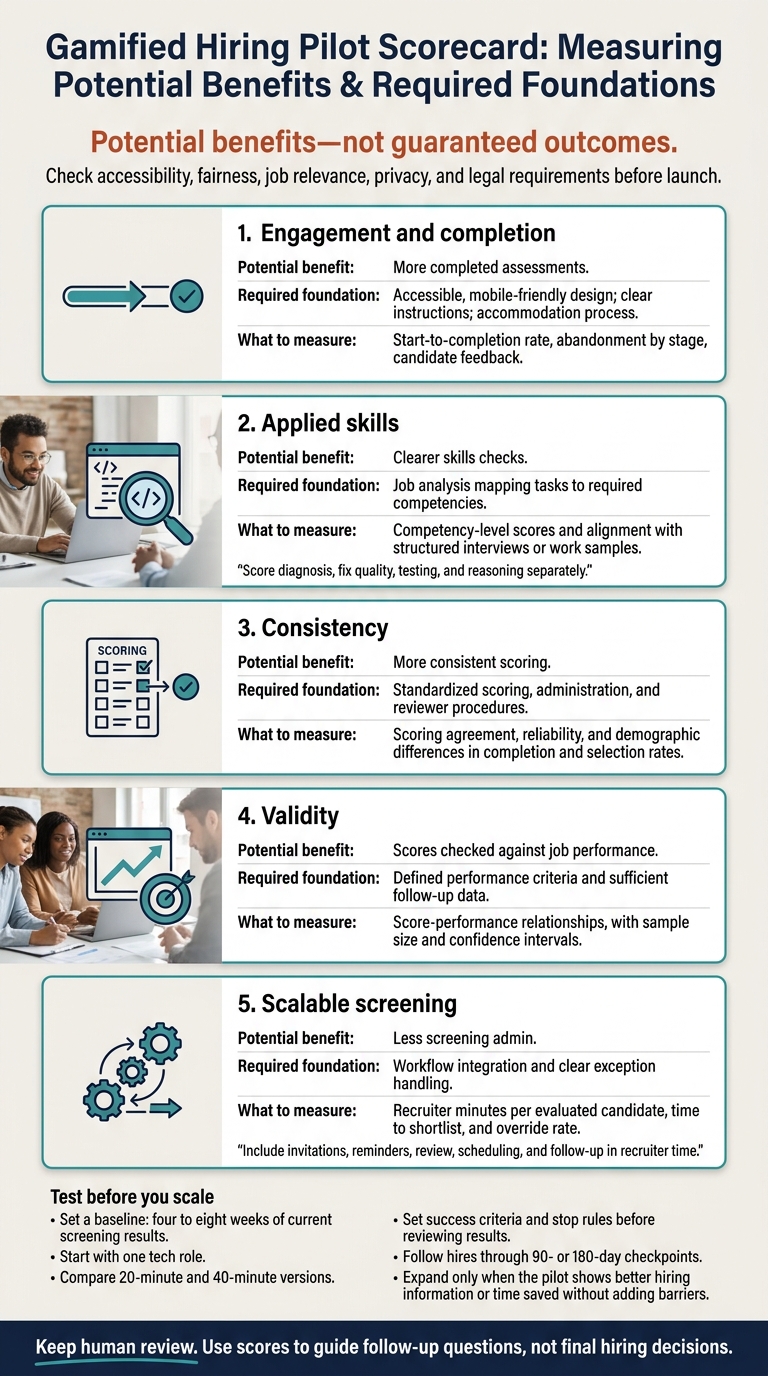
Use this checklist to turn the five benefits into a pilot plan with clear requirements and measurable results.
| Benefit | Prerequisite | Metrics |
|---|---|---|
| Engagement and completion | Accessible, mobile-friendly design; clear instructions; accommodation process | Start-to-completion rate, abandonment by stage, candidate feedback |
| Applied skills | Job analysis mapping tasks to required competencies | Competency-level scores and alignment with structured interviews or work samples |
| Consistency | Standardized scoring, administration, and reviewer procedures | Scoring agreement, reliability, and demographic differences in completion and selection rates |
| Validity | Defined performance criteria and sufficient follow-up data | Score-performance relationships, with sample size and confidence intervals |
| Scalable screening | Workflow integration and clear exception handling | Recruiter minutes per evaluated candidate, time to shortlist, and override rate |
Measure each benefit against your baseline. Expand only when the pilot shows it can improve your screening process.
Set a baseline first. Record four to eight weeks of current screening results. If hiring volume is low, use the largest recent cohort available. Keep metric definitions consistent and separate results by role and location. Your comparison point is your own baseline, not a universal benchmark.
Pilot one or two representative tech roles. Set success criteria and stop rules before reviewing results, including when to pause for technical failures, unexplained subgroup differences, or weak validation evidence. Compare matched cohorts where feasible.
Treat pilot results as preliminary evidence. Follow hires through 90- or 180-day checkpoints to assess how scores relate to job performance.
Review legal requirements separately. Before launch, clear the assessment with employment counsel. Title VII, the ADA, and the ADEA apply to employment testing. Review the Uniform Guidelines on Employee Selection Procedures and provide reasonable disability accommodations when required. Standardized scoring alone does not establish fair treatment or job relevance.[21][39]
Check privacy and automated-hiring rules before launch, too. New York City’s Local Law 144 generally requires covered automated employment decision tools to have a bias audit within one year of use, a publicly available results summary, and specified candidate notices.[36][37][38] Requirements vary by jurisdiction and use case. Review them with counsel, alongside your rules for data collection, access, retention, and deletion.
Conclusion: Prioritize Job-Relevant Evidence Over Game Mechanics
After reviewing your pilot metrics, base your decision on job relevance, not game design. Gamified assessments work only when they measure job-relevant skills reliably and treat applicants fairly.
Start with one tech role. Map three to five core competencies to tasks, and keep the assessment only if it improves hiring evidence or screening efficiency without adding barriers.
Use scores to guide follow-up questions, not final hiring decisions. Combine them with structured interviews, shared scoring criteria, and documented reviewer judgment. A high score should never outweigh stronger evidence of job performance. The assessment should support your hiring evidence, not replace it.
FAQs
How can we validate assessments with low hiring volume?
When hiring volume is low, keep assessment costs and admin work low too. Skip expensive, complex software in favor of a lean, manual-first approach. Structured interview guides and behaviorally anchored rating scales (BARS) help your team assess applicants consistently and objectively.
Keep technical assessments short and relevant to the role. Pair test results with human review so hiring decisions include the judgment and context that scores alone can’t provide.
How should assessments differ for junior and senior developers?
Match each assessment to the role’s requirements and complexity. For senior developers, use system design exercises or in-depth code reviews to assess architecture and problem-solving. For junior developers, focus on fundamental coding, debugging, or refactoring skills.
Keep assessments job-relevant and limit them to 60 to 90 minutes. You’re testing skill, not stamina. Use standardized scorecards that define the behaviors expected for each rating, so your hiring team can make objective, consistent decisions.
How should we handle candidates using AI during assessments?
Set clear rules on whether candidates can use documentation, web searches, or AI coding tools. Use plagiarism detection, tab-switch monitoring, or similarity checks against known AI-generated code to support assessment integrity without adding unnecessary friction.
Require human review of every flag in context. Never reject candidates automatically. Keep AI output separate from final hiring decisions. Trained reviewers must assess job-related evidence, not rely on AI-generated scores.