
If your hiring records live across inboxes, spreadsheets, and manager folders, every new hire adds cost, delay, and risk.
I see audit-ready recruitment in simple terms: one process, one file per role, clear approvals, and records you can pull in minutes. For scaling companies in SaaS, Technology, IT, Fintech, Engineering, Security, Insurance, and Professional Services, that means less admin drag, tighter hiring control, and fewer hours lost chasing paperwork. It also makes it easier to cut waste, especially when teams are already trying to save 80+ hours a month in hiring admin and reduce external recruitment spend by up to 70% versus agency fee models.
Here’s the short version:
- Set one hiring workflow from requisition to onboarding
- Use the same templates for job ads, scorecards, offers, and approvals
- Keep one record trail for each requisition
- Store files in one system with limited access
- Set retention rules and keep I-9s separate
- Run quarterly spot checks so gaps do not build up
- Track a small set of metrics like time-to-hire, file completion rate, and admin hours
If you need outside support, keep control of the process and the data. Providers like Rent a Recruiter or an embedded recruiter should work inside your system, not outside it.
The point is simple: you do not need more hiring activity, you need a hiring process that stands up under pressure.
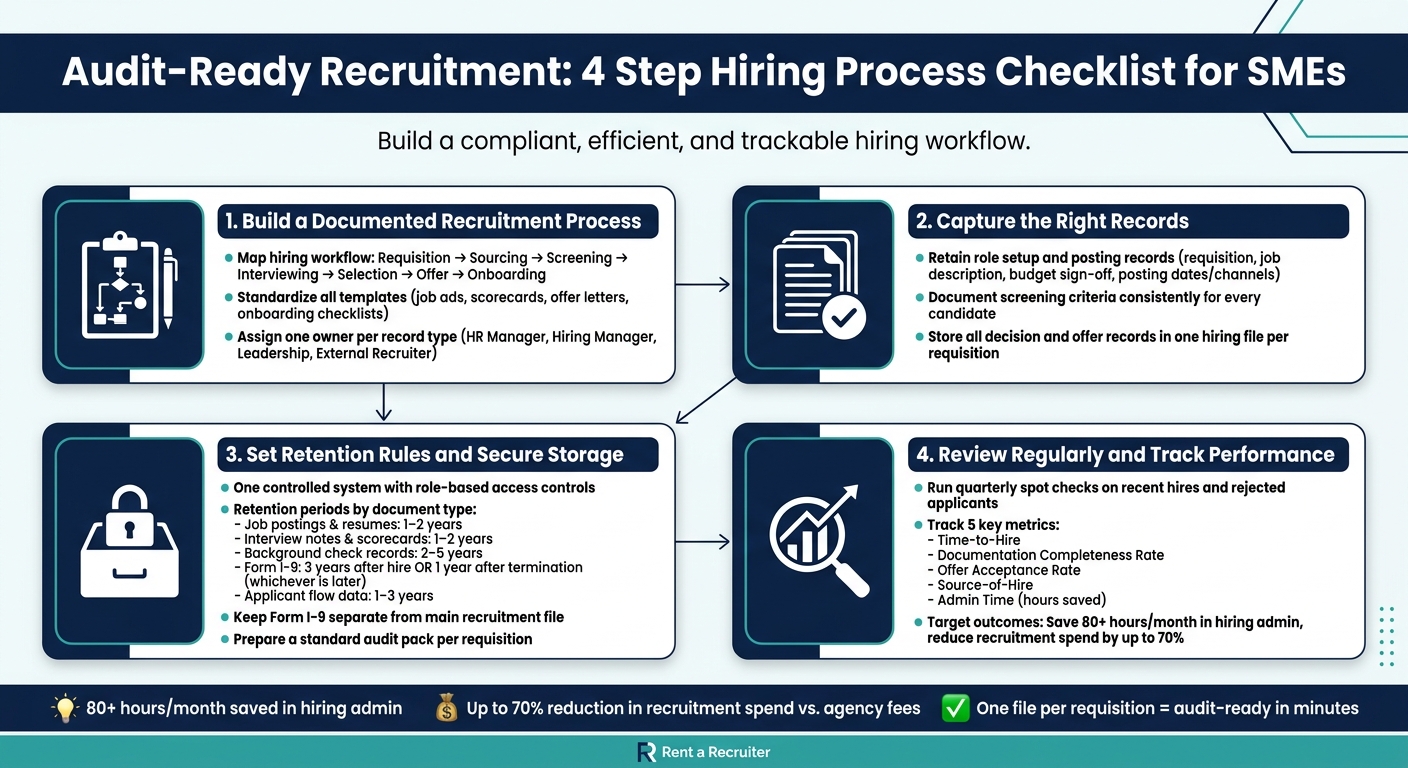
Audit-Ready Recruitment: 4-Step Hiring Process Checklist for SMEs
Compliance Audits Explained for HR: A Beginner’s Guide to Labor Law Adherence
sbb-itb-a23bd6a
Checklist 1: Build a documented recruitment process before you hire
Use this checklist to turn audit requirements into a repeatable hiring workflow.
Audit readiness starts with a repeatable, documented process that every hiring manager follows. If your team hires in different ways depending on the manager, the role, or the deadline, problems pile up fast. You lose time, records go missing, and audit risk goes up.
"No documentation means every hire starts from scratch." – Checkr Hiring Guide [2]
Map the hiring workflow from requisition to onboarding
Treat your hiring workflow as a sequence. Each step needs a clear owner, a defined output, and at least one approval point. That gives you a clean record trail, better control, and fewer gaps when someone asks for proof.
The table below maps each stage to the documents your team should produce and the audit checks that apply.
| Hiring Stage | Required Documents | Audit Checks |
|---|---|---|
| Requisition | Business case, workload analysis, approved job description, headcount sign-off | Leadership and finance approval |
| Sourcing | Job ad copy, posting locations | EEO law compliance |
| Screening | Applications, minimum qualification review | Consistent criteria applied to all candidates |
| Interviewing | Structured interview guide, scorecards | Standardized questions, comparable scoring |
| Selection | Background check consent, background check reports, reference check records | Privacy rights, FCRA compliance |
| Offer | Signed offer letter, compensation terms | Labor law and company policy alignment |
| Onboarding | Completed new hire documentation, IT checklist | Record retention for audit compliance |
A process map makes missing steps easier to spot. If there is no owner, no document, or no approval, you have a weak point in the workflow.
Once the workflow is mapped, the next job is to standardize the forms behind each step.
Standardize the documents your team uses
Use the same templates for job descriptions, job ads, interview guides, scorecards, offer letters, and onboarding checklists.
This is not just an admin exercise. It helps you cut delays, keep hiring decisions consistent, and show clear evidence if your process is ever reviewed. In scaling SaaS, Technology, IT, Fintech, Engineering, Security, Insurance, and Professional Services businesses, that kind of consistency matters because hiring volume can climb fast while internal HR support stays lean.
Require interviewers to complete scorecards before any group debrief. That reduces groupthink, protects independent judgment, and gives you a cleaner record of how the decision was made. It also keeps evaluation records more defensible. [3]
Then assign one owner for each record set.
Assign ownership for records, retention, and access
Assign one owner to each record type. Shared responsibility sounds fine in theory, but in practice it often means nobody owns the gap.
| Role | Primary Responsibility | Key Records Owned |
|---|---|---|
| HR Manager | Compliance oversight, final file control | Approved job descriptions, complete hiring files |
| Hiring Manager | Role definition, interviewing, selection | Scorecards, interview notes, evaluation records |
| Leadership | Strategic alignment, offer approval | Requisition approvals, final compensation terms |
| External/Embedded Recruiter | Sourcing, screening, process management | Sourcing logs, screening notes, candidate status updates |
Ownership of the record trail stays internal. If you work with an external or embedded recruitment provider like Rent a Recruiter, they must follow your templates, approvals, and ATS logging so every record stays centralized and audit-ready. [1]
That matters for more than compliance. It gives you better visibility into who approved what, where delays happen, and which parts of the process need work. If you are paying for outside recruitment support, you should still control the workflow, the data, and the audit trail.
"When expectations are defined upfront and applied consistently, hiring becomes faster, more predictable, and easier to get right – without needing a dedicated HR team or legal support." – Checkr [2]
Checklist 2: Capture the right records during sourcing, screening, and selection
Once your workflow is mapped and ownership is clear, the next job is simple: make sure the right records are captured at every stage.
This is where many teams slip. Not because the process is broken, but because the paperwork is patchy. And when an audit lands, missing documentation turns into an avoidable problem.
Follow the hiring workflow in the same order every time: posting, screening, selection, then offer.
Retain role setup and posting records
Keep the approved requisition, final job description, budget sign-off, posting dates, and posting channels.
You should also retain a copy of every job ad you posted, plus where it appeared, such as your company website, job boards, and social media. That gives you a clear EEO posting trail and shows how the role went to market.
If someone asks, "Where was this role advertised, and when?", you should be able to answer in minutes, not hours.
Document screening criteria and candidate evaluation consistently
Keep every application and resume received.
For each candidate, record how they met, or did not meet, the minimum qualifications. That should link back to the criteria set before the role was posted. If you use skills-based assessments, store the results with the scoring rubric.
Consistency matters here. For the same role, use the same minimum-qualification checklist, question set, and scorecard for every candidate.
Completed scorecards and interview notes should link each rating to skills, experience, and role requirements, not gut feel or off-the-cuff impressions.
That kind of discipline does two things at once. It cuts audit risk, and it gives you a hiring process you can defend with facts.
Store decision and offer records in one hiring file
Keep every document in one file structure for each requisition.
Each hire should have one retrievable file. That file should include:
- Shortlist rationale
- Reference check notes
- Background check reports
- The final approval trail
- The signed offer letter
- The signed employment agreement
- A rejection communication log, including outreach sent to non-selected candidates and disposition reasons tied to the role criteria
Store these records in one ATS or secure digital filing system so your team can pull them fast.
When records are split across email threads, shared drives, and hiring manager folders, you lose time and add risk. One hiring file per requisition keeps the process cleaner, faster, and far easier to defend.
Checklist 3: Set retention rules, secure storage, and an audit pack
Capture records, secure them, keep them for the right length of time, and pull them up fast when someone asks.
Use one system of record with controlled access
Once each requisition file is complete, store it in one controlled system.
When records are scattered across email, shared drives, and personal folders, audits take longer and missing documents become a problem. Put everything in a single ATS or HRIS with role-based access controls. Limit access based on role, log every action, and back records up automatically.
That gives you one place to find the full hiring record. It also means every file is traceable, easy to retrieve, and easier to defend if your process is ever reviewed.
"Documentation is the final piece. When you’ve recorded how roles were defined, how candidates were evaluated, and how decisions were made, you have something to point to. That record protects your team, supports fairness, and makes every subsequent hire easier." – Checkr Hiring Guide [2]
Define retention periods for key recruitment documents
Track each document type on its own and apply the right retention period. The table below covers the main records your team should track, along with standard retention periods and who owns each one [2].
Keep Form I-9 separate from the main recruitment file so you can produce it fast if needed [4].
| Document Type | Retention Period | Storage Location | Responsible Owner |
|---|---|---|---|
| Job postings & descriptions | 1 to 2 years | ATS or HRIS | Recruiting lead |
| Applications & resumes | 1 to 2 years | ATS or HRIS | Recruiting lead |
| Interview notes & scorecards | 1 to 2 years | ATS or HRIS | Hiring manager |
| Background check records | 2 to 5 years (varies by state) | Secure HRIS folder | HR/People Ops |
| Form I-9 | 3 years after hire OR 1 year after termination, whichever is later | Separate I-9 binder | HR/People Ops |
| Offer letters & rejection records | 1 to 2 years | ATS or HRIS | Recruiting lead |
| Applicant flow data | 1 to 3 years | HRIS or compliance folder | HR/People Ops |
If you hire for remote roles that could be done in California, Colorado, or Washington, make sure the job posting includes salary ranges and benefits details. Keep a copy on file to show compliance [4].
Prepare a standard audit pack for each requisition or hire
Build a standard audit pack for every requisition before the hire is closed.
Each pack should include:
- Requisition approval
- Final job posting copy
- Full applicant list with movement through each stage
- Screening criteria and scorecards used
- Interview records
- Selection rationale
- Offer documentation
- Onboarding confirmation [2]
This saves time during internal spot checks and helps you respond faster to EEOC or OFCCP requests [2].
Checklist 4: Review the process regularly and improve performance
Once your records are stored and kept the right way, the next step is simple: check the process, find the weak spots, and fix them before they turn into bigger problems.
A documented process on its own does very little. It only works when your team follows it, every time.
Run quarterly spot checks on recent hires and rejected applicants
Each quarter, review a random sample of recent requisitions and compare every file against your audit pack standard.
Check that background screening was cleared before the employee start date. Confirm policy signatures were completed before system access was granted. Make sure candidates applying for the same role were scored against the same rubric. Review rejected applicant files to confirm they were closed on time and that disposition notes were consistent. Review role-based access each quarter as well.
This gives you a clear view of whether the process is being followed in practice, not just on paper.
Use what you find to monitor a small group of metrics that show compliance health and hiring speed side by side.
Track a small set of metrics for audits and hiring efficiency
You do not need a huge dashboard. A small, consistent set of metrics is enough to show whether your hiring process is audit-ready and where time is being lost.
| Metric | How It’s Measured | What It Supports |
|---|---|---|
| Time-to-Hire | Days from requisition to offer acceptance | Identifies bottlenecks and helps control vacancy costs |
| Documentation Completeness Rate | % of hiring files with all required signatures, scorecards, and clearances | Direct indicator of audit readiness |
| Offer Acceptance Rate | % of extended offers accepted by candidates | Signals employer brand strength and market competitiveness |
| Source-of-Hire | Origin of successful hires, such as referral or job board | Identifies the most cost-effective recruiting channels |
| Admin Time | Hours spent on manual follow-ups and record retrieval | Measures process efficiency and the ROI of automation |
One metric deserves extra attention: internal admin time.
If your team is spending hours chasing approvals, following up on missing forms, or digging through folders during reviews, that is a cost. Tracking admin time helps you put a dollar value on process drag and show the return from automation or better hiring support.
"The tradeoff between speed and diligence isn’t built into hiring; more often than not, it’s a symptom of an unclear process." – Checkr [2]
Those two checks, file quality and performance data, tell you whether the process is doing its job.
Conclusion: Use audit-ready hiring to support growth
Documented workflows, standard templates, centralised records, and quarterly spot checks help cut risk and keep hiring consistent.
For SMEs scaling fast, Rent a Recruiter places experienced recruiters directly into your team. That means tighter process control and end-to-end hiring management that keeps your hiring audit-ready as you grow, while often cutting hiring costs by up to 70% compared with traditional recruitment agency fees and saving more than 80 hours per month in internal hiring and admin time [1]. Book a call to see what that could look like for your team.
FAQs
What makes recruitment audit-ready?
An audit-ready recruitment process relies on clear controls, repeatable steps, and a clean record trail from opening a role to making a hire.
That matters for more than compliance. It saves time, cuts risk, and gives you a hiring process you can defend when someone asks, Why was this person hired? or Where is the record?
At a practical level, that means:
- Standardisation: consistent job analysis, interview guides, and scoring criteria across roles
- Documentation: centralised records for job descriptions, interview notes, assessment results, hiring decisions, and separate secure I-9 files
- Accountability: clear owners, ATS checkpoints, AI oversight, and scheduled reviews
If your team is hiring at pace, this kind of structure stops recruitment from turning into a patchwork of one-off decisions. You get cleaner data, fewer gaps, and less time spent chasing paperwork later.
Which hiring records matter most?
Keep one central record for every hire. If your team has to dig through email threads, spreadsheets, and Slack messages to piece together a hiring decision, you’re wasting time and adding risk.
The key records to keep are:
- the original job description
- the application
- interview notes and completed scorecards
- the final hiring decision
- headcount and budget approvals
- the reasoning behind the offer
This gives you a clear audit trail from approval to offer. It also makes it much easier to review hiring quality, answer internal questions, and keep your process tight as headcount grows.
Store legally required documents, such as I-9 forms, securely in separate files.
How often should we audit hiring files?
Use a fixed audit schedule so compliance work does not drift.
Review job postings, background checks, general legal requirements, payroll, and worker classification quarterly. Audit Form I-9 for new hires monthly.
Review recordkeeping, pay equity, and AI tool bias annually. If hiring volume is high, adverse impact analyses may also be done monthly.


