Hybrid hiring breaks down when your team posts jobs by hand, checks five systems, and loses track of source data. If you connect job boards to your ATS the right way, you cut admin, keep job data clean, and give hiring leaders better numbers on cost, time to fill, and source quality.
I’d boil it down like this: post once, route applications into one system, standardise hybrid fields, and track which boards lead to hires, not just clicks. That matters when recruiters already spend 17.7 hours per vacancy on admin, and when 38% of completed candidate screenings happen outside normal working hours.
The short version:
- Manual posting wastes time and creates data drift
- Structured fields keep hybrid details consistent across boards
- Clear routing and deduplication stop rework inside your ATS
- Source tracking helps you shift spend towards boards that lead to hires
- Weekly checks and phased rollout keep the setup stable as hiring grows
For CEOs, CFOs, HR leaders, and Talent leaders, the point is simple: job board integrations are not just a tooling change, they are a cost and control play, much like an embedded recruitment service.
Guhuza Integrations | Connect Your Job Board & ATS to Reach More Qualified Candidates
sbb-itb-a23bd6a
Map Your Hybrid Hiring Workflow Before Connecting Any Tools
Once the purpose of the integration is clear, map the workflow it needs to support. Document the workflow first, then connect the tools. If you skip that step, the integration ends up serving a messy process instead of fixing it. For hybrid roles, that matters fast. You need location, onsite schedule, and work authorisation data to stay consistent across every board.
Audit your recruiting stack and manual handoffs
Start by listing every tool your team touches during a hire: your ATS, job boards, interview scheduling software, HRIS, email, and collaboration tools like Slack or Microsoft Teams.
Then trace one recent hybrid hire from start to finish. Follow the process closely. Where does a recruiter copy data from one system to another? Where does someone manually repost a role after a title change? Where does a spreadsheet get exported just to share a shortlist?
Pay close attention to:
- Location rules
- Onsite days
- Remote eligibility
These are the details most likely to drift across job boards in a hybrid hiring process.
Spreadsheets, reposts, exports, and offline notes usually point to the same problem: your process still depends on manual patchwork. Those are the gaps a well-set integration should remove. Cut those handoffs, and you save time, reduce posting errors, and give your team cleaner data to work from.
Standardize the fields that matter for hybrid roles
Define each field and its allowed values before you map anything. Hybrid roles need structured fields. If they don’t have them, postings start to vary by channel, and that creates confusion for both your team and your reporting.
| Field | Recommended Format |
|---|---|
| Job title | Public job title with work type (e.g., Senior Software Engineer – Hybrid) |
| Location | City, ST format (e.g., Austin, TX) |
| Hybrid/remote status | Required dropdown: Hybrid 2-3 days/week onsite, Remote (U.S.-based), etc. |
| Salary range | USD numeric range (e.g., $95,000-$115,000/year) |
| Work authorization | Required dropdown: U.S. work authorization required, Open to visa sponsorship, etc. |
| Employment type | Full-time, Part-time, Contract, Temporary |
| Owner | Recruiter, hiring manager, and department as structured fields |
One of the most common mapping mistakes is storing hybrid status in free-text job descriptions instead of a structured field. It sounds minor, but it causes real issues. One board may show the role as remote, while another shows the wrong city. That weakens trust in the data and creates extra cleanup work later.
Clean structured fields do two jobs at once: they reduce duplicate candidate records, and they make source reporting more dependable from day one.
Assign one owner for setup, testing, and changes
Assign one person to maintain mappings, test changes, and log updates. In most teams, that sits with a Talent Operations, Recruiting Operations, or HR Systems lead. You want someone who understands both recruiting ops and ATS configuration.
Without a clear owner, small changes turn into messy fixes. A field gets edited, a sync breaks, and suddenly your team is spending time correcting job data instead of hiring. One owner keeps setup tight, testing clean, and changes under control.
With the workflow mapped, you can connect boards and field mappings without rework.
How to Set Up Job Board Integrations Step by Step
Native vs. API vs. Middleware Job Board Integrations for Hybrid Hiring
With your workflow mapped and your fields standardised, you’re ready to connect the tools. The goal is simple: move fast without creating admin work later.
Connect job boards, authenticate access, and map job fields
Use the standardised fields from your talent acquisition strategies before you connect anything. Start with the job boards your ATS already supports natively. In most cases, native login or OAuth is the best first move. If a board isn’t supported, use an API or middleware.
Route every application into your ATS. Map location, onsite days, hybrid status, work authorisation, and compensation once, then keep that setup consistent across every board.
Before you go live, test the full posting flow end to end. Check that the role appears correctly on each connected board. Then make sure the application flows back into your ATS, the source is tagged properly, and the candidate lands in the right requisition.
That sounds basic, but it’s where teams lose time. One bad field mapping can create hours of cleanup.
Configure posting rules, routing, and deduplication
Once fields are mapped, decide where each role should post and how applications should return. Not every hybrid role belongs on every board. Set posting rules based on role type and market so you’re showing jobs where the right people are most likely to apply.
Routing matters just as much as distribution. Each application should land in the correct requisition in your ATS automatically. Set source tracking so you can follow each source through screening, not just the initial click.
Deduplication is another must-have. One person should create one record, even if they apply more than once. If that rule isn’t in place, your team ends up reviewing the same applicant again and again, and reporting gets messy fast.
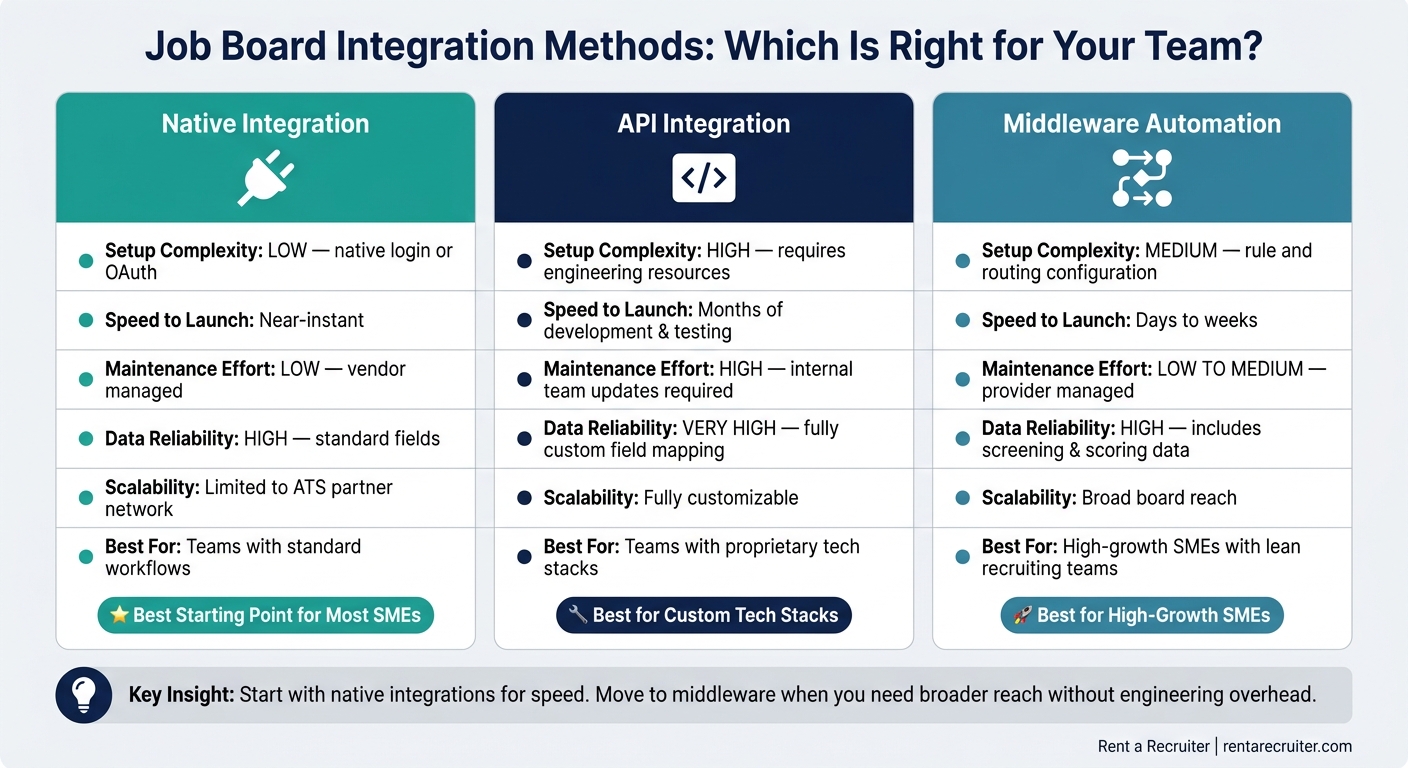
Comparison table: native integrations vs. API builds vs. middleware automation
Use the table below to match setup depth to your team’s capacity.
| Native Integration | API Integration | Middleware | |
|---|---|---|---|
| Setup complexity | Low, native login or OAuth connection | High, requires engineering resources | Medium, rule and routing configuration |
| Speed to launch | Near-instant | Months of development and testing | Days to weeks |
| Maintenance effort | Low, vendor managed | High, internal team updates when APIs change | Low to medium, provider managed |
| Data reliability | High for standard fields | Very high, fully custom field mapping | High, includes screening and scoring data |
| Scalability | Limited to the ATS partner network | Fully customizable | Broad board reach |
| Best fit for high-growth SMEs | Teams with standard workflows | Teams with proprietary tech stacks | High-growth SMEs with lean recruiting teams |
For most growing SMEs hiring hybrid roles, native integrations are a strong starting point. They get you live fast and keep setup simple. If you need broader distribution and more routing flexibility, middleware can help without the complexity and cost of a custom API build.
Improve Integrated Posting Performance for Hybrid Roles
Once the integration is live, the next step is simple: make each posting clearer and easier to track. For hybrid roles, that matters more than most teams think. If the post lacks the right detail, people apply anyway, then drop out later when they learn the setup does not suit them.
Posting on more boards will not fix that. Clear labels and clean source tracking are what help the right applicants self-select early.
Write hybrid job posts that are clear across every board
Spell out the hybrid setup in every post: work model, location, required onsite days, and salary. Use the standard ATS fields you already have so the same details flow to each board. That keeps postings aligned and makes reporting easier to compare.
Include one USD salary range for every role. Many applicants filter by pay. Leave salary out, and you may shrink your qualified applicant pool before anyone even reads the rest of the job description. A single range also keeps board-level reporting easier to read.
This is not just about clarity. It saves time. When applicants know the deal up front, you spend less time screening people who were never a fit for the hybrid setup in the first place, which is a key benefit of our fixed-cost recruitment model.
Use source data to cut waste and speed up hiring decisions
Once your integration tracks applications by source, you can stop guessing where your job board budget should go. The gap between volume and hiring output is often bigger than teams expect.
Job boards drive 61% of applicants but only 43% of hires, while referrals produce just 2% of applicants but 11% of hires. [1][2] That tells you something important: more applicants do not always mean more hires.
Track:
- Cost per applicant
- Apply-to-interview conversion
- Time to fill by source
Then use that board-level data to move spend for hybrid roles. Put more budget into boards that lead to hires, not boards that just send traffic.
Clear posts improve applicant quality. Source data shows which channels are worth paying for.
Comparison table: one standard posting vs. board-specific variations
For most SMEs, one master posting is the better option, with only light local changes where needed. If you do make local edits, keep the same work model and location data in every version. If those details drift, reporting gets messy fast and applicants get mixed messages.
| One Standard Posting | Board-Specific Variations | |
|---|---|---|
| Candidate quality | Consistent expectations across all boards; reduces misfit applications | Can improve quality per board if tuned well, but risks confusion if hybrid details diverge |
| Admin effort | Low, update once in your ATS, changes cascade everywhere | Higher, multiple versions to maintain, track, and update when policies change |
| Reporting consistency | Strong, performance differences are clearly attributable to board audience, not content | Harder to interpret, unclear whether results reflect board quality or message differences |
| Regional relevance (U.S.) | Works well for national roles; may miss local nuance (for example, commuter benefits in NYC) | Better for city- or state-focused boards, but requires strict governance to avoid contradictions |
| Best fit for | SMEs with lean recruiting teams and consistent hybrid policies | Teams with dedicated content ownership and advanced analytics capacity |
After rollout, keep an eye on delivery and fix broken mappings early. If a field stops syncing cleanly, your reports stop telling the truth, and that can lead to bad spend decisions.
Keep the System Running and Scale Hiring Without Adding Admin
Monitor integration health and fix issues early
After launch, the work shifts to maintenance, not just activation. Once the integration is live, review it every week so small problems do not distort your hiring data. A minor issue can snowball fast. One broken field mapping on a hybrid role can skew source reporting quietly, and by the time someone spots it, you’ve already made decisions on bad data.
Check failed-posting alerts daily. Spot-check 5 to 10 recent postings each week. Review posting rules, board category mappings, and sponsored settings every quarter. That keeps hybrid job details accurate for candidates and keeps your source data clean.
Don’t stop at postings. Watch the application flow as well. If a major source that usually drives a large share of hybrid role volume suddenly drops close to zero, treat it as an incident, not a one-off. Check API credentials. Confirm the integration is still authenticated. Make sure your posting rules still match the job settings in your ATS. Silent failures are the toughest ones to catch unless you’re doing routine record-count checks between your ATS and each board.
Clear ownership matters here. If nobody owns the checks, they slip, and your reporting drifts away from reality.
- A recruiter ops lead should own daily error logs and weekly field checks
- IT should own API monitoring and authentication
Use a phased rollout to expand from one team to company-wide hiring
Start small, then expand. Rolling out integrated job board workflows across every department at once usually creates rework, more admin, and slower fixes. A phased rollout cuts risk and gives you data you can trust before you make bigger changes.
Begin with one contained, high-volume hiring lane. That could be one department, one role type, or one geography. Set success metrics before the pilot starts: time-to-fill, application volume by board, admin hours saved, and data accuracy. Run the pilot only through the integrated workflow. Gather recruiter feedback. For more industry insights, visit our recruitment blog. Fix routing or field mapping issues before they spread into the next phase.
Once the pilot is stable, move into adjacent teams using the same hybrid model. Leave the most complex roles until later, after your routing logic and field standards are working as they should.
Conclusion: Build a scalable hybrid hiring process with the right support
Once the workflow is stable, the upside is simple: you scale hiring without piling on more admin. Job board integrations remove the manual work that slows hybrid hiring down. Applications sit in one place. Source data stays usable. Your team stops re-entering the same details across five different platforms.
Recruiters spend an average of 17.7 hours per vacancy on administrative tasks alone, more than two full working days per hire. [4][5] A well-run integration cuts that load, which gives your team more time for the work that affects hiring outcomes.
The setup does take effort. But the return builds over time. If your team doesn’t have the bandwidth to manage both hiring and the operating side of the integration, Rent a Recruiter places experienced recruiters directly into your team. They manage end-to-end hiring and take care of ATS and job board workflows, field mapping, and ongoing improvements, without adding permanent headcount. Companies typically reduce hiring costs by up to 70% compared to traditional agency fees and save over 80 hours per month in internal hiring admin time. [3]
FAQs
How do job board integrations improve hybrid hiring?
Integrating job boards with your recruitment platform makes hybrid hiring far easier to run.
Instead of posting roles manually across multiple sites, you can automate job ads, keep job descriptions aligned, and pull applications into one dashboard. That means less admin, fewer posting errors, and more control over your hiring process.
It also helps your team move faster. Real-time updates cut down on back-and-forth, while one central view of applicants makes it easier to track progress and make decisions. For scaling teams, that saves time and keeps hiring from turning into a mess.
There’s a candidate side to this too. Clear, consistent job ads across channels give people a better view of the role and what to expect. That kind of clarity matters, especially when you’re hiring across markets or running multiple roles at once.
Rent a Recruiter can support this by managing integrations and bringing more structure and consistency to the process.
What fields should we standardize for hybrid roles?
Standardise critical fields so your systems don’t fall out of sync and your reporting doesn’t drift off course.
A clear data dictionary helps here. It sets the rules for each field: the data type, whether it’s required, and the exact format it must follow. That includes things like dates in YYYY-MM-DD and phone numbers in E.164.
This matters more than most teams expect. If one system stores data one way and another stores it differently, you get sync failures, bad records, and manual cleanup work that eats into your team’s time.
Key fields usually include:
- Candidate information: legal name, email, phone number, and SSN
- Role data: department, cost center, and compensation details
- Process data and system identifiers: hire date, interview feedback, assessment status, employee ID, and persistent person GUIDs
Get these fields aligned early, and you cut down on admin, reduce reporting errors, and make hiring data far more dependable across your stack.
How do we know which job boards lead to hires?
Track end-to-end hiring outcomes in your ATS, not just application volume.
That means logging each job board as the original source, then measuring what happens after the click:
- submit-to-interview
- interview-to-hire
- offer acceptance
- time-to-hire
- 90-day retention by source
This is where a lot of teams get caught out. A board can send a high volume of applicants and still be a poor spend. If those applicants don’t convert into interviews, offers, and retained hires, the volume means very little.
With consistent ATS source tagging and a funnel-view dashboard, you can compare source quality side by side. You’ll see which boards drive hires, which ones slow your team down, and where your budget is doing its job.
The business impact is simple: better spend, less wasted recruiter time, and clearer hiring decisions.