If your hiring team keeps repeating the same role pitch, process steps, and company story, YouTube can cut that load and help you get better-fit applications.
I’d sum it up like this: YouTube works best when I use it as a hiring tool, not a brand side project. The article shows how four video types, employer brand, role spotlights, employee stories, and process explainers, can help you save recruiter time, cut wasted screening, and improve direct application flow. It also ties video use back to hiring outcomes, with figures like 34% more applications on job posts with video, 12% more views, and candidates 2x more likely to watch a video than read a job description.
If I were leading hiring in SaaS, IT, Fintech, Engineering, Security, Insurance, or Professional Services, here’s what I’d take from it straight away:
- Start by auditing your recruitment process to find the hiring bottleneck, not the channel
- Use four repeatable video formats tied to hiring stages
- Keep each video focused on one EVP point
- Use YouTube across job ads, careers pages, outreach, and interview emails
- Track watch time, retention, click-through rate, and ATS results
- Review performance against applications, interview rate, offer rate, and time-to-fill
The main point is simple: a well-run YouTube hiring setup can lower admin, improve message control, and help your team scale hiring with less waste.
I’d treat the rest of the article as the playbook for building that system.
How to Make a recruitment Video People Will Actually Watch
sbb-itb-a23bd6a
Choose the Right YouTube Video Formats for Your Hiring Goals
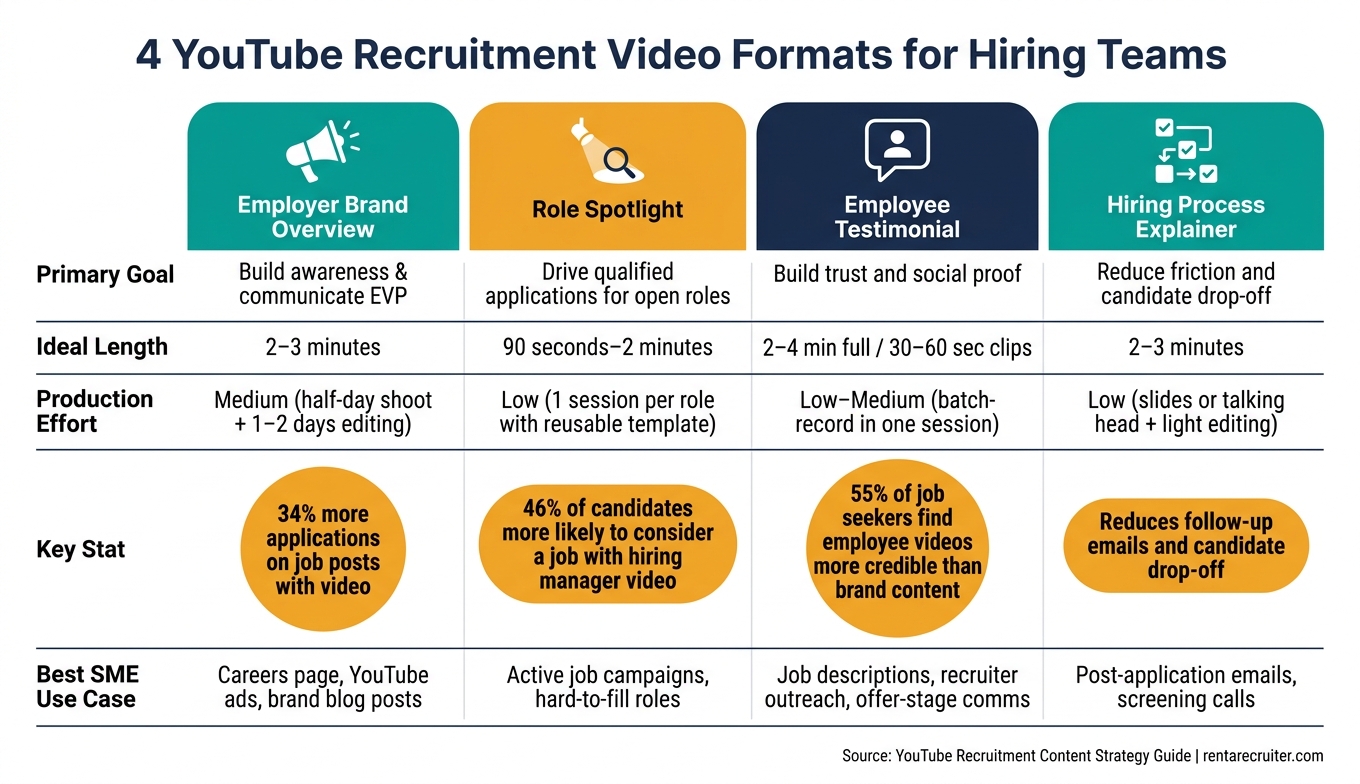
4 YouTube Recruitment Video Formats: Goals, Length & Production Effort
Most SMEs only need four video formats to cover the main hiring stages, and you do not need a dedicated video team to make them work.
The key is simple: pick the format that fits your current hiring pressure and the kind of content you can repeat across roles. That keeps production lean and gives you assets your team can use again and again.
Employer Brand, Role Spotlight, Testimonial, and Process Videos
Employer brand overview videos help people understand why your company is worth joining. They usually cover your mission, culture, benefits, and growth path in around 2 to 3 minutes. Use them to support your talent pipeline, careers page, YouTube ads, and brand posts.
Role spotlight videos are tied to a live job. Show what the role owns, what good performance looks like in the first 90 days, and who will do well on the team. Keep these to 90 seconds to 2 minutes. Around 46% of candidates are more likely to consider a job when it includes a video from the hiring manager.[1] A hiring manager speaking straight to camera, even on a smartphone, can do the job well.
Employee testimonial videos show what day-to-day life at your company looks like. Record 2 to 4 minute interviews, then cut them into 30 to 60 second clips for job descriptions, recruiter outreach, and offer-stage messages. 55% of active job seekers find employee videos more credible than company-produced content.[1] In plain terms, people tend to trust what employees say more than polished brand messaging.
Hiring process explainer videos help cut friction once someone applies. A 2 to 3 minute walkthrough of your application steps, interview stages, and timelines can reduce follow-up emails and clear up confusion.
How to Match Format to Hiring Stage and Team Capacity
Start with the format that fixes your biggest hiring bottleneck.
If you need to fill urgent or hard-to-fill roles, go with role spotlights first. They support application volume and help filter for fit. If you’re moving into a sustained hiring phase after funding or a product launch, begin with an employer brand overview, then add testimonials you can reuse across roles and campaigns. If candidates keep dropping off mid-process or asking the same questions, a process explainer will likely have the fastest payoff.
Here’s a simple way to map each format to the business need:
| Format | Primary Goal | Ideal Length | Production Effort | Best SME Use Case |
|---|---|---|---|---|
| Employer brand overview | Build awareness and communicate EVP | 2 to 3 minutes | Medium, half-day shoot and 1 to 2 days editing | Careers page, YouTube ads, brand-focused blog posts |
| Role spotlight | Drive qualified applications for open roles | 90 seconds to 2 minutes | Low, 1 session per role with a reusable template | Active job campaigns, hard-to-fill roles |
| Employee testimonial | Build trust and social proof | 2 to 4 minutes, then cut into 30 to 60 second clips | Low to medium, batch-record several in one session | Job descriptions, recruiter outreach, offer-stage communications |
| Hiring process explainer | Reduce friction and candidate drop-off | 2 to 3 minutes | Low, slides or talking head with light editing | Post-application emails, screening calls |
To keep production time down, batch your role spotlights in one afternoon, then record employee testimonials in the same session. Reuse the same intro graphics, lower thirds, and outro across each video. That gives you more output without piling extra work onto your team.
Build Recruitment Videos That Reflect Your EVP and Drive Action
Turn Your EVP Into Clear Scripts and Storylines
Once you pick a video format, give it one EVP message. Keep each video tight. One video, one theme. That way, each piece proves a single hiring promise and helps people self-select faster.
Start with the EVP themes that matter most to your target hires, such as career growth, manager support, flexibility, role impact, or the chance to build something new. Then match one theme to each video. If the theme is career growth, for example, show a mid-level employee talking through how they joined, what support they got, and how their role grew over time. Finish with one clear next step that sends viewers to your open roles.
A simple structure works best: start with the role, show the team, set expectations, and end with one next step.
Instead of giving employees a rigid script, use 5 to 7 open-ended prompts and let them speak in their own words.[6][8] Prompts can cover what surprised them about the company, how manager support shows up day to day, and what strong performance looks like. Natural answers make filming easier and make the message more believable.
Plan Shots, Captions, and Calls to Action for Better Performance
Plan your shots before recording. It saves editing time and helps you reuse footage across YouTube, LinkedIn, careers pages, and email. The point is not polish for the sake of it. The point is usable footage that works across channels.
Shoot for clarity, trust, and action. Use 2 to 3 real locations like team huddles, whiteboards, or workstations. Job postings with videos that show the real workplace atmosphere get a 46% higher application rate,[7] so skip staged scenes and stock-looking office shots.
Clean audio matters more than cinematic visuals. Add subtitles to every video, many people watch without sound, especially on mobile. Use short on-screen text to reinforce the main point without crowding the frame.[5][8]
End each video with a specific, low-friction call to action that matches where the viewer is in the hiring journey. Use one CTA only:
- Explore roles
- Apply now
- Watch the team playlist
A vague CTA throws away the attention you worked to earn.
Use Embedded Recruitment Support to Sharpen Messaging
An embedded recruiter works inside your hiring team. That means they see which roles are hardest to fill, which questions come up again and again, and where people drop out of the process.
Use those repeated candidate questions to decide what each video should answer. That makes it easier to choose which videos to make first, which EVP themes to lead with, and which messages need more proof before someone applies. Rent a Recruiter can audit your hiring messages and turn them into a focused YouTube roadmap. You get a clear content plan before you build out your channel structure.
Run a YouTube Channel That Supports Hiring at Scale
Set Up the Channel, Playlists, and Brand Elements
A single video will not do much if your channel is messy. Build a careers hub, not a random library.
Start with a dedicated brand channel under a name like CompanyName Careers or CompanyName Hiring. [4][16] That keeps hiring content separate from product marketing, helps candidates find you in search, and makes uploads easier to manage across your team. Use your company logo as the profile image. For the banner, show real team members and a clear EVP message tied to growth or learning. [4][12]
Organise the channel around four core playlists:
- Life at the Company for culture and day-to-day work
- Open Roles for role spotlights
- Team Stories for career journeys
- Hiring Process for interview stage explainers [4][11][12]
This makes self-serve easier for candidates. It also cuts basic inbound questions that eat up recruiter time.
Once the structure is in place, write the channel description around how candidates search. Mention the functions you hire for, where your teams sit, and why the role is worth a closer look. Add your careers page link and a recruiting contact email in the channel links section. [4][13][14] Each video should also include a short description with a direct apply link, so the next step is obvious.
Build a Content Calendar Around Hiring Cycles
Once the channel is set up, publish against planned hiring cycles.
Many SMEs only post recruitment videos when a role opens and the pressure is already on. A simple content calendar fixes that.
Map expected hires by quarter, split by function and seniority. Then line that up with business milestones. Tie content themes to funding, launches, and market expansion.
Give each month one main theme linked to your hiring plan. One month may focus on engineering. The next may shift to sales and customer success. The next may focus on early-career hiring.
Within each theme, mix evergreen content with role-specific content tied to live searches. Evergreen videos do more of the long-term work across multiple roles and hiring periods. Role-specific videos help when one hire needs extra attention. Reuse footage across both where you can, which keeps production time and cost under control.
Embed YouTube Content Across the Recruitment Process
Then use those same videos across the places where candidates already interact with your hiring process.
A YouTube channel only pays off when the videos are used across the hiring journey, not left sitting on the channel waiting to be found. [9][10][4][3][15]
Add a role spotlight and a hiring process explainer to your job ads. Embed your Life at the Company and Team Stories playlists on your careers page, so candidates weighing up options can quickly see what sets your team apart. When recruiters send outreach to passive candidates, a short team story video can do more than a long block of text. When you send an interview confirmation email, include a link to your interview process video so candidates show up better prepared, with fewer questions about format and logistics.
Use the same videos inside the business too. Share the role spotlight and EVP video in hiring briefs so every interviewer describes the opportunity in the same way. [4] It is a small habit, but it cuts back-and-forth between talent teams and hiring managers. It also gives candidates a clearer experience at each stage.
Measure Results, Improve Content, and Connect YouTube to Hiring Outcomes
Track the Metrics That Matter to Hiring Teams
Once your videos are live across your channel and hiring touchpoints, the next step is simple: track whether they improve hiring outcomes. Views alone don’t tell you much. You need to know if the content is helping you attract better-fit applicants and move them through the funnel.
Watch time and average view duration show how long candidates stay engaged. When people spend more time with employer brand and hiring process videos, they tend to come into the funnel with clearer expectations. That can cut drop-off later and support stronger offer acceptance. Audience retention shows where interest fades. If most viewers leave before you cover role requirements, you’re more likely to get mismatched applications and weaker interview conversion. CTR to your careers page or open roles shows whether the video is pushing the right next step. A strong CTR on a role spotlight often points to more motivated, better-informed applicants, which can reduce unqualified volume. Traffic sources show which channels, like YouTube search, LinkedIn posts, job ad embeds, or email, are sending the most engaged viewers, so you can put more budget and effort behind what works.
The table below links each metric to the hiring result it affects and what to do when performance slips:
| YouTube Metric | What It Signals | Hiring Outcome Affected | Next Action |
|---|---|---|---|
| Views | Role awareness and reach | Application volume | Improve titles, thumbnails, and distribution |
| Watch time / Avg. view duration | Depth of candidate engagement | Candidate quality, dropout rates | Tighten the script; move key info earlier |
| Audience retention | Where candidates lose interest | Application quality, interview conversion | Restructure the video; add captions at drop-off points |
| CTR to careers page | Strength of call to action | Application volume and quality | Test different CTAs; align the job page to the video messaging |
| Engagement (likes, comments, shares) | Content resonance | Employer brand perception | Review comments for recurring questions; update scripts |
| Traffic sources | Discovery channels | Cost per qualified applicant | Invest in the highest-performing distribution routes |
Candidates who watch a recruiting video are 64% more likely to apply.[2][19] But that uplift depends on execution. The video needs to be clear, aimed at the right audience, and connected to a smooth application path.
Use a Simple Review Process to Improve Future Videos
Use the data to decide what stays, what gets fixed, and what isn’t worth doing again.
A 60 to 90 minute monthly or quarterly review is usually enough. Keep the group small. A hiring manager or Head of Talent, a marketing or content lead, and a recruiter or recruitment partner will give you a useful mix of views without turning it into a long internal meeting that goes nowhere.
Review the top 5 to 10 videos from the period. For each one, compare YouTube analytics with ATS data, including applications sourced from YouTube, interview rate, offer rate, and time-to-fill. That gives you a much clearer picture of business impact. You’re looking for which formats drive qualified interest and which roles have messaging that isn’t landing. You should also check whether each video still fits the hiring stage and EVP theme it was meant to support.
Audience retention graphs are one of the most useful tools here. If viewers drop in the first 15 to 30 seconds, the intro is often too slow, too generic, or not close enough to the role. If the drop happens later, the issue is more likely pacing or visuals. If people leave before they hear about growth opportunities or salary range, move that information earlier. That’s not a small tweak. It can change who applies and how far they get.
Feedback from new hires and candidates adds something the numbers can’t. Ask whether they watched any of your YouTube videos before applying, and which one influenced their decision. That gives you direct proof of what’s helping. Over 55% of active job seekers find employee-generated video more credible than company-produced video,[17][18] so if testimonial content keeps coming up in feedback, that’s a clear sign to put more of it into the next production cycle.
End each review with a keep / improve / stop list. That gives you a practical output, not just a discussion:
- Keep: formats worth scaling
- Improve: scripts, hooks, or video structure that need fixing
- Stop: content types that don’t justify the production time
That list should feed straight into the content calendar for the next hiring cycle.
Conclusion: Build a Repeatable YouTube Recruitment Engine
A YouTube channel starts to pay off when each review makes the next round of content better. Pick a focused set of video formats tied to your hiring stages and broader talent acquisition strategies. Match every video to a clear EVP message. Keep the channel easy to navigate so candidates can find what they need without extra friction. Then review performance against actual hiring data, not just views, so each production cycle gets sharper. The process is simple: measure, review, revise, repeat.
If your team doesn’t have the internal capacity, Rent a Recruiter can embed recruiters inside your team and turn performance data into sharper scripts and role briefs. Companies typically cut hiring costs by up to 70% and save over 80 hours a month, giving you more room to build a recruitment content engine that scales.
FAQs
How often should we post recruitment videos?
Consistency matters more than posting all the time. Pick a schedule your team can keep up over the long term.
For general recruitment and employer branding, stick to a steady monthly rhythm. A good starting point is 2 to 4 videos per month for each active hiring priority. If you’re building a talent community, post at least twice a week.
The business case is simple. A steady posting cadence keeps your brand visible without putting strain on your team. It also makes planning easier, helps hiring managers stay involved, and cuts the stop-start pattern that slows momentum.
If your team posts in bursts and then goes quiet, reach usually drops. A lighter schedule you can maintain tends to work better than an ambitious plan that falls apart after a few weeks.
What equipment do we need to start?
You do not need a big budget or a complicated production setup to start making recruitment content on YouTube. In many cases, videos filmed in your actual workspace perform better than polished studio-style shoots because they feel more honest and easier to trust.
Keep it simple. Show what your team’s day-to-day work looks like. Build each video around one clear message and finish with a direct call to action, such as a link to apply.
For hiring teams, that matters because simple content gets made faster, costs less, and helps you keep your hiring message out in market without slowing the team down.
How do we connect YouTube data to ATS results?
Track the candidate journey from the first video click to the final hire. The simplest way to do that is with UTM parameters on links in video descriptions and pinned comments.
Those tags let your ATS or CRM record where each applicant came from. So instead of looking at views and hoping they mean something, you can tie specific videos to applications and hires.
That matters because views don’t pay for hiring. Better source tracking does. It shows which videos drive results, where your pipeline is coming from, and what that activity means for hiring output.