Recruitment chatbots should cut hiring admin, not take control of hiring decisions. I recommend starting with one task, such as interview scheduling, then measuring time saved against the full cost of setup, software, and recruiter oversight.
For your team, the priorities are simple:
- Choose the right workflow and tool: Match features to your workload and test connections to your hiring systems.
- Keep people accountable: Set clear recruiter handoffs, protect applicant data, and check accessibility before launch.
- Prove the return: Compare admin hours, scheduling time, and shortlist quality before and after your pilot.
Time saved is not automatically cash saved. If you free up 10 recruiter hours a week, that creates hiring capacity unless spending also falls. <u>Measure both separately.</u>
I’ll walk you through choosing, testing, and measuring a chatbot, plus when extra recruiter support makes more sense than more automation.
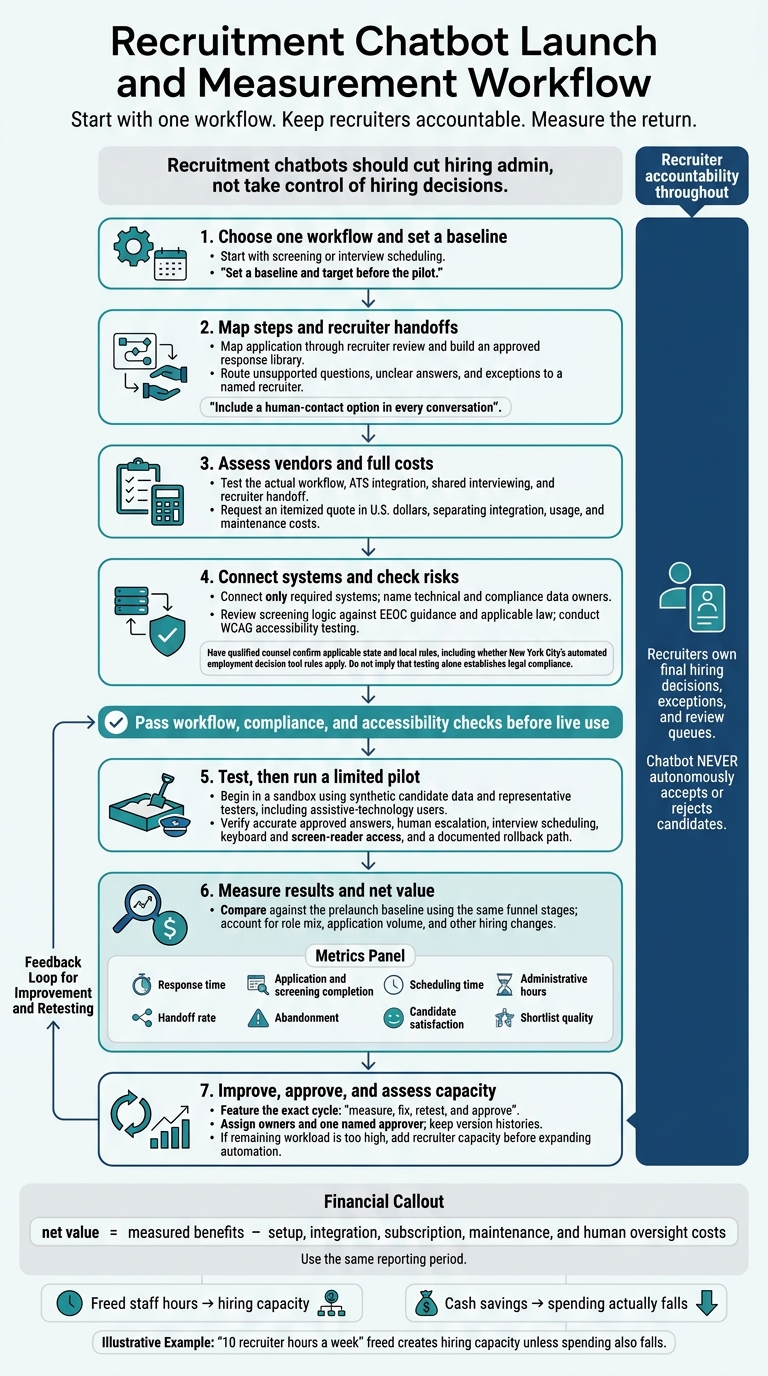
Recruitment Chatbot Launch and Measurement Workflow
Recruitment Chatbots Explained: How AI Chatbots Are Transforming Hiring & HR Operations
sbb-itb-a23bd6a
Plan Hiring Workflows and Recruiter Handoffs
Before launching your chosen workflow, define exactly when the chatbot hands over to a recruiter. Use it for screening and scheduling, while keeping final decisions with a recruiter. Assign a named recruiter to own the review queue and document which actions need their approval.
Map Candidate Steps and Approved Answers
Map each step from application to recruiter review. Specify what information the chatbot collects and what it can say about the role and interview logistics.
Build a predefined response library around those steps. Route questions outside that library to a recruiter, giving your team clear boundaries and making escalation rules easier to enforce.
Define Screening and Escalation Rules
Use the same job-related screening questions for everyone applying to the same role, based on documented requirements. Let the chatbot manage initial screening and interview coordination, then pass qualified candidates to a recruiter for final review.
Send unclear answers and exceptions to the recruiter review queue rather than letting the chatbot resolve them. Keep the recruiter involved, and make sure candidates know when a recruiter takes over.
Make Chatbot Conversations Accessible
Include a human-contact option in every conversation as part of the handoff flow. Candidates must be able to reach a recruiter if they prefer not to use the chatbot or have questions it cannot answer.
Position the chatbot as support for your hiring team, not a replacement. Keep the route to a recruiter clear whenever human input is needed.
Choose, Connect, and Test a Chatbot
Assess Vendors and Total Costs
Use the workflow you’ve already mapped as your test script for vendor demos, integrations, and pilot checks. Test the steps your team will run, rather than relying on feature claims.
A demo is a claim, not proof. Vendor labels mean little if the tool cannot handle your use case. A fast-start promise may cover a standalone bot, not a true ATS integration. Ask for an itemized quote in U.S. dollars, with integration, usage, and maintenance costs listed separately.
| Criteria | Ask the vendor | Evidence to request | Warning signs |
|---|---|---|---|
| ATS integration | Does this include true ATS integration or only a standalone bot? | A hands-on test using your actual workflow | Broad compatibility claims that the demo does not support |
| Interview collaboration | Can the tool support shared interviewing and a recruiter handoff? | A pilot showing shared interviewing and handoff | A black-box workflow with no human review |
| Screening and accessibility | Can you show EEOC-aligned screening logic and WCAG-tested access in the live workflow? | A review of screening criteria and accessibility tests | Compliance claims without testing |
Connect Hiring Systems and Assign Data Owners
Connect only the systems your launch workflow needs. Assign named technical and compliance owners for candidate data and hiring records so responsibility is clear.
Document which system receives the candidate, who owns the queue, and when the recruiter takes over. Your team should know where each record goes and who acts next.
Check Privacy and Automated Screening Risks
Once the systems are connected, check legal and accessibility risks before any live use.
If the chatbot screens candidates, review its logic against EEOC guidance and applicable law. Use WCAG testing to check that candidates with disabilities can complete the application.
Have qualified counsel confirm the state and local rules in force when this article is published, including whether New York City’s automated employment decision tool rules apply.
Test the Workflow and Run a Pilot
Start in a sandbox with synthetic candidate data and representative testers, including assistive-technology users. Move to a limited live workflow only after the bot passes the workflow, compliance, and accessibility checks.
Restrict early conversation reviews to approved reviewers and document a rollback path. Before live testing, confirm that:
- [ ] Approved answers remain accurate, and unsupported requests go to human review.
- [ ] The system can organize interviews and hand off to a human recruiter.
- [ ] Keyboard and screen-reader users can complete the workflow.
- [ ] Your team can disable automation and restore the previous workflow without interrupting the process.
Measure Results and Plan Hiring Capacity
Track Metrics and Calculate Net Value
Conversation volume alone does not prove impact. Compare pilot results against a prelaunch baseline, accounting for role mix and application volume. Measure the same funnel stages in both periods. Record other hiring changes so automation does not get credit for every improvement.
| Metric | Definition and data source | Management action |
|---|---|---|
| Response time | Time from candidate message to reply; chatbot timestamps | Optimize trigger logic or server response. |
| Application and screening completion | Percentage completing each stage; funnel analytics and ATS records | Simplify questions where candidates drop off. |
| Scheduling time | Time from interview invitation to confirmed booking; calendar logs | Check availability and calendar sync settings. |
| Administrative hours | Recruiter time spent on routine tasks; time tracking | Identify remaining manual work. |
| Handoff rate | Percentage of conversations transferred to recruiters; transition logs | Refine screening rules to reduce false escalations. |
| Abandonment | Percentage leaving before completing a step; conversation logs | Improve conversational tone or accessibility. |
| Candidate satisfaction | Post-interaction survey scores and comments | Address specific friction points in the chat. |
| Shortlist quality | Hiring manager assessment of shortlisted candidates; feedback and ATS records | Adjust screening criteria and weighting. |
Calculate net value = measured benefits − setup, integration, subscription, maintenance, and human oversight costs, using the same reporting period.
Keep freed staff hours separate from cash savings. Time freed for sourcing adds hiring capacity, but it does not automatically reduce payroll costs. Use saved hours and workload per role to forecast how much hiring your team can handle.
Use the results to fix the workflow, then assess whether you also need more recruiter capacity.
Review, Fix, and Approve Changes
Follow a measure, fix, retest, and approve cycle. Review unanswered questions, confusing wording, screening errors, unnecessary handoffs, and accessibility issues. Update answers when roles or policies change, then retest the affected steps before release.
Assign owners for content, queues, systems, and audits, plus one named approver. Keep version histories that record what changed, why, who approved it, and when it went live. This helps your team trace errors and reverse changes.
Use Embedded Recruiters to Cover Remaining Hiring Work
If the data shows automation still leaves too much work for your team, add recruiter capacity before expanding the bot. Use handoff rate, administrative hours, and shortlist quality to pinpoint where that support is needed.
Rent a Recruiter embeds experienced recruiters into growth teams on a fixed monthly model. Automation handles repetitive work, while recruiters own intake, sourcing, assessment, and coordination.[1]
Conclusion: Start With One Measurable Workflow
Automate one bottleneck, usually screening or scheduling. Keep hiring accountability with a lead recruiter who owns the workflow and handoff.
Before launch, check that the workflow is ready, with particular attention to the recruiter handoff and data protection for candidate records.
Set a baseline and target before the pilot. Use the results to assess whether automation cuts workload without reducing screening quality, or whether you still need more recruiter capacity.
If recruiting bandwidth remains the bottleneck, book a call with Rent a Recruiter to discuss embedded recruiter support.
FAQs
Is our hiring volume high enough for a chatbot?
Hiring bottlenecks matter more than volume. If you make more than 20 to 30 hires per year or handle over 20 applications per role, manual processes often delay hiring. Even at lower volumes, automation can save time on interview scheduling, application acknowledgments, and resume organization.
Review repetitive tasks that take up recruiter time. If software alone cannot close your capacity gaps, consider embedded recruitment support across the full hiring lifecycle.
How long should our chatbot pilot run?
A recruitment chatbot pilot typically runs for 30 to 90 days. Many experts recommend 60 days, with measurements every 30 days. For specific technical roles or administrative tasks, 4 to 8 weeks can also work.
Before launch, collect 2 to 4 weeks of baseline data so you can measure changes in efficiency and quality. Review results weekly against that baseline. Expand only when the chatbot meets the targets you set before the pilot.
How can we detect bias in chatbot screening?
Monitor selection outcomes and check screening logic against documented, job-related criteria. Regularly test diverse profiles for inconsistent results or discriminatory patterns. Compare demographic selection rates using the EEOC four-fifths rule to flag potential issues for investigation, and investigate unexplained disparities.
Track recruiter overrides to spot repeated disagreements with AI decisions. Choose tools that explain their results, such as structured scorecards, so your team can understand candidate rankings and rejections.