Contract employee onboarding should get work started, not leave your team chasing paperwork and access. I recommend starting preparation 5 to 10 business days before the assignment, with named owners for scope, payment setup, equipment and system access.
The goal? Less time lost to delays, clearer Recruitment as a Service spending controls and work you can review against agreed targets.
This guide covers how I would structure the process:
- Before day one: confirm the embedded recruitment service arrangement, agree deliverables and check that tools and access work.
- During the assignment: complete training, review the first milestone, clear blockers and approve changes before costs grow.
- At the end: transfer work, confirm final payments, recover equipment and remove access at the agreed time.
- After closeout: measure readiness, setup hours and time to first accepted output.
My starting rule: <u>give every task an owner, a deadline and a completion record</u>. Use the steps below to put that into practice on your next engagement.
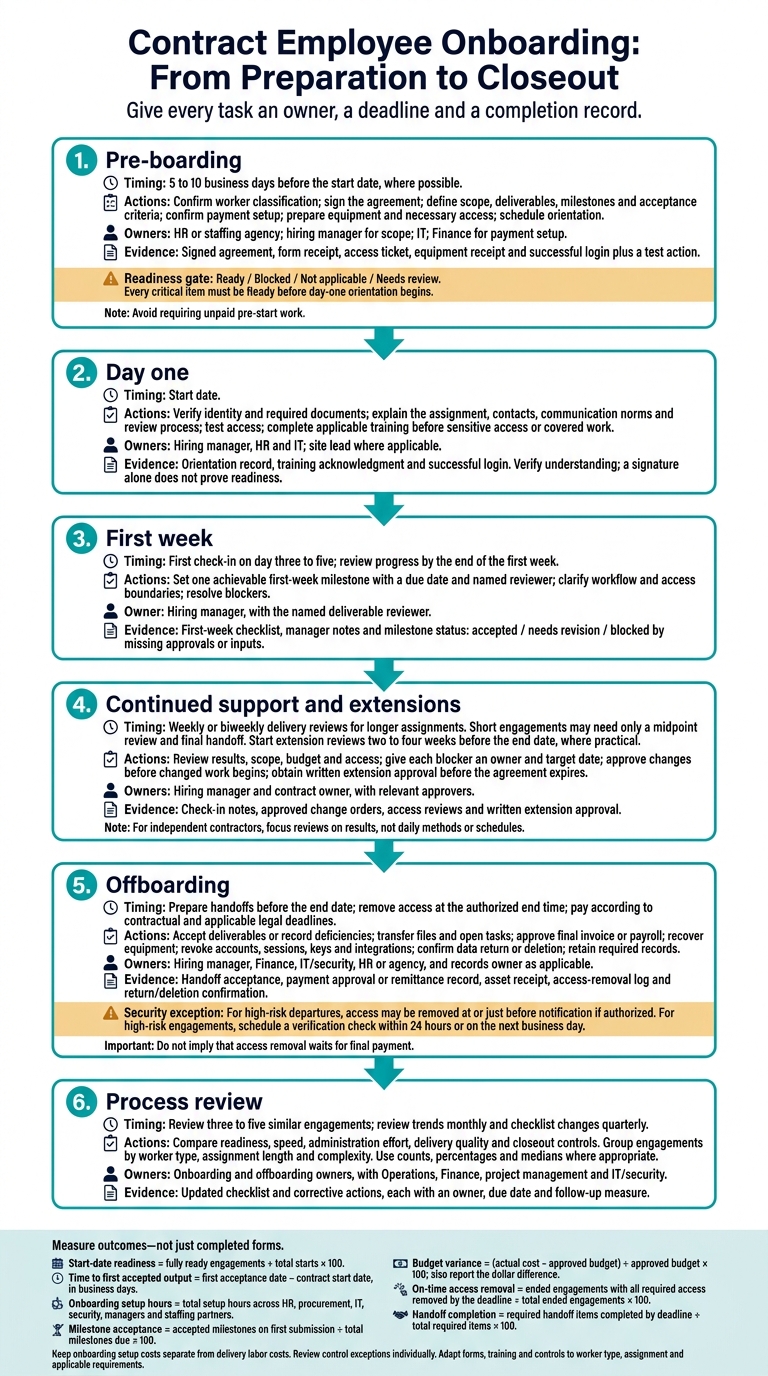
Contract Employee Onboarding: From Preparation to Closeout
How to Onboard a New Employee Checklist
sbb-itb-a23bd6a
Pre-Boarding: Prepare Paperwork, Owners, and Access
Start preparation 5 to 10 business days before the start date where possible. Use the confirmed worker type to determine which forms, approvals, and access controls apply. Track proof of completion, not just requests, so you catch missing paperwork, equipment, or access before day one.
Short engagements need a shorter preparation window. Longer engagements need recurring scope and access reviews, plus a decision on whether to extend. Completing these steps before the start date keeps day-one orientation on schedule.
| Stage | Tasks | Accountable owner | Deadline | Completion evidence |
|---|---|---|---|---|
| Pre-boarding | Confirm classification, sign agreement, collect required forms, define scope, prepare equipment, request access, schedule orientation | HR or staffing agency; hiring manager for scope; IT | 5 to 10 business days before start | Signed agreement, form receipt, access ticket, equipment receipt |
| Day one | Verify identity and required documents, explain assignment, review communication norms, test access, complete required training | Hiring manager; HR; IT | Start date | Orientation record, training acknowledgment, successful login |
| First week | Review deliverables, clarify workflow, confirm access boundaries, address blockers, schedule check-ins | Hiring manager | End of first week | First-week checklist and manager notes |
| Continued support | Hold periodic check-ins, review scope and performance, approve changes, renew access only when justified | Hiring manager and contract owner | Weekly or biweekly, depending on assignment length | Check-in notes, approved change orders, access reviews |
| Offboarding | Complete handoff, approve final invoice or payroll, recover equipment, disable access, retain records | Hiring manager, finance, IT, HR or agency | Final workday or immediately afterward | Handoff acceptance, payment approval, asset receipt, access-removal log |
Define Scope, Payment, and Ownership
Put the terms in writing before work starts. Document scope, deliverables, milestones, acceptance criteria, dates, availability, time zone, communication channels, and work location. Include dependencies, exclusions, the person reviewing completed work, their approval deadline, and the revision process.
Make payment terms clear: rates in U.S. dollars, billable units, invoice rules, payment timing, expenses, and dispute handling. Cover confidentiality, IP, data handling, security duties, and incident-reporting requirements. Set out how to approve additional work, rate or deadline changes, extensions, and termination.
Use the matrix below to assign named owners. Restrict tax, banking, identity, and screening records to authorized staff. Apply required screening consent, privacy notices, and consistent, nondiscriminatory standards.
| Task | Finance owner | Hiring manager | HR/procurement | IT/security | Staffing agency, if applicable | Worker |
|---|---|---|---|---|---|---|
| Agreement and scope | Approves budget | Defines acceptance criteria | Coordinates agreement | Reviews security terms | Confirms assignment terms | Reviews and signs |
| Tax forms and payment | Safeguards tax forms; approves invoices or confirms hours | Approves work or time | Coordinates employee payroll and restricted records | No tax-record access | Handles employee payroll and tax forms | Submits applicable forms, invoices, or time |
| Employment verification and screening | Sets lawful requirements | Confirms role needs | Handles direct-employee verification; coordinates screening | Defines security requirements | Handles employee verification; screening as agreed | Supplies information and required consent |
| Equipment and access | Approves funding | Defines business need | Coordinates arrangements | Provisions and removes access | Coordinates agreed equipment | Follows security requirements |
| Recordkeeping | Sets retention rules | Retains acceptance evidence | Retains restricted worker records | Retains access and asset logs | Retains required agency records | Supplies required documents |
Prepare Equipment and Restrict Access
Agree whether the company, agency, or worker provides equipment. Do not assume an independent contractor needs company tools. Where applicable, record asset identifiers, condition, security controls, support responsibility, and return dates.
Provide authentication and remote-access instructions, support contacts, and current project documents so missing information does not delay work.
Grant only the access the assignment needs. Separate staging from production and automate access expiration where supported. For sensitive access, schedule a review before the removal date. IT should retain provisioning and removal logs as proof of completion.
| System | Business purpose | Permission level | Approver | Start date | Review date | Removal date |
|---|---|---|---|---|---|---|
| Source-code repository | Modify assigned application code | Contributor to project repository; no production administration | Engineering manager | Start date | End of first week, then monthly | Final workday |
| Project-management platform | View tasks and update assigned work | Project-member access | Project manager | Start date | Every 30 days | Final workday |
| Cloud test environment | Run and validate feature changes | Limited developer access | Engineering manager and cloud owner | Start date | Weekly for short engagement | Final workday |
| Company email or chat | Coordinate with assigned team | Limited team access | Hiring manager | Start date | At extension review | Final workday |
| Production database | Not required for the assignment | No access | Not applicable | Not applicable | Not applicable | Not applicable |
Confirm Readiness Before the Start Date
Give each check a status: Ready, Blocked, Not applicable, or Needs review. Add a named contact and due date for each:
- Confirmed worker type and responsible legal or HR reviewer; signed agreements; applicable documents; payment setup.
- Equipment and tested access; the manager’s first assignment and agenda; required training scheduled or completed before the relevant work.
Require a successful login and test action, not just an invitation email. Avoid requiring unpaid pre-start work.
Send blockers directly to the named owner: document issues to HR/procurement or the agency, payment issues to Finance, technical issues to IT, and scope questions to the manager. Name a backup contact so an absence does not hold up the start.
Once every critical item is marked Ready, day-one orientation can begin. For additional templates and guides, visit our hiring resources.
Day One and First Week: Orient and Train
After pre-boarding, use day one to confirm the assignment, key contacts, access, and training. Keep orientation focused on the work, including relevant policies and safe practices.
Explain the Assignment and Team Workflow
Walk through how requests become approved work. Explain where requirements are recorded, who sets priorities, who reviews results, and who approves invoices or timesheets. For independent contractors, agree on coordination windows, time zones, and response expectations without controlling their methods or schedule.
Set one achievable first-week milestone, with a due date and named reviewer. Check readiness through action: access to approved systems, understanding of review and escalation steps, completion of required training, and progress toward the milestone. Record the status as accepted, needs revision, or blocked by missing approvals or inputs.
Once the assignment and review process are clear, address safety and security before granting protected access.
Complete Required Safety and Security Training
Complete applicable security, privacy, acceptable-use, and incident-reporting training before access to sensitive information or assigned work. Cover data sharing, approved AI use, lost devices, and suspected breaches.
For on-site work, explain hazards, emergency routes, personal protective equipment (PPE), and authorized tasks. Check understanding using the worker’s language and vocabulary. A signature alone does not prove readiness.[2][3]
OSHA identifies embedded IT recruitment partners and host employers as joint employers with shared safety responsibilities for agency-supplied temporary workers.[1] Contracts do not remove legal duties. OSHA standards are requirements; NIOSH recommendations help put them into practice. Confirm jurisdiction- and task-specific obligations with a qualified safety or legal advisor.
Use the table below to clarify who handles each safety duty and what records to keep.
| Safety responsibility | Host employer | Staffing agency | Evidence to retain |
|---|---|---|---|
| General safety training | Coordinate and supplement | Typically provide | Training content and completion date |
| Site- and task-specific training | Provide before covered work; verify understanding | Confirm training addresses the assignment | Trainer, date, task, and comprehension check |
| Protective equipment and controls | Identify requirements; provide and explain as required | Confirm requirements and resolve gaps | PPE and competency records |
| Injury and hazard reporting | Explain emergency response and site reporting | Explain agency reporting; coordinate follow-up | Reports and notification records |
| Changed tasks or hazards | Reassess risks and retrain before changed work | Confirm qualifications and updated requirements | Revised assignment and training records |
After Onboarding: Support Delivery and Resolve Problems
Schedule Check-Ins and Clear Blockers
After the first handoff, set regular delivery check-ins and resolve issues promptly. Schedule the first check-in for day three to five. Confirm access, deliverables, acceptance criteria, documentation, and available support. Ask both the worker and manager what is blocking progress.
For longer assignments, hold weekly or biweekly delivery reviews. Short engagements may need only a midpoint review and final handoff. Keep independent-contractor reviews focused on results, not daily methods or schedules.
Assign every blocker an owner and target date. Set response expectations, such as 24 hours for access issues, and escalate unresolved problems to someone with authority to act. Safety and security concerns require immediate reporting, not a wait until the next meeting. Track blockers in a shared log and require evidence before closing them.
| Milestone or support need | Blocker to resolve | Owner | Review date | Completion evidence |
|---|---|---|---|---|
| Required system access | Missing permissions | IT lead | First check-in | Successful access check |
| Deliverable acceptance | Unclear acceptance criteria | Project manager | Before milestone deadline | Written approval in project system |
| Task or worksite change readiness | Missing task-specific instruction | Site supervisor | Before changed work begins | Training record |
| Final handoff | Missing files or documentation | Assignment owner | Before contract end date | Accepted handoff checklist and access confirmation |
For longer assignments, store the statement of work, decisions, guides, and contacts in one restricted workspace. Update task-specific instructions when tools or procedures change. Record decisions and accepted work as you go, so the next team can pick up without rebuilding the project context.
Once blockers have owners, route any scope change through formal approval before the changed work starts.
Approve Scope Changes and Contract Extensions
Approve changes before the changed work begins. Document changes to deliverables, milestones, duration, rates, authorized hours where applicable, responsibilities, location, or access.
Record the business reason, cost and schedule impact, risks, and approver. Then update the agreement, purchase order, budget, project records, permissions, and system expiration dates. This makes extra work and spending visible, with a clear approval record.
Start extension reviews two to four weeks before the end date, where practical. Check the continuing business need, delivery quality, remaining budget, risks, and worker availability. Secure written approval before the agreement expires.
If control, permanence, or working arrangements change, review worker classification before extending the engagement. For new tasks or worksites, repeat the relevant onboarding steps: confirm qualifications, provide task-specific training, and retain completion evidence before work starts.
Offboarding: Close Work, Payments, and Access
Offboarding is the final control step in onboarding. When an assignment ends, close work, payments, and access in that order, then retain the required records. Document the end date, notice terms, final deliverables, final payment, equipment return, and data-return or deletion duties.
A scheduled end date gives your team time to hand over work. If you end the assignment early, follow the notice and cure terms, preserve evidence of work, and coordinate legal, finance, IT, and security. For high-risk departures, remove access at or just before notification, if authorized.[6]
Finish Handoffs and Final Payments
Require source files, documentation, key decisions, known defects, and open tasks, with named internal owners. This keeps unfinished work from falling between teams.
Check the final invoice before accepting it. Match it against the contract, approved timesheets, milestone acceptance, purchase order, expense policy, and prior invoices. Set payment timing using the contract and applicable state wage law. Employee wage rules and independent-contractor payment terms differ.[9][10]
| Task | Owner | Deadline | Completion evidence |
|---|---|---|---|
| Final deliverables accepted or deficiencies recorded | Project owner | Before end date | Written acceptance or documented deficiencies |
| Files, documentation, and work product transferred | Contractor and project owner | Before end date | Repository link, inventory, or transfer log |
| Unfinished work assigned | Department lead | Before end date | Named owners and updated tickets |
| Final timesheet and expenses approved | Manager and finance | Contract-defined deadline | Approved timesheet and expense report |
| Final invoice paid | Contractor and accounts payable | Contractual and legal deadline | Paid invoice and remittance record |
| Accounts, tokens, badges, and integrations revoked | IT or security | Authorized end time | System logs or access-review report |
| Company equipment recovered | IT or facilities | End date or agreed return date | Asset receipt and condition record |
| Data returned or deleted | Security or privacy owner | Contract-defined deadline | Written attestation or deletion record |
| Required business records archived | Records owner | Retention schedule deadline | Archive location and classification |
| Continuing obligations acknowledged | Legal or manager | At offboarding | Exit acknowledgment or contract record |
Retain final acceptance records, payment records, access logs, and evidence of equipment returns or data deletion under your retention schedule and any litigation hold. Remind the worker that confidentiality, IP, and return-or-destruction duties continue after the engagement.[4]
Once handoff and final payment steps are set, cut access at the approved end time.
Remove Access and Recover Equipment
At the authorized end time, disable accounts, revoke active sessions and MFA, and remove VPN, repository, cloud, shared-drive, badge, and integration access. Revoke standalone API and SSH keys, rotate shared secrets, and transfer ownership of files and automations. Verify completion through logs or administrator sign-off.[7][8]
Arrange equipment returns with tracking and an asset receipt. For approved personal devices, remove company data from downloads, synced folders, attachments, and backups under the agreement and retention rules. Use an approved selective wipe to remove company data without touching personal files.[4][5]
Obtain return or deletion confirmation and escalate anything your team cannot verify. For high-risk engagements, schedule a verification check within 24 hours or on the next business day.
Process Review: Measure Readiness, Cost, and Results
After each engagement closes, check whether the process was fast, controlled, and repeatable. Measure whether onboarding leads to usable work, not just completed forms.
Track readiness, first accepted output, cost, and access removal across three to five similar engagements. Group them by worker type, assignment length, and complexity. Report counts and percentages, and use medians to limit the effect of outliers. The same onboarding and offboarding owners should review the results and address gaps.
Define Onboarding and Offboarding Metrics
Define “ready” as having all required items complete by the agreed start time. Measure the first accepted output, not the first submission.
| Metric | Calculation | Data source | Accountable owner | Review frequency |
|---|---|---|---|---|
| Start-date readiness | Fully ready engagements ÷ total starts × 100 | Onboarding checklist and access tickets | Onboarding coordinator | Each start; monthly trend |
| Time to first accepted output | First acceptance date − contract start date, in business days | Project records and written approval | Project manager | First acceptance; monthly trend |
| Onboarding setup hours | Total setup hours across HR, procurement, IT, security, managers, and staffing partners | Time logs and workflow records | Operations lead | Per engagement; quarterly trend |
| Milestone acceptance | Accepted milestones on first submission ÷ total milestones due × 100 | Milestone schedule and acceptance records | Project manager | Each milestone; monthly trend |
| Budget variance | (Actual cost − approved budget) ÷ approved budget × 100; also report the dollar difference | Invoices, time records, purchase orders, and approved changes | Finance lead | Monthly; engagement close |
| On-time access removal | Ended engagements with all required access removed by the deadline ÷ total ended engagements × 100 | Identity-management logs and closure tickets | IT/security lead | Each departure; monthly trend |
| Handoff completion | Required handoff items completed by deadline ÷ total required items × 100 | Handoff checklist and repository audit | Project manager | Engagement close |
Keep onboarding setup costs separate from delivery labor costs. Include internal administration time, external setup fees, equipment shipping, training, and licenses. Count each expense only once.
Use consistent business-day rules and state the time zone. Review late access removal and other exceptions individually. A strong monthly average must not hide a control failure.
Use Feedback to Improve the Checklist
Collect short, role-specific feedback after the first week, at the first accepted milestone, and within a few business days of offboarding.
- Ask workers about instructions, tools, access, pay, safety, and escalation paths.
- Ask managers about deliverable clarity, approval delays, and rework.
- Ask IT and security about late requests, excessive permissions, and access-removal exceptions.
- Ask staffing agencies, where relevant, about missing documents, communication gaps, timekeeping, and unapproved changes.
Give each recurring problem an owner, due date, and follow-up measure. Record the evidence, root cause, and corrective action. Then update the relevant checklist, template, system, or workflow.
Compare the next similar engagements against your baseline. Check whether delays and administration hours fall without increasing rejected work, security exceptions, or missing records.
Review trends monthly. Use a quarterly cross-functional review to approve checklist changes, apply the findings, and confirm who owns each fix.
Conclusion: Give Every Onboarding Task an Owner
Put the guide to work on your next engagement. Use the checklist review to give every onboarding task a named owner, from classification and pre-boarding to delivery support and offboarding.
Test the Checklist on Your Next Engagement
Assign a named owner and backup contact to each role. Mark tasks complete only when the evidence is logged. Set deadlines relative to the start date so the checklist works for both short and long engagements.
| Owner | Deadline | Required completion evidence |
|---|---|---|
| Hiring manager | Before the start date | Approved scope brief, milestones, acceptance criteria, and change process; signed agreement on file |
| HR or operations | Before the start date | Verified worker type, required tax or vendor documentation, payment terms, insurance requirements, and contacts; completed compliance record |
| IT or security | No later than the prior business day | Only necessary accounts created, multifactor authentication configured, data-handling rules documented, and an expiration date set; access ticket and approval log |
| Site lead | By day one | Location access, emergency procedures, equipment rules, hazard information, and any required protective equipment provided; orientation or training acknowledgment |
| Staffing agency, if applicable | Before the assignment | Worker credentials, general safety training, payroll or timekeeping arrangements, escalation contacts, and responsibilities with the host company confirmed; agency confirmation |
| Worker | By day one | Required forms and training completed, equipment and access confirmed, deliverables and deadlines reviewed, and conflicts or missing information flagged; signed acknowledgment and readiness confirmation |
| Hiring manager and worker | During week one | Progress reviewed, priorities clarified, and the assignment confirmed to match the agreed scope; first-week check-in note |
| HR, IT, and the hiring manager | At offboarding | Deliverables accepted, final invoice or time record confirmed, access removed, equipment returned, and knowledge transfer completed; closeout record |
For temporary workers, document who provides general safety training and who handles worksite-specific training.
Test the checklist on one engagement before rolling it out across your business. Record planned and actual completion dates. Then hold a 15- to 30-minute review with the worker, hiring manager, operations, IT or security, and the staffing agency, if involved.
Use that review to clarify wording, remove unnecessary steps, and add missing owners. Turn recurring questions into standard instructions before the broader rollout, so repeatable hiring and onboarding do not come with extra administrative work.
Add Hiring Capacity With Rent a Recruiter
Rent a Recruiter embeds recruiters into your team to add hiring capacity, structure your hiring process, and improve handoffs into onboarding.
Your internal owners retain responsibility for legal classification, contract approval, payroll or invoicing, safety, security, IT access, supervision, compliance, and offboarding.
FAQs
How does onboarding differ for contractors and employees?
Employee onboarding usually follows a manager-led 30/60/90-day plan. It covers HR, IT, company culture, W-4 and I-9 paperwork, and regular check-ins to help new hires settle into their roles.
Contractor onboarding prioritizes getting work started quickly. That means collecting W-9 paperwork, setting up secure document and payment workflows, and restricting access to the tools and files needed for the assignment.
The focus is on deliverables and milestones rather than long-term integration. Role-based access must be revoked automatically when the engagement ends.
Can a contractor start before onboarding is complete?
No, a contractor should not start before onboarding is complete. Finish critical compliance paperwork, provide equipment, and set up system access before their first day.
Getting these tasks done upfront prevents delays and lost productivity. Your contractor can focus on the work from day one, rather than chasing paperwork or dealing with access issues.
Which onboarding activities require payment?
Payment-related onboarding covers setting up direct deposit and compensation in your payroll systems. Getting these details right and processing payments on time helps you avoid compliance issues.
For contractors, this also includes automated invoice approval and payment tracking, so you can monitor milestones within your financial systems.
Costs vary, but missed deadlines can carry penalties. Missing deadlines for federal compliance forms, such as Form I-9, can result in fines starting at $272 per violation.