AI interview scheduling can cut calendar admin, but your team still needs to own the hiring process. I recommend starting with one role, clear booking rules, and a named recruiter to handle issues the system cannot resolve.
Connect your ATS and calendars, then test invitations, reminders, time zones, and rescheduling before launch. Set limits such as 15 to 30-minute buffers to protect interviewer time, and measure booking speed, errors, and recruiter hours saved before expanding.
My approach is simple: automate coordination, not hiring decisions. <u>If scheduling works but your team is still stretched</u>, review recruiter capacity rather than adding more software.
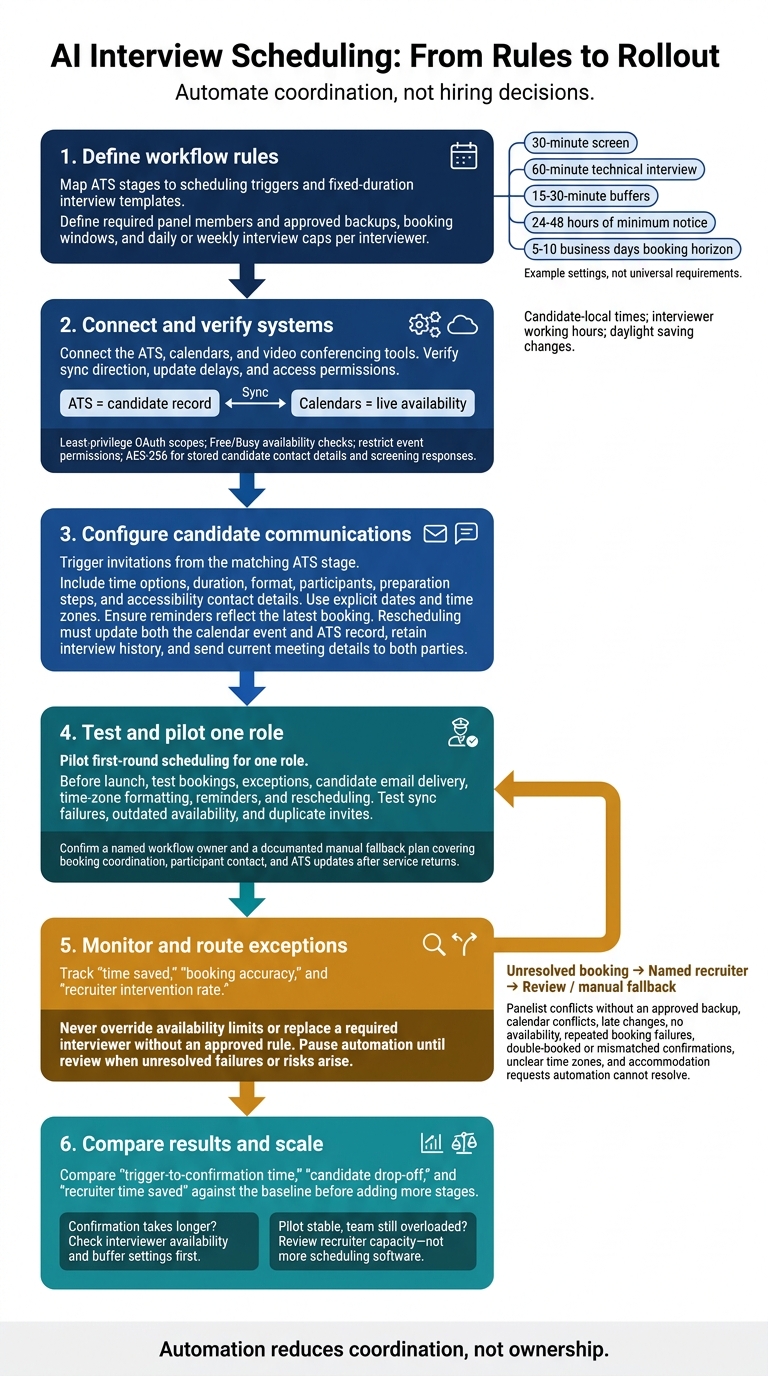
AI Interview Scheduling: From Rules to Rollout
I Built This Interview Scheduler AI Agent That Books Candidate Interviews Automatically
sbb-itb-a23bd6a
Plan Interview Workflows and Calendar Rules
Turn your scheduling rules into calendar logic before automation goes live. Clear rules reduce booking errors and time spent fixing schedules.
Map ATS Stages and Interview Requirements
Link each scheduling trigger to an applicant tracking system (ATS) stage and a fixed-duration interview template. This keeps bookings aligned with the time each interview requires. For more hiring tools, browse our recruitment resources.
Standard templates include a 30-minute screen or 60-minute technical interview.
Set Availability and Interviewer Limits
Set calendar limits for each interview stage. Mark personal appointments and recurring focus blocks as Busy, then define available booking windows.
Use 15-30-minute buffers, 24-48 hours of minimum notice, and a booking horizon of 5-10 business days. Set daily or weekly interview caps per interviewer to protect team capacity.
Display interview times in each candidate’s local time while keeping interviewers within working hours, accounting for daylight saving changes. Name required panel members and approved backups so a last-minute conflict doesn’t force your team to restart scheduling.
Set Rules for Exceptions and Escalation
Define which cancellations and reschedules the system can handle and which need recruiter review. When standard rules cannot resolve a booking, route it to a named recruiter.
That includes panelist conflicts with no approved backup, calendar conflicts, late changes, accommodation requests, and no-availability responses.
Never let the scheduler override availability limits or replace a required interviewer without an approved rule.
Set Up and Run AI Interview Scheduling
Connect Systems and Set Scheduling Rules
Once your workflow rules are set, connect the systems that will run them. Confirm that the AI tool supports your ATS, calendars, and video conferencing tools. Check whether it handles scheduling alone or also manages interview coordination.
Verify sync direction, update delays, and access permissions. Before launch, test sync failures, outdated availability, and duplicate invites to reduce booking errors and recruiter admin.
Keep the ATS as the candidate record and calendars as the source of live availability. Once those connections work, set up candidate-facing automation.
Automate Invitations, Reminders, and Rescheduling
Trigger invitations from the matching ATS stage. Include time options, duration, format, participants, preparation steps, and accessibility contact details. Use explicit dates and time zones, and display candidate-local times where supported.
November 12, 2026, at 2:00 p.m. Eastern Time
Reminders must reflect the latest booking, not a canceled time. When an interview is rescheduled, update both the calendar event and ATS record while keeping the interview history. Both parties should receive the current meeting details.
Booking changes should follow your rules without taking control away from recruiters.
Manage Booking Changes With Recruiter Oversight
Apply pre-approved substitution and cancellation rules. Keep recruiter buffers and workload limits in place, and notify only the participants affected by each change.
Assign a named recruiter to handle exceptions and record changes in the ATS. This keeps ownership clear when automation needs human input.
Document a manual fallback plan that names who will coordinate bookings, contact participants, and update the ATS after service returns.
Measure Results and Manage Scheduling Risks
Once scheduling is live, track time saved, booking accuracy, and recruiter intervention rate. Check that automation cuts manual coordination without harming the candidate experience, and stop it where it creates risk.
Use those results to review access controls and data handling for calendars and candidate data. Limit calendar access to least-privilege OAuth scopes, check availability using Free/Busy status, and restrict event permissions to the calendars and actions required. Encrypt stored candidate contact details and screening responses with AES-256.
Hand unresolved bookings back to a recruiter through your fallback process when automation reaches your established booking limits or exception rules. Route repeated booking failures, double-booked or mismatched confirmations, unclear time zones, and accommodation requests that automation cannot resolve to a recruiter. Pause automation until review.
Conclusion: Launch, Review, and Scale
Automation reduces coordination, not ownership. Launch with clear interview rules, reliable ATS and calendar integrations, and recruiter-led exception handling. Use the results to decide when to expand.
Validate the setup with the checklist below before scaling.
Implementation Checklist
Before launch, confirm:
- Workflow rules: ATS stages, scheduling triggers, interview formats, panel requirements, buffers, and booking windows.
- System settings: ATS sync, calendar permissions, reminder timing, time zones, and rescheduling rules.
- Ownership: A named owner for each workflow and its escalation process.
Test bookings, exceptions, candidate email delivery, time-zone formatting, and rescheduling. Then pilot first-round scheduling for one role.
Compare trigger-to-confirmation time, candidate drop-off, and recruiter time saved against your baseline before adding more stages, or rate your recruitment process to identify further gaps. If confirmation takes longer, check interviewer availability and buffer settings first. [1][2]
If the pilot is stable but your team remains overloaded, the bottleneck is capacity, not scheduling logic.
When to Add Embedded Recruitment Support
Growth, multiple interview rounds, and hiring spikes can stretch recruiters even when booking is automated. Candidate communication, hiring-manager follow-up, and process ownership can still slow hiring. Software alone cannot resolve those gaps.
If scheduling works but hiring volume still stretches your team, Rent a Recruiter adds embedded recruiter capacity to manage hiring end to end, with a consistent process and visibility into progress. [2]
FAQs
How do I calculate ROI for AI interview scheduling?
Calculate your net dollar savings by subtracting total AI implementation costs from the dollar value of recruiter time saved. Track licensing, setup, integrations, training, oversight, and human audit costs in U.S. dollars.
Start with baseline recruiter hours per role before implementation. Deduct all pilot-related hours, including setup, review, and corrections, to calculate net hours saved. Multiply those hours by approved loaded hourly rates to put a dollar value on the time saved.
Count review costs only once, not as both time deducted and a separate dollar cost.
Can AI scheduling work with a small interviewer pool?
Yes. AI scheduling automates calendar coordination for small interviewer pools, removing back-and-forth emails so your team spends less time on admin and more time assessing candidates.
Keep it efficient by defining eligible interviewers, setting time buffers, and managing time zones in the tool. Reserve recurring interview blocks and assign trained backup interviewers to prevent hiring bottlenecks and keep scheduling consistent and professional.
How do I know when I need embedded recruiter support?
You need embedded recruiter support when rapid scaling, product launches, or high-volume hiring stretch your internal capacity.
Watch for slow feedback, hiring stages taking more than 48 to 72 hours, or no dedicated internal team. These are capacity gaps that software alone cannot fix.
An embedded recruiter manages hiring end-to-end and keeps your process consistent. You can reclaim over 80 hours per month in hiring administration without adding permanent headcount.