Protecting recruitment data starts with three steps: map where it lives, restrict who can access it, and name who owns it. We recommend starting here to reduce exposure and avoid hiring delays caused by compromised accounts or lost records.
Our guide covers account and device controls, recruiter and vendor access, data retention, incident response, and recovery. The aim is simple: keep hiring moving without losing control of candidate data.
- Limit exposure: require multifactor authentication, use approved systems, and remove access when assignments end.
- Keep accountability clear: assign owners for access approvals, vendor checks, and deletion.
- Prepare for disruption: test backups, preserve incident logs, and agree who restores hiring systems.
We use the six functions of NIST’s Cybersecurity Framework 2.0 to organise these steps, with <u>clear owners and measurable progress</u> rather than policies alone.
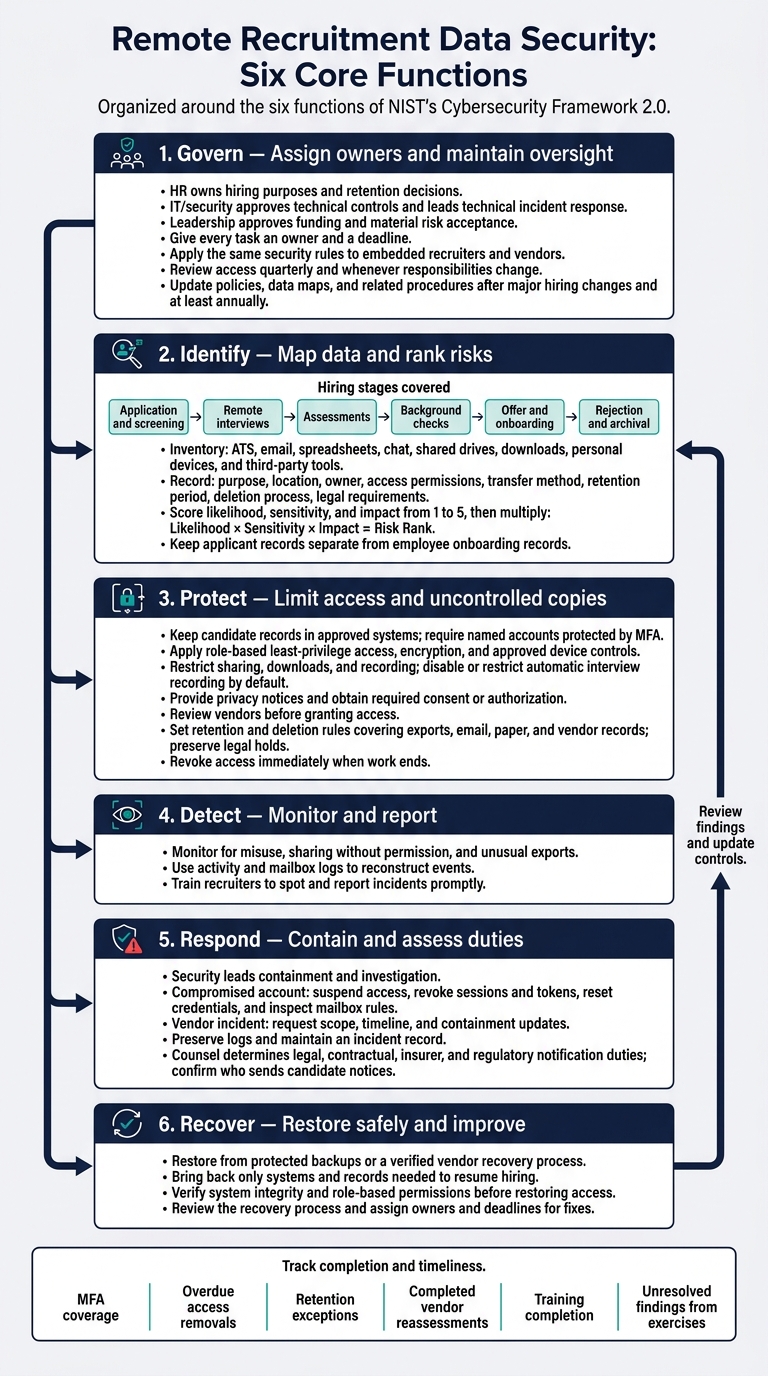
Remote Recruitment Data Security: Six Core Functions
Fake Job Scams: How Recruiters Steal Your Data
sbb-itb-a23bd6a
Identify Candidate Data, Risks, and Owners
Map candidate data and name its owners before choosing controls. Then rank the highest-risk hiring stages so you can direct your budget where it reduces exposure most.
Map Candidate Data From Collection to Deletion
Track candidate records from application through onboarding, covering screening, remote interviews, assessments, reference and background checks, offers, and rejection.
Include resumes, contact details, interview notes and recordings, work samples, assessment results, references, compensation expectations, identity documents, background reports, accommodation requests, and payroll information.
Follow that data across your applicant tracking system (ATS), email, spreadsheets, chat, shared drives, downloads, personal devices, and third-party tools. For each category, document its purpose, location, owner, access permissions, transfer method, retention period, deletion process, and legal requirements.[4][7]
Keep applicant records separate from employee onboarding records. These data sets have different access, retention, and day-to-day requirements. Collect government identification, banking details, and background-check information only when needed. Restrict access to accommodation requests, and avoid collecting medical or genetic data without HR or legal approval.
Before obtaining employment background reports from consumer-reporting companies, meet the applicable notice and written-authorization requirements.[6]
Assess Risks at Each Hiring Stage
Score likelihood, sensitivity, and impact from 1 to 5, then multiply the scores to rank risks. Spend first on controls that address several high-scoring risks, rather than dividing the budget evenly.[4][5]
Use this table to identify where sensitive data and exposure overlap, and what that could cost your business.
| Hiring stage | Data type | Main threat | Business impact | Recommended control |
|---|---|---|---|---|
| Application and screening | Resumes, contact details, work history | Phishing, misdirected email, excessive remote access | Complaints, regulatory exposure, lost trust | Use the ATS, require MFA, restrict exports, verify requests |
| Remote interviews | Notes, recordings, identity details | Unapproved recording, personal-device storage, misdirected files | Privacy complaints, reputational damage | Disable recording by default, obtain required consent, limit sharing, delete on schedule |
| Assessments | Work samples, results, evaluation notes | Vendor breach, unapproved sharing or AI tools | Disputed decisions, candidate data exposure | Approve vendors, require security terms, restrict access, document retention |
| Background checks | Identity details, reports | Stolen credentials, reports shared through email | Legal claims, discriminatory outcomes, hiring delays | Obtain required authorization, restrict HR access, secure reports, follow employment and nondiscrimination laws |
| Offer and onboarding | Identity, tax, payroll, employment records | Premature collection, intercepted email, shared spreadsheets | Identity theft, payroll fraud, disruption | Use approved transfer systems, separate records, apply least privilege |
| Rejection and archival | Applications, interview history | Indefinite retention, forgotten downloads | Greater breach impact, compliance risk | Set retention periods, automate deletion, preserve legal holds |
Assign Security and Approval Responsibilities
For each system, name a business owner, technical owner, access approver, retention owner, deletion owner, incident contact, and vendor contact. Clear ownership reduces approval delays and gaps in incident response. For more templates and tools, see our recruitment resources.
HR owns hiring purposes and retention decisions. IT/security approves technical controls and leads technical incident response. Hiring managers should access only the candidate and evaluation data they need and report suspected exposure immediately.
Leadership approves funding and material risk acceptance. Providers must meet contractual duties for access, incident reporting, and deletion.
Review access quarterly and whenever responsibilities change. Remove access when recruiters, interviewers, contractors, or vendors no longer need it.
Before moving to protection controls, confirm:
- [ ] The inventory covers every system, mailbox, spreadsheet, shared folder, and device used in hiring.
- [ ] Sensitive-data locations are identified, access-restricted, and separated from employee records where appropriate.
- [ ] Data flows document purpose, recipients, transfer methods, retention, deletion duties, and deletion evidence.
- [ ] Third-party access, integrations, subcontractors, exports, and offboarding requirements are documented.
- [ ] Priority risks have scores, control owners, deadlines, budgets, and measurable outcomes.
- [ ] Escalation contacts, approval targets, reporting deadlines, and risk-acceptance authority are documented, including immediate reporting of suspected exposure.
Protect Candidate Data Throughout Hiring
Use the data map and risk ranking from the prior section to put controls where exposure is highest.
Secure Accounts, Devices, and File Sharing
Keep candidate records in approved systems. Require named accounts protected by MFA and use expiring links. Block downloads, local storage, USB transfers, printing, and screenshots. Prohibit personal email, consumer file-sharing accounts, and personal cloud storage. Check external addresses and remove public sharing links to keep records within approved systems.
Personal devices need written approval, mobile-device management, encryption, separation of business data, and remote wipe. Protect data while people use it, too: lock screens, keep candidate discussions out of shared workspaces, and use private virtual meeting settings.
| Control | Purpose | Owner | Priority | Completion evidence |
|---|---|---|---|---|
| Password manager and account controls | Reduce account takeover | IT/security | High | MFA enrollment report |
| Role-based least-privilege access | Limit exposure by assignment | HR/IT | High | Role approval ticket |
| Device updates and endpoint protection | Protect remote devices | IT/security | High | Device compliance report |
| Encryption in transit and at rest; HTTPS and managed VPN where needed | Protect stored and transferred records | IT/security | High | Configuration review |
| Sharing and recording restrictions | Prevent uncontrolled copies | Recruiting operations | High | Settings test results |
Disable or restrict automatic interview recording by default. Enable it only with a documented purpose, required notice or consent, restricted viewers, approved storage, and a deletion date. Permit printing only as an exception when needed. Secure paper records and cross-cut shred them once their retention period ends.
Define Privacy Notices and Retention Rules
Provide a plain-language privacy notice at or before collection. Explain data categories, purposes, sources, recipients, retention, rights, contact details, transfers, and high-level security practices. Document why you collect each data category.
Have counsel review applicant privacy laws, background-check duties, recording consent, biometric rules, sector rules, and cross-border obligations. California’s privacy framework covers applicant data, while several state privacy laws exempt employment-related information.[10]
Set separate retention rules for applications, assessments, recordings, background reports, and talent pools. EEOC-related rules generally require employers to retain employment and hiring records for one year after creation or the personnel action, whichever is later. Other obligations may require longer preservation.[8][9]
Make deletion rules cover every copy: exports, email, paper, and vendor records, with overrides for legal holds. Document when backups expire and prevent deleted records from returning to active systems after a restoration. Dispose of background reports so the information cannot be read or reconstructed.[8][9]
Review Vendors and Recruiter Access
Review vendors before granting access. Check current security evidence, encryption, permissions, logging, subprocessors, hosting locations, transfer methods, and incident history. Confirm what the evidence covers and how recent it is. Keep the review focused on candidate data accessed and transferred during hiring.
Contracts should define incident-reporting deadlines, cooperation duties, audit or assurance rights, and responsibility for subprocessors.
Maintain an access register that records named users, systems, data categories, approvals, assignment end dates, and evidence of access removal. Revoke access immediately when work ends.
| Service category | Data access | Contract safeguards | Offboarding |
|---|---|---|---|
| Hiring system | Applications and evaluations | Processing limits, storage protections, access logs | Export required records; disable users; confirm deletion |
| Assessment provider | Work samples and results | Restricted evaluators, secure transfers, retention, candidate-request support | Revoke integrations; delete results and work-sample copies |
| Background-screening provider | Identifiers and reports | Restricted delivery, legal-process support, secure disposal | Revoke report access; verify disposal |
| Embedded recruiter | Assigned requisitions and candidates | Confidentiality, training, approved accounts and devices | Disable accounts, links, and tokens; confirm return or deletion |
Monitor for misuse, sharing without permission, and unusual exports while access is active and after offboarding.
Implementation checklist
- [ ] Account and device compliance verified.
- [ ] Sharing and recording restrictions tested.
- [ ] Notices and required consent records saved.
- [ ] Vendor safeguards and access register verified.
- [ ] Deletion, anonymization, backup expiration, and legal-hold overrides tested.
Detect Incidents, Respond, and Recover
Monitor Activity and Train Hiring Teams
If prevention fails, use your data map and access register to guide your response, with the same owners and systems identified earlier in this guide. Create an incident playbook covering backups, log review, vendor recovery, and evidence preservation.[3]
Use activity and mailbox logs to reconstruct what happened.[11] Train recruiters to spot and report incidents promptly so they serve as your first line of defense.[3]
Contain Incidents and Assess Notification Duties
Once you confirm suspicious activity, move from monitoring to containment. Security leads containment and investigation. Recruiting operations keeps hiring moving, while recruiting handles candidate notices.[11]
Counsel should determine your legal, contractual, insurer, and regulatory notification duties so you don’t miss required deadlines.[11]
| Incident | Immediate action | Escalation |
|---|---|---|
| Compromised account | Suspend access, revoke sessions and tokens, reset credentials, and inspect mailbox rules | Identity administrator and security |
| Vendor incident | Request the scope, timeline, and containment updates from the vendor | Vendor owner and security |
Confirm who sends candidate notices and who maintains the records needed to send them.[11] Keep draft notices ready for candidate access, correction, or deletion requests.[11]
Restore Hiring Systems and Test Recovery
Set recovery priorities before an incident. Restore from protected backups or a verified vendor recovery process, bringing back only the systems and records needed to resume hiring.[3]
Before restoring access, verify system integrity. Check that role-based permissions remain restricted and that restored access matches the roles defined in your hiring workflow.[11]
After each incident, review the recovery process and update your remediation roadmap, with fixes assigned and tracked.[3]
Response and recovery checklist
- [ ] Confirm backups and a clear communication channel.
- [ ] Preserve logs and maintain an incident record.
- [ ] Complete the notification review and approve candidate messages.
- [ ] Verify clean restoration, permissions, and security approval before resuming hiring.
- [ ] Review the playbook regularly and assign owners and deadlines for fixes.
Conclusion: Keep Your Recruitment Security Plan Current
Set Priorities and Track Progress
Start with data maps, system inventories, and clear owners. Check that access is removed, MFA is enforced, data collection is minimized, and retention rules are followed. Prioritize vendor reviews, monitoring, and response and recovery testing.
Give every task an owner and a deadline. Track MFA coverage, overdue access removals, retention exceptions, completed vendor reassessments, training completion, and unresolved findings from exercises. Measure completion and timeliness, not just whether policies exist, across your ATS, email, interview tools, file sharing, and vendor systems.
Set a recurring review cycle for access, retention, vendors, training, exercises, and backup tests. Provide onboarding and refresher training. Update policies, data maps, and related procedures after major hiring changes and at least annually. Apply the same oversight to anyone outside your core team who can access candidate data.
Apply Security Rules to Embedded Recruiters
Embedded recruiters handle the same candidate data and systems as your internal hiring team. The same security rules must apply. Treat them as part of your hiring security perimeter.
Before work starts, define ownership, who approves access, which systems recruiters may use, and how incidents are escalated. Agree on offboarding too: when the assignment ends, remove accounts, links, and tokens, and confirm that candidate data has been returned or deleted.
FAQs
How can I secure remote hiring on a small budget?
Start with consistent processes, not expensive tools. Keep all candidate data in one approved recruitment system, such as an applicant tracking system (ATS), with built-in governance, audit logs, and encryption at rest and in transit.
Limit access by role, following the principle of least privilege: each person should only access what they need for their work. Automate data retention schedules so records are deleted when no longer needed. This cuts manual admin, reduces liability, and shrinks your digital footprint.
Which retention rules apply when candidates live in different states?
Retention rules depend on where the candidate lives and where recruitment takes place [1]. Map both locations and record the applicable rules in a hiring profile for each locality so your team knows which retention periods apply [1].
In California, covered employment records, including automated decision data, must be kept for at least four years [1]. Before you collect applications, ask legal counsel to confirm the applicable laws and their effective dates in each jurisdiction [2][1].
Can I safely use AI tools to screen resumes?
AI screening puts candidate data and hiring decisions at risk. Never use unapproved tools that move candidate data outside secure, governed systems.
Before deployment, complete a Data Protection Impact Assessment (DPIA). Run annual bias audits and check whether vendors use your data to train their models.
Treat vendors as high-risk. Require a Data Processing Agreement (DPA), confirm certifications such as SOC 2 or ISO 27001, and verify candidate privacy protections.