
If you still hire temps only when demand hits, you are paying more, waiting longer, and giving up control.
I’d sum it up like this: a temp talent pool lets you fill repeat contract roles faster, cut agency spend, and plan capacity before hiring pressure lands. Instead of starting every search from zero, you keep a live group of pre-checked workers by skill, rate, availability, and past performance. That means hours to shortlist, not weeks, and better control over costs such as $1,200 pooled hires versus $3,500 reactive hires in the article’s example.
Here’s the article in plain English:
- What a temp talent pool is: a live database of pre-vetted temporary workers, freelancers, contractors, past temps, and silver-medalist applicants
- Why it matters: lower spend, less delay, fewer last-minute scrambles, and more visibility into staffing capacity
- Which roles to pool first: repeat temp roles that are hard to fill and cause missed deadlines, overtime, or service issues when left open
- How to build it: source early, pre-qualify in a simple way, tag records well, and keep the data current
- How to keep it usable: run monthly clean-up, segment outreach by hot, warm, and dormant contacts, and assign one owner
- How to measure it: track time-to-fill, time-to-submit, cost per temp hire, pool use rate, and redeployment rate
- What good looks like: the article points to results such as 24% lower time-to-fill, 100% fill rate, and 25% cost savings in structured temp hiring models
If your team is scaling in SaaS, IT, fintech, engineering, security, insurance, or professional services, this is not just a recruiting admin task. It is a cost and capacity system. And if you do not have the internal bandwidth to run it, an embedded recruiter or Rent a Recruiter can own the build, upkeep, and reporting inside your team.
Below, I’ll walk through the article’s main points so you can see where the savings come from, which roles to pool first, and how to keep the model working over time.
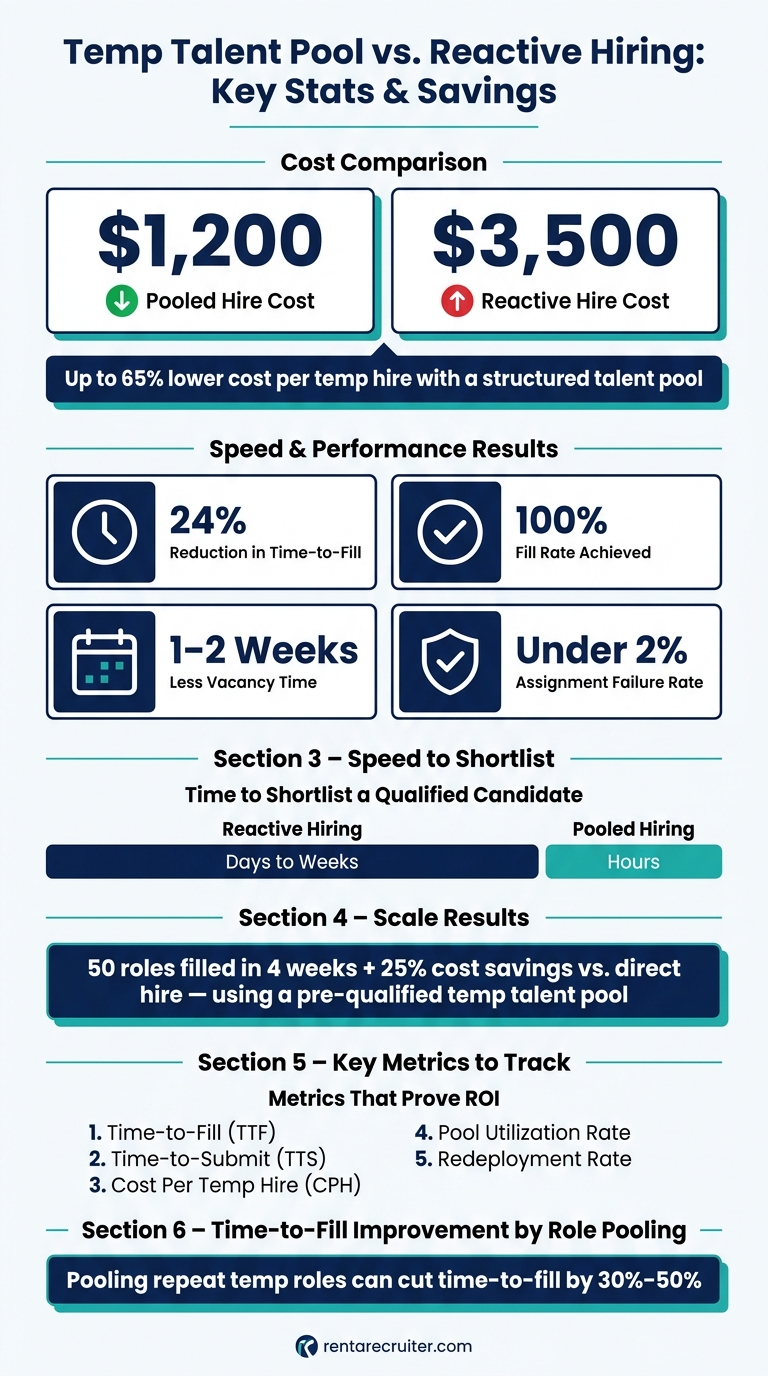
Temp Talent Pool vs. Reactive Hiring: Key Stats & Savings
Building Talent Pools and keeping them engaged
sbb-itb-a23bd6a
Build the Pool Around Roles, Skills, and Hiring Patterns
Once you know what a temp talent pool is, build it around the roles that put the most strain on the business. Look back at the last 6 to 12 months of temp, contractor, and freelancer hiring across your ATS, HRIS, and payroll data. Then check for the patterns that matter most:
- roles hired three or more times
- roles that took 30+ days to fill
- vacancies that led to missed deadlines, service issues, or overtime spikes
Use those patterns to rank roles by business impact and fill difficulty [1][6].
Identify the Temp Roles That Create the Most Hiring Pressure
Not every temp role should sit in a pool. The best ones are the roles that come up again and again, with requirements stable enough to assess in advance. For many U.S. SMEs, that usually means high-volume support, implementation, project coordination, IT, and finance roles. These are the roles that hit launches, service levels, compliance, or cash flow when they stay open too long.
Rank each role against two points:
- how much disruption the vacancy causes
- how hard the role has been to fill
Start with the top three to five. That gives you a pool built around the jobs that cost you the most time and money when demand hits. Roles that fit pooling well can cut time-to-fill by 30% to 50% and reduce vacancy time by one to two weeks [4][5].
Source and Pre-Qualify Talent Before Demand Spikes
Once you’ve picked the roles, the job is to keep people warm before demand spikes. If a hiring manager suddenly needs three customer support contractors in a few days, you should already have five vetted people ready to contact. That only works if sourcing runs all the time, not only when a requisition opens.
Your fastest source is usually former contractors and past applicants. They already know your business, and their ramp time is often shorter. Add employee referrals, which often lead to stronger performance and better team fit. For specialist roles, use LinkedIn and role-specific communities.
When you reach out, be clear. State the contract length, the hourly rate range in U.S. dollars, and whether the role is remote or on-site. Generic outreach slows everything down.
Pre-qualification should be structured, but it shouldn’t drag on. Capture:
- verified skills and tools
- pay expectations in USD per hour
- work authorization status
- location and time zone
- shift availability
- notice period
A short skills assessment, around 20 to 30 minutes, plus a 15- to 20-minute screening call is usually enough to sort people into ready now or needs more review. That simple two-tier setup helps your team respond fast when a request lands, without dropping quality checks for longer contracts.
Segment the Pool So Recruiters Can Search It Fast
Next, tag every candidate so recruiters can find the right people in seconds. Each record should include a standard set of fields: role family, skill cluster, metro area or remote status, shift availability, seniority level, rate band, engagement status, and last contacted.
Saved searches for common combinations, such as Customer Operations, Eastern Time, under $28/hour, available within 7 days, mean a recruiter can answer a hiring manager in minutes instead of hours [2][3][7].
The table below shows the main segmentation methods used by fast-growing U.S. SMEs, plus the trade-offs that come with each one:
| Segmentation Approach | How It Works | Pros | Trade-Offs |
|---|---|---|---|
| Role-based | Grouped by function, such as Customer Support, IT Contractor, or Finance Temp | Fast to match requests; easy for hiring managers to understand | Can hide gaps in availability and location |
| Location-based | Grouped by metro area, such as Dallas-Fort Worth or Bay Area, or by remote status | Important for on-site roles; helps with local compliance | Less useful for remote-eligible roles if used on its own |
| Availability-based | Split by shift pattern and notice period | Tied closely to coverage needs and urgent fill requests | Needs role and skill filters added on top |
| Performance tier-based | Tagged by past performance, assessment scores, and rehire status | Helps teams shortlist proven temps first; lowers onboarding risk | Needs consistent evaluation criteria |
Keep the Pool Active, Accurate, and Ready to Use
Once the pool is segmented, maintenance is what makes it usable. If contact details are out of date, availability has changed, or pay expectations are wrong, your team stops searching the pool and starts sourcing from scratch.
That’s where time gets lost.
Keep tags current so the pool stays searchable by role, skill, and availability. The goal is simple: when demand hits, your team can move fast without rebuilding the shortlist.
Run Simple Data Hygiene and Refresh Routines
Aim for current, searchable records, not perfect ones. A simple rhythm works best:
- Weekly updates for new records
- Monthly deduping and email checks for active contacts
- Quarterly audits to flag records older than 12 months for re-verification and to clean up bounced or invalid contacts [8][9][11]
Archive records untouched for 18 to 24 months after outreach [9][12]. Reconfirm communication consent where required, especially for California workers, and keep opt-out instructions clear [9][10][12].
This kind of routine cuts wasted recruiter time. It also helps your team avoid a common problem: thinking you have a deep temp pool, then finding half the records are no longer usable when hiring pressure kicks in.
Use Segmented Outreach to Keep Temp Workers Engaged
Not every contact needs the same cadence. Hot, warm, and dormant segments should not be treated the same way. Matching outreach to each tier helps keep workers engaged without turning your database into noise.
Use email for updates. Use SMS for short availability checks, and only with explicit opt-in [9][10].
For hot candidates, a short monthly message that highlights upcoming assignments and asks them to confirm availability keeps them ready without feeling pushy. For warm contacts, a quarterly update on new project types or open roles is usually enough to stay visible. Dormant candidates are better suited to event-based outreach, paired with a quick data re-verification so you can decide whether they move back into a warm segment or get archived.
| Cadence Type | Typical Use Case | Likely Effect on Responsiveness | Likely Admin Effort for SME Team |
|---|---|---|---|
| Monthly | Hot segments; high-demand roles | High – workers stay primed and respond quickly to availability checks | Moderate to High – needs templates and some automation |
| Quarterly | Warm segments; broader talent updates | Medium – keeps awareness up without fatigue | Low to Moderate – can be batched into newsletter-style campaigns |
| Event-based | Seasonal peaks; product launches; new clients | Varies – can lift responsiveness when tied to clear, timely openings | Low – triggered only when specific hiring events occur |
| Assignment-based | Start/end of contracts; redeployment planning | High for active temps – tied directly to current work and next steps | Moderate – works well when semi-automated through ATS or CRM |
Done well, this keeps response rates up and admin time under control. For scaling teams, that matters. A pool that stays warm is far cheaper than reopening every search from zero.
Those cadence rules only work when one person owns the process.
Assign Clear Ownership So the Process Does Not Stall
Temp pools go stale when ownership is vague. A talent acquisition lead or HR generalist should own pool structure and data hygiene. Recruiters or HR leads should manage segmented outreach. Hiring managers should provide performance feedback after each assignment.
Reporting should sit with HR or operations and tie back to workforce planning. Focus on metrics that show business impact:
- Fill rates
- Response rates
- Time-to-fill
- Redeployment
A one-page RACI can make this clear. If nobody owns the data, outreach, feedback, and reporting, the process slips. And when that happens, hiring gets slower and more expensive.
If your team does not have the internal capacity to run this on a steady basis, Rent a Recruiter can embed a recruiter to own pool maintenance, outreach, and reporting.
With ownership in place, the next step is tracking whether the pool is actually speeding hires and cutting cost.
Measure Business Impact and Improve the Model
Once the pool is in place, reporting tells you if it is actually saving time and money. Keep the focus tight. Track the metrics that show whether the pool is faster, lower cost, and easier to reuse.
Track the Metrics That Show Hiring Speed and Cost Control
Use one comparison set for each role family: pooled hires versus reactive hires.
Time-to-fill (TTF) measures calendar days from an approved temp requisition to start date. Time-to-submit (TTS) shows how fast your team gets a qualified candidate in front of the hiring manager. In a well-run pool, that can mean hours, not days or weeks. Cost per temp hire (CPH) covers total recruiting spend divided by the number of temp hires in a set period.
Tag every temp hire in your ATS or tracking sheet as either "POOL" or "REACTIVE" at the point of placement. Then review the numbers side by side each quarter, using the same role family where you can. If pooled hires cost $1,200 each and reactive sourcing costs $3,500, that gives you a clear number you can take to leadership with confidence. One case study of an optimized temp hiring program reported a 24% reduction in time-to-fill, a 100% fill rate, and less than a 2% assignment failure rate after building a structured talent pool approach. [13]
Two other metrics help round out the picture:
- Pool utilization rate shows the share of temp roles filled from the existing pool. For repeat roles, this should be high.
- Redeployment rate shows how often workers who finish one assignment move into another. That cuts repeat sourcing cost and reduces ramp-up time.
Review Pool Quality by Segment, Not Just Size
Big headline numbers can hide weak spots. A pool only matters if each segment is ready to use when demand lands.
For each core segment, say warehouse associates in Dallas or remote customer support reps, track four things: qualified candidate share, response rate, assignment conversion rate, and repeat placement rate. A segment with 50 engaged candidates, a 60%+ response rate, and strong conversion is worth far more than a much larger segment full of stale profiles.
If response is high but assignment conversion is low, that usually points to a mismatch in pay rates, shift patterns, or job expectations. That is useful because you can fix it.
| Metric | What It Tells You | Red Flag |
|---|---|---|
| Qualified candidate share | How many in the segment meet baseline criteria | Low share means the segment needs re-sourcing |
| Response rate | How engaged the segment is | Low response can suggest outreach fatigue or stale data |
| Assignment conversion rate | How often interest turns into a placement | Low conversion with high response usually means a pay or role mismatch |
| Repeat placement rate | How often proven temps come back | Low rate means you’re not reusing talent you already have |
Review these numbers by segment each month, not only at the top level. That changes the conversation. Instead of asking, "How big is our pool?" you start asking, "Which segments can we fill from today, and which ones need work?"
Connect Reporting to Hiring Capacity Planning
Once you know which segments are strong and which are weak, use that data for forecasting.
Look at segment-level supply each quarter and map your forecasted temp demand by role and location against your segment-level fill capacity. If demand is set to outstrip what the pool can cover, that is your signal to act early. You may need to start sourcing now, adjust pay rates, or add recruiting support before hiring pressure builds.
A temp-to-hire program that relied on a deep, pre-qualified pool filled 50 roles in four weeks and delivered 25% cost savings versus direct hire. Results like that happen when supply and demand are tracked together. [14]
Conclusion: Turn Temp Hiring Into a Repeatable System
Reactive temp hiring often costs more, delays launches, and leaves you making weaker trade-offs. The fix is simple: build the system before demand hits.
Those metrics only matter if your talent pool runs like a system. That means four things need to be in place: pre-vetted talent, tight segmentation, regular engagement, and simple metrics such as time-to-fill, cost-per-hire, pool utilization rate, and redeployment rate.
You do not need to build everything at once. Start small. Focus on the one or two temp roles that create the most repeat pressure in your business, then build a segmented pool around those first.
If you want a faster starting point, get help building the first pool around your highest-pressure roles. If you need support putting the process in place, Rent a Recruiter embeds recruiters into your team to run temp hiring end to end.
FAQs
How big should a temp talent pool be?
For smaller businesses, 20 to 50 candidates is often enough. It gives you cover across a mix of roles without turning the pool into an admin problem.
Larger or more specialised talent pools can stretch to 200+ candidates. But more names do not mean better hiring. Quality beats volume every time, especially when you need people who match the role, salary band, and market.
Once a pool goes past 500 candidates, engagement tends to fall off. People go cold. Data gets dated. Your team spends more time managing the list than hiring from it.
A better target is a 3:1 pipeline-to-hire ratio for each role. That keeps the pool tight, usable, and closer to live hiring demand.
If you want the biggest return, focus on the three to five roles you hire most often. That is where talent pooling saves the most time, cuts repeat sourcing work, and gives you a better shot at faster hires.
What tools do I need to manage a temp talent pool?
Use an ATS or TRM platform as your single source of truth.
That matters more than most teams think. When candidate data lives across inboxes, spreadsheets, and Slack threads, hiring slows down. People duplicate work. Good candidates get missed. Your team loses time, and your process gets messy.
An ATS or TRM keeps everything in one place. You can centralize candidate data, track every interaction, and group talent by skill set or seniority. That gives your team a clear view of who’s in the pipeline, who’s been engaged before, and where you can move faster on future roles.
These platforms also take repetitive admin off your team’s plate. They can automate welcome messages and role alerts, make communication smoother with templates and scheduling integrations, and support shared document management. In practice, that means fewer manual steps, less back-and-forth, and more recruiter time spent on actual hiring work.
None of this works if the data is poor. Keep records clean, tagged properly, and easy to search so your talent pool stays actionable instead of turning into a database no one trusts.
When should we use an embedded recruiter?
Use an embedded recruiter when your internal sourcing capacity is stretched or hiring demand is outpacing your team’s bandwidth. That gives you cover where it matters most: fewer hiring delays, less pipeline drag, and more control over delivery.
This works especially well for scaling SMEs when hiring needs shift fast, like after funding, during a product launch, or in seasonal peaks. Instead of adding the long-term cost of a full internal recruitment team, you get support that keeps momentum up, especially on hard-to-fill roles where delays can slow growth and put pressure on the business.


