To source tech talent on LinkedIn, I start with an agreed hiring brief, not a bigger search. Confirm pay, location and must-have skills first, then build searches, review profiles and send personal messages against those requirements.
I use six steps to keep hiring on track:
- Agree the role, budget and hiring deadline.
- Turn requirements into filters and Boolean searches.
- Review profiles against one shared scorecard.
- Assign outreach owners and log every contact.
- Check replies for qualified interest.
- Move suitable candidates through agreed interview stages.
Measure hiring progress, not message volume. Review results weekly, separate replies from interest, and set feedback targets such as two business days for profile reviews. That helps you spot wasted effort and internal delays before adding sourcing costs. For teams needing more hands-on support, an embedded recruitment service can provide the necessary structure and speed.
Below, I explain how to connect each step so your team can <u>control costs, save time and keep hiring moving</u>.
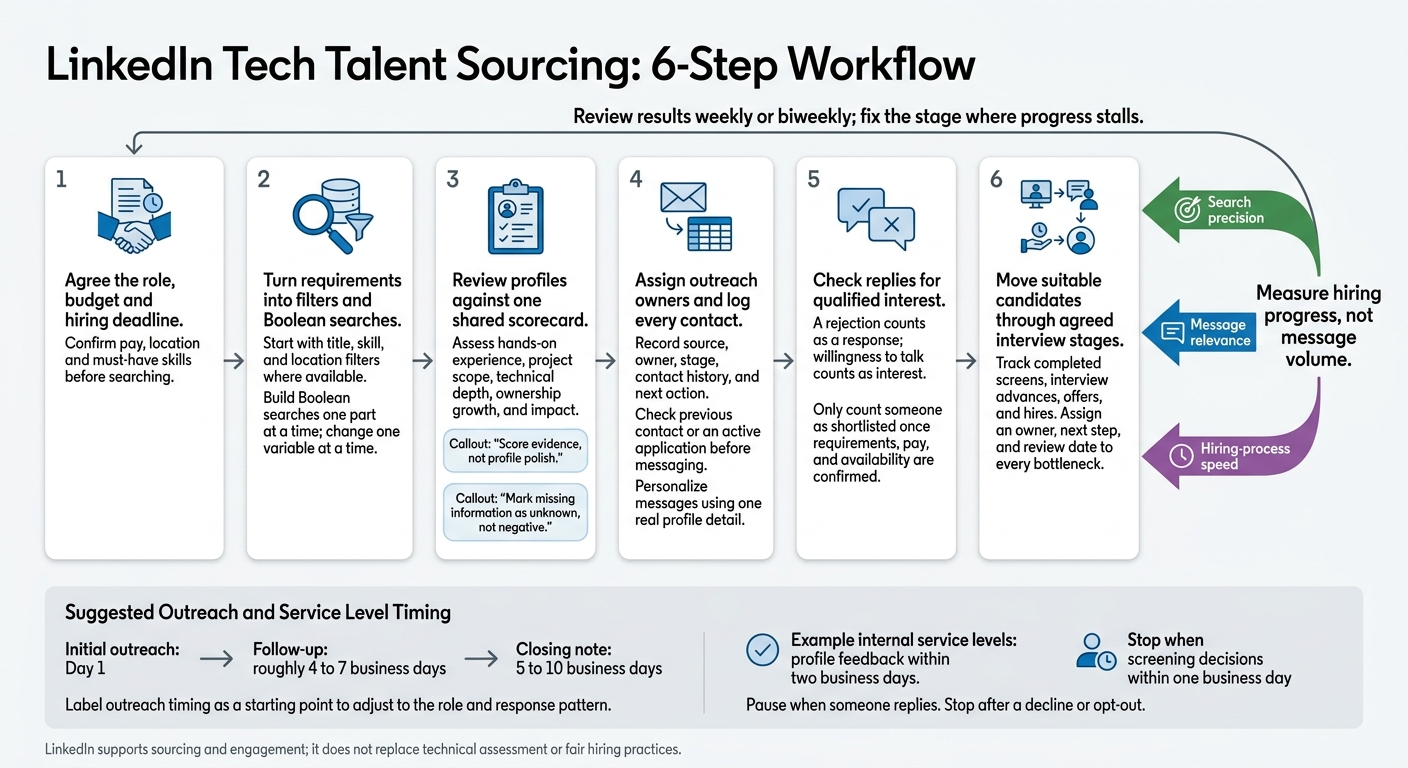
LinkedIn Tech Talent Sourcing: 6-Step Workflow
Build and Refine Your LinkedIn Search
Aim for relevant profiles, not volume. Choose the search product that fits your hiring volume and collaboration needs, or consider embedded IT recruitment for more hands-on support. Check current product labels before following plan-specific steps, since filters and features change.[1] Start with the smallest search that still finds qualified profiles.
| Capability | Standard LinkedIn access | Recruiter Lite | LinkedIn Recruiter |
|---|---|---|---|
| Candidate organization | Limited recruiting-specific organization tools | Saved searches, alerts, and project organization | Projects, shared workflows, and team collaboration |
| Messaging access | Basic outreach options vary by account | Monthly InMail allowance | Larger InMail allocation, depending on plan or configuration |
| Best fit | Basic sourcing and profile discovery | Lower-volume individual recruiting | Higher-volume or team-based hiring |
Use the lightest setup that supports your hiring volume and teamwork needs, rather than paying for features you won’t use.[5][7]
Choose Title, Skill, and Location Filters
Turn your approved must-haves into search filters. Start with title, skill, and location filters where available, then add profile keywords for required skills and role details.
Test “software engineer,” “backend engineer,” and “platform engineer” rather than relying on one exact title. Keep different role types in separate searches so results stay focused. Set location filters to your approved hiring geography, and check remote-work eligibility separately when filters cannot confirm it.[2][9][10]
Build Boolean Searches One Part at a Time
Start with the title group, add the programming language group, then add the framework requirement. OR accepts alternatives; AND requires both groups; NOT excludes a term. Quotation marks keep phrases together, while parentheses group alternatives. Always write operators in uppercase.[3][11]
("backend engineer" OR "software engineer") ("backend engineer" OR "software engineer") AND (Java OR Kotlin) ("backend engineer" OR "software engineer") AND (Java OR Kotlin) AND Spring
Apply location separately where supported. Boolean support and query limits vary by product and field.
Change one variable at a time so you can see what affects results. Test a synonym before adding exclusions. Use NOT cautiously, since it can remove qualified people whose profiles mention an unwanted term. If adding Spring removes otherwise relevant engineers, keep a broader search and check framework experience during review.[3][9][10]
Save Searches and Review Suggested Matches
Save searches once results show evidence of the agreed must-have skills, not just matching titles. Enable alerts where supported. Record criteria, review dates, and exclusion reasons so your team can rerun the same search and compare results over time.
Use Spotlights only to prioritize review order, not as proof of fit. Assess Recommended Matches against the same requirements as other search results, checking for evidence of required skills rather than matching titles.[1][4][6][8]
sbb-itb-a23bd6a
Review Candidates and Plan Outreach
Assess Technical Experience With a Shared Scorecard
When saved searches return suitable profiles, assess each against the same must-have criteria. Score evidence, not profile polish. Keep profile claims separate from your assessment, then check them in conversation. A structured, competency-based approach helps your team make consistent decisions. This is one of the key benefits of embedded recruitment for scaling teams.[15]
| Criterion | Strong evidence | Insufficient evidence | Follow-up question |
|---|---|---|---|
| Hands-on experience | Describes building, debugging, deploying, or operating a relevant system | Lists a technology without explaining how it was used | “What did you personally design, implement, or support?” |
| Project scope | Explains users, traffic, scale, team size, constraints, or delivery timeline | Uses broad claims such as “worked on major platforms” | “What was the system’s scale, and what part did you own?” |
| Technical depth | Explains trade-offs, architecture, testing, reliability, security, or performance decisions | Lists many tools with no examples of decisions made | “What alternatives did you consider, and why did you choose this approach?” |
| Ownership growth | Shows increasing ownership, complexity, mentoring, or leadership | Job titles alone suggest progression without supporting responsibilities | “How did your responsibilities change in your most recent role?” |
| Impact | Gives measurable results, such as reduced latency, improved uptime, increased revenue, or faster delivery | Claims a project was “successful” without outcomes | “What was the baseline, what changed, and how was the result measured?” |
Do not require GitHub samples. Proprietary work or work outside coding may leave no public artifacts. Instead, ask for an example the person can lawfully discuss: an architecture decision, incident response, or anonymized project outcome.
Mark missing information as unknown, not negative. Confirm availability and work authorization through your approved hiring process. Then move qualified candidates into one tracked workflow to keep outreach organized.
Assign Candidate Owners and Log Contact History
Keep suitable prospects in LinkedIn Recruiter, your ATS, or another approved system. Record each person’s source, owner, stage, contact history, and next action.
Before messaging, check for previous contact or an active application to avoid duplicate outreach. Set a hiring-manager review deadline so profiles do not sit waiting for a decision. Limit system access and follow applicable retention requirements.[14][16]
Do not scrape profiles or use unapproved tools to export data or automate outreach.[12][13]
Write Personal Messages and Limit Follow-Ups
Use the scorecard to decide who to contact and which details to mention. Reference one real profile detail, describe the technical work, and include pay and location when approved.
Treat the timing below as a starting point, adjusting it to the role and response pattern. Send a follow-up roughly 4 to 7 business days after the first message, then a closing note 5 to 10 business days later. Pause when someone replies. Stop after a decline or opt-out.
Initial message: Day 1
Hi Maya – your work improving Java services and reducing API latency at a healthcare SaaS company stood out. We’re hiring a senior backend engineer to help design Java/Spring services, improve observability, and support a small platform team. The role is remote within the United States, with a base salary of $165,000–$190,000 plus equity. Would you be open to a 20-minute conversation next week?
Follow-up: add useful details
Hi Maya – adding a little context: the team is six engineers, and the first project is improving service reliability as usage grows. The process is a recruiter call, a technical discussion focused on real project decisions, and a team conversation. If the role is not relevant, a quick “pass” is completely fine.
Final closing note
I’ll close the loop here so I don’t clutter your inbox. If a remote senior backend role in the $165,000–$190,000 range becomes relevant, feel free to reach out. Wishing you success with your search.
Before closing the batch, check that every prospect has a scorecard status, owner, stage, source, and contact log. Exclude anyone who declined or opted out from further outreach.
Measure Results and Address Hiring Delays
Track Replies and Hiring Stage Conversions
Once outreach starts, track responses and conversions to see what’s slowing hiring: the search, the message, or your internal recruitment strategy.
Review results with the hiring manager weekly or biweekly. Connect LinkedIn activity to screens, interviews, offers, and hires. Separate replies from qualified interest: a rejection counts as a response; willingness to talk counts as interest. Only count someone as shortlisted once you’ve confirmed requirements, pay, and availability.
Count each person once and multiply each ratio by 100 to calculate percentages:
- Reviewed-to-shortlist rate = shortlisted ÷ reviewed
- Response rate = respondents ÷ contacted
- Positive response rate = interested replies ÷ contacted
- Screen-to-interview conversion = candidates advancing to interview ÷ completed screenings
Compare outreach groups for the same role and seniority using an equal response window, such as 7 to 14 days. Extend that window if planned follow-ups are still in progress. Use the fields below to keep comparisons consistent. Small samples suggest a direction; they don’t prove a result.
| Comparison field | Record for each outreach group | Comparison rule |
|---|---|---|
| Reporting period | Outreach dates and response window | Compare groups with equal time to respond |
| Sample size | Profiles reviewed and distinct prospects contacted | Show counts alongside percentages |
| Qualified outcomes | Qualified shortlist, completed screens, and interview advances | Use the same qualification criteria |
| Speed | Sourcing hours and calendar days to shortlist | Use the same start point and shortlist definition |
If results fall short, address the weakest stage first rather than spending more time on outreach that isn’t converting.
Adjust Searches, Messages, and Feedback Timing
Fix the stage where progress stalls. Check search filters, message relevance, pay, and decision delays before increasing outreach volume. Change one variable at a time so you can see what affects results. Link each symptom to search precision, message relevance, or hiring-process speed.
| Symptom | Sourcing lever | Likely cause | Adjustment | Process owner |
|---|---|---|---|---|
| Many irrelevant profiles | Search precision | Titles or Boolean terms are too broad | Narrow one search variable, then inspect 20 results | Recruiter |
| Too few qualified candidates | Search precision | Filters or must-haves exclude suitable people | Reassess adjacent titles, location limits, and trainable skills | Hiring manager |
| Low response rate | Message relevance | Message relevance or role details are weak | Test one change to the opening, technical scope, or pay clarity | Recruiter |
| Replies but little qualified interest | Message relevance | Seniority, pay, or expectations do not align | Check candidate expectations against the approved role and range | Hiring manager |
| Screening slows down | Hiring-process speed | Feedback or interview capacity is delayed | Reserve screening blocks and set decision deadlines | Hiring manager |
Agree on service levels, such as profile feedback within two business days and screening decisions within one business day. Track missed deadlines separately from candidate conversion rates. Otherwise, internal delays can look like poor sourcing and send your team toward the wrong fix.
End each review by assigning an owner, next step, and review date to every bottleneck.
Conclusion: Make LinkedIn Sourcing Repeatable
Connect LinkedIn search, outreach, assessment, and tracking in a repeatable process so tech hiring stays consistent as volume grows. LinkedIn supports sourcing and engagement; it does not replace technical assessment or fair hiring practices.
Define Team Roles and Hiring Handoffs
Define who owns each handoff. Recruiters should own sourcing handoffs, candidate communication, and follow-up. Standardize how your team records requirements, handoffs, and feedback, with clear response deadlines and enough context for the next person to act.
Include behavioral questions that show how candidates work without a playbook or respond to changing priorities.
Add Tech Recruitment Solutions When Hiring Demand Grows
Check capacity before committing to hiring targets. Compare demand with your team’s capacity for sourcing, screening, and interviews.
When funding rounds, product launches, or rapid growth push hiring beyond internal capacity, Rent a Recruiter embeds recruiters within your team to manage hiring end-to-end, keep sourcing and outreach moving, and keep hiring on schedule.[17]
FAQs
How can I find tech candidates with incomplete profiles?
Don’t rely on LinkedIn keywords alone. Use Boolean searches (AND/OR/NOT) alongside related job titles and skills to find candidates whose profiles may be incomplete.
Treat search results as leads, not proof of fit. Check public sources such as recent LinkedIn posts, GitHub projects, conference talks, or specific work contributions before deciding whether someone meets your requirements.
Review the first 10-15 profiles against your must-haves. Mark missing evidence as “unknown” until you can verify it through those public sources. [1]
How can I reduce bias in LinkedIn sourcing?
Search for the skills the role needs, not particular schools, past employers, or years of experience. Before you start, agree with your hiring manager on the required skills and capabilities. Use those criteria as your primary search filters to keep sourcing focused on the work.
Assess seniority through what candidates have built or led, rather than exact job titles. Apply the same standardized assessment rubric and qualification criteria to every candidate so your team makes consistent hiring decisions.
When should I add recruiting support?
Bring in recruiting support before a vacancy becomes urgent or your internal team reaches capacity. Watch for slipping hiring timelines, stalled outreach, or high application volumes that produce few shortlisted candidates.
Aim to secure support 4 to 12 weeks before a role is formally approved, so you’re ready when hiring gets the green light. That lead time helps prevent bottlenecks during hiring spikes and keeps candidate relationships active and well managed.