
When hiring demand spikes, the cost of poor planning shows up fast, in missed headcount, slower hiring, and more pressure on your team.
If you want to stay in control, I’d focus on four things early: forecast demand, lock role priorities, add hiring capacity before bottlenecks hit, and track weekly metrics that show where hiring is slipping. Done well, that means less time lost, lower external spend, and fewer dropped hires during busy periods.
Here’s the article in plain terms:
- Spot the spike early by linking hiring plans to funding, launches, expansion, M&A, and budget cycles
- Rank roles by business impact so every vacancy is not treated like a top priority
- Pre-approve pay bands and offer rules to cut delays at offer stage
- Check recruiter and hiring manager capacity before requisitions build up
- Use embedded recruitment support if your team cannot cover the volume without slowing down
- Set sourcing, screening, and onboarding rules before the surge starts
- Watch weekly numbers like response time, offer acceptance, drop-off, and no-shows
- Review the peak after it ends so the next hiring push costs less and runs with more control
One stat sums up the risk: 63% of teams take more than two weeks to fill volume roles. In a busy market, that gap can mean lost hires, lost time, and lost revenue. The rest of the article walks through the checklist step by step.
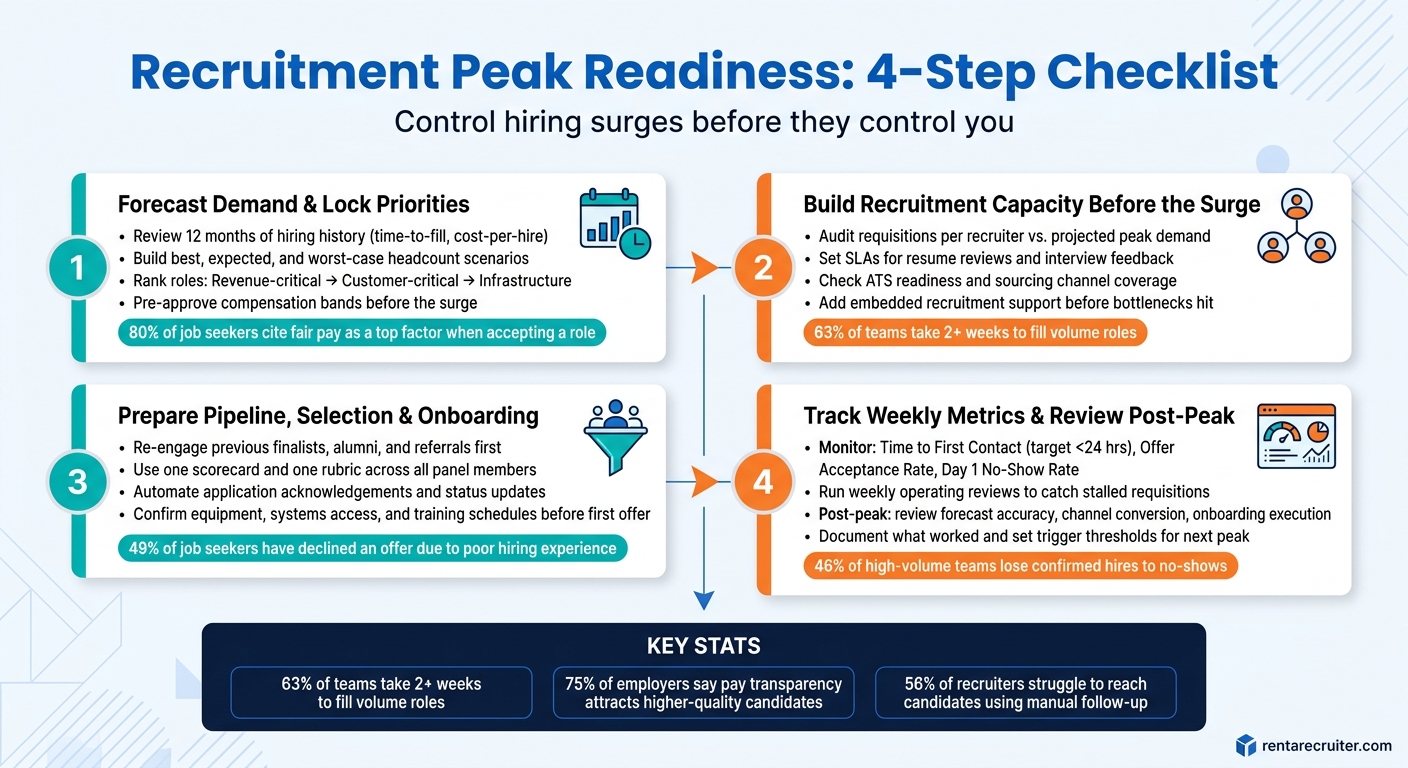
Recruitment Peak Readiness: 4-Step Checklist for High-Volume Hiring
How to build a recruiter capacity model
Checklist 1: Forecast demand and lock hiring priorities early
Start with demand. Get clear on how many people you need, when you need them, and which roles come first. Then turn that into role-level priorities and firm approval rules.
Review hiring history, business milestones, and role volume assumptions
Look back at the last 12 months of hiring data. Focus on time to hire, cost per hire, and the roles that took the longest to fill. Then line that up with what the business has coming next: product launches, new market entries, fiscal targets, and customer demand signals.
If hiring tends to spike around budget cycles, plan sourcing ahead of the January to April and September to October approval windows [1][2]. That gives you a head start instead of forcing the team to scramble once approvals land.
Attrition matters too. Historical turnover data shows how many backfills may pile on top of growth hiring [8]. If you skip that step, backfills can easily eat into the time and budget meant for net-new roles.
Build best-case, expected-case, and worst-case scenarios across:
- headcount
- start dates
- recruiter capacity
- budget
That forecast should shape who gets budget, who gets sourced first, and when hiring can begin.
Prioritize must-fill roles and pre-approve compensation bands
Rank roles by business impact first, revenue, then customer, then operations. A simple three-tier pipeline helps keep decisions clean:
- Revenue-critical roles that directly affect sales or income
- Customer-critical roles where gaps hurt service or push up churn
- Infrastructure roles that keep the business running [8]
For each must-fill role, lock the scope, seniority, and scorecard before the surge starts. Then lock compensation bands as well. With 80% of job seekers citing fair pay as a top consideration when accepting a new role, an unclear or delayed pay range can stall the process and cost you the hire [9].
Pre-approve offer sign-off, final terms, and negotiation limits [8]. When hiring volume climbs, there is no room for long approval chains.
"75% of employers agree that pay transparency helps them attract higher-quality candidates." – Recruitics [9]
Many U.S. states now require salary ranges, so add them to your templates now [9].
Once priorities and pay are locked, your team can move into capacity planning.
Checklist 2: Build enough recruitment capacity before the surge starts
With priorities and pay bands locked in, the next step is simple: can your team handle peak hiring volume? Knowing what you need to hire is not the same as having the capacity to deliver it.
Audit recruiter bandwidth, hiring manager time, and process bottlenecks
Start with your recruiters. Map active requisitions by person, then compare that workload against past time-to-fill and conversion data. If hiring volume is about to climb, the numbers will show pretty fast whether your current team can cope.
Then look at hiring managers. Before the surge begins, set clear SLAs for resume reviews and interview feedback. If those timelines are vague, things slow down fast. 63% of teams take more than two weeks to fill volume roles [6], and that can be more than enough time for candidates to take another offer.
Audit these five areas:
- Requisitions per recruiter: compare current workload with projected peak demand
- Interview load per manager: work out the total interview rounds and panel hours needed across all open roles
- Feedback turnaround times: spot where decisions are getting stuck
- ATS readiness: make sure your system can handle a spike in volume and that automated alerts are working
- Sourcing coverage: check whether your current channels reach enough qualified candidates for each function
Every gap turns into delay once hiring starts. And delay has a cost, in lost time, missed hires, and pressure on the team.
Decide when to add embedded recruitment support
Add embedded recruitment support when your internal recruiters can’t absorb peak demand without slowing down hiring.
Compare internal and embedded capacity for peak hiring
Use this comparison to judge whether your current team can absorb the surge or whether you need extra capacity.
| Factor | Internal team | Embedded support |
|---|---|---|
| Ramp-Up Speed | Slow, limited by current headcount and training time | Fast, experienced recruiters embedded within days |
| Process Control | Fully integrated with internal culture and tools, but limited by team capacity | Recruiters work inside your ATS and branded workflows, adding capacity without disrupting process |
| Reporting Visibility | Often manual or fragmented under pressure | Structured, real-time reporting during the peak |
| Cost Predictability | Variable, fixed salary costs plus hidden vacancy costs | Fixed monthly pricing with no per-hire fee spikes |
If your audit shows gaps, bring in support before volume peaks. That gives you more control, protects hiring speed, and helps you avoid a last-minute scramble.
sbb-itb-a23bd6a
Checklist 3: Prepare pipeline, selection, and onboarding for higher volume
Once you’ve added hiring capacity, the next job is to protect the funnel and your onboarding flow. If you don’t, volume creates drag. Sourcing slows, screening backs up, and accepted candidates can slip before Day 1.
Set sourcing targets and activate warm talent pools
Before you post a single role, define your target candidate profiles. Run a role gap analysis so you separate must-haves from nice-to-haves, then make sure every approved job description reflects that clearly.
Start with the talent closest to conversion. Re-engage previous finalists, past seasonal hires, and former employees who already know your brand. Turn on your employee referral programme early. Referral hires often lead to stronger candidate quality and better retention rates [3][8].
Set outreach targets based on your past hiring data. Look at time-to-fill, cost-per-hire, and candidate conversion rates so you know how many people you need at each stage to hit your hiring goals. That gives you a working model, not a guessing game.
Start with alumni, referrals, and warm CRM pools. Then use ads and niche boards when hiring volume goes beyond your existing network.
Once pipeline targets are set, lock the selection process. That’s how you keep speed from cutting into quality.
Standardize screening and interviews to protect quality under pressure
Use one rubric, one scorecard, and one set of decision criteria across every panel member. If each interviewer is using their own yardstick, volume will expose the cracks fast.
Set up automated workflows for application acknowledgements, status updates, and interview scheduling. 56% of recruiters struggle to reach candidates after they apply when relying on manual follow-up [6]. Manual follow-up sounds manageable, until the pipeline doubles.
Slow communication costs you candidates. 49% of job seekers have turned down a job offer because of a poor experience during the hiring process [5]. That’s not just a process issue. It’s lost hiring output, lost time, and more spend to refill the role.
Keep automated updates running through the full process. That helps you move faster without leaving candidates in the dark.
Standardisation also gives you cleaner comparisons across candidates. You can track decision patterns, spot bottlenecks early, and keep hiring quality steady while volume climbs.
Plan onboarding capacity before offers go out
Check onboarding capacity before the first offer goes out. Confirm that equipment provisioning, systems access, manager availability, and training schedules are mapped out in advance.
Connect your applicant tracking system (ATS) to your HRIS so onboarding flows trigger as soon as an offer is accepted. That cuts the gap between “yes” and Day 1, where 46% of high-volume hiring teams lose confirmed hires to no-shows [6].
Choose the onboarding model that fits your role volume and manager bandwidth:
| Onboarding Model | Manager Capacity Required | Role Volume Suitability | Best For |
|---|---|---|---|
| Cohort Onboarding | Low (Group sessions) | High | Seasonal surges, warehouse, retail |
| Rolling Onboarding | High (1-on-1 focus) | Low | Specialized roles, executive hires |
| Hybrid Model | Medium | Medium | Technical teams with high growth |
For high-volume roles, cohort onboarding usually makes the most sense. It reduces pressure on managers and helps you bring people in at scale without creating chaos. Assign a buddy to each new hire as well. That gives people immediate peer support and can help cut early turnover [3].
Checklist 4: Track results during the peak and review what to keep
Monitor the metrics that show whether the plan is working
Use the forecast, capacity, pipeline, and onboarding plan from the earlier checklists to check if the peak is staying on plan. Once the surge starts, instinct is not enough. You need a short set of weekly numbers that show speed, capacity, quality, and compliance.
| Weekly Metric | What It Tells You | Target/Watch Point |
|---|---|---|
| Time to First Contact | Sourcing speed | Aim for under 24 hours [10] |
| Pipeline Drop-off Rate | Where candidates are losing interest | High rates point to a clunky process [10] |
| Offer Acceptance Rate | Whether pay and benefits are competitive | If it falls, benchmark pay and benefits against regional norms [2] |
| Hiring Manager Response Time | Live signal that selection is slowing down | Over 24 hours = use self-service scheduling [10] |
| Recruiter Task Time | Live signal of capacity strain | Overtime over 20% = add embedded support [2] |
| Day 1 No-Show Rate | Onboarding and engagement effectiveness | Flag early if the rate rises [6] |
| I-9 Completion Status | Compliance readiness | Section 1 due by Day 1; Section 2 within three days [7] |
These weekly numbers help you spot slippage before it turns into a backlog. Run a short weekly operating review with your team. Use it to catch missed follow-ups, stalled requisitions, and roles getting close to the two-week mark.
That matters because 63% of teams take more than two weeks to fill volume roles [6]. In a busy hiring market, that is often enough time for a candidate to accept another offer.
Run a post-peak review and update the playbook
When the peak ends, use the same numbers to sharpen the playbook for the next surge. Run a short retrospective while the data is still fresh. Review forecast accuracy, channel conversion, quality of hire, onboarding execution, and team workload [4].
If no-shows or early attrition went up, tighten the pre-start handoff and screening bar [6][3].
Look closely at what moved the needle:
- Which sourcing channels converted best
- Where the biggest bottlenecks showed up
- Whether recruiter capacity held up or buckled under pressure
If burnout appeared, bring capacity planning forward in the next cycle. That saves time, protects output, and stops your team from hitting the next peak already stretched.
"Update playbooks and talent maps… so the next surge feels less like a hurricane and more like a well-forecasted storm." – Christine Moreno, TAL.co [4]
Document what worked. Set trigger thresholds for the next peak. Keep strong unfilled candidates warm with automated check-ins [3][2]. This review closes the loop on Checklists 1 to 3. It shows whether the earlier forecast, capacity, and onboarding choices worked, and it gives you a better base for the next hiring spike.
Conclusion: Use a repeatable checklist and add capacity before it becomes urgent
Strong peak hiring does not come from reacting faster. It comes from forecasting earlier, locking priorities before the surge hits, building recruiter capacity in advance, standardising how you screen and select, and tracking the numbers that tell you where things are slipping.
Each step builds on the last. Miss one, and the rest get harder. Get them right, and a hiring surge becomes a process you can run again, not a quarterly scramble.
If your team is heading into a hiring peak and capacity is already tight, Rent a Recruiter places experienced recruiters straight into your team within days. You get end-to-end hiring support with more structure, more visibility, and better control.
Book a Call to talk through your hiring plan, or See Your Potential Savings to look at what embedded recruitment support could mean for your next growth phase.
FAQs
How early should we start planning for a hiring spike?
Plan months ahead so you are not scrambling when hiring demand spikes. Many teams build in a 90-day buffer before peak hiring starts.
Work back from key business deadlines, like product launches or fiscal quarters, so hiring targets line up with what the business needs. If your team is already stretched, Rent a Recruiter can place an experienced recruiter straight into your team.
What metrics matter most during peak hiring?
Focus on the metrics that show speed, cost, and hiring quality: time-to-fill, cost-per-hire, offer acceptance rate, and quality-of-hire through 90-day retention and manager feedback.
These are the numbers that tell you whether your hiring engine is doing its job, or slowing the business down. If time-to-fill is drifting up, growth stalls. If cost-per-hire keeps climbing, margins take a hit. If new hires leave inside 90 days, the problem is not just hiring volume, it’s hiring quality.
It also helps to track the metrics behind the headline numbers. Look at pipeline velocity, source-channel ROI, candidate satisfaction through NPS surveys, and interview-to-offer ratios. Those signals help you spot bottlenecks early, cut waste, and keep hiring lined up with business expectations.
When should we add embedded recruitment support?
Consider embedded recruitment support when hiring demand jumps, like during rapid growth, a major product launch, or a sudden spike in open roles.
This model works well when your internal HR team needs extra capacity but you still need structure, visibility, and consistency across the hiring process. Instead of stretching your team too thin, you add focused recruiting support that works inside your business and keeps delivery on track.
If hiring plans keep going over budget or missing targets, an experienced embedded recruiter can help improve hiring performance and cut recruitment costs. Rent a Recruiter can embed support within days and manage hiring end-to-end.


