
If every new role sends your team back to spreadsheets, inboxes, and agency spend, your hiring system is costing you time and money.
I’d judge a recruitment CRM on five things only: whether it helps you reuse past candidates, cut manual follow-up, keep data in sync, show pipeline performance, and control access as hiring grows. For scaling teams in SaaS, IT, fintech, engineering, security, insurance, and professional services, that comes back to three commercial outcomes: lower cost-per-hire, less recruiter admin, and faster fills.
In simple terms, I’d look for:
- One searchable candidate database so you can reuse past applicants instead of rebuilding pipelines
- Email and SMS automation so recruiters spend less time chasing and updating records
- ATS, calendar, and reporting links so leadership can see what is moving and what is stuck
- Custom workflows and fields so the system fits your hiring process
- Role-based access and data controls so more stakeholders do not create risk or messy records
Small employers can take around 49 days to fill a role. Integrated ATS and CRM setups have also been linked to 36.8% lower time-to-fill and 28.9% lower cost-per-hire. That is why this checklist matters. It is not about software for its own sake—it’s about performing a recruitment health check on your internal processes. It is about more control over hiring outcomes.
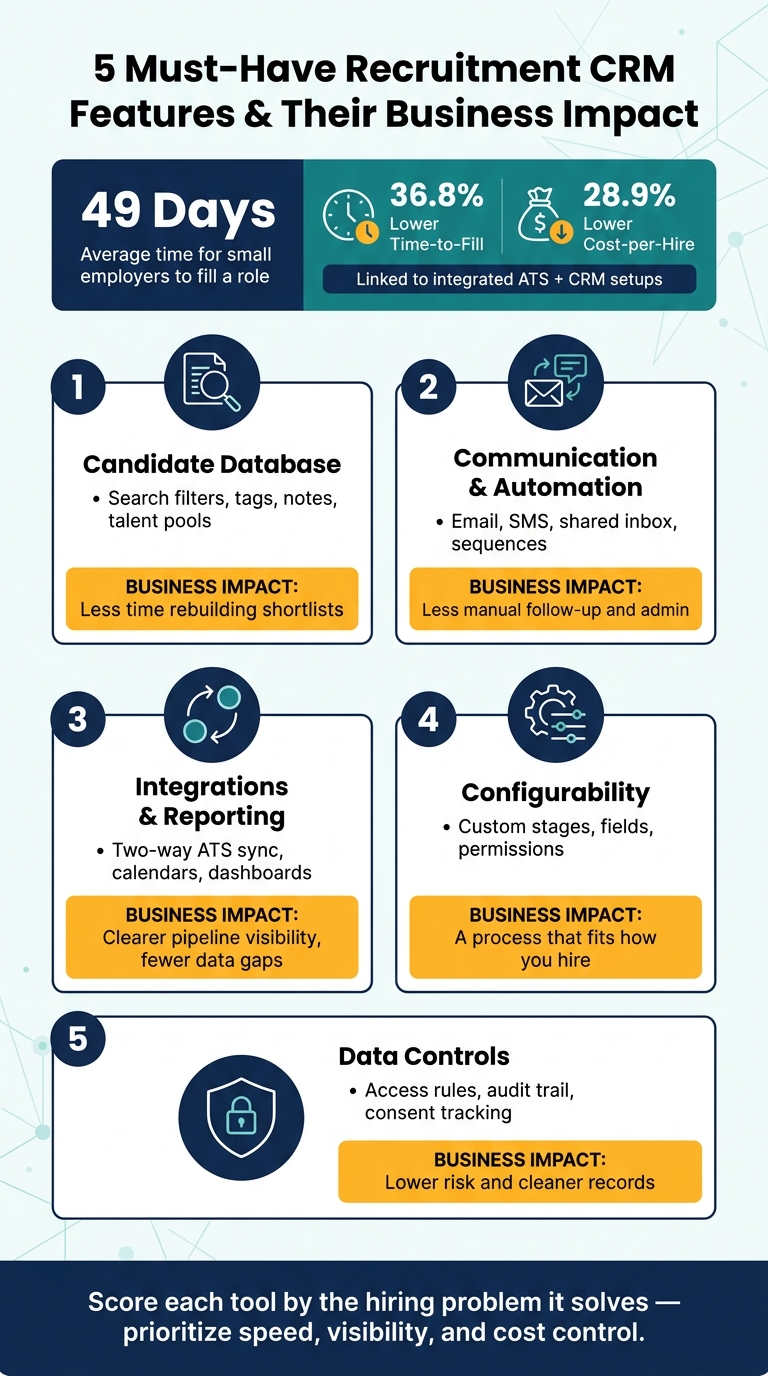
5 Must-Have Recruitment CRM Features & Their Business Impact
Setting up and customizing your Talent Pool page in Recruit CRM
sbb-itb-a23bd6a
Quick Comparison
| Feature | What I’d check first | Business impact |
|---|---|---|
| Candidate database | Search filters, tags, notes, talent pools | Less time rebuilding shortlists |
| Communication tools | Email, SMS, shared inbox, sequences | Less manual follow-up and admin |
| Integrations and reporting | Two-way ATS sync, calendars, dashboards | Clearer pipeline visibility and fewer data gaps |
| Configurability | Custom stages, fields, permissions | A process that fits how you hire |
| Data controls | Access rules, audit trail, consent tracking | Lower risk and cleaner records |
If you are comparing tools now, I’d use this checklist to score which platform removes the most manual work first, then tie that back to time saved, hiring speed, and spend control.
1. A Unified Candidate Database That Makes Talent Reuse Easy
When a new role opens, your recruiters should not be starting from zero. A unified candidate database gives your team one searchable place for every candidate, with resumes, notes, skills, and communication history in one view. That is what turns talent reuse into something your team can actually do, not just talk about.
For scaling companies, that matters. Less time spent rebuilding pipelines means faster shortlists, lower recruiter workload, and better use of people you’ve already assessed.
Centralized profiles, search, and segmentation
A strong recruitment CRM should hold both structured data and the human detail that helps teams make better hiring calls. You need searchable profiles with key fields like skills, seniority, location, experience, work arrangement, and function. Then layer in notes, interview feedback, and links to work samples.
That setup gives recruiters a far better starting point. Instead of digging through spreadsheets or old inbox threads, they can:
- Run Boolean keyword searches
- Apply multi-filter queries
- Save repeat searches as saved filters
For high-growth SMEs, this kind of structure makes a big difference. Large candidate volumes stop being noise and start becoming usable shortlists.
Talent pools for silver medalists and future hiring
One of the biggest missed chances in hiring is letting strong final-stage candidates disappear after a role closes.
Tag your silver medalists, the people your team already assessed and liked, then bring those profiles back up fast when a similar role opens. Beyond that, build talent pools by discipline, seniority, and region. When a hiring push lands, you are not scrambling to find people. The shortlist is already there.
That speeds up shortlist building when hiring demand jumps, and it helps you cut agency spend by getting more value from people already in your pipeline.
Comparison table: basic lists vs. segmented talent pools
| Dimension | Flat Candidate Lists | Tagged Databases | Structured Talent Pools |
|---|---|---|---|
| Search speed | Slow; manual filtering required | Moderate; depends on tag consistency | Fast; targeted subsets retrieved in clicks |
| Data quality | Inconsistent; often missing fields | Variable; relies on individual tagging habits | High; standardized fields and workflows enforced |
| Pipeline reuse | Low; history buried in free-text notes | Partial; some categorization, limited context | Strong; silver medalists and repeat-role candidates clearly organized |
| Hiring impact | Low to moderate | Moderate | High; shortlists built in hours, not weeks |
Once talent is organised, the next step is simple. You need a way to reach those candidates without manual follow-up.
2. Multi-Channel Communication and Automation That Save Recruiter Time
Once your talent database is in order, the next problem is simple: staying in touch without burying your team in follow-ups.
That’s where smaller hiring teams often lose hours—a challenge we’ve solved in our embedded recruitment case studies. One recruiter sends an email, sets a reminder, forgets to chase, then jumps into another tool to check replies. It adds up fast. After you’ve checked outreach automation, the next thing to look at is whether the CRM connects cleanly with your ATS and reporting tools.
A recruitment CRM should support email, SMS, and one shared inbox so recruiters don’t have to jump between systems just to piece together a conversation.[1][4]
Email, SMS, and outreach sequencing
Once candidate records sit in one place, messaging should happen there too.
The biggest time win comes from automated multi-step sequences, not one-off outreach. A sensible cadence might start with a short personal email on Day 1, follow up 2 to 3 days later with more context, send a brief SMS nudge around Day 8 if there’s still no reply, and close the loop with a final email around Day 12 to 15.[2][3]
The key point is this: the sequence runs on its own once it’s set up. When a candidate replies, the sequence stops, and the recruiter moves into a direct one-to-one conversation. That shift from automation to personal follow-up is where a good CRM saves time without making outreach feel robotic.
Personalization without manual repetition
Dynamic fields like {First Name}, {Role Title}, {Location}, and {Salary Range} let you tailor messages at send time without writing each one from scratch.
Add segment-based messaging by role, seniority, or location, and a lean team can run several campaigns at once without the process getting messy.
A template library grouped by role, seniority, and stage helps too. Used well, automation speeds up outreach, cuts admin, and still leaves room for recruiter judgment.
Comparison table: manual outreach vs. automated sequences
| Dimension | Manual Outreach | Basic Bulk Email | Automated Multi-Step Sequences |
|---|---|---|---|
| Recruiter time spent | High; every message drafted and sent one by one | Moderate; one send, no follow-up structure | Low; sequences run on schedule after initial setup |
| Consistency | Variable; depends on individual habits | Moderate; same message, no follow-up | High; every candidate gets the same structured journey |
| Personalization | High for individuals; hard to maintain at volume | Low; usually no dynamic fields | High; dynamic fields and segment targeting at scale |
| Candidate experience | Strong for high-touch roles; gaps appear at volume | Transactional; lacks follow-through | Consistent and timely; cuts drop-off between stages |
| Tracking and visibility | Low; activity spread across inboxes and notes | Partial; send data only, no reply tracking | High; full audit trail logged to each candidate record |
For U.S. teams, SMS outreach must include opt-in consent and a simple opt-out option.
Next, check whether the CRM integrates with your ATS, calendar, and reporting stack.
3. Integrations and Reporting That Improve Hiring Visibility
Once outreach is automated, the next issue is simple: does your data stay usable, or does it fall apart across tools?
That comes down to integrations.
Your recruitment CRM needs to connect with the rest of your hiring stack. If it does not sync with your ATS, email, calendar, and sourcing tools, your team ends up copying data from one system to another. Statuses drift. Notes go missing. Leadership loses sight of what is happening in the pipeline.
That is where integrations and reporting matter. They cut admin time and help you make faster hiring decisions.
ATS, email, calendar, and sourcing tool integrations
Start with two-way ATS sync.
It should sync stage changes, interview status, disposition reasons, and notes in both directions. If updates only move one way, your team still has to patch gaps by hand, and that defeats the point.
Email and calendar integrations should log outreach, replies, interviews, and follow-ups on their own. Your recruiters should not be wasting time updating records after every message or meeting.
Sourcing tools should also bring profiles into the CRM as clean records, with source data attached from the start. That gives you a cleaner pipeline and better reporting later.
Pipeline dashboards and conversion reporting
When systems sync cleanly, reporting becomes something you can trust.
Use dashboards to spot bottlenecks, track source quality, and keep control of cost-per-hire. A good pipeline dashboard shows candidates per stage, time in stage, and where volume is slowing down.
For U.S. SMEs, reporting should cover time-to-fill, time-to-hire, source of hire, offer acceptance rate, and cost-per-hire in USD. You should also be able to filter by role, recruiter, and department.
That level of visibility matters. If you can see which stage is adding delay, you can fix the process before missed hiring targets start hitting revenue, team output, or delivery timelines.
Without that, a dashboard is just window dressing.
With data flowing cleanly, the next priority is whether the CRM can match your hiring process.
Comparison table: integration and reporting priorities
| Area | What to require | Business benefit |
|---|---|---|
| ATS sync | Real-time or near-real-time two-way sync of stage, status, and notes | Eliminates data mismatches; saves reconciliation time |
| Email and calendar | Auto-logging of outreach, replies, interviews, and follow-ups to candidate records | Reduces manual updates; improves candidate follow-through |
| Sourcing imports | Structured profile capture with source attribution from LinkedIn, job boards, referrals, and internal talent pools | Faster pipeline building; accurate source-of-hire reporting |
| Pipeline visibility | Candidates per stage, time in stage, aging flags, and bottleneck visibility | Helps leaders forecast hiring and catch delays early |
| Conversion rates | Stage-by-stage conversion rates, time-to-hire, time-to-fill, and offer acceptance | Identifies where hiring breaks down; supports smarter budget decisions |
4. Configurability and Data Controls That Support a Scalable Hiring Process
Once reporting is in place, your CRM needs to match the way you hire. If it doesn’t, people drift back to spreadsheets, inbox threads, and side processes. That’s when visibility drops, admin grows, and hiring slows down.
Custom workflows, fields, and permissions
A configurable CRM lets you build pipelines around your actual hiring flow, not a generic template.
An engineering pipeline might include Technical screen, Coding assessment, and VP sign-off. A sales pipeline might include Discovery call and Executive panel. Different roles need different stages. Your system should reflect that without forcing workarounds.
Custom fields and tags make the setup far more useful. You can track role-specific data like salary expectations in USD, U.S. work authorization status, location preference, and technical certifications. Then you can use that data in filters, searches, and workflows.
That matters when hiring picks up. If a new role opens and you can instantly filter for people tagged Remote-friendly or Fintech experience, your team saves time and gets to a qualified shortlist faster.
Once the workflow is set, permissions help keep it in place as more stakeholders get involved. Recruiters need full editing access. Hiring managers need review and feedback access. Leaders usually need dashboard visibility, not editing rights.
That role-based setup helps stop process drift when internal recruiters, hiring managers, and external partners are all working inside the same pipeline. Less drift means fewer mistakes, less back-and-forth, and a cleaner hiring process at scale.
Secure access and candidate data management
As your hiring team grows, access control stops being a nice-to-have and starts becoming a risk issue.
Research on role-based access control found it significantly reduces unauthorized access and data breaches compared with systems without it. [5]
Beyond access settings, look for audit trails, consent tracking, and retention rules. These controls help keep candidate records accurate, accountable, and usable as volume grows.
A good example is structured consent stored on each candidate profile. If your CRM can trigger automated flags to renew consent or delete records, your team spends less time checking data manually and avoids cluttered talent pools. It also helps keep your data practices aligned with U.S. privacy requirements.
For hiring leaders, that has a direct business impact. Cleaner data means better searches, lower admin time, and less compliance risk as your recruiting function grows.
5. How to Apply This Checklist When Choosing a Recruitment CRM
Use the checklist below to compare tools based on business impact. Start with the feature linked to your biggest hiring bottleneck. Identifying these challenges in recruitment is the first step toward solving them. If your team is lean, the best tool is usually the one that strips out the most manual work first.
Score each tool by the hiring problem it solves:
| Feature Area | Hiring Problem It Solves |
|---|---|
| Candidate Database | Can you search, segment, and reuse past candidates without manual digging? |
| Communication & Automation | How many recruiter hours does it save by automating outreach, scheduling, and follow-ups? |
| Integrations & Reporting | Can leadership see essential recruitment metrics like pipeline status, source-of-hire, and time-in-stage without manual updates? |
| Configurability | Can you add custom fields and role-specific workflows without technical support? |
| Data Controls | Can you manage role-based access and protect sensitive candidate data as more stakeholders join the process? |
During a demo, look beyond the feature list. Check whether the CRM connects with your calendar and HR stack. Check whether your team can reuse workflows for similar roles.
That matters more than it sounds. If setup starts from scratch every time, admin time stacks up fast as hiring volume grows. What looks cheap at the start can end up costing you hours every week.
Once you score tools this way, it becomes much easier to spot the right fit.
Conclusion: Prioritize speed, visibility, and cost control
The right CRM should do more than store candidate data. It should help you hire with more speed, better visibility, and tighter cost control. That is what makes a CRM useful for a growing SME.
If you want help building a more structured hiring function, book a call with Rent a Recruiter.
FAQs
How do I know which CRM feature matters most for my team?
Start by pinpointing your main hiring bottleneck. Then prioritise the features that remove that friction first, whether that’s follow-ups, reporting, or handoffs.
Focus on tools that cut manual work, such as candidate search, calendar syncing, and status updates. If a feature doesn’t speed up hiring, reduce admin time, or improve handoffs, it shouldn’t sit high on your list. A 30- to 60-day pilot gives you a clean way to test fit and day-to-day use before you commit.
What should I ask for in a CRM demo?
Ask them to map your end-to-end workflow, then test the jobs your team will do every day using your own scenarios. That means adding a candidate, moving them through stages, and logging touchpoints with as few clicks as possible.
This is where software either helps your team or slows them down. If simple actions take too many steps, you’ll pay for it later in lost time, patchy data, and lower recruiter output.
You should also confirm a single source of truth for hiring data, along with stage conversion reporting and time-to-fill reporting. Without that, it’s hard to spot bottlenecks, forecast hiring capacity, or show clear hiring performance to leadership.
Then get clear on integrations. You want true two-way integrations, not one-way syncs that leave your team updating records in two places.
Finally, pin down the nuts and bolts of implementation:
- Security
- Training
- Data migration
- API access costs
Those details often shape the total cost, the speed of rollout, and how much work your team has to carry internally.
Can a recruitment CRM work for a small hiring team?
Yes. A recruitment CRM can work well for a small hiring team, if it matches how you hire today and the volume you expect to handle.
Start with the basics: pipeline tracking and email or calendar sync. That gives you a clear view of where each role sits, who owns what, and where time is getting lost.
As hiring picks up, add more control. Permissions, automation, and centralised records help you cut admin, keep data in one place, and avoid messy handovers between hiring managers, HR, and talent teams.
The aim is simple: less admin, better visibility, and no extra complexity your team won’t keep up with.


