
We use current pay data and hiring results to help you set competitive offers without losing control of costs. For U.S. SMEs, that means matching duties, level, and location, then checking salary, incentives, and employer costs before approving a range.
Our approach keeps the decisions clear:
- Check the market: Combine wage benchmarks with recent offer outcomes and candidate pay expectations.
- Check your team: Review pay gaps and new-hire compression before changing offers.
- Check the budget: Model total hiring costs, not just base salary.
- Check the results: Review fast-changing roles monthly and stable roles quarterly, tracking offer acceptance, time to fill, and budget variance.
We recommend a 30 to 60-day pilot across three to five roles before rollout. The goal is <u>better offer decisions with a budget you can defend</u>. Here’s how we build that process, with HR and finance retaining control of pay approvals.
Compensation Analysis 101:Market Data & Benchmarking
sbb-itb-a23bd6a
Build Reliable Data and Match Jobs
Separate broad wage baselines from live hiring signals, then clean your inputs before pricing roles. This gives you a clearer basis for pay decisions.
Compare Wage Data With Current Hiring Signals
Create a source register with a job ID, source URL or internal record, collection date, and reference period. Keep evidence types separate rather than averaging them together.
Use BLS OEWS for occupational and geographic context. Its estimates combine six semiannual panels collected over three years, so they lag fast-moving markets.[4][6] Use live hiring signals to check whether current pay expectations have moved beyond that baseline.
| Evidence type | Data age | Geographic coverage | Role detail | Main limitation | Decision use |
|---|---|---|---|---|---|
| BLS OEWS | Annual estimates built from six panels collected over 3 years | National, state, metropolitan, and nonmetropolitan areas | SOC occupation and wage distribution | Broad categories; not live hiring data | Establish external wage context |
| Salary disclosures | Posting date | Advertised location or stated remote eligibility | Duties and level, when disclosed | Ranges may be broad, stale, or incomplete | Compare advertised positioning and pay-transparency exposure |
| Candidate expectations | Collection date | Candidate’s intended work location | Skills and level | Self-reported; influenced by negotiation | Detect emerging pressure points and calibrate offer expectations |
| Accepted offers | Acceptance date | Hire location | Job and level | Small, selective samples | Assess offer competitiveness and accepted pay |
| Internal hiring outcomes | Recruiting-cycle dates | Company hiring locations and approved remote geographies | Requisition and team | Results also reflect interview speed, job quality, recruiting quality, and employer brand | Investigate declines, delays, and early turnover |
Match Job Duties, Level, and Location
Compare job scope, not titles. Build each profile around responsibilities, skills, relevant experience, decision authority, people-management duties, team or budget scope, industry, employment type, and work arrangement. BLS’s Standard Occupational Classification system supports this duties-first approach.[4][7]
For remote jobs, specify whether pay follows the employee’s approved work location, geographic zones, a national range, or a hybrid policy. Define how relocation changes the benchmark.
Use two or three strong matches when available. Record each source, internal level, and key differences, then rate the match as strong, partial, or weak. Document adjustments for scope, industry, or geography, and avoid adjusting for location twice.
If you only have weak matches, label the result directional and record the evidence gap. Don’t use weak evidence to justify an immediate pay change.
Standardize Pay Data and Check Quality
Before calculating anything, record source dates, sample sizes, inclusion rules, and pay definitions. Label each record by pay type and identify amounts as hourly, annual, actual earnings, or target compensation.
Annualize hourly wages only when scheduled hours are known. The 2,080-hour convention assumes 40 hours per week for 52 weeks and can misstate earnings for some jobs.[3][5] Don’t apply it to seasonal, part-time, or variable-schedule jobs. Keep unknown schedules in hourly terms.
Remove duplicates and exclude stale records from your current analysis set, but retain the originals. Set recency and sample requirements. Require at least three recent, comparable internal observations before treating accepted offers as a primary signal. Mark smaller samples as directional.
Record geographic and recency adjustments, including their effective dates, assumptions, and approver. Every output should disclose sample size, recency, match quality, pay definitions, exclusions, and gaps.
Calculate Pay Ranges and Costs
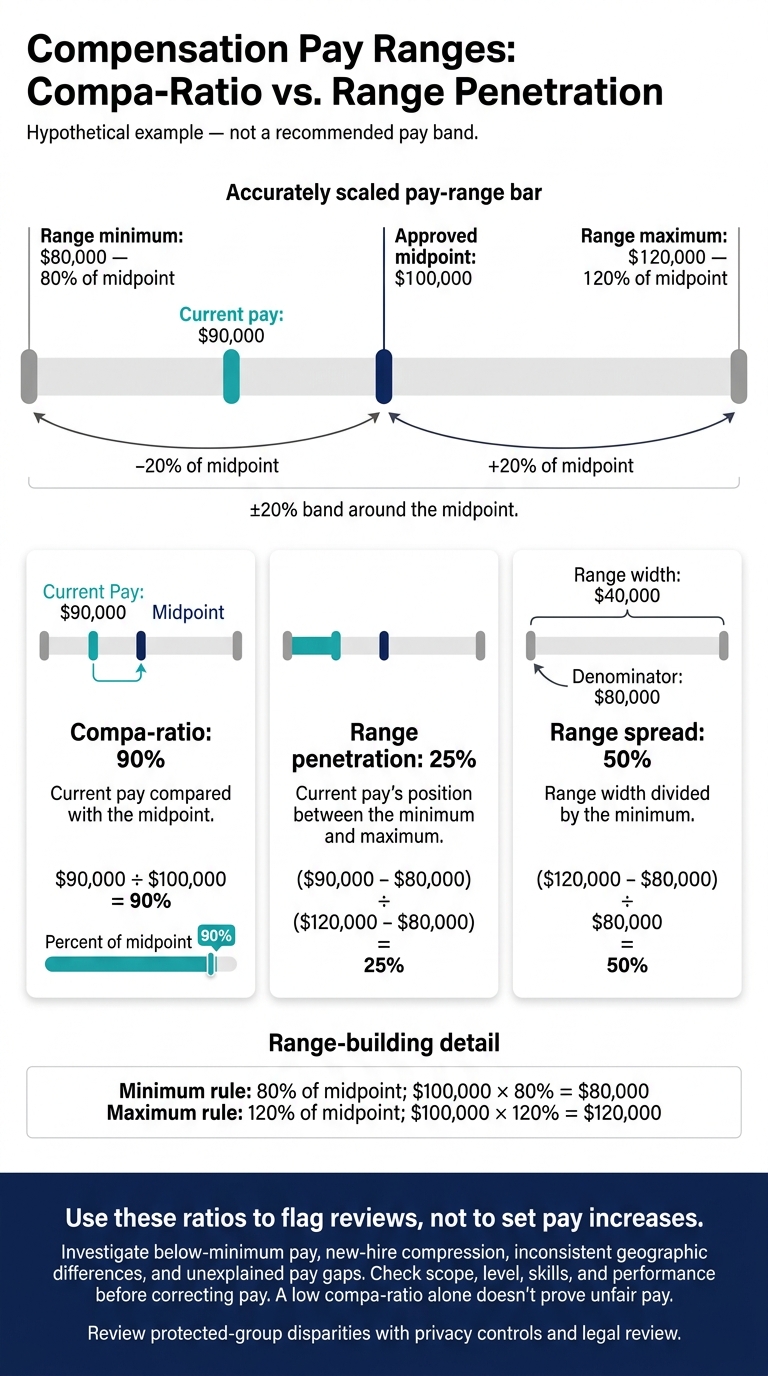
Compensation Pay Ranges: Compa-Ratio vs. Range Penetration
Set Market Targets and Source Weighting
Once you’ve matched and cleaned the data, turn it into a market reference point.
Choose your market target before approving the midpoint. The 50th percentile can serve as a balanced default. Consider the 25th when talent supply is broad or budgets are tight, and the 75th for scarce, business-critical roles.
These are policy choices, not automatic recommendations. Only use a percentile when the dataset matches the role, level, and location. A high offer alone doesn’t prove 75th percentile pay.
Weight comparable pay figures by job fit, sample quality, recency, and geography. Give stronger evidence more influence and record your reasons. Calculate the reference point as the weighted average of approved source pay figures, with weights totaling 100%. Never calculate employee pay percentiles from advertised range endpoints.[10][11]
Use this reference point to build your pay range.
Build Pay Ranges and Check Internal Equity
Hypothetical example: a $100,000 midpoint, 80% minimum, and 120% maximum create a ±20% band and a 50% range spread.
| Item | Calculation or value |
|---|---|
| Approved midpoint | $100,000 |
| Minimum rule | 80% of midpoint |
| Maximum rule | 120% of midpoint |
| Range minimum | $100,000 × 80% = $80,000 |
| Range maximum | $100,000 × 120% = $120,000 |
| Range spread | ($120,000 − $80,000) ÷ $80,000 = 50% |
| Current pay | $90,000 |
| Compa-ratio | $90,000 ÷ $100,000 = 90% |
| Range penetration | ($90,000 − $80,000) ÷ ($120,000 − $80,000) = 25% |
Use these ratios to flag reviews, not to set pay increases. To support hiring speed and retention, investigate below-minimum pay, new-hire compression, inconsistent geographic differences, and unexplained pay gaps.
Check scope, level, skills, and performance before correcting pay. Review protected-group disparities with privacy controls and legal review. A low compa-ratio alone doesn’t prove unfair pay.
Estimate Offer and Employee Pay Adjustment Costs
With the range set, calculate what your pay decisions will cost.
Hypothetical SaaS budget example: four hires at $105,000 each, plus a 10% bonus target, an 8% employer load, and an $18,000 benefits allowance per hire.
| Cost component | Per hire | Four hires |
|---|---|---|
| Annual base salary | $105,000 | $420,000 |
| Target bonus: 10% of base | $10,500 | $42,000 |
| Employer load: 8% of base | $8,400 | $33,600 |
| Benefits | $18,000 | $72,000 |
| Annual recurring cost | $141,900 | $567,600 |
| One-time sign-on bonus | $10,000 | $40,000 |
| Modeled first-year cost | $151,900 | $607,600 |
Replace planning allowances with actual benefit costs and applicable employer taxes, including taxes on bonuses and sign-on payments. BLS separates wages from benefits and legally required employer costs.[8][9]
A $5,000 raise for 20 employees adds $100,000 in base pay, $8,000 in employer load, and $10,000 in target bonuses: $118,000 before bonus tax or benefit changes.
Prorate costs from hire or adjustment dates. Separate growth hiring from equity corrections, and keep sign-on payments out of future-year salary budgets.
State equity separately, including the instrument, valuation date, vesting, dilution, and liquidity assumptions. A “$20,000” grant is not guaranteed cash. Require finance, HR, or leadership to check formulas and assumptions before approval.
Use Benchmarks in Hiring and Retention
Set Offer Rules and Review Retention Risks
Once you approve a pay range, use it to guide offers and flag retention risks. Base offers on the assigned job level, verified skills, relevant experience, location, and internal equity, not previous salary. Record the reasons for exceptions, who approved them, and the next review dates.
Track why offers are declined: base pay, benefits, remote-work terms, location, role scope, timing, competing offers, or another reason. Allow “unknown” rather than forcing a guess.
Review existing employees’ pay when new hires create pay compression or counteroffers become a pattern. Consider performance, promotion history, tenure, and exit feedback alongside pay.
Check U.S. Pay Disclosure and Data Rules
Keep a location-specific checklist covering range disclosure, benefits, salary-history bans, and recordkeeping, including remote roles. Publish a range you can justify using the approved benchmark. Check current local requirements before posting. Remove salary-history questions from applications and recruiter scripts unless counsel confirms a lawful process.
Illinois guidance requires certain pay-transparency records to be retained for five years.[15]
Limit access to identifiable compensation records to authorized users. Use multifactor authentication and encryption, and set retention and deletion rules. Check providers’ aggregation thresholds, small-sample suppression, permitted data uses, and redisclosure controls.
Do not exchange nonpublic current or future wage information with competing employers. Using an intermediary does not make nonpublic pay sharing lawful.[12][14] Ask counsel to review sensitive arrangements.
Assign Responsibilities and Track Results
With compliance rules in place, assign clear owners for benchmarking and approvals. Recruiting records hiring signals; HR validates data and owns ranges and equity reviews; finance approves budgets; managers confirm role scope. Assign an executive approver for material exceptions and counsel for compliance questions.
Review volatile roles monthly and stable roles quarterly. Set triggers for reviews between those dates, such as three pay-related declines within 60 days. That threshold prompts a review, not an automatic pay increase.
Track data age, offer acceptance, compa-ratios, budget variance, and retention by role and location. Keep the source, decision date, approver, and outcome in an audit trail so you can trace pay decisions and their results.
Use Embedded Recruiters to Record Hiring Signals
Keep benchmarks current by recording live hiring signals during recruitment. Embedded recruiters can record candidate salary expectations, offer details, decline reasons, timing, and market feedback in one system. HR and finance can then review that information when updating ranges.
Rent a Recruiter provides that hiring capacity. HR and finance still own pay policy, ranges, budgets, and approvals.[13]
Conclusion: Start With a Controlled Pilot
Once your first pay ranges are built, test them before rollout. Run a 30 to 60-day pilot across three to five priority roles. Choose roles with clear duties and recent, comparable pay data.
Check job matches, source quality, calculation repeatability, affordability, and internal equity before applying the ranges more broadly.
Compensation Benchmarking Setup Checklist
Before launch, confirm:
- Current pay records and job descriptions, with documented matches for duties, level, and location.
- Standardized USD units, with base pay and incentives recorded separately.
- Approved benchmarking rules, compliance and budget approval, named owners, and a review schedule.
Use the same method record for every role so you can reproduce the pilot. Document the data cutoff date, U.S. scope, and rules for resolving conflicts and escalating issues.
Track data completeness, preparation time, conflicts, approval revisions, and the gap between recommended and budgeted pay. This shows where the process takes time and where pay recommendations exceed your budget.
Have two qualified reviewers independently verify the pilot results. Resolve disagreements before expanding. Proceed only when inputs are complete and comparable, calculations are repeatable, and approvals are consistent and defensible.
Decide Whether You Need Recruitment Support
If the pilot reveals process gaps rather than pay gaps, add talent acquisition services for SMEs. If your team cannot maintain the process, contact Rent a Recruiter for embedded recruitment support to keep it running and collect live hiring signals that keep benchmarks current.
Base your decision on hiring volume, urgency, internal capacity, and process complexity.
FAQs
How can we benchmark pay with limited hiring data?
Use publicly available Bureau of Labor Statistics data for relevant roles, industries, and locations alongside salary information from job postings. Cross-check figures across salary aggregation tools to spot anomalies before setting your pay ranges.
Track offer acceptance rates and time-to-fill. Low acceptance rates or longer hiring timelines may suggest your pay doesn’t match market expectations. Rent a Recruiter can embed experienced recruiters in your team to support salary benchmarking and keep your offers competitive.
What if market pay exceeds our budget?
Benchmark your employee value proposition (EVP), not just salary. Highlight flexible remote work, professional development, career progression, and diversity initiatives to show what your business offers beyond pay [1].
Use real-time compensation data to review pay and avoid overspending. Adjust hiring criteria or tool requirements where possible to reach a broader talent pool [1].
Rent a Recruiter places recruiters inside your team to help keep offers informed, consistent, and aligned with your internal pay bands, market data, and growth goals [2].
How do we resolve conflicting pay benchmarks?
Cross-check federal labor statistics, industry-specific surveys, and salary aggregation tools to filter out anomalies and establish a more accurate market range. Focus on data that matches the role, experience level, and location so your offers reflect the market you’re hiring in.
Rent a Recruiter can embed experienced recruiters who combine internal and external data to take the guesswork out of compensation, helping you keep pay competitive, equitable, and aligned with your internal pay bands.


