
Hiring fast but struggling with productivity? Scaling companies often face slow onboarding, high early attrition, and overwhelmed managers. The solution? Role-specific training.
Unlike generic onboarding, role-specific training equips new hires with the exact tools, workflows, and knowledge they need to excel in their roles. The results are hard to ignore: 17% higher productivity, 82% retention rates, and 70% better performance. Plus, it reduces the burden on managers and minimizes costly errors.
Key benefits include:
- Faster ramp-up times for new hires.
- Reduced early turnover, saving up to 2x annual salary per replacement.
- Streamlined manager involvement, cutting repetitive questions by 30%.
For scaling businesses, this approach isn’t just better – it’s essential for maintaining growth and performance. Many organizations leverage flexible hiring for growing teams to manage this transition effectively. Ready to shift from inefficiency to impact? Keep reading for a practical framework to transform your onboarding process.
Designing Role-Specific Onboarding That Actually Works
sbb-itb-a23bd6a
Common Onboarding Challenges in High-Growth Companies
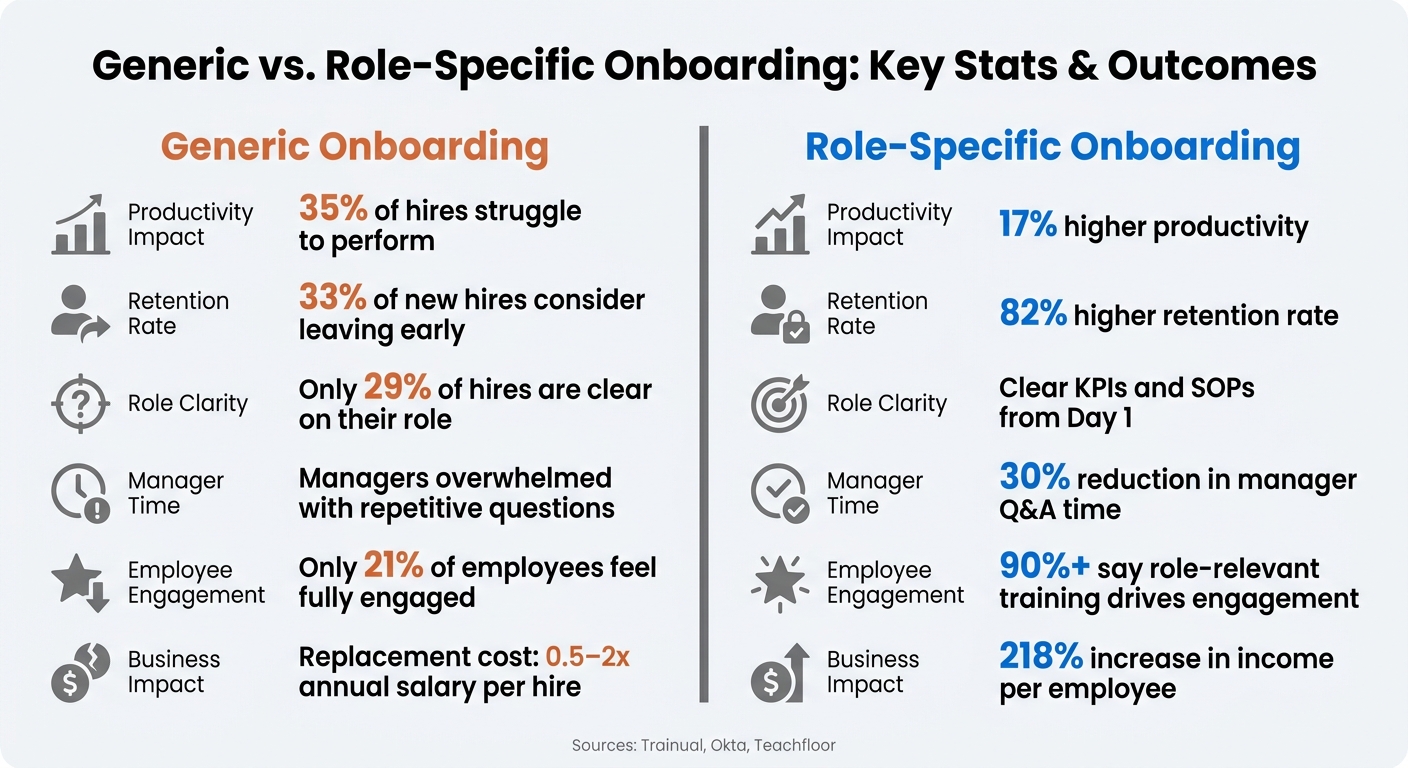
Generic vs. Role-Specific Onboarding: Key Stats & Outcomes
High-growth companies often face a unique problem: they hire quickly, but their onboarding systems can’t keep up. When the pace of hiring outstrips the infrastructure supporting it, onboarding becomes chaotic, and new hires bear the brunt of it. This is why crafting onboarding processes tailored to specific roles is so important.
Signs That Onboarding Is Not Working
When onboarding falls short, the warning signs are easy to spot. New hires take far longer than expected to become productive, and managers are overwhelmed, spending hours re-teaching basic tasks instead of focusing on their primary responsibilities. This creates a ripple effect, where productivity suffers across the board.
Then there’s the issue of early attrition. A poor onboarding experience can push 33% of new hires to start looking for a new job almost immediately [5]. Considering that replacing just one employee costs between 0.5 and 2 times their annual salary [2], the financial impact for companies hiring at scale can be staggering.
Other red flags include frequent errors and missed service-level agreements (SLAs), both of which point to gaps in onboarding.
Why Onboarding Breaks Down
The core issue lies in how most onboarding programs are designed. They aim for consistency across the company, but they fail to address the specific needs of different roles. For example, a Customer Success Manager and a Support Engineer might sit through the same onboarding sessions, even though their day-to-day responsibilities, tools, and success metrics are completely different.
This creates what’s known as a tribal knowledge problem. Without clear, role-specific documentation, new hires are left to rely on whoever is around to answer their questions. This approach is inconsistent and often incomplete. In fact, only 29% of new hires report being very clear on what their role involves [5]. The rest? They’re left guessing their way through the first few weeks.
Another common issue is information overload. Companies often cram everything into the first week, leaving new hires overwhelmed. While they might leave orientation with pages of notes, they often lack a clear understanding of what to do when they hit the ground running. This is where role-specific training can make a measurable difference.
Generic vs. Role-Specific Onboarding: Side-by-Side Comparison
The table below highlights why role-specific onboarding outperforms a one-size-fits-all approach:
| Metric | Generic Onboarding | Role-Specific Onboarding |
|---|---|---|
| Core Focus | Standardized processes across the company | Tailored to the execution needs of the role |
| Productivity Impact | Lower; 35% of hires struggle to perform [5] | 17% higher productivity [4] |
| Retention Rate | Poor; 33% of hires consider leaving early [5] | 82% higher retention [2] |
| Content Delivery | Overwhelming "firehose" approach | Gradual, tailored learning paths |
| Success Measurement | Focused on attendance and task completion | Tied to business outcomes like KPIs and SLAs |
The difference is striking. While generic onboarding emphasizes uniformity, role-specific onboarding focuses on equipping hires to succeed in their roles. For fast-growing companies, where every new hire needs to contribute quickly, this shift can have a massive impact.
How Role-Specific Training Improves New Hire Performance
Setting Clear Role Expectations and KPIs from Day 1
New hires often stumble when they don’t know what success looks like. Role-specific training eliminates this confusion by linking daily responsibilities to measurable outcomes right from the start.
When training is built around a role scorecard – with defined KPIs, clear responsibilities, and documented workflows – new hires gain a roadmap for success without needing constant oversight. As Trainual explains:
"Clarity is king, especially when you’re scaling fast. Every team member should know exactly what their role covers, what success looks like, and how their work connects to the bigger picture." [2]
By embedding Standard Operating Procedures (SOPs) into these training materials, companies ensure clarity at a task level. This approach helps new hires quickly understand their role, reducing ambiguity and speeding up skill development.
Getting New Hires Up to Speed Faster
The fastest way to reduce ramp-up time is by focusing on what new hires will actually do. Role-specific training achieves this by combining SOPs, job shadowing, and hands-on practice into a structured timeline.
Breaking down the first 30 days into phased learning – Week 1: role basics; Week 2: tools and processes; Week 3: cross-team collaboration; Week 4: independent work with feedback – helps new employees absorb information without feeling overwhelmed.
This tailored approach increases productivity by 17% [4] and improves new hire performance by 70% [2]. Additionally, well-documented role-specific training can cut down the time managers spend answering repetitive questions by up to 30% [2].
Improving Retention and Engagement
When new hires know what’s expected and feel equipped to succeed, they’re more engaged and likely to stay. Role-specific training not only boosts productivity but also builds confidence early on, which directly impacts retention.
The numbers speak for themselves: over 90% of employees say that role-relevant, personalized training is key to their engagement [4]. Yet, only 21% of employees feel fully engaged at work today [4]. Role-specific programs help close this gap by using language, scenarios, and metrics tailored to the employee’s day-to-day role.
"Role-based enablement means creating learning paths that talk about the business in their terms – adoption plays for TAMs, integration support for PS, troubleshooting and break/fix for support engineers."
Companies that excel in role-specific training see a 218% increase in income per employee [4], making it a critical strategy for scaling businesses effectively.
How to Design a Role-Specific Training Program
Creating a role-specific training program requires careful planning to ensure new hires can quickly adapt and excel in their roles. Here’s how to structure an effective program.
Defining the Role and Setting Performance Standards
Start by clearly defining the role’s responsibilities and expectations using a role scorecard. This document outlines daily tasks, required skills, and measurable success metrics like time-to-productivity or quality benchmarks. This approach helps new hires understand their objectives and ramps up productivity faster. As Denise Nelson, Founder and CEO of TalentBloom, explains:
"A successful onboarding plan equips new hires to perform their new job, sets clear expectations and helps them thrive within your organization." [1]
Complement the scorecard with 30/60/90-day milestones so new hires can track their progress. The table below provides an example of how to define these elements for different role types:
| Role Type | Key Focus Areas | Example Performance Indicators |
|---|---|---|
| Technical | Tool access, codebase orientation | Code review quality, CI/CD proficiency |
| Customer-Facing | Product personas, CRM training | Time to first solo call, CRM data accuracy |
| Creative | Brand guidelines, tool setup | Adherence to style guides, revision cycles |
| Leadership | Org structure, decision frameworks | Team alignment, reporting accuracy |
Structuring Modular Learning Paths
Organize training into layers, starting with a shared foundation that covers company culture, compliance, and essential tools. From there, branch into role-specific modules tailored to the demands of each position.
Sequence the modules thoughtfully. For instance, a sales representative should first learn about the product before diving into advanced sales techniques. Map out dependencies so each module builds on the last, ensuring skills are developed in a logical order. Chloe Park from Teachfloor highlights the importance of focus:
"Three well-maintained tracks consistently outperform twelve neglected ones." [6]
Incorporate a mix of learning formats – such as hands-on practice, roleplay, and shadowing – to suit the role’s needs. If multiple hires join within a short timeframe, consider a cohort model. This approach reduces the managerial burden and ensures consistent training for all participants [3].
Measuring Results and Improving the Program
Once the training is up and running, track results to identify areas for improvement. A key metric to monitor is time-to-productivity, which measures how quickly new hires become fully contributing team members. Additionally, focus on role-specific metrics like sales prospecting calls, customer support ticket resolution, or code review quality.
If knowledge check scores drop below 70% by Week 3, intervene immediately. As Camellia, Principal Product Marketing Strategist, advises:
"The manager who waits for a monthly review to spot problems will be having rescue conversations at week 10 instead of calibration conversations at week four." [3]
Use dashboards to monitor weekly performance metrics for each hire. Pair this data with feedback from new hire surveys to evaluate the clarity and relevance of training activities. Update or remove ineffective modules as needed, and review the entire program quarterly or whenever major processes change. Regular adjustments will keep the training aligned with evolving needs.
Scaling Role-Specific Training as Hiring Grows
Once you’ve nailed down effective role-specific training for individuals, the next challenge is keeping that consistency as hiring ramps up. Rapid growth can put pressure on training programs, and without a clear system to scale, quality often takes a hit. The key is building on what already works while adapting for increased volume.
Building Templates That Work Across Roles
One way to keep training scalable is by using a shared-foundation-plus-branching model. This approach ensures every new hire starts with a core foundation – covering company culture, compliance, and essential tools – before moving into tailored, role-specific training. This structure means you don’t have to reinvent the wheel every time you hire for a new position.
To keep things running smoothly, assign a track owner for each role. They’ll be responsible for updating content, ensuring assessments stay relevant, and tracking learner progress. This kind of ownership helps maintain consistency, even as your team grows.
Aligning Recruitment and Training from Day One
Scaling training effectively isn’t just about what happens after someone joins – it starts with recruitment. By defining clear, measurable competencies for each role, you can design training that aligns with what’s expected from day one. This is where partnering with Rent a Recruiter can make a difference. Their expertise in defining precise role competencies ensures that performance expectations are clear before a new hire even starts. The result? Shorter ramp-up times and better performance right out of the gate. [6]
Using Data to Fine-Tune Training
To improve training as you scale, focus on role-specific performance data rather than broad, company-wide metrics. Aggregate figures often hide the details, but tracking data at the role-track level can highlight specific areas that need adjustment. This targeted approach ensures your training evolves to meet the needs of each role.
Here’s a breakdown of key metrics to monitor and what they reveal:
| Metric | What It Signals | When to Act |
|---|---|---|
| Knowledge Check Scores | Identifies gaps in foundational understanding | Step in if scores drop below 70% by Week 3 [3] |
| Time to Productivity | Measures how quickly new hires become effective | Rising times may point to overly complex content [2] |
| Error Rates | Highlights issues in applying training to tasks | High error rates suggest certain modules or SOPs need revision [2] |
| Employee Confidence | Reflects readiness and comfort in the role | Scores under 4/5 indicate a need for more hands-on practice [2] |
As Teachfloor puts it, "Measurement at the same level of specificity as the training design is what makes continuous improvement possible." [6] Combine this data with regular feedback from new hires, and you’ll have a clear understanding of what’s working and what needs tweaking. These steps not only keep your training programs on track but also set your team up for ongoing success as your business scales.
Conclusion: The Business Case for Role-Specific Training
The challenges and solutions we’ve discussed highlight one thing clearly: role-specific training isn’t just a "nice to have" – it’s a growth driver. Companies with structured onboarding see better retention and higher productivity. Employees who receive training tailored to their role consistently outperform those who don’t. And the numbers don’t lie – organizations that excel in training generate significantly higher income per employee, directly impacting business growth. [2][4]
Key Takeaways for Decision-Makers
Generic onboarding might cover the basics, but role-specific training delivers measurable results. It leads to faster productivity, better retention, and a 30% drop in the time managers spend troubleshooting [2]. That means more time for strategic, high-value work.
As Lenny Ohm, Head of Marketing at Accord, explains:
"One-size-fits-all programs optimize for scale. Role-based enablement optimizes for results." [4]
This becomes especially critical during periods of rapid growth, where every new hire needs to hit the ground running.
Next Steps to Get Started
Now’s the time to put these insights into action. Here’s how to begin transforming your onboarding process:
- Audit your current approach: Evaluate whether new hires understand their role and what success looks like within their first week.
- Create competency maps for high-priority roles to identify key skills and knowledge areas.
- Develop a shared foundation layer for all employees, then tailor role-specific training tracks from there.
- Align hiring and training: Scaling quickly? Rent a Recruiter can embed experienced recruiters into your team, ensuring your hiring process is structured and seamlessly aligned with your training efforts from day one.
These steps will help bridge the gap between recruitment and training, setting up your team – and your business – for sustained success.
FAQs
What should I include in a role scorecard?
A role scorecard lays out the essentials: role-specific competencies, key performance indicators (KPIs), measurable objectives, and clear success benchmarks. These components make it easier to evaluate performance and ensure it aligns with the role’s goals and expectations.
How do I build role-specific training without overwhelming new hires?
To design effective role-specific training for new hires, focus on tailoring the onboarding process to their specific responsibilities. Start with the basics, introducing essential skills through clear, focused modules that are easy to digest. Gradually add more complex tasks as their confidence grows. Avoid overwhelming them with too much information at once or presenting content in a disorganized way. By keeping training relevant and straightforward, you’ll help new hires settle in faster and become productive sooner.
Which metrics show role-specific onboarding is effective?
Key metrics that show the impact of role-specific onboarding include knowledge retention rates, on-the-job application, and time-to-proficiency. These metrics give a clear picture of how effectively new hires are absorbing information, using their skills in real-world scenarios, and achieving full productivity in their roles.