
Poor candidate data handling slows hiring, adds cost, and puts your employer brand at risk.
If you are scaling across SaaS, Technology, IT, Fintech, Engineering, Security, Insurance, or Professional Services, candidate privacy is not just a legal issue. It is a process control issue. In 2025, the U.S. saw 3,322 data compromises, with HR data found in 82% of breaches and recruitment data in 58%. That means small gaps, inboxes, spreadsheets, loose access, and old records can turn into hiring delays, cleanup work, and risk you did not plan for.
Here is the short version. If you want tighter hiring control, lower admin, and fewer privacy problems, focus on these 10 steps:
- Collect less data
- Use a clear applicant privacy notice
- Document why each data point is used
- Limit access by role
- Keep records inside approved systems
- Set deletion timelines
- Handle data requests fast
- Check vendors before sharing data
- Train everyone in the process
- Review the process on a set schedule
This is the standard many scaling teams need, especially when hiring volume grows faster than internal process. Providers like Rent a Recruiter can help you tighten these controls across the full hiring workflow.
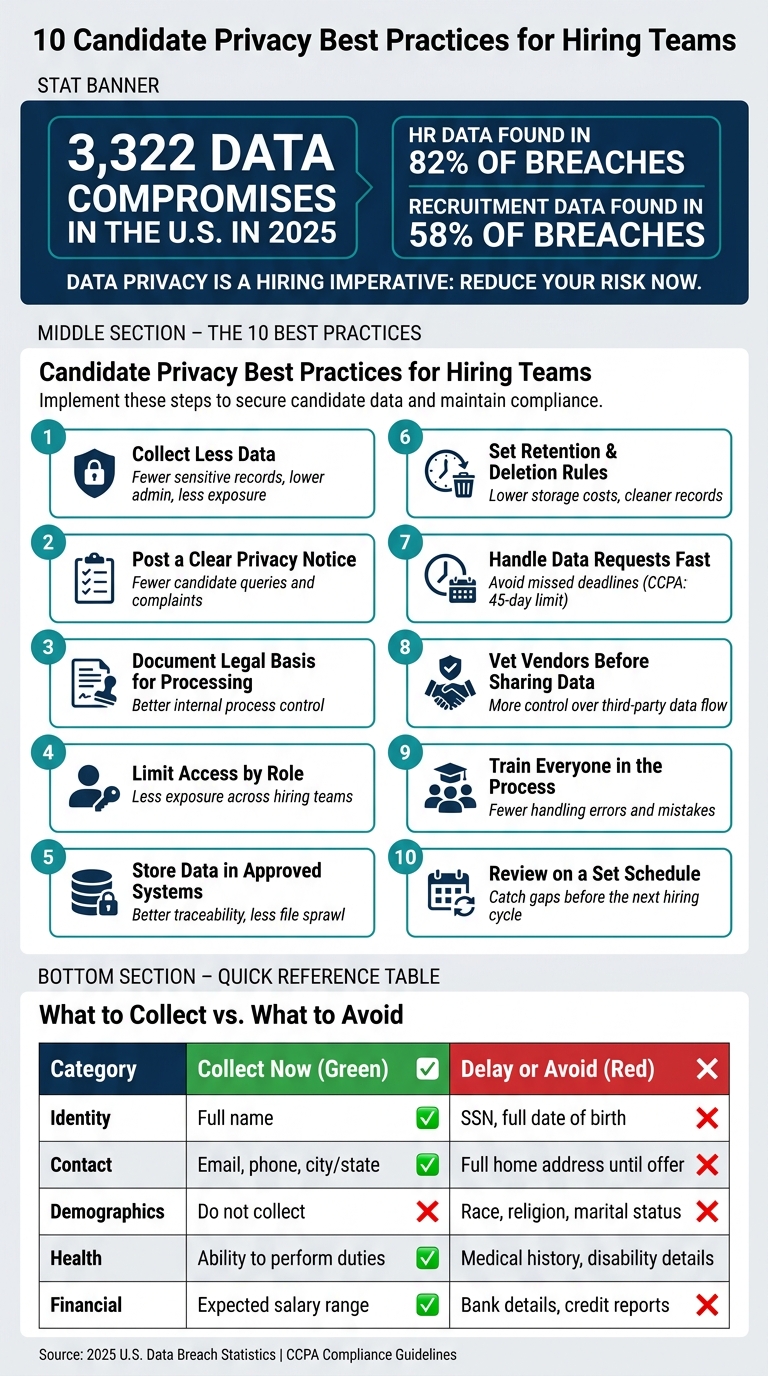
10 Candidate Privacy Best Practices: What to Do vs. What to Avoid
How to securely collect candidate data during recruitment? | 3 Tips for HR | Security Quotient |
sbb-itb-a23bd6a
Quick Comparison
| Practice | What it helps reduce | Business impact |
|---|---|---|
| Collect less data | Extra exposure | Less admin and lower risk |
| Clear privacy notice | Confusion and complaints | Fewer back-and-forth queries |
| Legal basis by activity | Poor process discipline | Better internal control |
| Role-based access | Loose permissions | Less exposure across teams |
| Approved systems only | File sprawl | Better traceability |
| Retention rules | Old records piling up | Lower storage and cleanup work |
| Request handling process | Missed deadlines | Less fire drill work |
| Vendor controls | Third-party exposure | More control over data flow |
| Team training | Process mistakes | Fewer handling errors |
| Scheduled reviews | Drift over time | Better hiring consistency |
If your hiring team wants more control without adding more manual work, these are the practices to tighten first.
What Candidate Privacy Means in Recruitment
Candidate privacy means protecting a candidate’s personal data at every point in hiring, from the first sourcing touchpoint through to retention and recordkeeping. In practice, that means looking at each hiring stage and asking a simple question: what data are you collecting, where does it sit, and who can access it?
One candidate can end up sharing far more than a resume. You might hold screening answers, interview notes, assessment results, a background check report, and an offer letter. In most companies, that data doesn’t sit in one neat place. It spreads across your ATS, email threads, shared drives, and third-party tools.
Here’s where candidate data usually shows up during hiring:
| Hiring Stage | Common Data Collected |
|---|---|
| Sourcing | Name, contact details, LinkedIn profile, referral notes |
| Screening | Resume, cover letter, work authorization, screening responses |
| Interviewing | Interview notes, schedules, video recordings, feedback |
| Background checks | Employment verification, criminal check results, reference feedback |
| Offer management | Compensation details, start date, tax setup information |
| Recordkeeping | ATS profile, communication logs, status history, offer documents |
Because each stage feeds into the next, your ATS often becomes the main privacy control point. It can hold home addresses, Social Security numbers, compensation history, disability disclosures, and background check results in one place.[3][2]
That’s why this isn’t just an admin problem. It’s a business risk issue.
Under the CCPA, all information tied to identifiable applicants, including internal ATS tags, interview ratings, and interview feedback, counts as personal information. That means you need to collect it, secure it, share it, and retain it with care.[5][6]
Once you look at candidate privacy through that lens, the next step becomes clear: you need controls at every stage of hiring, not just at the point of storage.
1. Only Collect the Data You Actually Need
Data minimisation is simple: collect only what you need to hire or to meet a legal duty. Privacy starts before data enters your ATS. That means looking first at your application form and ATS fields. If a field takes more than one sentence to defend, cut it.
Apply that rule across the full hiring process: application, screening, interviews, assessments, and background checks.
Every extra field adds risk. HR data appeared in 82% of breach incidents, and recruitment data appeared in 58% [12][1][13]. A smaller data footprint gives you fewer problems to manage if something goes wrong.
Use one test for every field: Is this needed for the role or required by law? If not, remove it. Common problem fields include marital status, date of birth, full home address, and SSNs collected at the application stage.
Under U.S. disability rules, you cannot ask disability-related or medical questions before a conditional job offer. Ask only whether the candidate can perform the essential functions of the job [7][8][9][10].
This is not just a privacy point. It’s an operating discipline. Less data means:
- fewer sensitive records sitting in your ATS
- less to review, restrict, and retain
- lower admin for HR and Talent teams
- lower exposure if systems or vendors are hit
Fix the process, not the paperwork. Set up your ATS so it asks only for job-related fields, and collect sensitive identifiers only after an offer. That makes access control, reviews, and retention much easier to handle.
Once you limit what you collect, explain it clearly in your candidate privacy notice.
2. Post a Clear Candidate Privacy Notice
Once you limit what you collect, tell candidates exactly how you use it. A candidate privacy notice sets that out. It needs to be specific.
This is not the place for a generic website privacy policy. Your candidate privacy notice should match your hiring process. It should spell out who you are, what data you collect, why you collect it, who you share it with, how long you keep it, and how candidates can use their rights. It should also name a clear contact, whether that’s a privacy officer, DPO, HR/privacy contact, or a dedicated email address, so people know where to send questions or requests. [15][16][19]
Placement matters just as much as wording. Put the notice where candidates actually hand over data:
- linked from your careers page
- built into the application form
- mentioned in recruiter outreach —a task often handled by an embedded recruitment service
If someone has to hunt for it in a footer, the point is lost. Candidates should see it before they submit data, not after. The UK’s Information Commissioner’s Office (ICO) says privacy information should be provided at the time data is collected, such as in a job ad or application form. [14][17][18]
A common mistake is copying over a broad website privacy policy and calling it done. In practice, that usually fails. It often says too little about how hiring data moves through your process, and it rarely reflects the tools you use every day, like your ATS, background check vendor, or video interview provider.
A stand-alone applicant notice works better because it reflects what actually happens in your hiring workflow. If you name the tools and third parties you use, you cut confusion, reduce back-and-forth, and lower the risk of giving candidates the wrong information.
To keep the notice accurate, you need the right records behind it. That includes an internal data inventory or hiring data map, retention rules, vendor contracts, and processing records. Keep the notice aligned with your ATS, vendors, and retention rules. If you add a new tool or supplier, update the notice before candidates use it. [15][4][19]
3. Establish a Legal Basis for Processing Candidate Data
Before you collect candidate data, write down why you need it.
That sounds simple, but it’s where a lot of hiring teams get sloppy. If you can’t point to a clear hiring reason for a data point, it probably shouldn’t be in your process.
In practice, that means linking each recruiting activity to a specific purpose in your hiring workflow. Apply that same standard across application review, interviews, background checks, sharing profiles with hiring managers, and recordkeeping. [24][11]
| Recruiting Activity | Typical Reason or Basis |
|---|---|
| Application review | Evaluating a candidate for the role they applied for |
| Interviews | Evaluating fit for the role |
| Work authorization verification | Legal compliance |
| EEOC recordkeeping | Legal compliance (employers must retain personnel records for at least one year) [26] |
| Background checks | Legal compliance or legitimate business interest, depending on the role |
| Sharing profiles with hiring managers | Evaluating the candidate for the role / legitimate business interest |
| Future talent pool | Legitimate business interest with documented assessment |
| Optional future job alerts or talent community | Consent |
A good rule here: use consent sparingly. It fits optional programmes like job alerts or talent communities, not core hiring steps.
This kind of documentation also saves time later. When a candidate asks what data you hold, why you hold it, or how it’s being used, your team isn’t scrambling through inboxes, ATS notes, and spreadsheets. It also makes internal reviews far easier, especially as state privacy laws like the CCPA extend certain rights to job applicants in some cases. [20][21][22]
Build a recruiting processing register with five fields:
- Data type
- Purpose
- Access
- Retention
- System or vendor
Think of it as your hiring data map. It shows what you collect, why it exists, who can see it, how long you keep it, and where it sits.
If you can’t link a data point to a hiring step, don’t collect it. Then use the register to control access to each record, so only the right people see the right data.
4. Limit Who Can Access Candidate Information
Once you know what candidate data you hold, the next step is simple: limit access.
Not everyone involved in hiring needs to see everything. The more open your access settings are, the more risk you carry. One forwarded email, one downloaded file, or one shared login can expose candidate data fast.
So don’t assign access person by person unless you have to. Assign it by role. Give each person only what they need to do their job, nothing more. That’s the idea behind least privilege.
And this can’t stop at your ATS. It needs to apply across your shared folders, interview tools, and any other system used in hiring. If access is locked down in one place but wide open everywhere else, you still have a problem.
The table below shows how access usually breaks down by role:
| Role | What They Typically Need Access To |
|---|---|
| Recruiter/HR | Full candidate profile, contact details, application history, and sensitive fields needed for recruiting and compliance |
| Hiring Manager | Resume, portfolio, shortlist, interview feedback |
| Interviewer | Resume, role description, interview guide, scorecard |
| External Recruiter or Vendor | Only the requisitions and candidates they’re directly supporting; no bulk export |
| HR Admin/Compliance | EEO data, medical/accommodation information, government IDs, salary details, and background check results |
Many ATS platforms support role-based access control, or RBAC. That lets you assign permission profiles by role instead of setting access one user at a time. For scaling teams, that saves time and cuts risk. When someone changes roles or leaves the business, their access can be updated straight away instead of being left open for months.
That matters more than many teams think. Old permissions have a habit of hanging around in the background, and that’s often where risk starts.
After access is set, keep an eye on it. Use audit logs. They show who opened a candidate record, when they accessed it, and what action they took. Review access every quarter and remove stale permissions.
A short written policy helps here too. Create a one-page access policy that sets out who can see what, when, and in which system. It doesn’t need to be long or legal-heavy. Even a simple reference that maps roles to data categories gives your team a clear standard to follow, saves time during onboarding, and reduces the odds of messy access decisions later.
5. Store Candidate Data in Secure Recruitment Systems
Once you’ve limited access, the next step is simple: keep candidate data inside secure systems.
Recruitment data is a common target. HR-related data appears in 81.7% of data breach incidents, and recruitment data appears in 58% of breaches.[28] One of the most common causes is misconfigured storage.
The rule here should be clear: candidate data belongs in your approved recruitment system, not in personal email inboxes, local spreadsheets, or shared drives. Those places are harder to audit and far easier to expose. A résumé sitting in someone’s inbox, or a background check report saved on a laptop, sits outside central control. A secure ATS keeps candidate information in one place, with governance and traceability built in. It also gives you a cleaner way to set retention rules, so you know what stays, for how long, and when it should be deleted.
When you’re reviewing or setting up your recruitment system, treat the following as the baseline:
- Encryption at rest and in transit, such as AES-256 and TLS 1.2 or higher
- Multi-factor authentication (MFA) for all user accounts
- Audit logs that show who accessed each candidate record and when
- Role-based permissions to limit access to only the people who need it[29][31]
This matters for more than compliance. It cuts the risk of exposure, gives you a clearer audit trail, and saves time if your team ever needs to review access or respond to an incident.
Your team should also have a short written recruitment data handling policy. Keep it direct. It should list approved storage systems and clearly ban storing candidate data anywhere else. For example, résumés should be uploaded to the ATS, and background check reports should stay out of email.
6. Set Clear Rules for Keeping and Deleting Candidate Data
Even if candidate data is stored safely, it still needs a clear deletion date. Old records create risk you don’t need. The fix is simple: set a retention schedule and stick to it.
For non-selected candidates, keep hiring records for at least one year. Many teams keep them for 1 to 2 years. Keep background checks and drug tests for 6 to 12 months, unless the law says you need to keep them longer.[27][25][33][34]
Use this simple retention baseline:
| Candidate Status | Data Type | Suggested Retention |
|---|---|---|
| Not selected | Application, resume, interview notes | 1 to 2 years from hiring decision |
| Not selected | Background check, drug test results | 6 to 12 months from hiring decision |
| Hired | Recruitment records | Move to employee file; follow employee retention rules |
| Opted-in talent pool | Contact and professional data | Up to 18 months, then review, re-consent, or delete |
| Withdrawn candidates | Application and contact data | Shortest period consistent with legal requirements |
A retention policy means very little if nobody follows it. Document it. Automate it in your ATS. Assign one owner.
Your ATS should be the system of record. When the retention period ends, delete exported copies too. Apply the same lifecycle rules to email, document storage, and local files. Delete exported candidate lists and emailed resumes when the hiring project closes, or within 90 days.[32][23][30]
This also saves time. When a candidate asks for their data to be deleted, clear rules make that process much faster.
7. Respond to Candidate Data Requests Without Delay
Once your retention rules are set, you still need a fast, clear process for privacy requests. These requests come with deadlines. Under the CCPA, businesses usually have 45 calendar days to respond. You may take one extra 45-day extension, but only if you notify the candidate within the first 45 days.[35][36][37][38][39]
The requests you’ll see most often are to:
- access candidate data
- correct it
- delete it
- limit how it’s used
- receive a downloadable copy
In hiring, that can cover resumes, interview notes, assessment results, background check records, and message history stored in your ATS and other hiring tools.
This is where teams often slip. A candidate may not use legal language. They might simply ask for “all my information” or say they want their data deleted. Your recruiters and hiring managers need to spot that for what it is, a privacy request that starts the clock.
Use one intake channel only, such as a dedicated email alias or ticket queue. That stops requests from getting lost between recruiters, hiring managers, and outside vendors. It also gives you a clean audit trail if you need to show how the request was handled.
Log each request as soon as it arrives. Record the date received, the request type, which systems need to be checked, and the response deadline. For identity checks, keep it simple. Confirm the email address used in the application or use another basic check. Don’t collect extra personal data just to verify identity.
A written workflow helps your team move without confusion. It should show who owns the request, which systems must be searched, and how responses are reviewed before they go out. Your request log should track the intake date, actions taken, response date, what was shared, what was withheld, and why.
Keep your ATS at the centre of this process. If candidate data is easy to search, trace, and remove across your hiring systems, your team saves time, cuts risk, and avoids the last-minute scramble that turns a simple privacy request into an internal fire drill.
8. Manage Third-Party Sharing and Data Transfers Carefully
Once you’ve tightened access and storage inside your own systems, apply the same discipline to every vendor you use. In hiring, third parties are everywhere: ATS platforms, background check providers, assessment tools, video interview software, and external recruiters. If candidate data leaves your system, it is still your responsibility.
The biggest issue is often simple over-sharing. Hiring teams forward resumes by email, upload candidate details into tools that haven’t been checked, or send full application files when a name and role summary would have done the job. Bit by bit, candidate data gets spread across systems no one is watching closely. That kind of vendor sprawl can weaken privacy controls fast.
Put a DPA in place before any candidate data is shared. It should set out what the vendor can process, the security controls they must have, how breach notice works, which sub-processors they use, and what happens to the data at offboarding, whether it is deleted or returned. A generic template won’t do the job. The agreement needs to match how the vendor actually handles data in practice.
Paperwork on its own is not enough. You also need to vet the vendor properly before a new tool or agency is brought in. Check whether they hold certifications such as ISO 27001 or SOC 2. Confirm where candidate data is stored. Ask how they deal with deletion requests. If a vendor can’t clearly explain where your data lives or how it is deleted, don’t onboard them.
If data moves across borders through cloud hosting or offshore support, confirm there is a valid transfer mechanism in place and tell candidates where processing may happen. Keep a central vendor register with each processor, their hosting location, offboarding terms, and the transfer mechanism that applies. Review it at least once a year, and check it again whenever a vendor adds new features, new sub-processors, or new data destinations.
This is not just a privacy exercise. It cuts risk, avoids messy cleanup later, and gives you more control over how hiring data moves through the business.
These controls only work when the people using the tools know the rules.
9. Train Everyone Who Touches the Hiring Process
Once you’ve got vendors and systems under control, the next step is simple: train the people using them. If people aren’t trained, candidate data can be mishandled fast, from resumes and interview notes to system access and file retention.[45][46][47]
That means training recruiters, hiring managers, interviewers, HR coordinators, IT admins, and any external partner with ATS access before they handle candidate data. This includes partners such as Rent a Recruiter. If they sit inside your hiring process, they should follow the same rules as your internal team.[44][45][46][47][48][49]
Your training should make one thing clear: who can do what with candidate data. Loose permissions and vague ownership create risk, slow down hiring, and make audits harder than they need to be.[44][45][48]
Core training should cover:
- What counts as candidate personal data
- How to handle that data safely
- How to escalate requests, issues, or incidents
Use short, role-based modules with scenario-led examples. People retain more when the training matches the decisions they make day to day.[40][41][42][43]
Refresh training every year, and also when you roll out a new tool, update a policy, or deal with a privacy incident.[44][45][46]
Track completion, training dates, and acknowledgements for each module. If it isn’t tracked, it didn’t happen from a compliance point of view.[44][47]
10. Review and Update Your Recruitment Process on a Set Schedule
Set a fixed review schedule. Hiring tools change, vendors change, and state rules change fast.
Review all of the controls above on one timetable so small process tweaks do not quietly break them. At a minimum, audit your full recruitment privacy process once a year: candidate privacy notices, consent language, vendor contracts, access permissions, and retention and deletion settings. If you’re in high-growth mode, add quarterly checks for access permissions and the processing register. Any major change, like a new ATS, an AI screening tool, a background check provider, or expansion into a new state, should trigger an immediate review of that part of the process.
Map the full path of candidate data. Track where it comes in, where it sits, who can see it, and how it leaves the process.
For each step, check that these details are still right and properly documented:
- data type
- purpose
- legal basis
- retention period
- storage location
- access controls
This matters because blanket retention rules can lead to complaints and extra scrutiny. A scheduled audit helps you spot gaps before the next hiring cycle, when fixing them is often slower and more expensive.
Keep your supporting records in one place. That should include the processing register, data destruction logs, vendor list, access-control matrix, and audit findings with remediation status. When everything is easy to find, you have a clear accountability trail. You also save time if a regulator, auditor, or internal legal team asks for answers.
Close each audit with a corrective action plan. Give every action an owner, a deadline, and a follow-up check. That’s how audit findings turn into updated policy, team training, and vendor changes, instead of sitting in a folder and getting ignored.
What to Collect vs. What to Avoid: A Quick Reference
Use this quick reference when you review application forms, screening questions, and post-offer requests. Keep application questions tight and focused on job fit. The rule is simple: collect only what you need now, and delay the rest.
That matters for more than compliance. It also helps you cut friction, speed up applications, and keep strong applicants from dropping off halfway through the form.
Use this table to separate job-related fields from data that belongs later, or not at all.
| Data Category | Collect Now | Delay or Avoid |
|---|---|---|
| Identity | Full name | Social Security number, full date of birth |
| Contact | Email, phone number, city/state | Full home address (until offer stage) |
| Work History | Job titles, employer names, responsibilities, key achievements | Detailed reasons for leaving, salary history |
| Education | Degrees, relevant majors, professional certifications (e.g., CPA, bar admission) | High school details for senior roles, unrelated training |
| Eligibility | Work authorization and availability for required shifts or travel | Immigration documents, copies of ID documents |
| Demographics | Do not collect | Race, religion, marital status, sexual orientation, pregnancy status |
| Financial | Expected salary range | Bank account details, credit card info, credit reports |
| Health | Ability to perform essential job duties | Medical history, disability details, mental health records |
Request Social Security numbers only after a conditional offer, when needed for background checks or payroll.
Here’s the practical test: if a field is not needed now to assess job fit, remove it or move it to a later stage. If it does not help you decide whether someone can do the role, it should not be on the first form.
Any field that fails this test belongs in the common mistakes below.
Common Candidate Privacy Mistakes to Avoid
These mistakes can undo otherwise solid hiring controls, and they’re easy to miss when your team is moving fast. In day-to-day recruiting, privacy usually breaks down through small habits, not one big failure.
Storing resumes in email inboxes makes retention, deletion, and access control much harder. If CVs sit across inboxes, shared folders, or password-protected spreadsheets, you lose visibility fast. Keep candidate data in your ATS, where you can control access, track records, and remove data on time.
Sharing interview notes in broad Slack threads or email chains creates the same problem. Feedback can end up with people who aren’t part of the hiring decision. That adds risk with no business upside. Keep candidate feedback inside approved systems, and limit access to the hiring team directly involved.
Keeping rejected candidate data indefinitely is a common audit finding. It’s one of those issues that often gets ignored until someone asks for a deletion record or your process gets reviewed. Set a fixed retention period, for example, 24 months after the hiring decision, and automate deletion in the ATS where possible.
Even teams with clean processes run into trouble when records move outside the system. Using unapproved file-sharing, personal email, or AI tools pushes candidate data beyond your approved controls. That’s where governance starts to slip. A simple rule helps: if it isn’t approved, it doesn’t touch candidate data.
Vague privacy notices create friction as well. Candidates shouldn’t have to guess how long you keep their data, which vendor types handle it, or how they can make a request. Plain language works better than saying, “we retain data as long as necessary.”
The risk here isn’t theoretical. A study of 141 million files leaked in public data breaches found that HR data appeared in 82% of incidents and recruitment data in 58%, typically including candidates’ names, addresses, and contact details from CVs and cover letters.[12][1]
These are usually the gaps that show up first in audits, complaints, or breach reviews. Fixing them saves time later, cuts risk, and gives you tighter control over hiring data.
Conclusion
These ten practices work best as one system, not as separate tasks. Candidate privacy needs day-to-day attention, and it runs through every stage of hiring.
The strongest teams keep it simple: collect less, disclose clearly, limit access, delete on schedule, and respond fast. That’s how privacy shifts from a box-ticking exercise to a clear hiring standard. You can find more insights on our recruitment blog.
That kind of discipline cuts risk and helps hiring keep moving. It should sit inside every hiring decision you make.
FAQs
What candidate data is most sensitive?
The most sensitive candidate data includes personally identifiable information (PII), such as Social Security numbers, health data, and identifiers like gender, race, age, or photos. Background check information also sits in the high-risk category.
Under the FCRA, screening requires standalone written disclosure and candidate consent. That part isn’t optional.
From a business point of view, this is about more than compliance. Poor data handling can lead to legal cost, delays in hiring, and loss of trust with the people you want to hire.
Keep data collection tight. Only gather information that is directly linked to the role. Then limit access with role-based permissions, encryption, and secure storage so sensitive records don’t end up in the wrong hands.
How often should we review our hiring privacy process?
Use a fixed audit schedule, not sporadic checks. Quarterly spot checks on a random sample of recent hires and rejected applications help you confirm files meet your audit standard.
Recommended cadence:
- Monthly: Form I-9 verification
- Quarterly: Job postings, background checks, and hiring compliance
- Annually: Recordkeeping, pay equity analyses, and bias audits for AI-driven tools
What should we do first to improve candidate privacy?
Start by putting a clear framework in place before any hiring starts. Set up a Master Service Agreement (MSA) and Statement of Work (SOW) that spell out data ownership, retention rules, and security expectations.
Then map every point where candidate data is collected, including AI tools and vendor handoffs. Document how data is handled at each stage so you can spot risk early, assign accountability, and avoid costly gaps later.


